
F
licenseNot graded
qualityD
maintenanceA Model Context Protocol server that connects AI assistants to MISP threat intelligence platforms. It enables threat intelligence search, IOC lookup, and event analysis through natural conversation.
-

Illumio PCE(Policy Compute Engine)と連携するためのインターフェースを提供するModel Context Protocol(MCP)サーバー。このサーバーは、Illumioのワークロード管理、ラベル操作、トラフィックフロー分析へのプログラムによるアクセスを可能にします。
会話型 AI を使用して PCE と会話します。
ワークロードの作成、更新、削除
ラベルの作成、更新、削除
トラフィックの概要を取得し、セキュリティ分析を行う
PCEヘルスを取得
Related MCP server: OpenCTI MCP Server
Python 3.8以上
Illumio PCEインスタンスへのアクセス
PCE の有効な API 認証情報
リポジトリをクローンします。
git clone [repository-url]
cd illumio-mcp
依存関係をインストールします:
pip install -r requirements.txtこれをuvコマンドを使用して実行する必要があります。これにより、環境変数を渡してバックグラウンドで実行することが容易になります。
MacOS の場合: ~/Library/Application\ Support/Claude/claude_desktop_config.json Windows の場合: %APPDATA%/Claude/claude_desktop_config.json
custom_settingsセクションに以下を追加します。
"mcpServers": {
    "illumio-mcp": {
      "command": "uv",
      "args": [
        "--directory",
        "/Users/alex.goller/git/illumio-mcp",
        "run",
        "illumio-mcp"
      ],
      "env": {
        "PCE_HOST": "your-pce-host",
        "PCE_PORT": "your-pce-port",
        "PCE_ORG_ID": "1", # your org id
        "API_KEY": "api_key",
        "API_SECRET": "api_secret"
      }
    }
  }
}リソースはまだ完成していないので、後で調べます。
illumio://workloads - PCE からワークロードを取得する
illumio://labels - PCE からすべてのラベルを取得します
get-workloads - PCE からすべてのワークロードを取得します
create-workload - 指定された名前、IP アドレス、ラベルを持つ管理されていないワークロードを作成します
update-workload - 既存のワークロードのプロパティを更新する
delete-workload - PCE から名前でワークロードを削除します
create-label - キーと値のペアを持つ新しいラベルを作成する
delete-label - キーと値のペアで既存のラベルを削除します
get-labels - PCE からすべてのラベルを取得します
get-traffic-flows - 包括的なフィルタリング オプションを使用して詳細なトラフィック フロー データを取得します。
日付範囲フィルタリング
送信元/宛先フィルタリング
サービス(ポート/プロトコル)フィルタリング
ポリシー決定フィルタリング
ワークロードと IP リストのクエリ オプション
結果の制限
get-traffic-flows-summary - get-traffic-flowsと同じフィルタリング機能を使用して、要約されたトラフィックフロー情報を取得します。
get-rulesets - オプションのフィルタリングを使用して PCE からルールセットを取得します。
名前でフィルタリング
有効ステータスでフィルタリング
get-iplists - オプションのフィルタリングを使用して PCE から IP リストを取得します。
名前でフィルタリング
説明でフィルタリング
IP範囲でフィルタリング
check-pce-connection - PCE の接続と資格情報を確認する
get-events - オプションのフィルタリングを使用して PCE からイベントを取得します。
イベントタイプでフィルタリングする(例: 'system_task.expire_service_account_api_keys')
重大度によるフィルタリング(緊急、アラート、重大、エラー、警告、通知、情報、デバッグ)
ステータス(成功、失敗)でフィルタリング
返される結果の数を制限する
サーバーは包括的なエラー処理とログ記録を実装します。
PCE接続の問題
API認証の失敗
リソースの作成/更新の失敗
無効な入力検証
すべてのエラーは完全なスタック トレースとともにログに記録され、フォーマットされたエラー メッセージとしてクライアントに返されます。
テストはまだ実装されていません。
python -m pytest tests/詳細な操作ログを取得するには、コードまたは環境でログ レベルを DEBUG に設定します。
リポジトリをフォークする
機能ブランチを作成する
変更をコミットする
ブランチにプッシュする
プルリクエストを作成する
このプロジェクトはGPL-3.0ライセンスの下で提供されています。詳細はLICENSEファイルをご覧ください。
サポートを受けるには、問題を作成してください。
以下の例はすべて、Claude Desktop 3.5 Sonnet で生成され、この MCP サーバーから取得したデータを使用しています。React コンポーネントにデータをレンダリングすると、美しい視覚効果と結果が得られることがわかりました。
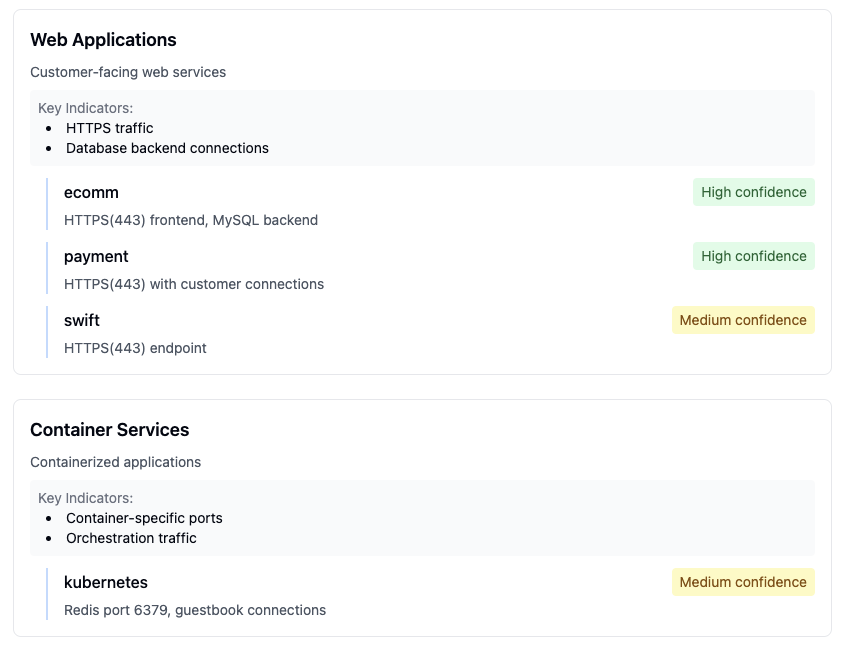 アプリケーションの通信パターンと依存関係の詳細な表示
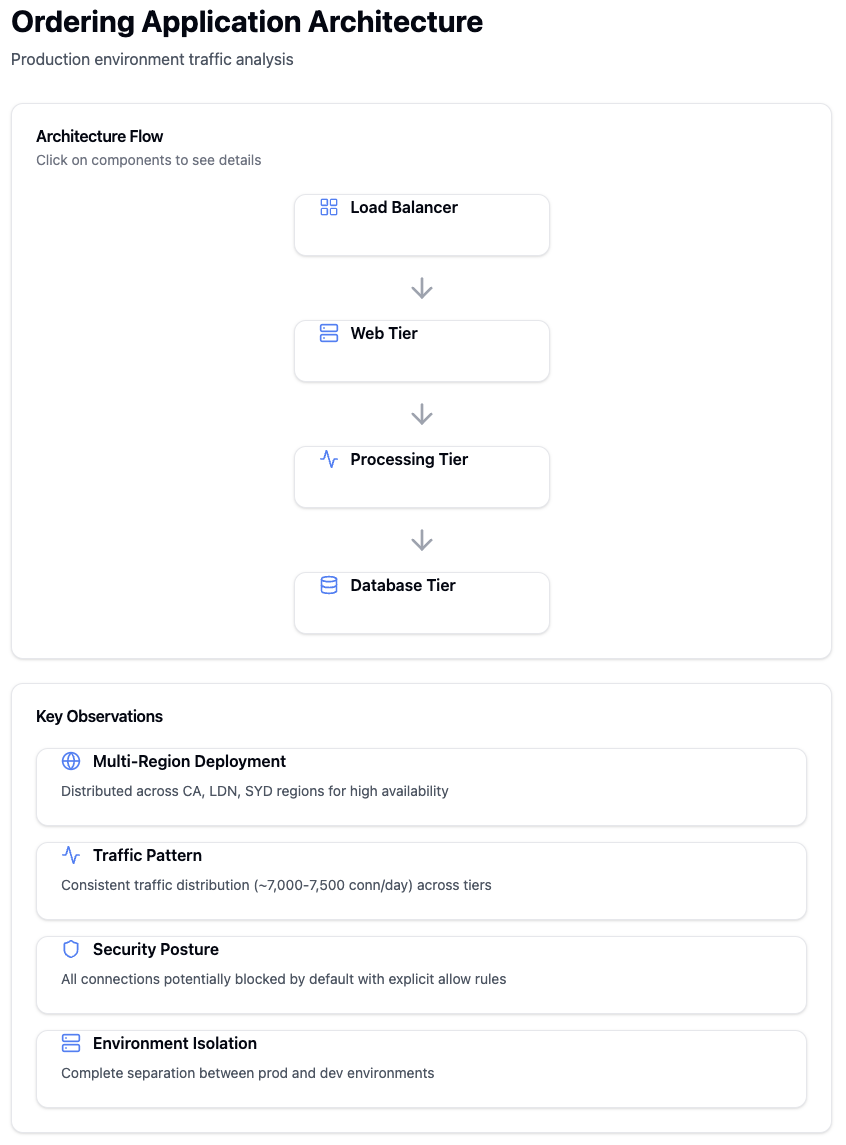 異なるアプリケーション層間のトラフィックパターンの分析
 主要なインフラストラクチャの指標とステータスを表示する概要ダッシュボード
 インフラストラクチャサービス通信の詳細な分析
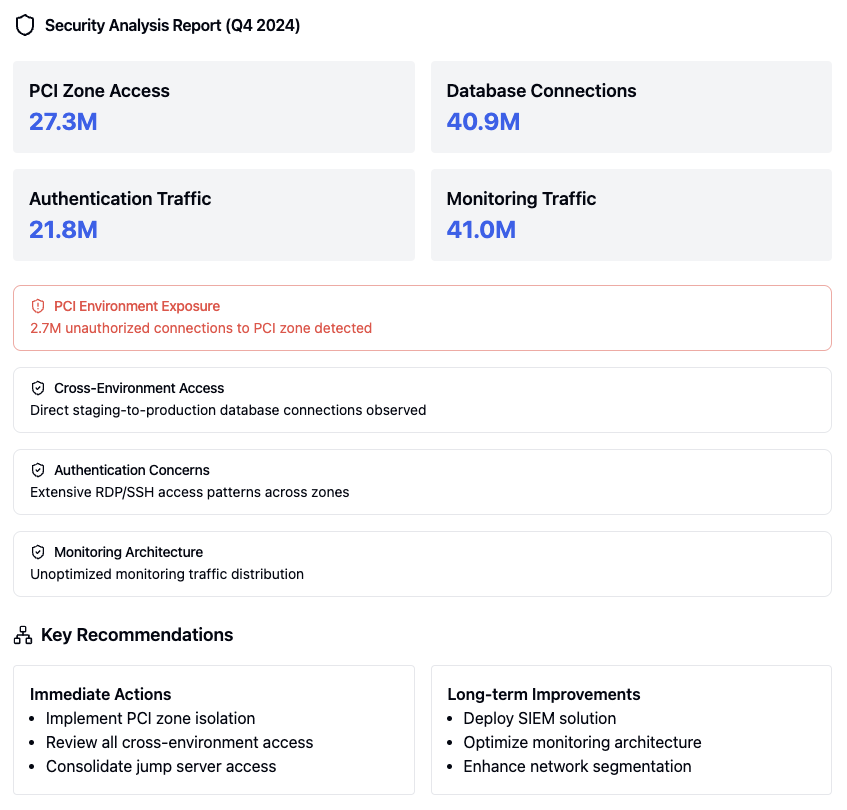 包括的なセキュリティ分析レポート
 高リスクの脆弱性に関するセキュリティ評価結果
 PCIコンプライアンス評価結果
 SWIFTコンプライアンス評価結果
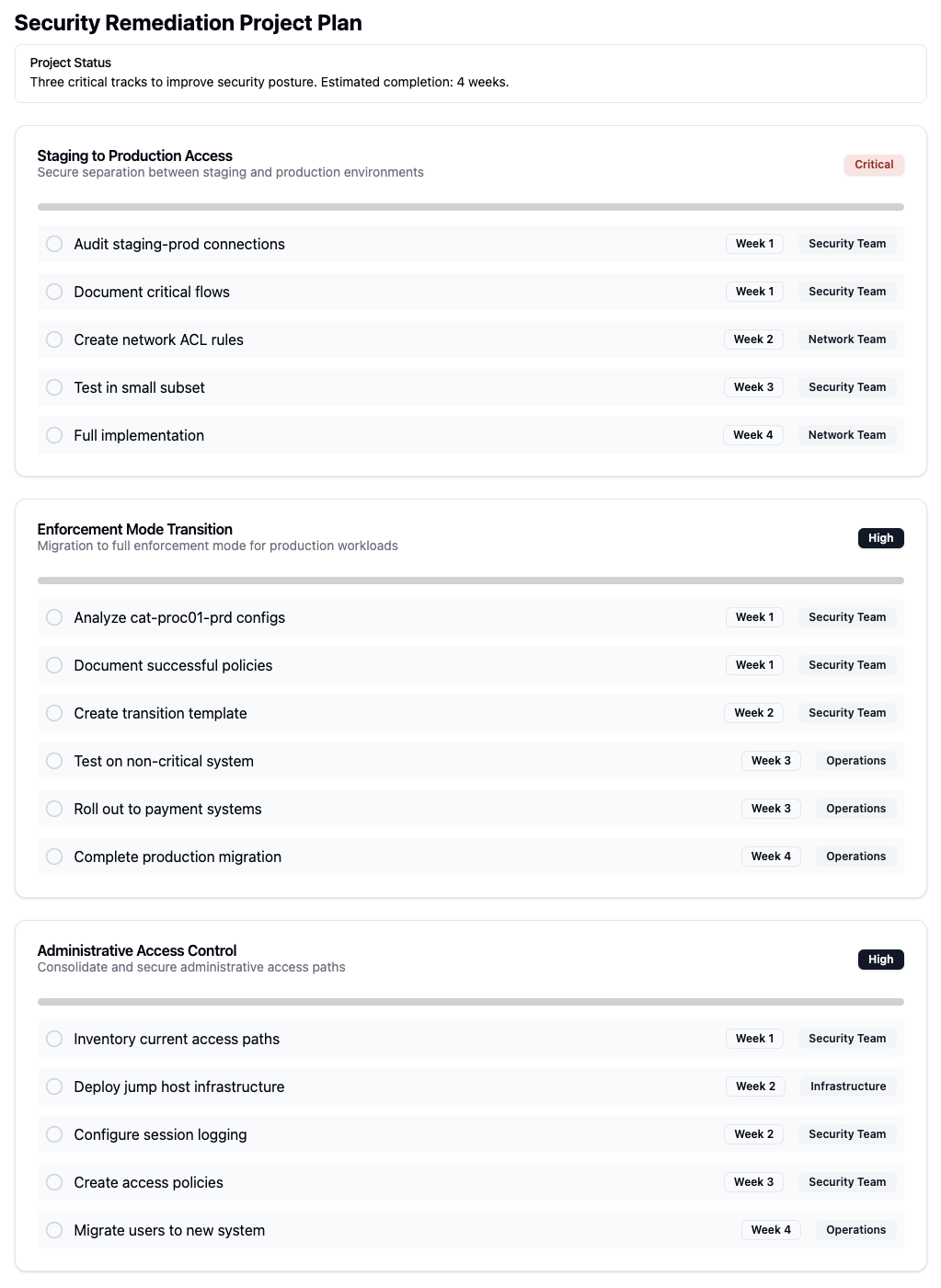 セキュリティ修復計画の概要
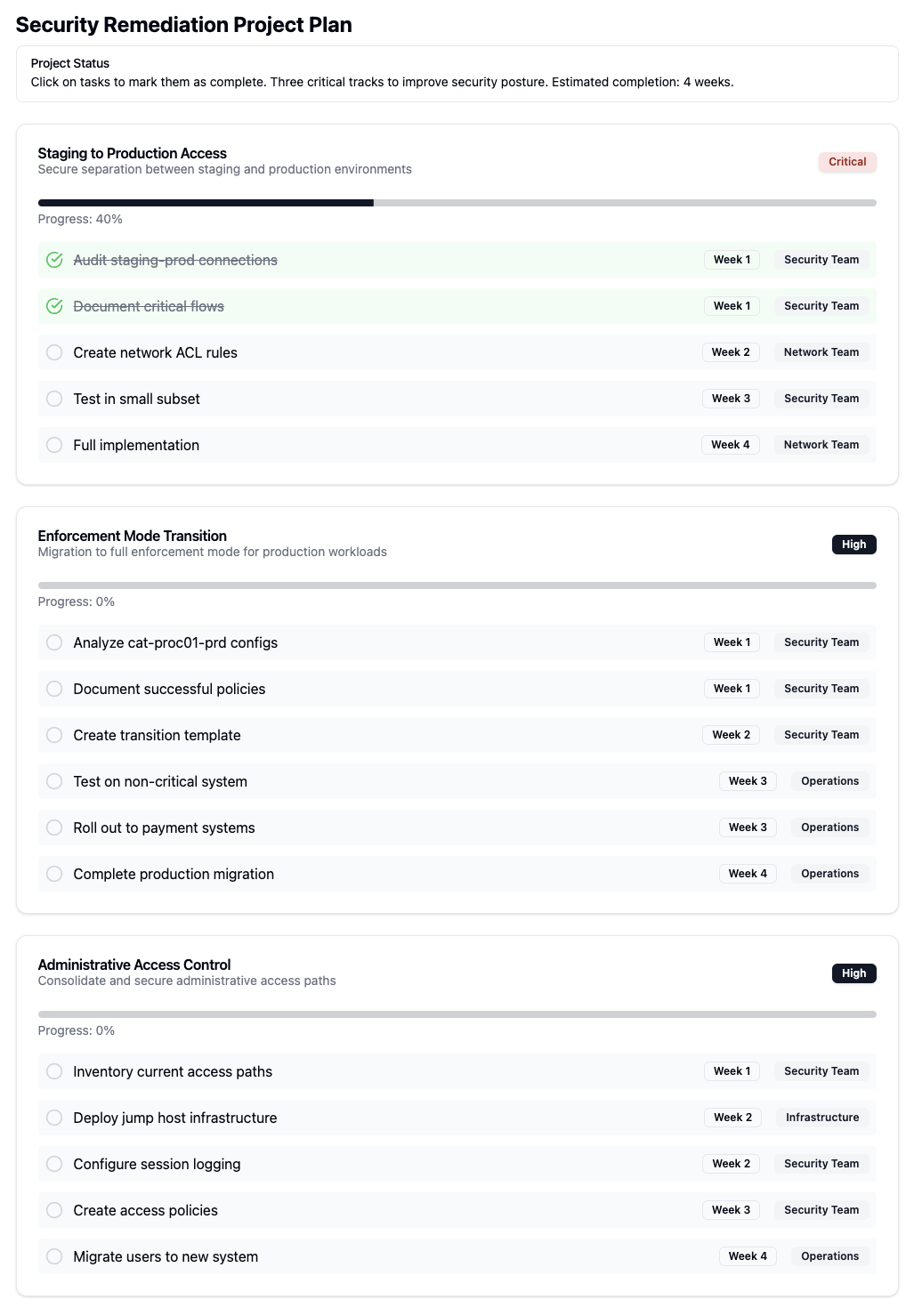 セキュリティ修復実装の詳細な手順
 IPリストの管理インターフェース
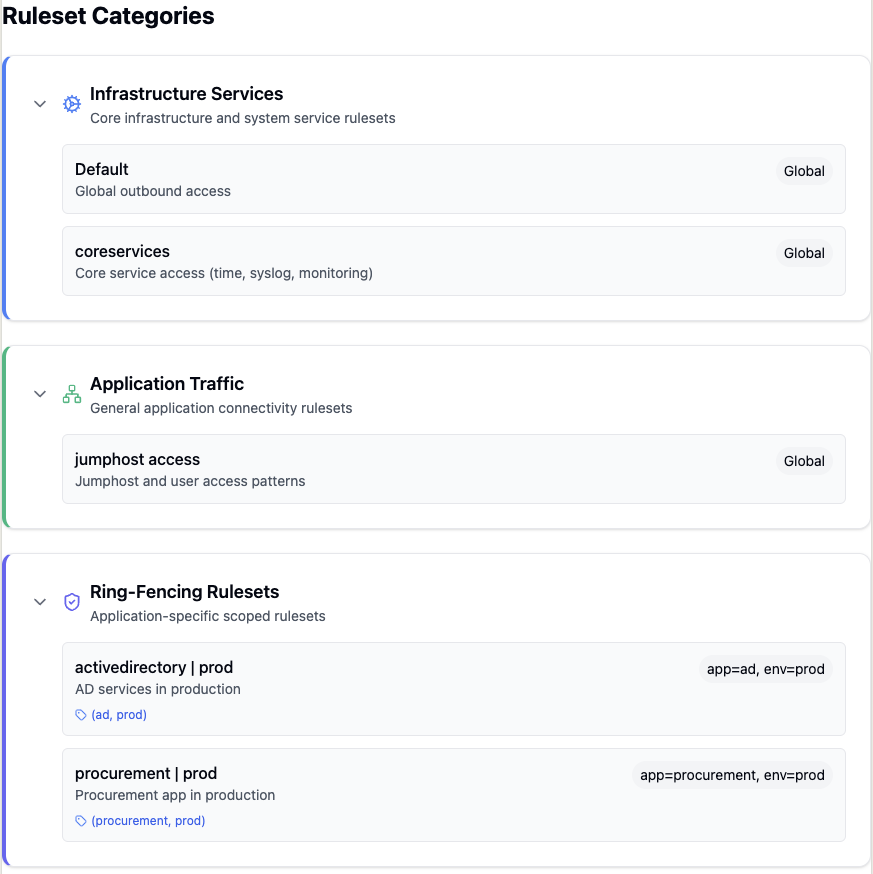 ルールセットのカテゴリと構成の概要
 アプリケーションルールセットの順序設定
 詳細なワークロード分析とメトリクス
 ワークロードのトラフィックパターンの識別と分析
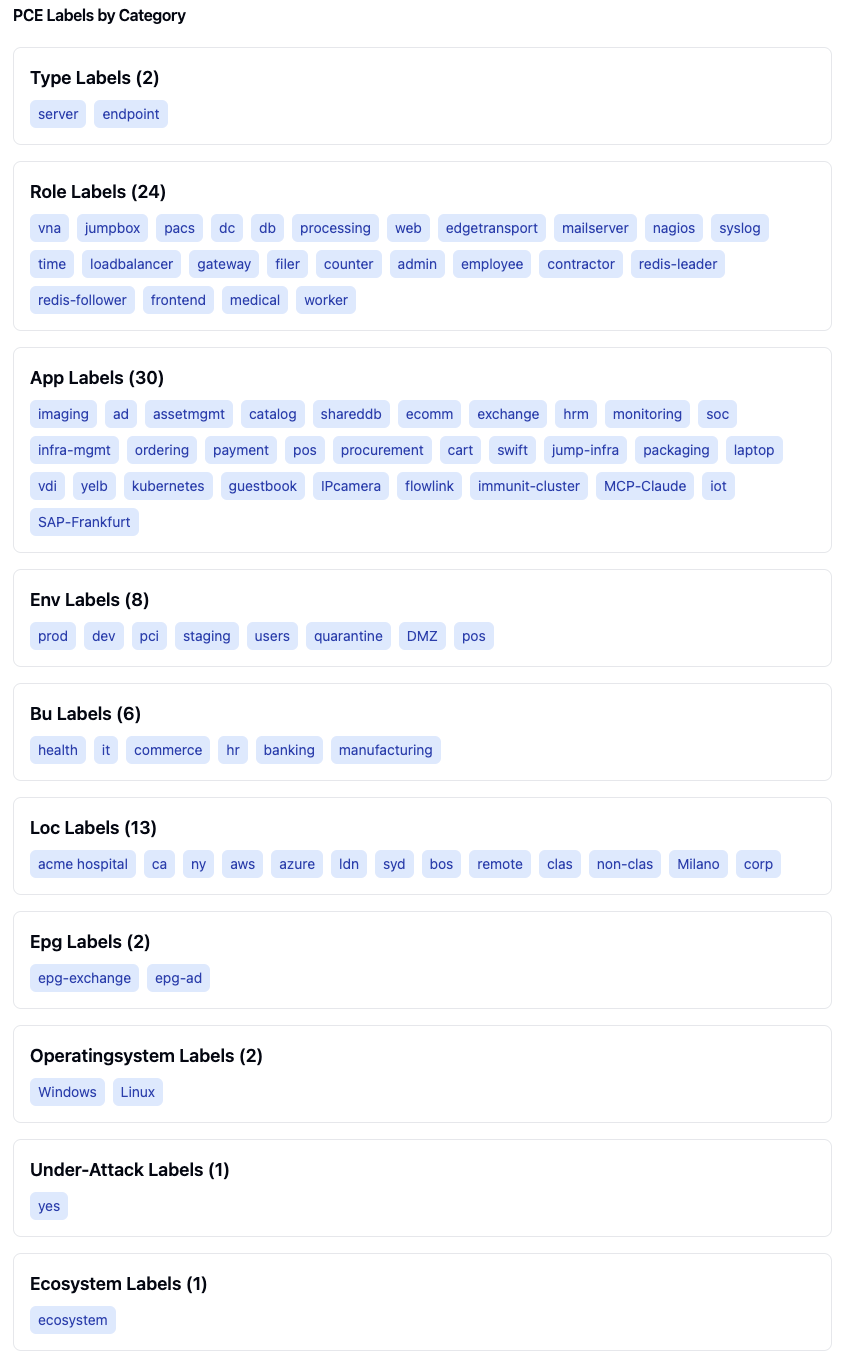 PCEラベルの種類とカテゴリー別の整理
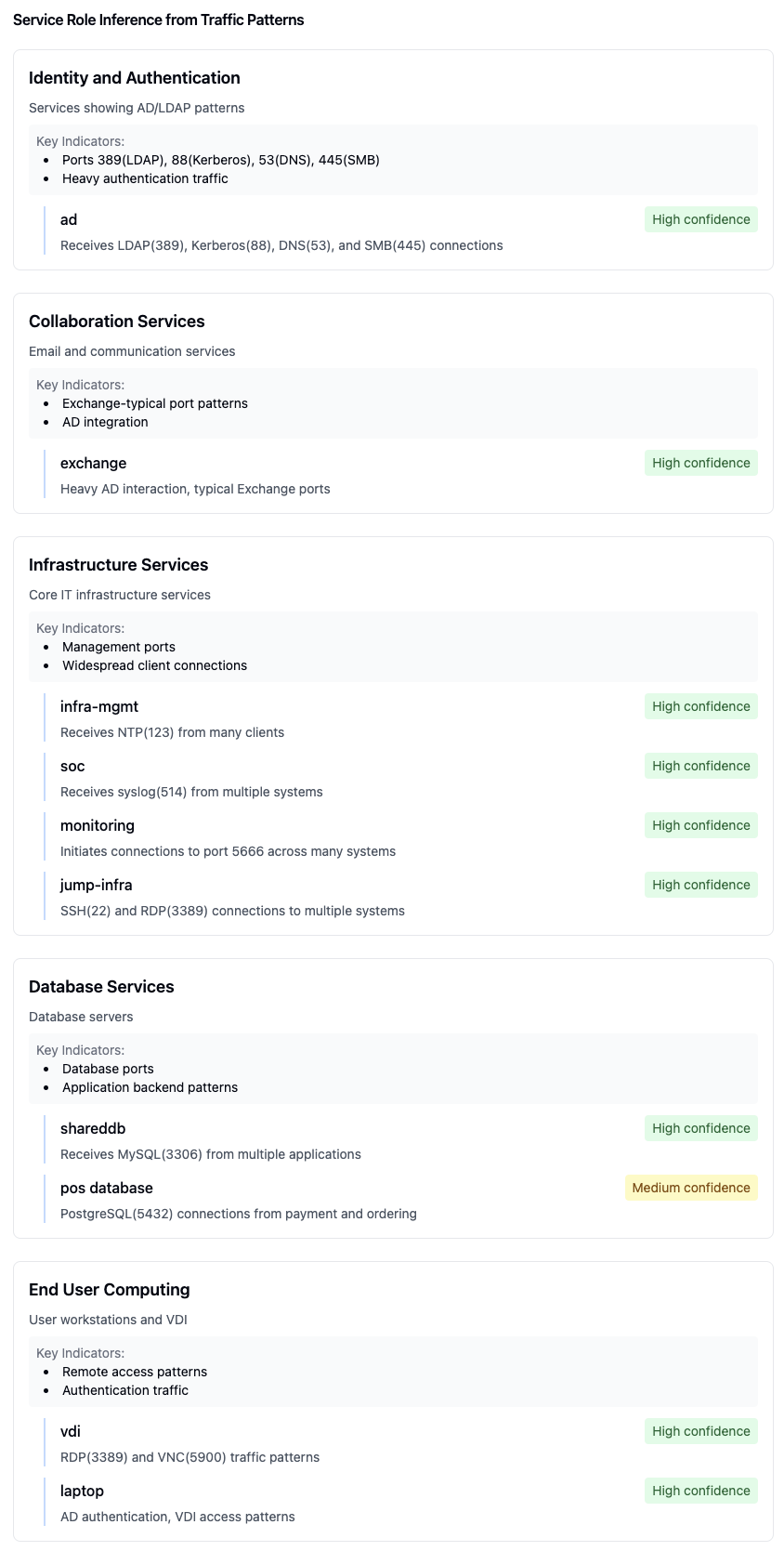 トラフィックパターンに基づくサービスロールの自動推論
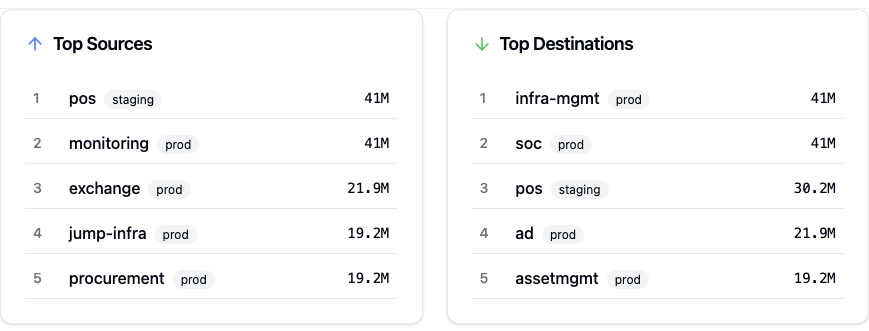 上位5つのトラフィックソースと宛先の分析
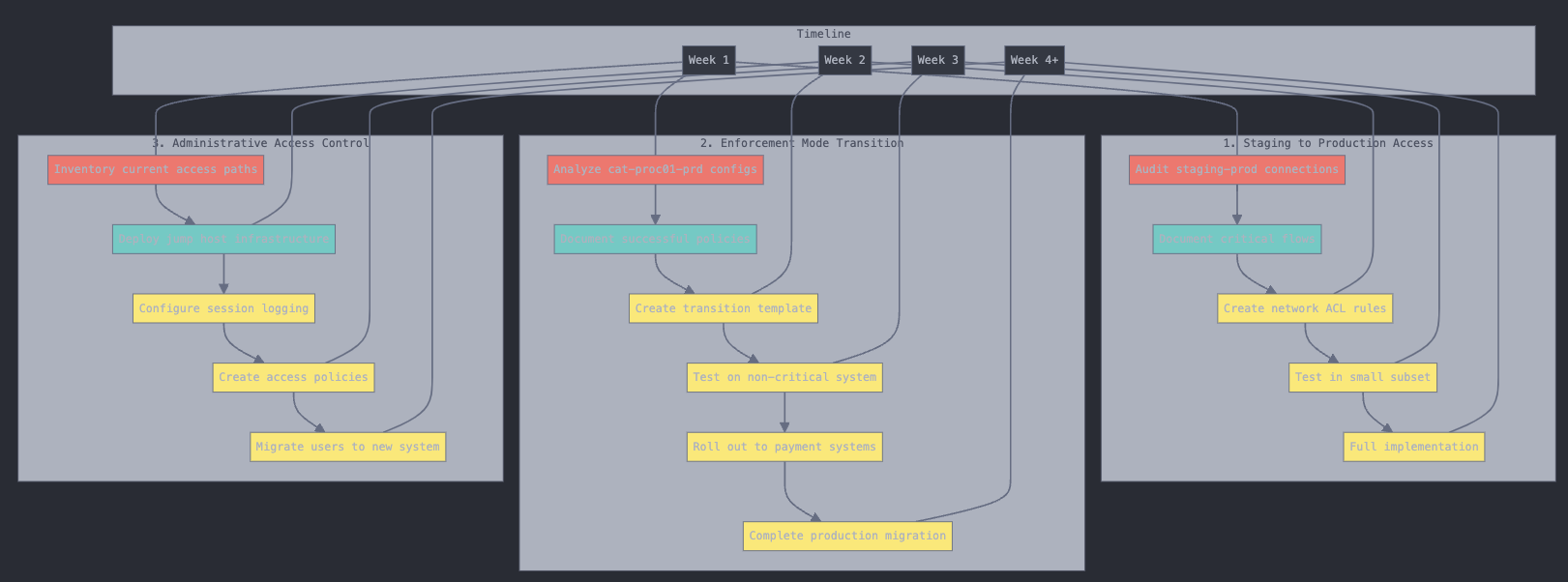 プロジェクト実施のタイムラインとマイルストーン
ringfence-applicationプロンプトは、受信トラフィックと送信トラフィックを制御してアプリケーションを分離および保護するためのセキュリティ ポリシーの作成に役立ちます。
必須引数:
application_name : リングフェンスするアプリケーションの名前
application_environment : リングフェンスするアプリケーションの環境
特徴:
アプリケーション内の層間通信のルールを作成する
トラフィックフローを使用して必要な外部接続を識別する
ソースアプリケーションに基づいて受信トラフィック制限を実装します
必要な外部通信のための送信トラフィックルールを作成する
スコープ内(同じアプリ/環境)接続とスコープ外(外部)接続の両方を処理します
リモートアプリケーション接続用に個別のルールセットを作成します
analyze-application-trafficプロンプトは、アプリケーション トラフィック パターンと接続の詳細な分析を提供します。
必須引数:
application_name : 分析するアプリケーションの名前
application_environment : 分析するアプリケーションの環境
分析機能:
トラフィックをインバウンドフローとアウトバウンドフローで順序付けます
アプリケーション/環境/役割の組み合わせによるグループ
関連するラベルの種類とパターンを識別します
Reactコンポーネント形式で結果を表示します
プロトコルとポート情報を表示します
既知のサービスパターンを識別しようとする(例:ポート5666のNagios)
トラフィックをインフラストラクチャとアプリケーションの種類に分類します
インターネット露出を決定する
Illumio のロール、アプリケーション、環境ラベルを表示します。
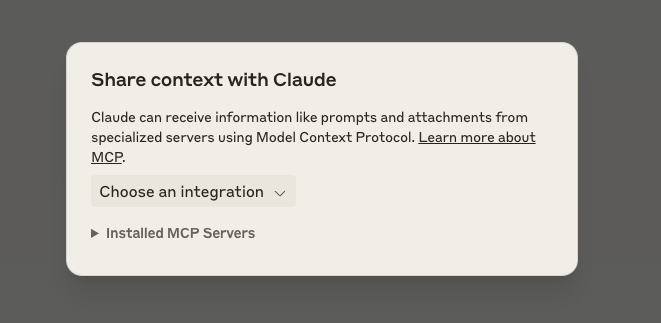
ステップ1: インターフェースの「MCPから添付」ボタンをクリックします

ステップ2: インストール済みのMCPサーバーから選択する
ステップ 3: 必要なプロンプト引数を入力します。
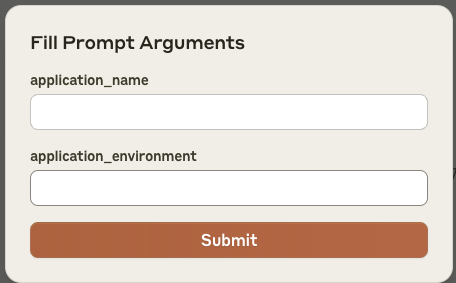
ステップ4: 送信をクリックして、設定したプロンプトを送信します。
MCPサーバーは設定されたプロンプトをクロードに送信する
クロードはモデルコンテキストプロトコルを通じてコンテキストを受け取ります
Illumio固有のタスクを専門的に処理できます
このワークフローにより、アプリケーション トラフィック分析とリングフェンシング タスクのために、Illumio システムと Claude 間でコンテキストの自動共有が可能になります。
アプリケーションは、GitHub Container Registry から Docker コンテナとして入手できます。
docker pull ghcr.io/alexgoller/illumio-mcp-server:latestまた、 latestバージョン番号に置き換えて、特定のバージョンを使用することもできます。
docker pull ghcr.io/alexgoller/illumio-mcp-server:1.0.0Claude Desktop でコンテナーを使用するには、次のことが必要です。
PCE 資格情報を使用して環境ファイル (例~/.illumio-mcp.env ) を作成します。
PCE_HOST=your-pce-host
PCE_PORT=your-pce-port
PCE_ORG_ID=1
API_KEY=your-api-key
API_SECRET=your-api-secret
Claude Desktop 構成ファイルに次の構成を追加します。
MacOS の場合 ( ~/Library/Application Support/Claude/claude_desktop_config.json ):
{
    "mcpServers": {
        "illumio-mcp-docker": {
            "command": "docker",
            "args": [
                "run",
                "-i",
                "--init",
                "--rm",
                "-v",
                "/Users/YOUR_USERNAME/tmp:/var/log/illumio-mcp",
                "-e",
                "DOCKER_CONTAINER=true",
                "-e",
                "PYTHONWARNINGS=ignore",
                "--env-file",
                "/Users/YOUR_USERNAME/.illumio-mcp.env",
                "illumio-mcp:latest"
            ]
        }
    }
}
必ず次の点に注意してください:
YOUR_USERNAME実際のユーザー名に置き換えます
ログディレクトリを作成します(例: ~/tmp )
システムに応じてパスを調整します
コンテナを直接実行することもできます。
docker run -i --init --rm \
  -v /path/to/logs:/var/log/illumio-mcp \
  -e DOCKER_CONTAINER=true \
  -e PYTHONWARNINGS=ignore \
  --env-file ~/.illumio-mcp.env \
ghcr.io/alexgoller/illumio-mcp-server:latest開発やテストにはDocker Composeを使用できます。docker docker-compose.ymlファイルを作成します。
version: '3'
services:
  illumio-mcp:
    image: ghcr.io/alexgoller/illumio-mcp-server:latest
    init: true
    volumes:
      - ./logs:/var/log/illumio-mcp
    environment:
      - DOCKER_CONTAINER=true
      - PYTHONWARNINGS=ignore
    env_file:
      - ~/.illumio-mcp.env
次に以下を実行します:
docker-compose upコンテナを実行すると、Illumio SDK の正規表現による構文警告が表示される場合があります。これらの警告は機能には影響せず、コンテナ内で自動的に抑制されます。
コンテナの実行時に警告が表示される場合は、以下を追加して手動で警告を抑制できます。
docker run \
  -e PYTHONWARNINGS=ignore \
  ... other environment variables ...
  ghcr.io/alexgoller/illumio-mcp-server:latest
または docker-compose.yml の場合:
services:
  illumio-mcp:
    environment:
      - PYTHONWARNINGS=ignore
# ... other environment variables ...Claude Desktop ユーザーの場合は、次の構成を Claude Desktop 構成ファイルに追加します。
{
    "mcpServers": {
        "illumio-mcp-docker": {
            "command": "docker",
            "args": [
                "run",
                "-i",
                "--init",
                "--rm",
                "-v",
                "/Users/YOUR_USERNAME/tmp:/var/log/illumio-mcp",
                "-e",
                "DOCKER_CONTAINER=true",
                "-e",
                "PYTHONWARNINGS=ignore",
                "--env-file",
                "/Users/YOUR_USERNAME/.illumio-mcp.env",
                "illumio-mcp:latest"
            ]
        }
    }
}
必ず次の点に注意してください:
YOUR_USERNAME実際のユーザー名に置き換えます
~/tmpにログディレクトリを作成します(または必要に応じてパスを調整します)。
PCE 資格情報を使用して、 ~/.illumio-mcp.envに環境ファイルを作成します。
PCE_HOST=your-pce-host
PCE_PORT=your-pce-port
PCE_ORG_ID=1
API_KEY=your-api-key
API_SECRET=your-api-secret
構成:
コンテナを実行するためにDockerを使用する
ログ用のローカルディレクトリをマウントします
Pythonの警告を抑制する
環境ファイルから PCE 資格情報を読み込みます
--initと--rmで適切なコンテナのクリーンアップを有効にする
Identity-centric view of traffic: which ACCOUNT the communicating process ran as, which workloads it acted from, what it reached, and over what period. Answers least-privilege questions that workload labels cannot -- what can this account reach, and from how many places. Resolves DOMAIN\user and user@realm to one identity, so a person appearing as both CRYSTAL\jdoe and jdoe is not counted twice. Classifies service accounts (root, SYSTEM, mysql) separately from interactive ones, because wide host spread is normal for a daemon and notable for a person. Findings are ranked by how unexpected they are, and are observations, not verdicts.
Inputs: top, end_date, identity, start_date, +6 more.
Is the PCE answering, and how fast. Probes GET /health first and returns JSON: status (ok | unreachable), health_http_status, health_round_trip_ms, total_seconds. On failure the error names the host, how long it waited and the HTTP status or timeout -- a 5xx is the PCE or its front end, a timeout is the network. Waits are bounded (MCP_PCE_RETRIES, MCP_PCE_REQUEST_TIMEOUT); run this first when any other tool returns tool_timeout.
Inputs: no named parameters.
Check which PCE credentials apply to the current user without revealing secrets. Always carries mode: per_user (your own key), shared (the operator's service account -- PCE-side audit shows it, not you), or stdio. In hybrid mode this reflects THIS request: registered users whose key could not be used are told they ran as shared.
Inputs: no named parameters.
Audit evidence for segmentation controls, per app/env scope pair, from ACTIVE policy (pversion=active by default) and observed traffic. Runs the framework-independent tests the illumio-compliance-evidence skill defines (T1 inventory, T2 enforcement, T3 VEN health, T4 unmanaged in scope, T5 providing rules described, T6 no broad consumer, T7 admitted services vs approved list, T8 inbound boundary flows with potentially-blocked and blocked evidence plus a per-day timeline, T9 outbound crossings, T11 draft-vs-active drift for the scope's rulesets, T14 events and flows present) and returns, per test and per pair, {result: PASS|FAIL|EXCEPTION|NOT_TESTED, measured, rows, evidence}. No score. A capped pull never yields PASS (EXCEPTION). An unknown scope label is an error. T10 (unknown endpoints), T12 and T13 (attestations) are listed in not_run. Framework requirement mapping stays in the illumio://compliance/* resources. Read-only. Query cost: scope-wide one pull each of labels, rulesets, IP lists, services, pending changes and events, plus per pair one workload pull, four traffic queries and one deny-rule read per matched ruleset; queries reports the count.
Inputs: scope (required), tests, end_date, max_rows, +5 more.
Compare draft vs active policy to see what would change on provisioning. Shows new, modified, and deleted rulesets, rules, IP lists, and services.
Inputs: resource_type.
First look at policy posture against a framework (PCI-DSS, DORA, NIS2, NIST, CIS, ISO 27001, SWIFT CSP, HIPAA): keyword-routed heuristics on draft policy and recent traffic, summarised as a score. Not audit evidence: for per-test results from ACTIVE policy for an app/env scope use collect-compliance-evidence. An unknown app_name or env_name label is an error, not an estate-wide run.
Inputs: app_name, env_name, framework, lookback_days.
Create a deny rule in an existing ruleset. Deny rules block specific traffic (processed after allow rules). Override deny rules (override_deny=true) are the HIGHEST priority — they block traffic even when allow rules exist, meaning 'this must not happen under any circumstances.' Use override deny for emergency isolation, hard compliance blocks, or active attack response — NOT for normal segmentation or ringfencing. Rule processing order: 1) Essential rules, 2) Override Deny (blocks above all), 3) Allow rules, 4) Deny rules, 5) Default action. WRITE OPERATION: changes PCE state. In clients that gate tool calls (Claude Desktop, Claude Code), this pauses for the user to approve it -- the call has not failed and must not be retried while waiting.
Inputs: consumers (required), providers (required), ingress_services (required), ruleset_href, +3 more.
Create an IP List from IP ranges, FQDNs (api.example.com, *.example.com), or both. At least one entry is required. WRITE OPERATION: changes PCE state. In clients that gate tool calls (Claude Desktop, Claude Code), this pauses for the user to approve it -- the call has not failed and must not be retried while waiting.
Inputs: name (required), fqdn, fqdns, ip_ranges, +1 more.
Create a label of a specific type and the value in the PCE WRITE OPERATION: changes PCE state. In clients that gate tool calls (Claude Desktop, Claude Code), this pauses for the user to approve it -- the call has not failed and must not be retried while waiting.
Inputs: key (required), value (required).
Create a ringfencing policy for an application. This analyzes traffic flows to discover which other apps communicate with this app, then creates a ruleset with:
An intra-scope rule allowing all workloads within the app to communicate on All Services
Extra-scope rules for each remote app+env discovered in traffic, allowing them in on All Services The result is a coarse-grained segmentation that controls which apps can talk to each other, reducing risk without requiring per-port policies. WRITE OPERATION: changes PCE state. In clients that gate tool calls (Claude Desktop, Claude Code), this pauses for the user to approve it -- the call has not failed and must not be retried while waiting.
Inputs: app_name (required), env_name (required), dry_run, selective, +5 more.
Create a ruleset in the PCE with support for ring-fencing patterns WRITE OPERATION: changes PCE state. In clients that gate tool calls (Claude Desktop, Claude Code), this pauses for the user to approve it -- the call has not failed and must not be retried while waiting.
Inputs: name (required), scopes (required), rules, description.
Create a service in the PCE. Supply at least one of service_ports, windows_services or windows_egress_services. windows_egress_services matches a process on the consumer side and needs a Windows VEN there. WRITE OPERATION: changes PCE state. In clients that gate tool calls (Claude Desktop, Claude Code), this pauses for the user to approve it -- the call has not failed and must not be retried while waiting.
Inputs: name (required), description, service_ports, windows_services, +1 more.
Create a Illumio Core unmanaged workload in the PCE WRITE OPERATION: changes PCE state. In clients that gate tool calls (Claude Desktop, Claude Code), this pauses for the user to approve it -- the call has not failed and must not be retried while waiting.
Inputs: name (required), ip_addresses (required), labels.
Delete a deny rule from a ruleset by its href WRITE OPERATION: changes PCE state. In clients that gate tool calls (Claude Desktop, Claude Code), this pauses for the user to approve it -- the call has not failed and must not be retried while waiting.
Inputs: href (required).
Delete an IP List from the PCE. Provide either 'href' or 'name' (but not both) to identify the IP List. WRITE OPERATION: changes PCE state. In clients that gate tool calls (Claude Desktop, Claude Code), this pauses for the user to approve it -- the call has not failed and must not be retried while waiting.
Inputs: href, name.
Delete a label in the PCE WRITE OPERATION: changes PCE state. In clients that gate tool calls (Claude Desktop, Claude Code), this pauses for the user to approve it -- the call has not failed and must not be retried while waiting.
Inputs: key (required), value (required).
Remove the current user's stored PCE credentials. Idempotent — safe to call even if no credentials are stored. WRITE OPERATION: changes PCE state. In clients that gate tool calls (Claude Desktop, Claude Code), this pauses for the user to approve it -- the call has not failed and must not be retried while waiting.
Inputs: no named parameters.
Delete a ruleset from the PCE by its href WRITE OPERATION: changes PCE state. In clients that gate tool calls (Claude Desktop, Claude Code), this pauses for the user to approve it -- the call has not failed and must not be retried while waiting.
Inputs: href (required).
Delete a single allow rule from a ruleset, leaving the rest of the ruleset intact. For deny rules use delete-deny-rule. WRITE OPERATION: changes PCE state. In clients that gate tool calls (Claude Desktop, Claude Code), this pauses for the user to approve it -- the call has not failed and must not be retried while waiting.
Inputs: href (required).
Delete a service from the PCE. Identify by href (preferred) or name. WRITE OPERATION: changes PCE state. In clients that gate tool calls (Claude Desktop, Claude Code), this pauses for the user to approve it -- the call has not failed and must not be retried while waiting.
Inputs: href, name.
Delete a workload from the PCE. Identify by href (preferred) or name. WRITE OPERATION: changes PCE state. In clients that gate tool calls (Claude Desktop, Claude Code), this pauses for the user to approve it -- the call has not failed and must not be retried while waiting.
Inputs: href, name.
Analyze traffic patterns to detect potential lateral movement paths — chains of connections that could allow an attacker to pivot between applications. Identifies apps that serve as bridges between otherwise disconnected app groups.
Inputs: app_name, env_name, max_hops, lookback_days.
Find which processes talk to destinations outside this PCE's managed estate - the shadow-IT / unsanctioned-egress question. Returns ranked findings of process -> external destination with port, protocol, the user, current policy decision and volume, preferring an FQDN over a bare IP where the PCE resolved one. Use this instead of get-traffic-flows when the question is 'what is talking out', not 'show me all traffic'.
Inputs: limit, process, end_date, start_date, +5 more.
Assess whether an application is ready for enforcement by analyzing its traffic flows, existing policy coverage, and identifying potential gaps. Provides a readiness score and actionable recommendations.
Inputs: app_name (required), env_name (required), lookback_days.
Which IP addresses show up in traffic that the PCE does not know as a workload at all, and what do they do. Unknown = Explorer attached no workload to that side of the flow AND the IP is not an interface address of any inventoried workload (managed or unmanaged). Not the same as find-unmanaged-traffic, whose test is 'no app label'. One Explorer pull, one workload pull, one IP-list pull. Per endpoint: fqdn, address_class (private | public | link_local | multicast | broadcast | loopback), ip_lists (named lists containing it; the 0.0.0.0/0 default list is dropped), likely_provider for public addresses, neighbourhood (the /24 or /64 it shares with N managed workloads), as_source / as_destination blocks (connections, flows, peer workloads, peer apps as 'app (env)', top-10 ports with an admin flag, policy mix, first/last seen), peers_enforced, and profile shapes: scanner, fan_in_server, admin_reach, high_volume, single_peer, with the numbers each test used. Noise classes are counted but listed only with include_noise. With ip set, profiles that one address: full peer x port table and a timeline (1h buckets up to two days, else 1d) with the shared spike rule. Read-only.
Inputs: ip, top_n, end_date, direction, +9 more.
Find traffic involving unmanaged (unlabeled) workloads or IP addresses. These are sources or destinations without app/env labels, representing potential policy blind spots.
Inputs: top_n, direction, lookback_days, min_connections.
Get container clusters (Kubernetes/OpenShift) registered in the PCE. Shows cluster name, CLAS mode, online status, kubelink version, and node count.
Inputs: name, max_results.
Get Container Workload Profiles for a container cluster. These profiles control how Kubernetes pods are managed by Illumio — mapping K8s namespaces to Illumio labels and enforcement modes.
Inputs: managed, namespace, cluster_href.
PCE audit events as data. Each event carries created_by as {type: user|agent|system, username, href}, resource_changes as [{resource_type, href, name, change_type, changes}] (which ruleset, rule, workload... changed and how), notifications as [{notification_type, info}] and action as {api_endpoint, api_method, src_ip, http_status_code}. Filter by event_type (one string or a list, ORed) or by kind: policy = sec_policy.create/restore, rule_set., sec_rule., deny_rule., ip_list., service.* (create/update/delete); enforcement = workloads.bulk_update / workload.update whose changes name enforcement_mode; ven = agent.activate/deactivate/tampering/clone_detected/suspend/unsuspend, workloads.unpair; auth = user.login/logout/sign_in/sign_out/authenticate, request.authorization_failed. Verified on a live PCE (26.30): rule_set., sec_rule.create/delete, deny_rule., ip_list., service., workloads.bulk_update, request.authorization_failed. The rest are Illumio's documented names not yet seen on a PCE (expected); event_types_unverified lists them per call. The PCE filters on one event_type per request, so a list or kind is one request per type, merged newest-first and capped at max_results; event_types_queried echoes the list.
Inputs: kind, status, severity, created_by, +4 more.
Get IP lists from the PCE with optional filtering. Each list carries ip_ranges as [{from_ip, to_ip, exclusion, description}] and fqdns as [{fqdn, description}], plus is_default: true on the built-in list that covers 0.0.0.0/0 or ::/0. Use contains_ip for an exact 'which lists cover this address' answer, evaluated server-side (CIDRs, from/to spans, exclusions, IPv4 and IPv6); the ip_address filter is the PCE's substring match on the range text and does not look inside CIDRs.
Inputs: fqdn, name, pversion, ip_address, +3 more.
Get Kubernetes Workloads (CLAS mode) from a container cluster. Shows Deployments, Services, and other K8s objects managed by Illumio with their labels and policy sync state.
Inputs: namespace, max_results, cluster_href.
Get labels from the PCE with optional filtering
Inputs: key, usage, value, max_results, +1 more.
Get pairing profiles from the PCE. Pairing profiles define the initial enforcement mode and labels for VENs when they pair with the PCE.
Inputs: name, max_results.
How full is this PCE, against its limits. Reads the documented metrics -- flow storage and retention per source vs limits (traffic_flows/database_metrics), managed-workload count over time (reports/time_series_statistics), and soft_limit_exceeded / hard_limit_exceeded events in the window -- and probes the object-limit API (/api/v2/object_limit_profiles and /api/v2/api_usage_limit_profiles, root-level, undocumented). A 403 there is reported as 'exists but this key is not allowed' (the PCE logs an authorization_failed audit event), a 404 as 'not on this PCE version', a 200 passed through with a best-effort summary. warnings lists anything at or above 80% of a limit or above a soft limit.
Inputs: lookback_days, include_object_limits.
Generate a policy coverage report for an app, showing what traffic is covered by existing rules vs what would be blocked. Helps understand how much of an app's traffic is already policy'd.
Inputs: app_name (required), env_name (required), lookback_days.
Get rulesets and their rules, from draft or active policy, rendered as data: scopes as [{key, value, href}], consumers/providers as {label: {key, value, href}} | {all_workloads: true} | {ip_list: {name, href}} | {label_group: {name, href}}, ingress_services as {port, proto} or {service: {name, href}}. Allow, deny and override_deny rules share one shape (rule_type). Rulesets and rules carry created_at, updated_at, update_type and created_by/updated_by as {username, href} when the PCE sends them (username needs GET /users; null if this key may not list users). labels matches ruleset SCOPE; actor_labels returns only the rules that NAME those labels as consumer or provider, in any ruleset -- 'the policy that touches app X'. Each ruleset costs one extra request for its deny rules, so filter where you can.
Inputs: name, labels, enabled, pversion, +4 more.
What changed in this MCP server. Call this when tool behaviour does not match what you expect, after the server has been updated mid-session, or before relying on assumptions formed earlier in a long session -- a cached tools/list and remembered response shapes are not refreshed when the server changes. The unlearn field lists behaviour changes that make previously correct assumptions wrong. Needs no PCE connection.
Inputs: since, unlearn_only.
Get services from the PCE with optional filtering
Inputs: name, port, proto, description, +3 more.
A snapshot of who talks to whom on which service -- for the whole org, one environment (scope={env}) or one app (scope={app, env}) -- and the drift against an earlier snapshot. One Explorer query over the window; keys are app-pair x service with the decision set seen (A allowed, P potentially blocked, B blocked), never counts, plus per-app shape: peers in/out, external destinations and sources, services, blocked share, attributed providers. Compare by passing baseline (the fingerprint object this tool returned before) or baseline_days (a second query over the N days before the window): new / changed / gone keys, drift per app, the peers and providers that came and went. A compare across another PCE, org, scope or identity axis is refused; unequal windows and truncated sides are warned, since they inflate new or gone. Use it for 'what changed in payments/prod since last month', 'is this environment's shape stable', or to keep a per-app history.
Inputs: scope, baseline, end_date, start_date, +6 more.
Get traffic flows from the PCE with comprehensive filtering options
Inputs: end_date (required), start_date (required), group_by, query_name, +9 more.
Summarize traffic flows as structured JSON. Sections: by_process (which binary talks to which destination, on which port, under which policy, and as which user), external_destinations (traffic leaving the managed estate), blocked (what policy is stopping), app_to_app (coarse view). Prefer this over get-traffic-flows for analysis - it is far smaller and answers the usual questions directly.
Inputs: end_date (required), start_date (required), query_name, max_results, +10 more.
Time-bucketed flow counts from ONE Explorer query: how many flows and connections fell into each 15m/1h/6h/1d bucket of the window, with every bucket present (zeros included). Use it for 'blocked flows per hour for app X' instead of one summary query per bucket. Rows are bucketed by first_detected; Explorer aggregates a persistent connection (and, for older data, several days) into one row, so rows_spanning_buckets and resolution_note say how much the start of the window is smeared. spikes=true applies the shared rule: a bucket >= 3x the median of the non-zero buckets is a spike, and worst names the largest with its multiple.
Inputs: bucket, spikes, end_date, split_by, +12 more.
Get enforcement mode status across all workloads, grouped by application and environment. Shows counts per enforcement mode and identifies apps with mixed enforcement states.
Inputs: app_name, env_name.
Get workloads from the PCE. Use detail_level to control breadth vs depth: 'compact' (default) for tabular overviews of thousands of workloads, 'full' for complete data on specific workloads, 'labels_only' for maximum breadth with just identity and labels.
Inputs: name, labels, online, managed, +6 more.
Analyze traffic flows to identify infrastructure services in your environment. Builds an app-to-app communication graph and computes centrality metrics to rank apps by how 'infrastructure-like' they are. Infrastructure services (DNS, AD, logging, monitoring platforms, shared databases) are consumed by many apps and should be policy'd first during segmentation rollouts. Returns a ranked list with scores, classification tiers, and connectivity details.
Inputs: top_n, lookback_days, min_connections.
Provision pending draft policy changes in the PCE. This moves draft rulesets, rules, IP lists, services, and label groups from draft to active state. You can provision all pending changes or specific items by href. WRITE OPERATION: changes PCE state. In clients that gate tool calls (Claude Desktop, Claude Code), this pauses for the user to approve it -- the call has not failed and must not be retried while waiting. Additionally requires an explicit confirm token, so it takes two steps: the first call returns a token to be passed back in the second.
Inputs: hrefs, change_description.
Register (or overwrite) PCE credentials for the current authenticated user. After registering, all PCE tools become available in this session. WRITE OPERATION: changes PCE state. In clients that gate tool calls (Claude Desktop, Claude Code), this pauses for the user to approve it -- the call has not failed and must not be retried while waiting.
Inputs: api_key (required), pce_host (required), pce_port (required), api_secret (required), +3 more.
Create ringfence policies for multiple applications at once. Optionally auto-discovers infrastructure services and ringfences them first, then standard apps. Uses the same logic as create-ringfence for each app. WRITE OPERATION: changes PCE state. In clients that gate tool calls (Claude Desktop, Claude Code), this pauses for the user to approve it -- the call has not failed and must not be retried while waiting. Additionally requires an explicit confirm token, so it takes two steps: the first call returns a token to be passed back in the second.
Inputs: apps (required), dry_run, auto_order, lookback_days.
Update a Container Workload Profile to manage Kubernetes pods in Illumio. Set managed=true and assign labels to start managing pods in a namespace. WRITE OPERATION: changes PCE state. In clients that gate tool calls (Claude Desktop, Claude Code), this pauses for the user to approve it -- the call has not failed and must not be retried while waiting.
Inputs: profile_href (required), managed, assign_labels, enforcement_mode.
Update an existing deny rule in a ruleset. Identify the rule by its href. WRITE OPERATION: changes PCE state. In clients that gate tool calls (Claude Desktop, Claude Code), this pauses for the user to approve it -- the call has not failed and must not be retried while waiting.
Inputs: href (required), enabled, consumers, providers, +1 more.
Update an existing IP List in the PCE. Provide either 'href' or 'name' (but not both) to identify the IP List. WRITE OPERATION: changes PCE state. In clients that gate tool calls (Claude Desktop, Claude Code), this pauses for the user to approve it -- the call has not failed and must not be retried while waiting.
Inputs: fqdn, href, name, fqdns, +2 more.
Update an existing label in the PCE. Provide either: 1) href + new_value (optionally with key), or 2) key + value + new_value to identify and update the label. WRITE OPERATION: changes PCE state. In clients that gate tool calls (Claude Desktop, Claude Code), this pauses for the user to approve it -- the call has not failed and must not be retried while waiting.
Inputs: key, href, value, new_value.
Update an existing ruleset in the PCE. Provide either 'href' or 'name' (but not both) to identify the ruleset. WRITE OPERATION: changes PCE state. In clients that gate tool calls (Claude Desktop, Claude Code), this pauses for the user to approve it -- the call has not failed and must not be retried while waiting.
Inputs: href, name, scopes, enabled, +1 more.
Update an allow rule inside a ruleset, identified by its href. Only the fields you supply change. Use this to refine a rule in place — swapping an inline port for a process-qualified service, for example — instead of rebuilding the ruleset. For deny rules use update-deny-rule. WRITE OPERATION: changes PCE state. In clients that gate tool calls (Claude Desktop, Claude Code), this pauses for the user to approve it -- the call has not failed and must not be retried while waiting.
Inputs: href (required), enabled, consumers, providers, +4 more.
Update an existing service in the PCE. Identify by href (preferred) or name. WRITE OPERATION: changes PCE state. In clients that gate tool calls (Claude Desktop, Claude Code), this pauses for the user to approve it -- the call has not failed and must not be retried while waiting.
Inputs: href, name, new_name, description, +3 more.
Update a workload in the PCE. Identify by href (preferred) or name. Provide only fields you want to change. WRITE OPERATION: changes PCE state. In clients that gate tool calls (Claude Desktop, Claude Code), this pauses for the user to approve it -- the call has not failed and must not be retried while waiting.
Inputs: href, name, labels, hostname, +4 more.
Recent tool additions, removals, and schema changes observed during successful MCP inspections.
Loading tool schema changelog…
Scored across 56 tools
Most CRUD tools are cleanly separated by resource (workload, label, service, iplist, ruleset, sec-rule, deny-rule), but the read/analysis surface is crowded with near-neighbours: get-traffic-flows, get-traffic-flows-summary, get-traffic-fingerprint, get-traffic-timeline, discover-process-egress, build-identity-graph, find-unmanaged-traffic and find-unknown-endpoints all answer 'what is talking to what'. Likewise enforcement-readiness, get-policy-coverage-report, compliance-check and collect-compliance-evidence are four posture-assessment tools whose boundaries require careful reading of long descriptions. The descriptions do explicitly steer ('use this instead of get-traffic-flows', 'not the same as find-unmanaged-traffic'), which rescues the set from being genuinely ambiguous, but an agent must read a lot of prose to pick correctly.
The dominant pattern is consistent kebab-case verb-noun: get-/create-/update-/delete- prefixes applied uniformly across workloads, labels, services, iplists, rulesets and rules. Minor deviations exist — enforcement-readiness and ringfence-batch drop the verb, and find- vs get- vs discover- vs identify- are used for similar read actions — but on the whole the naming is predictable.
56 tools is well past the point where a single agent can hold the surface in context, especially with eight traffic-analysis variants and four compliance/posture tools. The domain (Illumio PCE segmentation) is broad enough to justify many tools, but this set looks like it has accumulated one tool per question rather than staying scoped, and the write-tool approval boilerplate repeated across ~25 descriptions makes the list expensive to read.
Coverage is strong for workloads, labels, services, IP lists, rulesets, deny rules and container/cluster artifacts, plus provisioning, draft-vs-active diffing and a rich read-only analytics layer. However there is a notable gap around allow rules: update-sec-rule and delete-sec-rule exist but there is no create-sec-rule (allow rules can only be created indirectly via create-ruleset or create-ringfence), and there is no label-group tooling or VEN/agent listing despite VEN health being referenced in compliance tests. These are workable but force detours.
An MCP server that provides an API to LLMs to manage their JumpCloud resources.
A Model Context Protocol server for Wix AI tools
A comprehensive Model Context Protocol (MCP) server that enables AI assistants to interact with yo…
MCP server for secureFlows: token-free URL builders and integration-linting tools for AI agents.