
The Illumio MCP Server provides programmatic access to interact with the Illumio Policy Compute Engine (PCE) for comprehensive security policy management. With this server, you can:
Workload Management: Create, update, delete, and retrieve workloads
Label Operations: Manage key-value label pairs for organization
Traffic Analysis: Get detailed and summarized traffic flow data with extensive filtering options
Policy Management: Create and manage rulesets, including ring-fencing patterns
IP Lists Management: Create and maintain IP Lists with filtering capabilities
Service Management: Retrieve and filter services by name, port, protocol, and process
Event Management: Access events with filtering by status, severity, and type
Connection Testing: Verify PCE connectivity and credentials
Conversational AI: Enable AI-assisted interactions for specific security tasks
Offers containerized deployment of the Illumio MCP server with configuration options for environment variables, volume mounting, and integration with Claude Desktop.
Creates diagram visualizations for Illumio project planning and implementation timelines.
Provides an interface to interact with Illumio PCE (Policy Compute Engine), enabling programmatic management of workloads, labels, and traffic flow analysis in Illumio's zero-trust segmentation platform.
Generates visualizations and interactive components for Illumio data analysis, including application dependencies, traffic patterns, security assessments, and remediation planning.
Click on "Install Server".
Wait a few minutes for the server to deploy. Once ready, it will show a "Started" state.
In the chat, type
@followed by the MCP server name and your instructions, e.g., "@Illumio MCP Servershow me traffic flows from the last 24 hours"
That's it! The server will respond to your query, and you can continue using it as needed.
Here is a step-by-step guide with screenshots.
Illumio MCP Server
A Model Context Protocol (MCP) server that provides an interface to interact with Illumio PCE (Policy Compute Engine). This server enables programmatic access to Illumio workload management, label operations, traffic flow analysis, automated ringfencing, and infrastructure service identification.
What can it do?
Use conversational AI to talk to your PCE:
Full CRUD on workloads, labels, IP lists, services, and rulesets
Traffic analysis — query flows, get summaries, filter by policy decision
Automated ringfencing — analyze traffic and create app-to-app segmentation policies with one command
Selective enforcement — add deny rules for apps in selective mode with configurable consumer flavors
Infrastructure service identification — discover which apps are infrastructure services using graph centrality analysis, so you know what to policy first
Deny rule management — create, update, and delete deny rules (including override deny for emergencies)
Event monitoring — query PCE events with severity and type filters
PCE health checks — verify connectivity and credentials
Related MCP server: Voice Call MCP Server
Prerequisites
Python 3.8+
Access to an Illumio PCE instance
Valid API credentials for the PCE
Installation
Clone the repository:
git clone https://github.com/alexgoller/illumio-mcp-server.git
cd illumio-mcp-server
Install dependencies:
uv syncConfiguration
You should run this using the uv command, which makes it easier to pass in environment variables and run it in the background.
Using uv and Claude Desktop
On MacOS: ~/Library/Application\ Support/Claude/claude_desktop_config.json
On Windows: %APPDATA%/Claude/claude_desktop_config.json
Add the following to the custom_settings section:
"mcpServers": {
    "illumio-mcp": {
      "command": "uv",
      "args": [
        "--directory",
        "/path/to/illumio-mcp-server",
        "run",
        "illumio-mcp"
      ],
      "env": {
        "PCE_HOST": "your-pce-host",
        "PCE_PORT": "your-pce-port",
        "PCE_ORG_ID": "1",
        "API_KEY": "api_key",
        "API_SECRET": "api_secret"
      }
    }
  }
}
Tools
Workload Management
get-workloads— Retrieve workloads with optional filtering by name, hostname, IP, labels, and max resultscreate-workload— Create an unmanaged workload with name, IP addresses, and labelsupdate-workload— Update an existing workload's propertiesdelete-workload— Remove a workload from PCE
Label Operations
get-labels— Retrieve labels with optional filtering by key, value, and max resultscreate-label— Create a new label with key-value pairupdate-label— Update an existing labeldelete-label— Remove a label
Ruleset & Rule Management
get-rulesets— Get rulesets with optional filtering by name, description, and enabled statuscreate-ruleset— Create a new ruleset with scopesupdate-ruleset— Update ruleset propertiesdelete-ruleset— Remove a rulesetcreate-deny-rule— Create a deny rule (regular or override deny) in a rulesetupdate-deny-rule— Update an existing deny ruledelete-deny-rule— Remove a deny rule
IP List Management
get-iplists— Get IP lists with optional filtering by name, description, FQDN, and max resultscreate-iplist— Create a new IP listupdate-iplist— Update an existing IP listdelete-iplist— Remove an IP list
Service Management
get-services— Get services with optional filtering by name, port, protocol, and max resultscreate-service— Create a new service definitionupdate-service— Update an existing servicedelete-service— Remove a service
Traffic Analysis
get-traffic-flows— Get detailed traffic flow data with filtering by date range, source/destination, service, policy decision, and moreget-traffic-flows-summary— Get aggregated traffic summaries grouped by app, env, port, and protocol
Automated Ringfencing
create-ringfence— Automated app-to-app segmentation policy creation. Analyzes traffic flows to discover which remote apps communicate with a target app, then creates a ruleset with:Intra-scope allow rule — all workloads within the app can communicate freely
Extra-scope allow rules — each discovered remote app gets an allow rule on All Services
Selective enforcement mode (
selective=true) — adds a deny rule blocking all inbound, with allow rules for known apps processed first. Gets you to enforcement faster than full enforcement mode.Deny consumer flavors (
deny_consumerparameter):any(default) — IP list Any (0.0.0.0/0) as consumer, deny only at destination. Safest.ams— All Workloads as consumer, deny pushed to every managed workload. Broader.ams_and_any— Both. Maximum coverage.
Policy coverage awareness — each rule is annotated as
already_allowed(traffic covered by existing policy, created for documentation) ornewly_allowed(filling a policy gap). Summary shows how many remote apps are already covered vs need new rules.skip_allowedparameter — set totrueto only create rules for traffic not yet covered by existing policy, producing minimal rulesets that fill gaps onlyMerge-safe — detects existing rulesets and rules, never creates duplicates
Dry-run support — preview what would be created without making changes
Infrastructure Service Identification
identify-infrastructure-services— Discover which apps are infrastructure services by analyzing traffic patterns. Builds an app-to-app communication graph and uses dual-pattern scoring to recognize two types of infrastructure:Provider infra (AD, DNS, shared DB) — consumed by many apps, high in-degree, low out-degree. Consumer infra (monitoring, backup, log shipping) — connects out to many apps, high out-degree, low in-degree.
Two scores are computed per app, and the higher one wins:
| Score | Degree metric (40%) | Directionality (30%) | Betweenness (25%) | Volume (5%) | |---|---|---|---|---| | Provider | In-degree | Consumer ratio (in/total) | Betweenness centrality | Connection volume | | Consumer | Out-degree | Producer ratio (out/total) | Betweenness centrality | Connection volume |
Mixed-traffic dampening:
score *= 1 / (1 + min(in_degree, out_degree) * 0.3)— apps with both significant inbound AND outbound connections are business apps, not infrastructure. Pure directional apps (all in OR all out) get no penalty.Non-production environments (staging, dev, etc.) receive a 50% score penalty since infrastructure services typically live in production.
Apps are classified into tiers:
Core Infrastructure (score >= 75) — monitoring, AD, SIEM, DNS. Policy these first.
Shared Service (score >= 50) — shared databases, message queues. Policy these second.
Standard Application (score < 50) — normal business apps.
Each result includes a
dominant_patternfield ("provider" or "consumer") indicating which type of infrastructure the app resembles.Why this matters: Infrastructure services are consumed by many apps OR connect out to many apps. If you ringfence apps without allowing infrastructure services first, you break dependencies. This tool tells you what to policy first.
Policy Lifecycle
provision-policy— Provision pending draft changes to move them from draft to active state. Can provision all pending changes or specific items by href. Includes change descriptions for audit trail.compare-draft-active— Compare draft vs active policy to preview what would change on provisioning. Shows created, updated, and deleted rulesets, rules, IP lists, and services.
Enforcement Readiness
enforcement-readiness— Assess whether an app is ready for enforcement. Analyzes traffic flows, existing policy coverage, enforcement modes, and ringfence status. Returns a readiness score (0-100) with actionable recommendations:Policy coverage (40 points) — what percentage of traffic is covered by rules
Ringfence exists (20 points) — has a ringfence ruleset been created
Enforcement mode (20 points) — are workloads in full/selective/visibility_only
No blocked traffic (10 points) — no unintended blocks
All remote apps covered (10 points) — no uncovered remote app traffic
Batch Operations
ringfence-batch— Ringfence multiple apps at once. Optionally usesidentify-infrastructure-servicesto auto-order apps by infrastructure score (infrastructure first, then standard apps). Supports dry-run mode to preview all changes before applying.
Workload Enforcement Status
get-workload-enforcement-status— Get enforcement mode status across workloads, grouped by app and environment. Shows counts per mode (idle, visibility_only, selective, full) and identifies apps with mixed enforcement states — a common issue during rollouts.
Policy Coverage
get-policy-coverage-report— Generate a policy coverage report for an app showing what traffic is covered by existing rules vs what would be blocked. Breaks down by inbound/outbound, identifies uncovered services and remote apps, and provides an overall coverage percentage.find-unmanaged-traffic— Find traffic involving unmanaged workloads or IP addresses. These are sources/destinations without app/env labels, representing policy blind spots. Filters by direction (inbound/outbound/both) and connection count.
Security Analysis
detect-lateral-movement-paths— Detect potential lateral movement paths by analyzing app-to-app traffic patterns. Identifies articulation points (bridge nodes) whose compromise would provide access to otherwise disconnected app groups. Computes reachability from any starting app and traces multi-hop paths up to a configurable depth.compliance-check— Check policy compliance against frameworks (PCI-DSS, NIST 800-53, CIS Controls, or general best practices). Evaluates segmentation, enforcement modes, high-risk port exposure, and policy coverage. Returns a compliance score with per-check findings (PASS/FAIL/WARNING).
Event Monitoring
get-events— Get PCE events with optional filtering by event type, severity, status, and result limits
Connection Testing
check-pce-connection— Verify PCE connectivity and credentials
Testing
The project includes a comprehensive integration test suite that runs against a real PCE using the MCP protocol.
# Set up credentials in .env
cat > .env << EOF
PCE_HOST=your-pce-host
PCE_PORT=8443
PCE_ORG_ID=1
API_KEY=your-api-key
API_SECRET=your-api-secret
EOF

# Run all tests
uv run pytest tests/ -v
The test suite covers:
Tool listing and schema validation
Full CRUD lifecycle for workloads, labels, IP lists, services, rulesets, and deny rules
Traffic flow queries and summaries
Ringfence creation (standard, selective, deny consumer flavors, merge idempotency)
Infrastructure service identification (scoring, sorting, tier classification)
Error handling for missing resources
Illumio Rule Processing Order
Understanding rule processing is essential for ringfencing:
Essential rules — built-in, cannot be modified
Override Deny rules — block traffic overriding all allows (emergency use)
Allow rules — permit traffic (ringfence remote app rules go here)
Deny rules — block specific traffic (ringfence deny-all-inbound goes here)
Default action — selective mode = allow-all, full enforcement = deny-all
In selective enforcement, the default is allow-all, so a deny rule is needed to make the ringfence effective. Known remote apps get allow rules (step 3) which are processed before the deny (step 4).
Visual Examples
All the examples below were generated by Claude Desktop and with data obtained through this MCP server.
Application Analysis
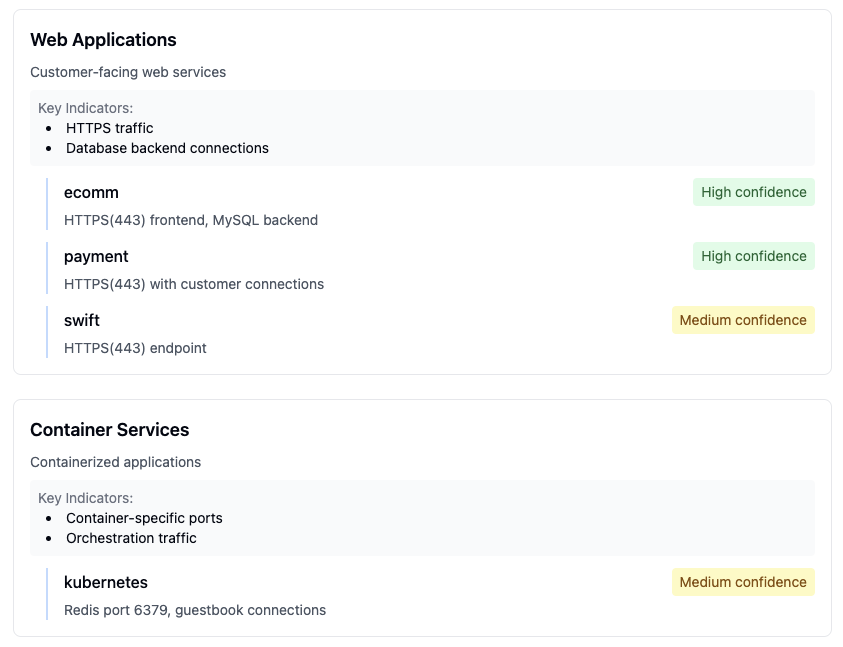 Detailed view of application communication patterns and dependencies
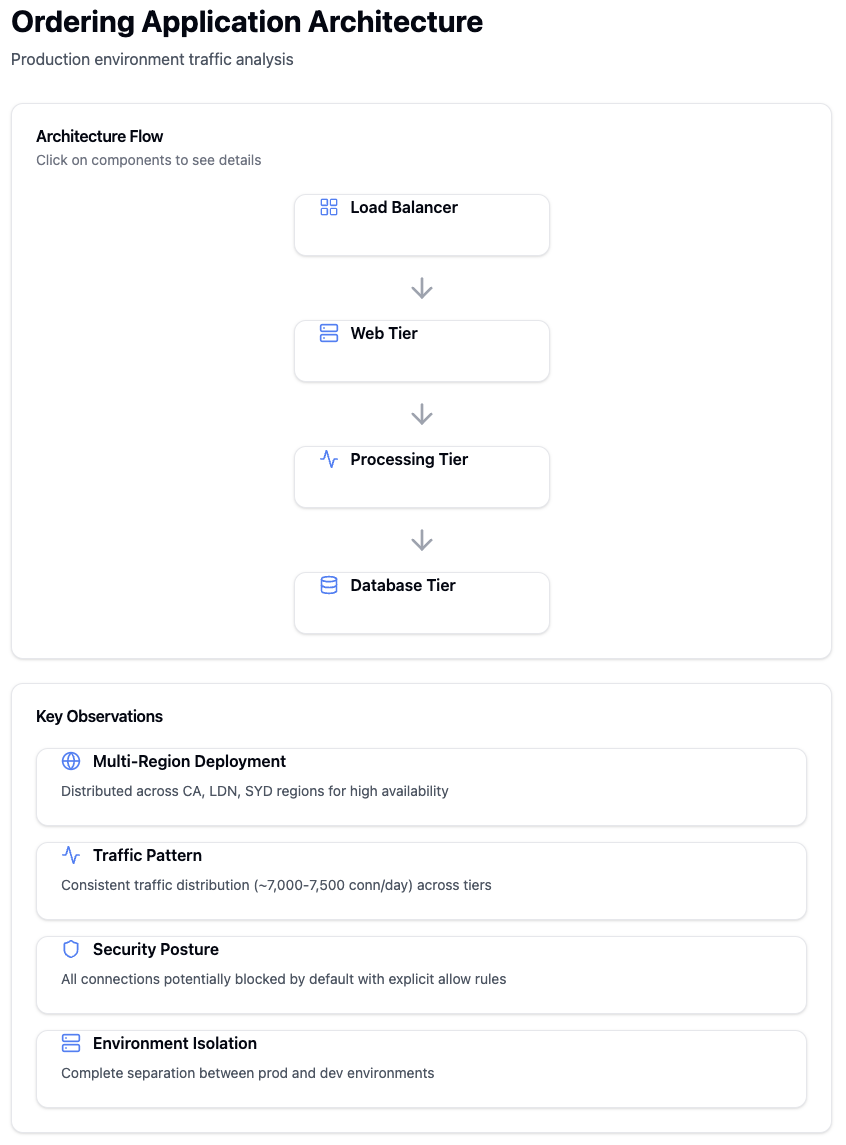 Analysis of traffic patterns between different application tiers
Infrastructure Insights
 Overview dashboard showing key infrastructure metrics and status
 Detailed analysis of infrastructure service communications
Security Assessment
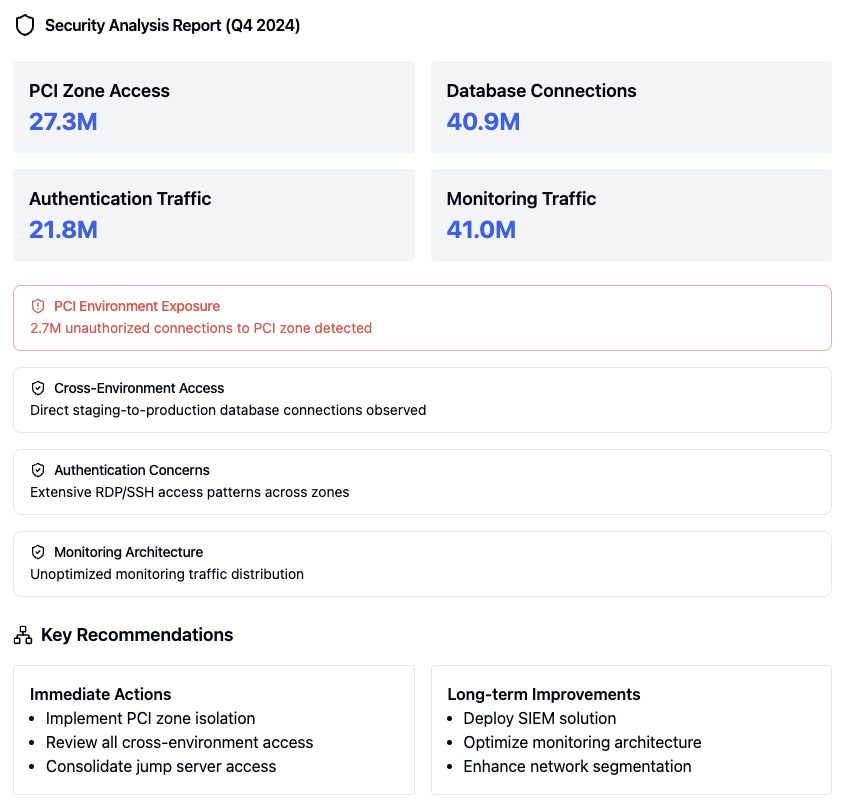 Comprehensive security analysis report
 Security assessment findings for high-risk vulnerabilities
 PCI compliance assessment findings
 SWIFT compliance assessment findings
Remediation Planning
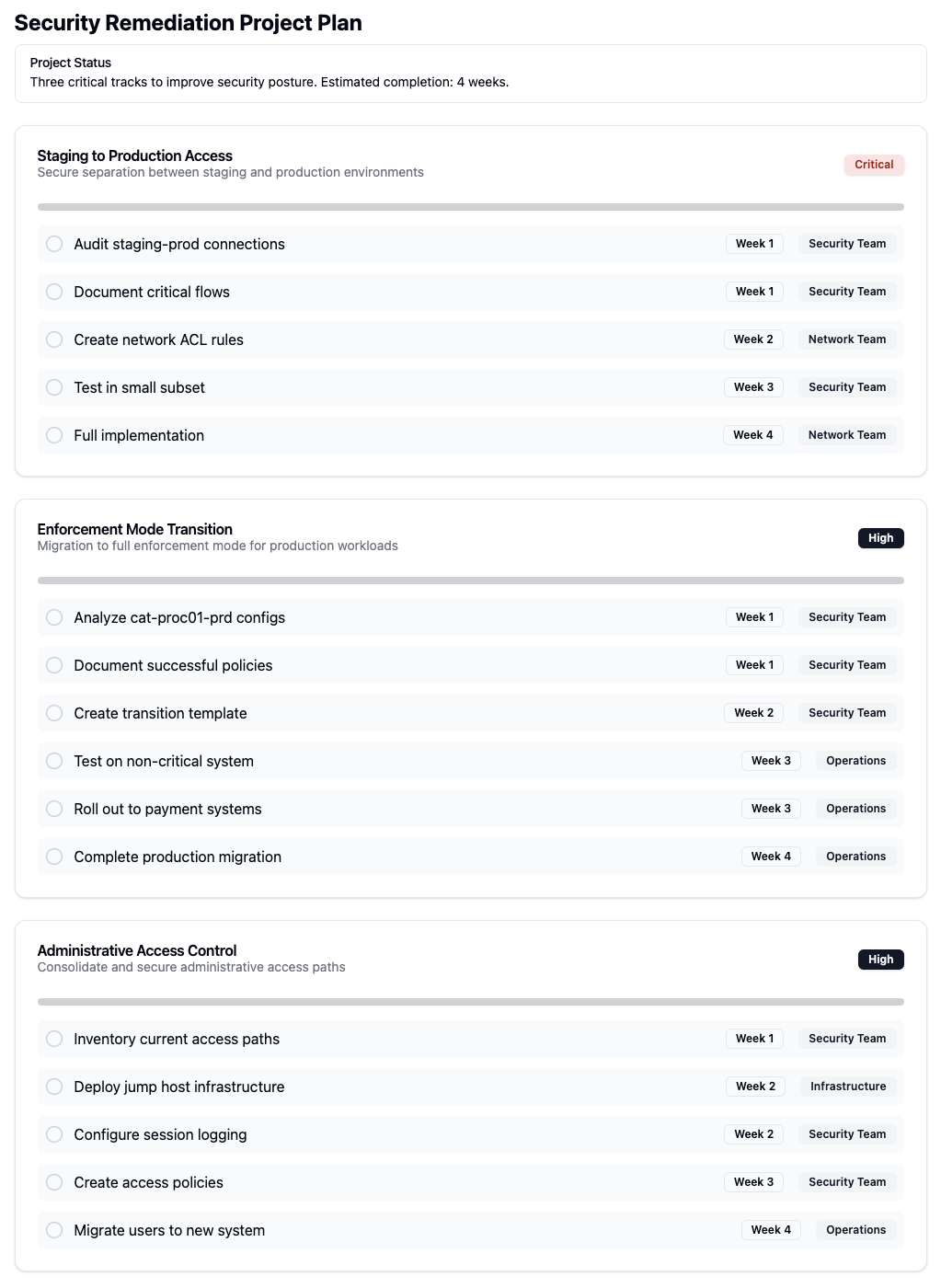 Overview of security remediation planning
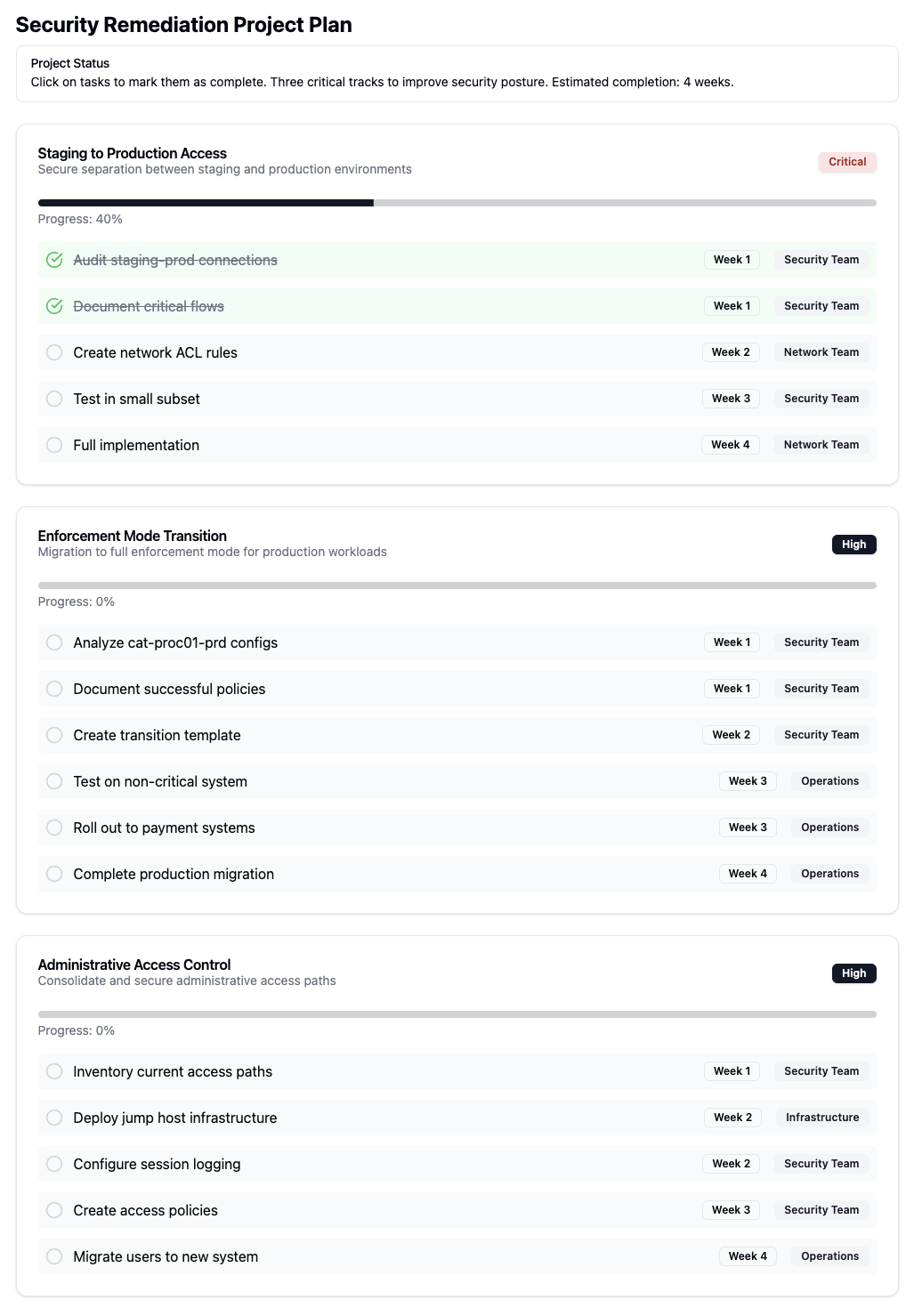 Detailed steps for security remediation implementation
Policy Management
 Management interface for IP lists
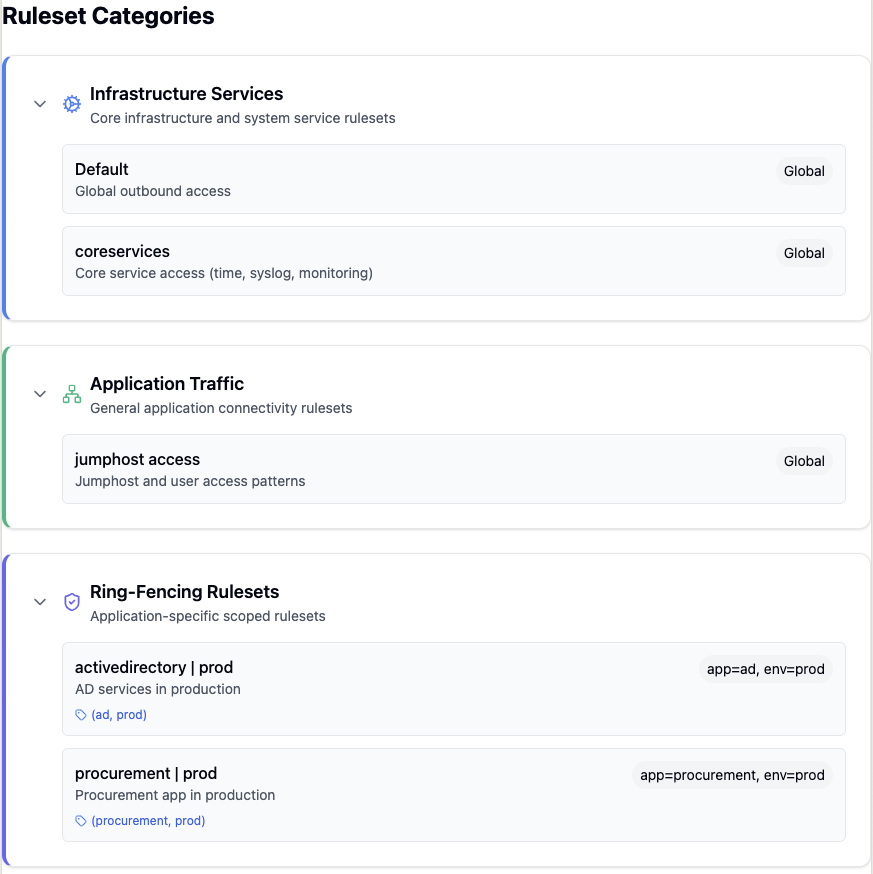 Overview of ruleset categories and organization
 Configuration of application ruleset ordering
Workload Management
 Detailed workload analysis and metrics
 Identification and analysis of workload traffic patterns
Label Management
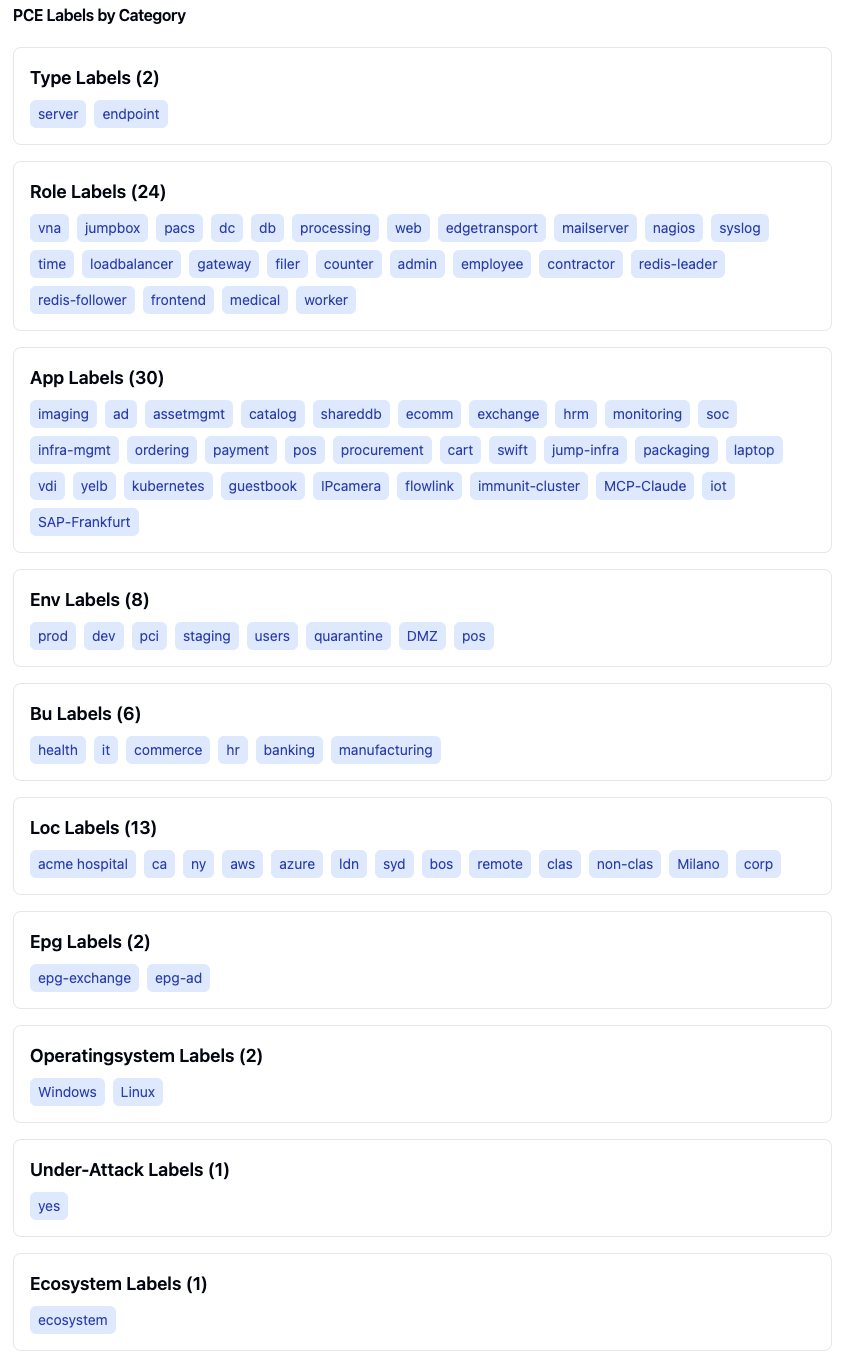 Organization of PCE labels by type and category
Service Analysis
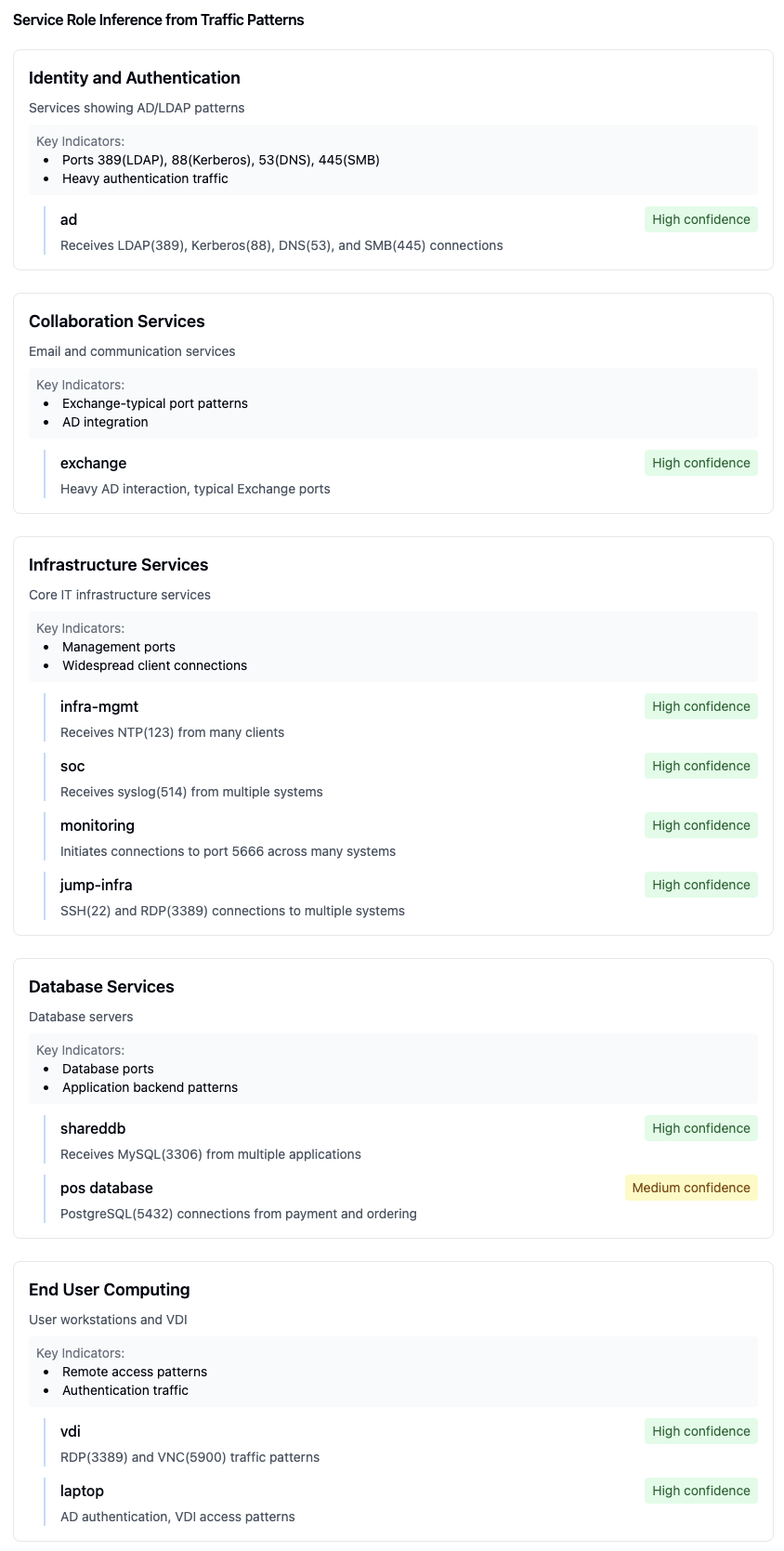 Automatic inference of service roles based on traffic patterns
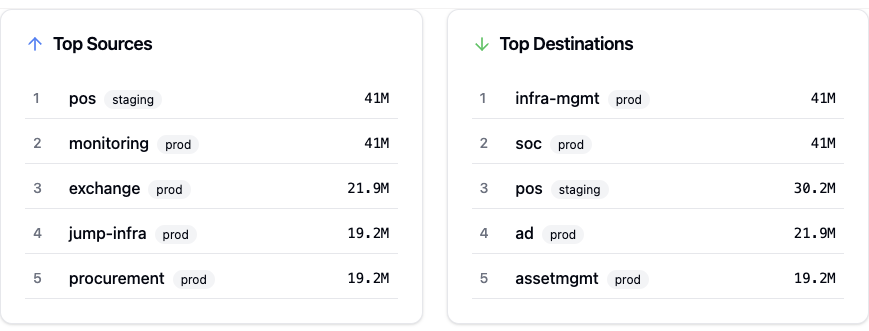 Analysis of top 5 traffic sources and destinations
Project Planning
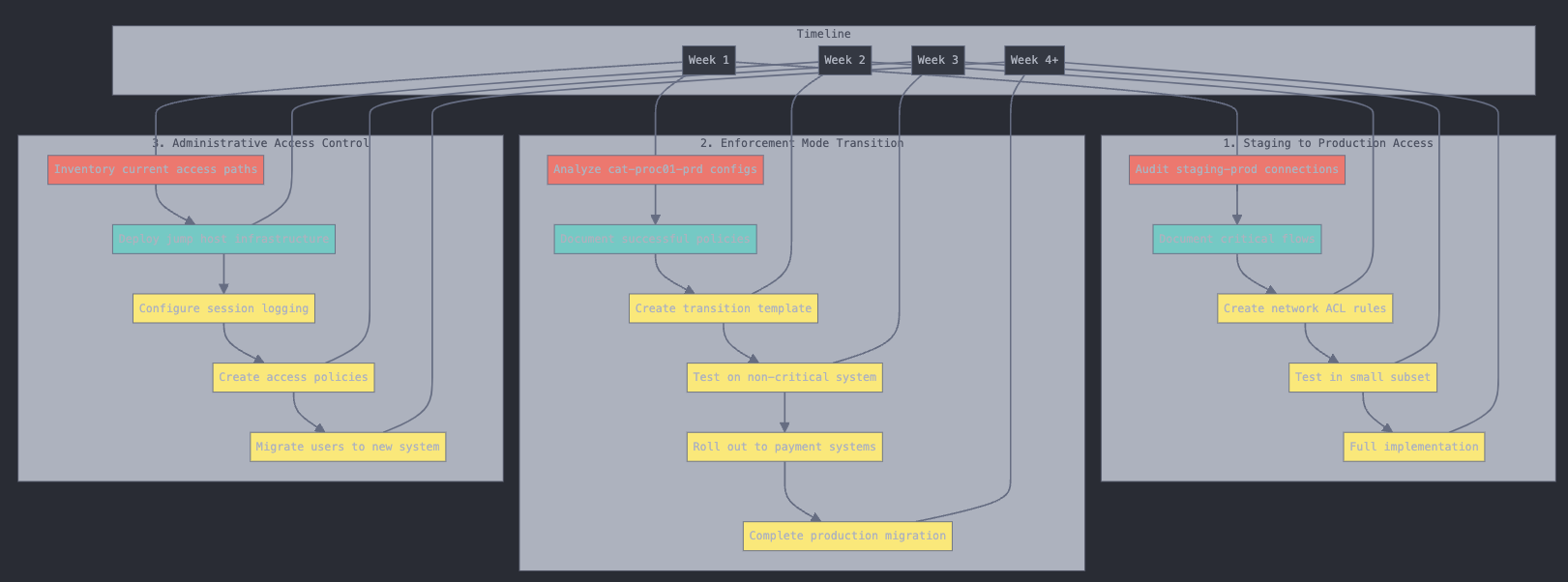 Project implementation timeline and milestones
Available Prompts
Ringfence Application
The ringfence-application prompt helps create security policies to isolate and protect applications by controlling inbound and outbound traffic.
Required Arguments:
application_name: Name of the application to ringfenceapplication_environment: Environment of the application to ringfence
Features:
Creates rules for inter-tier communication within the application
Uses traffic flows to identify required external connections
Implements inbound traffic restrictions based on source applications
Creates outbound traffic rules for necessary external communications
Handles both intra-scope (same app/env) and extra-scope (external) connections
Creates separate rulesets for remote application connections
Analyze Application Traffic
The analyze-application-traffic prompt provides detailed analysis of application traffic patterns and connectivity.
Required Arguments:
application_name: Name of the application to analyzeapplication_environment: Environment of the application to analyze
Analysis Features:
Orders traffic by inbound and outbound flows
Groups by application/environment/role combinations
Identifies relevant label types and patterns
Displays results in a React component format
Shows protocol and port information
Attempts to identify known service patterns (e.g., Nagios on port 5666)
Categorizes traffic into infrastructure and application types
Determines internet exposure
Displays Illumio role, application, and environment labels
How to use MCP prompts
Step1: Click "Attach from MCP" button in the interface

Step 2: Choose from installed MCP servers
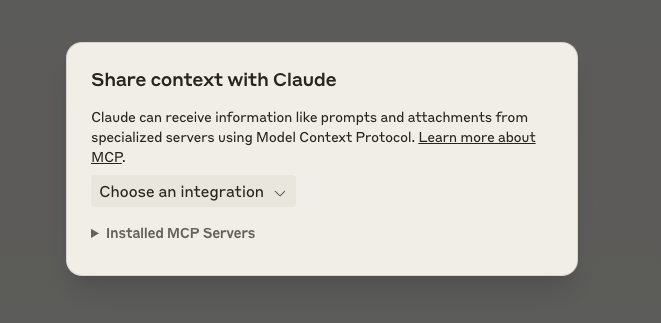
Step 3: Fill in required prompt arguments:
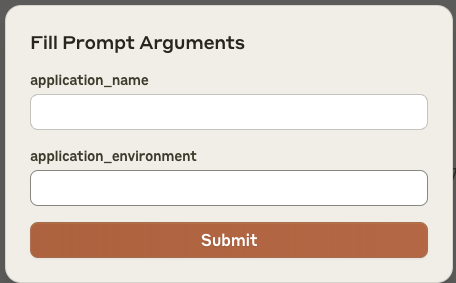
Step 4: Click Submit to send the configured prompt
How prompts work
The MCP server sends the configured prompt to Claude
Claude receives context through the Model Context Protocol
Allows specialized handling of Illumio-specific tasks
This workflow enables automated context sharing between Illumio systems and Claude for application traffic analysis and ringfencing tasks.
Docker
The application is available as a Docker container from the GitHub Container Registry.
Pull the container
docker pull ghcr.io/alexgoller/illumio-mcp-server:latestYou can also use a specific version by replacing latest with a version number:
docker pull ghcr.io/alexgoller/illumio-mcp-server:1.0.0Run with Claude Desktop
To use the container with Claude Desktop, you'll need to:
Create an environment file (e.g.
~/.illumio-mcp.env) with your PCE credentials:
PCE_HOST=your-pce-host
PCE_PORT=your-pce-port
PCE_ORG_ID=1
API_KEY=your-api-key
API_SECRET=your-api-secret
Add the following configuration to your Claude Desktop config file:
On MacOS (~/Library/Application Support/Claude/claude_desktop_config.json):
{
    "mcpServers": {
        "illumio-mcp-docker": {
            "command": "docker",
            "args": [
                "run",
                "-i",
                "--init",
                "--rm",
                "-v",
                "/Users/YOUR_USERNAME/tmp:/var/log/illumio-mcp",
                "-e",
                "DOCKER_CONTAINER=true",
                "-e",
                "PYTHONWARNINGS=ignore",
                "--env-file",
                "/Users/YOUR_USERNAME/.illumio-mcp.env",
                "illumio-mcp:latest"
            ]
        }
    }
}
Make sure to:
Replace
YOUR_USERNAMEwith your actual usernameCreate the log directory (e.g.
~/tmp)Adjust the paths according to your system
Run Standalone
You can also run the container directly:
docker run -i --init --rm \
  -v /path/to/logs:/var/log/illumio-mcp \
  -e DOCKER_CONTAINER=true \
  -e PYTHONWARNINGS=ignore \
  --env-file ~/.illumio-mcp.env \
  ghcr.io/alexgoller/illumio-mcp-server:latest
Docker Compose
For development or testing, you can use Docker Compose:
version: '3'
services:
  illumio-mcp:
    image: ghcr.io/alexgoller/illumio-mcp-server:latest
    init: true
    volumes:
      - ./logs:/var/log/illumio-mcp
    environment:
      - DOCKER_CONTAINER=true
      - PYTHONWARNINGS=ignore
    env_file:
      - ~/.illumio-mcp.env
Then run:
docker-compose upContributing
Fork the repository
Create a feature branch
Commit your changes
Push to the branch
Create a Pull Request
License
This project is licensed under the GPL-3.0 License. See the LICENSE file for details.
Support
For support, please create an issue.
Resources
Unclaimed servers have limited discoverability.
Looking for Admin?
If you are the server author, to access and configure the admin panel.