Yandex Tracker MCP Server


mcp-name: io.github.aikts/yandex-tracker-mcp
A comprehensive Model Context Protocol (MCP) server that enables AI assistants to interact with Yandex Tracker APIs. This server provides secure, authenticated access to Yandex Tracker issues, queues, comments, worklogs, and search functionality with optional Redis caching for improved performance.
Documentation in Russian is available here / Документация на русском языке доступна здесь.
Features
Complete Queue Management: List and access all available Yandex Tracker queues with pagination support, tag retrieval, and detailed metadata
User Management: Retrieve user account information, including login details, email addresses, license status, and organizational data
Full Issue Lifecycle: Create, read, update, and manage issues with support for custom fields, attachments, and workflow transitions
Status Workflow Management: Execute status transitions, close issues with resolutions, and navigate complex workflows
Field Management: Access global fields, queue-specific local fields, statuses, issue types, priorities, and resolutions
Advanced Query Language: Full Yandex Tracker Query Language support with complex filtering, sorting, and date functions
Performance Caching: Optional Redis caching layer for improved response times
Security Controls: Configurable queue access restrictions and secure token handling
Multiple Transport Options: Support for stdio, SSE (deprecated), and HTTP transports for flexible integration
OAuth 2.0 Authentication: Dynamic token-based authentication with automatic refresh support as an alternative to static API tokens
Organization Support: Compatible with both standard and cloud organization IDs
Organization ID Configuration
Choose one of the following based on your Yandex organization type:
You can find your organization ID in the Yandex Tracker URL or organization settings.
Related MCP server: YaTracker Connector
MCP Client Configuration
Installing extension in Claude Desktop
Yandex Tracker MCP Server can be one-click installed in Claude Desktop as and extension.
Installation
Download the *.mcpb file from GitHub Releases.
Double-click the downloaded file to install it in Claude Desktop. 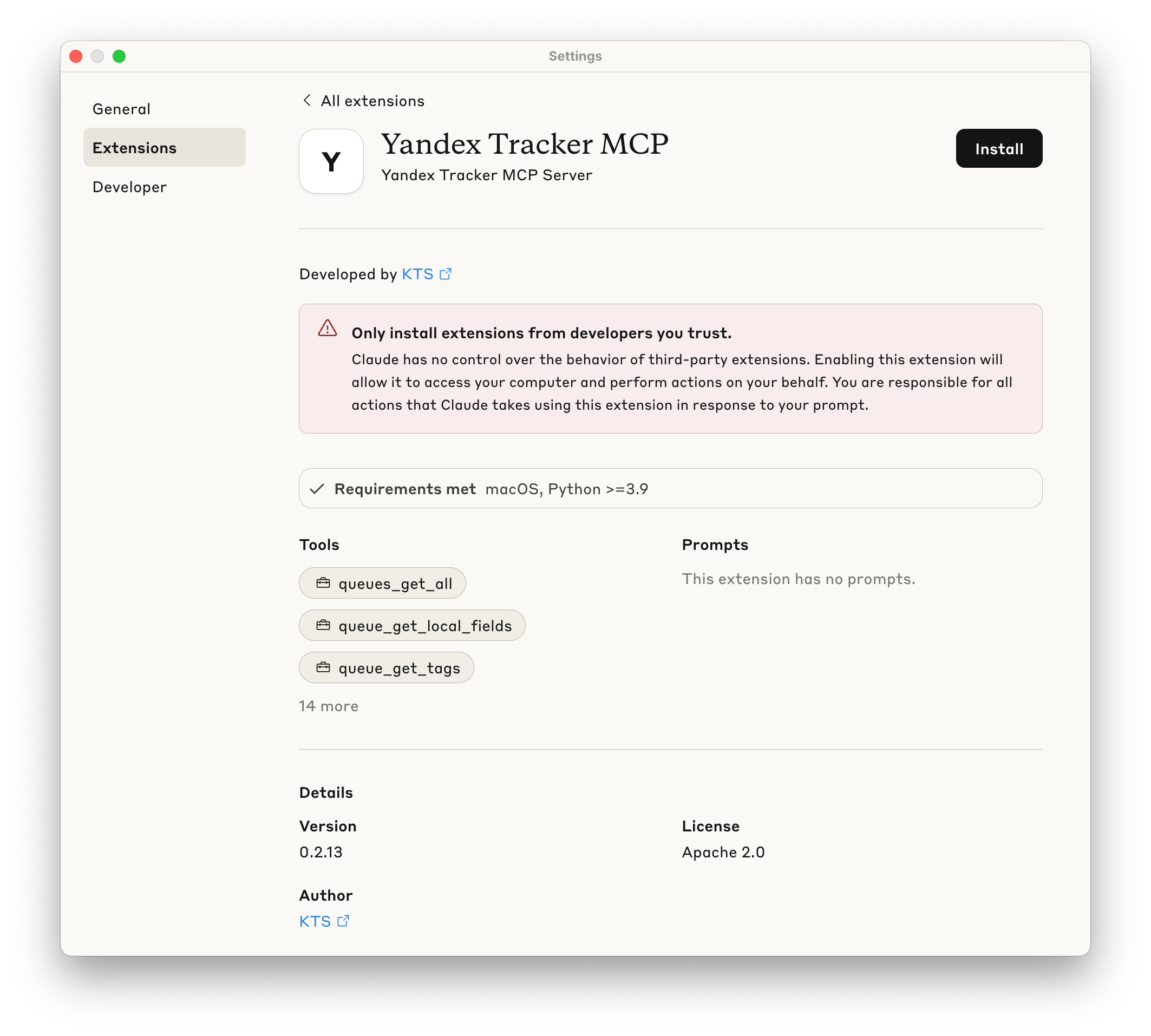
Provide your Yandex Tracker OAuth token when prompted. 
Make sure extension is enabled - now you may use this MCP Server.
Manual installation
Prerequisites
The following sections show how to configure the MCP server for different AI clients. You can use either uvx yandex-tracker-mcp@latest or the Docker image ghcr.io/aikts/yandex-tracker-mcp:latest. Both require these environment variables:
Configuration file path:
Using uvx:
{
  "mcpServers": {
    "yandex-tracker": {
      "command": "uvx",
      "args": ["yandex-tracker-mcp@latest"],
      "env": {
        "TRACKER_TOKEN": "your_tracker_token_here",
        "TRACKER_CLOUD_ORG_ID": "your_cloud_org_id_here",
        "TRACKER_ORG_ID": "your_org_id_here"
      }
    }
  }
}
Using Docker:
{
  "mcpServers": {
    "yandex-tracker": {
      "command": "docker",
      "args": [
        "run", "--rm", "-i",
        "-e", "TRACKER_TOKEN",
        "-e", "TRACKER_CLOUD_ORG_ID",
        "-e", "TRACKER_ORG_ID",
        "ghcr.io/aikts/yandex-tracker-mcp:latest"
      ],
      "env": {
        "TRACKER_TOKEN": "your_tracker_token_here",
        "TRACKER_CLOUD_ORG_ID": "your_cloud_org_id_here",
        "TRACKER_ORG_ID": "your_org_id_here"
      }
    }
  }
}
Using uvx:
claude mcp add yandex-tracker uvx yandex-tracker-mcp@latest \
  -e TRACKER_TOKEN=your_tracker_token_here \
  -e TRACKER_CLOUD_ORG_ID=your_cloud_org_id_here \
  -e TRACKER_ORG_ID=your_org_id_here \
  -e TRANSPORT=stdio
Using Docker:
claude mcp add yandex-tracker docker "run --rm -i -e TRACKER_TOKEN=your_tracker_token_here -e TRACKER_CLOUD_ORG_ID=your_cloud_org_id_here -e TRACKER_ORG_ID=your_org_id_here -e TRANSPORT=stdio ghcr.io/aikts/yandex-tracker-mcp:latest"
Configuration file path:
Using uvx:
{
  "mcpServers": {
    "yandex-tracker": {
      "command": "uvx",
      "args": ["yandex-tracker-mcp@latest"],
      "env": {
        "TRACKER_TOKEN": "your_tracker_token_here",
        "TRACKER_CLOUD_ORG_ID": "your_cloud_org_id_here",
        "TRACKER_ORG_ID": "your_org_id_here"
      }
    }
  }
}
Using Docker:
{
  "mcpServers": {
    "yandex-tracker": {
      "command": "docker",
      "args": [
        "run", "--rm", "-i",
        "-e", "TRACKER_TOKEN",
        "-e", "TRACKER_CLOUD_ORG_ID",
        "-e", "TRACKER_ORG_ID",
        "ghcr.io/aikts/yandex-tracker-mcp:latest"
      ],
      "env": {
        "TRACKER_TOKEN": "your_tracker_token_here",
        "TRACKER_CLOUD_ORG_ID": "your_cloud_org_id_here",
        "TRACKER_ORG_ID": "your_org_id_here"
      }
    }
  }
}
Configuration file path:
Access via: Windsurf Settings → Cascade tab → Model Context Protocol (MCP) Servers → "View raw config"
Using uvx:
{
  "mcpServers": {
    "yandex-tracker": {
      "command": "uvx",
      "args": ["yandex-tracker-mcp@latest"],
      "env": {
        "TRACKER_TOKEN": "your_tracker_token_here",
        "TRACKER_CLOUD_ORG_ID": "your_cloud_org_id_here",
        "TRACKER_ORG_ID": "your_org_id_here"
      }
    }
  }
}
Using Docker:
{
  "mcpServers": {
    "yandex-tracker": {
      "command": "docker",
      "args": [
        "run", "--rm", "-i",
        "-e", "TRACKER_TOKEN",
        "-e", "TRACKER_CLOUD_ORG_ID",
        "-e", "TRACKER_ORG_ID",
        "ghcr.io/aikts/yandex-tracker-mcp:latest"
      ],
      "env": {
        "TRACKER_TOKEN": "your_tracker_token_here",
        "TRACKER_CLOUD_ORG_ID": "your_cloud_org_id_here",
        "TRACKER_ORG_ID": "your_org_id_here"
      }
    }
  }
}
Configuration file path:
Access via: Cmd+, (macOS) or Ctrl+, (Linux/Windows) or command palette: "zed: open settings"
Note: Requires Zed Preview version for MCP support.
Using uvx:
{
  "context_servers": {
    "yandex-tracker": {
      "source": "custom",
      "command": {
        "path": "uvx",
        "args": ["yandex-tracker-mcp@latest"],
        "env": {
          "TRACKER_TOKEN": "your_tracker_token_here",
          "TRACKER_CLOUD_ORG_ID": "your_cloud_org_id_here",
          "TRACKER_ORG_ID": "your_org_id_here"
        }
      }
    }
  }
}
Using Docker:
{
  "context_servers": {
    "yandex-tracker": {
      "source": "custom",
      "command": {
        "path": "docker",
        "args": [
          "run", "--rm", "-i",
          "-e", "TRACKER_TOKEN",
          "-e", "TRACKER_CLOUD_ORG_ID",
          "-e", "TRACKER_ORG_ID",
          "ghcr.io/aikts/yandex-tracker-mcp:latest"
        ],
        "env": {
          "TRACKER_TOKEN": "your_tracker_token_here",
          "TRACKER_CLOUD_ORG_ID": "your_cloud_org_id_here",
          "TRACKER_ORG_ID": "your_org_id_here"
        }
      }
    }
  }
}
Configuration file path:
Option 1: Workspace Configuration (Recommended for security)
Create .vscode/mcp.json:
Using uvx:
{
  "inputs": [
    {
      "type": "promptString",
      "id": "tracker-token",
      "description": "Yandex Tracker Token",
      "password": true
    },
    {
      "type": "promptString",
      "id": "cloud-org-id",
      "description": "Yandex Cloud Organization ID"
    },
    {
      "type": "promptString",
      "id": "org-id",
      "description": "Yandex Tracker Organization ID (optional)"
    }
  ],
  "servers": {
    "yandex-tracker": {
      "type": "stdio",
      "command": "uvx",
      "args": ["yandex-tracker-mcp@latest"],
      "env": {
        "TRACKER_TOKEN": "${input:tracker-token}",
        "TRACKER_CLOUD_ORG_ID": "${input:cloud-org-id}",
        "TRACKER_ORG_ID": "${input:org-id}",
        "TRANSPORT": "stdio"
      }
    }
  }
}
Using Docker:
{
  "inputs": [
    {
      "type": "promptString",
      "id": "tracker-token",
      "description": "Yandex Tracker Token",
      "password": true
    },
    {
      "type": "promptString",
      "id": "cloud-org-id",
      "description": "Yandex Cloud Organization ID"
    },
    {
      "type": "promptString",
      "id": "org-id",
      "description": "Yandex Tracker Organization ID (optional)"
    }
  ],
  "servers": {
    "yandex-tracker": {
      "type": "stdio",
      "command": "docker",
      "args": [
        "run", "--rm", "-i",
        "-e", "TRACKER_TOKEN",
        "-e", "TRACKER_CLOUD_ORG_ID",
        "-e", "TRACKER_ORG_ID",
        "ghcr.io/aikts/yandex-tracker-mcp:latest"
      ],
      "env": {
        "TRACKER_TOKEN": "${input:tracker-token}",
        "TRACKER_CLOUD_ORG_ID": "${input:cloud-org-id}",
        "TRACKER_ORG_ID": "${input:org-id}",
        "TRANSPORT": "stdio"
      }
    }
  }
}
Option 2: Global Configuration
Add to VS Code settings.json:
Using uvx:
{
  "github.copilot.chat.mcp.servers": {
    "yandex-tracker": {
      "type": "stdio",
      "command": "uvx",
      "args": ["yandex-tracker-mcp@latest"],
      "env": {
        "TRACKER_TOKEN": "your_tracker_token_here",
        "TRACKER_CLOUD_ORG_ID": "your_cloud_org_id_here",
        "TRACKER_ORG_ID": "your_org_id_here"
      }
    }
  }
}
Using Docker:
{
  "github.copilot.chat.mcp.servers": {
    "yandex-tracker": {
      "type": "stdio",
      "command": "docker",
      "args": [
        "run", "--rm", "-i",
        "-e", "TRACKER_TOKEN",
        "-e", "TRACKER_CLOUD_ORG_ID",
        "-e", "TRACKER_ORG_ID",
        "ghcr.io/aikts/yandex-tracker-mcp:latest"
      ],
      "env": {
        "TRACKER_TOKEN": "your_tracker_token_here",
        "TRACKER_CLOUD_ORG_ID": "your_cloud_org_id_here",
        "TRACKER_ORG_ID": "your_org_id_here"
      }
    }
  }
}
For other MCP-compatible clients, use the standard MCP server configuration format:
Using uvx:
{
  "mcpServers": {
    "yandex-tracker": {
      "command": "uvx",
      "args": ["yandex-tracker-mcp@latest"],
      "env": {
        "TRACKER_TOKEN": "your_tracker_token_here",
        "TRACKER_CLOUD_ORG_ID": "your_cloud_org_id_here",
        "TRACKER_ORG_ID": "your_org_id_here"
      }
    }
  }
}
Using Docker:
{
  "mcpServers": {
    "yandex-tracker": {
      "command": "docker",
      "args": [
        "run", "--rm", "-i",
        "-e", "TRACKER_TOKEN",
        "-e", "TRACKER_CLOUD_ORG_ID",
        "-e", "TRACKER_ORG_ID",
        "ghcr.io/aikts/yandex-tracker-mcp:latest"
      ],
      "env": {
        "TRACKER_TOKEN": "your_tracker_token_here",
        "TRACKER_CLOUD_ORG_ID": "your_cloud_org_id_here",
        "TRACKER_ORG_ID": "your_org_id_here"
      }
    }
  }
}
Important Notes:
Replace placeholder values with your actual credentials
Restart your AI client after configuration changes
Ensure uvx is installed and available in your system PATH
For production use, consider using environment variables instead of hardcoding tokens
Available MCP Tools
The server exposes the following tools through the MCP protocol:
queues_get_all: List all available Yandex Tracker queues
queue_get_tags: Get all tags for a specific queue
Parameters: queue_id (string, queue key like "SOMEPROJECT")
Returns list of available tags in the specified queue
Respects TRACKER_LIMIT_QUEUES restrictions
queue_get_versions: Get all versions for a specific queue
Parameters: queue_id (string, queue key like "SOMEPROJECT")
Returns list of available versions in the specified queue with details like name, description, dates, and status
Respects TRACKER_LIMIT_QUEUES restrictions
queue_get_fields: Get fields for a specific queue
Parameters:
queue_id (string, required): Queue key like "SOMEPROJECT"
include_local_fields (boolean, optional, default: true): Whether to include queue-specific local fields
Returns list of global fields and optionally local (queue-specific) fields
Makes parallel requests to fetch both field types when include_local_fields is true
The schema.required property indicates whether a field is mandatory
Use this to find available and required fields before creating an issue with issue_create tool
Respects TRACKER_LIMIT_QUEUES restrictions
queue_get_metadata: Get detailed metadata about a specific queue
Parameters:
queue_id (string, required): Queue key like "SOMEPROJECT"
expand (array of strings, optional): Fields to expand in the response. Available options: all, projects, components, versions, types, team, workflows, fields, issueTypesConfig
Returns queue information including name, description, default type/priority, and optionally expanded data
Use expand: ["issueTypesConfig"] to get available resolutions for each issue type (needed for issue_close tool)
Respects TRACKER_LIMIT_QUEUES restrictions
users_get_all: Get information about user accounts registered in the organization
Parameters:
Returns paginated list of users with login, email, license status, and organizational details
Includes user metadata such as external status, dismissal status, and notification preferences
user_get: Get information about a specific user by login or UID
Parameters: user_id (string, user login like "john.doe" or UID like "12345")
Returns detailed user information including login, email, license status, and organizational details
Supports both user login names and numeric user IDs for flexible identification
user_get_current: Get information about the current authenticated user
No parameters required
Returns detailed information about the user associated with the current authentication token
Includes login, email, display name, and organizational details for the authenticated user
users_search: Search user based on login, email or real name (first or last name, or both)
Parameters: login_or_email_or_name (string, user login, email or real name to search for)
Returns either single user or multiple users if several match the query or an empty list if no users matched
Uses fuzzy matching for real names with a similarity threshold of 80%
Prioritizes exact matches for login and email over fuzzy name matches
get_statuses: Get all available issue statuses
Returns complete list of issue statuses that can be assigned
Includes status IDs, names, and type information
get_issue_types: Get all available issue types
Returns complete list of issue types for creating/updating issues
Includes type IDs, names, and configuration details
get_priorities: Get all available issue priorities
Returns complete list of priorities that can be assigned to issues
Includes priority keys, names, and order information
get_resolutions: Get all available issue resolutions
Returns complete list of resolutions that can be used when closing issues
Includes resolution keys, names, descriptions, and order information
issue_get: Retrieve detailed issue information by ID
issue_get_url: Generate web URL for an issue
issue_get_comments: Fetch all comments for an issue
issue_add_comment: Add a comment to an issue
issue_update_comment: Update an existing comment in an issue
issue_delete_comment: Delete a comment from an issue
Parameters:
issue_id (string, required, format: "QUEUE-123")
comment_id (int, required): Comment ID
Returns: null (success)
issue_get_links: Get related issue links
Parameters: issue_id (string)
Returns links to related, blocked, or duplicate issues
issue_get_worklogs: Retrieve worklog entries
issue_add_worklog: Add a worklog entry (log spent time) to an issue
issue_update_worklog: Update a worklog entry (spent time record) in an issue
issue_delete_worklog: Delete a worklog entry (spent time record) from an issue
Parameters:
issue_id (string, required, format: "QUEUE-123")
worklog_id (int, required): Worklog entry ID
Returns: null (success)
issue_get_attachments: Get attachments for an issue
Parameters: issue_id (string, format: "QUEUE-123")
Returns list of attachments with metadata for the specified issue
issue_get_checklist: Get checklist items of an issue
Parameters: issue_id (string, format: "QUEUE-123")
Returns list of checklist items including text, status, assignee, and deadline information
issue_get_transitions: Get possible status transitions for an issue
Parameters: issue_id (string, format: "QUEUE-123")
Returns list of available transitions that can be performed on the issue
Each transition includes an ID, display name, and target status information
issue_execute_transition: Execute a status transition for an issue
Parameters:
issue_id (string, required, format: "QUEUE-123"): The issue key
transition_id (string, required): The transition ID to execute. IMPORTANT: Must be one of the IDs returned by issue_get_transitions tool
comment (string, optional): Optional comment to add when executing the transition
fields (object, optional): Dictionary of additional fields to set during the transition. Common fields include resolution (e.g., 'fixed', 'wontFix') for closing issues, assignee for reassigning, etc.
Returns list of available transitions for the new status after the transition is executed
Usage note: You MUST first call issue_get_transitions to retrieve available transitions, then pass one of the returned transition IDs. Do NOT use arbitrary transition IDs.
issue_close: Close an issue with a resolution (convenience tool)
Parameters:
issue_id (string, required, format: "QUEUE-123"): The issue key
resolution_id (string, required): The resolution ID to set when closing (e.g., 'fixed', 'wontFix', 'duplicate')
comment (string, optional): Optional comment to add when closing the issue
Automatically finds a transition to a 'done' status and executes it with the specified resolution
Returns list of available transitions for the new (closed) status
Usage note: Before closing, you MUST:
Call issue_get to retrieve the issue's type field
Call get_queue_metadata with expand: ["issueTypesConfig"] to get available resolutions
Choose a resolution from the issueTypesConfig entry matching the issue's type - each issue type has its own set of valid resolutions
issue_create: Create a new issue in a queue
issue_update: Update an existing issue
Parameters:
issue_id (string, required, format: "QUEUE-123"): The issue key to update
summary (string, optional): New issue title/summary
description (string, optional): New issue description
markup_type (string, optional): Markup type for description text (use 'md' for YFM markup)
parent (IssueUpdateParent, optional): Parent issue reference with id (string) and/or key (string, e.g., 'QUEUE-123')
sprint (array of IssueUpdateSprint, optional): Sprint assignments - array of objects with id (int) field
type (IssueUpdateType, optional): Issue type with id (string) and/or key (string, e.g., 'bug', 'task')
priority (IssueUpdatePriority, optional): Priority with id (string) and/or key (string, e.g., 'critical', 'normal')
followers (array of IssueUpdateFollower, optional): Followers - array of objects with id (string, user ID or login)
project (IssueUpdateProject, optional): Project with primary (int, main project shortId) and optional secondary (array of ints)
attachment_ids (array of strings, optional): IDs of temporary files to attach
description_attachment_ids (array of strings, optional): IDs of temporary files to embed in description
tags (array of strings, optional): Issue tags
version (int, optional): Issue version for optimistic locking - changes only made to current version
fields (object, optional): Additional fields to update. Use queue_get_fields to discover available fields.
Returns the updated issue object with all standard issue fields
Only provided fields are updated; omitted fields remain unchanged
Respects TRACKER_LIMIT_QUEUES restrictions
http Transport
The MCP server can also be run in streamable-http mode for web-based integrations or when stdio transport is not suitable.
streamable-http Mode Environment Variables
# Required - Set transport to streamable-http mode
TRANSPORT=streamable-http

# Server Configuration
HOST=0.0.0.0  # Default: 0.0.0.0 (all interfaces)
PORT=8000     # Default: 8000
Starting the streamable-http Server
# Basic streamable-http server startup
TRANSPORT=streamable-http uvx yandex-tracker-mcp@latest

# With custom host and port
TRANSPORT=streamable-http \
HOST=localhost \
PORT=9000 \
uvx yandex-tracker-mcp@latest

# With all environment variables
TRANSPORT=streamable-http \
HOST=0.0.0.0 \
PORT=8000 \
TRACKER_TOKEN=your_token \
TRACKER_CLOUD_ORG_ID=your_org_id \
uvx yandex-tracker-mcp@latest
You may skip configuring TRACKER_CLOUD_ORG_ID or TRACKER_ORG_ID if you are using the following format when connecting to MCP Server (example for Claude Code):
claude mcp add --transport http yandex-tracker "http://localhost:8000/mcp/?cloudOrgId=your_cloud_org_id&"
or
claude mcp add --transport http yandex-tracker "http://localhost:8000/mcp/?orgId=org_id&"
You may also skip configuring global TRACKER_TOKEN environment variable if you choose to use OAuth 2.0 authentication (see below).
OAuth 2.0 Authentication
The Yandex Tracker MCP Server supports OAuth 2.0 authentication as a secure alternative to static API tokens. When configured, the server acts as an OAuth provider, facilitating authentication between your MCP client and Yandex OAuth services.
How OAuth Works
The MCP server implements a standard OAuth 2.0 authorization code flow:
Client Registration: Your MCP client registers with the server to obtain client credentials
Authorization: Users are redirected to Yandex OAuth to authenticate
Token Exchange: The server exchanges authorization codes for access tokens
API Access: Clients use bearer tokens for all API requests
Token Refresh: Expired tokens can be refreshed without re-authentication
MCP Client → MCP Server → Yandex OAuth → User Authentication
    ↑                                           ↓
    └────────── Access Token ←─────────────────┘
OAuth Configuration
To enable OAuth authentication, set the following environment variables:
# Enable OAuth mode
OAUTH_ENABLED=true

# Yandex OAuth Application Credentials (required for OAuth)
OAUTH_CLIENT_ID=your_yandex_oauth_app_id
OAUTH_CLIENT_SECRET=your_yandex_oauth_app_secret

# Public URL of your MCP server (required for OAuth callbacks)
MCP_SERVER_PUBLIC_URL=https://your-mcp-server.example.com

# Optional OAuth settings
OAUTH_SERVER_URL=https://oauth.yandex.ru  # Default Yandex OAuth server

# When OAuth is enabled, TRACKER_TOKEN becomes optional
Setting Up Yandex OAuth Application
Go to Yandex OAuth and create a new application
Set the callback URL to: {MCP_SERVER_PUBLIC_URL}/oauth/yandex/callback
Request the following permissions:
Save your Client ID and Client Secret
OAuth vs Static Token Authentication
Feature | OAuth | Static Token |
Security | Dynamic tokens with expiration | Long-lived static tokens |
User Experience | Interactive login flow | One-time configuration |
Token Management | Automatic refresh | Manual rotation |
Access Control | Per-user authentication | Shared token |
Setup Complexity | Requires OAuth app setup | Simple token configuration |
OAuth Mode Limitations
Currently, the OAuth mode requires the MCP server to be publicly accessible for callback URLs
OAuth mode is best suited for interactive clients that support web-based authentication flows
Using OAuth with MCP Clients
When OAuth is enabled, MCP clients will need to:
Support OAuth 2.0 authorization code flow
Handle token refresh when access tokens expire
Store refresh tokens securely for persistent authentication
Note: Not all MCP clients currently support OAuth authentication. Check your client's documentation for OAuth compatibility.
Example configuration for Claude Code:
claude mcp add --transport http yandex-tracker https://your-mcp-server.example.com/mcp/ -s user
OAuth Data Storage
The MCP server supports two different storage backends for OAuth data (client registrations, access tokens, refresh tokens, and authorization states):
InMemory Store (Default)
The in-memory store keeps all OAuth data in server memory. This is the default option and requires no additional configuration.
Characteristics:
Persistence: Data is lost when the server restarts
Performance: Very fast access since data is stored in memory
Scalability: Limited to single server instance
Setup: No additional dependencies required
Best for: Development, testing, or single-instance deployments where losing OAuth sessions on restart is acceptable
Configuration:
OAUTH_STORE=memory # Default value, can be omitted
Redis Store
The Redis store provides persistent storage for OAuth data using a Redis database. This ensures OAuth sessions survive server restarts and enables multi-instance deployments.
Characteristics:
Persistence: Data persists across server restarts
Performance: Fast access with network overhead
Scalability: Supports multiple server instances sharing the same Redis database
Setup: Requires Redis server installation and configuration
Best for: Production deployments, high availability setups, or when OAuth sessions must persist
Configuration:
# Enable Redis store for OAuth data
OAUTH_STORE=redis

# Redis connection settings (same as used for tools caching)
REDIS_ENDPOINT=localhost                  # Default: localhost
REDIS_PORT=6379                           # Default: 6379
REDIS_DB=0                                # Default: 0
REDIS_PASSWORD=your_redis_password        # Optional: Redis password
REDIS_POOL_MAX_SIZE=10                    # Default: 10
Storage Behavior:
Client Information: Stored persistently
OAuth States: Stored with TTL (time-to-live) for security
Authorization Codes: Stored with TTL and automatically cleaned up after use
Access Tokens: Stored with automatic expiration based on token lifetime
Refresh Tokens: Stored persistently until revoked
Key Namespacing: Uses oauth:* prefixes to avoid conflicts with other Redis data
Token Encryption (Required for Redis Store)
When using Redis store, you must configure encryption to protect OAuth tokens at rest. Token values are encrypted using Fernet (AES-128) and Redis keys use SHA-256 hashes instead of raw tokens, preventing token exposure if Redis is compromised.
Generate an encryption key:
python3 -c "import base64, os; print(base64.b64encode(os.urandom(32)).decode())"
Configuration:
# Single encryption key
OAUTH_ENCRYPTION_KEYS=<base64-encoded-32-byte-key>

# Multiple keys for rotation (first encrypts, all decrypt)
OAUTH_ENCRYPTION_KEYS=<new-key>,<old-key>
Key rotation allows seamless key updates: add the new key first, wait for old tokens to expire, then remove the old key.
Important Notes:
Both stores use the same Redis connection settings as the tools caching system
When using Redis store, ensure your Redis instance is properly secured and accessible
The OAUTH_STORE setting only affects OAuth data storage; tools caching uses TOOLS_CACHE_ENABLED
Redis store uses JSON serialization for better cross-language compatibility and debugging
Authentication
Yandex Tracker MCP Server supports multiple authentication methods with a clear priority order. The server will use the first available authentication method based on this hierarchy:
Authentication Priority Order
Dynamic OAuth Token (highest priority)
When OAuth is enabled and a user authenticates via OAuth flow
Tokens are dynamically obtained and refreshed per user session
Supports both standard Yandex OAuth and Yandex Cloud federative OAuth
Required env vars: OAUTH_ENABLED=true, OAUTH_CLIENT_ID, OAUTH_CLIENT_SECRET, MCP_SERVER_PUBLIC_URL
Additional vars for federative OAuth: OAUTH_SERVER_URL=https://auth.yandex.cloud/oauth, OAUTH_TOKEN_TYPE=Bearer, OAUTH_USE_SCOPES=false
Passthrough Bearer OAuth Token
When MCP OAuth middleware does not provide a token, the server can read a Yandex OAuth token from the incoming Authorization: Bearer <token> header
Useful behind a trusted reverse proxy or gateway that authenticates users, resolves their stored Yandex OAuth token, and injects it per request
The token from MCP OAuth still has priority when OAuth mode is enabled and active
Static OAuth Token
Traditional OAuth token provided via environment variable
Single token used for all requests
Required env var: TRACKER_TOKEN (your OAuth token)
Static IAM Token
IAM (Identity and Access Management) token for service-to-service authentication
Suitable for automated systems and CI/CD pipelines
Required env var: TRACKER_IAM_TOKEN (your IAM token)
Dynamic IAM Token (lowest priority)
Automatically retrieved using service account credentials
Token is fetched and refreshed automatically
Required env vars: TRACKER_SA_KEY_ID, TRACKER_SA_SERVICE_ACCOUNT_ID, TRACKER_SA_PRIVATE_KEY
Authentication Scenarios
Scenario 1: OAuth with Dynamic Tokens (Recommended for Interactive Use)
# Enable OAuth mode
OAUTH_ENABLED=true
OAUTH_CLIENT_ID=your_oauth_app_id
OAUTH_CLIENT_SECRET=your_oauth_app_secret
MCP_SERVER_PUBLIC_URL=https://your-server.com

# Organization ID (choose one)
TRACKER_CLOUD_ORG_ID=your_cloud_org_id  # or TRACKER_ORG_ID
Scenario 2: Static OAuth Token (Simple Setup)
# OAuth token
TRACKER_TOKEN=your_oauth_token

# Organization ID (choose one)
TRACKER_CLOUD_ORG_ID=your_cloud_org_id  # or TRACKER_ORG_ID
Scenario 3: Passthrough Bearer Token Behind a Reverse Proxy
Use this mode when a trusted gateway handles user authentication, looks up the user's Yandex OAuth token, and forwards the request to the MCP server with that token in the request header:
Authorization: Bearer <user_yandex_oauth_token>
# Organization ID (choose one)
TRACKER_CLOUD_ORG_ID=your_cloud_org_id  # or TRACKER_ORG_ID
This passthrough token is used only when MCP OAuth middleware has not provided an access token for the request. In OAuth-enabled deployments with an active MCP OAuth session, the MCP OAuth token takes priority.
Scenario 4: Static IAM Token
# IAM token
TRACKER_IAM_TOKEN=your_iam_token

# Organization ID (choose one)
TRACKER_CLOUD_ORG_ID=your_cloud_org_id  # or TRACKER_ORG_ID
Scenario 5: Dynamic IAM Token with Service Account
# Service account credentials
TRACKER_SA_KEY_ID=your_key_id
TRACKER_SA_SERVICE_ACCOUNT_ID=your_service_account_id
TRACKER_SA_PRIVATE_KEY=your_private_key

# Organization ID (choose one)
TRACKER_CLOUD_ORG_ID=your_cloud_org_id  # or TRACKER_ORG_ID
Scenario 6: Federative OAuth for OIDC Applications (Advanced)
# Enable OAuth with Yandex Cloud federation
OAUTH_ENABLED=true
OAUTH_SERVER_URL=https://auth.yandex.cloud/oauth
OAUTH_TOKEN_TYPE=Bearer
OAUTH_USE_SCOPES=false
OAUTH_CLIENT_ID=your_oidc_client_id
OAUTH_CLIENT_SECRET=your_oidc_client_secret
MCP_SERVER_PUBLIC_URL=https://your-server.com

# Organization ID (choose one)
TRACKER_CLOUD_ORG_ID=your_cloud_org_id  # or TRACKER_ORG_ID
This configuration enables authentication through Yandex Cloud OIDC applications, which is required for federated accounts in Yandex Cloud. Federated users authenticate through their organization's identity provider (IdP) and use this OAuth flow to access Yandex Tracker APIs.
Important Notes
The server checks authentication methods in the order listed above
Only one authentication method will be used at a time
For production use, dynamic tokens (OAuth or IAM) are recommended for better security
IAM tokens have a shorter lifetime than OAuth tokens and may need more frequent renewal
When using service accounts, ensure the account has appropriate permissions for Yandex Tracker
Configuration
Environment Variables
# Authentication (use one of the following methods)
# Method 1: OAuth Token
TRACKER_TOKEN=your_yandex_tracker_oauth_token

# Method 2: IAM Token
TRACKER_IAM_TOKEN=your_iam_token

# Method 3: Service Account (for dynamic IAM token)
TRACKER_SA_KEY_ID=your_key_id                    # Service account key ID
TRACKER_SA_SERVICE_ACCOUNT_ID=your_sa_id        # Service account ID
TRACKER_SA_PRIVATE_KEY=your_private_key          # Service account private key

# Organization Configuration (choose one)
TRACKER_CLOUD_ORG_ID=your_cloud_org_id    # For Yandex Cloud organizations
TRACKER_ORG_ID=your_org_id                # For Yandex 360 organizations

# API Configuration (optional)
TRACKER_API_BASE_URL=https://api.tracker.yandex.net  # Default: https://api.tracker.yandex.net

# Security - Restrict access to specific queues (optional)
TRACKER_LIMIT_QUEUES=PROJ1,PROJ2,DEV      # Comma-separated queue keys

# Server Configuration
HOST=0.0.0.0                              # Default: 0.0.0.0
PORT=8000                                 # Default: 8000
TRANSPORT=stdio                           # Options: stdio, streamable-http, sse

# Redis connection settings (used for caching and OAuth store)
REDIS_ENDPOINT=localhost                  # Default: localhost
REDIS_PORT=6379                           # Default: 6379
REDIS_DB=0                                # Default: 0
REDIS_PASSWORD=your_redis_password        # Optional: Redis password
REDIS_POOL_MAX_SIZE=10                    # Default: 10

# Tools caching configuration (optional)
TOOLS_CACHE_ENABLED=true                  # Default: false
TOOLS_CACHE_REDIS_TTL=3600                # Default: 3600 seconds (1 hour)

# OAuth 2.0 Authentication (optional)
OAUTH_ENABLED=true                        # Default: false
OAUTH_STORE=redis                         # Options: memory, redis (default: memory)
OAUTH_SERVER_URL=https://oauth.yandex.ru  # Default: https://oauth.yandex.ru (use https://auth.yandex.cloud/oauth for federation)
OAUTH_TOKEN_TYPE=<Bearer|OAuth|<empty>>   # Default: <empty> (required to be Bearer for Yandex Cloud federation)
OAUTH_USE_SCOPES=true                     # Default: true (set to false for Yandex Cloud federation)
OAUTH_CLIENT_ID=your_oauth_client_id      # Required when OAuth enabled
OAUTH_CLIENT_SECRET=your_oauth_secret     # Required when OAuth enabled
MCP_SERVER_PUBLIC_URL=https://your.server.com  # Required when OAuth enabled
TRACKER_READ_ONLY=true                    # Default: false - Limit OAuth to read-only permissions
Docker Deployment
Using Pre-built Image (Recommended)
# Using environment file
docker run --env-file .env -p 8000:8000 ghcr.io/aikts/yandex-tracker-mcp:latest

# With inline environment variables
docker run -e TRACKER_TOKEN=your_token \
           -e TRACKER_CLOUD_ORG_ID=your_org_id \
           -p 8000:8000 \
           ghcr.io/aikts/yandex-tracker-mcp:latest
Building the Image Locally
docker build -t yandex-tracker-mcp .
Docker Compose
Using pre-built image:
version: '3.8'
services:
  mcp-tracker:
    image: ghcr.io/aikts/yandex-tracker-mcp:latest
    ports:
      - "8000:8000"
    environment:
      - TRACKER_TOKEN=${TRACKER_TOKEN}
      - TRACKER_CLOUD_ORG_ID=${TRACKER_CLOUD_ORG_ID}
Building locally:
version: '3.8'
services:
  mcp-tracker:
    build: .
    ports:
      - "8000:8000"
    environment:
      - TRACKER_TOKEN=${TRACKER_TOKEN}
      - TRACKER_CLOUD_ORG_ID=${TRACKER_CLOUD_ORG_ID}
Development Setup
# Clone and setup
git clone https://github.com/aikts/yandex-tracker-mcp
cd yandex-tracker-mcp

# Install development dependencies
uv sync --dev

# Formatting and static checking
task
License
This project is licensed under the terms specified in the LICENSE file.
Support
For issues and questions:

