Glama
aikts

Yandex Tracker MCP

Yandex Tracker MCP Server

PyPI - Version Test Workflow Release Workflow

mcp-name: io.github.aikts/yandex-tracker-mcp

A comprehensive Model Context Protocol (MCP) server that enables AI assistants to interact with Yandex Tracker APIs. This server provides secure, authenticated access to Yandex Tracker issues, queues, comments, worklogs, and search functionality with optional Redis caching for improved performance.

Documentation in Russian is available here / Документация на русском языке доступна здесь.

Features

  • Complete Queue Management: List and access all available Yandex Tracker queues with pagination support, tag retrieval, and detailed metadata

  • Projects, Portfolios and Goals: Dedicated read and write tools with explicit schemas for each entity type in the Tracker "entities" API (opt-in via TRACKER_ENTITIES_ENABLED)

  • User Management: Retrieve user account information, including login details, email addresses, license status, and organizational data

  • Full Issue Lifecycle: Create, read, update, and manage issues with support for custom fields, attachments, and workflow transitions

  • Status Workflow Management: Execute status transitions, close issues with resolutions, and navigate complex workflows

  • Field Management: Access global fields, queue-specific local fields, statuses, issue types, priorities, and resolutions

  • Boards and Sprints: List agile boards and their sprints to find sprint IDs for issue planning

  • Advanced Query Language: Full Yandex Tracker Query Language support with complex filtering, sorting, and date functions

  • Performance Caching: Optional Redis caching layer for improved response times

  • Security Controls: Configurable queue access restrictions and secure token handling

  • Multiple Transport Options: Support for stdio, SSE (deprecated), and HTTP transports for flexible integration

  • OAuth 2.0 Authentication: Dynamic token-based authentication with automatic refresh support as an alternative to static API tokens

  • Organization Support: Compatible with both standard and cloud organization IDs

Organization ID Configuration

Choose one of the following based on your Yandex organization type:

  • Yandex Cloud Organization: Use TRACKER_CLOUD_ORG_ID env var later for Yandex Cloud-managed organizations

  • Yandex 360 Organization: Use TRACKER_ORG_ID env var later for Yandex 360 organizations

You can find your organization ID in the Yandex Tracker URL or organization settings.

Related MCP server: YaTracker Connector

MCP Client Configuration

Installing extension in Claude Desktop

Yandex Tracker MCP Server can be one-click installed in Claude Desktop as and extension.

Installation

  1. Download the *.mcpb file from GitHub Releases.

  2. Double-click the downloaded file to install it in Claude Desktop. img.png
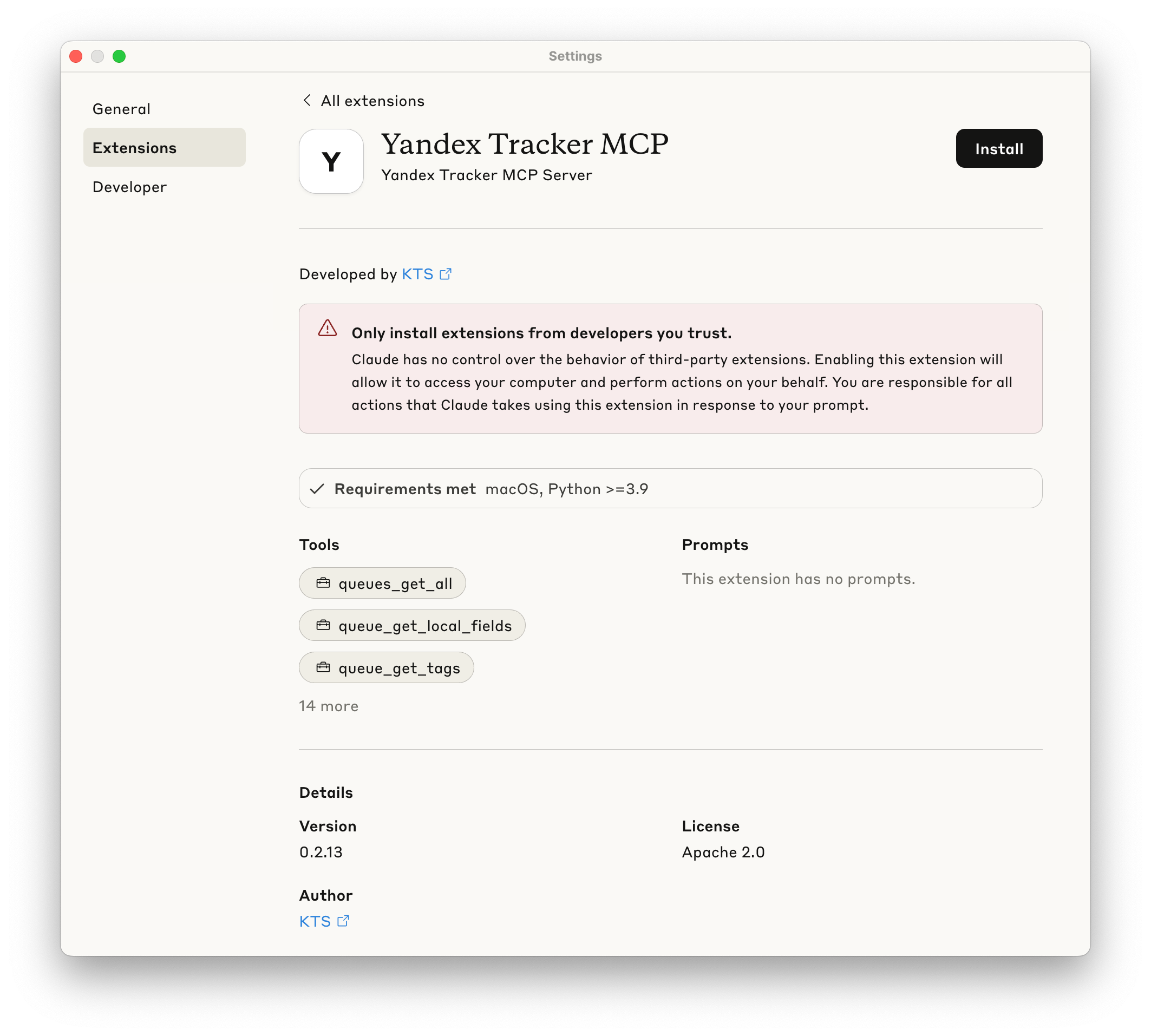
  3. Provide your Yandex Tracker OAuth token when prompted. img.png

  4. Make sure extension is enabled - now you may use this MCP Server.

Manual installation

Prerequisites

  • uv installed globally

  • Valid Yandex Tracker API token with appropriate permissions

The following sections show how to configure the MCP server for different AI clients. You can use either uvx yandex-tracker-mcp@latest or the Docker image ghcr.io/aikts/yandex-tracker-mcp:latest. Both require these environment variables:

  • Authentication (one of the following):

    • TRACKER_TOKEN - Your Yandex Tracker OAuth token

    • TRACKER_IAM_TOKEN - Your IAM token

    • TRACKER_SA_KEY_ID, TRACKER_SA_SERVICE_ACCOUNT_ID, TRACKER_SA_PRIVATE_KEY - Service account credentials

  • Organization - exactly one of the following:

    • TRACKER_CLOUD_ORG_ID - Your Yandex Cloud organization ID

    • TRACKER_ORG_ID - Your Yandex 360 organization ID

Set one of the two. Setting both makes every Tracker call fail with Only one of org_id or cloud_org_id should be provided. The examples below use TRACKER_CLOUD_ORG_ID; on Yandex 360, replace that key with TRACKER_ORG_ID.

Configuration file path:

  • macOS: ~/Library/Application Support/Claude/claude_desktop_config.json

  • Windows: %APPDATA%\Claude\claude_desktop_config.json

Using uvx:

{
  "mcpServers": {
    "yandex-tracker": {
      "command": "uvx",
      "args": ["yandex-tracker-mcp@latest"],
      "env": {
        "TRACKER_TOKEN": "your_tracker_token_here",
        "TRACKER_CLOUD_ORG_ID": "your_cloud_org_id_here"
      }
    }
  }
}

Using Docker:

{
  "mcpServers": {
    "yandex-tracker": {
      "command": "docker",
      "args": [
        "run", "--rm", "-i",
        "-e", "TRACKER_TOKEN",
        "-e", "TRACKER_CLOUD_ORG_ID",
        "ghcr.io/aikts/yandex-tracker-mcp:latest"
      ],
      "env": {
        "TRACKER_TOKEN": "your_tracker_token_here",
        "TRACKER_CLOUD_ORG_ID": "your_cloud_org_id_here"
      }
    }
  }
}

Using uvx:

claude mcp add yandex-tracker uvx yandex-tracker-mcp@latest \
  -e TRACKER_TOKEN=your_tracker_token_here \
  -e TRACKER_CLOUD_ORG_ID=your_cloud_org_id_here \
  -e TRANSPORT=stdio

Using Docker:

claude mcp add yandex-tracker docker "run --rm -i -e TRACKER_TOKEN=your_tracker_token_here -e TRACKER_CLOUD_ORG_ID=your_cloud_org_id_here -e TRANSPORT=stdio ghcr.io/aikts/yandex-tracker-mcp:latest"

Configuration file path:

  • Project-specific: .cursor/mcp.json in your project directory

  • Global: ~/.cursor/mcp.json

Using uvx:

{
  "mcpServers": {
    "yandex-tracker": {
      "command": "uvx",
      "args": ["yandex-tracker-mcp@latest"],
      "env": {
        "TRACKER_TOKEN": "your_tracker_token_here",
        "TRACKER_CLOUD_ORG_ID": "your_cloud_org_id_here"
      }
    }
  }
}

Using Docker:

{
  "mcpServers": {
    "yandex-tracker": {
      "command": "docker",
      "args": [
        "run", "--rm", "-i",
        "-e", "TRACKER_TOKEN",
        "-e", "TRACKER_CLOUD_ORG_ID",
        "ghcr.io/aikts/yandex-tracker-mcp:latest"
      ],
      "env": {
        "TRACKER_TOKEN": "your_tracker_token_here",
        "TRACKER_CLOUD_ORG_ID": "your_cloud_org_id_here"
      }
    }
  }
}

Configuration file path:

  • ~/.codeium/windsurf/mcp_config.json

Access via: Windsurf Settings → Cascade tab → Model Context Protocol (MCP) Servers → "View raw config"

Using uvx:

{
  "mcpServers": {
    "yandex-tracker": {
      "command": "uvx",
      "args": ["yandex-tracker-mcp@latest"],
      "env": {
        "TRACKER_TOKEN": "your_tracker_token_here",
        "TRACKER_CLOUD_ORG_ID": "your_cloud_org_id_here"
      }
    }
  }
}

Using Docker:

{
  "mcpServers": {
    "yandex-tracker": {
      "command": "docker",
      "args": [
        "run", "--rm", "-i",
        "-e", "TRACKER_TOKEN",
        "-e", "TRACKER_CLOUD_ORG_ID",
        "ghcr.io/aikts/yandex-tracker-mcp:latest"
      ],
      "env": {
        "TRACKER_TOKEN": "your_tracker_token_here",
        "TRACKER_CLOUD_ORG_ID": "your_cloud_org_id_here"
      }
    }
  }
}

Configuration file path:

  • ~/.config/zed/settings.json

Access via: Cmd+, (macOS) or Ctrl+, (Linux/Windows) or command palette: "zed: open settings"

Note: Requires Zed Preview version for MCP support.

Using uvx:

{
  "context_servers": {
    "yandex-tracker": {
      "source": "custom",
      "command": {
        "path": "uvx",
        "args": ["yandex-tracker-mcp@latest"],
        "env": {
          "TRACKER_TOKEN": "your_tracker_token_here",
          "TRACKER_CLOUD_ORG_ID": "your_cloud_org_id_here"
        }
      }
    }
  }
}

Using Docker:

{
  "context_servers": {
    "yandex-tracker": {
      "source": "custom",
      "command": {
        "path": "docker",
        "args": [
          "run", "--rm", "-i",
          "-e", "TRACKER_TOKEN",
          "-e", "TRACKER_CLOUD_ORG_ID",
          "ghcr.io/aikts/yandex-tracker-mcp:latest"
        ],
        "env": {
          "TRACKER_TOKEN": "your_tracker_token_here",
          "TRACKER_CLOUD_ORG_ID": "your_cloud_org_id_here"
        }
      }
    }
  }
}

Configuration file path:

  • Workspace: .vscode/mcp.json in your project directory

  • Global: VS Code settings.json

Option 1: Workspace Configuration (Recommended for security)

Create .vscode/mcp.json:

Using uvx:

{
  "inputs": [
    {
      "type": "promptString",
      "id": "tracker-token",
      "description": "Yandex Tracker Token",
      "password": true
    },
    {
      "type": "promptString",
      "id": "cloud-org-id",
      "description": "Yandex Cloud Organization ID"
    }
  ],
  "servers": {
    "yandex-tracker": {
      "type": "stdio",
      "command": "uvx",
      "args": ["yandex-tracker-mcp@latest"],
      "env": {
        "TRACKER_TOKEN": "${input:tracker-token}",
        "TRACKER_CLOUD_ORG_ID": "${input:cloud-org-id}",
        "TRANSPORT": "stdio"
      }
    }
  }
}

Using Docker:

{
  "inputs": [
    {
      "type": "promptString",
      "id": "tracker-token",
      "description": "Yandex Tracker Token",
      "password": true
    },
    {
      "type": "promptString",
      "id": "cloud-org-id",
      "description": "Yandex Cloud Organization ID"
    }
  ],
  "servers": {
    "yandex-tracker": {
      "type": "stdio",
      "command": "docker",
      "args": [
        "run", "--rm", "-i",
        "-e", "TRACKER_TOKEN",
        "-e", "TRACKER_CLOUD_ORG_ID",
        "ghcr.io/aikts/yandex-tracker-mcp:latest"
      ],
      "env": {
        "TRACKER_TOKEN": "${input:tracker-token}",
        "TRACKER_CLOUD_ORG_ID": "${input:cloud-org-id}",
        "TRANSPORT": "stdio"
      }
    }
  }
}

Option 2: Global Configuration

Add to VS Code settings.json:

Using uvx:

{
  "github.copilot.chat.mcp.servers": {
    "yandex-tracker": {
      "type": "stdio",
      "command": "uvx",
      "args": ["yandex-tracker-mcp@latest"],
      "env": {
        "TRACKER_TOKEN": "your_tracker_token_here",
        "TRACKER_CLOUD_ORG_ID": "your_cloud_org_id_here"
      }
    }
  }
}

Using Docker:

{
  "github.copilot.chat.mcp.servers": {
    "yandex-tracker": {
      "type": "stdio",
      "command": "docker",
      "args": [
        "run", "--rm", "-i",
        "-e", "TRACKER_TOKEN",
        "-e", "TRACKER_CLOUD_ORG_ID",
        "ghcr.io/aikts/yandex-tracker-mcp:latest"
      ],
      "env": {
        "TRACKER_TOKEN": "your_tracker_token_here",
        "TRACKER_CLOUD_ORG_ID": "your_cloud_org_id_here"
      }
    }
  }
}

For other MCP-compatible clients, use the standard MCP server configuration format:

Using uvx:

{
  "mcpServers": {
    "yandex-tracker": {
      "command": "uvx",
      "args": ["yandex-tracker-mcp@latest"],
      "env": {
        "TRACKER_TOKEN": "your_tracker_token_here",
        "TRACKER_CLOUD_ORG_ID": "your_cloud_org_id_here"
      }
    }
  }
}

Using Docker:

{
  "mcpServers": {
    "yandex-tracker": {
      "command": "docker",
      "args": [
        "run", "--rm", "-i",
        "-e", "TRACKER_TOKEN",
        "-e", "TRACKER_CLOUD_ORG_ID",
        "ghcr.io/aikts/yandex-tracker-mcp:latest"
      ],
      "env": {
        "TRACKER_TOKEN": "your_tracker_token_here",
        "TRACKER_CLOUD_ORG_ID": "your_cloud_org_id_here"
      }
    }
  }
}

Important Notes:

  • Replace placeholder values with your actual credentials

  • Restart your AI client after configuration changes

  • Ensure uvx is installed and available in your system PATH

  • For production use, consider using environment variables instead of hardcoding tokens

Available MCP Tools

The server exposes the following tools through the MCP protocol:

Tool

What it does

Key arguments

queues_get_all

Every queue the token may see; returns {values, hits, pages}

fields, page (omit to walk every page), per_page

queue_get_tags

The tags defined in the queue

queue_id (a key like "SOMEPROJECT")

queue_get_versions

The queue's versions, with dates and status

queue_id

queue_get_components

The queue's components as full objects, with lead, auto-assign flag and version; queue_get_metadata with expand: ["components"] gives ids and names only

queue_id

queue_create_version

Create a version in the queue

queue_id, name, description, start_date, due_date (YYYY-MM-DD)

queue_get_fields

The fields configured on the queue, local ones included; schema.required marks the mandatory ones

queue_id, include_local_fields

queue_get_metadata

Name, description, default type and priority, plus whatever expand asks for

queue_id, expand (all, projects, components, versions, types, team, workflows, fields, issueTypesConfig)

  • Read queue_get_fields before issue_create, but it is not the whole registry: system fields such as parent or estimation are settable without appearing there, and get_global_fields lists every field the organization has.

  • queue_get_metadata with expand: ["issueTypesConfig"] is where the resolutions valid for each issue type come from - issue_close needs one of them.

  • All of these respect TRACKER_LIMIT_QUEUES. hits / pages from queues_get_all are reported only for an explicit single page on a server without the allow-list, since the totals count queues the allow-list then hides.

A component is a label grouping a queue's issues by product, process or owner. Its numeric id is what issue_create / issue_update take in components.

Tool

What it does

Key arguments

component_get

One component with queue, lead, assignAuto and version

component_id (from queue_get_components or an issue's components)

component_create

Create a component in a queue

queue_id, name, description, lead (a login or uid), assign_auto

component_update

Change name, description, lead or auto-assign flag; omitted fields keep their value, clear_lead removes the lead

component_id, name, description, lead, assign_auto, clear_lead, version

component_delete

Delete a component

component_id

  • TRACKER_LIMIT_QUEUES and TRACKER_READ_ONLY_QUEUES apply through the component's queue: component_update and component_delete read the component first to learn it, and a component in a queue outside TRACKER_LIMIT_QUEUES is reported as not found.

Projects, portfolios and goals are separate Yandex Tracker entities (distinct from queues), exposed through the Tracker "entities" API. Custom (organization-defined) attributes are not modeled and are not returned.

These tools are opt-in. They are registered only when TRACKER_ENTITIES_ENABLED=true (default false), because they add a large tool manifest and are not covered by the queue restrictions — see Queue Access Control.

The three entity types share one tool set, so it is listed once - the row says what the tool does, the columns which name to call:

What it does

Projects

Portfolios

Goals

One entity by id or shortId

project_get

portfolio_get

goal_get

Search by name substring and/or field filters; returns {values, hits, pages}

project_find

portfolio_find

goal_find

A page of comments; returns {comments, next_cursor}

project_get_comments

portfolio_get_comments

goal_get_comments

Create, returning the entity

project_create

portfolio_create

goal_create

Change any field creation takes

project_update

portfolio_update

goal_update

Delete it, and with with_board its board too - goals have no board

project_delete

portfolio_delete

goal_delete

Add a comment

project_add_comment

portfolio_add_comment

goal_add_comment

Edit a comment

project_update_comment

portfolio_update_comment

goal_update_comment

Delete a comment

project_delete_comment

portfolio_delete_comment

goal_delete_comment

Append one checklist item

project_add_checklist_item

portfolio_add_checklist_item

-

Edit one checklist item, leaving the fields you omit as they are

project_update_checklist_item

portfolio_update_checklist_item

-

Move a checklist item before another one

project_move_checklist_item

portfolio_move_checklist_item

-

Delete one checklist item

project_delete_checklist_item

portfolio_delete_checklist_item

-

Edit several existing items by id

project_update_checklist

portfolio_update_checklist

-

Delete the whole checklist

project_delete_checklist

portfolio_delete_checklist

-

  • Arguments. Reads take entity_id and fields; the *_find tools take input, filter, order_by, order_asc, root_only, page, per_page. Create and update take summary (required on create), description, lead, team_users, clients, followers, start (goals have none), end, tags, entity_status, parent_entity, team_access and links, and update also comment and version (optimistic locking). Every tool takes the same fields selector and returns the entity.

  • links are added, never replaced, and the API never returns them: an existing link cannot be read back or removed through this server, and a links-only update is rejected rather than reported as a success Tracker silently ignores.

  • Not in the default field set: checklistItems (the checklist tools return the whole entity, so ask for them to see the result), metricItems, and a goal's keyResultItems - the last two are read-only. Goals use their own entityStatus values (draft, according_to_plan, at_risk, blocked, achieved, partially_achieved, not_achieved, exceeded, cancelled). Bulk changes are not supported.

Tool

What it does

Key arguments

users_get_all

A page of the organization's users; returns {values, hits, pages}

page, per_page, fields

user_get

One user by login or uid

user_id ("john.doe" or "12345")

user_get_current

The user the current token belongs to

-

users_search

Find users by login, email or real name

login_or_email_or_name

  • users_search matches login and email exactly first and falls back to fuzzy name matching (80% similarity, at most the three best matches).

  • The page from users_get_all is the last one when page equals pages.

Tool

What it does

Key arguments

get_global_fields

Every global field of the organization, with its schema and type

-

Queue-local fields are not here - queue_get_fields returns them together with the global ones.

Tool

What it does

Key arguments

get_statuses

Every issue status the organization defines

-

get_issue_types

Every issue type, for the type argument of issue_create / issue_update

-

get_priorities

Every priority, with id, key, name and order

-

get_resolutions

Every resolution, for the resolution_id of issue_close

-

These four are organization-wide. A queue may accept only some of the values they list, and Tracker answers 422 for one it does not accept - queue_get_metadata with expand: ["issueTypesConfig"] says which resolutions each issue type takes.

Tool

What it does

Key arguments

issue_templates_get_all

The issue templates, with the fieldTemplates values they prefill; returns {values, hits, pages}

queue, page (omit to walk every page), per_page

issue_template_get

One issue template by id

template_id

comment_templates_get_all

The comment templates, with the template text and its summonees / maillistSummonees

queue, page, per_page

comment_template_get

One comment template by id

template_id

  • Templates are read-only helpers. The API cannot create an issue or a comment from a template, so issue_create and issue_add_comment take no template_id: read the template and pass its values as the write tool's own arguments. Macros such as {{today}} arrive literally.

  • The issue body a template prefills is in fieldTemplates.description; the template's own description describes the template.

  • queue returns that queue's templates plus the ones bound to no queue, which are usable everywhere. TRACKER_LIMIT_QUEUES applies: templates of a restricted queue are omitted from the listings and rejected on direct access, while templates without a queue stay visible.

Tool

What it does

Key arguments

boards_get_all

The organization's agile boards; returns {boards, next_cursor}

queue, fields, cursor (the previous next_cursor), per_page

board_get

One board with autoFilterSettings (what it collects), estimateBy, useRanking and its working calendar

board_id, fields

board_get_columns

The board's columns with the issue statuses that land in each

board_id

board_get_sprints

The board's sprints with status (draft, in_progress, released, archived) and planned/actual dates

board_id, fields

  • A board has no queue of its own, so queue is matched against the board's own filter and misses the boards that filter by something else - a personal board filtering by assignee, for one. To catch those, read a few issues of the queue with issues_find and look at their boards field.

  • Boards belong to the organization, not to a queue, so TRACKER_LIMIT_QUEUES does not filter them: only the queue argument of boards_get_all is checked, and what these tools return can name restricted queues.

  • A non-scrum board has no sprints and board_get_sprints is rejected for it. The sprint id it returns is what issue_create / issue_update take.

Tool

What it does

Key arguments

issue_get

One issue by key: the full record, the current version included

issue_id, include_description

issue_get_url

The web URL of an issue

issue_id

issue_get_comments

A page of comments, oldest first; returns {comments, next_cursor}

issue_id, cursor, per_page, fields

issue_add_comment

Add a comment; summonees is what notifies a user, an @login in the text notifies nobody

issue_id, text, summonees, maillist_summonees, markup_type, is_add_to_followers

issue_update_comment

Edit a comment

issue_id, comment_id, text, summonees, maillist_summonees

issue_delete_comment

Delete a comment

issue_id, comment_id

issue_get_links

Links to related, blocking and duplicate issues

issue_id

issue_add_link

Link two issues

issue_id, relationship, issue

issue_delete_link

Remove a link

issue_id, link_id (from issue_get_links)

issue_get_worklogs

The time logged on one or more issues

issue_ids, fields

issue_add_worklog

Log spent time

issue_id, duration (ISO-8601, PT1H30M), comment, start

issue_update_worklog

Edit a worklog entry

issue_id, worklog_id, duration, comment, start

issue_delete_worklog

Delete a worklog entry

issue_id, worklog_id

issue_get_attachments

Attachment metadata

issue_id, fields

issue_get_checklist

The checklist, with the item ids the write tools need

issue_id

issue_add_checklist_items

Append items in order, creating the checklist if there is none

issue_id, items (text, checked, assignee, deadline)

issue_update_checklist_item

Change one item; the fields you omit keep their value

issue_id, checklist_item_id, text, checked, assignee, deadline, clear_assignee, clear_deadline

issue_delete_checklist_item

Delete one item

issue_id, checklist_item_id

issue_get_transitions

The status transitions available right now, with their ids

issue_id

issue_execute_transition

Run a transition, returning the transitions available afterwards

issue_id, transition_id, comment, fields

issue_close

Find a transition to a done status and run it with a resolution

issue_id, resolution_id, comment, fields

issue_get_changelog

Field edits, status transitions, comment changes and fired triggers; returns {entries, next_cursor}

issue_id, cursor, per_page, field, type

issue_create

Create an issue, returning it

queue, summary, type, description, markup_type, assignee, priority, parent, sprint, followers, components, tags, project, fields

issue_update

Change any of those fields; the ones you omit stay as they are

issue_id, version, and the arguments issue_create takes

issue_move

Move an issue to another queue, which changes its key (TASKS-1NEWQUEUE-42)

issue_id, queue, notify, notify_author, move_all_fields, initial_status

  • version goes stale on its own. Queue triggers and automation run right after issue_create and bump it, so the version it returns is routinely already old. Re-read it with issue_get immediately before issue_update, or omit it to update the latest version unconditionally; a stale one fails with an editing conflict.

  • Reference fields take the same values on create and on update: an object with id and/or key, or - for type, priority and parent - the bare key or id. components take {"id": ...} or {"name": ...}, and components / followers replace the current list rather than adding to it. Anything without a dedicated argument goes into the fields map, keyed by the field id from queue_get_fields; an entry there overrides the dedicated argument, and an explicit null clears the field.

  • Transitions are not guessed. issue_execute_transition only takes ids from issue_get_transitions, and before issue_close read the issue's type with issue_get and the resolutions valid for that type from queue_get_metadata with expand: ["issueTypesConfig"] - each type has its own set. Where the client supports elicitation, issue_move asks the user to confirm its flags first, and declining aborts the move.

Every tool here respects TRACKER_LIMIT_QUEUES and TRACKER_READ_ONLY_QUEUES; the ones that write are registered only when TRACKER_READ_ONLY is off.

Tool

What it does

Key arguments

issues_find

Search issues with Yandex Tracker Query Language; returns {values, hits, pages}

query, fields, include_description, page, per_page

issues_count

How many issues match a query; returns {"count": N}

query

  • fields uses Tracker's own spelling (storyPoints, not story_points) and accepts any field name, a queue's local and the organization's custom fields included - pass the field id from queue_get_fields. A name Tracker does not know is dropped silently.

  • include_description is ignored when description is listed in fields: naming it there is an explicit request for it.

  • per_page defaults to 100 and can be lowered when a page does not fit the context window.

http Transport

The MCP server can also be run in streamable-http mode for web-based integrations or when stdio transport is not suitable.

streamable-http Mode Environment Variables

# Required - Set transport to streamable-http mode
TRANSPORT=streamable-http

# Server Configuration
HOST=0.0.0.0  # Default: 0.0.0.0 (all interfaces)
PORT=8000     # Default: 8000

Starting the streamable-http Server

# Basic streamable-http server startup
TRANSPORT=streamable-http uvx yandex-tracker-mcp@latest

# With custom host and port
TRANSPORT=streamable-http \
HOST=localhost \
PORT=9000 \
uvx yandex-tracker-mcp@latest

# With all environment variables
TRANSPORT=streamable-http \
HOST=0.0.0.0 \
PORT=8000 \
TRACKER_TOKEN=your_token \
TRACKER_CLOUD_ORG_ID=your_org_id \
uvx yandex-tracker-mcp@latest

You may skip configuring TRACKER_CLOUD_ORG_ID or TRACKER_ORG_ID if you are using the following format when connecting to MCP Server (example for Claude Code):

claude mcp add --transport http yandex-tracker "http://localhost:8000/mcp/?cloudOrgId=your_cloud_org_id&"

or

claude mcp add --transport http yandex-tracker "http://localhost:8000/mcp/?orgId=org_id&"

You may also skip configuring global TRACKER_TOKEN environment variable if you choose to use OAuth 2.0 authentication (see below).

OAuth 2.0 Authentication

The Yandex Tracker MCP Server supports OAuth 2.0 authentication as a secure alternative to static API tokens. When configured, the server acts as an OAuth provider, facilitating authentication between your MCP client and Yandex OAuth services.

How OAuth Works

The MCP server implements a standard OAuth 2.0 authorization code flow:

  1. Client Registration: Your MCP client registers with the server to obtain client credentials

  2. Authorization: Users are redirected to Yandex OAuth to authenticate

  3. Token Exchange: The server exchanges authorization codes for access tokens

  4. API Access: Clients use bearer tokens for all API requests

  5. Token Refresh: Expired tokens can be refreshed without re-authentication

MCP Client → MCP Server → Yandex OAuth → User Authentication
    ↑                                           ↓
    └────────── Access Token ←─────────────────┘

OAuth Configuration

To enable OAuth authentication, set the following environment variables:

# Enable OAuth mode
OAUTH_ENABLED=true

# Yandex OAuth Application Credentials (required for OAuth)
OAUTH_CLIENT_ID=your_yandex_oauth_app_id
OAUTH_CLIENT_SECRET=your_yandex_oauth_app_secret

# Public URL of your MCP server (required for OAuth callbacks)
MCP_SERVER_PUBLIC_URL=https://your-mcp-server.example.com

# Optional OAuth settings
OAUTH_SERVER_URL=https://oauth.yandex.ru  # Default Yandex OAuth server

# When OAuth is enabled, TRACKER_TOKEN becomes optional
OAuth Scopes

With OAUTH_USE_SCOPES=true (the default) the server requests, advertises and requires the Yandex Tracker scopes tracker:read and tracker:write - or tracker:read alone when TRACKER_READ_ONLY=true, so a read-only instance never asks the user for write access. Setting OAUTH_USE_SCOPES=false drops scopes from the flow entirely, which is what Yandex Cloud federation requires.

Setting Up Yandex OAuth Application

  1. Go to Yandex OAuth and create a new application

  2. Set the callback URL to: {MCP_SERVER_PUBLIC_URL}/oauth/yandex/callback

  3. Request the following permissions:

    • tracker:read - Read permissions for Tracker

    • tracker:write - Write permissions for Tracker

  4. Save your Client ID and Client Secret

OAuth vs Static Token Authentication

Feature

OAuth

Static Token

Security

Dynamic tokens with expiration

Long-lived static tokens

User Experience

Interactive login flow

One-time configuration

Token Management

Automatic refresh

Manual rotation

Access Control

Per-user authentication

Shared token

Setup Complexity

Requires OAuth app setup

Simple token configuration

OAuth Mode Limitations

  • Currently, the OAuth mode requires the MCP server to be publicly accessible for callback URLs

  • OAuth mode is best suited for interactive clients that support web-based authentication flows

Using OAuth with MCP Clients

When OAuth is enabled, MCP clients will need to:

  1. Support OAuth 2.0 authorization code flow

  2. Handle token refresh when access tokens expire

  3. Store refresh tokens securely for persistent authentication

Note: Not all MCP clients currently support OAuth authentication. Check your client's documentation for OAuth compatibility.

Example configuration for Claude Code:

claude mcp add --transport http yandex-tracker https://your-mcp-server.example.com/mcp/ -s user

OAuth Data Storage

The MCP server supports two different storage backends for OAuth data (client registrations, access tokens, refresh tokens, and authorization states):

InMemory Store (Default)

The in-memory store keeps all OAuth data in server memory. This is the default option and requires no additional configuration.

Characteristics:

  • Persistence: Data is lost when the server restarts

  • Performance: Very fast access since data is stored in memory

  • Scalability: Limited to single server instance

  • Setup: No additional dependencies required

  • Best for: Development, testing, or single-instance deployments where losing OAuth sessions on restart is acceptable

Configuration:

OAUTH_STORE=memory  # Default value, can be omitted
Redis Store

The Redis store provides persistent storage for OAuth data using a Redis database. This ensures OAuth sessions survive server restarts and enables multi-instance deployments.

Characteristics:

  • Persistence: Data persists across server restarts

  • Performance: Fast access with network overhead

  • Scalability: Supports multiple server instances sharing the same Redis database

  • Setup: Requires Redis server installation and configuration

  • Best for: Production deployments, high availability setups, or when OAuth sessions must persist

Configuration:

# Enable Redis store for OAuth data
OAUTH_STORE=redis

# Redis connection settings (same as used for tools caching)
REDIS_ENDPOINT=localhost                  # Default: localhost
REDIS_PORT=6379                           # Default: 6379
REDIS_DB=0                                # Default: 0
REDIS_PASSWORD=your_redis_password        # Optional: Redis password
REDIS_POOL_MAX_SIZE=10                    # Default: 10

Storage Behavior:

  • Client Information: Stored persistently

  • OAuth States: Stored with TTL (time-to-live) for security

  • Authorization Codes: Stored with TTL and automatically cleaned up after use

  • Access Tokens: Stored with automatic expiration based on token lifetime

  • Refresh Tokens: Stored persistently until revoked

  • Key Namespacing: Uses oauth:* prefixes to avoid conflicts with other Redis data

Token Encryption (Required for Redis Store)

When using Redis store, you must configure encryption to protect OAuth tokens at rest. Token values are encrypted using Fernet (AES-128) and Redis keys use SHA-256 hashes instead of raw tokens, preventing token exposure if Redis is compromised.

Generate an encryption key:

python3 -c "import base64, os; print(base64.b64encode(os.urandom(32)).decode())"

Configuration:

# Single encryption key
OAUTH_ENCRYPTION_KEYS=<base64-encoded-32-byte-key>

# Multiple keys for rotation (first encrypts, all decrypt)
OAUTH_ENCRYPTION_KEYS=<new-key>,<old-key>

Key rotation allows seamless key updates: add the new key first, wait for old tokens to expire, then remove the old key.

Important Notes:

  • Both stores use the same Redis connection settings as the tools caching system

  • When using Redis store, ensure your Redis instance is properly secured and accessible

  • The OAUTH_STORE setting only affects OAuth data storage; tools caching uses TOOLS_CACHE_ENABLED

  • Redis store uses JSON serialization for better cross-language compatibility and debugging

Authentication

Yandex Tracker MCP Server supports multiple authentication methods with a clear priority order. The server will use the first available authentication method based on this hierarchy:

Authentication Priority Order

  1. Dynamic OAuth Token (highest priority)

    • When OAuth is enabled and a user authenticates via OAuth flow

    • Tokens are dynamically obtained and refreshed per user session

    • Supports both standard Yandex OAuth and Yandex Cloud federative OAuth

    • Required env vars: OAUTH_ENABLED=true, OAUTH_CLIENT_ID, OAUTH_CLIENT_SECRET, MCP_SERVER_PUBLIC_URL

    • Additional vars for federative OAuth: OAUTH_SERVER_URL=https://auth.yandex.cloud/oauth, OAUTH_TOKEN_TYPE=Bearer, OAUTH_USE_SCOPES=false

  2. Passthrough Bearer OAuth Token

    • When MCP OAuth middleware does not provide a token, the server can read a Yandex OAuth token from the incoming Authorization: Bearer <token> header

    • Useful behind a trusted reverse proxy or gateway that authenticates users, resolves their stored Yandex OAuth token, and injects it per request

    • The token from MCP OAuth still has priority when OAuth mode is enabled and active

  3. Static OAuth Token

    • Traditional OAuth token provided via environment variable

    • Single token used for all requests

    • Required env var: TRACKER_TOKEN (your OAuth token)

  4. Static IAM Token

    • IAM (Identity and Access Management) token for service-to-service authentication

    • Suitable for automated systems and CI/CD pipelines

    • Required env var: TRACKER_IAM_TOKEN (your IAM token)

  5. Dynamic IAM Token (lowest priority)

    • Automatically retrieved using service account credentials

    • Token is fetched and refreshed automatically

    • Required env vars: TRACKER_SA_KEY_ID, TRACKER_SA_SERVICE_ACCOUNT_ID, TRACKER_SA_PRIVATE_KEY

Authentication Scenarios

# Enable OAuth mode
OAUTH_ENABLED=true
OAUTH_CLIENT_ID=your_oauth_app_id
OAUTH_CLIENT_SECRET=your_oauth_app_secret
MCP_SERVER_PUBLIC_URL=https://your-server.com

# Organization ID (choose one)
TRACKER_CLOUD_ORG_ID=your_cloud_org_id  # or TRACKER_ORG_ID

Scenario 2: Static OAuth Token (Simple Setup)

# OAuth token
TRACKER_TOKEN=your_oauth_token

# Organization ID (choose one)
TRACKER_CLOUD_ORG_ID=your_cloud_org_id  # or TRACKER_ORG_ID

Scenario 3: Passthrough Bearer Token Behind a Reverse Proxy

Use this mode when a trusted gateway handles user authentication, looks up the user's Yandex OAuth token, and forwards the request to the MCP server with that token in the request header:

Authorization: Bearer <user_yandex_oauth_token>
# Organization ID (choose one)
TRACKER_CLOUD_ORG_ID=your_cloud_org_id  # or TRACKER_ORG_ID

This passthrough token is used only when MCP OAuth middleware has not provided an access token for the request. In OAuth-enabled deployments with an active MCP OAuth session, the MCP OAuth token takes priority.

Scenario 4: Static IAM Token

# IAM token
TRACKER_IAM_TOKEN=your_iam_token

# Organization ID (choose one)
TRACKER_CLOUD_ORG_ID=your_cloud_org_id  # or TRACKER_ORG_ID

Scenario 5: Dynamic IAM Token with Service Account

# Service account credentials
TRACKER_SA_KEY_ID=your_key_id
TRACKER_SA_SERVICE_ACCOUNT_ID=your_service_account_id
TRACKER_SA_PRIVATE_KEY=your_private_key

# Organization ID (choose one)
TRACKER_CLOUD_ORG_ID=your_cloud_org_id  # or TRACKER_ORG_ID

Scenario 6: Federative OAuth for OIDC Applications (Advanced)

# Enable OAuth with Yandex Cloud federation
OAUTH_ENABLED=true
OAUTH_SERVER_URL=https://auth.yandex.cloud/oauth
OAUTH_TOKEN_TYPE=Bearer
OAUTH_USE_SCOPES=false
OAUTH_CLIENT_ID=your_oidc_client_id
OAUTH_CLIENT_SECRET=your_oidc_client_secret
MCP_SERVER_PUBLIC_URL=https://your-server.com

# Organization ID (choose one)
TRACKER_CLOUD_ORG_ID=your_cloud_org_id  # or TRACKER_ORG_ID

This configuration enables authentication through Yandex Cloud OIDC applications, which is required for federated accounts in Yandex Cloud. Federated users authenticate through their organization's identity provider (IdP) and use this OAuth flow to access Yandex Tracker APIs.

Important Notes

  • The server checks authentication methods in the order listed above

  • Only one authentication method will be used at a time

  • For production use, dynamic tokens (OAuth or IAM) are recommended for better security

  • IAM tokens have a shorter lifetime than OAuth tokens and may need more frequent renewal

  • When using service accounts, ensure the account has appropriate permissions for Yandex Tracker

Configuration

Environment Variables

# Authentication (use one of the following methods)
# Method 1: OAuth Token
TRACKER_TOKEN=your_yandex_tracker_oauth_token

# Method 2: IAM Token
TRACKER_IAM_TOKEN=your_iam_token

# Method 3: Service Account (for dynamic IAM token)
TRACKER_SA_KEY_ID=your_key_id                    # Service account key ID
TRACKER_SA_SERVICE_ACCOUNT_ID=your_sa_id        # Service account ID
TRACKER_SA_PRIVATE_KEY=your_private_key          # Service account private key

# Organization Configuration (set exactly one - setting both is an error)
TRACKER_CLOUD_ORG_ID=your_cloud_org_id    # For Yandex Cloud organizations
TRACKER_ORG_ID=your_org_id                # For Yandex 360 organizations

# API Configuration (optional)
TRACKER_API_BASE_URL=https://api.tracker.yandex.net  # Default: https://api.tracker.yandex.net
TRACKER_API_TIMEOUT=10                    # Default: 10 - Per-request timeout in seconds for Tracker API calls

# Security - Restrict access to specific queues (optional)
TRACKER_LIMIT_QUEUES=PROJ1,PROJ2,DEV      # Comma-separated queue keys - allow-list of accessible queues
TRACKER_READ_ONLY_QUEUES=PROJ2            # Comma-separated queue keys - allowed for reads but reject writes (per-queue read-only)
TRACKER_ENTITIES_ENABLED=true             # Default: false - Register project/portfolio/goal tools (NOT covered by the queue restrictions above)

# Server Configuration
HOST=0.0.0.0                              # Default: 0.0.0.0
PORT=8000                                 # Default: 8000
TRANSPORT=stdio                           # Options: stdio, streamable-http, sse

# Redis connection settings (used for caching and OAuth store)
REDIS_ENDPOINT=localhost                  # Default: localhost
REDIS_PORT=6379                           # Default: 6379
REDIS_DB=0                                # Default: 0
REDIS_PASSWORD=your_redis_password        # Optional: Redis password
REDIS_POOL_MAX_SIZE=10                    # Default: 10

# Tools caching configuration (optional)
TOOLS_CACHE_ENABLED=true                  # Default: false
TOOLS_CACHE_REDIS_TTL=3600                # Default: 3600 seconds (1 hour)

# OAuth 2.0 Authentication (optional)
OAUTH_ENABLED=true                        # Default: false
OAUTH_STORE=redis                         # Options: memory, redis (default: memory)
OAUTH_SERVER_URL=https://oauth.yandex.ru  # Default: https://oauth.yandex.ru (use https://auth.yandex.cloud/oauth for federation)
OAUTH_TOKEN_TYPE=<Bearer|OAuth|<empty>>   # Default: <empty> (required to be Bearer for Yandex Cloud federation)
OAUTH_USE_SCOPES=true                     # Default: true (set to false for Yandex Cloud federation)
OAUTH_CLIENT_ID=your_oauth_client_id      # Required when OAuth enabled
OAUTH_CLIENT_SECRET=your_oauth_secret     # Required when OAuth enabled
MCP_SERVER_PUBLIC_URL=https://your.server.com  # Required when OAuth enabled
TRACKER_READ_ONLY=true                    # Default: false - Disable all write tools for the whole instance

Queue Access Control

Access to queues can be scoped at three levels, from coarse to fine-grained:

  • TRACKER_LIMIT_QUEUES — allow-list of queue keys. Queues outside the list are treated as not found / not allowed for both reads and writes. Keys are matched ignoring case, here and in TRACKER_READ_ONLY_QUEUES, so dev and DEV name the same queue. The one exception is the board tools: a board belongs to the organization rather than to a queue, so they are not filtered and can name a restricted queue in a board's settings.

  • TRACKER_READ_ONLY — when true, all write tools are unregistered, so the whole instance is read-only.

  • TRACKER_READ_ONLY_QUEUES — per-queue read-only allow-list. Write tools stay registered, but any mutating call (create/update/move/comment/worklog/link, queue version creation) targeting a listed queue is rejected, while reads keep working. Queues not listed here remain read-write.

Project/portfolio/goal tools are outside this model. A project, portfolio or goal isn't reliably mappable to a single queue, so none of the three settings above constrain them — neither the read tools (project_get, project_find, *_get_comments, …) nor the write tools (including comment and checklist tools). Enabling them grants org-wide access to those entities for anyone who can reach the server. For this reason they are opt-in: they are registered only when TRACKER_ENTITIES_ENABLED=true (default false), which also keeps the tool manifest small for deployments that don't need them. TRACKER_READ_ONLY still applies: it unregisters entity write tools along with all other write tools.

This lets a single instance be read-write on some queues and read-only on others at the same time — e.g. TRACKER_LIMIT_QUEUES=DEV,MGMT together with TRACKER_READ_ONLY_QUEUES=MGMT gives full access to DEV and read-only visibility into MGMT. This is especially useful for a shared MCP gateway where end users reach Tracker only through the server and never hold the raw token themselves.

These checks are in-process guardrails. For clients that hold the raw Tracker token directly, real limits should additionally be enforced on the token itself.

Docker Deployment

The image defaults to TRANSPORT=stdio, which talks over the container's stdin/stdout and opens no port. Set TRANSPORT=streamable-http for the examples below, where the server is reached over HTTP; for a stdio client, run the container with -i and no -p instead (see the MCP Client Configuration examples).

# Using environment file (it must set TRANSPORT=streamable-http)
docker run --env-file .env -p 8000:8000 ghcr.io/aikts/yandex-tracker-mcp:latest

# With inline environment variables
docker run -e TRACKER_TOKEN=your_token \
           -e TRACKER_CLOUD_ORG_ID=your_org_id \
           -e TRANSPORT=streamable-http \
           -p 8000:8000 \
           ghcr.io/aikts/yandex-tracker-mcp:latest

Building the Image Locally

docker build -t yandex-tracker-mcp .

Docker Compose

Using pre-built image:

services:
  mcp-tracker:
    image: ghcr.io/aikts/yandex-tracker-mcp:latest
    ports:
      - "8000:8000"
    environment:
      - TRACKER_TOKEN=${TRACKER_TOKEN}
      - TRACKER_CLOUD_ORG_ID=${TRACKER_CLOUD_ORG_ID}
      - TRANSPORT=streamable-http

Building locally:

services:
  mcp-tracker:
    build: .
    ports:
      - "8000:8000"
    environment:
      - TRACKER_TOKEN=${TRACKER_TOKEN}
      - TRACKER_CLOUD_ORG_ID=${TRACKER_CLOUD_ORG_ID}
      - TRANSPORT=streamable-http

Development Setup

# Clone and setup
git clone https://github.com/aikts/yandex-tracker-mcp
cd yandex-tracker-mcp

# Install development dependencies
uv sync --dev

# Formatting and static checking
task

License

This project is licensed under the terms specified in the LICENSE file.

Support

For issues and questions:

Available Tools

55 tools
board_getGet BoardA
Read-only

Get a single Yandex Tracker agile board (in russian - 'доска') with its settings, columns, the field issues are estimated by and the working calendar. autoFilterSettings is the board's own filter and tells which issues it collects - read it to learn which queue a board is about.

ParametersJSON Schema
NameRequiredDescriptionDefault
fieldsNoFields to include in the response; omit to get all. id and name are usually enough while searching - read the one board you need in full with `board_get`.
board_idYesAgile board identifier, as returned by the `boards_get_all` tool

Output Schema

ParametersJSON Schema
NameRequiredDescription
idNoBoard identifier
nameNo
columnsNo
countryNoCountry whose working calendar the board uses
versionNo
calendarNoWorking calendar used to count working days in a sprint
createdAtNo
createdByNo
updatedAtNo
estimateByNoField the board estimates issues by, e.g. 'storyPoints'
useRankingNoWhether issues are ordered by manual ranking
autoFilterSettingsNoWhich issues the board picks up automatically. This is the board's filter - read it to learn which queue the board is about.

TDQS

A4.2/5.0
Behavior4/5

Does the description disclose side effects, auth requirements, rate limits, or destructive behavior?

The readOnlyHint annotation already establishes safety; the description adds useful behavioral context by explaining that autoFilterSettings is the board's own filter that shows which issues the board collects. It also discloses the board subcomponents returned, which helps set expectations without contradicting the annotation.

Agents need to know what a tool does to the world before calling it. Descriptions should go beyond structured annotations to explain consequences.

Conciseness5/5

Is the description appropriately sized, front-loaded, and free of redundancy?

Two dense sentences with no filler; the core action and scope are front-loaded, and the second sentence adds value by explaining a non-obvious field. The parenthetical Russian term is a small, purposeful addition for localization.

Shorter descriptions cost fewer tokens and are easier for agents to parse. Every sentence should earn its place.

Completeness4/5

Given the tool's complexity, does the description cover enough for an agent to succeed on first attempt?

With a read-only annotation, an output schema, fully described parameters, and a clear purpose, the description is mostly sufficient. It could be more complete by explicitly routing to boards_get_all or board_get_columns when only IDs or columns are needed, but this is a minor gap.

Complex tools with many parameters or behaviors need more documentation. Simple tools need less. This dimension scales expectations accordingly.

Parameters3/5

Does the description clarify parameter syntax, constraints, interactions, or defaults beyond what the schema provides?

Schema coverage is 100%, and both parameters already have meaningful descriptions, so the tool description adds little beyond schema. The description's focus on board contents does not explain the fields/board_id parameters further, keeping this at the baseline.

Input schemas describe structure but not intent. Descriptions should explain non-obvious parameter relationships and valid value ranges.

Purpose5/5

Does the description clearly state what the tool does and how it differs from similar tools?

The description uses a specific verb-resource pair ('Get a single Yandex Tracker agile board') and enumerates what is included: settings, columns, estimation field, and working calendar. It also defines autoFilterSettings, which differentiates this tool from listing tools like boards_get_all and narrower tools like board_get_columns.

Agents choose between tools based on descriptions. A clear purpose with a specific verb and resource helps agents select the right tool.

Usage Guidelines4/5

Does the description explain when to use this tool, when not to, or what alternatives exist?

The description gives a concrete use case: read autoFilterSettings to learn which queue a board is about, and it implies single-board retrieval rather than listing. It does not explicitly name alternatives or state when not to use it, so it falls short of a 5.

Agents often have multiple tools that could apply. Explicit usage guidance like "use X instead of Y when Z" prevents misuse.

board_get_columnsGet Board ColumnsA
Read-only

Get the columns of a Yandex Tracker agile board with the issue statuses mapped onto each - use it to see which status an issue needs to show up in a given column. Richer than the columns in boards_get_all / board_get, which carry no statuses.

ParametersJSON Schema
NameRequiredDescriptionDefault
board_idYesAgile board identifier, as returned by the `boards_get_all` tool

Output Schema

ParametersJSON Schema
NameRequiredDescription
resultYes

TDQS

A4.5/5.0
Behavior4/5

Does the description disclose side effects, auth requirements, rate limits, or destructive behavior?

The description adds useful behavioral context beyond the readOnlyHint annotation by clarifying that results include status mappings and are richer than simpler board column endpoints. It does not mention auth or rate limits, but for a simple read-only lookup with a readOnlyHint, the safety profile is already clear.

Agents need to know what a tool does to the world before calling it. Descriptions should go beyond structured annotations to explain consequences.

Conciseness5/5

Is the description appropriately sized, front-loaded, and free of redundancy?

Two dense sentences with no filler: the action is first, then the use case, then the comparison to sibling tools. Every sentence contributes value.

Shorter descriptions cost fewer tokens and are easier for agents to parse. Every sentence should earn its place.

Completeness5/5

Given the tool's complexity, does the description cover enough for an agent to succeed on first attempt?

The tool has one fully documented parameter, a readOnlyHint annotation, and an output schema, so the description does not need to explain return values. The provided use case and sibling differentiation make the description complete for an agent to select and call the tool correctly.

Complex tools with many parameters or behaviors need more documentation. Simple tools need less. This dimension scales expectations accordingly.

Parameters3/5

Does the description clarify parameter syntax, constraints, interactions, or defaults beyond what the schema provides?

Schema description coverage is 100%: the only parameter, `board_id`, is described as an agile board identifier returned by `boards_get_all`. The tool description adds the Yandex Tracker context but does not need to compensate for missing parameter documentation because the schema already covers it.

Input schemas describe structure but not intent. Descriptions should explain non-obvious parameter relationships and valid value ranges.

Purpose5/5

Does the description clearly state what the tool does and how it differs from similar tools?

The description states a specific verb and resource: getting the columns of a Yandex Tracker agile board, including the statuses mapped to each column. It also explicitly distinguishes this tool from `boards_get_all` and `board_get`, so an agent can tell them apart without opening their schemas.

Agents choose between tools based on descriptions. A clear purpose with a specific verb and resource helps agents select the right tool.

Usage Guidelines5/5

Does the description explain when to use this tool, when not to, or what alternatives exist?

The description gives a concrete use case: see which status an issue needs to show up in a given column. It also names alternatives and explains why this tool is preferable when status mappings matter, since sibling board endpoints carry columns without statuses.

Agents often have multiple tools that could apply. Explicit usage guidance like "use X instead of Y when Z" prevents misuse.

board_get_sprintsGet Board SprintsA
Read-only

Get all sprints (in russian - 'спринты') of a specific Yandex Tracker agile board. The currently running sprint is the one with status 'in_progress'. Use the returned sprint id to put an issue into a sprint with the issue_create or issue_update tools.

ParametersJSON Schema
NameRequiredDescriptionDefault
fieldsNoFields to include in the response; omit to get all. id, name and status are usually enough.
board_idYesAgile board identifier, as returned by the `boards_get_all` tool

Output Schema

ParametersJSON Schema
NameRequiredDescription
resultYes

TDQS

A4.5/5.0
Behavior4/5

Does the description disclose side effects, auth requirements, rate limits, or destructive behavior?

Annotations declare readOnlyHint=true, and the description adds valuable behavioral context beyond that: it explains how to identify the currently running sprint ('status in_progress') and how the returned sprint id should be used downstream. This helps the agent understand the data semantics without contradicting the read-only annotation.

Agents need to know what a tool does to the world before calling it. Descriptions should go beyond structured annotations to explain consequences.

Conciseness5/5

Is the description appropriately sized, front-loaded, and free of redundancy?

The description is two sentences with no filler. The core action is front-loaded, followed by a useful status clarification and a concrete downstream instruction. Every sentence earns its place.

Shorter descriptions cost fewer tokens and are easier for agents to parse. Every sentence should earn its place.

Completeness5/5

Given the tool's complexity, does the description cover enough for an agent to succeed on first attempt?

For a simple read-only list operation with a complete input schema and an output schema present, the description covers what an agent needs: how to find the board, what the status field means, which fields are typically sufficient, and how to use the result. No critical information is missing.

Complex tools with many parameters or behaviors need more documentation. Simple tools need less. This dimension scales expectations accordingly.

Parameters4/5

Does the description clarify parameter syntax, constraints, interactions, or defaults beyond what the schema provides?

Schema coverage is 100%, so the schema already documents both parameters. The description adds meaningful context beyond the schema by explaining the status semantics for the returned sprints and clarifying the practical use of the id field, which is more useful than the bare field names.

Input schemas describe structure but not intent. Descriptions should explain non-obvious parameter relationships and valid value ranges.

Purpose5/5

Does the description clearly state what the tool does and how it differs from similar tools?

The description identifies a precise action and resource: 'Get all sprints' of 'a specific Yandex Tracker agile board.' It also clarifies that the running sprint is identifiable by status 'in_progress', which further distinguishes the tool's purpose from board-level tools like board_get or boards_get_all.

Agents choose between tools based on descriptions. A clear purpose with a specific verb and resource helps agents select the right tool.

Usage Guidelines4/5

Does the description explain when to use this tool, when not to, or what alternatives exist?

The description gives clear context for when to use the tool—when sprint data for a specific board is needed—and explicitly connects the output to downstream issue creation/update tools: 'Use the returned sprint id to put an issue into a sprint with the issue_create or issue_update tools.' It does not explicitly discuss exclusions or alternatives, but no direct alternative for retrieving sprints appears among siblings.

Agents often have multiple tools that could apply. Explicit usage guidance like "use X instead of Y when Z" prevents misuse.

boards_get_allGet All BoardsA
Read-only

Get the agile boards (in russian - 'доски') of the organization; pass queue for the boards collecting issues of that queue. Matching is done on the board's own filter, so boards filtering by something else are missed - read a few issues with issues_find and look at their boards field for those.

ParametersJSON Schema
NameRequiredDescriptionDefault
queueNoOptional queue key (Project ID) to scope the boards to, like 'SOMEPROJECT'. A board has no queue field - it is matched by the queue in its own auto-filter, so boards whose filter names no queue are left out when this is set.
cursorNoCursor for the next page: the `next_cursor` value returned by the previous call, which is the id of the last board it returned. Leave empty for the first page.
fieldsNoFields to include in the response; omit to get all. id and name are usually enough while searching - read the one board you need in full with `board_get`.
per_pageNoThe number of items per page for cursor-paginated endpoints. May be decreased if results exceed the context window.

Output Schema

ParametersJSON Schema
NameRequiredDescription
boardsYes
next_cursorNoId of the last board on this page, to be passed back as `cursor` for the next one. Null when this was the last page.

TDQS

A4.7/5.0
Behavior4/5

Does the description disclose side effects, auth requirements, rate limits, or destructive behavior?

Annotations already declare readOnlyHint=true, so the safety profile is covered. The description adds valuable behavioral nuance: matching relies on each board's own filter, so boards filtering by other criteria will be missed. This goes beyond the schema and helps set expectations.

Agents need to know what a tool does to the world before calling it. Descriptions should go beyond structured annotations to explain consequences.

Conciseness5/5

Is the description appropriately sized, front-loaded, and free of redundancy?

The description is two sentences with no filler. The main action comes first, followed by the key parameter guidance, then an important limitation and workaround. Every clause earns its place.

Shorter descriptions cost fewer tokens and are easier for agents to parse. Every sentence should earn its place.

Completeness5/5

Given the tool's complexity, does the description cover enough for an agent to succeed on first attempt?

For a read-only listing tool with a rich schema and output schema, the description covers purpose, usage, a key behavioral caveat, and an alternative route. Pagination and field selection are already documented in the input schema, so nothing essential is missing.

Complex tools with many parameters or behaviors need more documentation. Simple tools need less. This dimension scales expectations accordingly.

Parameters4/5

Does the description clarify parameter syntax, constraints, interactions, or defaults beyond what the schema provides?

Schema coverage is 100%, so the baseline is 3. The description adds meaningful context beyond the schema by explaining the queue parameter's behavior (matching against the board's filter) and by suggesting `issues_find` plus the `boards` field as a fallback when queue-based lookup is incomplete.

Input schemas describe structure but not intent. Descriptions should explain non-obvious parameter relationships and valid value ranges.

Purpose5/5

Does the description clearly state what the tool does and how it differs from similar tools?

The description clearly states the operation: retrieving all agile boards of the organization, with an optional queue filter. It also distinguishes itself from related tools by pointing to `board_get` for reading a single board in full and to `issues_find` for discovering boards via issues.

Agents choose between tools based on descriptions. A clear purpose with a specific verb and resource helps agents select the right tool.

Usage Guidelines5/5

Does the description explain when to use this tool, when not to, or what alternatives exist?

It explicitly explains when to use this tool (get organization boards, optionally scoped by queue) and provides a practical alternative when a board's own filter does not match. The caveat about queue matching and the recommendation to inspect issues' `boards` field gives concrete routing guidance.

Agents often have multiple tools that could apply. Explicit usage guidance like "use X instead of Y when Z" prevents misuse.

comment_template_getGet Comment TemplateA
Read-only

Get a single Yandex Tracker comment template by its id, including the comment text it inserts. Use comment_templates_get_all first to find the template id.

ParametersJSON Schema
NameRequiredDescriptionDefault
template_idYesComment template identifier, as returned by the `comment_templates_get_all` tool

Output Schema

ParametersJSON Schema
NameRequiredDescription
idNoUnique template identifier
nameNoDisplayed template name
queueNoQueue the template belongs to, if it is queue-specific
versionNoTemplate version
templateNoComment text inserted by the template
summoneesNoUsers summoned by a comment created from the template
descriptionNoWhat the template itself is for. Not the issue body: an issue template prefills that through `fieldTemplates.description`
maillistSummoneesNoMailing lists summoned by a comment created from the template

TDQS

A4.4/5.0
Behavior4/5

Does the description disclose side effects, auth requirements, rate limits, or destructive behavior?

The readOnlyHint annotation already communicates the non-mutating nature; the description adds that the returned template includes the inserted comment text, which is useful behavioral context. It does not mention not-found or error behavior, but the output schema and simple read-only nature reduce that need.

Agents need to know what a tool does to the world before calling it. Descriptions should go beyond structured annotations to explain consequences.

Conciseness5/5

Is the description appropriately sized, front-loaded, and free of redundancy?

Two concise sentences carry the full message: first the core function, then the dependency workflow. There is no filler or redundant restating of the title.

Shorter descriptions cost fewer tokens and are easier for agents to parse. Every sentence should earn its place.

Completeness4/5

Given the tool's complexity, does the description cover enough for an agent to succeed on first attempt?

For a one-parameter, read-only tool with an output schema, the description gives enough context to invoke correctly and understand the primary return content. Minor gaps around error cases exist but are acceptable for this tool's simplicity.

Complex tools with many parameters or behaviors need more documentation. Simple tools need less. This dimension scales expectations accordingly.

Parameters3/5

Does the description clarify parameter syntax, constraints, interactions, or defaults beyond what the schema provides?

Schema description coverage is 100%, and both the schema and description point to comment_templates_get_all as the source of template_id. The description adds no new meaning beyond what the schema already provides, so baseline 3 is appropriate.

Input schemas describe structure but not intent. Descriptions should explain non-obvious parameter relationships and valid value ranges.

Purpose5/5

Does the description clearly state what the tool does and how it differs from similar tools?

The description uses a specific verb ('Get'), names the exact resource ('single Yandex Tracker comment template by its id'), and clarifies that the returned object includes the comment text. This clearly distinguishes it from list-style tools like comment_templates_get_all and other template tools.

Agents choose between tools based on descriptions. A clear purpose with a specific verb and resource helps agents select the right tool.

Usage Guidelines5/5

Does the description explain when to use this tool, when not to, or what alternatives exist?

It explicitly instructs the agent to call comment_templates_get_all first to obtain the template id, giving the tool a clear prerequisite and placement in a workflow. Since this is a simple single-item fetch, this is sufficient usage guidance.

Agents often have multiple tools that could apply. Explicit usage guidance like "use X instead of Y when Z" prevents misuse.

comment_templates_get_allGet Comment TemplatesA
Read-only

Get the comment templates configured in Yandex Tracker - the wording a team reuses when replying, with the users and mailing lists such a comment summons. Read one before adding a comment. Pass queue for the templates of that queue plus those bound to no queue. All pages are fetched by default; pass page for a single one.

ParametersJSON Schema
NameRequiredDescriptionDefault
pageNoPage number to return, default is None which means to retrieve all pages. Specify page number to retrieve a specific page when context limit is reached.
queueNoOptional queue (Project ID) to scope the result to, like 'SOMEPROJECT'. Templates that are not bound to any queue are usable everywhere and are returned as well.
per_pageNoThe number of items per page. May be decreased if results exceed context window. If there is a change in per_page argument - retrieval must be started over with page = 1, as the paging could have changed.

Output Schema

ParametersJSON Schema
NameRequiredDescription
hitsNoTotal items matching the request, across all pages. Null if unknown or filtered - then page on until a page comes back empty.
pagesNoTotal pages at the requested `per_page`; this is the last page when it equals `page`. Null together with `hits`.
valuesNo

TDQS

A4.2/5.0
Behavior4/5

Does the description disclose side effects, auth requirements, rate limits, or destructive behavior?

Annotations already declare readOnlyHint=true, and the description adds meaningful behavioral detail: all pages are fetched by default, passing page returns a single page, and templates bound to no queue are included when queue is provided. This goes beyond the annotation without contradicting it.

Agents need to know what a tool does to the world before calling it. Descriptions should go beyond structured annotations to explain consequences.

Conciseness5/5

Is the description appropriately sized, front-loaded, and free of redundancy?

Three short sentences with no filler: purpose first, usage context second, pagination behavior third. Every sentence contributes new, actionable information.

Shorter descriptions cost fewer tokens and are easier for agents to parse. Every sentence should earn its place.

Completeness5/5

Given the tool's complexity, does the description cover enough for an agent to succeed on first attempt?

The definition is complete for a read-only listing tool. It covers purpose, usage timing, queue scoping, and pagination; the output schema handles return-value documentation, and the annotation covers safety. No critical guidance is missing.

Complex tools with many parameters or behaviors need more documentation. Simple tools need less. This dimension scales expectations accordingly.

Parameters4/5

Does the description clarify parameter syntax, constraints, interactions, or defaults beyond what the schema provides?

Schema coverage is 100%, so the baseline is 3. The description adds value by explaining the queue fallback behavior and reinforcing the default all-pages behavior for the page parameter, which helps an agent choose parameters correctly even when skimming the schema.

Input schemas describe structure but not intent. Descriptions should explain non-obvious parameter relationships and valid value ranges.

Purpose4/5

Does the description clearly state what the tool does and how it differs from similar tools?

The description clearly identifies the resource: comment templates configured in Yandex Tracker, including their content and associated users/mailing lists. It is a specific verb+resource statement, though it does not explicitly differentiate itself from the sibling comment_template_get beyond the plural 'get_all' framing.

Agents choose between tools based on descriptions. A clear purpose with a specific verb and resource helps agents select the right tool.

Usage Guidelines4/5

Does the description explain when to use this tool, when not to, or what alternatives exist?

The description gives practical context: 'Read one before adding a comment' tells the agent when this tool matters, and the queue guidance clarifies scoping. It stops short of explicitly naming alternatives or exclusion criteria, so it does not earn a 5.

Agents often have multiple tools that could apply. Explicit usage guidance like "use X instead of Y when Z" prevents misuse.

component_createCreate ComponentA

Create a component (in russian - 'компонент') in a Yandex Tracker queue - a label grouping the queue's issues by product, process or owner; lead is a user login.

ParametersJSON Schema
NameRequiredDescriptionDefault
leadNoLogin or uid of the user responsible for the component, e.g. 'i.ivanov' or the `id` a component read returns in `lead`. Omitting it leaves it unset or, on update, unchanged; on update, `clear_lead` removes the current one.
nameYesComponent name, e.g. 'Backend' or 'Billing'.
queue_idYesQueue (Project ID) to search in, like 'SOMEPROJECT'
assign_autoNoWhether new issues with this component get its lead as assignee automatically. Defaults to false on create; omitting it on update leaves it unchanged.
descriptionNoComponent description. Omitting it leaves it unset or, on update, unchanged; on update, an empty string clears it.

Output Schema

ParametersJSON Schema
NameRequiredDescription
idYes
leadNo
nameYes
queueNo
versionYes
assignAutoNo
descriptionNo

TDQS

A3.6/5.0
Behavior3/5

Does the description disclose side effects, auth requirements, rate limits, or destructive behavior?

The annotation readOnlyHint=false already signals a mutation, and the description is consistent with that, so there is no contradiction. However, the description discloses no behavioral traits beyond the act of creation — no note on duplicate-name handling, permissions, or side effects on the queue's component list.

Agents need to know what a tool does to the world before calling it. Descriptions should go beyond structured annotations to explain consequences.

Conciseness4/5

Is the description appropriately sized, front-loaded, and free of redundancy?

A single sentence that front-loads the verb and resource and keeps the domain definition tight. The Russian parenthetical ('компонент') and the trailing lead note are marginal additions but do not bloat the description.

Shorter descriptions cost fewer tokens and are easier for agents to parse. Every sentence should earn its place.

Completeness3/5

Given the tool's complexity, does the description cover enough for an agent to succeed on first attempt?

With 5 parameters all documented in the schema, an output schema present, and a readOnlyHint annotation, the structured context is strong, so a short description is acceptable. The clear gaps are the absence of sibling routing (when to use component_update instead) and any disclosure of creation constraints such as duplicate names.

Complex tools with many parameters or behaviors need more documentation. Simple tools need less. This dimension scales expectations accordingly.

Parameters3/5

Does the description clarify parameter syntax, constraints, interactions, or defaults beyond what the schema provides?

Schema description coverage is 100%, with each parameter individually explained (e.g., lead's login/uid format, assign_auto's create default, description clearing behavior), so the schema carries the load. The description's only parameter note, '`lead` is a user login', merely restates what the lead schema description already says.

Input schemas describe structure but not intent. Descriptions should explain non-obvious parameter relationships and valid value ranges.

Purpose5/5

Does the description clearly state what the tool does and how it differs from similar tools?

States a specific verb+resource: 'Create a component ... in a Yandex Tracker queue' and defines the domain concept ('a label grouping the queue's issues by product, process or owner'), which separates it from sibling operations like component_update, component_delete, and component_get. The verb 'Create' plus the container context leaves no ambiguity about what the tool does.

Agents choose between tools based on descriptions. A clear purpose with a specific verb and resource helps agents select the right tool.

Usage Guidelines3/5

Does the description explain when to use this tool, when not to, or what alternatives exist?

Usage is only implied by the verb 'Create' and the component definition; there is no explicit statement of when to prefer this over component_update or component_delete, and no exclusions. The parameter descriptions hint at update semantics ('on update, unchanged', 'clear_lead'), which subtly distinguishes create from update, but the description itself gives no routing guidance.

Agents often have multiple tools that could apply. Explicit usage guidance like "use X instead of Y when Z" prevents misuse.

component_deleteDelete ComponentA
Destructive

Delete a Yandex Tracker queue component (in russian - 'компонент') by its numeric id. Cannot be undone.

ParametersJSON Schema
NameRequiredDescriptionDefault
component_idYesComponent identifier (numeric), as returned by `queue_get_components` or in an issue's `components` field

Output Schema

ParametersJSON Schema
NameRequiredDescription
resultYes

TDQS

A4.3/5.0
Behavior4/5

Does the description disclose side effects, auth requirements, rate limits, or destructive behavior?

Annotations already mark the operation as destructive, and the description adds the important behavioral detail that the action 'Cannot be undone.' This goes beyond the annotation by emphasizing irreversibility, which is valuable for an agent deciding whether to call this tool.

Agents need to know what a tool does to the world before calling it. Descriptions should go beyond structured annotations to explain consequences.

Conciseness5/5

Is the description appropriately sized, front-loaded, and free of redundancy?

The description is two short sentences with no wasted words. The action and target are front-loaded, and the irreversibility warning is concise but essential.

Shorter descriptions cost fewer tokens and are easier for agents to parse. Every sentence should earn its place.

Completeness5/5

Given the tool's complexity, does the description cover enough for an agent to succeed on first attempt?

For a single-parameter destructive operation with annotations and an output schema present, the description covers the necessary details: what is deleted, how the target is identified, and that the operation is permanent.

Complex tools with many parameters or behaviors need more documentation. Simple tools need less. This dimension scales expectations accordingly.

Parameters3/5

Does the description clarify parameter syntax, constraints, interactions, or defaults beyond what the schema provides?

The input schema already provides 100% coverage for component_id, including its type and how it is obtained. The tool description adds little beyond restating 'by its numeric id,' so the schema carries the parameter semantics.

Input schemas describe structure but not intent. Descriptions should explain non-obvious parameter relationships and valid value ranges.

Purpose5/5

Does the description clearly state what the tool does and how it differs from similar tools?

The description uses a specific verb ('Delete') and resource ('Yandex Tracker queue component'), and explicitly states the identifying key (numeric id). It clearly distinguishes this tool from sibling tools like component_update or component_create.

Agents choose between tools based on descriptions. A clear purpose with a specific verb and resource helps agents select the right tool.

Usage Guidelines4/5

Does the description explain when to use this tool, when not to, or what alternatives exist?

The description clearly indicates this tool is for deleting a component by its numeric id and notes irreversibility. It does not explicitly name alternatives or when not to use it, but the context is clear enough for an agent to select it for deletion tasks.

Agents often have multiple tools that could apply. Explicit usage guidance like "use X instead of Y when Z" prevents misuse.

component_getGet ComponentA
Read-only

Get one Yandex Tracker queue component (in russian - 'компонент') by its numeric id, with queue, lead, assignAuto and the version that component_update takes. Ids come from queue_get_components or an issue's components field.

ParametersJSON Schema
NameRequiredDescriptionDefault
component_idYesComponent identifier (numeric), as returned by `queue_get_components` or in an issue's `components` field

Output Schema

ParametersJSON Schema
NameRequiredDescription
idYes
leadNo
nameYes
queueNo
versionYes
assignAutoNo
descriptionNo

TDQS

A4.3/5.0
Behavior4/5

Does the description disclose side effects, auth requirements, rate limits, or destructive behavior?

readOnlyHint=true already communicates safety; the description adds value by naming the returned fields (queue, lead, assignAuto, version) and noting the version is the one component_update consumes. It does not cover missing-id error behavior, but for a simple read with annotations this is a useful and non-redundant disclosure.

Agents need to know what a tool does to the world before calling it. Descriptions should go beyond structured annotations to explain consequences.

Conciseness5/5

Is the description appropriately sized, front-loaded, and free of redundancy?

A single dense sentence front-loads the action and resource, then packs the id source, returned fields, and compatibility with component_update. Every clause contributes useful information with no filler.

Shorter descriptions cost fewer tokens and are easier for agents to parse. Every sentence should earn its place.

Completeness5/5

Given the tool's complexity, does the description cover enough for an agent to succeed on first attempt?

For a one-parameter, read-only getter with an output schema and sibling context, the description is complete: it explains what is returned, where the id comes from, and how the result relates to component_update. Nothing essential is missing.

Complex tools with many parameters or behaviors need more documentation. Simple tools need less. This dimension scales expectations accordingly.

Parameters3/5

Does the description clarify parameter syntax, constraints, interactions, or defaults beyond what the schema provides?

With 100% schema description coverage, the schema already documents component_id as numeric and from queue_get_components or an issue's components field. The description repeats this rather than adding new parameter semantics, so the baseline of 3 is appropriate.

Input schemas describe structure but not intent. Descriptions should explain non-obvious parameter relationships and valid value ranges.

Purpose5/5

Does the description clearly state what the tool does and how it differs from similar tools?

The description uses a specific verb (Get), identifies the resource (one Yandex Tracker queue component) and gives the exact identifier type. It distinguishes itself from queue_get_components by emphasizing 'one' component by numeric id, and the sibling list/create/update/delete tools are clearly different operations.

Agents choose between tools based on descriptions. A clear purpose with a specific verb and resource helps agents select the right tool.

Usage Guidelines4/5

Does the description explain when to use this tool, when not to, or what alternatives exist?

It clearly states the input required (numeric component id) and where ids come from (queue_get_components or an issue's components field), which tells an agent how to obtain a valid input. It does not explicitly state 'use queue_get_components for listing' or list exclusion cases, so it stops short of a full when-to-use/when-not-to-use guide.

Agents often have multiple tools that could apply. Explicit usage guidance like "use X instead of Y when Z" prevents misuse.

component_updateUpdate ComponentA

Change the name, description, lead or auto-assign flag of a Yandex Tracker queue component (in russian - 'компонент'); omitted fields keep their value, clear_lead removes the lead.

ParametersJSON Schema
NameRequiredDescriptionDefault
leadNoLogin or uid of the user responsible for the component, e.g. 'i.ivanov' or the `id` a component read returns in `lead`. Omitting it leaves it unset or, on update, unchanged; on update, `clear_lead` removes the current one.
nameNoComponent name, e.g. 'Backend' or 'Billing'. Omit to leave it unchanged.
versionNoComponent version for optimistic locking, as read by `component_get` / `queue_get_components`: the change lands only if this is still the current version, otherwise the call fails with an editing conflict. Omit to update the current version.
clear_leadNoRemove the component's lead. Cannot be combined with `lead`. Example: true
assign_autoNoWhether new issues with this component get its lead as assignee automatically. Defaults to false on create; omitting it on update leaves it unchanged.
descriptionNoComponent description. Omitting it leaves it unset or, on update, unchanged; on update, an empty string clears it.
component_idYesComponent identifier (numeric), as returned by `queue_get_components` or in an issue's `components` field

Output Schema

ParametersJSON Schema
NameRequiredDescription
idYes
leadNo
nameYes
queueNo
versionYes
assignAutoNo
descriptionNo

TDQS

A4.5/5.0
Behavior4/5

Does the description disclose side effects, auth requirements, rate limits, or destructive behavior?

Beyond the readOnlyHint=false annotation, the description discloses important partial-update semantics and the special behavior of `clear_lead`. It does not discuss version-conflict failure behavior, but that is fully covered by the well-described `version` parameter in the schema.

Agents need to know what a tool does to the world before calling it. Descriptions should go beyond structured annotations to explain consequences.

Conciseness5/5

Is the description appropriately sized, front-loaded, and free of redundancy?

The description is a single front-loaded sentence that states the action, resource, editable fields, and the most important update semantics. The parenthetical Russian term adds a useful domain cue, and there is no redundant wording.

Shorter descriptions cost fewer tokens and are easier for agents to parse. Every sentence should earn its place.

Completeness5/5

Given the tool's complexity, does the description cover enough for an agent to succeed on first attempt?

Given that all seven parameters have rich schema-level descriptions and an output schema exists, the description does not need to repeat parameter details. It provides the high-level behavioral context an agent needs to understand that this is a partial-update operation on an existing component.

Complex tools with many parameters or behaviors need more documentation. Simple tools need less. This dimension scales expectations accordingly.

Parameters4/5

Does the description clarify parameter syntax, constraints, interactions, or defaults beyond what the schema provides?

Schema description coverage is 100%, so the baseline is 3. The description adds value by summarizing the cross-cutting rule that omitted fields retain their values and that `clear_lead` is the explicit removal mechanism, complementing the per-parameter schema documentation without repeating it.

Input schemas describe structure but not intent. Descriptions should explain non-obvious parameter relationships and valid value ranges.

Purpose5/5

Does the description clearly state what the tool does and how it differs from similar tools?

The description names a specific verb ('Change'), a precise resource ('Yandex Tracker queue component'), and enumerates the exact fields that can be modified. This clearly distinguishes it from sibling tools like component_create, component_get, and component_delete.

Agents choose between tools based on descriptions. A clear purpose with a specific verb and resource helps agents select the right tool.

Usage Guidelines4/5

Does the description explain when to use this tool, when not to, or what alternatives exist?

The description clearly frames this as an update to an existing component and states the central usage rule that omitted fields keep their value, with `clear_lead` as an explicit removal mechanism. It does not explicitly name alternatives, but the mutation semantics make it clear this is for updating rather than creating, reading, or deleting.

Agents often have multiple tools that could apply. Explicit usage guidance like "use X instead of Y when Z" prevents misuse.

get_global_fieldsGet Global FieldsA
Read-only

Get all global fields available in Yandex Tracker that can be used in issues

ParametersJSON Schema
NameRequiredDescriptionDefault

No parameters

Output Schema

ParametersJSON Schema
NameRequiredDescription
resultYes

TDQS

A4.3/5.0
Behavior4/5

Does the description disclose side effects, auth requirements, rate limits, or destructive behavior?

The readOnlyHint annotation already covers the read-only nature. The description adds context that the returned fields are global and usable in issues, which is useful. However, it does not describe pagination, ordering, or other behavioral details, though these are less critical for a simple list endpoint.

Agents need to know what a tool does to the world before calling it. Descriptions should go beyond structured annotations to explain consequences.

Conciseness5/5

Is the description appropriately sized, front-loaded, and free of redundancy?

The description is a single, front-loaded sentence without any fluff. Every word contributes to conveying the tool's purpose.

Shorter descriptions cost fewer tokens and are easier for agents to parse. Every sentence should earn its place.

Completeness5/5

Given the tool's complexity, does the description cover enough for an agent to succeed on first attempt?

Given the zero-parameter, read-only nature and the presence of an output schema, the description fully covers the tool's purpose. It clearly explains what the tool returns and its scope, with no missing critical information.

Complex tools with many parameters or behaviors need more documentation. Simple tools need less. This dimension scales expectations accordingly.

Parameters4/5

Does the description clarify parameter syntax, constraints, interactions, or defaults beyond what the schema provides?

With zero parameters, the schema is fully covered. The description adds no parameter-specific semantics, but none are needed. The tool has no input requirements, so the baseline of 4 is appropriate.

Input schemas describe structure but not intent. Descriptions should explain non-obvious parameter relationships and valid value ranges.

Purpose5/5

Does the description clearly state what the tool does and how it differs from similar tools?

The description states 'Get all global fields available in Yandex Tracker that can be used in issues' with a specific verb, resource, and scope. It clearly distinguishes from sibling tools like queue_get_fields by emphasizing 'global' and 'can be used in issues'.

Agents choose between tools based on descriptions. A clear purpose with a specific verb and resource helps agents select the right tool.

Usage Guidelines3/5

Does the description explain when to use this tool, when not to, or what alternatives exist?

The description does not explicitly mention when to use this tool versus alternatives. The word 'global' implies a distinction from queue-specific fields, but no direct comparison or exclusion is provided. Usage context is implied rather than stated.

Agents often have multiple tools that could apply. Explicit usage guidance like "use X instead of Y when Z" prevents misuse.

get_issue_typesGet Issue TypesA
Read-only

Get all issue types available in Yandex Tracker that can be used when creating or updating issues

ParametersJSON Schema
NameRequiredDescriptionDefault

No parameters

Output Schema

ParametersJSON Schema
NameRequiredDescription
resultYes

TDQS

A4.3/5.0
Behavior3/5

Does the description disclose side effects, auth requirements, rate limits, or destructive behavior?

The annotation readOnlyHint=true already signals a safe read operation. The description adds that the tool retrieves all issue types for create/update operations, but it does not disclose return format, sorting, or edge cases. Since the schema and output schema provide structural details, the description offers modest additional transparency.

Agents need to know what a tool does to the world before calling it. Descriptions should go beyond structured annotations to explain consequences.

Conciseness5/5

Is the description appropriately sized, front-loaded, and free of redundancy?

The description is a single sentence that immediately states the action and resource, with no filler or repetition. It is front-loaded and efficiently communicates the tool's purpose.

Shorter descriptions cost fewer tokens and are easier for agents to parse. Every sentence should earn its place.

Completeness5/5

Given the tool's complexity, does the description cover enough for an agent to succeed on first attempt?

Given zero parameters, a readOnly annotation, and an output schema, the description fully covers what the tool does and when it is relevant. It explains the data's usage context, making it complete for an agent to decide when to call this tool.

Complex tools with many parameters or behaviors need more documentation. Simple tools need less. This dimension scales expectations accordingly.

Parameters4/5

Does the description clarify parameter syntax, constraints, interactions, or defaults beyond what the schema provides?

The tool has zero parameters and the schema coverage is 100% for an empty properties object. Per rubric, zero-parameter tools receive a baseline of 4. The description adds context about the returned data's purpose but there are no parameter semantics to elaborate on.

Input schemas describe structure but not intent. Descriptions should explain non-obvious parameter relationships and valid value ranges.

Purpose5/5

Does the description clearly state what the tool does and how it differs from similar tools?

The description uses the specific verb 'Get' and clearly identifies the resource as 'all issue types available in Yandex Tracker'. It further explains the purpose ('can be used when creating or updating issues'), which distinguishes it from sibling tools like get_statuses or get_priorities.

Agents choose between tools based on descriptions. A clear purpose with a specific verb and resource helps agents select the right tool.

Usage Guidelines4/5

Does the description explain when to use this tool, when not to, or what alternatives exist?

The description states the context for use ('when creating or updating issues'), which implies when to call this tool. However, it does not explicitly name alternative tools or specify when not to use it, so it lacks full exclusionary guidance.

Agents often have multiple tools that could apply. Explicit usage guidance like "use X instead of Y when Z" prevents misuse.

get_prioritiesGet PrioritiesA
Read-only

Get the issue priority levels of Yandex Tracker - trivial, minor, normal, critical, blocker and whatever else the organization configured - with the id and key that issue_create and issue_update accept in priority. The list is organization-wide: a queue may still reject a priority it does not use.

ParametersJSON Schema
NameRequiredDescriptionDefault

No parameters

Output Schema

ParametersJSON Schema
NameRequiredDescription
resultYes

TDQS

A4.5/5.0
Behavior4/5

Does the description disclose side effects, auth requirements, rate limits, or destructive behavior?

The readOnlyHint annotation already marks this as safe, and the description adds useful non-obvious behavior: the result is organization-wide and a queue may still reject a priority it does not use. It does not overstate mutation or introduce contradictions.

Agents need to know what a tool does to the world before calling it. Descriptions should go beyond structured annotations to explain consequences.

Conciseness5/5

Is the description appropriately sized, front-loaded, and free of redundancy?

Two sentences with no filler: the first states the resource and purpose, the second adds a critical scope caveat. Every sentence earns its place and the main action is front-loaded.

Shorter descriptions cost fewer tokens and are easier for agents to parse. Every sentence should earn its place.

Completeness5/5

Given the tool's complexity, does the description cover enough for an agent to succeed on first attempt?

With no parameters and an output schema available, the description fully covers what an agent needs: what is returned, the accepted field compatibility, and the organization-wide scope. No missing prerequisite or postcondition is apparent.

Complex tools with many parameters or behaviors need more documentation. Simple tools need less. This dimension scales expectations accordingly.

Parameters4/5

Does the description clarify parameter syntax, constraints, interactions, or defaults beyond what the schema provides?

The input schema has zero parameters and 100% schema description coverage, so there are no parameter semantics for the description to add; the baseline for zero-parameter tools is 4. The description instead clarifies useful output semantics (id/key compatibility with issue_create/issue_update).

Input schemas describe structure but not intent. Descriptions should explain non-obvious parameter relationships and valid value ranges.

Purpose5/5

Does the description clearly state what the tool does and how it differs from similar tools?

The description uses a specific verb+resource ('Get the issue priority levels of Yandex Tracker') and enumerates example values, making it clearly distinct from sibling lookup tools like get_statuses and get_resolutions. The tie to the priority field accepted by issue_create/issue_update further pins down its purpose.

Agents choose between tools based on descriptions. A clear purpose with a specific verb and resource helps agents select the right tool.

Usage Guidelines4/5

Does the description explain when to use this tool, when not to, or what alternatives exist?

It provides clear usage context by stating the returned id/key are what issue_create and issue_update accept in priority, which tells an agent when to call this tool. It does not explicitly name alternatives or exclusion cases, but the lookup is self-contained and the sibling list contains no competing priority tool.

Agents often have multiple tools that could apply. Explicit usage guidance like "use X instead of Y when Z" prevents misuse.

get_resolutionsGet ResolutionsA
Read-only

Get all resolutions available in Yandex Tracker that can be used when closing issues

ParametersJSON Schema
NameRequiredDescriptionDefault

No parameters

Output Schema

ParametersJSON Schema
NameRequiredDescription
resultYes

TDQS

A4.3/5.0
Behavior3/5

Does the description disclose side effects, auth requirements, rate limits, or destructive behavior?

The annotations already declare readOnlyHint=true, so the safety profile is covered. The description adds the scope ('all resolutions') and the context ('when closing issues') but does not disclose additional behaviors like ordering, filtering, or response format. This is acceptable for a simple list retrieval with annotations present.

Agents need to know what a tool does to the world before calling it. Descriptions should go beyond structured annotations to explain consequences.

Conciseness5/5

Is the description appropriately sized, front-loaded, and free of redundancy?

The description is a single, focused sentence that immediately states the action and resource. It is front-loaded with the tool's purpose and contains no unnecessary words or repetition.

Shorter descriptions cost fewer tokens and are easier for agents to parse. Every sentence should earn its place.

Completeness5/5

Given the tool's complexity, does the description cover enough for an agent to succeed on first attempt?

Given the tool has no parameters and the output schema exists, the description is sufficient for an agent to understand the tool's role. The context 'when closing issues' and the scope 'all resolutions' provide complete guidance for this low-complexity read operation.

Complex tools with many parameters or behaviors need more documentation. Simple tools need less. This dimension scales expectations accordingly.

Parameters4/5

Does the description clarify parameter syntax, constraints, interactions, or defaults beyond what the schema provides?

The tool has zero parameters, so the schema fully covers the input space (100% coverage). Per the rubric, a no-parameter tool gets a baseline of 4. The description does not need to add parameter details, as none exist.

Input schemas describe structure but not intent. Descriptions should explain non-obvious parameter relationships and valid value ranges.

Purpose5/5

Does the description clearly state what the tool does and how it differs from similar tools?

The description clearly identifies the tool's purpose: retrieving all resolutions in Yandex Tracker used when closing issues. It uses a specific verb ('Get') and resource ('resolutions'), and the context 'when closing issues' distinguishes it from sibling tools like get_statuses or get_issue_types.

Agents choose between tools based on descriptions. A clear purpose with a specific verb and resource helps agents select the right tool.

Usage Guidelines4/5

Does the description explain when to use this tool, when not to, or what alternatives exist?

The description implies the intended use case ('when closing issues'), which helps the agent select it for issue closure scenarios. However, it does not explicitly mention alternatives or exclusions, though the context is reasonably clear among the many sibling getter tools.

Agents often have multiple tools that could apply. Explicit usage guidance like "use X instead of Y when Z" prevents misuse.

get_statusesGet StatusesA
Read-only

Get all statuses available in Yandex Tracker that can be used in issues

ParametersJSON Schema
NameRequiredDescriptionDefault

No parameters

Output Schema

ParametersJSON Schema
NameRequiredDescription
resultYes

TDQS

A3.9/5.0
Behavior3/5

Does the description disclose side effects, auth requirements, rate limits, or destructive behavior?

The readOnlyHint annotation already covers the safety profile. The description adds a contextual detail that only statuses usable in issues are returned, which is mildly informative. It does not describe pagination, return format, or other behavioral traits, but the output schema fills some gaps.

Agents need to know what a tool does to the world before calling it. Descriptions should go beyond structured annotations to explain consequences.

Conciseness5/5

Is the description appropriately sized, front-loaded, and free of redundancy?

The description is a single concise sentence that front-loads the action ('Get all statuses') and provides necessary qualifying context without any fluff. Every word earns its place.

Shorter descriptions cost fewer tokens and are easier for agents to parse. Every sentence should earn its place.

Completeness5/5

Given the tool's complexity, does the description cover enough for an agent to succeed on first attempt?

For a simple, parameterless, read-only tool with an output schema, the description adequately explains what the tool returns. The context of 'available in Yandex Tracker' and 'usable in issues' is sufficient for the agent to use it correctly, and the output schema covers return structure.

Complex tools with many parameters or behaviors need more documentation. Simple tools need less. This dimension scales expectations accordingly.

Parameters4/5

Does the description clarify parameter syntax, constraints, interactions, or defaults beyond what the schema provides?

With zero parameters, the schema is empty and schema description coverage is trivially 100%. The baseline for 0 params is 4, and the description does not need to explain any parameters. It appropriately focuses on the tool's purpose.

Input schemas describe structure but not intent. Descriptions should explain non-obvious parameter relationships and valid value ranges.

Purpose5/5

Does the description clearly state what the tool does and how it differs from similar tools?

The description clearly states it gets all statuses available in Yandex Tracker that are usable in issues, with a specific verb and resource. It distinguishes itself from sibling reference-data tools by naming the exact entity (statuses) and scoping to issue-usable statuses.

Agents choose between tools based on descriptions. A clear purpose with a specific verb and resource helps agents select the right tool.

Usage Guidelines2/5

Does the description explain when to use this tool, when not to, or what alternatives exist?

The description provides no explicit guidance on when to use this tool versus alternatives such as get_issue_types or get_resolutions. It only states what it does, leaving the agent to infer usage from the name. There is no mention of exclusions or alternative tools.

Agents often have multiple tools that could apply. Explicit usage guidance like "use X instead of Y when Z" prevents misuse.

issue_add_checklist_itemsAdd Issue Checklist ItemsA

Add one or more items to the checklist of a Yandex Tracker issue. The checklist is created if the issue does not have one yet, and items are appended in the order given. Returns the issue's checklist after the items were added.

ParametersJSON Schema
NameRequiredDescriptionDefault
itemsYesChecklist items to append, in order. Example: [{'text': 'Get sign-off from legal'}, {'text': 'Deploy', 'checked': false}].
issue_idYesIssue ID in the format '<project>-<id>', like 'SOMEPROJECT-1'

Output Schema

ParametersJSON Schema
NameRequiredDescription
resultYes

TDQS

A4.3/5.0
Behavior5/5

Does the description disclose side effects, auth requirements, rate limits, or destructive behavior?

Beyond the readOnlyHint=false annotation, the description discloses important behavioral details: the checklist is created if it does not exist, items are appended in the given order, and the response contains the checklist after addition. This gives the agent a clear model of the operation's side effects and return semantics.

Agents need to know what a tool does to the world before calling it. Descriptions should go beyond structured annotations to explain consequences.

Conciseness5/5

Is the description appropriately sized, front-loaded, and free of redundancy?

The description is concise, front-loaded with the core action, and every sentence adds meaningful information: action, creation behavior, ordering, and return value. There is no redundant or filler content.

Shorter descriptions cost fewer tokens and are easier for agents to parse. Every sentence should earn its place.

Completeness5/5

Given the tool's complexity, does the description cover enough for an agent to succeed on first attempt?

For a tool with two required parameters, a full input schema, an output schema, and readOnlyHint=false, the description is complete enough. It explains the mutation behavior, the ordering guarantee, the auto-creation behavior, and what the caller should expect in the response, so an agent can invoke it correctly without missing key context.

Complex tools with many parameters or behaviors need more documentation. Simple tools need less. This dimension scales expectations accordingly.

Parameters3/5

Does the description clarify parameter syntax, constraints, interactions, or defaults beyond what the schema provides?

Schema description coverage is 100%, and the schema already documents issue_id format and items as an array with an example. The description adds minor behavioral context ('items are appended in the order given'), but the schema already conveys the same ordering intent in the items description, so the description adds limited value beyond the structured schema.

Input schemas describe structure but not intent. Descriptions should explain non-obvious parameter relationships and valid value ranges.

Purpose5/5

Does the description clearly state what the tool does and how it differs from similar tools?

The description uses a specific verb ('add') with a clear resource ('items to the checklist of a Yandex Tracker issue') and clarifies that multiple items can be added. It also specifies the 'one or more items' semantics and the append behavior, making it easy to distinguish from sibling tools like issue_update_checklist_item or issue_delete_checklist_item.

Agents choose between tools based on descriptions. A clear purpose with a specific verb and resource helps agents select the right tool.

Usage Guidelines3/5

Does the description explain when to use this tool, when not to, or what alternatives exist?

The description implies usage through its verb and behavior but does not explicitly state when to prefer this tool over alternatives such as issue_update_checklist_item or issue_delete_checklist_item. It does clarify that the checklist is created on demand, which helps an agent understand the tool's effect, but no explicit when-to-use or when-not-to-use guidance is provided.

Agents often have multiple tools that could apply. Explicit usage guidance like "use X instead of Y when Z" prevents misuse.

issue_add_commentAdd Issue CommentA

Add a comment to a Yandex Tracker issue. There is no template_id parameter: check comment_templates_get_all (with queue set) first and copy the template's template text into text and its summonees into the parameters below. To mention or call people so they get notified, use summonees - '@login' in the text notifies nobody.

ParametersJSON Schema
NameRequiredDescriptionDefault
textYesComment text (markdown supported by Tracker).
issue_idYesIssue ID in the format '<project>-<id>', like 'SOMEPROJECT-1'
summoneesNoUsers to summon (logins or IDs): they are invited to the discussion and notified. This is the API way to 'mention/call' someone in a Yandex Tracker comment.
markup_typeNoOptional markup type for comment text. Use 'md' for YFM (markdown).
maillist_summoneesNoOptional list of mailing lists to summon (emails). Example: ['team@example.com'].
is_add_to_followersNoWhether to add the comment author to issue followers. Default: true.

Output Schema

ParametersJSON Schema
NameRequiredDescription
idYes
textNo
longIdNo
textHtmlNo
createdAtNo
createdByNo
summoneesNo
transportNo
updatedAtNo
updatedByNo
maillistSummoneesNo

TDQS

A4.7/5.0
Behavior4/5

Does the description disclose side effects, auth requirements, rate limits, or destructive behavior?

Beyond the annotation readOnlyHint=false, the description discloses meaningful behavioral details: comments are created via this call, '@login' in text does not produce notifications, and notification requires the `summonees` parameter. This gives the agent important side-effect knowledge about who gets notified and how template content should be transferred. It does not state every consequence, but it covers the key non-obvious behavior.

Agents need to know what a tool does to the world before calling it. Descriptions should go beyond structured annotations to explain consequences.

Conciseness5/5

Is the description appropriately sized, front-loaded, and free of redundancy?

The description is compact and front-loaded with the core action, followed by two targeted caveats. Every sentence contributes either primary purpose, a template-workflow correction, or a mention-behavior warning. There is no filler or repetition of schema content.

Shorter descriptions cost fewer tokens and are easier for agents to parse. Every sentence should earn its place.

Completeness5/5

Given the tool's complexity, does the description cover enough for an agent to succeed on first attempt?

The tool has six parameters, but all are fully described in the schema and the required ones are obvious. The description adds the critical contextual guidance about templates and mention semantics, and the presence of an output schema means return-value details are not the description's responsibility. An agent has enough information to call this tool correctly and avoid the most likely errors.

Complex tools with many parameters or behaviors need more documentation. Simple tools need less. This dimension scales expectations accordingly.

Parameters4/5

Does the description clarify parameter syntax, constraints, interactions, or defaults beyond what the schema provides?

Schema coverage is 100%, so the baseline is 3. The description adds value beyond the schema by explaining that there is no `template_id` parameter and that template text should be copied into `text` while template summonees go into the summon parameters. It also clarifies the real-world meaning of `summonees` for mentions, reinforcing and extending the schema's explanation.

Input schemas describe structure but not intent. Descriptions should explain non-obvious parameter relationships and valid value ranges.

Purpose5/5

Does the description clearly state what the tool does and how it differs from similar tools?

The description opens with an unambiguous action: 'Add a comment to a Yandex Tracker issue.' This names the exact verb and resource and clearly separates it from sibling operations like issue_update_comment, issue_get_comments, and issue_delete_comment. It also clarifies what the tool is not for by stating there is no `template_id` parameter, preventing confusion with template-related helpers.

Agents choose between tools based on descriptions. A clear purpose with a specific verb and resource helps agents select the right tool.

Usage Guidelines5/5

Does the description explain when to use this tool, when not to, or what alternatives exist?

The description gives concrete when-to-use guidance: add comments to issues, and if using a saved template, first call `comment_templates_get_all` with `queue` set, then copy values into `text` and the summon parameters. It also explicitly warns against the common mistake of putting '@login' in the text, directing users to the `summonees` parameter instead, which is a clear exclusion and alternative.

Agents often have multiple tools that could apply. Explicit usage guidance like "use X instead of Y when Z" prevents misuse.

issue_add_worklogAdd WorklogA

Add a worklog entry (log spent time) to a Yandex Tracker issue

ParametersJSON Schema
NameRequiredDescriptionDefault
startNoOptional start datetime for the worklog. If timezone is not provided, UTC is assumed.
commentNoOptional comment to add to the worklog entry.
durationYesTime spent in ISO-8601 duration format (e.g., 'PT1H30M').
issue_idYesIssue ID in the format '<project>-<id>', like 'SOMEPROJECT-1'

Output Schema

ParametersJSON Schema
NameRequiredDescription
idYes
issueNo
startNo
commentNo
durationNo
createdAtNo
createdByNo
updatedAtNo
updatedByNo

TDQS

A3.6/5.0
Behavior2/5

Does the description disclose side effects, auth requirements, rate limits, or destructive behavior?

Annotations already indicate readOnlyHint=false, so the description's mention of 'Add' aligns. However, no additional behavioral traits are disclosed (e.g., permissions needed, side effects like triggering notifications, or rate limits). The description adds minimal value beyond annotations.

Agents need to know what a tool does to the world before calling it. Descriptions should go beyond structured annotations to explain consequences.

Conciseness5/5

Is the description appropriately sized, front-loaded, and free of redundancy?

A single, direct sentence with no wasted words. It is appropriately front-loaded and provides essential information efficiently.

Shorter descriptions cost fewer tokens and are easier for agents to parse. Every sentence should earn its place.

Completeness4/5

Given the tool's complexity, does the description cover enough for an agent to succeed on first attempt?

Given the 100% schema coverage and existence of an output schema, the description is fairly complete. It lacks mention of error conditions or prerequisites (e.g., issue must exist), but for a straightforward add operation, it is adequate.

Complex tools with many parameters or behaviors need more documentation. Simple tools need less. This dimension scales expectations accordingly.

Parameters3/5

Does the description clarify parameter syntax, constraints, interactions, or defaults beyond what the schema provides?

All four parameters are described in the input schema (100% coverage). The description does not add new meaning beyond the schema; it merely restates the tool's purpose. Baseline of 3 is appropriate given high schema coverage.

Input schemas describe structure but not intent. Descriptions should explain non-obvious parameter relationships and valid value ranges.

Purpose5/5

Does the description clearly state what the tool does and how it differs from similar tools?

The description clearly states the action ('Add a worklog entry'), the resource ('worklog entry'), and the context ('to a Yandex Tracker issue'). It effectively distinguishes from sibling tools like issue_delete_worklog, issue_update_worklog, and issue_get_worklogs.

Agents choose between tools based on descriptions. A clear purpose with a specific verb and resource helps agents select the right tool.

Usage Guidelines3/5

Does the description explain when to use this tool, when not to, or what alternatives exist?

The description provides no explicit guidance on when to use this tool versus alternatives (e.g., issue_add_comment). It only describes the function without usage context or prerequisites, leaving the agent to infer based on the tool name.

Agents often have multiple tools that could apply. Explicit usage guidance like "use X instead of Y when Z" prevents misuse.

issue_closeClose IssueA

Close a Yandex Tracker issue with a resolution: finds a transition to a 'done' status and executes it. The resolution has to be one the issue's type allows - read the type with issue_get, then call queue_get_metadata with expand=['issueTypesConfig'] for the resolutions of that type. Returns the transitions available in the new (closed) status.

ParametersJSON Schema
NameRequiredDescriptionDefault
fieldsNoOptional dictionary of additional fields to set during the transition (e.g. 'assignee' for reassigning). Do NOT set 'resolution' here - use the dedicated resolution_id parameter instead.
commentNoOptional comment to add when closing the issue.
issue_idYesIssue ID in the format '<project>-<id>', like 'SOMEPROJECT-1'
resolution_idYesThe resolution ID to set when closing the issue. Must be one of the IDs returned by get_resolutions tool (e.g., 'fixed', 'wontFix', 'duplicate').

Output Schema

ParametersJSON Schema
NameRequiredDescription
resultYes

TDQS

A4.4/5.0
Behavior4/5

Does the description disclose side effects, auth requirements, rate limits, or destructive behavior?

Annotations only state readOnlyHint=false, so the description carries the behavioral burden. It discloses that the tool mutates state by executing a transition, that it targets 'done' status, that resolution must be valid for the issue type, and that it returns the transitions available in the closed status. This is meaningful behavioral context beyond the annotation.

Agents need to know what a tool does to the world before calling it. Descriptions should go beyond structured annotations to explain consequences.

Conciseness5/5

Is the description appropriately sized, front-loaded, and free of redundancy?

The description is compact: two sentences that lead with the core action and resolution constraint, then state the return value. Every sentence carries needed information without repetition or filler.

Shorter descriptions cost fewer tokens and are easier for agents to parse. Every sentence should earn its place.

Completeness4/5

Given the tool's complexity, does the description cover enough for an agent to succeed on first attempt?

The definition covers the operation, resolution-selection process, and return value, which is strong for a focused tool with a full schema and output schema. It could be slightly more complete by mentioning what happens if no 'done' transition is available, but this is a minor gap.

Complex tools with many parameters or behaviors need more documentation. Simple tools need less. This dimension scales expectations accordingly.

Parameters4/5

Does the description clarify parameter syntax, constraints, interactions, or defaults beyond what the schema provides?

Schema coverage is 100%, so the baseline is 3. The description adds important semantic value for resolution_id by explaining it must be allowed by the issue's type and how to discover the allowed values via issue_get and queue_get_metadata. It does not add detail for fields or comment, but the schema already describes those clearly.

Input schemas describe structure but not intent. Descriptions should explain non-obvious parameter relationships and valid value ranges.

Purpose5/5

Does the description clearly state what the tool does and how it differs from similar tools?

The description clearly states the tool's specific action: closing a Yandex Tracker issue by finding and executing a transition to a 'done' status. It names the exact resource and operation, and the 'finds a transition' detail helps distinguish it from a generic transition tool like issue_execute_transition.

Agents choose between tools based on descriptions. A clear purpose with a specific verb and resource helps agents select the right tool.

Usage Guidelines4/5

Does the description explain when to use this tool, when not to, or what alternatives exist?

The description gives explicit procedural guidance: read the issue type, call queue_get_metadata, then provide a resolution allowed by that type. It does not explicitly name alternative tools like issue_execute_transition or state when not to use this tool, but the context and specialized purpose make the intended use clear.

Agents often have multiple tools that could apply. Explicit usage guidance like "use X instead of Y when Z" prevents misuse.

issue_createCreate IssueA

Create an issue (in russian - 'задача') in a Yandex Tracker queue. There is no template argument: read a template with issue_templates_get_all and copy its fieldTemplates values into these arguments field by field. The returned version goes stale at once, as queue triggers bump it - re-read it with issue_get.

ParametersJSON Schema
NameRequiredDescriptionDefault
tagsNoIssue tags as array of strings.
typeNoIssue type: an object with 'id' (type ID) and/or 'key' (e.g., 'bug', 'task'), or the bare key/ID (from get_issue_types tool).
queueYesQueue key where to create the issue (e.g., 'MYQUEUE')
fieldsNoAdditional fields to set, for those without a dedicated parameter above. Field ids come from `queue_get_fields` (schema.required=true marks the mandatory ones) or `get_global_fields`, which also lists system fields such as `parent` or `estimation` that the queue listing may omit. Keys are Tracker's own camelCase ids, e.g. 'storyPoints'. An entry here overrides the dedicated parameter of the same name. Values are sent as-is: reference fields want numeric IDs as numbers or {'id': ...} objects, since a bare string may be read as a name.
parentNoParent issue reference. Object with 'id' (parent issue ID) and/or 'key' (parent issue key like 'QUEUE-123'); when both are given Tracker resolves by 'id', or the bare key.
sprintNoSprint assignments. Array of objects, each with 'id' field containing the sprint ID (integer).
projectNoProject assignment. Object with 'primary' (int, main project shortId) and optional 'secondary' (list of ints, additional project shortIds).
summaryYesIssue title/summary
assigneeNoAssignee login or UID
priorityNoIssue priority: an object with 'id' (priority ID) and/or 'key' (e.g., 'critical', 'normal'), or the bare key/ID (from get_priorities tool).
followersNoIssue followers/watchers. Array of objects, each with an 'id' field holding the user ID (uid) or login.
componentsNoQueue components. Array of objects with either 'id' (numeric component ID, from queue_get_components or queue_get_metadata with expand=['components']) or 'name' (component name). Tracker resolves numbers as IDs and strings as names, so the object form is required to avoid a 422 on a numeric-looking name.
descriptionNoIssue description (use markdown formatting)
markup_typeNoMarkup type for description text. Use 'md' for YFM (markdown) markup.md

Output Schema

ParametersJSON Schema
NameRequiredDescription
keyNo
epicNo
tagsNo
typeNo
spentNo
startNo
votesNo
boardsNoAgile boards the issue shows up on. Tracker fills this in from the boards' own filters - an issue is not assigned to a board directly, so this is read-only. Use the board id with `board_get`, `board_get_columns` or `board_get_sprints`.
parentNo
sprintNoSprints the issue is in. Use `board_get_sprints` to look up the sprints of a board, and pass a sprint id to `issue_update` to move the issue between them.
statusNo
uniqueNo
summaryNo
versionNo
assigneeNo
deadlineNo
priorityNo
createdAtNo
createdByNo
updatedAtNo
updatedByNo
componentsNo
estimationNo
descriptionNo
storyPointsNo
previousStatusNo

TDQS

A4.4/5.0
Behavior4/5

Does the description disclose side effects, auth requirements, rate limits, or destructive behavior?

readOnlyHint=false already marks this as a write operation, and the description adds genuinely new behavioral context: the returned version goes stale at once because queue triggers bump it, plus a concrete mitigation (re-read with issue_get). This goes beyond what the schema or annotations convey. It could additionally disclose permission requirements or side effects like notifications, which keeps it at a 4 rather than a 5.

Agents need to know what a tool does to the world before calling it. Descriptions should go beyond structured annotations to explain consequences.

Conciseness5/5

Is the description appropriately sized, front-loaded, and free of redundancy?

Three sentences, zero filler: the first states purpose, the second covers the template workflow, the third warns about version staleness. The core purpose is front-loaded ahead of the caveats, and every sentence earns its place.

Shorter descriptions cost fewer tokens and are easier for agents to parse. Every sentence should earn its place.

Completeness4/5

Given the tool's complexity, does the description cover enough for an agent to succeed on first attempt?

For a 14-parameter create tool, the schema documents parameters, the output schema covers return values, and the description covers the workflow gotchas an agent would otherwise trip on. The template-argument absence and stale-version behavior are the critical non-obvious pieces, and both are addressed; no blocking information is missing.

Complex tools with many parameters or behaviors need more documentation. Simple tools need less. This dimension scales expectations accordingly.

Parameters4/5

Does the description clarify parameter syntax, constraints, interactions, or defaults beyond what the schema provides?

Schema description coverage is 100%, so the schema already documents all 14 parameters, putting the baseline at 3. The description adds value by warning that no template parameter exists and instructing the agent to copy fieldTemplates values into the regular arguments field by field — preventing an invocation that passes a nonexistent argument.

Input schemas describe structure but not intent. Descriptions should explain non-obvious parameter relationships and valid value ranges.

Purpose5/5

Does the description clearly state what the tool does and how it differs from similar tools?

The description states a specific verb and resource: 'Create an issue ... in a Yandex Tracker queue,' with the Russian synonym 'задача' added to remove ambiguity for a term that has multiple meanings. The verb clearly separates it from read/update/close siblings like issue_get, issue_update, and issue_close without needing to open any schema.

Agents choose between tools based on descriptions. A clear purpose with a specific verb and resource helps agents select the right tool.

Usage Guidelines4/5

Does the description explain when to use this tool, when not to, or what alternatives exist?

The description gives explicit guidance for the genuinely non-obvious workflow: there is no template argument, so the agent must read a template via issue_templates_get_all and copy its fieldTemplates values into these arguments field by field. It also routes post-create follow-up to issue_get when the version needs re-reading. It does not enumerate when-not-to-use conditions against mutation siblings, but the template case is the one that would actually cause a failed call.

Agents often have multiple tools that could apply. Explicit usage guidance like "use X instead of Y when Z" prevents misuse.

issue_delete_checklist_itemDelete Issue Checklist ItemA
Destructive

Delete a single item from the checklist of a Yandex Tracker issue. Use issue_get_checklist to get the item IDs. Returns the issue's checklist after the deletion.

ParametersJSON Schema
NameRequiredDescriptionDefault
issue_idYesIssue ID in the format '<project>-<id>', like 'SOMEPROJECT-1'
checklist_item_idYesChecklist item ID, as returned in the `id` field of an item by issue_get_checklist. Example: '5f8b2c1e4c3a2d001a7e9b1c'.

Output Schema

ParametersJSON Schema
NameRequiredDescription
resultYes

TDQS

A4.5/5.0
Behavior4/5

Does the description disclose side effects, auth requirements, rate limits, or destructive behavior?

Annotations already declare destructiveHint=true, and the description adds useful behavioral detail beyond that: it confirms the operation deletes a single item and states the return behavior, "Returns the issue's checklist after the deletion." This helps the agent set expectations about the side effect and response.

Agents need to know what a tool does to the world before calling it. Descriptions should go beyond structured annotations to explain consequences.

Conciseness5/5

Is the description appropriately sized, front-loaded, and free of redundancy?

Three short sentences carry all the essential information: the action, the prerequisite lookup step, and the return behavior. No filler or redundant repetition of the schema.

Shorter descriptions cost fewer tokens and are easier for agents to parse. Every sentence should earn its place.

Completeness5/5

Given the tool's complexity, does the description cover enough for an agent to succeed on first attempt?

The tool is low-complexity with two fully documented required parameters, a destructive annotation, and an output schema. The description adds the only practical missing piece—how to find the checklist item ID—and states the return value. Nothing else an agent needs is absent.

Complex tools with many parameters or behaviors need more documentation. Simple tools need less. This dimension scales expectations accordingly.

Parameters4/5

Does the description clarify parameter syntax, constraints, interactions, or defaults beyond what the schema provides?

The input schema already covers both parameters thoroughly at 100% coverage. The description adds value by telling the agent exactly how to obtain checklist_item_id via issue_get_checklist, which supplements the schema's static field description with a practical source for the value.

Input schemas describe structure but not intent. Descriptions should explain non-obvious parameter relationships and valid value ranges.

Purpose5/5

Does the description clearly state what the tool does and how it differs from similar tools?

Description uses a precise verb-resource combination: "Delete a single item from the checklist of a Yandex Tracker issue." It clearly distinguishes this from sibling tools like issue_delete_link or issue_delete_comment by naming the specific checklist-item resource.

Agents choose between tools based on descriptions. A clear purpose with a specific verb and resource helps agents select the right tool.

Usage Guidelines4/5

Does the description explain when to use this tool, when not to, or what alternatives exist?

Description provides clear context and a concrete prerequisite: "Use issue_get_checklist to get the item IDs." It does not explicitly mention when not to use this tool or contrast it with checklist update/add alternatives, but the usage context is unambiguous.

Agents often have multiple tools that could apply. Explicit usage guidance like "use X instead of Y when Z" prevents misuse.

issue_delete_commentDelete Issue CommentA

Delete a comment from a Yandex Tracker issue

ParametersJSON Schema
NameRequiredDescriptionDefault
issue_idYesIssue ID in the format '<project>-<id>', like 'SOMEPROJECT-1'
comment_idYesComment ID (integer).

Output Schema

ParametersJSON Schema
NameRequiredDescription
resultYes

TDQS

A4/5.0
Behavior3/5

Does the description disclose side effects, auth requirements, rate limits, or destructive behavior?

The readOnlyHint annotation (false) already indicates a write operation, and the description's 'Delete' aligns. However, it adds no extra behavioral context such as permanence, permissions, or side effects, which is a gap for a destructive action.

Agents need to know what a tool does to the world before calling it. Descriptions should go beyond structured annotations to explain consequences.

Conciseness5/5

Is the description appropriately sized, front-loaded, and free of redundancy?

The description is a single, concise sentence that immediately states the action and resource. No superfluous information.

Shorter descriptions cost fewer tokens and are easier for agents to parse. Every sentence should earn its place.

Completeness4/5

Given the tool's complexity, does the description cover enough for an agent to succeed on first attempt?

Given the low complexity, complete schema, and presence of annotation and output schema, the description is sufficient for the agent to understand the tool's purpose and usage. It lacks some deeper behavioral context, but the overall package is complete.

Complex tools with many parameters or behaviors need more documentation. Simple tools need less. This dimension scales expectations accordingly.

Parameters3/5

Does the description clarify parameter syntax, constraints, interactions, or defaults beyond what the schema provides?

Schema coverage is 100% with clear descriptions for both issue_id and comment_id. The description adds no parameter detail, but this is acceptable because the schema fully documents the parameters.

Input schemas describe structure but not intent. Descriptions should explain non-obvious parameter relationships and valid value ranges.

Purpose5/5

Does the description clearly state what the tool does and how it differs from similar tools?

The description 'Delete a comment from a Yandex Tracker issue' uses a specific verb and resource, clearly distinguishing this tool from siblings like issue_add_comment and issue_update_comment.

Agents choose between tools based on descriptions. A clear purpose with a specific verb and resource helps agents select the right tool.

Usage Guidelines4/5

Does the description explain when to use this tool, when not to, or what alternatives exist?

The description clearly states the tool's action and context, making it obvious when to use it. However, it does not explicitly mention alternatives or exclusions, which prevents a 5.

Agents often have multiple tools that could apply. Explicit usage guidance like "use X instead of Y when Z" prevents misuse.

issue_delete_worklogDelete WorklogA

Delete a worklog entry (spent time record) from a Yandex Tracker issue

ParametersJSON Schema
NameRequiredDescriptionDefault
issue_idYesIssue ID in the format '<project>-<id>', like 'SOMEPROJECT-1'
worklog_idYesWorklog entry ID (integer).

Output Schema

ParametersJSON Schema
NameRequiredDescription
resultYes

TDQS

A4/5.0
Behavior3/5

Does the description disclose side effects, auth requirements, rate limits, or destructive behavior?

Annotations already indicate readOnlyHint=false, signaling a write operation. The description's 'Delete' verb aligns with this. However, it adds no further behavioral details such as permanence, required permissions, or side effects. Given that annotations cover the basic safety profile and the description is consistent, it provides minimal additional transparency.

Agents need to know what a tool does to the world before calling it. Descriptions should go beyond structured annotations to explain consequences.

Conciseness5/5

Is the description appropriately sized, front-loaded, and free of redundancy?

The description is a single sentence with no unnecessary words. It is front-loaded with the verb 'Delete' and the resource, making it easy to scan and understand immediately.

Shorter descriptions cost fewer tokens and are easier for agents to parse. Every sentence should earn its place.

Completeness4/5

Given the tool's complexity, does the description cover enough for an agent to succeed on first attempt?

The tool is a simple delete operation with an output schema and annotations, and the schema fully documents parameters. The description provides enough context for an agent to know what the tool does. It lacks explicit mention of irreversibility or permission dependencies, but for a basic deletion action, the information is sufficiently complete.

Complex tools with many parameters or behaviors need more documentation. Simple tools need less. This dimension scales expectations accordingly.

Parameters3/5

Does the description clarify parameter syntax, constraints, interactions, or defaults beyond what the schema provides?

Schema description coverage is 100%, so both parameters (issue_id and worklog_id) are fully documented in the schema itself. The description does not add any extra parameter semantics. Per the rubric, with high schema coverage, the baseline is 3, and the description contributes nothing beyond the schema.

Input schemas describe structure but not intent. Descriptions should explain non-obvious parameter relationships and valid value ranges.

Purpose5/5

Does the description clearly state what the tool does and how it differs from similar tools?

The description uses the specific verb 'Delete' and identifies the resource as 'worklog entry (spent time record)' within a Yandex Tracker issue. This clearly distinguishes it from sibling worklog tools like issue_add_worklog and issue_update_worklog, which perform different operations.

Agents choose between tools based on descriptions. A clear purpose with a specific verb and resource helps agents select the right tool.

Usage Guidelines4/5

Does the description explain when to use this tool, when not to, or what alternatives exist?

The description makes the usage context clear: it is for removing spent time records from an issue. However, it does not explicitly mention when to use this tool over alternatives or state exclusions, such as permission limitations or inability to delete certain worklogs. Still, the context is unambiguous for a straightforward delete operation.

Agents often have multiple tools that could apply. Explicit usage guidance like "use X instead of Y when Z" prevents misuse.

issue_execute_transitionExecute Issue TransitionA

Execute a status transition for a Yandex Tracker issue. Call issue_get_transitions first and pass one of the ids it returned - the API rejects anything else. Returns the transitions available in the new status.

ParametersJSON Schema
NameRequiredDescriptionDefault
fieldsNoOptional dictionary of additional fields to set during the transition. Common fields include 'resolution' (e.g., 'fixed', 'wontFix') for closing issues, 'assignee' for reassigning, etc.
commentNoOptional comment to add when executing the transition.
issue_idYesIssue ID in the format '<project>-<id>', like 'SOMEPROJECT-1'
transition_idYesThe transition ID to execute. Must be one of the IDs returned by issue_get_transitions tool.

Output Schema

ParametersJSON Schema
NameRequiredDescription
resultYes

TDQS

A4.4/5.0
Behavior4/5

Does the description disclose side effects, auth requirements, rate limits, or destructive behavior?

Annotations only indicate readOnlyHint: false, so the description carries the burden of behavioral context. It adds that invalid transition IDs are rejected and that the tool returns the transitions available in the new status, giving the agent useful post-invocation expectations.

Agents need to know what a tool does to the world before calling it. Descriptions should go beyond structured annotations to explain consequences.

Conciseness5/5

Is the description appropriately sized, front-loaded, and free of redundancy?

Two concise, front-loaded sentences communicate the action, prerequisite, constraint, and return behavior without extraneous detail. Every sentence earns its place.

Shorter descriptions cost fewer tokens and are easier for agents to parse. Every sentence should earn its place.

Completeness4/5

Given the tool's complexity, does the description cover enough for an agent to succeed on first attempt?

The description covers the core prerequisite, the API constraint, and the result of a successful call. Since an output schema exists, detailed return-value documentation is unnecessary. A small gap is not distinguishing this tool from sibling issue_close, but the core invocation context is complete.

Complex tools with many parameters or behaviors need more documentation. Simple tools need less. This dimension scales expectations accordingly.

Parameters4/5

Does the description clarify parameter syntax, constraints, interactions, or defaults beyond what the schema provides?

Schema coverage is 100%, so the schema already documents each parameter. The description adds meaningful value by emphasizing that transition_id must come from issue_get_transitions and by explaining the consequence of using an invalid ID, which is not fully captured in the schema.

Input schemas describe structure but not intent. Descriptions should explain non-obvious parameter relationships and valid value ranges.

Purpose5/5

Does the description clearly state what the tool does and how it differs from similar tools?

The description clearly states the tool executes a status transition for a Yandex Tracker issue, using a specific verb and resource. It also distinguishes itself from the read-only sibling issue_get_transitions by describing an action that changes state.

Agents choose between tools based on descriptions. A clear purpose with a specific verb and resource helps agents select the right tool.

Usage Guidelines4/5

Does the description explain when to use this tool, when not to, or what alternatives exist?

The description gives explicit usage guidance: call issue_get_transitions first and pass one of the returned IDs, warning that the API rejects anything else. It does not mention alternatives like issue_close or when to prefer this tool over other transition-related tools, so it stops short of a full 5.

Agents often have multiple tools that could apply. Explicit usage guidance like "use X instead of Y when Z" prevents misuse.

issue_getGet IssueA
Read-only

Read one Yandex Tracker issue (task, ticket, bug; in russian - 'задача') by its key and return its full record, the current version included. To search instead, use issues_find. Comments, links, attachments, worklogs, checklist, changelog and transitions each have their own issue_get_* tool.

ParametersJSON Schema
NameRequiredDescriptionDefault
issue_idYesIssue ID in the format '<project>-<id>', like 'SOMEPROJECT-1'
include_descriptionNoWhether to include issue description in the issues result. It can be large, so use only when needed.

Output Schema

ParametersJSON Schema
NameRequiredDescription
keyNo
epicNo
tagsNo
typeNo
spentNo
startNo
votesNo
boardsNoAgile boards the issue shows up on. Tracker fills this in from the boards' own filters - an issue is not assigned to a board directly, so this is read-only. Use the board id with `board_get`, `board_get_columns` or `board_get_sprints`.
parentNo
sprintNoSprints the issue is in. Use `board_get_sprints` to look up the sprints of a board, and pass a sprint id to `issue_update` to move the issue between them.
statusNo
uniqueNo
summaryNo
versionNo
assigneeNo
deadlineNo
priorityNo
createdAtNo
createdByNo
updatedAtNo
updatedByNo
componentsNo
estimationNo
descriptionNo
storyPointsNo
previousStatusNo

TDQS

A4.5/5.0
Behavior4/5

Does the description disclose side effects, auth requirements, rate limits, or destructive behavior?

Annotations already declare readOnlyHint=true, and the description consistently describes a read operation. It adds useful behavioral context by stating that the tool returns the full issue record including the current version, which goes beyond the schema's parameter documentation.

Agents need to know what a tool does to the world before calling it. Descriptions should go beyond structured annotations to explain consequences.

Conciseness5/5

Is the description appropriately sized, front-loaded, and free of redundancy?

Two concise sentences with no filler. The core purpose is front-loaded, and the routing to alternatives is packed efficiently into the second sentence.

Shorter descriptions cost fewer tokens and are easier for agents to parse. Every sentence should earn its place.

Completeness5/5

Given the tool's complexity, does the description cover enough for an agent to succeed on first attempt?

For a read-only tool with a readOnlyHint annotation, an output schema, fully described parameters, and explicit sibling differentiation, nothing essential is missing. The description covers purpose, scope, and alternatives without redundancy.

Complex tools with many parameters or behaviors need more documentation. Simple tools need less. This dimension scales expectations accordingly.

Parameters3/5

Does the description clarify parameter syntax, constraints, interactions, or defaults beyond what the schema provides?

Schema description coverage is 100%, and both parameters (issue_id and include_description) are fully documented with formats and fine print about size. The tool description does not add meaning beyond the schema, so the baseline of 3 applies.

Input schemas describe structure but not intent. Descriptions should explain non-obvious parameter relationships and valid value ranges.

Purpose5/5

Does the description clearly state what the tool does and how it differs from similar tools?

Description clearly states a specific verb ('Read') and resource ('one Yandex Tracker issue') and notes it returns the full record including version. It also distinguishes itself from issues_find and the issue_get_* subresource tools, so an agent can tell exactly what this tool does.

Agents choose between tools based on descriptions. A clear purpose with a specific verb and resource helps agents select the right tool.

Usage Guidelines5/5

Does the description explain when to use this tool, when not to, or what alternatives exist?

Explicitly directs users to issues_find when searching instead and lists which related resources (comments, links, attachments, worklogs, etc.) have their own issue_get_* tools. This gives clear when-to-use and when-not-to-use guidance with named alternatives.

Agents often have multiple tools that could apply. Explicit usage guidance like "use X instead of Y when Z" prevents misuse.

issue_get_attachmentsGet Issue AttachmentsA
Read-only

Get attachments of a Yandex Tracker issue by its id

ParametersJSON Schema
NameRequiredDescriptionDefault
fieldsNoFields to include in each attachment; omit to get all. The 'content' field can be large, so select only what you need.
issue_idYesIssue ID in the format '<project>-<id>', like 'SOMEPROJECT-1'

Output Schema

ParametersJSON Schema
NameRequiredDescription
resultYes

TDQS

A3.9/5.0
Behavior3/5

Does the description disclose side effects, auth requirements, rate limits, or destructive behavior?

The readOnlyHint annotation already covers the safety profile, so the description does not need to restate read-only behavior. The description adds no behavioral context beyond 'by its id' and does not discuss pagination, size limits, or potential for large content, though the schema's fields parameter does warn about the content field.

Agents need to know what a tool does to the world before calling it. Descriptions should go beyond structured annotations to explain consequences.

Conciseness5/5

Is the description appropriately sized, front-loaded, and free of redundancy?

The description is one short sentence with no filler, front-loads the action and resource, and is easily parsable. Every word contributes meaning.

Shorter descriptions cost fewer tokens and are easier for agents to parse. Every sentence should earn its place.

Completeness5/5

Given the tool's complexity, does the description cover enough for an agent to succeed on first attempt?

For a simple read-only attachment-listing tool, the description combined with the rich input schema, readOnlyHint, and output schema is sufficient. The required input is clear, the optional fields behavior is documented in the schema, and no critical invocation information is missing.

Complex tools with many parameters or behaviors need more documentation. Simple tools need less. This dimension scales expectations accordingly.

Parameters3/5

Does the description clarify parameter syntax, constraints, interactions, or defaults beyond what the schema provides?

Schema description coverage is 100%, so both issue_id and fields are already documented in the input schema. The description reinforces that issue_id identifies the target issue but adds no new semantic value beyond the parameter descriptions.

Input schemas describe structure but not intent. Descriptions should explain non-obvious parameter relationships and valid value ranges.

Purpose5/5

Does the description clearly state what the tool does and how it differs from similar tools?

The description states a specific verb ('Get'), a clear resource ('attachments'), and the required identifier ('by its id'). This distinguishes it from sibling issue_get_* tools such as issue_get_comments, issue_get_worklogs, and issue_get, since 'attachments' is an unambiguous resource.

Agents choose between tools based on descriptions. A clear purpose with a specific verb and resource helps agents select the right tool.

Usage Guidelines3/5

Does the description explain when to use this tool, when not to, or what alternatives exist?

The description implies the tool is used when a caller needs attachments for a specific Yandex Tracker issue, and the issue ID requirement is clear. However, it does not explicitly state when to prefer this over alternatives or mention any exclusions, leaving differentiation to inference from the tool name and sibling list.

Agents often have multiple tools that could apply. Explicit usage guidance like "use X instead of Y when Z" prevents misuse.

issue_get_changelogGet Issue ChangelogA
Read-only

Get the change history (changelog) of a Yandex Tracker issue: status transitions, field edits (who changed what from -> to and when), comment changes and executed triggers. Returns a page of entries plus next_cursor - pass it back as cursor until it is null.

ParametersJSON Schema
NameRequiredDescriptionDefault
typeNoOptional change type to filter by (e.g. 'IssueWorkflow' for status transitions).
fieldNoOptional field key to filter the changelog by (e.g. 'status' to only see status changes).
cursorNoCursor for the next page: the 'next_cursor' value returned by the previous call. Leave empty for the first page.
issue_idYesIssue ID in the format '<project>-<id>', like 'SOMEPROJECT-1'
per_pageNoThe number of items per page for cursor-paginated endpoints. May be decreased if results exceed the context window.

Output Schema

ParametersJSON Schema
NameRequiredDescription
entriesYes
next_cursorNo

TDQS

A4.3/5.0
Behavior5/5

Does the description disclose side effects, auth requirements, rate limits, or destructive behavior?

The description is consistent with the readOnlyHint annotation and adds valuable behavioral detail beyond it: results are paginated, the response contains a next_cursor, and that cursor must be passed back as the cursor parameter until it becomes null. It also discloses the breadth of events included, such as triggered triggers.

Agents need to know what a tool does to the world before calling it. Descriptions should go beyond structured annotations to explain consequences.

Conciseness4/5

Is the description appropriately sized, front-loaded, and free of redundancy?

The description is compact and front-loaded with the core action and expected contents, followed by the pagination contract. It contains no filler, though the first sentence is slightly dense with enumerated content.

Shorter descriptions cost fewer tokens and are easier for agents to parse. Every sentence should earn its place.

Completeness4/5

Given the tool's complexity, does the description cover enough for an agent to succeed on first attempt?

Given the output schema exists, all parameters are documented, and the tool is read-only, the description sufficiently covers scope and pagination behavior. It does not discuss alternative tools or edge cases, but those are not required for correct invocation here.

Complex tools with many parameters or behaviors need more documentation. Simple tools need less. This dimension scales expectations accordingly.

Parameters3/5

Does the description clarify parameter syntax, constraints, interactions, or defaults beyond what the schema provides?

Schema description coverage is 100%, so all five parameters are already documented with types, defaults, and examples. The description adds only the pagination loop concept ('next_cursor' passed back as 'cursor' until null), which is a modest enhancement rather than a necessary compensation.

Input schemas describe structure but not intent. Descriptions should explain non-obvious parameter relationships and valid value ranges.

Purpose5/5

Does the description clearly state what the tool does and how it differs from similar tools?

The description opens with a specific verb and resource ('Get the change history of a Yandex Tracker issue') and enumerates exactly what the changelog contains: status transitions, field edits, comment changes, and executed triggers. This clearly distinguishes it from sibling read tools like issue_get_comments or issue_get.

Agents choose between tools based on descriptions. A clear purpose with a specific verb and resource helps agents select the right tool.

Usage Guidelines4/5

Does the description explain when to use this tool, when not to, or what alternatives exist?

The intended use is clear: this is the tool for retrieving an issue's full change history, including who changed what and when. It does not explicitly name alternatives or say when not to use it, but the described scope gives agents enough context to select it appropriately.

Agents often have multiple tools that could apply. Explicit usage guidance like "use X instead of Y when Z" prevents misuse.

issue_get_checklistGet Issue ChecklistA
Read-only

Get checklist items of a Yandex Tracker issue by its id

ParametersJSON Schema
NameRequiredDescriptionDefault
issue_idYesIssue ID in the format '<project>-<id>', like 'SOMEPROJECT-1'

Output Schema

ParametersJSON Schema
NameRequiredDescription
resultYes

TDQS

A3.6/5.0
Behavior2/5

Does the description disclose side effects, auth requirements, rate limits, or destructive behavior?

The description adds no behavioral context beyond the readOnlyHint annotation. It does not mention pagination, return format, or error behavior. Since annotations already declare the operation safe, the description provides minimal additional transparency.

Agents need to know what a tool does to the world before calling it. Descriptions should go beyond structured annotations to explain consequences.

Conciseness5/5

Is the description appropriately sized, front-loaded, and free of redundancy?

The description is a single sentence that front-loads the action and resource, with no extraneous words. It is concise and well-structured.

Shorter descriptions cost fewer tokens and are easier for agents to parse. Every sentence should earn its place.

Completeness4/5

Given the tool's complexity, does the description cover enough for an agent to succeed on first attempt?

For a simple read-only tool with one parameter and an output schema, the description is adequate to convey the tool's purpose. It doesn't cover edge cases like absent checklist items, but the output schema and annotations cover most operational context, so this is acceptable.

Complex tools with many parameters or behaviors need more documentation. Simple tools need less. This dimension scales expectations accordingly.

Parameters3/5

Does the description clarify parameter syntax, constraints, interactions, or defaults beyond what the schema provides?

The input schema already fully documents the single parameter with a clear format example ('SOMEPROJECT-1'). The description's 'by its id' adds no new meaning, so the description does not enhance parameter understanding beyond the schema.

Input schemas describe structure but not intent. Descriptions should explain non-obvious parameter relationships and valid value ranges.

Purpose5/5

Does the description clearly state what the tool does and how it differs from similar tools?

The description uses the specific verb 'Get' followed by the resource 'checklist items of a Yandex Tracker issue' and identifies the input by 'its id'. This clearly states the tool's function and distinguishes it from sibling issue_get_* tools such as issue_get_comments and issue_get_links.

Agents choose between tools based on descriptions. A clear purpose with a specific verb and resource helps agents select the right tool.

Usage Guidelines3/5

Does the description explain when to use this tool, when not to, or what alternatives exist?

The description implies usage when checklist items for a specific issue are needed, but it does not explicitly state when to prefer this tool over alternatives or mention any exclusions. Given the sibling tools for various issue aspects, more explicit guidance would improve this dimension.

Agents often have multiple tools that could apply. Explicit usage guidance like "use X instead of Y when Z" prevents misuse.

issue_get_commentsGet Issue CommentsA
Read-only

Get a page of comments of a Yandex Tracker issue by its id. Returns the comments plus next_cursor - pass it back as cursor until it is null.

ParametersJSON Schema
NameRequiredDescriptionDefault
cursorNoCursor for the next page of comments: the 'next_cursor' value returned by the previous call. Leave empty for the first page.
fieldsNoFields to include in each comment; omit to get all. text/text_html can be large, so select only what you need.
issue_idYesIssue ID in the format '<project>-<id>', like 'SOMEPROJECT-1'
per_pageNoThe number of items per page for cursor-paginated endpoints. May be decreased if results exceed the context window.

Output Schema

ParametersJSON Schema
NameRequiredDescription
commentsYes
next_cursorNo

TDQS

A4.5/5.0
Behavior4/5

Does the description disclose side effects, auth requirements, rate limits, or destructive behavior?

Annotations provide readOnlyHint=true. The description adds meaningful behavioral context: results are paginated, the response includes next_cursor, and callers must loop by passing next_cursor back as cursor until null. This goes beyond the static annotation and clarifies the expected interaction pattern.

Agents need to know what a tool does to the world before calling it. Descriptions should go beyond structured annotations to explain consequences.

Conciseness5/5

Is the description appropriately sized, front-loaded, and free of redundancy?

Two sentences with no redundancy. The core purpose is front-loaded, and the pagination instruction is the only additional sentence, earning its place.

Shorter descriptions cost fewer tokens and are easier for agents to parse. Every sentence should earn its place.

Completeness5/5

Given the tool's complexity, does the description cover enough for an agent to succeed on first attempt?

Combined with a fully described input schema, an output schema, and readOnlyHint annotation, the description provides everything needed to correctly invoke and paginate through comments. No critical behavioral or usage detail is missing.

Complex tools with many parameters or behaviors need more documentation. Simple tools need less. This dimension scales expectations accordingly.

Parameters4/5

Does the description clarify parameter syntax, constraints, interactions, or defaults beyond what the schema provides?

Schema coverage is 100% with detailed parameter descriptions, so the baseline is 3. The description adds value by connecting 'next_cursor' from the response to the 'cursor' parameter, explaining the pagination workflow that ties parameters together across calls.

Input schemas describe structure but not intent. Descriptions should explain non-obvious parameter relationships and valid value ranges.

Purpose5/5

Does the description clearly state what the tool does and how it differs from similar tools?

States a specific action ('Get a page of comments') on a specific resource ('a Yandex Tracker issue by its id'). Clearly distinguishes from sibling tools like issue_get_worklogs or issue_get_attachments by naming the exact resource.

Agents choose between tools based on descriptions. A clear purpose with a specific verb and resource helps agents select the right tool.

Usage Guidelines4/5

Does the description explain when to use this tool, when not to, or what alternatives exist?

Clear context: this is the tool for fetching issue comments, identified by issue_id. It does not explicitly name alternatives or exclusions, but the resource specificity makes the intended use unambiguous. The pagination instruction ('pass it back as cursor until it is null') also guides multi-page usage.

Agents often have multiple tools that could apply. Explicit usage guidance like "use X instead of Y when Z" prevents misuse.

issue_get_transitionsGet Issue TransitionsA
Read-only

Get possible status transitions for a Yandex Tracker issue. Returns list of available transitions that can be performed on the issue.

ParametersJSON Schema
NameRequiredDescriptionDefault
issue_idYesIssue ID in the format '<project>-<id>', like 'SOMEPROJECT-1'

Output Schema

ParametersJSON Schema
NameRequiredDescription
resultYes

TDQS

A3.9/5.0
Behavior3/5

Does the description disclose side effects, auth requirements, rate limits, or destructive behavior?

The readOnlyHint annotation already establishes that this is a safe read operation. The description adds that it returns a list of available transitions, which is mildly informative but does not disclose additional behavior such as whether the list depends on user permissions or includes all possible transitions.

Agents need to know what a tool does to the world before calling it. Descriptions should go beyond structured annotations to explain consequences.

Conciseness5/5

Is the description appropriately sized, front-loaded, and free of redundancy?

The description is two short sentences with no redundant information. It front-loads the purpose and includes the key detail about returning a list of available transitions.

Shorter descriptions cost fewer tokens and are easier for agents to parse. Every sentence should earn its place.

Completeness5/5

Given the tool's complexity, does the description cover enough for an agent to succeed on first attempt?

For a simple read-only lookup tool with one well-documented parameter and an output schema, the description fully covers the context needed to select and invoke the tool. No further behavioral or return-value details are necessary.

Complex tools with many parameters or behaviors need more documentation. Simple tools need less. This dimension scales expectations accordingly.

Parameters3/5

Does the description clarify parameter syntax, constraints, interactions, or defaults beyond what the schema provides?

The single parameter 'issue_id' is fully described in the schema with format examples, so the description does not need to add parameter details. The description does not go beyond the schema but the schema is sufficient, warranting the baseline score.

Input schemas describe structure but not intent. Descriptions should explain non-obvious parameter relationships and valid value ranges.

Purpose5/5

Does the description clearly state what the tool does and how it differs from similar tools?

The description clearly states the tool gets possible status transitions for a Yandex Tracker issue, using a specific verb and resource. It distinguishes itself from the sibling tool 'issue_execute_transition' by focusing on retrieval rather than execution.

Agents choose between tools based on descriptions. A clear purpose with a specific verb and resource helps agents select the right tool.

Usage Guidelines3/5

Does the description explain when to use this tool, when not to, or what alternatives exist?

The description implies the tool is useful for discovering available transitions before performing one, but it does not explicitly state when to use it versus alternatives like issue_execute_transition. No exclusions or alternative tools are mentioned.

Agents often have multiple tools that could apply. Explicit usage guidance like "use X instead of Y when Z" prevents misuse.

issue_get_urlGet Issue URLA
Read-only

Get a Yandex Tracker issue url by its id

ParametersJSON Schema
NameRequiredDescriptionDefault
issue_idYesIssue ID in the format '<project>-<id>', like 'SOMEPROJECT-1'

Output Schema

ParametersJSON Schema
NameRequiredDescription
resultYes

TDQS

A3.6/5.0
Behavior2/5

Does the description disclose side effects, auth requirements, rate limits, or destructive behavior?

The readOnlyHint annotation already indicates this is a safe read operation. The description adds no further behavioral context, such as behavior when the issue ID does not exist, whether the URL is absolute, or if any special permissions are required. The description is essentially a restatement of the tool's name, providing no extra transparency value.

Agents need to know what a tool does to the world before calling it. Descriptions should go beyond structured annotations to explain consequences.

Conciseness5/5

Is the description appropriately sized, front-loaded, and free of redundancy?

The description is a single clear sentence, front-loaded with the verb and resource, and contains no superfluous words. It is appropriately concise for the tool's simplicity.

Shorter descriptions cost fewer tokens and are easier for agents to parse. Every sentence should earn its place.

Completeness4/5

Given the tool's complexity, does the description cover enough for an agent to succeed on first attempt?

For a simple one-parameter tool with an output schema and a readOnlyHint annotation, the description is sufficiently complete. It clearly states what the tool does, and the schema documents the parameter. The presence of the output schema covers return value details, so no further elaboration is necessary.

Complex tools with many parameters or behaviors need more documentation. Simple tools need less. This dimension scales expectations accordingly.

Parameters3/5

Does the description clarify parameter syntax, constraints, interactions, or defaults beyond what the schema provides?

The input schema provides 100% coverage of the single parameter, including its description with format example ('SOMEPROJECT-1'). The tool description does not add additional meaning beyond what the schema already provides, so the baseline of 3 is appropriate.

Input schemas describe structure but not intent. Descriptions should explain non-obvious parameter relationships and valid value ranges.

Purpose5/5

Does the description clearly state what the tool does and how it differs from similar tools?

The description uses a specific verb (Get), names the resource (Yandex Tracker issue url), and specifies the input method (by its id). This clearly distinguishes it from siblings like issue_get (which likely returns full issue details) and other getter tools.

Agents choose between tools based on descriptions. A clear purpose with a specific verb and resource helps agents select the right tool.

Usage Guidelines3/5

Does the description explain when to use this tool, when not to, or what alternatives exist?

The description implies usage when an issue URL is needed, but it does not explicitly state when to use this tool versus alternatives. No exclusions or alternative tool names are provided, so the guidance is implicit rather than explicit.

Agents often have multiple tools that could apply. Explicit usage guidance like "use X instead of Y when Z" prevents misuse.

issue_get_worklogsGet Issue WorklogsA
Read-only

Get worklogs of a Yandex Tracker issue by its id

ParametersJSON Schema
NameRequiredDescriptionDefault
fieldsNoFields to include in each worklog entry; omit to get all. Select only what you need.
issue_idsYesMultiple Issue IDs. Each issue id is in the format '<project>-<id>', like 'SOMEPROJECT-1'

Output Schema

ParametersJSON Schema
NameRequiredDescription

No output parameters

TDQS

A3.6/5.0
Behavior3/5

Does the description disclose side effects, auth requirements, rate limits, or destructive behavior?

The readOnlyHint annotation already establishes this is a safe read operation, and the description's 'Get' is consistent with it. The description adds no further behavioral context such as return shape, pagination, or multi-issue support; it even uses singular 'by its id', slightly understating the capability. No contradiction with annotations.

Agents need to know what a tool does to the world before calling it. Descriptions should go beyond structured annotations to explain consequences.

Conciseness5/5

Is the description appropriately sized, front-loaded, and free of redundancy?

The description is a single, front-loaded sentence with no filler. It states the action and resource immediately, and every word is informative. It is appropriately sized for a straightforward retrieval tool.

Shorter descriptions cost fewer tokens and are easier for agents to parse. Every sentence should earn its place.

Completeness4/5

Given the tool's complexity, does the description cover enough for an agent to succeed on first attempt?

Given the rich input schema (which documents both parameters and the multi-issue format), the presence of an output schema, and the readOnlyHint annotation, the minimal description is mostly sufficient. The only notable omission is that the description itself does not mention that multiple issue IDs can be queried in one call, though the schema covers that detail.

Complex tools with many parameters or behaviors need more documentation. Simple tools need less. This dimension scales expectations accordingly.

Parameters3/5

Does the description clarify parameter syntax, constraints, interactions, or defaults beyond what the schema provides?

Schema description coverage is 100%: issue_ids documents the '<project>-<id>' format and 'Multiple Issue IDs', and fields explains what to include and to omit to get all. The tool description itself adds no parameter detail and its singular 'by its id' is less accurate than the schema's plural description, so it provides no added value beyond the structured field descriptions.

Input schemas describe structure but not intent. Descriptions should explain non-obvious parameter relationships and valid value ranges.

Purpose5/5

Does the description clearly state what the tool does and how it differs from similar tools?

The description clearly states the operation ('Get') and resource ('worklogs') for Yandex Tracker issues, distinguishing it from sibling tools that handle comments, attachments, changelogs, or that add/update/delete worklogs. The phrase 'by its id' identifies the key input, though it underrepresents that multiple issue IDs are supported.

Agents choose between tools based on descriptions. A clear purpose with a specific verb and resource helps agents select the right tool.

Usage Guidelines2/5

Does the description explain when to use this tool, when not to, or what alternatives exist?

The description provides no guidance on when to choose this tool over alternatives, nor does it mention exclusions, prerequisites, or related tools like issue_get_comments or issue_get_changelog. The only clues are the tool name and the word 'worklogs', so usage is left entirely to inference.

Agents often have multiple tools that could apply. Explicit usage guidance like "use X instead of Y when Z" prevents misuse.

issue_moveMove Issue to Another QueueA

Move a Yandex Tracker issue to a different queue. The issue will receive a new key in the target queue (e.g., TASKS-1 → NEWQUEUE-42). Returns the updated issue with its new key and queue.

ParametersJSON Schema
NameRequiredDescriptionDefault
queueYesTarget queue key (e.g., 'MYQUEUE')
notifyNoWhether users referenced in the issue's fields are notified of the change.
issue_idYesIssue ID in the format '<project>-<id>', like 'SOMEPROJECT-1'
notify_authorNoWhether the issue author is notified of the change.
initial_statusNoWhether to reset the issue status to the initial value. Set this to true when moving to a queue with a different workflow.
move_all_fieldsNoWhether to carry over the issue's versions, components and projects when matching ones exist in the target queue. When false, those fields are cleared.

Output Schema

ParametersJSON Schema
NameRequiredDescription
keyNo
epicNo
tagsNo
typeNo
spentNo
startNo
votesNo
boardsNoAgile boards the issue shows up on. Tracker fills this in from the boards' own filters - an issue is not assigned to a board directly, so this is read-only. Use the board id with `board_get`, `board_get_columns` or `board_get_sprints`.
parentNo
sprintNoSprints the issue is in. Use `board_get_sprints` to look up the sprints of a board, and pass a sprint id to `issue_update` to move the issue between them.
statusNo
uniqueNo
summaryNo
versionNo
assigneeNo
deadlineNo
priorityNo
createdAtNo
createdByNo
updatedAtNo
updatedByNo
componentsNo
estimationNo
descriptionNo
storyPointsNo
previousStatusNo

TDQS

A4.2/5.0
Behavior4/5

Does the description disclose side effects, auth requirements, rate limits, or destructive behavior?

The description discloses the key side effect that the issue receives a new key in the target queue, which is critical and not inferable from annotations alone. It also states that the updated issue is returned. While it doesn't mention potential field clearing or irreversibility, those are partly covered by parameter descriptions, so the added value is solid.

Agents need to know what a tool does to the world before calling it. Descriptions should go beyond structured annotations to explain consequences.

Conciseness5/5

Is the description appropriately sized, front-loaded, and free of redundancy?

Two sentences contain the core action, a concrete example of the key change, and the return value. Nothing is wasted and the most important consequence is front-loaded.

Shorter descriptions cost fewer tokens and are easier for agents to parse. Every sentence should earn its place.

Completeness4/5

Given the tool's complexity, does the description cover enough for an agent to succeed on first attempt?

The description captures the essential consequence (new key) and return shape, and the schema covers the six parameters including nuanced toggles like initial_status and move_all_fields. It is slightly thin on caveats such as old key invalidation or field-clearing defaults, but these are sufficiently implied or documented elsewhere.

Complex tools with many parameters or behaviors need more documentation. Simple tools need less. This dimension scales expectations accordingly.

Parameters3/5

Does the description clarify parameter syntax, constraints, interactions, or defaults beyond what the schema provides?

The input schema already describes all six parameters with 100% coverage, so the description does not need to repeat them. The description adds no parameter-level detail beyond the schema, matching the baseline of 3.

Input schemas describe structure but not intent. Descriptions should explain non-obvious parameter relationships and valid value ranges.

Purpose5/5

Does the description clearly state what the tool does and how it differs from similar tools?

States the specific action 'Move a Yandex Tracker issue to a different queue' with a concrete example of the resulting key change. This clearly distinguishes it from sibling tools like issue_update or issue_execute_transition, which operate within the same queue or on status.

Agents choose between tools based on descriptions. A clear purpose with a specific verb and resource helps agents select the right tool.

Usage Guidelines4/5

Does the description explain when to use this tool, when not to, or what alternatives exist?

The description gives clear context: use this tool when an issue must be relocated to another queue rather than merely updated or transitioned. It does not explicitly name alternatives or state when not to use it, which prevents a 5, but the intent is unambiguous.

Agents often have multiple tools that could apply. Explicit usage guidance like "use X instead of Y when Z" prevents misuse.

issues_countCount IssuesA
Read-only

Get the count of Yandex Tracker issues matching a query.

ParametersJSON Schema
NameRequiredDescriptionDefault
queryYesSearch query to filter issues using Yandex Tracker Query. # General instructions 1. To search by a specific field use the following syntax: `Description: "some issue description"` 2. Multiple fields should be separated by space: `Description: "some issue description" Created: today()` 3. If you need to specify multiple values for the same field - provide them using comma (,), e.g.: `author: "vpupkin","iivanov"` 4. You may specify multiple conditions and combine them using `AND` and `OR` statements, e.g. `<param_1>: "<value_1>" AND <param_2>: "<value_2>"` 5. You may use brackets for complex logical expressions 6. To find issues with exact string matching in the field use this syntax: `Summary: #"Version 2.0"`. If you need to pass special characters - you must escape them using `\` symbol 7. To find issues that don't contain the specified text use this syntax: `Summary: !"Version 2.0"`. If you need to pass special characters - you must escape them using `\` symbol 8. If you need to search by local queue field use the following syntax: `<QUEUE>.<LOCAL_FIELD_KEY>: "<value>", where <QUEUE> is a queue key, <LOCAL_FIELD_KEY> is a local field's key from the `queue_get_fields` tool result (call it with `include_local_fields=true`). 9. For dates use the format YYYY-MM-DD. 10. For numerical values you may use comparison operators (>, <, >=, <=): `<param>: ><value>`. 11. To sort the result specify the `Sort By` directive (you may provide ASC or DESC for the sort order): `"Sort By": Created ASC`. 12. For Assignee field and any other field representing a user (such as Author and others) always use username and not name. # Functions These functions may be used, for example: `Created: week()` - return issues created on the current week" * `empty()` - empty value * `notEmpty()` - not empty value * `now()` - current time * `today()` - current date * `week()` - current week * `month()` - current month * `quarter()` - current quarter * `year()` - current year * `unresolved()` - there is no resolution * `me()` - currently logged in user # Examples Find issues in a specific queue: `"Queue": "PROJ"` Find issues by an assignee: `"Assignee": "i.ivanov"` Find not resolved (open, in progress) issues: `"Resolution": unresolved()` Find issues in specific status: `"Status": "Открыт", "В работе"` Find issues created in a specific range: `"Created": "2017-01-01".."2017-01-30"` Find issues created by currently logged in user: `"Author": me()"` Find issues assigned to currently logged in user: `"Assignee": me()"` Find issues created no earlier than 1 week and 1 day before today: `Created: > today() - "1w 1d"` Complete instructions page is available here: https://yandex.ru/support/tracker/ru/user/query-filter

Output Schema

ParametersJSON Schema
NameRequiredDescription
countYesNumber of issues matching the query - a count, not an HTTP status.

TDQS

A3.5/5.0
Behavior3/5

Does the description disclose side effects, auth requirements, rate limits, or destructive behavior?

Annotations include readOnlyHint=true, which already indicates the tool does not mutate state. The description adds no further behavioral details beyond this. It doesn't mention performance implications, return format (though output schema exists), or any constraints. Given the read-only annotation, a score of 3 is baseline; the description doesn't contradict annotations.

Agents need to know what a tool does to the world before calling it. Descriptions should go beyond structured annotations to explain consequences.

Conciseness4/5

Is the description appropriately sized, front-loaded, and free of redundancy?

The description is a single sentence, which is concise and to the point. It is front-loaded with the action and resource. No waste. However, it could arguably be expanded with a note about performance or alternative tools, but as is, it is clean and efficient.

Shorter descriptions cost fewer tokens and are easier for agents to parse. Every sentence should earn its place.

Completeness4/5

Given the tool's complexity, does the description cover enough for an agent to succeed on first attempt?

Given the tool has a single parameter with comprehensive schema documentation, a simple output schema, and a read-only annotation, the description is adequate. The context signals indicate high schema coverage and no nested objects. The description suffices for understanding the tool's basic function, and the schema covers the query syntax. It doesn't need to explain return values since output schema exists.

Complex tools with many parameters or behaviors need more documentation. Simple tools need less. This dimension scales expectations accordingly.

Parameters3/5

Does the description clarify parameter syntax, constraints, interactions, or defaults beyond what the schema provides?

The schema description coverage is 100% per context signals, and the query parameter's description in the schema is extremely detailed, covering syntax, operators, functions, and examples. The tool description itself does not add content beyond 'matching a query,' but the schema already carries the burden. Baseline 3 is appropriate.

Input schemas describe structure but not intent. Descriptions should explain non-obvious parameter relationships and valid value ranges.

Purpose4/5

Does the description clearly state what the tool does and how it differs from similar tools?

The description clearly states the tool's purpose: 'Get the count of Yandex Tracker issues matching a query.' It specifies the verb (get), resource (issues), and the scope (count, matching a query). It is distinct from sibling tools like 'issues_find' (which likely returns issues) and 'issue_get' (single issue), though it doesn't explicitly name alternatives.

Agents choose between tools based on descriptions. A clear purpose with a specific verb and resource helps agents select the right tool.

Usage Guidelines3/5

Does the description explain when to use this tool, when not to, or what alternatives exist?

The description implies usage: it is used to get a count of issues based on a query. However, it does not explicitly state when to use this tool over alternatives like 'issues_find' (e.g., when only a count is needed, not a list). The query parameter has extensive guidance, but the tool-level description lacks explicit context on when to prefer it.

Agents often have multiple tools that could apply. Explicit usage guidance like "use X instead of Y when Z" prevents misuse.

issues_findFind IssuesA
Read-only

Find Yandex Tracker issues matching a Yandex Tracker Query (YQL) - not limited to queue/date, any indexed field can be used (assignee, status, tags, etc., see the query parameter for the full syntax).

ParametersJSON Schema
NameRequiredDescriptionDefault
pageNoPage number to return, default is 1
queryYesSearch query to filter issues using Yandex Tracker Query. # General instructions 1. To search by a specific field use the following syntax: `Description: "some issue description"` 2. Multiple fields should be separated by space: `Description: "some issue description" Created: today()` 3. If you need to specify multiple values for the same field - provide them using comma (,), e.g.: `author: "vpupkin","iivanov"` 4. You may specify multiple conditions and combine them using `AND` and `OR` statements, e.g. `<param_1>: "<value_1>" AND <param_2>: "<value_2>"` 5. You may use brackets for complex logical expressions 6. To find issues with exact string matching in the field use this syntax: `Summary: #"Version 2.0"`. If you need to pass special characters - you must escape them using `\` symbol 7. To find issues that don't contain the specified text use this syntax: `Summary: !"Version 2.0"`. If you need to pass special characters - you must escape them using `\` symbol 8. If you need to search by local queue field use the following syntax: `<QUEUE>.<LOCAL_FIELD_KEY>: "<value>", where <QUEUE> is a queue key, <LOCAL_FIELD_KEY> is a local field's key from the `queue_get_fields` tool result (call it with `include_local_fields=true`). 9. For dates use the format YYYY-MM-DD. 10. For numerical values you may use comparison operators (>, <, >=, <=): `<param>: ><value>`. 11. To sort the result specify the `Sort By` directive (you may provide ASC or DESC for the sort order): `"Sort By": Created ASC`. 12. For Assignee field and any other field representing a user (such as Author and others) always use username and not name. # Functions These functions may be used, for example: `Created: week()` - return issues created on the current week" * `empty()` - empty value * `notEmpty()` - not empty value * `now()` - current time * `today()` - current date * `week()` - current week * `month()` - current month * `quarter()` - current quarter * `year()` - current year * `unresolved()` - there is no resolution * `me()` - currently logged in user # Examples Find issues in a specific queue: `"Queue": "PROJ"` Find issues by an assignee: `"Assignee": "i.ivanov"` Find not resolved (open, in progress) issues: `"Resolution": unresolved()` Find issues in specific status: `"Status": "Открыт", "В работе"` Find issues created in a specific range: `"Created": "2017-01-01".."2017-01-30"` Find issues created by currently logged in user: `"Author": me()"` Find issues assigned to currently logged in user: `"Assignee": me()"` Find issues created no earlier than 1 week and 1 day before today: `Created: > today() - "1w 1d"` Complete instructions page is available here: https://yandex.ru/support/tracker/ru/user/query-filter
fieldsNoFields to return, in Tracker's own spelling (`storyPoints`, not `story_points`); the standard ones are in this tool's output schema. For a queue's local or the organization's custom fields, pass the field `id` from `queue_get_fields`. An unknown name is dropped silently, so check there if a field comes back missing. Omitting this returns ALL fields.
per_pageNoThe number of items per page. May be decreased if results exceed context window. If there is a change in per_page argument - retrieval must be started over with page = 1, as the paging could have changed.
include_descriptionNoWhether to include the issue description; it can be large. Ignored when `description` is listed in `fields`.

Output Schema

ParametersJSON Schema
NameRequiredDescription
hitsNoTotal items matching the request, across all pages. Null if unknown or filtered - then page on until a page comes back empty.
pagesNoTotal pages at the requested `per_page`; this is the last page when it equals `page`. Null together with `hits`.
valuesNo

TDQS

A4.1/5.0
Behavior3/5

Does the description disclose side effects, auth requirements, rate limits, or destructive behavior?

The readOnlyHint annotation already establishes that this is a safe read operation, and the description is consistent with that. The main description adds scope context but does not disclose behavioral details such as pagination resets, silent dropping of unknown fields, or return-size implications; those live in parameter descriptions rather than the tool description itself.

Agents need to know what a tool does to the world before calling it. Descriptions should go beyond structured annotations to explain consequences.

Conciseness5/5

Is the description appropriately sized, front-loaded, and free of redundancy?

The description is a single, front-loaded sentence that states what the tool does, narrows the scope ('not limited to queue/date'), gives concrete examples of supported fields, and points to the authoritative syntax source. Every clause earns its place with no wasted words.

Shorter descriptions cost fewer tokens and are easier for agents to parse. Every sentence should earn its place.

Completeness5/5

Given the tool's complexity, does the description cover enough for an agent to succeed on first attempt?

The tool has a rich input schema covering all parameters, an output schema for return values, and a readOnlyHint annotation. The main description supplies the missing high-level framing of YQL-based search scope, and the query parameter description provides the full syntax and examples. Nothing essential for correctly selecting and invoking the tool is missing.

Complex tools with many parameters or behaviors need more documentation. Simple tools need less. This dimension scales expectations accordingly.

Parameters3/5

Does the description clarify parameter syntax, constraints, interactions, or defaults beyond what the schema provides?

Schema description coverage is 100%, so the schema already documents all parameters thoroughly, including the full YQL syntax in the query parameter. The main description merely points to the query parameter and mentions indexed field categories, adding little semantic value beyond the schema itself.

Input schemas describe structure but not intent. Descriptions should explain non-obvious parameter relationships and valid value ranges.

Purpose5/5

Does the description clearly state what the tool does and how it differs from similar tools?

The description uses a specific verb-resource pair ('Find Yandex Tracker issues') and immediately distinguishes this tool from other issue tools by framing it as a YQL search that is 'not limited to queue/date' and can target 'any indexed field.' This clearly separates it from issue_get, issues_count, and queue-scoped tools.

Agents choose between tools based on descriptions. A clear purpose with a specific verb and resource helps agents select the right tool.

Usage Guidelines4/5

Does the description explain when to use this tool, when not to, or what alternatives exist?

The description gives clear context for when to use the tool: whenever issues need to be found by YQL across indexed fields rather than by a known ID. It does not explicitly name alternative tools such as issue_get or issues_count, nor does it state when not to use this tool, so it stops short of the fullest guidance.

Agents often have multiple tools that could apply. Explicit usage guidance like "use X instead of Y when Z" prevents misuse.

issue_template_getGet Issue TemplateA
Read-only

Get a single Yandex Tracker issue template by its id, with the field values it prefills; find the id with issue_templates_get_all. The issue body is in fieldTemplates.description, not the template's own description.

ParametersJSON Schema
NameRequiredDescriptionDefault
template_idYesIssue template identifier, as returned by the `issue_templates_get_all` tool

Output Schema

ParametersJSON Schema
NameRequiredDescription
idNoUnique template identifier
nameNoDisplayed template name
queueNoQueue the template belongs to, if it is queue-specific
versionNoTemplate version
descriptionNoWhat the template itself is for. Not the issue body: an issue template prefills that through `fieldTemplates.description`
fieldTemplatesNoIssue field values prefilled by the template, keyed by field id

TDQS

A4.3/5.0
Behavior4/5

Does the description disclose side effects, auth requirements, rate limits, or destructive behavior?

The readOnlyHint annotation already indicates a safe read operation. The description adds meaningful behavioral nuance beyond the annotation by pointing out that the prefilled issue body lives in `fieldTemplates.description` rather than the template's own `description` field. This prevents a likely misinterpretation of the response structure.

Agents need to know what a tool does to the world before calling it. Descriptions should go beyond structured annotations to explain consequences.

Conciseness5/5

Is the description appropriately sized, front-loaded, and free of redundancy?

Two tightly written sentences with no filler. The main action is front-loaded, the id-lookup step is immediately given, and the critical field-location caveat is stated at the end. Every sentence earns its place.

Shorter descriptions cost fewer tokens and are easier for agents to parse. Every sentence should earn its place.

Completeness5/5

Given the tool's complexity, does the description cover enough for an agent to succeed on first attempt?

For a single-parameter read tool with an output schema, readOnlyHint, and a clear id-discoverability pointer, the description is complete. It also resolves the likely confusion around `fieldTemplates.description`, which is exactly the kind of contextual detail an agent needs before invoking the tool.

Complex tools with many parameters or behaviors need more documentation. Simple tools need less. This dimension scales expectations accordingly.

Parameters3/5

Does the description clarify parameter syntax, constraints, interactions, or defaults beyond what the schema provides?

Schema description coverage is 100%, so the schema already fully documents `template_id` and states it comes from `issue_templates_get_all`. The description's mention of finding the id via that tool adds no new parameter semantics; it reinforces, but does not expand upon, the schema. Baseline 3 is appropriate.

Input schemas describe structure but not intent. Descriptions should explain non-obvious parameter relationships and valid value ranges.

Purpose5/5

Does the description clearly state what the tool does and how it differs from similar tools?

The description states the specific action ('Get a single Yandex Tracker issue template'), the resource, and the lookup key ('by its id'). It also clarifies the distinction from the listing tool by naming `issue_templates_get_all` for id discovery. This is unambiguous and well differentiated from siblings.

Agents choose between tools based on descriptions. A clear purpose with a specific verb and resource helps agents select the right tool.

Usage Guidelines4/5

Does the description explain when to use this tool, when not to, or what alternatives exist?

The description gives clear usage context: use this tool to fetch a single template by id, and use `issue_templates_get_all` to find the id. It does not explicitly enumerate when-not-to-use scenarios or mention the equally similar `comment_template_get` sibling, so it stops short of a full 5.

Agents often have multiple tools that could apply. Explicit usage guidance like "use X instead of Y when Z" prevents misuse.

issue_templates_get_allGet Issue TemplatesA
Read-only

Get the issue templates (in russian - 'шаблоны задач') configured in Yandex Tracker, optionally scoped to a queue - read one before issue_create instead of inventing a structure. The issue body is in fieldTemplates.description; the template's own description describes the template.

ParametersJSON Schema
NameRequiredDescriptionDefault
pageNoPage number to return, default is None which means to retrieve all pages. Specify page number to retrieve a specific page when context limit is reached.
queueNoOptional queue (Project ID) to scope the result to, like 'SOMEPROJECT'. Templates that are not bound to any queue are usable everywhere and are returned as well.
per_pageNoThe number of items per page. May be decreased if results exceed context window. If there is a change in per_page argument - retrieval must be started over with page = 1, as the paging could have changed.

Output Schema

ParametersJSON Schema
NameRequiredDescription
hitsNoTotal items matching the request, across all pages. Null if unknown or filtered - then page on until a page comes back empty.
pagesNoTotal pages at the requested `per_page`; this is the last page when it equals `page`. Null together with `hits`.
valuesNo

TDQS

A4.3/5.0
Behavior4/5

Does the description disclose side effects, auth requirements, rate limits, or destructive behavior?

Beyond the readOnlyHint annotation, the description discloses that the issue body lives in fieldTemplates.description and clarifies that the template's own description describes the template. This provides meaningful behavioral context not present in annotations or schema.

Agents need to know what a tool does to the world before calling it. Descriptions should go beyond structured annotations to explain consequences.

Conciseness5/5

Is the description appropriately sized, front-loaded, and free of redundancy?

The description is compact, front-loaded with the primary action, and every clause adds value: scope, usage intent, and field guidance. The Russian translation is a minor but harmless addition.

Shorter descriptions cost fewer tokens and are easier for agents to parse. Every sentence should earn its place.

Completeness5/5

Given the tool's complexity, does the description cover enough for an agent to succeed on first attempt?

For a read-only list tool with full schema documentation, annotations, and an output schema, the description covers why and when to use it, how to handle queue scoping, and what the key output field means. Nothing essential is missing.

Complex tools with many parameters or behaviors need more documentation. Simple tools need less. This dimension scales expectations accordingly.

Parameters3/5

Does the description clarify parameter syntax, constraints, interactions, or defaults beyond what the schema provides?

Schema coverage is 100%, so the schema already documents all three parameters thoroughly. The description adds context about queue scoping and the relationship between templates and issue creation, but it does not significantly elaborate on parameter details beyond the schema.

Input schemas describe structure but not intent. Descriptions should explain non-obvious parameter relationships and valid value ranges.

Purpose5/5

Does the description clearly state what the tool does and how it differs from similar tools?

The description clearly states the tool retrieves issue templates configured in Yandex Tracker, supports optional queue scoping, and explains its purpose as a precursor to issue_create. This distinguishes it from the singular sibling issue_template_get and from comment templates.

Agents choose between tools based on descriptions. A clear purpose with a specific verb and resource helps agents select the right tool.

Usage Guidelines4/5

Does the description explain when to use this tool, when not to, or what alternatives exist?

It explicitly tells the agent to read templates before calling issue_create instead of inventing a structure, giving strong usage context. It does not explicitly list exclusions or compare against the singular template tool, but the guidance is sufficiently clear.

Agents often have multiple tools that could apply. Explicit usage guidance like "use X instead of Y when Z" prevents misuse.

issue_updateUpdate IssueA

Update an existing Yandex Tracker issue. Only the parameters you pass change; the rest stay as they are. Use queue_get_fields to discover the queue's fields. version is optional optimistic locking - pass one read moments earlier with issue_get, never the one issue_create returned, since triggers bump it right after creation.

ParametersJSON Schema
NameRequiredDescriptionDefault
tagsNoIssue tags as array of strings.
typeNoIssue type. Object with 'id' (type ID) and/or 'key' (type key like 'bug', 'task'), or the bare key/ID. Use `queue_get_metadata` tool with expand=['issueTypesConfig'] to get available issue types in this queue.
fieldsNoAdditional fields to update, for those without a dedicated parameter above. Field ids come from `queue_get_fields` or `get_global_fields`, which also lists system fields such as `parent` or `estimation` that the queue listing may omit. Keys are Tracker's own camelCase ids, e.g. 'storyPoints'. An entry here overrides the dedicated parameter of the same name, which is how a field is cleared: pass null (e.g. {'assignee': null}), since a dedicated parameter left unset is simply not sent. Values are sent as-is: reference fields want numeric IDs as numbers or {'id': ...} objects, since a bare string may be read as a name.
parentNoParent issue reference. Object with 'id' (parent issue ID) and/or 'key' (parent issue key like 'QUEUE-123'); when both are given Tracker resolves by 'id', or the bare key.
sprintNoSprint assignments. Array of objects, each with 'id' field containing the sprint ID (integer).
projectNoProject assignment. Object with 'primary' (int, main project shortId) and optional 'secondary' (list of ints, additional project shortIds).
summaryNoNew issue title/summary
versionNoIssue version for optimistic locking: the change lands only if this is the issue's current version, otherwise the call fails with an editing conflict. Read it with `issue_get` right before updating, or omit it to update whatever the latest version is. The version `issue_create` returned is not safe here - triggers bump it right after creation.
assigneeNoNew assignee login or UID
issue_idYesIssue ID in the format '<project>-<id>', like 'SOMEPROJECT-1'
priorityNoIssue priority. Object with 'id' (priority ID) and/or 'key' (priority key like 'critical', 'normal'), or the bare key/ID. Use get_priorities to find available priorities.
followersNoIssue followers/watchers. Array of objects, each with an 'id' field holding the user ID (uid) or login. Replaces the current follower list.
componentsNoQueue components. Array of objects with either 'id' (numeric component ID, from queue_get_components or queue_get_metadata with expand=['components']) or 'name' (component name). Tracker resolves numbers as IDs and strings as names, so the object form is required to avoid a 422 on a numeric-looking name. Replaces the current component list.
descriptionNoNew issue description (use markdown formatting)
markup_typeNoMarkup type for description text. Use 'md' for YFM (markdown) markup.md

Output Schema

ParametersJSON Schema
NameRequiredDescription
keyNo
epicNo
tagsNo
typeNo
spentNo
startNo
votesNo
boardsNoAgile boards the issue shows up on. Tracker fills this in from the boards' own filters - an issue is not assigned to a board directly, so this is read-only. Use the board id with `board_get`, `board_get_columns` or `board_get_sprints`.
parentNo
sprintNoSprints the issue is in. Use `board_get_sprints` to look up the sprints of a board, and pass a sprint id to `issue_update` to move the issue between them.
statusNo
uniqueNo
summaryNo
versionNo
assigneeNo
deadlineNo
priorityNo
createdAtNo
createdByNo
updatedAtNo
updatedByNo
componentsNo
estimationNo
descriptionNo
storyPointsNo
previousStatusNo

TDQS

A3.8/5.0
Behavior4/5

Does the description disclose side effects, auth requirements, rate limits, or destructive behavior?

With only readOnlyHint=false in annotations, the description adds meaningful behavioral detail: only passed parameters change, and version is an optional optimistic-locking mechanism with a caution about using the version from issue_create due to triggers. This goes beyond the minimal mutation signal provided by annotations.

Agents need to know what a tool does to the world before calling it. Descriptions should go beyond structured annotations to explain consequences.

Conciseness5/5

Is the description appropriately sized, front-loaded, and free of redundancy?

The description is three concise sentences with the core purpose front-loaded first, followed by the partial-update semantics and the most important operational caveats. Every sentence adds value and there is no redundant or filler content.

Shorter descriptions cost fewer tokens and are easier for agents to parse. Every sentence should earn its place.

Completeness4/5

Given the tool's complexity, does the description cover enough for an agent to succeed on first attempt?

For a 15-parameter update tool, the description covers the critical behavioral semantics: partial update, field discovery, and optimistic locking. The output schema exists, so return-value details are not needed, though a bit more explicit guidance on when to prefer sibling tools would make it fully complete.

Complex tools with many parameters or behaviors need more documentation. Simple tools need less. This dimension scales expectations accordingly.

Parameters3/5

Does the description clarify parameter syntax, constraints, interactions, or defaults beyond what the schema provides?

Schema description coverage is 100%, so the schema already documents all parameters thoroughly. The description reinforces the version guidance and points to queue_get_fields, but it does not add substantial new parameter meaning beyond what the schema already provides, so the baseline of 3 is appropriate.

Input schemas describe structure but not intent. Descriptions should explain non-obvious parameter relationships and valid value ranges.

Purpose4/5

Does the description clearly state what the tool does and how it differs from similar tools?

The description states a clear verb and resource: 'Update an existing Yandex Tracker issue,' and the partial-update sentence clarifies the operation's semantics. It does not explicitly name or contrast sibling tools like issue_create or issue_execute_transition, so it stops short of full sibling differentiation.

Agents choose between tools based on descriptions. A clear purpose with a specific verb and resource helps agents select the right tool.

Usage Guidelines3/5

Does the description explain when to use this tool, when not to, or what alternatives exist?

The description gives useful operational guidance such as using queue_get_fields to discover fields and reading the version with issue_get before updating. It does not explicitly state when this tool should be preferred over alternatives or when it should not be used, leaving usage context mostly implied.

Agents often have multiple tools that could apply. Explicit usage guidance like "use X instead of Y when Z" prevents misuse.

issue_update_checklist_itemUpdate Issue Checklist ItemA

Update one checklist item of a Yandex Tracker issue - to check it off, rename it, or set an assignee or a deadline. Only the fields you pass change, and null leaves a field as it is: use clear_assignee / clear_deadline to remove a value. Item ids come from issue_get_checklist. Returns the whole checklist.

ParametersJSON Schema
NameRequiredDescriptionDefault
textNoNew checklist item text (Markdown/YFM supported). Omit to leave the current text unchanged. Example: 'Get sign-off from legal.'
checkedNoWhether the checklist item is checked off. Omit to leave unchanged. Example: true
assigneeNoUser login or ID (uid) to assign the checklist item to. Omit to leave unchanged; pass `clear_assignee` to remove the current one. Example: 'i.ivanov'
deadlineNoDeadline for the checklist item. Omit to leave unchanged; pass `clear_deadline` to remove the current one. `deadline_type` (or `deadlineType`) is 'date' or 'quarter'. Example: {'date': '2026-08-20T00:00:00', 'deadline_type': 'date'}.
issue_idYesIssue ID in the format '<project>-<id>', like 'SOMEPROJECT-1'
clear_assigneeNoRemove the checklist item's assignee. Cannot be combined with `assignee`. Example: true
clear_deadlineNoRemove the checklist item's deadline. Cannot be combined with `deadline`. Example: true
checklist_item_idYesChecklist item ID, as returned in the `id` field of an item by issue_get_checklist. Example: '5f8b2c1e4c3a2d001a7e9b1c'.

Output Schema

ParametersJSON Schema
NameRequiredDescription
resultYes

TDQS

A4.5/5.0
Behavior4/5

Does the description disclose side effects, auth requirements, rate limits, or destructive behavior?

Beyond the readOnlyHint=false annotation, the description discloses the patch-like behavior ('Only the fields you pass change'), the null semantics, the clearing behavior, and the return value ('Returns the whole checklist'). This gives an agent a solid mental model of the mutation without relying solely on the schema.

Agents need to know what a tool does to the world before calling it. Descriptions should go beyond structured annotations to explain consequences.

Conciseness5/5

Is the description appropriately sized, front-loaded, and free of redundancy?

Three sentences with no filler. The first sentence says what the tool does and its main use cases; the second explains key behavioral semantics; the third points to the ID source and return value. Every sentence earns its place and the most important information is front-loaded.

Shorter descriptions cost fewer tokens and are easier for agents to parse. Every sentence should earn its place.

Completeness5/5

Given the tool's complexity, does the description cover enough for an agent to succeed on first attempt?

For an 8-parameter update tool with a rich schema and output schema, the description covers all essential operational context: partial-update semantics, null handling, clearing values, ID sourcing, and the return value. Required parameters and field-level constraints are already in the schema, so nothing critical is missing.

Complex tools with many parameters or behaviors need more documentation. Simple tools need less. This dimension scales expectations accordingly.

Parameters4/5

Does the description clarify parameter syntax, constraints, interactions, or defaults beyond what the schema provides?

Schema coverage is 100%, so the baseline is 3. The description adds value by synthesizing the optional-parameter behavior: null leaves fields unchanged, clear flags remove values, and checklist_item_id is sourced from issue_get_checklist. This clarifies how the parameters relate beyond their individual descriptions.

Input schemas describe structure but not intent. Descriptions should explain non-obvious parameter relationships and valid value ranges.

Purpose5/5

Does the description clearly state what the tool does and how it differs from similar tools?

The description names a specific action ('Update one checklist item'), the resource ('of a Yandex Tracker issue'), and concrete use cases ('check it off, rename it, or set an assignee or a deadline'). This clearly differentiates it from sibling tools like issue_add_checklist_items, issue_delete_checklist_item, and issue_get_checklist.

Agents choose between tools based on descriptions. A clear purpose with a specific verb and resource helps agents select the right tool.

Usage Guidelines4/5

Does the description explain when to use this tool, when not to, or what alternatives exist?

It clearly states when to use the tool: to update an existing checklist item rather than add or delete one. It also tells the user where item ids come from ('issue_get_checklist') and explains when to use clear_assignee/clear_deadline. It does not explicitly name the alternative add/delete siblings, but the update-focused context makes the intended usage clear.

Agents often have multiple tools that could apply. Explicit usage guidance like "use X instead of Y when Z" prevents misuse.

issue_update_commentUpdate Issue CommentA

Update an existing comment in a Yandex Tracker issue. To mention or call people, use summonees, not '@login' in the text.

ParametersJSON Schema
NameRequiredDescriptionDefault
textYesNew comment text (markdown supported by Tracker).
issue_idYesIssue ID in the format '<project>-<id>', like 'SOMEPROJECT-1'
summoneesNoUsers to summon (logins or IDs): they are invited to the discussion and notified. This is the API way to 'mention/call' someone in a Yandex Tracker comment.
comment_idYesComment ID (integer).
markup_typeNoOptional markup type for comment text. Use 'md' for YFM (markdown).
maillist_summoneesNoOptional list of mailing lists to summon (emails). Example: ['team@example.com'].

Output Schema

ParametersJSON Schema
NameRequiredDescription
idYes
textNo
longIdNo
textHtmlNo
createdAtNo
createdByNo
summoneesNo
transportNo
updatedAtNo
updatedByNo
maillistSummoneesNo

TDQS

A4.2/5.0
Behavior3/5

Does the description disclose side effects, auth requirements, rate limits, or destructive behavior?

The annotations only mark readOnlyHint as false, so the description carries some burden for behavioral context. It adds a useful API-specific behavior: mentions/calls should use summonees rather than @login in the text. However, it does not disclose details like whether the update overwrites the entire comment, permission requirements, or side effects.

Agents need to know what a tool does to the world before calling it. Descriptions should go beyond structured annotations to explain consequences.

Conciseness5/5

Is the description appropriately sized, front-loaded, and free of redundancy?

The description is two sentences with no filler. The first sentence clearly states the operation, and the second adds a high-value usage caveat that prevents a common mistake.

Shorter descriptions cost fewer tokens and are easier for agents to parse. Every sentence should earn its place.

Completeness4/5

Given the tool's complexity, does the description cover enough for an agent to succeed on first attempt?

With six parameters, three required, 100% schema coverage, and an output schema present, the description does not need to repeat parameter details. It covers the core purpose and a key behavioral nuance, making it sufficient for an agent to call the tool correctly. It could be more explicit about alternative tools, but that is already addressed in usage guidelines.

Complex tools with many parameters or behaviors need more documentation. Simple tools need less. This dimension scales expectations accordingly.

Parameters4/5

Does the description clarify parameter syntax, constraints, interactions, or defaults beyond what the schema provides?

Schema description coverage is 100%, so the baseline is 3. The description goes beyond the schema by clarifying that the text field should not contain '@login' for mentions/calls and that summonees is the intended mechanism, adding meaningful semantic guidance for the text and summonees parameters.

Input schemas describe structure but not intent. Descriptions should explain non-obvious parameter relationships and valid value ranges.

Purpose5/5

Does the description clearly state what the tool does and how it differs from similar tools?

The description states a specific verb and resource: 'Update an existing comment in a Yandex Tracker issue.' It clearly differentiates from sibling tools like issue_add_comment and issue_delete_comment by emphasizing 'existing comment.'

Agents choose between tools based on descriptions. A clear purpose with a specific verb and resource helps agents select the right tool.

Usage Guidelines4/5

Does the description explain when to use this tool, when not to, or what alternatives exist?

The description implies the tool is for editing existing comments rather than creating or deleting them, giving clear context. It also provides a concrete usage rule for mentioning people ('use summonees, not @login'), but it does not explicitly name alternatives or state when not to use this tool.

Agents often have multiple tools that could apply. Explicit usage guidance like "use X instead of Y when Z" prevents misuse.

issue_update_worklogUpdate WorklogB

Update a worklog entry (spent time record) in a Yandex Tracker issue

ParametersJSON Schema
NameRequiredDescriptionDefault
startNoNew start datetime for the worklog. If timezone is not provided, UTC is assumed.
commentNoNew comment for the worklog entry.
durationNoNew time spent in ISO-8601 duration format (e.g., 'PT1H30M').
issue_idYesIssue ID in the format '<project>-<id>', like 'SOMEPROJECT-1'
worklog_idYesWorklog entry ID (integer).

Output Schema

ParametersJSON Schema
NameRequiredDescription
idYes
issueNo
startNo
commentNo
durationNo
createdAtNo
createdByNo
updatedAtNo
updatedByNo

TDQS

B3.2/5.0
Behavior3/5

Does the description disclose side effects, auth requirements, rate limits, or destructive behavior?

Annotations set readOnlyHint to false, confirming this is a write operation. The description adds no further behavioral context, such as whether fields are overwritten or merged, or any side effects. With annotations covering the read/write nature, the description provides minimal additional transparency.

Agents need to know what a tool does to the world before calling it. Descriptions should go beyond structured annotations to explain consequences.

Conciseness4/5

Is the description appropriately sized, front-loaded, and free of redundancy?

The description is a single short sentence with no wasted words. It is appropriately concise for its purpose, though it could be slightly more informative without sacrificing brevity.

Shorter descriptions cost fewer tokens and are easier for agents to parse. Every sentence should earn its place.

Completeness3/5

Given the tool's complexity, does the description cover enough for an agent to succeed on first attempt?

Given the tool has 5 parameters and an output schema (not shown), the description lacks information about return values, partial updates, or error conditions. It is minimally adequate for a simple update tool but leaves room for more context.

Complex tools with many parameters or behaviors need more documentation. Simple tools need less. This dimension scales expectations accordingly.

Parameters3/5

Does the description clarify parameter syntax, constraints, interactions, or defaults beyond what the schema provides?

Schema description coverage is 100%, so each parameter is already documented. The description adds 'spent time record' context but no parameter-specific details beyond the schema. Baseline score of 3 is appropriate.

Input schemas describe structure but not intent. Descriptions should explain non-obvious parameter relationships and valid value ranges.

Purpose4/5

Does the description clearly state what the tool does and how it differs from similar tools?

The description clearly states the verb 'Update' and the resource 'worklog entry (spent time record)' in Yandex Tracker. It distinguishes from siblings by specifying 'update' rather than 'add' or 'delete', but does not explicitly differentiate from other update tools like issue_update.

Agents choose between tools based on descriptions. A clear purpose with a specific verb and resource helps agents select the right tool.

Usage Guidelines2/5

Does the description explain when to use this tool, when not to, or what alternatives exist?

The description provides no guidance on when to use this tool versus alternatives such as issue_add_worklog or issue_delete_worklog. An agent would need to infer usage from the name alone.

Agents often have multiple tools that could apply. Explicit usage guidance like "use X instead of Y when Z" prevents misuse.

queue_create_versionCreate Queue VersionB

Create a new version in a Yandex Tracker queue.

ParametersJSON Schema
NameRequiredDescriptionDefault
nameYesVersion name
due_dateNoOptional version due date in YYYY-MM-DD format
queue_idYesQueue (Project ID) to search in, like 'SOMEPROJECT'
start_dateNoOptional version start date in YYYY-MM-DD format
descriptionNoOptional version description

Output Schema

ParametersJSON Schema
NameRequiredDescription
idYes
nameYes
dueDateNo
versionYes
archivedYes
releasedYes
startDateNo
descriptionNo

TDQS

B3.3/5.0
Behavior2/5

Does the description disclose side effects, auth requirements, rate limits, or destructive behavior?

The description simply restates the write nature already indicated by annotations (readOnlyHint=false). It adds nothing about side effects, error behavior, idempotency, or confirmation of creation. Given the annotation, the bar is lower, but the description still fails to provide any additional behavioral context beyond what is already known.

Agents need to know what a tool does to the world before calling it. Descriptions should go beyond structured annotations to explain consequences.

Conciseness5/5

Is the description appropriately sized, front-loaded, and free of redundancy?

The description is a single, clear sentence that conveys the essential action and target. There is no redundancy, filler, or unnecessary detail. It is appropriately sized for the tool's straightforward purpose.

Shorter descriptions cost fewer tokens and are easier for agents to parse. Every sentence should earn its place.

Completeness3/5

Given the tool's complexity, does the description cover enough for an agent to succeed on first attempt?

The input schema covers all parameters, annotations indicate a write operation, and an output schema exists, so the basic usage is fully documented. However, the description lacks broader context such as how creating a version interacts with other queue data, whether duplicate names are allowed, or when to use this over other version-related tools. It is minimally adequate but not complete in a holistic sense.

Complex tools with many parameters or behaviors need more documentation. Simple tools need less. This dimension scales expectations accordingly.

Parameters3/5

Does the description clarify parameter syntax, constraints, interactions, or defaults beyond what the schema provides?

Schema description coverage is 100%, so all parameters are already documented with meaningful descriptions. The tool description adds no additional parameter-level insight, but the schema does the heavy lifting. This matches the baseline for full schema coverage.

Input schemas describe structure but not intent. Descriptions should explain non-obvious parameter relationships and valid value ranges.

Purpose5/5

Does the description clearly state what the tool does and how it differs from similar tools?

The description clearly states a specific verb ('Create') and resource ('a new version in a Yandex Tracker queue'), which distinguishes it from sibling tools like queue_get_versions. It is unambiguous and directly conveys the tool's core function.

Agents choose between tools based on descriptions. A clear purpose with a specific verb and resource helps agents select the right tool.

Usage Guidelines2/5

Does the description explain when to use this tool, when not to, or what alternatives exist?

No guidance is provided on when to use this tool versus alternatives, such as using queue_get_versions to list existing versions or other mutation tools. There is no mention of prerequisites, whether the queue must exist, or when this operation should be preferred over updating an existing version. The description is silent on usage context.

Agents often have multiple tools that could apply. Explicit usage guidance like "use X instead of Y when Z" prevents misuse.

queue_get_componentsGet Queue ComponentsA
Read-only

Get the components (in russian - 'компоненты') of a Yandex Tracker queue with lead, auto-assign flag and version. queue_get_metadata with expand=['components'] names them only (id and name); the id is what issue_create / issue_update take in components.

ParametersJSON Schema
NameRequiredDescriptionDefault
queue_idYesQueue (Project ID) to search in, like 'SOMEPROJECT'

Output Schema

ParametersJSON Schema
NameRequiredDescription
resultYes

TDQS

A4.3/5.0
Behavior3/5

Does the description disclose side effects, auth requirements, rate limits, or destructive behavior?

Annotations already declare readOnlyHint=true, so the safety profile is known. The description adds useful content details about returned fields, but it does not describe pagination, error behavior, or other runtime traits. This is acceptable for a simple read-only call, but the description itself adds only modest behavioral context beyond the annotations.

Agents need to know what a tool does to the world before calling it. Descriptions should go beyond structured annotations to explain consequences.

Conciseness5/5

Is the description appropriately sized, front-loaded, and free of redundancy?

The description is two dense, purposeful sentences: the first states what is returned, and the second distinguishes a sibling tool and explains the practical use of the id. There is no filler or redundancy.

Shorter descriptions cost fewer tokens and are easier for agents to parse. Every sentence should earn its place.

Completeness5/5

Given the tool's complexity, does the description cover enough for an agent to succeed on first attempt?

For a single-parameter, read-only list tool with an output schema, the description covers what is returned, the alternative tool, and the downstream use of the id. Nothing an agent needs to invoke it correctly is missing.

Complex tools with many parameters or behaviors need more documentation. Simple tools need less. This dimension scales expectations accordingly.

Parameters3/5

Does the description clarify parameter syntax, constraints, interactions, or defaults beyond what the schema provides?

The single parameter queue_id is fully documented in the schema, including a format example ('SOMEPROJECT'), so the schema carries the parameter-meaning burden. The description does not add further queue_id semantics, so the baseline 3 is appropriate.

Input schemas describe structure but not intent. Descriptions should explain non-obvious parameter relationships and valid value ranges.

Purpose5/5

Does the description clearly state what the tool does and how it differs from similar tools?

The description states a specific verb and resource: it gets queue components and explicitly lists the included fields (lead, auto-assign flag, version). It also distinguishes this tool from queue_get_metadata, which only returns names and ids, so an agent can tell them apart.

Agents choose between tools based on descriptions. A clear purpose with a specific verb and resource helps agents select the right tool.

Usage Guidelines5/5

Does the description explain when to use this tool, when not to, or what alternatives exist?

It explicitly names queue_get_metadata with expand=['components'] as the lighter alternative that 'names them only', implying this tool is for when richer component data is needed. It also explains that the returned id is what issue_create and issue_update expect, giving clear downstream context for choosing this tool.

Agents often have multiple tools that could apply. Explicit usage guidance like "use X instead of Y when Z" prevents misuse.

queue_get_fieldsGet Queue FieldsA
Read-only

Get the fields configured on a Yandex Tracker queue (in russian - 'поля очереди'), its local ones included; schema.required marks the mandatory ones. Not the whole registry: system fields such as parent or estimation are settable without appearing here, and get_global_fields lists every organization field.

ParametersJSON Schema
NameRequiredDescriptionDefault
queue_idYesQueue (Project ID) to search in, like 'SOMEPROJECT'
include_local_fieldsNoWhether to include queue-specific local fields in the response. When True, makes parallel requests to get both global and local fields.

Output Schema

ParametersJSON Schema
NameRequiredDescription
resultYes

TDQS

A4.3/5.0
Behavior4/5

Does the description disclose side effects, auth requirements, rate limits, or destructive behavior?

The readOnlyHint annotation already signals a safe read operation, and the description adds meaningful scope limitations: it is not the whole registry, system fields may be missing, and schema.required indicates mandatory fields. This gives an agent an accurate mental model of what the result will and will not contain beyond the annotation's basic safety signal.

Agents need to know what a tool does to the world before calling it. Descriptions should go beyond structured annotations to explain consequences.

Conciseness5/5

Is the description appropriately sized, front-loaded, and free of redundancy?

The description is compact and front-loaded: it states what is retrieved, clarifies local-field inclusion, explains a key response attribute, and then distinguishes the tool from its closest alternative. Every sentence earns its place without redundancy.

Shorter descriptions cost fewer tokens and are easier for agents to parse. Every sentence should earn its place.

Completeness5/5

Given the tool's complexity, does the description cover enough for an agent to succeed on first attempt?

Given the read-only annotation, the output schema, and the simple two-parameter input schema, the description covers all essential aspects: what is returned, what is excluded, how mandatory fields are indicated, and which sibling tool should be used for the broader scope. No critical behavioral information is missing for an agent to call this tool correctly.

Complex tools with many parameters or behaviors need more documentation. Simple tools need less. This dimension scales expectations accordingly.

Parameters3/5

Does the description clarify parameter syntax, constraints, interactions, or defaults beyond what the schema provides?

Schema description coverage is 100%, so the input schema already documents queue_id and include_local_fields thoroughly. The description adds the useful note that schema.required marks mandatory fields, but this refers to the response schema rather than input parameter semantics. With full schema coverage, a baseline of 3 is appropriate.

Input schemas describe structure but not intent. Descriptions should explain non-obvious parameter relationships and valid value ranges.

Purpose5/5

Does the description clearly state what the tool does and how it differs from similar tools?

The description clearly states the tool gets the fields configured on a Yandex Tracker queue, including local fields. It further distinguishes itself from get_global_fields by explicitly noting this is not the whole registry. An agent can understand exactly what resource and operation this tool covers.

Agents choose between tools based on descriptions. A clear purpose with a specific verb and resource helps agents select the right tool.

Usage Guidelines4/5

Does the description explain when to use this tool, when not to, or what alternatives exist?

The description provides a clear alternative, get_global_fields, and explains when that alternative is more appropriate (when all organization fields are needed). It also notes that system fields may be settable without appearing here, which prevents incorrect usage. It does not explicitly address other queue-related siblings like queue_get_tags or queue_get_components, but those are clearly different resources.

Agents often have multiple tools that could apply. Explicit usage guidance like "use X instead of Y when Z" prevents misuse.

queue_get_metadataGet Queue MetadataA
Read-only

Get detailed metadata about a specific Yandex Tracker queue: name, description, default type and priority, plus the sections named in expand (issue types with their resolutions, workflows, team, ...). Use expand=['issueTypesConfig'] for the resolutions issue_close needs.

ParametersJSON Schema
NameRequiredDescriptionDefault
expandNoOptional list of fields to expand in the response. Available options: 'all', 'projects', 'components', 'versions', 'types', 'team', 'workflows', 'fields', 'issueTypesConfig'. Use 'issueTypesConfig' to get available resolutions for each issue type. A requested section that the queue has nothing in comes back as an empty list.
queue_idYesQueue (Project ID) to search in, like 'SOMEPROJECT'

Output Schema

ParametersJSON Schema
NameRequiredDescription
idNo
keyNo
nameNo
defaultTypeNo
descriptionNo
defaultPriorityNo
issueTypesConfigNo

TDQS

A4/5.0
Behavior3/5

Does the description disclose side effects, auth requirements, rate limits, or destructive behavior?

The readOnlyHint annotation already communicates that this is a safe read operation. The description adds context about the kind of metadata returned and the expand behavior, but it does not disclose deeper behavioral details such as response size limits or failure modes. This is acceptable given the annotation and output schema.

Agents need to know what a tool does to the world before calling it. Descriptions should go beyond structured annotations to explain consequences.

Conciseness5/5

Is the description appropriately sized, front-loaded, and free of redundancy?

The description is two concise sentences with no filler. The core purpose is front-loaded, followed by a practical parameter tip. Every clause earns its place.

Shorter descriptions cost fewer tokens and are easier for agents to parse. Every sentence should earn its place.

Completeness5/5

Given the tool's complexity, does the description cover enough for an agent to succeed on first attempt?

For a read-only metadata tool with only two parameters, full schema coverage, and an output schema, the description covers everything needed to select and invoke it correctly. It explains the main purpose, the expand parameter's role, and the relevant integration with issue_close.

Complex tools with many parameters or behaviors need more documentation. Simple tools need less. This dimension scales expectations accordingly.

Parameters4/5

Does the description clarify parameter syntax, constraints, interactions, or defaults beyond what the schema provides?

Schema coverage is 100%, so the baseline is 3. The description adds value by explaining that `expand` controls which metadata sections come back and explicitly ties `issueTypesConfig` to what `issue_close` needs, which is more than the schema alone provides.

Input schemas describe structure but not intent. Descriptions should explain non-obvious parameter relationships and valid value ranges.

Purpose4/5

Does the description clearly state what the tool does and how it differs from similar tools?

The description clearly states the tool gets detailed metadata for a specific Yandex Tracker queue and lists what is included (name, description, default type/priority, expandable sections). It distinguishes itself from sibling tools like queues_get_all by emphasizing 'specific queue' and 'detailed metadata', though it does not explicitly name sibling alternatives.

Agents choose between tools based on descriptions. A clear purpose with a specific verb and resource helps agents select the right tool.

Usage Guidelines4/5

Does the description explain when to use this tool, when not to, or what alternatives exist?

The description provides concrete usage context and even cross-tool guidance: 'Use expand=[\'issueTypesConfig\'] for the resolutions issue_close needs.' It does not explicitly state when not to use this tool or compare directly to sibling queue tools, but the intended use case is clear.

Agents often have multiple tools that could apply. Explicit usage guidance like "use X instead of Y when Z" prevents misuse.

queue_get_tagsGet Queue TagsA
Read-only

Get all tags for a specific Yandex Tracker queue

ParametersJSON Schema
NameRequiredDescriptionDefault
queue_idYesQueue (Project ID) to search in, like 'SOMEPROJECT'

Output Schema

ParametersJSON Schema
NameRequiredDescription
resultYes

TDQS

A3.6/5.0
Behavior3/5

Does the description disclose side effects, auth requirements, rate limits, or destructive behavior?

The annotation readOnlyHint=true already indicates a safe read operation. The description adds that it returns 'all tags', which specifies the full scope of the resource. However, it does not disclose additional behaviors such as pagination, filtering, or error conditions. The addition is modest, so a score of 3 is appropriate.

Agents need to know what a tool does to the world before calling it. Descriptions should go beyond structured annotations to explain consequences.

Conciseness5/5

Is the description appropriately sized, front-loaded, and free of redundancy?

The description is a single, front-loaded sentence that directly states the action and resource. No redundant information, ideal in length.

Shorter descriptions cost fewer tokens and are easier for agents to parse. Every sentence should earn its place.

Completeness4/5

Given the tool's complexity, does the description cover enough for an agent to succeed on first attempt?

The tool is a simple read operation with one parameter and an output schema available, so the description is sufficient for an agent to invoke it correctly. It could optionally note that it returns all tags without filtering, but the phrase 'all tags' already implies completeness. No significant gaps.

Complex tools with many parameters or behaviors need more documentation. Simple tools need less. This dimension scales expectations accordingly.

Parameters3/5

Does the description clarify parameter syntax, constraints, interactions, or defaults beyond what the schema provides?

The input schema already provides a complete description of queue_id with an example format. The description only rephrases it as 'specific Yandex Tracker queue', adding no extra meaning. With 100% schema coverage, baseline 3 is warranted.

Input schemas describe structure but not intent. Descriptions should explain non-obvious parameter relationships and valid value ranges.

Purpose5/5

Does the description clearly state what the tool does and how it differs from similar tools?

The description uses the specific verb 'Get' with the resource 'all tags for a specific Yandex Tracker queue', clearly distinguishing it from sibling tools like queue_get_metadata or queue_get_versions. It leaves no ambiguity about what the tool returns.

Agents choose between tools based on descriptions. A clear purpose with a specific verb and resource helps agents select the right tool.

Usage Guidelines2/5

Does the description explain when to use this tool, when not to, or what alternatives exist?

The description provides no guidance on when to use this tool versus alternatives. It does not mention exclusions, prerequisites, or related tools. The only inference is from the name and description that tags are the resource, but no explicit usage context is given.

Agents often have multiple tools that could apply. Explicit usage guidance like "use X instead of Y when Z" prevents misuse.

queue_get_versionsGet Queue VersionsA
Read-only

Get all versions for a specific Yandex Tracker queue

ParametersJSON Schema
NameRequiredDescriptionDefault
queue_idYesQueue (Project ID) to search in, like 'SOMEPROJECT'

Output Schema

ParametersJSON Schema
NameRequiredDescription
resultYes

TDQS

A3.9/5.0
Behavior3/5

Does the description disclose side effects, auth requirements, rate limits, or destructive behavior?

The readOnlyHint annotation already indicates a safe read operation. The description adds the 'all versions' scope, but does not disclose other behavioral aspects such as pagination, ordering, or error cases. No contradiction with annotations.

Agents need to know what a tool does to the world before calling it. Descriptions should go beyond structured annotations to explain consequences.

Conciseness5/5

Is the description appropriately sized, front-loaded, and free of redundancy?

A single, front-loaded sentence with no unnecessary words. It communicates the tool's purpose immediately and efficiently.

Shorter descriptions cost fewer tokens and are easier for agents to parse. Every sentence should earn its place.

Completeness5/5

Given the tool's complexity, does the description cover enough for an agent to succeed on first attempt?

The tool is simple: one required parameter, read-only annotations, and an output schema present. The description, combined with the schema and annotations, is sufficiently complete for accurate use.

Complex tools with many parameters or behaviors need more documentation. Simple tools need less. This dimension scales expectations accordingly.

Parameters3/5

Does the description clarify parameter syntax, constraints, interactions, or defaults beyond what the schema provides?

The schema fully covers the one parameter queue_id with a descriptive example ('like SOMEPROJECT'). The description merely restates the parameter's purpose without adding further semantic detail.

Input schemas describe structure but not intent. Descriptions should explain non-obvious parameter relationships and valid value ranges.

Purpose5/5

Does the description clearly state what the tool does and how it differs from similar tools?

The description uses a specific verb ('Get') and resource ('all versions for a specific queue'), clearly distinguishing it from siblings like queue_get_metadata or queue_get_tags. The scope is precise (versions, not other queue properties).

Agents choose between tools based on descriptions. A clear purpose with a specific verb and resource helps agents select the right tool.

Usage Guidelines3/5

Does the description explain when to use this tool, when not to, or what alternatives exist?

The description implies usage when retrieving queue versions, but does not explicitly mention when to use this tool over alternatives like queue_create_version or queue_get_metadata. No exclusions or context are provided.

Agents often have multiple tools that could apply. Explicit usage guidance like "use X instead of Y when Z" prevents misuse.

queues_get_allGet All QueuesA
Read-only

Find all Yandex Tracker queues available to the user (a queue is a project in some sense). page defaults to None and fetches ALL pages; pass a page number only when the result does not fit the context window.

ParametersJSON Schema
NameRequiredDescriptionDefault
pageNoPage number to return, default is None which means to retrieve all pages. Specify page number to retrieve a specific page when context limit is reached.
fieldsNoFields to include in the response; omitting returns ALL of them (unlike project_find/portfolio_find/goal_find, which default to a small subset). key and name are usually enough.
per_pageNoThe number of items per page. May be decreased if results exceed context window. If there is a change in per_page argument - retrieval must be started over with page = 1, as the paging could have changed.

Output Schema

ParametersJSON Schema
NameRequiredDescription
hitsNoTotal items matching the request, across all pages. Null if unknown or filtered - then page on until a page comes back empty.
pagesNoTotal pages at the requested `per_page`; this is the last page when it equals `page`. Null together with `hits`.
valuesNo

TDQS

A4.3/5.0
Behavior4/5

Does the description disclose side effects, auth requirements, rate limits, or destructive behavior?

Annotations already provide readOnlyHint=true, so the read-only nature is covered. The description adds useful behavioral context beyond that: the default behavior of fetching ALL pages, the context-window consideration, and that the result is scoped to queues available to the user. This is valuable because page semantics can otherwise be surprising.

Agents need to know what a tool does to the world before calling it. Descriptions should go beyond structured annotations to explain consequences.

Conciseness5/5

Is the description appropriately sized, front-loaded, and free of redundancy?

The description is two short sentences with the purpose front-loaded and pagination guidance immediately after. Every sentence earns its place, and the parenthetical about queues being projects adds useful domain context without bloating the text.

Shorter descriptions cost fewer tokens and are easier for agents to parse. Every sentence should earn its place.

Completeness5/5

Given the tool's complexity, does the description cover enough for an agent to succeed on first attempt?

Given the readOnlyHint annotation, the extensive schema descriptions, and the presence of an output schema, the description covers the essential operational guidance: what the tool returns, its scope, and how to handle pagination when context limits are hit. Nothing critical is missing for an agent to call it correctly.

Complex tools with many parameters or behaviors need more documentation. Simple tools need less. This dimension scales expectations accordingly.

Parameters3/5

Does the description clarify parameter syntax, constraints, interactions, or defaults beyond what the schema provides?

Schema description coverage is 100%, and the schema already thoroughly documents page, fields, and per_page, including defaults and the restart-on-per_page-change caveat. The tool description repeats the page default but adds little beyond the schema, so the baseline of 3 applies.

Input schemas describe structure but not intent. Descriptions should explain non-obvious parameter relationships and valid value ranges.

Purpose5/5

Does the description clearly state what the tool does and how it differs from similar tools?

The description states a specific action and resource: 'Find all Yandex Tracker queues available to the user.' It clearly distinguishes this list-all operation from sibling tools like queue_get_metadata or queue_get_components by emphasizing scope ('all queues available to the user') and the pagination behavior tied to fetching all pages.

Agents choose between tools based on descriptions. A clear purpose with a specific verb and resource helps agents select the right tool.

Usage Guidelines4/5

Does the description explain when to use this tool, when not to, or what alternatives exist?

The description gives clear context for when to use the page parameter: only pass a page number when the result does not fit the context window; otherwise fetch all pages. It does not explicitly name alternatives or when-not-to-use the tool versus siblings, but the pagination guidance is actionable and unambiguous.

Agents often have multiple tools that could apply. Explicit usage guidance like "use X instead of Y when Z" prevents misuse.

user_getGet UserA
Read-only

Get information about a specific user by login or UID

ParametersJSON Schema
NameRequiredDescriptionDefault
user_idYesUser identifier - can be user login (e.g., 'john.doe') or user UID (e.g., '12345')

Output Schema

ParametersJSON Schema
NameRequiredDescription
uidYes
emailNo
loginYes
displayNo
externalNo
lastNameNo
dismissedNo
firstNameNo

TDQS

A4.1/5.0
Behavior3/5

Does the description disclose side effects, auth requirements, rate limits, or destructive behavior?

Annotations already declare readOnlyHint=true, and the description's 'Get information' aligns with that. The description adds the scope of lookup by login or UID, but this is more about parameter semantics than additional behavioral disclosure. No extra context about return format, errors, or permissions is provided, but the read-only annotation covers the safety profile.

Agents need to know what a tool does to the world before calling it. Descriptions should go beyond structured annotations to explain consequences.

Conciseness5/5

Is the description appropriately sized, front-loaded, and free of redundancy?

The description is a single concise sentence that directly communicates the tool's function and scope. Every word earns its place, with no redundancy or filler.

Shorter descriptions cost fewer tokens and are easier for agents to parse. Every sentence should earn its place.

Completeness5/5

Given the tool's complexity, does the description cover enough for an agent to succeed on first attempt?

For a simple single-parameter getter with readOnly annotation and an output schema available, the description is sufficient. It clearly identifies what the tool does, and the schema handles parameter details, so no additional context is needed.

Complex tools with many parameters or behaviors need more documentation. Simple tools need less. This dimension scales expectations accordingly.

Parameters3/5

Does the description clarify parameter syntax, constraints, interactions, or defaults beyond what the schema provides?

The input schema already provides 100% coverage, including a clear description of user_id as accepting either a login or UID with examples. The tool description adds no new parameter information, so it neither enhances nor detracts from the schema baseline.

Input schemas describe structure but not intent. Descriptions should explain non-obvious parameter relationships and valid value ranges.

Purpose5/5

Does the description clearly state what the tool does and how it differs from similar tools?

Description uses a specific verb ('Get') and resource ('information about a specific user') with clear identifier scope ('by login or UID'). It distinguishes from sibling tools like users_get_all, users_search, and user_get_current by emphasizing a single specific user lookup.

Agents choose between tools based on descriptions. A clear purpose with a specific verb and resource helps agents select the right tool.

Usage Guidelines4/5

Does the description explain when to use this tool, when not to, or what alternatives exist?

The description clearly implies usage when a specific user identifier (login or UID) is known, which guides selection away from search/list tools. However, it does not explicitly mention when not to use it or name alternative tools, so it falls short of full guideline clarity.

Agents often have multiple tools that could apply. Explicit usage guidance like "use X instead of Y when Z" prevents misuse.

user_get_currentGet Current UserA
Read-only

Get information about the current authenticated user

ParametersJSON Schema
NameRequiredDescriptionDefault

No parameters

Output Schema

ParametersJSON Schema
NameRequiredDescription
uidYes
emailNo
loginYes
displayNo
externalNo
lastNameNo
dismissedNo
firstNameNo

TDQS

A4.2/5.0
Behavior3/5

Does the description disclose side effects, auth requirements, rate limits, or destructive behavior?

The annotation readOnlyHint:true already discloses the read-only nature, and the description 'Get information' aligns with that. However, the description adds no further behavioral context such as authentication requirements or potential error cases. It is consistent with annotations but does not enrich the agent's understanding beyond them.

Agents need to know what a tool does to the world before calling it. Descriptions should go beyond structured annotations to explain consequences.

Conciseness5/5

Is the description appropriately sized, front-loaded, and free of redundancy?

The description is a single sentence, front-loaded with the action and resource. There is no wasted wording, and it conveys the essential purpose efficiently.

Shorter descriptions cost fewer tokens and are easier for agents to parse. Every sentence should earn its place.

Completeness4/5

Given the tool's complexity, does the description cover enough for an agent to succeed on first attempt?

Given the tool's simplicity (0 parameters, output schema present), the description is sufficient. It does not need to explain return values because the output schema covers that. The only minor gap is not explicitly stating that the user is determined by the authentication context, but 'current authenticated user' already implies this.

Complex tools with many parameters or behaviors need more documentation. Simple tools need less. This dimension scales expectations accordingly.

Parameters4/5

Does the description clarify parameter syntax, constraints, interactions, or defaults beyond what the schema provides?

The tool has zero parameters, so there is nothing to document. The baseline is 4 per the rubric since no parameter information is needed. The description correctly implies that no user-specific input is required, as it targets the current authenticated user.

Input schemas describe structure but not intent. Descriptions should explain non-obvious parameter relationships and valid value ranges.

Purpose5/5

Does the description clearly state what the tool does and how it differs from similar tools?

The description clearly states 'Get information about the current authenticated user', identifying the specific action (get) and resource (current user). This distinguishes it from siblings like user_get (which fetches a specific user by ID) and users_get_all (which lists users). The verb and resource are precise and unambiguous.

Agents choose between tools based on descriptions. A clear purpose with a specific verb and resource helps agents select the right tool.

Usage Guidelines4/5

Does the description explain when to use this tool, when not to, or what alternatives exist?

The description implies usage context: it is for retrieving the currently authenticated user's info. It does not explicitly mention alternatives or exclusions, but the phrase 'current authenticated user' makes it clear when this tool is appropriate compared to user_get or users_search. A slight gap is the lack of explicit 'use this when...' guidance.

Agents often have multiple tools that could apply. Explicit usage guidance like "use X instead of Y when Z" prevents misuse.

users_get_allGet All UsersC
Read-only

Get information about user accounts registered in the organization.

ParametersJSON Schema
NameRequiredDescriptionDefault
pageNoPage number to return, default is 1
fieldsNoFields to include in each user; omit to get all. Select only what you need.
per_pageNoThe number of items per page. May be decreased if results exceed context window. If there is a change in per_page argument - retrieval must be started over with page = 1, as the paging could have changed.

Output Schema

ParametersJSON Schema
NameRequiredDescription
hitsNoTotal items matching the request, across all pages. Null if unknown or filtered - then page on until a page comes back empty.
pagesNoTotal pages at the requested `per_page`; this is the last page when it equals `page`. Null together with `hits`.
valuesNo

TDQS

C2.9/5.0
Behavior2/5

Does the description disclose side effects, auth requirements, rate limits, or destructive behavior?

The readOnlyHint annotation already communicates that this is a read-only operation, and the description adds little beyond restating that. It does not disclose pagination behavior, result limits, or any other operational traits, aside from the nominal scoping to organization-registered accounts.

Agents need to know what a tool does to the world before calling it. Descriptions should go beyond structured annotations to explain consequences.

Conciseness4/5

Is the description appropriately sized, front-loaded, and free of redundancy?

The description is a single concise sentence with no wasted words and is easy to parse. However, it is somewhat generic ('Get information') and could have used the space to add scope or sibling differentiation without becoming verbose.

Shorter descriptions cost fewer tokens and are easier for agents to parse. Every sentence should earn its place.

Completeness3/5

Given the tool's complexity, does the description cover enough for an agent to succeed on first attempt?

The presence of an output schema and well-described parameters covers much of what an agent needs to make a valid call. Still, the description fails to guide selection among closely related user tools, and the pagination reset behavior is only visible in the schema rather than highlighted as a usage consideration.

Complex tools with many parameters or behaviors need more documentation. Simple tools need less. This dimension scales expectations accordingly.

Parameters3/5

Does the description clarify parameter syntax, constraints, interactions, or defaults beyond what the schema provides?

Schema description coverage is 100%, so the description does not need to explain parameters. The schema already documents page, fields, and per_page with meaningful guidance, including the context-window note. The description adds no parameter-level meaning, but the baseline of 3 is appropriate given full schema coverage.

Input schemas describe structure but not intent. Descriptions should explain non-obvious parameter relationships and valid value ranges.

Purpose4/5

Does the description clearly state what the tool does and how it differs from similar tools?

The description clearly identifies a specific verb and resource: getting information about user accounts. However, it does not differentiate from sibling tools like users_search, user_get, or user_get_current, so the agent must rely on the tool name to infer it is a list-all operation.

Agents choose between tools based on descriptions. A clear purpose with a specific verb and resource helps agents select the right tool.

Usage Guidelines2/5

Does the description explain when to use this tool, when not to, or what alternatives exist?

No usage guidance is provided. The description does not state when to use this tool over users_search or user_get, nor does it mention pagination as a reason to use this tool versus alternatives. The agent is left to infer context from the name and parameter schema.

Agents often have multiple tools that could apply. Explicit usage guidance like "use X instead of Y when Z" prevents misuse.

Tool Schema Changelog

Recent tool additions, removals, and schema changes observed during successful MCP inspections.

  1. 24 tool updatesv0.10.0
    • Addedboard_get
    • Addedboard_get_columns
    • Addedboard_get_sprints
    • Addedboards_get_all
    • Addedcomponent_create
    • Addedcomponent_delete
    • Addedcomponent_get
    • Addedcomponent_update
    • Addedissue_add_checklist_items
    • Changedissue_add_comment1 field changed
      • changedInput schema / properties / summonees / description
        Previous value: -"Optional list of summoned users (logins or IDs). These users will be invited to the discussion and receive notifications (this is the API way to 'mention/call' someone in Yandex Tracker comments)."New value: +"Users to summon (logins or IDs): they are invited to the discussion and notified. This is the API way to 'mention/call' someone in a Yandex Tracker comment."
    • Changedissue_create6 fields changed
      • changedInput schema / $defs / IssueComponentRef / properties / id / description
        Previous value: -"Component ID (numeric, as returned by queue_get_metadata with expand=['components']). A numeric string is accepted and sent as a number."New value: +"Component ID (numeric, as returned by queue_get_components or queue_get_metadata with expand=['components']). A numeric string is accepted and sent as a number."
      • changedInput schema / properties / components / description
        Previous value: -"Queue components. Array of objects with either 'id' (numeric component ID, from queue_get_metadata with expand=['components']) or 'name' (component name). Tracker resolves numbers as IDs and strings as names, so the object form is required to avoid a 422 on a numeric-looking name."New value: +"Queue components. Array of objects with either 'id' (numeric component ID, from queue_get_components or queue_get_metadata with expand=['components']) or 'name' (component name). Tracker resolves numbers as IDs and strings as names, so the object form is required to avoid a 422 on a numeric-looking name."
      • changedInput schema / properties / fields / description
        Previous value: -"Additional fields to set during issue creation, for fields without a dedicated parameter above. Call `queue_get_fields` for the fields configured on the queue (schema.required=true marks the mandatory ones) and `get_global_fields` for the whole registry - system fields such as `parent` or `estimation` are settable but may be missing from the queue listing. Keys are Tracker field ids as those tools return them (camelCase, e.g. 'storyPoints'), which is also how they come back in issue responses. An entry here overrides the dedicated parameter of the same name. Values are sent to Tracker as-is: reference fields expect numeric IDs as numbers (or {'id': ...} objects), because a bare string may be resolved as a name."New value: +"Additional fields to set, for those without a dedicated parameter above. Field ids come from `queue_get_fields` (schema.required=true marks the mandatory ones) or `get_global_fields`, which also lists system fields such as `parent` or `estimation` that the queue listing may omit. Keys are Tracker's own camelCase ids, e.g. 'storyPoints'. An entry here overrides the dedicated parameter of the same name. Values are sent as-is: reference fields want numeric IDs as numbers or {'id': ...} objects, since a bare string may be read as a name."
      • addedOutput schema / $defs / IssueBoardReference
        Added value: +{
        +  "description": "A board an issue shows up on, as nested in an issue record.\n\nTracker spells this one differently from its other references: `name`\ninstead of `display`, and a numeric id. That id is what `board_get`,\n`board_get_columns` and `board_get_sprints` take.",
        +  "properties": {
        +    "id": {
        +      "anyOf": [
        +        {
        +          "type": "integer"
        +        },
        +        {
        +          "type": "null"
        +        }
        +      ],
        +      "default": null,
        +      "description": "Board identifier, as taken by the `board_get`, `board_get_columns` and `board_get_sprints` tools",
        +      "title": "Id"
        +    },
        +    "name": {
        +      "anyOf": [
        +        {
        +          "type": "string"
        +        },
        +        {
        +          "type": "null"
        +        }
        +      ],
        +      "default": null,
        +      "description": "Board name",
        +      "title": "Name"
        +    }
        +  },
        +  "title": "IssueBoardReference",
        +  "type": "object"
        +}
      • addedOutput schema / properties / boards
        Added value: +{
        +  "anyOf": [
        +    {
        +      "items": {
        +        "$ref": "#/$defs/IssueBoardReference"
        +      },
        +      "type": "array"
        +    },
        +    {
        +      "type": "null"
        +    }
        +  ],
        +  "default": null,
        +  "description": "Agile boards the issue shows up on. Tracker fills this in from the boards' own filters - an issue is not assigned to a board directly, so this is read-only. Use the board id with `board_get`, `board_get_columns` or `board_get_sprints`.",
        +  "title": "Boards"
        +}
      • addedOutput schema / properties / sprint / description
        Added value: +"Sprints the issue is in. Use `board_get_sprints` to look up the sprints of a board, and pass a sprint id to `issue_update` to move the issue between them."
    • Addedissue_delete_checklist_item
    • Changedissue_get3 fields changed
      • addedOutput schema / $defs / IssueBoardReference
        Added value: +{
        +  "description": "A board an issue shows up on, as nested in an issue record.\n\nTracker spells this one differently from its other references: `name`\ninstead of `display`, and a numeric id. That id is what `board_get`,\n`board_get_columns` and `board_get_sprints` take.",
        +  "properties": {
        +    "id": {
        +      "anyOf": [
        +        {
        +          "type": "integer"
        +        },
        +        {
        +          "type": "null"
        +        }
        +      ],
        +      "default": null,
        +      "description": "Board identifier, as taken by the `board_get`, `board_get_columns` and `board_get_sprints` tools",
        +      "title": "Id"
        +    },
        +    "name": {
        +      "anyOf": [
        +        {
        +          "type": "string"
        +        },
        +        {
        +          "type": "null"
        +        }
        +      ],
        +      "default": null,
        +      "description": "Board name",
        +      "title": "Name"
        +    }
        +  },
        +  "title": "IssueBoardReference",
        +  "type": "object"
        +}
      • addedOutput schema / properties / boards
        Added value: +{
        +  "anyOf": [
        +    {
        +      "items": {
        +        "$ref": "#/$defs/IssueBoardReference"
        +      },
        +      "type": "array"
        +    },
        +    {
        +      "type": "null"
        +    }
        +  ],
        +  "default": null,
        +  "description": "Agile boards the issue shows up on. Tracker fills this in from the boards' own filters - an issue is not assigned to a board directly, so this is read-only. Use the board id with `board_get`, `board_get_columns` or `board_get_sprints`.",
        +  "title": "Boards"
        +}
      • addedOutput schema / properties / sprint / description
        Added value: +"Sprints the issue is in. Use `board_get_sprints` to look up the sprints of a board, and pass a sprint id to `issue_update` to move the issue between them."
    • Changedissue_get_attachments1 field changed
      • changedInput schema / properties / fields / description
        Previous value: -"Fields to include in each attachment. In order to not pollute the context window - select only the fields you need (the 'content' field can be large). Not specifying this returns all available fields."New value: +"Fields to include in each attachment; omit to get all. The 'content' field can be large, so select only what you need."
    • Changedissue_get_comments1 field changed
      • changedInput schema / properties / fields / description
        Previous value: -"Fields to include in each comment. In order to not pollute the context window - select only the fields you need (comment text/text_html can be large). Not specifying this returns all available fields."New value: +"Fields to include in each comment; omit to get all. text/text_html can be large, so select only what you need."
    • Changedissue_get_worklogs1 field changed
      • changedInput schema / properties / fields / description
        Previous value: -"Fields to include in each worklog entry. In order to not pollute the context window - select only the fields you need. Not specifying this returns all available fields."New value: +"Fields to include in each worklog entry; omit to get all. Select only what you need."
    • Changedissue_move3 fields changed
      • addedOutput schema / $defs / IssueBoardReference
        Added value: +{
        +  "description": "A board an issue shows up on, as nested in an issue record.\n\nTracker spells this one differently from its other references: `name`\ninstead of `display`, and a numeric id. That id is what `board_get`,\n`board_get_columns` and `board_get_sprints` take.",
        +  "properties": {
        +    "id": {
        +      "anyOf": [
        +        {
        +          "type": "integer"
        +        },
        +        {
        +          "type": "null"
        +        }
        +      ],
        +      "default": null,
        +      "description": "Board identifier, as taken by the `board_get`, `board_get_columns` and `board_get_sprints` tools",
        +      "title": "Id"
        +    },
        +    "name": {
        +      "anyOf": [
        +        {
        +          "type": "string"
        +        },
        +        {
        +          "type": "null"
        +        }
        +      ],
        +      "default": null,
        +      "description": "Board name",
        +      "title": "Name"
        +    }
        +  },
        +  "title": "IssueBoardReference",
        +  "type": "object"
        +}
      • addedOutput schema / properties / boards
        Added value: +{
        +  "anyOf": [
        +    {
        +      "items": {
        +        "$ref": "#/$defs/IssueBoardReference"
        +      },
        +      "type": "array"
        +    },
        +    {
        +      "type": "null"
        +    }
        +  ],
        +  "default": null,
        +  "description": "Agile boards the issue shows up on. Tracker fills this in from the boards' own filters - an issue is not assigned to a board directly, so this is read-only. Use the board id with `board_get`, `board_get_columns` or `board_get_sprints`.",
        +  "title": "Boards"
        +}
      • addedOutput schema / properties / sprint / description
        Added value: +"Sprints the issue is in. Use `board_get_sprints` to look up the sprints of a board, and pass a sprint id to `issue_update` to move the issue between them."
    • Changedissue_update7 fields changed
      • changedInput schema / $defs / IssueComponentRef / properties / id / description
        Previous value: -"Component ID (numeric, as returned by queue_get_metadata with expand=['components']). A numeric string is accepted and sent as a number."New value: +"Component ID (numeric, as returned by queue_get_components or queue_get_metadata with expand=['components']). A numeric string is accepted and sent as a number."
      • changedInput schema / properties / components / description
        Previous value: -"Queue components. Array of objects with either 'id' (numeric component ID, from queue_get_metadata with expand=['components']) or 'name' (component name). Tracker resolves numbers as IDs and strings as names, so the object form is required to avoid a 422 on a numeric-looking name. Replaces the current component list."New value: +"Queue components. Array of objects with either 'id' (numeric component ID, from queue_get_components or queue_get_metadata with expand=['components']) or 'name' (component name). Tracker resolves numbers as IDs and strings as names, so the object form is required to avoid a 422 on a numeric-looking name. Replaces the current component list."
      • changedInput schema / properties / fields / description
        Previous value: -"Additional fields to update, for fields without a dedicated parameter above. Call `queue_get_fields` for the fields configured on the queue and `get_global_fields` for the whole registry - system fields such as `parent` or `estimation` are settable but may be missing from the queue listing. Keys are Tracker field ids as those tools return them (camelCase, e.g. 'storyPoints'), which is also how they come back in issue responses. An entry here overrides the dedicated parameter of the same name, which is how a field is cleared: pass null (e.g. {'assignee': null, 'parent': null}), since a dedicated parameter left unset simply is not sent. Values are sent to Tracker as-is: reference fields expect numeric IDs as numbers (or {'id': ...} objects), because a bare string may be resolved as a name."New value: +"Additional fields to update, for those without a dedicated parameter above. Field ids come from `queue_get_fields` or `get_global_fields`, which also lists system fields such as `parent` or `estimation` that the queue listing may omit. Keys are Tracker's own camelCase ids, e.g. 'storyPoints'. An entry here overrides the dedicated parameter of the same name, which is how a field is cleared: pass null (e.g. {'assignee': null}), since a dedicated parameter left unset is simply not sent. Values are sent as-is: reference fields want numeric IDs as numbers or {'id': ...} objects, since a bare string may be read as a name."
      • changedInput schema / properties / version / description
        Previous value: -"Issue version for optimistic locking; changes are only applied when it is the issue's current version, otherwise the call fails with an editing conflict. Read it with issue_get immediately before updating, and omit it when you just want the update to land on whatever the latest version is. The version returned by issue_create is not safe to use here: queue triggers and automation bump it right after creation."New value: +"Issue version for optimistic locking: the change lands only if this is the issue's current version, otherwise the call fails with an editing conflict. Read it with `issue_get` right before updating, or omit it to update whatever the latest version is. The version `issue_create` returned is not safe here - triggers bump it right after creation."
      • addedOutput schema / $defs / IssueBoardReference
        Added value: +{
        +  "description": "A board an issue shows up on, as nested in an issue record.\n\nTracker spells this one differently from its other references: `name`\ninstead of `display`, and a numeric id. That id is what `board_get`,\n`board_get_columns` and `board_get_sprints` take.",
        +  "properties": {
        +    "id": {
        +      "anyOf": [
        +        {
        +          "type": "integer"
        +        },
        +        {
        +          "type": "null"
        +        }
        +      ],
        +      "default": null,
        +      "description": "Board identifier, as taken by the `board_get`, `board_get_columns` and `board_get_sprints` tools",
        +      "title": "Id"
        +    },
        +    "name": {
        +      "anyOf": [
        +        {
        +          "type": "string"
        +        },
        +        {
        +          "type": "null"
        +        }
        +      ],
        +      "default": null,
        +      "description": "Board name",
        +      "title": "Name"
        +    }
        +  },
        +  "title": "IssueBoardReference",
        +  "type": "object"
        +}
      • addedOutput schema / properties / boards
        Added value: +{
        +  "anyOf": [
        +    {
        +      "items": {
        +        "$ref": "#/$defs/IssueBoardReference"
        +      },
        +      "type": "array"
        +    },
        +    {
        +      "type": "null"
        +    }
        +  ],
        +  "default": null,
        +  "description": "Agile boards the issue shows up on. Tracker fills this in from the boards' own filters - an issue is not assigned to a board directly, so this is read-only. Use the board id with `board_get`, `board_get_columns` or `board_get_sprints`.",
        +  "title": "Boards"
        +}
      • addedOutput schema / properties / sprint / description
        Added value: +"Sprints the issue is in. Use `board_get_sprints` to look up the sprints of a board, and pass a sprint id to `issue_update` to move the issue between them."
    • Addedissue_update_checklist_item
    • Changedissue_update_comment1 field changed
      • changedInput schema / properties / summonees / description
        Previous value: -"Optional list of summoned users (logins or IDs). These users will be invited to the discussion and receive notifications."New value: +"Users to summon (logins or IDs): they are invited to the discussion and notified. This is the API way to 'mention/call' someone in a Yandex Tracker comment."
    • Changedissues_find4 fields changed
      • changedInput schema / properties / fields / description
        Previous value: -"Fields to return, in Tracker's own spelling (`storyPoints`, not `story_points`); the standard ones are those of this tool's output schema. For a queue's local or the organization's custom fields, pass the field `id` from `queue_get_fields`. A name Tracker does not know is dropped silently rather than reported, so check that tool if a field comes back missing. Omitting this returns ALL fields, including the queue's local ones."New value: +"Fields to return, in Tracker's own spelling (`storyPoints`, not `story_points`); the standard ones are in this tool's output schema. For a queue's local or the organization's custom fields, pass the field `id` from `queue_get_fields`. An unknown name is dropped silently, so check there if a field comes back missing. Omitting this returns ALL fields."
      • addedOutput schema / $defs / Issue / properties / boards
        Added value: +{
        +  "anyOf": [
        +    {
        +      "items": {
        +        "$ref": "#/$defs/IssueBoardReference"
        +      },
        +      "type": "array"
        +    },
        +    {
        +      "type": "null"
        +    }
        +  ],
        +  "default": null,
        +  "description": "Agile boards the issue shows up on. Tracker fills this in from the boards' own filters - an issue is not assigned to a board directly, so this is read-only. Use the board id with `board_get`, `board_get_columns` or `board_get_sprints`.",
        +  "title": "Boards"
        +}
      • addedOutput schema / $defs / Issue / properties / sprint / description
        Added value: +"Sprints the issue is in. Use `board_get_sprints` to look up the sprints of a board, and pass a sprint id to `issue_update` to move the issue between them."
      • addedOutput schema / $defs / IssueBoardReference
        Added value: +{
        +  "description": "A board an issue shows up on, as nested in an issue record.\n\nTracker spells this one differently from its other references: `name`\ninstead of `display`, and a numeric id. That id is what `board_get`,\n`board_get_columns` and `board_get_sprints` take.",
        +  "properties": {
        +    "id": {
        +      "anyOf": [
        +        {
        +          "type": "integer"
        +        },
        +        {
        +          "type": "null"
        +        }
        +      ],
        +      "default": null,
        +      "description": "Board identifier, as taken by the `board_get`, `board_get_columns` and `board_get_sprints` tools",
        +      "title": "Id"
        +    },
        +    "name": {
        +      "anyOf": [
        +        {
        +          "type": "string"
        +        },
        +        {
        +          "type": "null"
        +        }
        +      ],
        +      "default": null,
        +      "description": "Board name",
        +      "title": "Name"
        +    }
        +  },
        +  "title": "IssueBoardReference",
        +  "type": "object"
        +}
    • Addedqueue_get_components
    • Changedqueues_get_all1 field changed
      • changedInput schema / properties / fields / description
        Previous value: -"Fields to include in the response. In order to not pollute context window - select appropriate fields beforehand. Not specifying fields returns ALL available fields (unlike project_find/portfolio_find/goal_find, which default to a small field subset). Most of the time one needs key and name only."New value: +"Fields to include in the response; omitting returns ALL of them (unlike project_find/portfolio_find/goal_find, which default to a small subset). key and name are usually enough."
    • Changedusers_get_all1 field changed
      • changedInput schema / properties / fields / description
        Previous value: -"Fields to include in each user. In order to not pollute the context window - select only the fields you need. Not specifying this returns all available fields."New value: +"Fields to include in each user; omit to get all. Select only what you need."
  2. 16 tool updatesv0.8.0
    • Addedcomment_template_get
    • Addedcomment_templates_get_all
    • Changedget_priorities3 fields changed
      • addedOutput schema / $defs / Priority / properties / description
        Added value: +{
        +  "anyOf": [
        +    {
        +      "type": "string"
        +    },
        +    {
        +      "type": "null"
        +    }
        +  ],
        +  "default": null,
        +  "description": "Priority description",
        +  "title": "Description"
        +}
      • addedOutput schema / $defs / Priority / properties / id
        Added value: +{
        +  "description": "Priority ID",
        +  "title": "Id",
        +  "type": "integer"
        +}
      • changedOutput schema / $defs / Priority / required
        Previous value: -[
        -  "version",
        -  "key",
        -  "name",
        -  "order"
        -]New value: +[
        +  "id",
        +  "version",
        +  "key",
        +  "name",
        +  "order"
        +]
    • Changedissue_close1 field changed
      • changedInput schema / properties / fields / description
        Previous value: -"Optional dictionary of additional fields to set during the transition. Common fields include 'resolution' (e.g., 'fixed', 'wontFix') for closing issues, 'assignee' for reassigning, etc."New value: +"Optional dictionary of additional fields to set during the transition (e.g. 'assignee' for reassigning). Do NOT set 'resolution' here - use the dedicated resolution_id parameter instead."
    • Changedissue_create14 fields changed
      • addedInput schema / $defs
        Added value: +{
        +  "IssueComponentRef": {
        +    "description": "Queue component reference.\n\nExactly one of `id` / `name` must be set: Tracker treats numbers as\ncomponent ids and strings as component names, so `\"694\"` is a *name*.",
        +    "properties": {
        +      "id": {
        +        "anyOf": [
        +          {
        +            "type": "integer"
        +          },
        +          {
        +            "type": "null"
        +          }
        +        ],
        +        "default": null,
        +        "description": "Component ID (numeric, as returned by queue_get_metadata with expand=['components']). A numeric string is accepted and sent as a number.",
        +        "title": "Id"
        +      },
        +      "name": {
        +        "anyOf": [
        +          {
        +            "type": "string"
        +          },
        +          {
        +            "type": "null"
        +          }
        +        ],
        +        "default": null,
        +        "description": "Component name, used only when the ID is unknown",
        +        "title": "Name"
        +      }
        +    },
        +    "title": "IssueComponentRef",
        +    "type": "object"
        +  },
        +  "IssueFollowerRef": {
        +    "description": "Follower reference.",
        +    "properties": {
        +      "id": {
        +        "anyOf": [
        +          {
        +            "type": "string"
        +          },
        +          {
        +            "type": "integer"
        +          }
        +        ],
        +        "description": "User ID (uid, e.g. 8000000000000034) or login (e.g. 'jdoe')",
        +        "title": "Id"
        +      }
        +    },
        +    "required": [
        +      "id"
        +    ],
        +    "title": "IssueFollowerRef",
        +    "type": "object"
        +  },
        +  "IssueParentRef": {
        +    "description": "Parent issue reference.",
        +    "properties": {
        +      "id": {
        +        "anyOf": [
        +          {
        +            "type": "string"
        +          },
        +          {
        +            "type": "null"
        +          }
        +        ],
        +        "default": null,
        +        "description": "Parent issue ID",
        +        "title": "Id"
        +      },
        +      "key": {
        +        "anyOf": [
        +          {
        +            "type": "string"
        +          },
        +          {
        +            "type": "null"
        +          }
        +        ],
        +        "default": null,
        +        "description": "Parent issue key (e.g., 'QUEUE-123')",
        +        "title": "Key"
        +      }
        +    },
        +    "title": "IssueParentRef",
        +    "type": "object"
        +  },
        +  "IssuePriorityRef": {
        +    "description": "Priority reference.",
        +    "properties": {
        +      "id": {
        +        "anyOf": [
        +          {
        +            "type": "string"
        +          },
        +          {
        +            "type": "null"
        +          }
        +        ],
        +        "default": null,
        +        "description": "Priority ID",
        +        "title": "Id"
        +      },
        +      "key": {
        +        "anyOf": [
        +          {
        +            "type": "string"
        +          },
        +          {
        +            "type": "null"
        +          }
        +        ],
        +        "default": null,
        +        "description": "Priority key (e.g., 'critical', 'normal')",
        +        "title": "Key"
        +      }
        +    },
        +    "title": "IssuePriorityRef",
        +    "type": "object"
        +  },
        +  "IssueProjectRef": {
        +    "description": "Project configuration for an issue.",
        +    "properties": {
        +      "primary": {
        +        "anyOf": [
        +          {
        +            "type": "integer"
        +          },
        +          {
        +            "type": "null"
        +          }
        +        ],
        +        "default": null,
        +        "description": "Primary project ID (shortId of the project)",
        +        "title": "Primary"
        +      },
        +      "secondary": {
        +        "anyOf": [
        +          {
        +            "items": {
        +              "type": "integer"
        +            },
        +            "type": "array"
        +          },
        +          {
        +            "type": "null"
        +          }
        +        ],
        +        "default": null,
        +        "description": "Secondary project IDs (shortId of additional projects)",
        +        "title": "Secondary"
        +      }
        +    },
        +    "title": "IssueProjectRef",
        +    "type": "object"
        +  },
        +  "IssueSprintRef": {
        +    "description": "Sprint reference.",
        +    "properties": {
        +      "id": {
        +        "description": "Sprint ID",
        +        "title": "Id",
        +        "type": "integer"
        +      }
        +    },
        +    "required": [
        +      "id"
        +    ],
        +    "title": "IssueSprintRef",
        +    "type": "object"
        +  },
        +  "IssueTypeRef": {
        +    "description": "Issue type reference.",
        +    "properties": {
        +      "id": {
        +        "anyOf": [
        +          {
        +            "type": "string"
        +          },
        +          {
        +            "type": "null"
        +          }
        +        ],
        +        "default": null,
        +        "description": "Issue type ID",
        +        "title": "Id"
        +      },
        +      "key": {
        +        "anyOf": [
        +          {
        +            "type": "string"
        +          },
        +          {
        +            "type": "null"
        +          }
        +        ],
        +        "default": null,
        +        "description": "Issue type key (e.g., 'bug', 'task')",
        +        "title": "Key"
        +      }
        +    },
        +    "title": "IssueTypeRef",
        +    "type": "object"
        +  }
        +}
      • addedInput schema / properties / components
        Added value: +{
        +  "anyOf": [
        +    {
        +      "items": {
        +        "$ref": "#/$defs/IssueComponentRef"
        +      },
        +      "type": "array"
        +    },
        +    {
        +      "type": "null"
        +    }
        +  ],
        +  "default": null,
        +  "description": "Queue components. Array of objects with either 'id' (numeric component ID, from queue_get_metadata with expand=['components']) or 'name' (component name). Tracker resolves numbers as IDs and strings as names, so the object form is required to avoid a 422 on a numeric-looking name.",
        +  "title": "Components"
        +}
      • changedInput schema / properties / description / description
        Previous value: -"Issue description"New value: +"Issue description (use markdown formatting)"
      • changedInput schema / properties / fields / description
        Previous value: -"Additional fields to set during issue creation. IMPORTANT: Before creating an issue, you MUST call `queue_get_fields` to get available fields (it returns both global and local fields by default). Fields with schema.required=true are mandatory and must be provided. Use the field's `id` property as the key in this map (e.g., {'fieldId': 'value'})."New value: +"Additional fields to set during issue creation, for fields without a dedicated parameter above. Call `queue_get_fields` for the fields configured on the queue (schema.required=true marks the mandatory ones) and `get_global_fields` for the whole registry - system fields such as `parent` or `estimation` are settable but may be missing from the queue listing. Keys are Tracker field ids as those tools return them (camelCase, e.g. 'storyPoints'), which is also how they come back in issue responses. An entry here overrides the dedicated parameter of the same name. Values are sent to Tracker as-is: reference fields expect numeric IDs as numbers (or {'id': ...} objects), because a bare string may be resolved as a name."
      • addedInput schema / properties / followers
        Added value: +{
        +  "anyOf": [
        +    {
        +      "items": {
        +        "$ref": "#/$defs/IssueFollowerRef"
        +      },
        +      "type": "array"
        +    },
        +    {
        +      "type": "null"
        +    }
        +  ],
        +  "default": null,
        +  "description": "Issue followers/watchers. Array of objects, each with an 'id' field holding the user ID (uid) or login.",
        +  "title": "Followers"
        +}
      • addedInput schema / properties / markup_type
        Added value: +{
        +  "default": "md",
        +  "description": "Markup type for description text. Use 'md' for YFM (markdown) markup.",
        +  "title": "Markup Type",
        +  "type": "string"
        +}
      • addedInput schema / properties / parent
        Added value: +{
        +  "anyOf": [
        +    {
        +      "$ref": "#/$defs/IssueParentRef"
        +    },
        +    {
        +      "type": "string"
        +    },
        +    {
        +      "type": "null"
        +    }
        +  ],
        +  "default": null,
        +  "description": "Parent issue reference. Object with 'id' (parent issue ID) and/or 'key' (parent issue key like 'QUEUE-123'); when both are given Tracker resolves by 'id', or the bare key.",
        +  "title": "Parent"
        +}
      • changedInput schema / properties / priority / anyOf
        Previous value: -[
        -  {
        -    "type": "string"
        -  },
        -  {
        -    "type": "null"
        -  }
        -]New value: +[
        +  {
        +    "$ref": "#/$defs/IssuePriorityRef"
        +  },
        +  {
        +    "type": "string"
        +  },
        +  {
        +    "type": "integer"
        +  },
        +  {
        +    "type": "null"
        +  }
        +]
      • changedInput schema / properties / priority / description
        Previous value: -"Priority key (from get_priorities tool,)"New value: +"Issue priority: an object with 'id' (priority ID) and/or 'key' (e.g., 'critical', 'normal'), or the bare key/ID (from get_priorities tool)."
      • addedInput schema / properties / project
        Added value: +{
        +  "anyOf": [
        +    {
        +      "$ref": "#/$defs/IssueProjectRef"
        +    },
        +    {
        +      "type": "null"
        +    }
        +  ],
        +  "default": null,
        +  "description": "Project assignment. Object with 'primary' (int, main project shortId) and optional 'secondary' (list of ints, additional project shortIds)."
        +}
      • addedInput schema / properties / sprint
        Added value: +{
        +  "anyOf": [
        +    {
        +      "items": {
        +        "$ref": "#/$defs/IssueSprintRef"
        +      },
        +      "type": "array"
        +    },
        +    {
        +      "type": "null"
        +    }
        +  ],
        +  "default": null,
        +  "description": "Sprint assignments. Array of objects, each with 'id' field containing the sprint ID (integer).",
        +  "title": "Sprint"
        +}
      • addedInput schema / properties / tags
        Added value: +{
        +  "anyOf": [
        +    {
        +      "items": {
        +        "type": "string"
        +      },
        +      "type": "array"
        +    },
        +    {
        +      "type": "null"
        +    }
        +  ],
        +  "default": null,
        +  "description": "Issue tags as array of strings.",
        +  "title": "Tags"
        +}
      • changedInput schema / properties / type / anyOf
        Previous value: -[
        -  {
        -    "type": "integer"
        -  },
        -  {
        -    "type": "null"
        -  }
        -]New value: +[
        +  {
        +    "$ref": "#/$defs/IssueTypeRef"
        +  },
        +  {
        +    "type": "string"
        +  },
        +  {
        +    "type": "integer"
        +  },
        +  {
        +    "type": "null"
        +  }
        +]
      • changedInput schema / properties / type / description
        Previous value: -"Issue type id (from get_issue_types tool)"New value: +"Issue type: an object with 'id' (type ID) and/or 'key' (e.g., 'bug', 'task'), or the bare key/ID (from get_issue_types tool)."
    • Changedissue_get_attachments2 fields changed
      • addedInput schema / $defs
        Added value: +{
        +  "AttachmentFieldsEnum": {
        +    "enum": [
        +      "created_at",
        +      "created_by",
        +      "id",
        +      "name",
        +      "content",
        +      "size",
        +      "mimetype",
        +      "metadata"
        +    ],
        +    "title": "AttachmentFieldsEnum",
        +    "type": "string"
        +  }
        +}
      • addedInput schema / properties / fields
        Added value: +{
        +  "anyOf": [
        +    {
        +      "items": {
        +        "$ref": "#/$defs/AttachmentFieldsEnum"
        +      },
        +      "type": "array"
        +    },
        +    {
        +      "type": "null"
        +    }
        +  ],
        +  "default": null,
        +  "description": "Fields to include in each attachment. In order to not pollute the context window - select only the fields you need (the 'content' field can be large). Not specifying this returns all available fields.",
        +  "title": "Fields"
        +}
    • Changedissue_get_comments10 fields changed
      • addedInput schema / $defs
        Added value: +{
        +  "CommentFieldsEnum": {
        +    "enum": [
        +      "created_at",
        +      "updated_at",
        +      "created_by",
        +      "updated_by",
        +      "id",
        +      "long_id",
        +      "text",
        +      "transport",
        +      "text_html",
        +      "summonees",
        +      "maillist_summonees"
        +    ],
        +    "title": "CommentFieldsEnum",
        +    "type": "string"
        +  }
        +}
      • addedInput schema / properties / cursor
        Added value: +{
        +  "anyOf": [
        +    {
        +      "type": "string"
        +    },
        +    {
        +      "type": "null"
        +    }
        +  ],
        +  "default": null,
        +  "description": "Cursor for the next page of comments: the 'next_cursor' value returned by the previous call. Leave empty for the first page.",
        +  "title": "Cursor"
        +}
      • addedInput schema / properties / fields
        Added value: +{
        +  "anyOf": [
        +    {
        +      "items": {
        +        "$ref": "#/$defs/CommentFieldsEnum"
        +      },
        +      "type": "array"
        +    },
        +    {
        +      "type": "null"
        +    }
        +  ],
        +  "default": null,
        +  "description": "Fields to include in each comment. In order to not pollute the context window - select only the fields you need (comment text/text_html can be large). Not specifying this returns all available fields.",
        +  "title": "Fields"
        +}
      • addedInput schema / properties / per_page
        Added value: +{
        +  "default": 50,
        +  "description": "The number of items per page for cursor-paginated endpoints. May be decreased if results exceed the context window.",
        +  "minimum": 1,
        +  "title": "Per Page",
        +  "type": "integer"
        +}
      • addedOutput schema / description
        Added value: +"A page of comments plus the cursor to fetch the next page.\n\n`next_cursor` is the cursor for the next page, or `None` when there are no more\npages; how it is obtained depends on the endpoint. Pass it back as the `cursor`\nargument to continue."
      • addedOutput schema / properties / comments
        Added value: +{
        +  "items": {
        +    "$ref": "#/$defs/IssueComment"
        +  },
        +  "title": "Comments",
        +  "type": "array"
        +}
      • addedOutput schema / properties / next_cursor
        Added value: +{
        +  "anyOf": [
        +    {
        +      "type": "string"
        +    },
        +    {
        +      "type": "null"
        +    }
        +  ],
        +  "default": null,
        +  "title": "Next Cursor"
        +}
      • removedOutput schema / properties / result
        Removed value: -{
        -  "items": {
        -    "$ref": "#/$defs/IssueComment"
        -  },
        -  "title": "Result",
        -  "type": "array"
        -}
      • changedOutput schema / required
        Previous value: -[
        -  "result"
        -]New value: +[
        +  "comments"
        +]
      • changedOutput schema / title
        Previous value: -"issue_get_commentsOutput"New value: +"CommentsPage"
    • Changedissue_get_worklogs2 fields changed
      • addedInput schema / $defs
        Added value: +{
        +  "WorklogFieldsEnum": {
        +    "enum": [
        +      "created_at",
        +      "updated_at",
        +      "created_by",
        +      "updated_by",
        +      "id",
        +      "start",
        +      "duration",
        +      "issue",
        +      "comment"
        +    ],
        +    "title": "WorklogFieldsEnum",
        +    "type": "string"
        +  }
        +}
      • addedInput schema / properties / fields
        Added value: +{
        +  "anyOf": [
        +    {
        +      "items": {
        +        "$ref": "#/$defs/WorklogFieldsEnum"
        +      },
        +      "type": "array"
        +    },
        +    {
        +      "type": "null"
        +    }
        +  ],
        +  "default": null,
        +  "description": "Fields to include in each worklog entry. In order to not pollute the context window - select only the fields you need. Not specifying this returns all available fields.",
        +  "title": "Fields"
        +}
    • Addedissue_template_get
    • Addedissue_templates_get_all
    • Changedissue_update30 fields changed
      • addedInput schema / $defs / IssueComponentRef
        Added value: +{
        +  "description": "Queue component reference.\n\nExactly one of `id` / `name` must be set: Tracker treats numbers as\ncomponent ids and strings as component names, so `\"694\"` is a *name*.",
        +  "properties": {
        +    "id": {
        +      "anyOf": [
        +        {
        +          "type": "integer"
        +        },
        +        {
        +          "type": "null"
        +        }
        +      ],
        +      "default": null,
        +      "description": "Component ID (numeric, as returned by queue_get_metadata with expand=['components']). A numeric string is accepted and sent as a number.",
        +      "title": "Id"
        +    },
        +    "name": {
        +      "anyOf": [
        +        {
        +          "type": "string"
        +        },
        +        {
        +          "type": "null"
        +        }
        +      ],
        +      "default": null,
        +      "description": "Component name, used only when the ID is unknown",
        +      "title": "Name"
        +    }
        +  },
        +  "title": "IssueComponentRef",
        +  "type": "object"
        +}
      • addedInput schema / $defs / IssueFollowerRef
        Added value: +{
        +  "description": "Follower reference.",
        +  "properties": {
        +    "id": {
        +      "anyOf": [
        +        {
        +          "type": "string"
        +        },
        +        {
        +          "type": "integer"
        +        }
        +      ],
        +      "description": "User ID (uid, e.g. 8000000000000034) or login (e.g. 'jdoe')",
        +      "title": "Id"
        +    }
        +  },
        +  "required": [
        +    "id"
        +  ],
        +  "title": "IssueFollowerRef",
        +  "type": "object"
        +}
      • addedInput schema / $defs / IssueParentRef
        Added value: +{
        +  "description": "Parent issue reference.",
        +  "properties": {
        +    "id": {
        +      "anyOf": [
        +        {
        +          "type": "string"
        +        },
        +        {
        +          "type": "null"
        +        }
        +      ],
        +      "default": null,
        +      "description": "Parent issue ID",
        +      "title": "Id"
        +    },
        +    "key": {
        +      "anyOf": [
        +        {
        +          "type": "string"
        +        },
        +        {
        +          "type": "null"
        +        }
        +      ],
        +      "default": null,
        +      "description": "Parent issue key (e.g., 'QUEUE-123')",
        +      "title": "Key"
        +    }
        +  },
        +  "title": "IssueParentRef",
        +  "type": "object"
        +}
      • addedInput schema / $defs / IssuePriorityRef
        Added value: +{
        +  "description": "Priority reference.",
        +  "properties": {
        +    "id": {
        +      "anyOf": [
        +        {
        +          "type": "string"
        +        },
        +        {
        +          "type": "null"
        +        }
        +      ],
        +      "default": null,
        +      "description": "Priority ID",
        +      "title": "Id"
        +    },
        +    "key": {
        +      "anyOf": [
        +        {
        +          "type": "string"
        +        },
        +        {
        +          "type": "null"
        +        }
        +      ],
        +      "default": null,
        +      "description": "Priority key (e.g., 'critical', 'normal')",
        +      "title": "Key"
        +    }
        +  },
        +  "title": "IssuePriorityRef",
        +  "type": "object"
        +}
      • addedInput schema / $defs / IssueProjectRef
        Added value: +{
        +  "description": "Project configuration for an issue.",
        +  "properties": {
        +    "primary": {
        +      "anyOf": [
        +        {
        +          "type": "integer"
        +        },
        +        {
        +          "type": "null"
        +        }
        +      ],
        +      "default": null,
        +      "description": "Primary project ID (shortId of the project)",
        +      "title": "Primary"
        +    },
        +    "secondary": {
        +      "anyOf": [
        +        {
        +          "items": {
        +            "type": "integer"
        +          },
        +          "type": "array"
        +        },
        +        {
        +          "type": "null"
        +        }
        +      ],
        +      "default": null,
        +      "description": "Secondary project IDs (shortId of additional projects)",
        +      "title": "Secondary"
        +    }
        +  },
        +  "title": "IssueProjectRef",
        +  "type": "object"
        +}
      • addedInput schema / $defs / IssueSprintRef
        Added value: +{
        +  "description": "Sprint reference.",
        +  "properties": {
        +    "id": {
        +      "description": "Sprint ID",
        +      "title": "Id",
        +      "type": "integer"
        +    }
        +  },
        +  "required": [
        +    "id"
        +  ],
        +  "title": "IssueSprintRef",
        +  "type": "object"
        +}
      • addedInput schema / $defs / IssueTypeRef
        Added value: +{
        +  "description": "Issue type reference.",
        +  "properties": {
        +    "id": {
        +      "anyOf": [
        +        {
        +          "type": "string"
        +        },
        +        {
        +          "type": "null"
        +        }
        +      ],
        +      "default": null,
        +      "description": "Issue type ID",
        +      "title": "Id"
        +    },
        +    "key": {
        +      "anyOf": [
        +        {
        +          "type": "string"
        +        },
        +        {
        +          "type": "null"
        +        }
        +      ],
        +      "default": null,
        +      "description": "Issue type key (e.g., 'bug', 'task')",
        +      "title": "Key"
        +    }
        +  },
        +  "title": "IssueTypeRef",
        +  "type": "object"
        +}
      • removedInput schema / $defs / IssueUpdateFollower
        Removed value: -{
        -  "description": "Follower reference for issue update.",
        -  "properties": {
        -    "id": {
        -      "description": "User ID or login",
        -      "title": "Id",
        -      "type": "string"
        -    }
        -  },
        -  "required": [
        -    "id"
        -  ],
        -  "title": "IssueUpdateFollower",
        -  "type": "object"
        -}
      • removedInput schema / $defs / IssueUpdateParent
        Removed value: -{
        -  "description": "Parent issue reference for issue update.",
        -  "properties": {
        -    "id": {
        -      "anyOf": [
        -        {
        -          "type": "string"
        -        },
        -        {
        -          "type": "null"
        -        }
        -      ],
        -      "default": null,
        -      "description": "Parent issue ID",
        -      "title": "Id"
        -    },
        -    "key": {
        -      "anyOf": [
        -        {
        -          "type": "string"
        -        },
        -        {
        -          "type": "null"
        -        }
        -      ],
        -      "default": null,
        -      "description": "Parent issue key (e.g., 'QUEUE-123')",
        -      "title": "Key"
        -    }
        -  },
        -  "title": "IssueUpdateParent",
        -  "type": "object"
        -}
      • removedInput schema / $defs / IssueUpdatePriority
        Removed value: -{
        -  "description": "Priority reference for issue update.",
        -  "properties": {
        -    "id": {
        -      "anyOf": [
        -        {
        -          "type": "string"
        -        },
        -        {
        -          "type": "null"
        -        }
        -      ],
        -      "default": null,
        -      "description": "Priority ID",
        -      "title": "Id"
        -    },
        -    "key": {
        -      "anyOf": [
        -        {
        -          "type": "string"
        -        },
        -        {
        -          "type": "null"
        -        }
        -      ],
        -      "default": null,
        -      "description": "Priority key (e.g., 'critical', 'normal')",
        -      "title": "Key"
        -    }
        -  },
        -  "title": "IssueUpdatePriority",
        -  "type": "object"
        -}
      • removedInput schema / $defs / IssueUpdateProject
        Removed value: -{
        -  "description": "Project configuration for issue update.",
        -  "properties": {
        -    "primary": {
        -      "anyOf": [
        -        {
        -          "type": "integer"
        -        },
        -        {
        -          "type": "null"
        -        }
        -      ],
        -      "default": null,
        -      "description": "Primary project ID (shortId of the project)",
        -      "title": "Primary"
        -    },
        -    "secondary": {
        -      "anyOf": [
        -        {
        -          "items": {
        -            "type": "integer"
        -          },
        -          "type": "array"
        -        },
        -        {
        -          "type": "null"
        -        }
        -      ],
        -      "default": null,
        -      "description": "Secondary project IDs (shortId of additional projects)",
        -      "title": "Secondary"
        -    }
        -  },
        -  "title": "IssueUpdateProject",
        -  "type": "object"
        -}
      • removedInput schema / $defs / IssueUpdateSprint
        Removed value: -{
        -  "description": "Sprint reference for issue update.",
        -  "properties": {
        -    "id": {
        -      "description": "Sprint ID",
        -      "title": "Id",
        -      "type": "integer"
        -    }
        -  },
        -  "required": [
        -    "id"
        -  ],
        -  "title": "IssueUpdateSprint",
        -  "type": "object"
        -}
      • removedInput schema / $defs / IssueUpdateType
        Removed value: -{
        -  "description": "Issue type reference for issue update.",
        -  "properties": {
        -    "id": {
        -      "anyOf": [
        -        {
        -          "type": "string"
        -        },
        -        {
        -          "type": "null"
        -        }
        -      ],
        -      "default": null,
        -      "description": "Issue type ID",
        -      "title": "Id"
        -    },
        -    "key": {
        -      "anyOf": [
        -        {
        -          "type": "string"
        -        },
        -        {
        -          "type": "null"
        -        }
        -      ],
        -      "default": null,
        -      "description": "Issue type key (e.g., 'bug', 'task')",
        -      "title": "Key"
        -    }
        -  },
        -  "title": "IssueUpdateType",
        -  "type": "object"
        -}
      • addedInput schema / properties / assignee
        Added value: +{
        +  "anyOf": [
        +    {
        +      "type": "string"
        +    },
        +    {
        +      "type": "integer"
        +    },
        +    {
        +      "type": "null"
        +    }
        +  ],
        +  "default": null,
        +  "description": "New assignee login or UID",
        +  "title": "Assignee"
        +}
      • addedInput schema / properties / components
        Added value: +{
        +  "anyOf": [
        +    {
        +      "items": {
        +        "$ref": "#/$defs/IssueComponentRef"
        +      },
        +      "type": "array"
        +    },
        +    {
        +      "type": "null"
        +    }
        +  ],
        +  "default": null,
        +  "description": "Queue components. Array of objects with either 'id' (numeric component ID, from queue_get_metadata with expand=['components']) or 'name' (component name). Tracker resolves numbers as IDs and strings as names, so the object form is required to avoid a 422 on a numeric-looking name. Replaces the current component list.",
        +  "title": "Components"
        +}
      • changedInput schema / properties / fields / description
        Previous value: -"Additional fields to update. Use queue_get_fields to discover available fields. Use the field's 'id' property as the key (e.g., {'fieldId': 'value'})."New value: +"Additional fields to update, for fields without a dedicated parameter above. Call `queue_get_fields` for the fields configured on the queue and `get_global_fields` for the whole registry - system fields such as `parent` or `estimation` are settable but may be missing from the queue listing. Keys are Tracker field ids as those tools return them (camelCase, e.g. 'storyPoints'), which is also how they come back in issue responses. An entry here overrides the dedicated parameter of the same name, which is how a field is cleared: pass null (e.g. {'assignee': null, 'parent': null}), since a dedicated parameter left unset simply is not sent. Values are sent to Tracker as-is: reference fields expect numeric IDs as numbers (or {'id': ...} objects), because a bare string may be resolved as a name."
      • changedInput schema / properties / followers / anyOf
        Previous value: -[
        -  {
        -    "items": {
        -      "$ref": "#/$defs/IssueUpdateFollower"
        -    },
        -    "type": "array"
        -  },
        -  {
        -    "type": "null"
        -  }
        -]New value: +[
        +  {
        +    "items": {
        +      "$ref": "#/$defs/IssueFollowerRef"
        +    },
        +    "type": "array"
        +  },
        +  {
        +    "type": "null"
        +  }
        +]
      • changedInput schema / properties / followers / description
        Previous value: -"Issue followers/watchers. Array of objects, each with 'id' field containing the user ID or login."New value: +"Issue followers/watchers. Array of objects, each with an 'id' field holding the user ID (uid) or login. Replaces the current follower list."
      • changedInput schema / properties / parent / anyOf
        Previous value: -[
        -  {
        -    "$ref": "#/$defs/IssueUpdateParent"
        -  },
        -  {
        -    "type": "null"
        -  }
        -]New value: +[
        +  {
        +    "$ref": "#/$defs/IssueParentRef"
        +  },
        +  {
        +    "type": "string"
        +  },
        +  {
        +    "type": "null"
        +  }
        +]
      • changedInput schema / properties / parent / description
        Previous value: -"Parent issue reference. Object with 'id' (parent issue ID) and/or 'key' (parent issue key like 'QUEUE-123')."New value: +"Parent issue reference. Object with 'id' (parent issue ID) and/or 'key' (parent issue key like 'QUEUE-123'); when both are given Tracker resolves by 'id', or the bare key."
      • addedInput schema / properties / parent / title
        Added value: +"Parent"
      • changedInput schema / properties / priority / anyOf
        Previous value: -[
        -  {
        -    "$ref": "#/$defs/IssueUpdatePriority"
        -  },
        -  {
        -    "type": "null"
        -  }
        -]New value: +[
        +  {
        +    "$ref": "#/$defs/IssuePriorityRef"
        +  },
        +  {
        +    "type": "string"
        +  },
        +  {
        +    "type": "integer"
        +  },
        +  {
        +    "type": "null"
        +  }
        +]
      • changedInput schema / properties / priority / description
        Previous value: -"Issue priority. Object with 'id' (priority ID) and/or 'key' (priority key like 'critical', 'normal'). Use get_priorities to find available priorities."New value: +"Issue priority. Object with 'id' (priority ID) and/or 'key' (priority key like 'critical', 'normal'), or the bare key/ID. Use get_priorities to find available priorities."
      • addedInput schema / properties / priority / title
        Added value: +"Priority"
      • changedInput schema / properties / project / anyOf
        Previous value: -[
        -  {
        -    "$ref": "#/$defs/IssueUpdateProject"
        -  },
        -  {
        -    "type": "null"
        -  }
        -]New value: +[
        +  {
        +    "$ref": "#/$defs/IssueProjectRef"
        +  },
        +  {
        +    "type": "null"
        +  }
        +]
      • changedInput schema / properties / sprint / anyOf
        Previous value: -[
        -  {
        -    "items": {
        -      "$ref": "#/$defs/IssueUpdateSprint"
        -    },
        -    "type": "array"
        -  },
        -  {
        -    "type": "null"
        -  }
        -]New value: +[
        +  {
        +    "items": {
        +      "$ref": "#/$defs/IssueSprintRef"
        +    },
        +    "type": "array"
        +  },
        +  {
        +    "type": "null"
        +  }
        +]
      • changedInput schema / properties / type / anyOf
        Previous value: -[
        -  {
        -    "$ref": "#/$defs/IssueUpdateType"
        -  },
        -  {
        -    "type": "null"
        -  }
        -]New value: +[
        +  {
        +    "$ref": "#/$defs/IssueTypeRef"
        +  },
        +  {
        +    "type": "string"
        +  },
        +  {
        +    "type": "integer"
        +  },
        +  {
        +    "type": "null"
        +  }
        +]
      • changedInput schema / properties / type / description
        Previous value: -"Issue type. Object with 'id' (type ID) and/or 'key' (type key like 'bug', 'task'). Use `queue_get_metadata` tool with expand=['issueTypesConfig'] to get available issue types in this queue."New value: +"Issue type. Object with 'id' (type ID) and/or 'key' (type key like 'bug', 'task'), or the bare key/ID. Use `queue_get_metadata` tool with expand=['issueTypesConfig'] to get available issue types in this queue."
      • addedInput schema / properties / type / title
        Added value: +"Type"
      • changedInput schema / properties / version / description
        Previous value: -"Issue version for optimistic locking. Changes are only made to the current version of the issue. Always try to receive issue's version using issue_get tool first."New value: +"Issue version for optimistic locking; changes are only applied when it is the issue's current version, otherwise the call fails with an editing conflict. Read it with issue_get immediately before updating, and omit it when you just want the update to land on whatever the latest version is. The version returned by issue_create is not safe to use here: queue triggers and automation bump it right after creation."
    • Changedissues_count6 fields changed
      • changedInput schema / properties / query / description
        Previous value: -"Search query to filter issues using Yandex Tracker Query.\n# General instructions\n1. To search by a specific field use the following syntax: `Description: \"some issue description\"`\n2. Multiple fields should be separated by space: `Description: \"some issue description\" Created: today()`\n3. If you need to specify multiple values for the same field - provide them using comma (,), e.g.: `author: \"vpupkin\",\"iivanov\"`\n4. You may specify multiple conditions and combine them using `AND` and `OR` statements, e.g. `<param_1>: \"<value_1>\" AND <param_2>: \"<value_2>\"`\n5. You may use brackets for complex logical expressions\n6. To find issues with exact string matching in the field use this syntax: `Summary: #\"Version 2.0\"`. If you need to pass special characters - you must escape them using `\\` symbol\n7. To find issues that don't contain the specified text use this syntax: `Summary: !\"Version 2.0\"`. If you need to pass special characters - you must escape them using `\\` symbol\n8. If you need to search by local queue field use the following syntax: `<QUEUE>.<LOCAL_FIELD_KEY>: \"<value>\", where <QUEUE> is a queue key, <LOCAL_FIELD_KEY> is a local field's key from the `queue_get_local_fields` tool result.\n9. For dates use the format YYYY-MM-DD.\n10. For numerical values you may use comparison operators (>, <, >=, <=): `<param>: ><value>`.\n11. To sort the result specify the `Sort By` directive (you may provide ASC or DESC for the sort order): `\"Sort By\": Created ASC`.\n12. For Assignee field and any other field representing a user (such as Author and others) always use username and not name.\n# Functions\nThese functions may be used, for example: `Created: week()` - return issues created on the current week\"\n* `empty()` - empty value\n* `notEmpty()` - not empty value\n* `now()` - current time\n* `today()` - current date\n* `week()` - current week\n* `month()` - current month\n* `quarter()` - current quarter\n* `year()` - current year\n* `unresolved()` - there is no resolution\n* `me()` - currently logged in user\n# Examples\nFind issues in a specific queue: `\"Queue\": \"PROJ\"`\nFind issues by an assignee: `\"Assignee\": \"i.ivanov\"`\nFind not resolved (open, in progress) issues: `\"Resolution\": unresolved()`\nFind issues in specific status: `\"Status\": \"Открыт\", \"В работе\"`\nFind issues created in a specific range: `\"Created\": \"2017-01-01\"..\"2017-01-30\"`\nFind issues created by currently logged in user: `\"Author\": me()\"`\nFind issues assigned to currently logged in user: `\"Assignee\": me()\"`\nFind issues created no earlier than 1 week and 1 day before today: `Created: > today() - \"1w 1d\"`\nComplete instructions page is available here: https://yandex.ru/support/tracker/ru/user/query-filter\n"New value: +"Search query to filter issues using Yandex Tracker Query.\n# General instructions\n1. To search by a specific field use the following syntax: `Description: \"some issue description\"`\n2. Multiple fields should be separated by space: `Description: \"some issue description\" Created: today()`\n3. If you need to specify multiple values for the same field - provide them using comma (,), e.g.: `author: \"vpupkin\",\"iivanov\"`\n4. You may specify multiple conditions and combine them using `AND` and `OR` statements, e.g. `<param_1>: \"<value_1>\" AND <param_2>: \"<value_2>\"`\n5. You may use brackets for complex logical expressions\n6. To find issues with exact string matching in the field use this syntax: `Summary: #\"Version 2.0\"`. If you need to pass special characters - you must escape them using `\\` symbol\n7. To find issues that don't contain the specified text use this syntax: `Summary: !\"Version 2.0\"`. If you need to pass special characters - you must escape them using `\\` symbol\n8. If you need to search by local queue field use the following syntax: `<QUEUE>.<LOCAL_FIELD_KEY>: \"<value>\", where <QUEUE> is a queue key, <LOCAL_FIELD_KEY> is a local field's key from the `queue_get_fields` tool result (call it with `include_local_fields=true`).\n9. For dates use the format YYYY-MM-DD.\n10. For numerical values you may use comparison operators (>, <, >=, <=): `<param>: ><value>`.\n11. To sort the result specify the `Sort By` directive (you may provide ASC or DESC for the sort order): `\"Sort By\": Created ASC`.\n12. For Assignee field and any other field representing a user (such as Author and others) always use username and not name.\n# Functions\nThese functions may be used, for example: `Created: week()` - return issues created on the current week\"\n* `empty()` - empty value\n* `notEmpty()` - not empty value\n* `now()` - current time\n* `today()` - current date\n* `week()` - current week\n* `month()` - current month\n* `quarter()` - current quarter\n* `year()` - current year\n* `unresolved()` - there is no resolution\n* `me()` - currently logged in user\n# Examples\nFind issues in a specific queue: `\"Queue\": \"PROJ\"`\nFind issues by an assignee: `\"Assignee\": \"i.ivanov\"`\nFind not resolved (open, in progress) issues: `\"Resolution\": unresolved()`\nFind issues in specific status: `\"Status\": \"Открыт\", \"В работе\"`\nFind issues created in a specific range: `\"Created\": \"2017-01-01\"..\"2017-01-30\"`\nFind issues created by currently logged in user: `\"Author\": me()\"`\nFind issues assigned to currently logged in user: `\"Assignee\": me()\"`\nFind issues created no earlier than 1 week and 1 day before today: `Created: > today() - \"1w 1d\"`\nComplete instructions page is available here: https://yandex.ru/support/tracker/ru/user/query-filter\n"
      • addedOutput schema / description
        Added value: +"The number of issues matching a query."
      • addedOutput schema / properties / count
        Added value: +{
        +  "description": "Number of issues matching the query - a count, not an HTTP status.",
        +  "title": "Count",
        +  "type": "integer"
        +}
      • removedOutput schema / properties / result
        Removed value: -{
        -  "title": "Result",
        -  "type": "integer"
        -}
      • changedOutput schema / required
        Previous value: -[
        -  "result"
        -]New value: +[
        +  "count"
        +]
      • changedOutput schema / title
        Previous value: -"issues_countOutput"New value: +"IssuesCount"
    • Changedissues_find11 fields changed
      • removedInput schema / $defs
        Removed value: -{
        -  "IssueFieldsEnum": {
        -    "enum": [
        -      "created_at",
        -      "updated_at",
        -      "created_by",
        -      "updated_by",
        -      "version",
        -      "unique",
        -      "key",
        -      "summary",
        -      "description",
        -      "type",
        -      "priority",
        -      "assignee",
        -      "status",
        -      "previous_status",
        -      "deadline",
        -      "components",
        -      "start",
        -      "story_points",
        -      "tags",
        -      "votes",
        -      "sprint",
        -      "epic",
        -      "parent",
        -      "estimation",
        -      "spent"
        -    ],
        -    "title": "IssueFieldsEnum",
        -    "type": "string"
        -  }
        -}
      • changedInput schema / properties / fields / anyOf
        Previous value: -[
        -  {
        -    "items": {
        -      "$ref": "#/$defs/IssueFieldsEnum"
        -    },
        -    "type": "array"
        -  },
        -  {
        -    "type": "null"
        -  }
        -]New value: +[
        +  {
        +    "items": {
        +      "type": "string"
        +    },
        +    "type": "array"
        +  },
        +  {
        +    "type": "null"
        +  }
        +]
      • changedInput schema / properties / fields / description
        Previous value: -"Fields to include in the response. In order to not pollute context window - select appropriate fields beforehand. Not specifying fields will return all available."New value: +"Fields to return, in Tracker's own spelling (`storyPoints`, not `story_points`); the standard ones are those of this tool's output schema. For a queue's local or the organization's custom fields, pass the field `id` from `queue_get_fields`. A name Tracker does not know is dropped silently rather than reported, so check that tool if a field comes back missing. Omitting this returns ALL fields, including the queue's local ones."
      • changedInput schema / properties / include_description / description
        Previous value: -"Whether to include issue description in the issues result. It can be large, so use only when needed."New value: +"Whether to include the issue description; it can be large. Ignored when `description` is listed in `fields`."
      • changedInput schema / properties / query / description
        Previous value: -"Search query to filter issues using Yandex Tracker Query.\n# General instructions\n1. To search by a specific field use the following syntax: `Description: \"some issue description\"`\n2. Multiple fields should be separated by space: `Description: \"some issue description\" Created: today()`\n3. If you need to specify multiple values for the same field - provide them using comma (,), e.g.: `author: \"vpupkin\",\"iivanov\"`\n4. You may specify multiple conditions and combine them using `AND` and `OR` statements, e.g. `<param_1>: \"<value_1>\" AND <param_2>: \"<value_2>\"`\n5. You may use brackets for complex logical expressions\n6. To find issues with exact string matching in the field use this syntax: `Summary: #\"Version 2.0\"`. If you need to pass special characters - you must escape them using `\\` symbol\n7. To find issues that don't contain the specified text use this syntax: `Summary: !\"Version 2.0\"`. If you need to pass special characters - you must escape them using `\\` symbol\n8. If you need to search by local queue field use the following syntax: `<QUEUE>.<LOCAL_FIELD_KEY>: \"<value>\", where <QUEUE> is a queue key, <LOCAL_FIELD_KEY> is a local field's key from the `queue_get_local_fields` tool result.\n9. For dates use the format YYYY-MM-DD.\n10. For numerical values you may use comparison operators (>, <, >=, <=): `<param>: ><value>`.\n11. To sort the result specify the `Sort By` directive (you may provide ASC or DESC for the sort order): `\"Sort By\": Created ASC`.\n12. For Assignee field and any other field representing a user (such as Author and others) always use username and not name.\n# Functions\nThese functions may be used, for example: `Created: week()` - return issues created on the current week\"\n* `empty()` - empty value\n* `notEmpty()` - not empty value\n* `now()` - current time\n* `today()` - current date\n* `week()` - current week\n* `month()` - current month\n* `quarter()` - current quarter\n* `year()` - current year\n* `unresolved()` - there is no resolution\n* `me()` - currently logged in user\n# Examples\nFind issues in a specific queue: `\"Queue\": \"PROJ\"`\nFind issues by an assignee: `\"Assignee\": \"i.ivanov\"`\nFind not resolved (open, in progress) issues: `\"Resolution\": unresolved()`\nFind issues in specific status: `\"Status\": \"Открыт\", \"В работе\"`\nFind issues created in a specific range: `\"Created\": \"2017-01-01\"..\"2017-01-30\"`\nFind issues created by currently logged in user: `\"Author\": me()\"`\nFind issues assigned to currently logged in user: `\"Assignee\": me()\"`\nFind issues created no earlier than 1 week and 1 day before today: `Created: > today() - \"1w 1d\"`\nComplete instructions page is available here: https://yandex.ru/support/tracker/ru/user/query-filter\n"New value: +"Search query to filter issues using Yandex Tracker Query.\n# General instructions\n1. To search by a specific field use the following syntax: `Description: \"some issue description\"`\n2. Multiple fields should be separated by space: `Description: \"some issue description\" Created: today()`\n3. If you need to specify multiple values for the same field - provide them using comma (,), e.g.: `author: \"vpupkin\",\"iivanov\"`\n4. You may specify multiple conditions and combine them using `AND` and `OR` statements, e.g. `<param_1>: \"<value_1>\" AND <param_2>: \"<value_2>\"`\n5. You may use brackets for complex logical expressions\n6. To find issues with exact string matching in the field use this syntax: `Summary: #\"Version 2.0\"`. If you need to pass special characters - you must escape them using `\\` symbol\n7. To find issues that don't contain the specified text use this syntax: `Summary: !\"Version 2.0\"`. If you need to pass special characters - you must escape them using `\\` symbol\n8. If you need to search by local queue field use the following syntax: `<QUEUE>.<LOCAL_FIELD_KEY>: \"<value>\", where <QUEUE> is a queue key, <LOCAL_FIELD_KEY> is a local field's key from the `queue_get_fields` tool result (call it with `include_local_fields=true`).\n9. For dates use the format YYYY-MM-DD.\n10. For numerical values you may use comparison operators (>, <, >=, <=): `<param>: ><value>`.\n11. To sort the result specify the `Sort By` directive (you may provide ASC or DESC for the sort order): `\"Sort By\": Created ASC`.\n12. For Assignee field and any other field representing a user (such as Author and others) always use username and not name.\n# Functions\nThese functions may be used, for example: `Created: week()` - return issues created on the current week\"\n* `empty()` - empty value\n* `notEmpty()` - not empty value\n* `now()` - current time\n* `today()` - current date\n* `week()` - current week\n* `month()` - current month\n* `quarter()` - current quarter\n* `year()` - current year\n* `unresolved()` - there is no resolution\n* `me()` - currently logged in user\n# Examples\nFind issues in a specific queue: `\"Queue\": \"PROJ\"`\nFind issues by an assignee: `\"Assignee\": \"i.ivanov\"`\nFind not resolved (open, in progress) issues: `\"Resolution\": unresolved()`\nFind issues in specific status: `\"Status\": \"Открыт\", \"В работе\"`\nFind issues created in a specific range: `\"Created\": \"2017-01-01\"..\"2017-01-30\"`\nFind issues created by currently logged in user: `\"Author\": me()\"`\nFind issues assigned to currently logged in user: `\"Assignee\": me()\"`\nFind issues created no earlier than 1 week and 1 day before today: `Created: > today() - \"1w 1d\"`\nComplete instructions page is available here: https://yandex.ru/support/tracker/ru/user/query-filter\n"
      • addedOutput schema / properties / hits
        Added value: +{
        +  "anyOf": [
        +    {
        +      "type": "integer"
        +    },
        +    {
        +      "type": "null"
        +    }
        +  ],
        +  "default": null,
        +  "description": "Total items matching the request, across all pages. Null if unknown or filtered - then page on until a page comes back empty.",
        +  "title": "Hits"
        +}
      • addedOutput schema / properties / pages
        Added value: +{
        +  "anyOf": [
        +    {
        +      "type": "integer"
        +    },
        +    {
        +      "type": "null"
        +    }
        +  ],
        +  "default": null,
        +  "description": "Total pages at the requested `per_page`; this is the last page when it equals `page`. Null together with `hits`.",
        +  "title": "Pages"
        +}
      • removedOutput schema / properties / result
        Removed value: -{
        -  "items": {
        -    "$ref": "#/$defs/Issue"
        -  },
        -  "title": "Result",
        -  "type": "array"
        -}
      • addedOutput schema / properties / values
        Added value: +{
        +  "items": {
        +    "$ref": "#/$defs/Issue"
        +  },
        +  "title": "Values",
        +  "type": "array"
        +}
      • removedOutput schema / required
        Removed value: -[
        -  "result"
        -]
      • changedOutput schema / title
        Previous value: -"issues_findOutput"New value: +"PaginatedResult[Issue]"
    • Changedqueue_get_metadata2 fields changed
      • changedInput schema / properties / expand / description
        Previous value: -"Optional list of fields to expand in the response. Available options: 'all', 'projects', 'components', 'versions', 'types', 'team', 'workflows', 'fields', 'issueTypesConfig'. Use 'issueTypesConfig' to get available resolutions for each issue type."New value: +"Optional list of fields to expand in the response. Available options: 'all', 'projects', 'components', 'versions', 'types', 'team', 'workflows', 'fields', 'issueTypesConfig'. Use 'issueTypesConfig' to get available resolutions for each issue type. A requested section that the queue has nothing in comes back as an empty list."
      • addedOutput schema / additionalProperties
        Added value: +true
    • Changedqueues_get_all9 fields changed
      • changedInput schema / properties / fields / description
        Previous value: -"Fields to include in the response. In order to not pollute context window - select appropriate fields beforehand. Not specifying fields will return all available. Most of the time one needs key and name only."New value: +"Fields to include in the response. In order to not pollute context window - select appropriate fields beforehand. Not specifying fields returns ALL available fields (unlike project_find/portfolio_find/goal_find, which default to a small field subset). Most of the time one needs key and name only."
      • changedInput schema / properties / page / anyOf
        Previous value: -[
        -  {
        -    "type": "integer"
        -  },
        -  {
        -    "type": "null"
        -  }
        -]New value: +[
        +  {
        +    "minimum": 1,
        +    "type": "integer"
        +  },
        +  {
        +    "type": "null"
        +  }
        +]
      • addedOutput schema / $defs / Queue / additionalProperties
        Added value: +true
      • addedOutput schema / properties / hits
        Added value: +{
        +  "anyOf": [
        +    {
        +      "type": "integer"
        +    },
        +    {
        +      "type": "null"
        +    }
        +  ],
        +  "default": null,
        +  "description": "Total items matching the request, across all pages. Null if unknown or filtered - then page on until a page comes back empty.",
        +  "title": "Hits"
        +}
      • addedOutput schema / properties / pages
        Added value: +{
        +  "anyOf": [
        +    {
        +      "type": "integer"
        +    },
        +    {
        +      "type": "null"
        +    }
        +  ],
        +  "default": null,
        +  "description": "Total pages at the requested `per_page`; this is the last page when it equals `page`. Null together with `hits`.",
        +  "title": "Pages"
        +}
      • removedOutput schema / properties / result
        Removed value: -{
        -  "items": {
        -    "$ref": "#/$defs/Queue"
        -  },
        -  "title": "Result",
        -  "type": "array"
        -}
      • addedOutput schema / properties / values
        Added value: +{
        +  "items": {
        +    "$ref": "#/$defs/Queue"
        +  },
        +  "title": "Values",
        +  "type": "array"
        +}
      • removedOutput schema / required
        Removed value: -[
        -  "result"
        -]
      • changedOutput schema / title
        Previous value: -"queues_get_allOutput"New value: +"PaginatedResult[Queue]"
    • Changedusers_get_all8 fields changed
      • addedInput schema / $defs
        Added value: +{
        +  "UserFieldsEnum": {
        +    "enum": [
        +      "uid",
        +      "login",
        +      "first_name",
        +      "last_name",
        +      "display",
        +      "email",
        +      "external",
        +      "dismissed"
        +    ],
        +    "title": "UserFieldsEnum",
        +    "type": "string"
        +  }
        +}
      • addedInput schema / properties / fields
        Added value: +{
        +  "anyOf": [
        +    {
        +      "items": {
        +        "$ref": "#/$defs/UserFieldsEnum"
        +      },
        +      "type": "array"
        +    },
        +    {
        +      "type": "null"
        +    }
        +  ],
        +  "default": null,
        +  "description": "Fields to include in each user. In order to not pollute the context window - select only the fields you need. Not specifying this returns all available fields.",
        +  "title": "Fields"
        +}
      • addedOutput schema / properties / hits
        Added value: +{
        +  "anyOf": [
        +    {
        +      "type": "integer"
        +    },
        +    {
        +      "type": "null"
        +    }
        +  ],
        +  "default": null,
        +  "description": "Total items matching the request, across all pages. Null if unknown or filtered - then page on until a page comes back empty.",
        +  "title": "Hits"
        +}
      • addedOutput schema / properties / pages
        Added value: +{
        +  "anyOf": [
        +    {
        +      "type": "integer"
        +    },
        +    {
        +      "type": "null"
        +    }
        +  ],
        +  "default": null,
        +  "description": "Total pages at the requested `per_page`; this is the last page when it equals `page`. Null together with `hits`.",
        +  "title": "Pages"
        +}
      • removedOutput schema / properties / result
        Removed value: -{
        -  "items": {
        -    "$ref": "#/$defs/User"
        -  },
        -  "title": "Result",
        -  "type": "array"
        -}
      • addedOutput schema / properties / values
        Added value: +{
        +  "items": {
        +    "$ref": "#/$defs/User"
        +  },
        +  "title": "Values",
        +  "type": "array"
        +}
      • removedOutput schema / required
        Removed value: -[
        -  "result"
        -]
      • changedOutput schema / title
        Previous value: -"users_get_allOutput"New value: +"PaginatedResult[User]"
  3. 1 tool updatev0.7.2
    • Addedissue_get_changelog
  4. 4 tool updatesv0.7.1
    • Addedissue_add_link
    • Addedissue_delete_link
    • Addedissue_move
    • Addedqueue_create_version
  5. 23 tool updatesv0.6.3
    • Changedget_global_fields3 fields changed
      • addedOutput schema / $defs / OptionsProvider / additionalProperties
        Added value: +true
      • addedOutput schema / $defs / QueryProvider / additionalProperties
        Added value: +true
      • addedOutput schema / $defs / SuggestProvider / additionalProperties
        Added value: +true
    • Addedget_resolutions
    • Changedget_statuses5 fields changed
      • addedOutput schema / $defs / Status / properties / type / anyOf
        Added value: +[
        +  {
        +    "enum": [
        +      "new",
        +      "inProgress",
        +      "paused",
        +      "done",
        +      "cancelled"
        +    ],
        +    "type": "string"
        +  },
        +  {
        +    "type": "null"
        +  }
        +]
      • addedOutput schema / $defs / Status / properties / type / default
        Added value: +null
      • removedOutput schema / $defs / Status / properties / type / enum
        Removed value: -[
        -  "new",
        -  "inProgress",
        -  "paused",
        -  "done",
        -  "cancelled"
        -]
      • removedOutput schema / $defs / Status / properties / type / type
        Removed value: -"string"
      • changedOutput schema / $defs / Status / required
        Previous value: -[
        -  "version",
        -  "key",
        -  "name",
        -  "order",
        -  "type"
        -]New value: +[
        +  "version",
        +  "key",
        +  "name",
        +  "order"
        +]
    • Addedissue_add_comment
    • Addedissue_add_worklog
    • Addedissue_close
    • Addedissue_create
    • Addedissue_delete_comment
    • Addedissue_delete_worklog
    • Addedissue_execute_transition
    • Changedissue_get4 fields changed
      • addedOutput schema / additionalProperties
        Added value: +true
      • addedOutput schema / properties / estimation
        Added value: +{
        +  "anyOf": [
        +    {
        +      "type": "string"
        +    },
        +    {
        +      "type": "null"
        +    }
        +  ],
        +  "default": null,
        +  "title": "Estimation"
        +}
      • addedOutput schema / properties / spent
        Added value: +{
        +  "anyOf": [
        +    {
        +      "type": "string"
        +    },
        +    {
        +      "type": "null"
        +    }
        +  ],
        +  "default": null,
        +  "title": "Spent"
        +}
      • addedOutput schema / properties / version
        Added value: +{
        +  "anyOf": [
        +    {
        +      "type": "integer"
        +    },
        +    {
        +      "type": "null"
        +    }
        +  ],
        +  "default": null,
        +  "title": "Version"
        +}
    • Changedissue_get_comments3 fields changed
      • addedOutput schema / $defs / IssueComment / properties / maillistSummonees
        Added value: +{
        +  "anyOf": [
        +    {
        +      "items": {
        +        "$ref": "#/$defs/MaillistReference"
        +      },
        +      "type": "array"
        +    },
        +    {
        +      "type": "null"
        +    }
        +  ],
        +  "default": null,
        +  "title": "Maillistsummonees"
        +}
      • addedOutput schema / $defs / IssueComment / properties / summonees
        Added value: +{
        +  "anyOf": [
        +    {
        +      "items": {
        +        "$ref": "#/$defs/UserReference"
        +      },
        +      "type": "array"
        +    },
        +    {
        +      "type": "null"
        +    }
        +  ],
        +  "default": null,
        +  "title": "Summonees"
        +}
      • addedOutput schema / $defs / MaillistReference
        Added value: +{
        +  "properties": {
        +    "display": {
        +      "anyOf": [
        +        {
        +          "type": "string"
        +        },
        +        {
        +          "type": "null"
        +        }
        +      ],
        +      "default": null,
        +      "title": "Display"
        +    },
        +    "id": {
        +      "anyOf": [
        +        {},
        +        {
        +          "type": "null"
        +        }
        +      ],
        +      "default": null,
        +      "title": "Id"
        +    }
        +  },
        +  "title": "MaillistReference",
        +  "type": "object"
        +}
    • Addedissue_get_transitions
    • Addedissue_update
    • Addedissue_update_comment
    • Addedissue_update_worklog
    • Changedissues_count1 field changed
      • changedInput schema / properties / query / description
        Previous value: -"Search query to filter issues using Yandex Tracker Query.\n# General instructions\n1. To search by a specific field use the following syntax: `Description: \"some issue description\"`\n2. Multiple fields should be separated by space: `Description: \"some issue description\" Created: today()`\n3. If you need to specify multiple values for the same field - provide them using comma (,), e.g.: `author: \"vpupkin\",\"iivanov\"`\n4. You may specify multiple conditions and combine them using `AND` and `OR` statements, e.g. `<param_1>: \"<value_1>\" AND <param_2>: \"<value_2>\"`\n5. You may use brackets for complex logical expressions\n6. To find issues with exact string matching in the field use this syntax: `Summary: #\"Version 2.0\"`. If you need to pass special characters - you must escape them using `\\` symbol\n7. To find issues that don't contain the specified text use this syntax: `Summary: !\"Version 2.0\"`. If you need to pass special characters - you must escape them using `\\` symbol\n8. If you need to search by local queue field use the following syntax: `<QUEUE>.<LOCAL_FIELD_KEY>: \"<value>\", where <QUEUE> is a queue key, <LOCAL_FIELD_KEY> is a local field's key from the `queue_get_local_fields` tool result.\n9. For dates use the format YYYY-MM-DD.\n10. For numerical values you may use comparison operators (>, <, >=, <=): `<param>: ><value>`.\n11. To sort the result specify the `Sort By` directive (you may provide ASC or DESC for the sort order): `\"Sort By\": Created ASC`.\n# Functions\nThese functions may be used, for example: `Created: week()` - return issues created on the current week\"\n* `empty()` - empty value\n* `notEmpty()` - not empty value\n* `now()` - current time\n* `today()` - current date\n* `week()` - current week\n* `month()` - current month\n* `quarter()` - current quarter\n* `year()` - current year\n* `unresolved()` - there is no resolution\n# Examples\nFind issues in a specific queue: `\"Queue\": \"PROJ\"`\nFind issues by an assignee: `\"Assignee\": \"Иван Иванов\"`\nFind not resolved (open, in progress) issues: `\"Resolution\": unresolved()`\nFind issues in specific status: `\"Status\": \"Открыт\", \"В работе\"`\nFind issues created in a specific range: `\"Created\": \"2017-01-01\"..\"2017-01-30\"`\nFind issues created no earlier than 1 week and 1 day before today: `Created: > today() - \"1w 1d\"`\nComplete instructions page is available here: https://yandex.ru/support/tracker/ru/user/query-filter\n"New value: +"Search query to filter issues using Yandex Tracker Query.\n# General instructions\n1. To search by a specific field use the following syntax: `Description: \"some issue description\"`\n2. Multiple fields should be separated by space: `Description: \"some issue description\" Created: today()`\n3. If you need to specify multiple values for the same field - provide them using comma (,), e.g.: `author: \"vpupkin\",\"iivanov\"`\n4. You may specify multiple conditions and combine them using `AND` and `OR` statements, e.g. `<param_1>: \"<value_1>\" AND <param_2>: \"<value_2>\"`\n5. You may use brackets for complex logical expressions\n6. To find issues with exact string matching in the field use this syntax: `Summary: #\"Version 2.0\"`. If you need to pass special characters - you must escape them using `\\` symbol\n7. To find issues that don't contain the specified text use this syntax: `Summary: !\"Version 2.0\"`. If you need to pass special characters - you must escape them using `\\` symbol\n8. If you need to search by local queue field use the following syntax: `<QUEUE>.<LOCAL_FIELD_KEY>: \"<value>\", where <QUEUE> is a queue key, <LOCAL_FIELD_KEY> is a local field's key from the `queue_get_local_fields` tool result.\n9. For dates use the format YYYY-MM-DD.\n10. For numerical values you may use comparison operators (>, <, >=, <=): `<param>: ><value>`.\n11. To sort the result specify the `Sort By` directive (you may provide ASC or DESC for the sort order): `\"Sort By\": Created ASC`.\n12. For Assignee field and any other field representing a user (such as Author and others) always use username and not name.\n# Functions\nThese functions may be used, for example: `Created: week()` - return issues created on the current week\"\n* `empty()` - empty value\n* `notEmpty()` - not empty value\n* `now()` - current time\n* `today()` - current date\n* `week()` - current week\n* `month()` - current month\n* `quarter()` - current quarter\n* `year()` - current year\n* `unresolved()` - there is no resolution\n* `me()` - currently logged in user\n# Examples\nFind issues in a specific queue: `\"Queue\": \"PROJ\"`\nFind issues by an assignee: `\"Assignee\": \"i.ivanov\"`\nFind not resolved (open, in progress) issues: `\"Resolution\": unresolved()`\nFind issues in specific status: `\"Status\": \"Открыт\", \"В работе\"`\nFind issues created in a specific range: `\"Created\": \"2017-01-01\"..\"2017-01-30\"`\nFind issues created by currently logged in user: `\"Author\": me()\"`\nFind issues assigned to currently logged in user: `\"Assignee\": me()\"`\nFind issues created no earlier than 1 week and 1 day before today: `Created: > today() - \"1w 1d\"`\nComplete instructions page is available here: https://yandex.ru/support/tracker/ru/user/query-filter\n"
    • Changedissues_find6 fields changed
      • changedInput schema / $defs / IssueFieldsEnum / enum
        Previous value: -[
        -  "created_at",
        -  "updated_at",
        -  "created_by",
        -  "updated_by",
        -  "unique",
        -  "key",
        -  "summary",
        -  "description",
        -  "type",
        -  "priority",
        -  "assignee",
        -  "status",
        -  "previous_status",
        -  "deadline",
        -  "components",
        -  "start",
        -  "story_points",
        -  "tags",
        -  "votes",
        -  "sprint",
        -  "epic",
        -  "parent"
        -]New value: +[
        +  "created_at",
        +  "updated_at",
        +  "created_by",
        +  "updated_by",
        +  "version",
        +  "unique",
        +  "key",
        +  "summary",
        +  "description",
        +  "type",
        +  "priority",
        +  "assignee",
        +  "status",
        +  "previous_status",
        +  "deadline",
        +  "components",
        +  "start",
        +  "story_points",
        +  "tags",
        +  "votes",
        +  "sprint",
        +  "epic",
        +  "parent",
        +  "estimation",
        +  "spent"
        +]
      • changedInput schema / properties / query / description
        Previous value: -"Search query to filter issues using Yandex Tracker Query.\n# General instructions\n1. To search by a specific field use the following syntax: `Description: \"some issue description\"`\n2. Multiple fields should be separated by space: `Description: \"some issue description\" Created: today()`\n3. If you need to specify multiple values for the same field - provide them using comma (,), e.g.: `author: \"vpupkin\",\"iivanov\"`\n4. You may specify multiple conditions and combine them using `AND` and `OR` statements, e.g. `<param_1>: \"<value_1>\" AND <param_2>: \"<value_2>\"`\n5. You may use brackets for complex logical expressions\n6. To find issues with exact string matching in the field use this syntax: `Summary: #\"Version 2.0\"`. If you need to pass special characters - you must escape them using `\\` symbol\n7. To find issues that don't contain the specified text use this syntax: `Summary: !\"Version 2.0\"`. If you need to pass special characters - you must escape them using `\\` symbol\n8. If you need to search by local queue field use the following syntax: `<QUEUE>.<LOCAL_FIELD_KEY>: \"<value>\", where <QUEUE> is a queue key, <LOCAL_FIELD_KEY> is a local field's key from the `queue_get_local_fields` tool result.\n9. For dates use the format YYYY-MM-DD.\n10. For numerical values you may use comparison operators (>, <, >=, <=): `<param>: ><value>`.\n11. To sort the result specify the `Sort By` directive (you may provide ASC or DESC for the sort order): `\"Sort By\": Created ASC`.\n# Functions\nThese functions may be used, for example: `Created: week()` - return issues created on the current week\"\n* `empty()` - empty value\n* `notEmpty()` - not empty value\n* `now()` - current time\n* `today()` - current date\n* `week()` - current week\n* `month()` - current month\n* `quarter()` - current quarter\n* `year()` - current year\n* `unresolved()` - there is no resolution\n# Examples\nFind issues in a specific queue: `\"Queue\": \"PROJ\"`\nFind issues by an assignee: `\"Assignee\": \"Иван Иванов\"`\nFind not resolved (open, in progress) issues: `\"Resolution\": unresolved()`\nFind issues in specific status: `\"Status\": \"Открыт\", \"В работе\"`\nFind issues created in a specific range: `\"Created\": \"2017-01-01\"..\"2017-01-30\"`\nFind issues created no earlier than 1 week and 1 day before today: `Created: > today() - \"1w 1d\"`\nComplete instructions page is available here: https://yandex.ru/support/tracker/ru/user/query-filter\n"New value: +"Search query to filter issues using Yandex Tracker Query.\n# General instructions\n1. To search by a specific field use the following syntax: `Description: \"some issue description\"`\n2. Multiple fields should be separated by space: `Description: \"some issue description\" Created: today()`\n3. If you need to specify multiple values for the same field - provide them using comma (,), e.g.: `author: \"vpupkin\",\"iivanov\"`\n4. You may specify multiple conditions and combine them using `AND` and `OR` statements, e.g. `<param_1>: \"<value_1>\" AND <param_2>: \"<value_2>\"`\n5. You may use brackets for complex logical expressions\n6. To find issues with exact string matching in the field use this syntax: `Summary: #\"Version 2.0\"`. If you need to pass special characters - you must escape them using `\\` symbol\n7. To find issues that don't contain the specified text use this syntax: `Summary: !\"Version 2.0\"`. If you need to pass special characters - you must escape them using `\\` symbol\n8. If you need to search by local queue field use the following syntax: `<QUEUE>.<LOCAL_FIELD_KEY>: \"<value>\", where <QUEUE> is a queue key, <LOCAL_FIELD_KEY> is a local field's key from the `queue_get_local_fields` tool result.\n9. For dates use the format YYYY-MM-DD.\n10. For numerical values you may use comparison operators (>, <, >=, <=): `<param>: ><value>`.\n11. To sort the result specify the `Sort By` directive (you may provide ASC or DESC for the sort order): `\"Sort By\": Created ASC`.\n12. For Assignee field and any other field representing a user (such as Author and others) always use username and not name.\n# Functions\nThese functions may be used, for example: `Created: week()` - return issues created on the current week\"\n* `empty()` - empty value\n* `notEmpty()` - not empty value\n* `now()` - current time\n* `today()` - current date\n* `week()` - current week\n* `month()` - current month\n* `quarter()` - current quarter\n* `year()` - current year\n* `unresolved()` - there is no resolution\n* `me()` - currently logged in user\n# Examples\nFind issues in a specific queue: `\"Queue\": \"PROJ\"`\nFind issues by an assignee: `\"Assignee\": \"i.ivanov\"`\nFind not resolved (open, in progress) issues: `\"Resolution\": unresolved()`\nFind issues in specific status: `\"Status\": \"Открыт\", \"В работе\"`\nFind issues created in a specific range: `\"Created\": \"2017-01-01\"..\"2017-01-30\"`\nFind issues created by currently logged in user: `\"Author\": me()\"`\nFind issues assigned to currently logged in user: `\"Assignee\": me()\"`\nFind issues created no earlier than 1 week and 1 day before today: `Created: > today() - \"1w 1d\"`\nComplete instructions page is available here: https://yandex.ru/support/tracker/ru/user/query-filter\n"
      • addedOutput schema / $defs / Issue / additionalProperties
        Added value: +true
      • addedOutput schema / $defs / Issue / properties / estimation
        Added value: +{
        +  "anyOf": [
        +    {
        +      "type": "string"
        +    },
        +    {
        +      "type": "null"
        +    }
        +  ],
        +  "default": null,
        +  "title": "Estimation"
        +}
      • addedOutput schema / $defs / Issue / properties / spent
        Added value: +{
        +  "anyOf": [
        +    {
        +      "type": "string"
        +    },
        +    {
        +      "type": "null"
        +    }
        +  ],
        +  "default": null,
        +  "title": "Spent"
        +}
      • addedOutput schema / $defs / Issue / properties / version
        Added value: +{
        +  "anyOf": [
        +    {
        +      "type": "integer"
        +    },
        +    {
        +      "type": "null"
        +    }
        +  ],
        +  "default": null,
        +  "title": "Version"
        +}
    • Addedqueue_get_fields
    • Removedqueue_get_local_fields
    • Addedqueue_get_metadata
    • Changedqueues_get_all11 fields changed
      • addedInput schema / $defs
        Added value: +{
        +  "QueueFieldsEnum": {
        +    "enum": [
        +      "id",
        +      "key",
        +      "name",
        +      "description",
        +      "defaultType",
        +      "defaultPriority",
        +      "issueTypesConfig"
        +    ],
        +    "title": "QueueFieldsEnum",
        +    "type": "string"
        +  }
        +}
      • addedInput schema / properties / fields
        Added value: +{
        +  "anyOf": [
        +    {
        +      "items": {
        +        "$ref": "#/$defs/QueueFieldsEnum"
        +      },
        +      "type": "array"
        +    },
        +    {
        +      "type": "null"
        +    }
        +  ],
        +  "default": null,
        +  "description": "Fields to include in the response. In order to not pollute context window - select appropriate fields beforehand. Not specifying fields will return all available. Most of the time one needs key and name only.",
        +  "title": "Fields"
        +}
      • addedInput schema / properties / page
        Added value: +{
        +  "anyOf": [
        +    {
        +      "type": "integer"
        +    },
        +    {
        +      "type": "null"
        +    }
        +  ],
        +  "default": null,
        +  "description": "Page number to return, default is None which means to retrieve all pages. Specify page number to retrieve a specific page when context limit is reached.",
        +  "title": "Page"
        +}
      • addedInput schema / properties / per_page
        Added value: +{
        +  "default": 100,
        +  "description": "The number of items per page. May be decreased if results exceed context window. If there is a change in per_page argument - retrieval must be started over with page = 1, as the paging could have changed.",
        +  "minimum": 1,
        +  "title": "Per Page",
        +  "type": "integer"
        +}
      • addedOutput schema / $defs / Queue / properties / id / anyOf
        Added value: +[
        +  {
        +    "type": "integer"
        +  },
        +  {
        +    "type": "null"
        +  }
        +]
      • addedOutput schema / $defs / Queue / properties / id / default
        Added value: +null
      • removedOutput schema / $defs / Queue / properties / id / type
        Removed value: -"integer"
      • addedOutput schema / $defs / Queue / properties / issueTypesConfig
        Added value: +{
        +  "anyOf": [
        +    {
        +      "items": {
        +        "$ref": "#/$defs/QueueIssueTypeConfig"
        +      },
        +      "type": "array"
        +    },
        +    {
        +      "type": "null"
        +    }
        +  ],
        +  "default": null,
        +  "title": "Issuetypesconfig"
        +}
      • removedOutput schema / $defs / Queue / required
        Removed value: -[
        -  "id"
        -]
      • addedOutput schema / $defs / QueueIssueTypeConfig
        Added value: +{
        +  "description": "Issue type configuration within a queue, including available resolutions.",
        +  "properties": {
        +    "issueType": {
        +      "anyOf": [
        +        {
        +          "$ref": "#/$defs/IssueTypeReference"
        +        },
        +        {
        +          "type": "null"
        +        }
        +      ],
        +      "default": null,
        +      "description": "Issue type reference"
        +    },
        +    "resolutions": {
        +      "anyOf": [
        +        {
        +          "items": {
        +            "$ref": "#/$defs/Resolution"
        +          },
        +          "type": "array"
        +        },
        +        {
        +          "type": "null"
        +        }
        +      ],
        +      "default": null,
        +      "description": "Available resolutions for this issue type",
        +      "title": "Resolutions"
        +    }
        +  },
        +  "title": "QueueIssueTypeConfig",
        +  "type": "object"
        +}
      • addedOutput schema / $defs / Resolution
        Added value: +{
        +  "properties": {
        +    "description": {
        +      "anyOf": [
        +        {
        +          "type": "string"
        +        },
        +        {
        +          "type": "null"
        +        }
        +      ],
        +      "default": null,
        +      "description": "Resolution description",
        +      "title": "Description"
        +    },
        +    "id": {
        +      "description": "Unique resolution identifier",
        +      "title": "Id",
        +      "type": "integer"
        +    },
        +    "key": {
        +      "description": "Resolution key",
        +      "title": "Key",
        +      "type": "string"
        +    },
        +    "name": {
        +      "anyOf": [
        +        {
        +          "type": "string"
        +        },
        +        {
        +          "type": "null"
        +        }
        +      ],
        +      "default": null,
        +      "description": "Displayed resolution name",
        +      "title": "Name"
        +    },
        +    "order": {
        +      "anyOf": [
        +        {
        +          "type": "integer"
        +        },
        +        {
        +          "type": "null"
        +        }
        +      ],
        +      "default": null,
        +      "description": "Display weight for ordering resolutions",
        +      "title": "Order"
        +    },
        +    "version": {
        +      "anyOf": [
        +        {
        +          "type": "integer"
        +        },
        +        {
        +          "type": "null"
        +        }
        +      ],
        +      "default": null,
        +      "description": "Resolution version",
        +      "title": "Version"
        +    }
        +  },
        +  "required": [
        +    "id",
        +    "key"
        +  ],
        +  "title": "Resolution",
        +  "type": "object"
        +}
    • Addedusers_search
  6. 20 tool updatesv1.0.0
    • First observedget_global_fields
    • First observedget_issue_types
    • First observedget_priorities
    • First observedget_statuses
    • First observedissue_get
    • First observedissue_get_attachments
    • First observedissue_get_checklist
    • First observedissue_get_comments
    • First observedissue_get_links
    • First observedissue_get_url
    • First observedissue_get_worklogs
    • First observedissues_count
    • First observedissues_find
    • First observedqueue_get_local_fields
    • First observedqueue_get_tags
    • First observedqueue_get_versions
    • First observedqueues_get_all
    • First observeduser_get
    • First observeduser_get_current
    • First observedusers_get_all

TDQS

A3.7/5.0

Scored across 55 tools

Disambiguation4/5

Most tools are clearly separated by resource and action (queues, boards, issues, components, users, templates). Some potential confusion exists between queue_get_components and component_get, or between issue_get and issues_find, but descriptions clarify the distinction well.

Naming Consistency4/5

The naming mostly follows a consistent resource_action pattern (e.g., issue_get, issue_create, issue_update, queue_get_components). Minor deviations exist: issues_find vs issue_get, issues_count, get_priorities, get_statuses, get_issue_types, get_global_fields, get_resolutions, users_get_all vs user_get, and board_get_sprints vs boards_get_all.

Tool Count3/5

55 tools is on the heavy side, but the server covers a broad domain (queues, boards, issues, components, users, templates, worklogs, checklists, links, transitions). The count is justified by the breadth, though it approaches the upper limit of what an agent can comfortably navigate.

Completeness5/5

The tool surface is remarkably complete: full CRUD for issues, comments, worklogs, checklist items, components, links, and versions; plus metadata discovery (fields, statuses, resolutions, priorities, templates, transitions). No obvious dead ends—every returned ID has a corresponding tool that consumes it.

Maintenance

ActivityActive
ResponsivenessResponsive

Related MCP Connectors

Related MCP Servers

  • F
    license
    Not graded
    quality
    D
    maintenance
    Enables AI assistants to interact with Yandex.Tracker task management system through MCP protocol. Supports creating and managing issues, searching tasks, handling comments, managing projects and queues, and generating analytics reports.
    -
  • A
    license
    Not graded
    quality
    D
    maintenance
    Enables interaction with Yandex Tracker through its API for managing tasks, comments, and attachments. It supports issue searching, status transitions, and metadata retrieval for automated project management.
    MIT
  • A
    license
    Not graded
    quality
    C
    maintenance
    MCP server for Yandex Tracker API, enabling AI assistants to search, read, create, and edit issues, as well as manage comments, attachments, and links in Yandex Tracker.
    48
    1
    MIT
  • A
    license
    Not graded
    quality
    A
    maintenance
    MCP server for interacting with YouTrack, enabling issue management, project operations, and search via natural language.
    71
    95
    MIT