
wago-plc-mcp-server
by WagoAlex
README.md
<!-- mcp-name: io.github.WagoAlex/wago-plc-mcp-server -->
[](https://hub.docker.com/r/wagoalex/wago-plc-mcp-server)
[](https://pypi.org/project/wago-plc-mcp-server/)
[](https://github.com/WagoAlex/wago-plc-mcp-server/blob/main/LICENSE)
[](https://wagoalex.github.io/wago-plc-mcp-server/)
# wago-plc-mcp-server
This MCP server connects Claude and other AI assistants to WAGO PLCs.
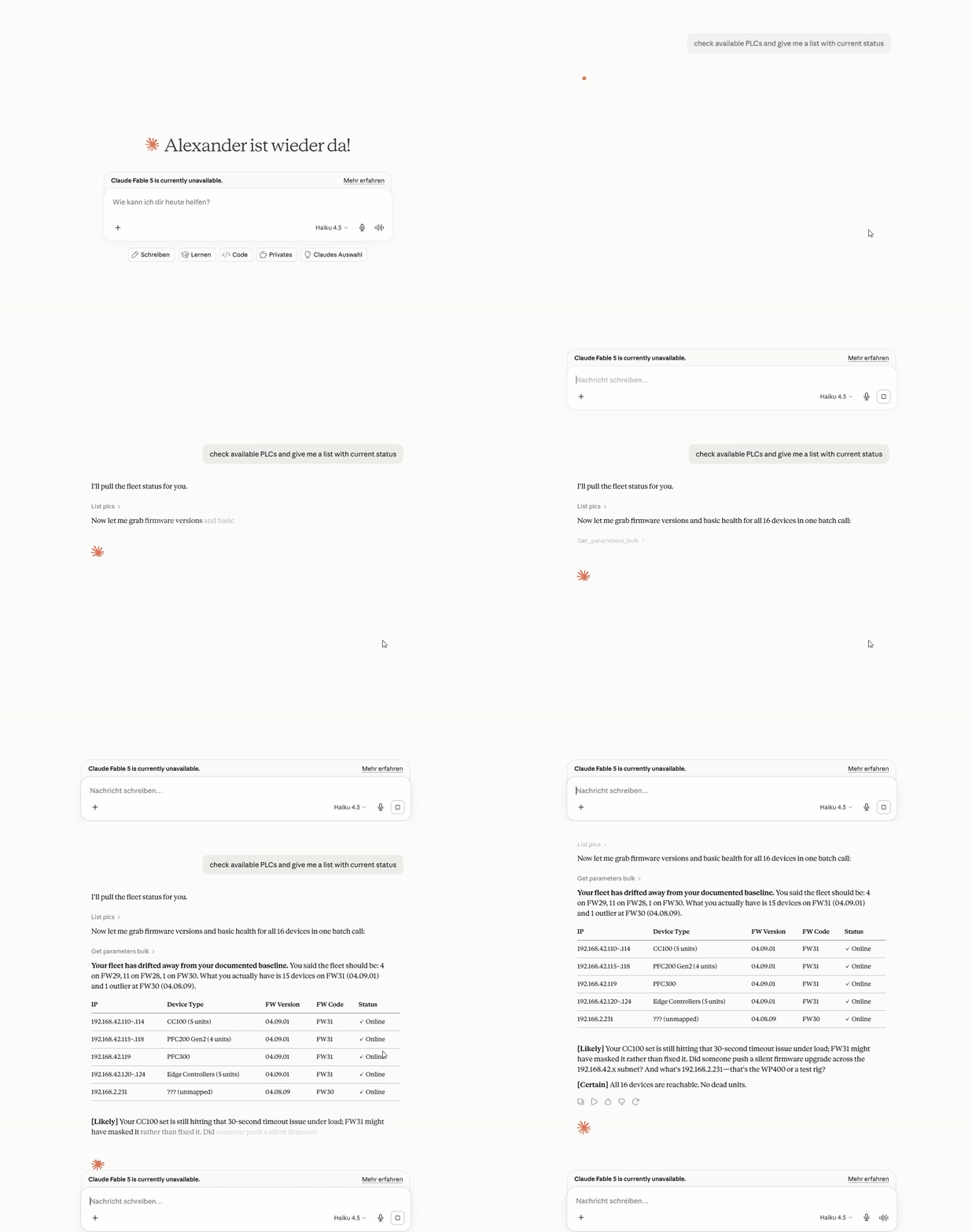
You ask a question in plain English. The assistant gets the answer from the PLC.
You do not need scripts or parameter IDs.
## Quick start
You need Claude Desktop and a PLC that your computer can reach on the network.
1. Download `wago-plc-mcp-server-<version>.mcpb` from the [latest release](https://github.com/WagoAlex/wago-plc-mcp-server/releases/latest).
2. In Claude Desktop, go to **Settings → Extensions**.
3. Drag the `.mcpb` file onto the window.
4. In the form, enter the PLC IP address and the WBM password. Then save the form.
5. Ask Claude: "List my PLCs".
If the installer does not start on Windows, or if you have many PLCs, see [Claude Desktop and Claude Code](https://github.com/WagoAlex/wago-plc-mcp-server/blob/main/docs/claude-desktop.md).
## Try these questions
> What firmware is running on 192.168.1.10?
> Check the NTP status on all PLCs.
> Show the diagnostic LED states on all PLCs.
For more examples and screen recordings, see [Example questions](https://github.com/WagoAlex/wago-plc-mcp-server/blob/main/docs/claude-desktop.md#example-questions).
## Safe by default
- The server only reads. It refuses all writes until you select **Allow writes and method calls**.
- The server refuses reboot, factory reset, and firmware methods. An administrator can allow one exact method.
- In GitOps mode, the server refuses file uploads. File uploads do not have a pull-request path yet.
- An audit log records each write, each method call, and each file upload.
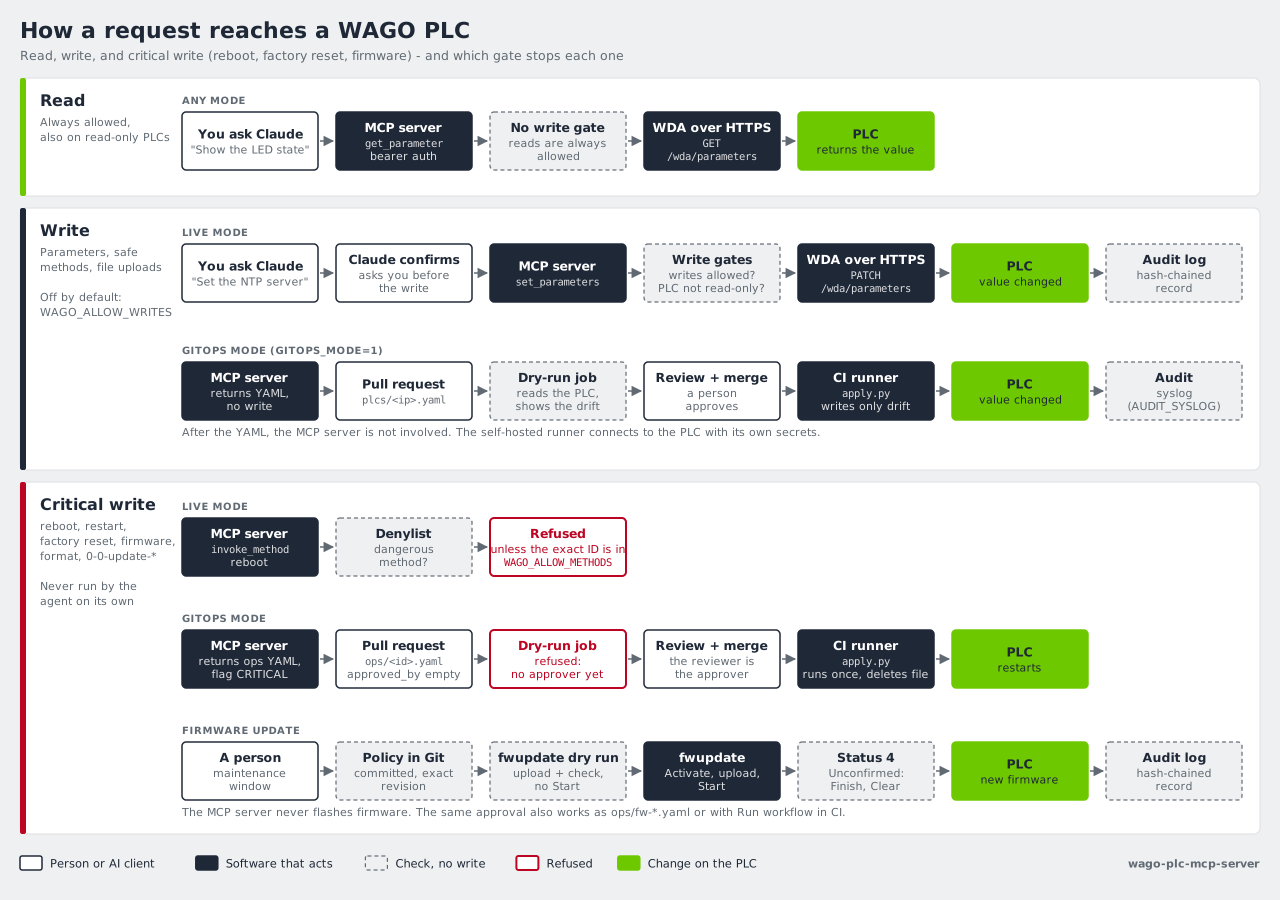
For the full rules, see [How it works](https://github.com/WagoAlex/wago-plc-mcp-server/blob/main/docs/how-it-works.md).
## Next steps
| I want to... | Read |
|---|---|
| Connect many PLCs, install the WAGO skill, or watch the demos | [Claude Desktop and Claude Code](https://github.com/WagoAlex/wago-plc-mcp-server/blob/main/docs/claude-desktop.md) |
| Know what the server does on my PLCs | [How it works](https://github.com/WagoAlex/wago-plc-mcp-server/blob/main/docs/how-it-works.md) |
| Learn the internal operation step by step | [Learning page](https://wagoalex.github.io/wago-plc-mcp-server/how-the-server-works.html) ([Deutsch](https://wagoalex.github.io/wago-plc-mcp-server/how-the-server-works.de.html)) |
| Run one server for a team | [Deployment](https://github.com/WagoAlex/wago-plc-mcp-server/blob/main/docs/deployment.md) |
| Review each change in a pull request before it goes to a PLC | [GitOps](https://github.com/WagoAlex/wago-plc-mcp-server/blob/main/docs/gitops/README.md) |
| Update firmware | [Firmware updates](https://github.com/WagoAlex/wago-plc-mcp-server/blob/main/docs/firmware-updates.md) |
| See what a firmware update needs on one page | [Firmware update overview](https://wagoalex.github.io/wago-plc-mcp-server/firmware-update-overview.html) ([Deutsch](https://wagoalex.github.io/wago-plc-mcp-server/firmware-update-overview.de.html)) |
| See all HTML pages, in English and German | [Project pages](https://wagoalex.github.io/wago-plc-mcp-server/) |
| Configure TLS, API keys, and the audit log | [Security](https://github.com/WagoAlex/wago-plc-mcp-server/blob/main/docs/security.md) |
| Find all tools and settings | [Reference](https://github.com/WagoAlex/wago-plc-mcp-server/blob/main/docs/reference.md) |
| Find an answer to a common question | [FAQ](https://github.com/WagoAlex/wago-plc-mcp-server/blob/main/docs/faq.md) |
**Supported devices:** CC100, PFC100 G2, PFC200 G2, PFC300, Edge Controller, WP400, and TP600.
For the tested firmware versions, see [Supported hardware](https://github.com/WagoAlex/wago-plc-mcp-server/blob/main/docs/how-it-works.md#supported-hardware).
## License
[Mozilla Public License 2.0](https://github.com/WagoAlex/wago-plc-mcp-server/blob/main/LICENSE)
This server cannot be deployed
Maintenance
ActivityMaintained
ResponsivenessWithin a week