Verodat MCP 服务器


概述
Verodat的模型上下文协议 (MCP) 服务器实现,使 Verodat 的数据管理功能与 Claude Desktop 等 AI 系统无缝集成。
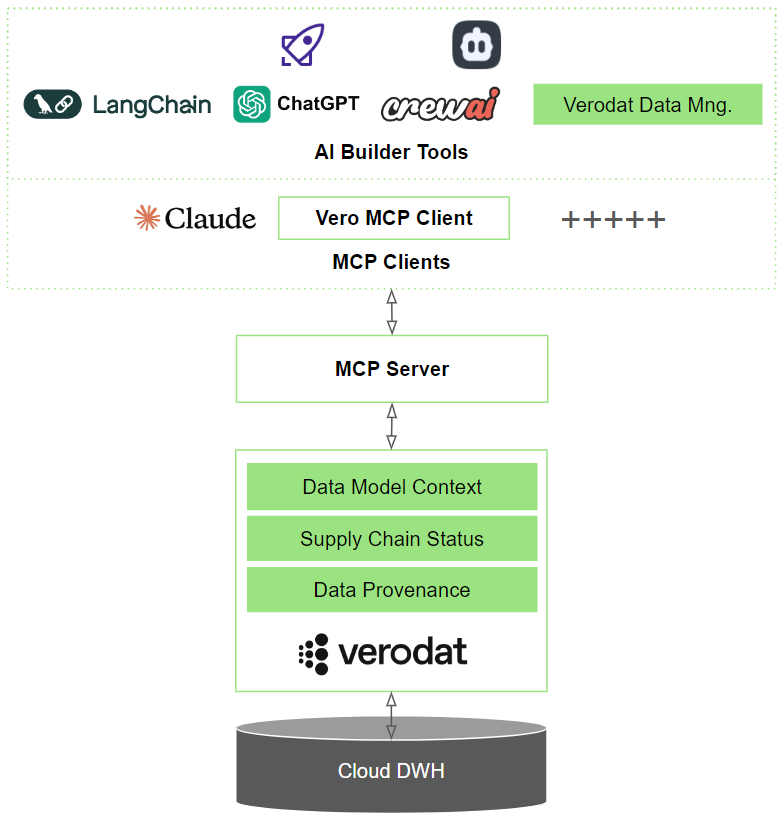
Verodat MCP 服务器
该存储库包含 Verodat 的模型上下文协议 (MCP) 服务器实现,允许 AI 模型通过明确定义的工具与 Verodat 的数据管理功能进行交互。
Related MCP server: MCP Claude Code
概述
Verodat MCP 服务器为 AI 模型提供了一种标准化的方式来访问和操作 Verodat 中的数据。它实现了模型上下文协议 (MCP) 规范,并提供了用于数据消费、设计和管理的工具。
工具类别
该服务器分为三个主要工具类别,每个类别都提供一组渐进的功能:
1.消耗(8种工具)
基础类别侧重于数据检索操作:
get-accounts :检索可用帐户
get-workspaces :列出帐户内的工作区
get-datasets :列出工作区中的数据集
get-dataset-output :从数据集中检索实际数据
get-dataset-targetfields :检索数据集的字段定义
get-queries :检索现有的 AI 查询
get-ai-context :获取工作区上下文和数据结构
execute-ai-query :对数据集执行 AI 驱动的查询
2. 设计(9 种工具)
包括 Consume 的所有工具,以及:
3. 管理(10 种工具)
包括 Design 的所有工具,以及:
先决条件
Node.js(v18 或更高版本)
Git
Claude 桌面(用于 Claude 集成)
Verodat 帐户和 AI API 密钥
安装
快速入门
通过 Smithery 安装
要通过 Smithery 自动为 Claude Desktop 安装 Verodat MCP Server:
npx -y @smithery/cli install @Verodat/verodat-mcp-server --client claude
手动安装
克隆存储库:
git clone https://github.com/Verodat/verodat-mcp-server.git
cd verodat-mcp-server
安装依赖项并构建:
npm install
npm run build
配置 Claude Desktop:创建或修改配置文件:
Verodat 入门
在 verodat.com 注册 Verodat 账户
从您的 Verodat 仪表板生成 AI API 密钥
将 API 密钥添加到您的 Claude Desktop 配置中
配置
服务器需要配置身份验证和 API 端点。请为您的 AI 模型创建一个配置文件以供使用:
{
  "mcpServers": {
    "verodat-consume": {
      "command": "node",
      "args": [
        "path/to/verodat-mcp-server/build/src/consume.js"
      ],
      "env": {
        "VERODAT_AI_API_KEY": "your-api-key",
        "VERODAT_API_BASE_URL": "https://verodat.io/api/v3"
      }
    }
  }
}
配置选项
您可以通过在 claude 中逐个指定适当的 JS 文件来配置这三个工具类别中的任何一个:
仅消费:使用consume.js (8个数据检索工具)
设计能力:使用design.js (9 种工具,包括数据集创建)
全面管理:使用manage.js (10个工具,包括数据上传)
同时配置所有三个类别的示例:
{
  "mcpServers": {
    "verodat-consume": {
      "command": "node",
      "args": [
        "path/to/verodat-mcp-server/build/src/consume.js"
      ],
      "env": {
        "VERODAT_AI_API_KEY": "your-api-key",
        "VERODAT_API_BASE_URL": "https://verodat.io/api/v3"
      }
    },
    "verodat-design": {
      "command": "node",
      "args": [
        "path/to/verodat-mcp-server/build/src/design.js"
      ],
      "env": {
        "VERODAT_AI_API_KEY": "your-api-key",
        "VERODAT_API_BASE_URL": "https://verodat.io/api/v3"
      }
    },
    "verodat-manage": {
      "command": "node",
      "args": [
        "path/to/verodat-mcp-server/build/src/manage.js"
      ],
      "env": {
        "VERODAT_AI_API_KEY": "your-api-key",
        "VERODAT_API_BASE_URL": "https://verodat.io/api/v3"
      }
    }
  }
}
环境变量
工具使用指南
可用命令
服务器提供以下 MCP 命令:
// Account & Workspace Management
get-accounts        // List accessible accounts
get-workspaces      // List workspaces in an account
get-queries         // Retrieve existing AI queries

// Dataset Operations
create-dataset      // Create a new dataset
get-datasets        // List datasets in a workspace
get-dataset-output  // Retrieve dataset records
get-dataset-targetfields // Retrieve dataset targetfields
upload-dataset-rows // Add new data rows to an existing dataset

// AI Operations
get-ai-context      // Get workspace AI context
execute-ai-query    // Run AI queries on datasets
选择正确的工具类别
对于只读操作:使用consume.js服务器配置
创建数据集:使用design.js服务器配置
对于上传数据:使用manage.js服务器配置
安全注意事项
需要通过 API 密钥进行身份验证
请求验证确保数据格式正确
发展
代码库用 TypeScript 编写,并组织成:
工具处理器:实现每个工具的功能
传输层:处理与 AI 模型的通信
验证:使用 Zod 模式确保数据格式正确
调试
MCP 服务器通过 stdio 进行通信,这会增加调试难度。我们提供 MCP Inspector 工具来帮助:
这将提供一个 URL 来访问浏览器中的调试工具。
贡献
欢迎大家贡献代码!欢迎提交 Pull 请求。
执照
LICENSE文件的详细信息
支持