Verodat MCP 서버


개요
Verodat 용 MCP(Model Context Protocol) 서버 구현을 통해 Claude Desktop과 같은 AI 시스템과 Verodat의 데이터 관리 기능을 원활하게 통합할 수 있습니다.
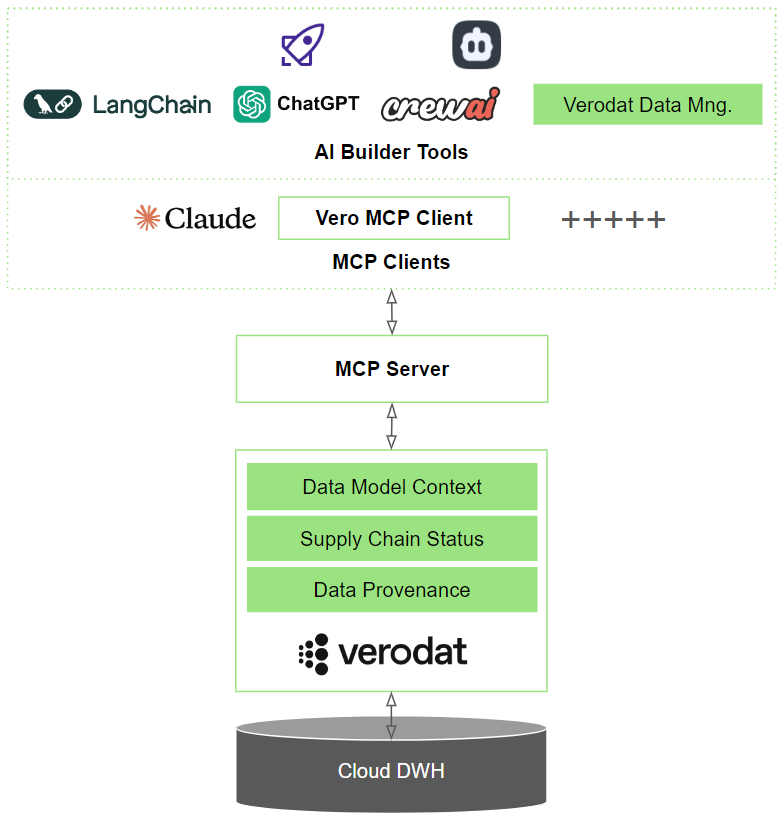
Verodat MCP 서버
이 저장소에는 Verodat에 대한 MCP(Model Context Protocol) 서버 구현이 포함되어 있으며, 이를 통해 AI 모델은 명확하게 정의된 도구를 통해 Verodat의 데이터 관리 기능과 상호 작용할 수 있습니다.
Related MCP server: MCP Claude Code
개요
Verodat MCP 서버는 AI 모델이 Verodat 데이터에 접근하고 조작할 수 있는 표준화된 방식을 제공합니다. 모델 컨텍스트 프로토콜(MCP) 사양을 구현하여 데이터 사용, 설계 및 관리를 위한 도구를 제공합니다.
도구 카테고리
서버는 세 가지 주요 도구 범주로 구성되어 있으며, 각각 점진적으로 기능을 제공합니다.
1. 소비 (도구 8개)
기본 카테고리는 데이터 검색 작업에 초점을 맞췄습니다.
get-accounts : 사용 가능한 계정 검색
get-workspaces : 계정 내의 작업 공간 나열
get-datasets : 작업 공간의 데이터 세트 나열
get-dataset-output : 데이터 세트에서 실제 데이터를 검색합니다.
get-dataset-targetfields : 데이터 세트에 대한 필드 정의를 검색합니다.
get-queries : 기존 AI 쿼리 검색
get-ai-context : 작업 공간 컨텍스트 및 데이터 구조 가져오기
execute-ai-query : 데이터 세트에 AI 기반 쿼리 실행
2. 디자인(9가지 도구)
Consume의 모든 도구와 다음이 포함됩니다.
3. 관리(10개 도구)
Design의 모든 도구와 다음이 포함됩니다.
필수 조건
설치
빠른 시작
Smithery를 통해 설치
Smithery를 통해 Claude Desktop용 Verodat MCP Server를 자동으로 설치하려면:
지엑스피1
수동 설치
저장소를 복제합니다.
git clone https://github.com/Verodat/verodat-mcp-server.git
cd verodat-mcp-server
종속성을 설치하고 빌드합니다.
npm install
npm run build
Claude Desktop 구성: 구성 파일을 만들거나 수정하세요.
Verodat 시작하기
verodat.com에서 Verodat 계정에 가입하세요
Verodat 대시보드에서 AI API 키 생성
Claude Desktop 구성에 API 키를 추가합니다.
구성
서버에는 인증 및 API 엔드포인트 구성이 필요합니다. AI 모델에서 사용할 구성 파일을 만드세요.
{
  "mcpServers": {
    "verodat-consume": {
      "command": "node",
      "args": [
        "path/to/verodat-mcp-server/build/src/consume.js"
      ],
      "env": {
        "VERODAT_AI_API_KEY": "your-api-key",
        "VERODAT_API_BASE_URL": "https://verodat.io/api/v3"
      }
    }
  }
}
구성 옵션
Claude에서 적절한 JS 파일을 하나씩 지정하여 세 가지 도구 범주를 구성할 수 있습니다.
소비만 : consume.js 사용(데이터 검색을 위한 8가지 도구)
디자인 기능 : design.js 사용(9개 도구, 데이터 세트 생성 포함)
전체 관리 : manage.js 사용(10개 도구, 데이터 업로드 포함)
세 가지 카테고리를 동시에 구성하는 예:
{
  "mcpServers": {
    "verodat-consume": {
      "command": "node",
      "args": [
        "path/to/verodat-mcp-server/build/src/consume.js"
      ],
      "env": {
        "VERODAT_AI_API_KEY": "your-api-key",
        "VERODAT_API_BASE_URL": "https://verodat.io/api/v3"
      }
    },
    "verodat-design": {
      "command": "node",
      "args": [
        "path/to/verodat-mcp-server/build/src/design.js"
      ],
      "env": {
        "VERODAT_AI_API_KEY": "your-api-key",
        "VERODAT_API_BASE_URL": "https://verodat.io/api/v3"
      }
    },
    "verodat-manage": {
      "command": "node",
      "args": [
        "path/to/verodat-mcp-server/build/src/manage.js"
      ],
      "env": {
        "VERODAT_AI_API_KEY": "your-api-key",
        "VERODAT_API_BASE_URL": "https://verodat.io/api/v3"
      }
    }
  }
}
환경 변수
도구 사용 가이드
사용 가능한 명령
서버는 다음과 같은 MCP 명령을 제공합니다.
// Account & Workspace Management
get-accounts        // List accessible accounts
get-workspaces      // List workspaces in an account
get-queries         // Retrieve existing AI queries

// Dataset Operations
create-dataset      // Create a new dataset
get-datasets        // List datasets in a workspace
get-dataset-output  // Retrieve dataset records
get-dataset-targetfields // Retrieve dataset targetfields
upload-dataset-rows // Add new data rows to an existing dataset

// AI Operations
get-ai-context      // Get workspace AI context
execute-ai-query    // Run AI queries on datasets
올바른 도구 범주 선택
읽기 전용 작업의 경우 : consume.js 서버 구성을 사용하세요.
데이터 세트를 생성하려면 design.js 서버 구성을 사용하세요.
데이터 업로드를 위해 : manage.js 서버 구성을 사용하세요.
보안 고려 사항
개발
코드베이스는 TypeScript로 작성되었으며 다음과 같이 구성되어 있습니다.
디버깅
MCP 서버는 stdio를 통해 통신하므로 디버깅이 어려울 수 있습니다. 다음과 같은 작업을 도와주는 MCP Inspector 도구를 제공합니다.
이렇게 하면 브라우저에서 디버깅 도구에 액세스할 수 있는 URL이 제공됩니다.
기여하다
여러분의 참여를 환영합니다! 풀 리퀘스트를 제출해 주세요.
특허
자세한 내용은 LICENSE 파일을 참조하세요.
지원하다