AutoHotkey v2 MCP Server
Ein TypeScript-MCP-Server für die AutoHotkey-v2-Entwicklung. Er bietet
Skriptanalyse, Dateioperationen, Dokumentsuche und Skriptausführungswerkzeuge für
MCP-Clients wie Claude Desktop.


Architektur
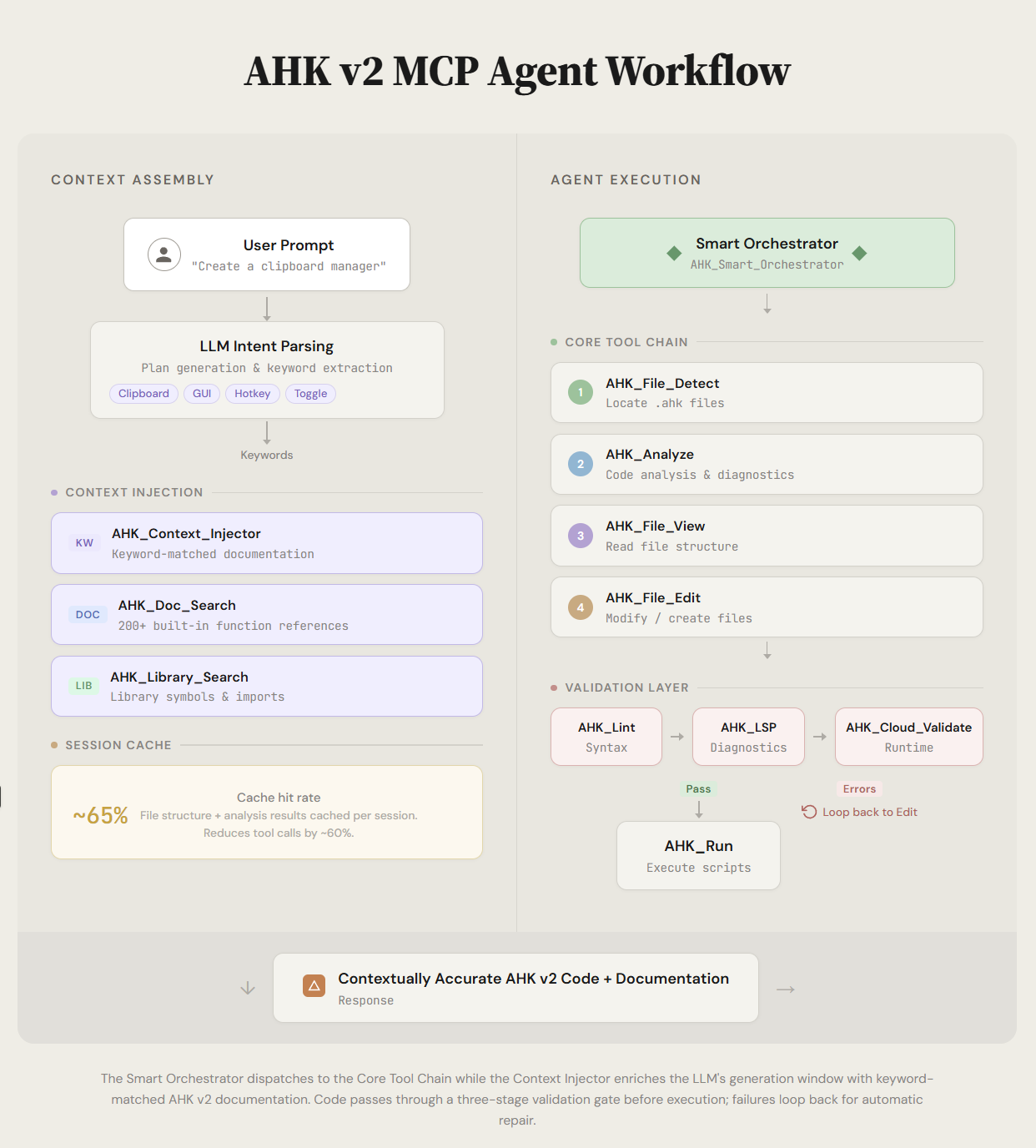
Related MCP server: Hotkeyless AHK MCP
Highlights
25+ AHK_*-Werkzeuge für AutoHotkey-Workflows
Gezielte Dateisuche und Operationen, die die aktive Datei berücksichtigen
Skriptausführung mit Prozessverfolgung und Fenstererkennung
Lokale AutoHotkey-Validierungs- und Diagnosewerkzeuge
Integrierte AutoHotkey-Dokumentation sowie Prompt-/Kontext-Helfer
Stdio- und Streamable-HTTP-Transports (zustandsbehaftet oder zustandslos), plus Legacy-SSE-Endpunkte
Optionale Bearer-Token-Authentifizierung und DNS-Rebinding-Schutz für den HTTP-Modus
Anforderungen
Installation
git clone https://github.com/truecrimedev/ahk-mcp.git
cd ahk-mcp
npm install
npm run build
Ausführen
Entwicklungsmodus:
Smoke-Test:
HTTP-Modus und Umgebungsvariablen
npm start verwendet stdio (Claude Desktop). Um Streamable HTTP auf /mcp
(zusätzlich zu den Legacy-SSE-Endpunkten) bereitzustellen, setzen Sie PORT oder übergeben Sie --sse:
Das Verhalten wird über Umgebungsvariablen gesteuert:
Variable | Standard | Zweck |
PORT
| 3000
| HTTP-Port; das Setzen aktiviert den HTTP-Modus |
AHK_MCP_STATELESS
| aus | true führt /mcp im zustandslosen Modus der MCP-Spezifikation aus: keine mcp-session-id, ein neuer Transport pro POST, sicher hinter Load-Balancern
|
AHK_MCP_AUTH_TOKEN
| nicht gesetzt | Wenn gesetzt, muss jede HTTP-Anfrage Authorization: Bearer <token> senden; nicht gesetzt bedeutet keine Authentifizierung |
AHK_MCP_ALLOWED_HOSTS
| nicht gesetzt | Kommagetrennte Host-Zulassungsliste; aktiviert DNS-Rebinding-Schutz (z. B. localhost:3000,127.0.0.1:3000) |
AHK_MCP_ALLOWED_ORIGINS
| nicht gesetzt | Kommagetrennte Origin-Zulassungsliste für Browser-Clients |
AHK_MCP_TASK_RETENTION_MS
| 1800000
| Wie lange abgeschlossene Aufgabenaufzeichnungen aufbewahrt werden (30 Min.); 0 behält sie bis zum Prozessende |
AHK_MCP_LOG_LEVEL
| warn
| error, warn, info oder debug
|
Sicherheitshinweis: Die Werkzeugoberfläche umfasst Dateischreibvorgänge und Prozessausführung. Wenn
der HTTP-Port von etwas anderem als Ihrem eigenen Rechner erreichbar ist, setzen Sie
AHK_MCP_AUTH_TOKEN (z. B. openssl rand -hex 32) sowie die beiden Zulassungslisten — standardmäßig
akzeptieren die Endpunkte jede Anfrage.
Siehe docs/MCP_TRANSPORT_COMPATIBILITY.md für den Sitzungsablauf, Details zum zustandslosen Modus
und cURL-Beispiele.
Claude-Desktop-Konfiguration
Fügen Sie dies zu claude_desktop_config.json hinzu:
{
  "mcpServers": {
    "ahk": {
      "command": "C:\\Program Files\\nodejs\\node.exe",
      "args": ["C:\\Users\\YourUsername\\path\\to\\ahk-mcp\\dist\\index.js"],
      "env": {
        "NODE_ENV": "production",
        "AHK_MCP_LOG_LEVEL": "warn"
      }
    }
  }
}
Verwenden Sie absolute Pfade und maskieren Sie Backslashes in JSON.
AutoHotkey-Pfad und Startverhalten konfigurieren
Verwenden Sie AHK_Config, um den ausführbaren Pfad und das nicht blockierende Startverhalten festzulegen:
{
  "action": "set",
  "ahkPath": "C:\\Users\\YourUsername\\Documents\\Design\\Coding\\AutoHotkey\\bin\\AutoHotkey64.exe",
  "waitForStdoutLine": true,
  "stdoutLineTimeoutMs": 300
}
Dies wird von AHK_Run (und der Pfadauflösung von AHK_Cloud_Validate) verwendet.
Kernwerkzeuge
AHK_Smart_Orchestrator: Reduziert mehrstufige Bearbeitungs-/Analyse-Workflows
AHK_File_List, AHK_File_View, AHK_File_Edit: Dateioperationen
AHK_Analyze, AHK_Diagnostics: Analyse und Diagnose
AHK_Run: Skripte ausführen (warten, nicht warten, Fenstererkennung)
AHK_Cloud_Validate: Validierung auf Basis lokaler Ausführung
AHK_Doc_Search, AHK_Tools_Search: Dokumentations- und Werkzeugsuche
AHK_Config: MCP-Serverkonfiguration
Entwicklungsbefehle
npm run build
npm run clean
npm run lint
npm run test
npm run test:integration
npm run smoke:mcp
Dokumentation
Mitwirken
Siehe CONTRIBUTING.md und AGENTS.md.
Lizenz
MIT. Siehe LICENSE.


