ahk-mcp
A TypeScript MCP server for AutoHotkey v2 development that provides script analysis, file operations, documentation search, execution, live UIA inspection, debugging, and configuration via MCP clients like Claude Desktop.
Inspect live UI Automation trees with six read-only
uia_*tools that return verified, paste-ready AHK v2 selectors.List, view, create, edit, detect, and manage active AHK files with backups, dry-run, regex, and multi-file support.
Analyze, lint, and diagnose AHK v2 code, including LSP/document-symbol support and auto-fixing.
Run and validate AHK scripts locally with process tracking, window detection, and optional watch mode.
Search AutoHotkey v2 documentation, built-in prompts, and context helpers.
Discover, inspect, import, and search AutoHotkey libraries and symbols.
Debug AHK scripts via DBGp and TCP debug agents, capture errors, manage breakpoints, and evaluate expressions.
Orchestrate multi-step analyze/fix/run workflows and process natural-language file requests.
Configure MCP settings, allowed directories, script directories, AHK executable path, and VS Code integration.
Use progressive tool discovery and analytics to reduce token usage and track tool performance.
Serve over stdio or Streamable HTTP, with opt-in legacy SSE compatibility.
Provides comprehensive development tools for AutoHotkey v2, including code completion, syntax diagnostics, script analysis, and contextual documentation for built-in functions, classes, and hotkeys.
AutoHotkey v2 MCP Server
A TypeScript MCP server for AutoHotkey v2 development. It provides script analysis, file operations, documentation search, and script execution tools for MCP clients such as Claude Desktop.
Architecture
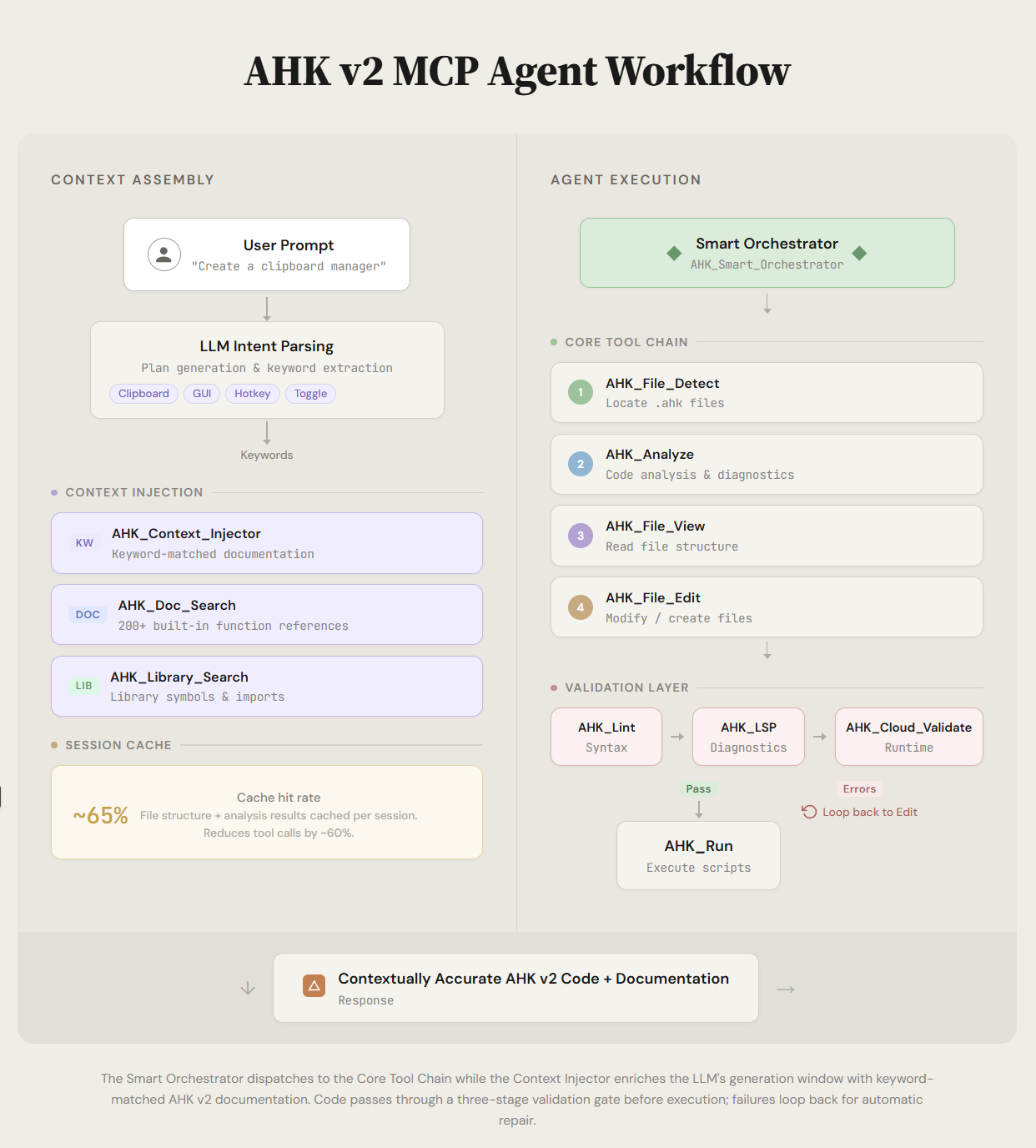
Related MCP server: Hotkeyless AHK MCP
Highlights
12 core tools by default, more in opt-in toolsets (see Tools and toolsets)
AHK_Check: one checker that uses AutoHotkey's own/Validatewhen availableAHK_Navigate: definition, references, rename and symbols through THQBY's v2 language serverSix read-only
uia_*tools that feed live UI Automation ground truth to the model, so it writes correct selectors instead of guessing themFocused file discovery and active-file aware operations
Script execution with process tracking and window detection
Local AutoHotkey validation and diagnostics tools
Built-in AutoHotkey docs and prompt/context helpers
Stdio and Streamable HTTP transport support, with opt-in legacy SSE compatibility
UIA inspection
Writing UIA automation without inspecting the live tree means guessing selectors. These tools remove the guesswork:
uia_windows -> uia_tree -> uia_find / uia_element -> paste snippet -> uia_highlight
which what's the exact control into your .ahk confirm it is
window in it + verified selector script the right oneThey are in the uia toolset; enable it with AHK_MCP_TOOLSETS=core,uia or
AHK_Settings { "action": "enable_toolset", "toolset": "uia" }.
Every element result carries a paste-ready AHK v2 snippet that has been executed against the live tree and confirmed to resolve back to that exact element. Paths are property chains, not RuntimeIds, so they still work after the target app restarts.
All six tools are strictly read-only ā they read properties and pattern availability but never invoke a control pattern, so none of them can press, toggle, select, or delete anything in the target app.
Full reference, including the selector-validation hook and Electron/WebView2
guidance: docs/UIA_INSPECTION.md.
Requirements
Node.js 20+
npm
AutoHotkey v2 (for
AHK_Run,AHK_EvalandAHK_Check's interpreter engine)Optional: THQBY's AutoHotkey v2 Language Support VS Code extension, for
AHK_NavigateandAHK_Check's language-server engine. It is found automatically in the VS Code extensions folder, or setAHK_THQBY_LSP_SERVERto itsserver/dist/server.js
Installation
git clone https://github.com/truecrimedev/ahk-mcp.git
cd ahk-mcp
npm install
npm run buildRun
npm startDevelopment mode:
npm run devSmoke test:
npm run smoke:mcp
npm run smoke:http
npm run test:evals # eval grader tests
npm run eval:tasks # task evals with and without the server (see evals/README.md; costs API credits)Claude Desktop Configuration
Add this to claude_desktop_config.json:
{
"mcpServers": {
"ahk": {
"command": "C:\\Program Files\\nodejs\\node.exe",
"args": ["C:\\Users\\YourUsername\\path\\to\\ahk-mcp\\dist\\index.js"],
"env": {
"NODE_ENV": "production",
"AHK_MCP_LOG_LEVEL": "warn",
"AHK_MCP_TOOLSETS": "core",
"AHK_MCP_SCRIPT_DIR": "C:\\Users\\YourUsername\\Documents\\AutoHotkey"
}
}
}
}Use absolute paths and escape backslashes in JSON. A ready-to-edit template is
in .mcp.example.json.
Claude Code on Windows
From the repo root in PowerShell:
powershell -NoProfile -ExecutionPolicy Bypass -File .\scripts\setup-claude-code.ps1It builds the server, registers it with Claude Code as ahk, and sets up
permissions, MCP timeouts and an AutoHotkey /Validate hook for edited .ahk
files. Add -WhatIf to preview. Options and troubleshooting:
docs/CLAUDE_CODE_WINDOWS.md.
File Access
File tools only read and write inside allowed directories: the client's MCP
roots, AHK_MCP_SCRIPT_DIR, the scriptDir/searchDirs set with AHK_Config,
the server's working directory, and AHK_MCP_ALLOWED_DIRS. Paths are checked
after resolving symlinks, and writes through a symlink are refused.
Variable | Effect |
| Extra allowed folders, |
| Turn off the allowlist (the symlink guard stays on) |
| Let |
| Serve Streamable HTTP instead of stdio (same as |
Configure AutoHotkey Path and Startup Behavior
Use AHK_Config to set the executable path and non-blocking startup behavior:
{
"action": "set",
"ahkPath": "C:\\Program Files\\AutoHotkey\\v2\\AutoHotkey64.exe",
"waitForStdoutLine": true,
"stdoutLineTimeoutMs": 300
}This is used by AHK_Run (and AHK_Cloud_Validate path resolution).
Tools and toolsets
Every tool a server lists costs context in every session, so only the core
toolset is listed by default. Pick toolsets with AHK_MCP_TOOLSETS
(comma-separated, or all), or at runtime with AHK_Settings
(enable_toolset, disable_toolset, reset_toolsets); the server then sends
tools/list_changed. AHK_Settings is always listed.
Toolset | Tools |
|
|
|
|
|
|
|
|
|
|
| Superseded tools kept for old prompts: |
AHK_Checkreplaces the analysis tools. It runs up to three engines: AutoHotkey itself with/Validate(loads the script without running it: the authoritative load-time errors), THQBY's language server, and built-in static checks. Static errors become warnings when an authoritative engine ran. Results come back as text and asstructuredContent.AHK_Navigatedoessymbols,definition,references,hover,workspace_symbolsandrenamethrough one long-lived THQBY process. Without THQBY, symbols, definition and references fall back to a text search markedapproximate. Rename previews by default.AHK_Eval { "reset": true }replacesAHK_Repl_Reset.
Development Commands
npm run build
npm run clean
npm run lint
npm run test
npm run test:integration
npm run smoke:mcp
npm run smoke:httpDocumentation
docs/README.mddocs/QUICK_START.mddocs/QUICKREFERENCE.mddocs/MCP_TRANSPORT_COMPATIBILITY.mddocs/ARCHITECTURE_DIAGRAMS.mddocs/RELEASE_NOTES.md
Contributing
See CONTRIBUTING.md and AGENTS.md.
License
MIT. See LICENSE.
Available Tools
32 toolsAHK_AnalyticsARead-onlyIdempotent
View tool usage analytics and performance metrics. Track success rates, execution times, common errors, and usage patterns across all MCP tools. Actions: summary (overall stats), tool_stats (specific tool), recent (recent calls), export (JSON data), clear (reset). Use to diagnose tool issues or optimize workflows.
Inputs: action, toolName, limit.
AHK_AnalyzeBRead-onlyIdempotent
Ahk analyze Analyzes AutoHotkey v2 scripts and provides contextual information about functions, variables, classes, and other elements used in the code. Accepts direct code or a file path (falls back to active file).
Inputs: code, filePath, includeDocumentation, includeUsageExamples, +4 more.
AHK_Cloud_ValidateADestructive
Validate AHK v2 code with optional watch mode for auto-validation on save.
Modes:
validate: One-shot validation of code snippetwatch: Auto-validate file on every save
Examples:
Validate code:
{ "code": "MsgBox(\"Hi\")\nExitApp" }Validate file:
{ "filePath": "C:\\Scripts\\test.ahk" }Start watching:
{ "mode": "watch", "filePath": "C:\\Scripts\\test.ahk" }Stop watching:
{ "mode": "watch", "enabled": false }
Error Patterns Detected:
Syntax errors (line number + message)
Runtime errors (Error, ValueError, TypeError, etc.)
Unset variable references
Inputs: mode, code, filePath, enabled, +2 more.
AHK_ConfigCRead-only
Ahk config Get/Set MCP configuration for script directories, AutoHotkey executable path, and VS Code workspace.
Inputs: action, scriptDir, searchDirs, ahkPath, +1 more.
AHK_Context_InjectorCRead-onlyIdempotent
Ahk context injector Analyzes user prompts and LLM thinking to automatically inject relevant AutoHotkey v2 documentation context.
Inputs: userPrompt (required), llmThinking, contextType, maxItems, +1 more.
AHK_Debug_AgentCDestructive
Ahk debug agent Starts a TCP listener for AutoHotkey /Debug and optionally proxies to a real debug adapter while capturing traffic.
Inputs: mode, listenHost, listenPort, listenPorts, +6 more.
AHK_Debug_DBGpBDestructive
AutoHotkey v2 debugger via DBGp protocol. Enables autonomous debugging: capture errors, analyze them, and auto-apply fixes.
Actions:
start: Start DBGp listener (waits for AHK /Debug connection)
stop: Stop DBGp listener
status: Get connection status
run: Continue execution
step_into/step_over/step_out: Step debugging
capture_error: Wait for next error with full context
analyze_error: Build analysis prompt from error
apply_fix: Auto-apply code fix to file
list_errors/clear_errors: Manage error queue
get_source: Get source lines around a line
breakpoint_set/remove/list: Manage breakpoints
variables_get: Get variables (context: 0=local, 1=global)
evaluate: Evaluate expression
stack_trace: Get call stack
Inputs: action (required), port, timeout, file, +9 more.
AHK_Doc_SearchBRead-onlyIdempotent
Ahk doc search Full-text search across AutoHotkey v2 docs using FlexSearch (functions, variables, classes, methods).
Inputs: query (required), category, offset, limit.
AHK_File_ActiveARead-only
Ahk file DETECT AND SET ACTIVE FILE FOR EDITING - Use this immediately when user mentions any .ahk file path. This enables all other editing tools to work on the specified file. Essential first step before any file modifications.
š Active File: Not set. Use AHK_File_Active to select a target.
Inputs: action, path, text.
AHK_File_CreateADestructive
Create a new AutoHotkey v2 script on disk with full path interception support.
⢠Validates .ahk extension (case-insensitive) ⢠Automatically creates parent directories (configurable) ⢠Prevents accidental overwrite unless explicitly allowed ⢠Supports dry-run previews and active file management
š Active File: Not set. Use AHK_File_Active to select a target.
Inputs: filePath (required), content, overwrite, createDirectories, +2 more.
AHK_File_DetectCRead-only
Ahk auto file Automatically detect and set active AutoHotkey file from user text
š Active File: Not set. Use AHK_File_Active to select a target.
Inputs: text (required), autoSet, scriptDir.
AHK_File_EditADestructive
Primary AutoHotkey file editor for direct on-disk modifications. Handles search/replace, line inserts, deletes, appends, prepends, and even new file creation. Supports regex, automatic backups, dry-run previews, and optional script execution after edits.
Common Usage
{
"action": "replace",
"search": "oldClassName",
"newContent": "NewClassName",
"filePath": "C:\\Scripts\\MyAutomation.ahk"
}Batch Replace with Regex (Preview First)
{
"action": "replace",
"search": "class\\s+(\\w+)",
"newContent": "class Refactored$1",
"regex": true,
"all": true,
"dryRun": true
}Shows a DRY RUN report instead of touching the file.
Create New Script
{
"action": "create",
"filePath": "C:\\AHK\\Helpers\\ClipboardTools.ahk",
"newContent": "class ClipboardTools {\n __New() {\n ; init\n }\n}"
}What to Avoid
Using deprecated "content" parameter - migrate to "newContent"
Running batch replacements without
dryRun: truefirstDisabling backups on production files unless absolutely necessary
See also: AHK_File_Edit_Advanced, AHK_File_Edit_Small, AHK_File_View, AHK_Smart_Orchestrator
š Active File: Not set. Use AHK_File_Active to select a target.
Inputs: action, search, newContent, content, +10 more.
AHK_File_Edit_AdvancedADestructive
Ahk file editor PRIMARY FILE EDITING TOOL - Use this IMMEDIATELY when user mentions a .ahk file path and wants to modify it. This tool automatically detects the file, sets it active, and helps determine the best editing approach. ALWAYS use this instead of generating code blocks when a file path is provided.
š Active File: Not set. Use AHK_File_Active to select a target.
Inputs: filePath (required), changes (required), action, dryRun.
AHK_File_Edit_SmallADestructive
Token-efficient editor for small, targeted changes. Ideal when you need a lightweight replace or line edit without loading the full diff engine. Supports regex and literal replacements, multi-file batches, optional diff previews, and dry-run mode.
Common Replace
{
"action": "replace_literal",
"file": "C:\\Scripts\\MyScript.ahk",
"find": "Sleep(500)",
"replace": "Sleep(100)"
}Insert Before a Line (Preview)
{
"action": "line_insert_before",
"file": "C:\\Scripts\\TrayMenu.ahk",
"line": 42,
"newContent": " TrayTip(\"Menu refreshed\")",
"dryRun": true
}Multi-File Regex Replace
{
"action": "replace_regex",
"files": ["core.ahk", "ui.ahk"],
"find": "SetTimer\\((\\w+), 5000\\)",
"replace": "SetTimer($1, 10000)",
"all": true
}What to Avoid
Mixing deprecated "content" parameter with newContent - prefer newContent
Running multi-file edits without
dryRun: trueto previewForgetting
backup: truewhen touching critical scripts
See also: AHK_File_Edit (full-featured editor), AHK_File_Edit_Diff (complex diffs), AHK_File_Edit_Advanced
š Active File: Not set. Use AHK_File_Active to select a target.
Inputs: action, file, files, find, +12 more.
AHK_File_ListARead-only
List AHK files with optional name search. Use nameFilter with wildcards (e.g., "Hotstring") to find specific files.
š Active File: Not set. Use AHK_File_Active to select a target.
Inputs: directory, nameFilter, recursive, includeDirectories, +8 more.
AHK_File_RecentBRead-only
Ahk recent scripts List the most recent AutoHotkey scripts from configured directories. Supports overriding A_ScriptDir.
š Active File: Not set. Use AHK_File_Active to select a target.
Inputs: scriptDir, extraDirs, offset, limit, +1 more.
AHK_File_ViewARead-only
View AHK files with structure analysis. Modes: structured (default), raw, summary, outline. Supports line ranges and syntax highlighting.
š Active File: Not set. Use AHK_File_Active to select a target.
Inputs: file, mode, lineStart, lineEnd, +5 more.
AHK_Library_ImportARead-onlyIdempotent
Generate #Include statements for importing a library. Resolves dependencies and provides correct import order. Supports different #Include formats (angle-brackets, relative, absolute).
Inputs: name (required), include_dependencies, format.
AHK_Library_InfoBRead-onlyIdempotent
Get detailed information about a specific AutoHotkey library. Returns metadata, documentation, classes, functions, and dependencies.
Inputs: name (required), include_dependencies.
AHK_Library_ListARead-onlyIdempotent
List and search AutoHotkey libraries in the catalog. Search by query string or filter by category. Returns library names with descriptions.
Inputs: query, category.
AHK_Library_SearchARead-onlyIdempotent
Search for symbols (classes, methods, functions, properties) across all AutoHotkey libraries. Uses fuzzy matching to find symbols by partial name. Automatically scans standard AHK library paths: ⢠ScriptDir\Lib (active file's directory) ⢠Documents\AutoHotkey\Lib ⢠Program Files\AutoHotkey\v2\Lib
Examples: ⢠Find clipboard utilities: { query: "clipboard" } ⢠Find all classes: { query: "Manager", types: ["class"] } ⢠Find methods by name: { query: "OnClick", types: ["method"] } ⢠Show library locations: { query: "Gui", showPaths: true }
Inputs: query (required), types, offset, limit, +2 more.
AHK_LintARead-onlyIdempotent
Lint AHK v2 scripts. Levels: fast (syntax), standard (default, +structure), thorough (+semantics). Supports autoFix with dryRun preview.
Inputs: filePath, level, includeStructure, forceRefresh, +3 more.
AHK_LSPARead-onlyIdempotent
Provides LSP-like analysis and auto-fixing for AutoHotkey v2 code. Accepts direct code or a file path (falls back to active file).
Inputs: code, filePath, mode, fixLevel, +3 more.
AHK_Process_RequestCDestructive
Ahk process request Process user requests that contain file paths and instructions for AutoHotkey scripts
Inputs: input (required), autoExecute, defaultAction.
AHK_PromptsBRead-onlyIdempotent
AHK Prompts Returns a set of built-in AHK v2 prompt templates for code generation and learning.
Inputs: no named parameters.
AHK_SettingsDRead-only
Ahk settings Manage tool settings and enable/disable features
Inputs: action, tool, settings.
AHK_Smart_OrchestratorBDestructive
Orchestrates AHK file operations with smart caching. Chains detectāanalyzeāview/edit. Operations: view, edit, analyze.
Inputs: intent (required), filePath, targetEntity, operation, +2 more.
AHK_THQBY_Document_SymbolsARead-onlyIdempotent
Document symbols via THQBY AutoHotkey v2 LSP (vscode-autohotkey2-lsp). Returns classes, methods, functions, variables, hotkeys, and labels using the external LSP server. Accepts direct code or a file path (falls back to active file).
Inputs: code, filePath, timeoutMs.
AHK_Tools_SearchARead-onlyIdempotent
Efficiently discover available AHK tools without loading all 35+ tool definitions upfront. Progressive tool discovery reduces initial token usage from 17,500-70,000 tokens to 50-1,000 tokens based on detail level.
Examples: ⢠List all file tools: { category: "file", detailLevel: "names" } - Returns only tool names (~50 tokens) ⢠Search for analysis tools: { category: "analysis", detailLevel: "summary" } - Returns names + brief descriptions (~200 tokens) ⢠Find tools with keyword: { keyword: "edit", detailLevel: "summary" } - Returns matching tools ⢠Get full details: { category: "file", detailLevel: "full" } - Returns complete tool definitions (~1000+ tokens)
Categories:
file: File operations (view, edit, create, detect)
analysis: Code analysis and diagnostics
execution: Script running and debugging
docs: Documentation search and context
library: Library management (list, info, import)
system: System configuration and settings
Detail Levels:
names: Just tool names (minimal tokens)
summary: Names + brief descriptions (medium tokens)
full: Complete tool definitions with all parameters (high tokens)
Use Cases: ⢠Initial exploration: Use "names" or "summary" to see what's available ⢠Targeted search: Use keyword to find specific functionality ⢠Full details: Use "full" only when you need complete parameter schemas
See also: AHK_Config (system configuration), AHK_Analytics (usage analytics)
Inputs: category, keyword, detailLevel.
AHK_VSCode_OpenARead-only
Open the most recently edited AutoHotkey file (or a specified file) in VS Code. Defaults to the last edited file recorded by MCP and falls back to the active file. Supports WSL environments and can target a specific workspace window.
Inputs: filePath, line, column, reuseWindow, +2 more.
AHK_VSCode_ProblemsBRead-onlyIdempotent
Ahk vscode problems Reads a VS Code Problems list (from file or provided JSON) and summarizes AutoHotkey LSP diagnostics.
Inputs: path, content, severity, fileIncludes, +4 more.
AHK_Workflow_Analyze_Fix_RunADestructive
Analyzeāfixāverifyārun workflow in one call. Fix types: syntax, style, performance, all. Use dryRun to preview, summaryOnly for minimal tokens.
Inputs: filePath (required), autoFix, runAfterFix, fixTypes, +2 more.
Tool Schema Changelog
Recent tool additions, removals, and schema changes observed during successful MCP inspections.
Loading tool schema changelogā¦
TDQS
Scored across 32 tools
Multiple tools have overlapping purposes, causing significant ambiguity. For example, AHK_File_Edit, AHK_File_Edit_Advanced, AHK_File_Edit_Small, and AHK_Smart_Orchestrator all handle file editing with unclear distinctions, and AHK_Analyze, AHK_Lint, AHK_LSP, and AHK_Cloud_Validate all perform code analysis or validation. The descriptions often cross-reference each other, indicating poor separation of concerns.
Tool names follow a highly consistent pattern throughout, using a clear 'AHK_' prefix followed by a descriptive noun or noun phrase (e.g., AHK_File_Edit, AHK_Doc_Search, AHK_Library_List). There are no deviations in style (e.g., no camelCase or mixed conventions), making the naming predictable and easy to parse.
With 32 tools, the count is excessive for the domain of AutoHotkey script management, leading to bloat and redundancy. Many tools could be consolidated (e.g., multiple file editors and analyzers), and the high number increases cognitive load without clear added value, indicating poor scoping.
The tool set covers a broad range of operations for AutoHotkey v2 scripting, including file management, code analysis, debugging, documentation, library handling, and integration with VS Code. Minor gaps exist, such as no explicit tool for deleting files or managing script execution beyond debugging, but core workflows are well-supported.
Maintenance
Related MCP Connectors
Shared memory MCP server for Claude Code, Codex, Gemini CLI and Cursor. Cited, editable.
Nifty's MCP server ā exposes tasks, projects, messages, and files as tools for AI agents.
Remote MCP server exposing your Node Command fleet (files, shell, processes, browser) to AI hosts.
MCP server for your apps' tools and custom tools, plus hosted AI agents and approval-gated workflows
Related MCP Servers
- AlicenseNot gradedqualityCmaintenanceA comprehensive utility MCP server that enables AI assistants to execute system commands, manage files, integrate with Google Sheets and Tasks, perform AI-powered text processing, and load dynamic prompts from markdown files.MIT
- AlicenseAqualityCmaintenanceMCP server for Hotkeyless AHK HTTP API. It lets your agent control your whole computer using hotkeys.42MIT
- AlicenseNot gradedqualityCmaintenanceMCP server for advanced PowerShell integration with AI agents, enabling autonomous script execution, code analysis, and IntelliSense.3MIT
- AlicenseBqualityDmaintenanceAn all-in-one MCP server that enables AI agents with local system capabilities like filesystem navigation, command execution, desktop automation, and a continuity memory suite for persistent cross-session project context.37MIT