Binance MCP Server
The Binance MCP Server is a backend service that integrates with the Binance API to manage accounts, execute trades, and monitor portfolios securely and efficiently.
Key capabilities include:
Retrieve comprehensive account information and portfolio status
Access real-time market data and order books for trading pairs
Place spot market orders with flexible quantity specifications
Execute Time-Weighted Average Price (TWAP) orders
Perform smart token conversions with minimized market impact
Get current cryptocurrency prices
Utilize the Model Context Protocol (MCP) for structured and secure transactions
Manage API keys and integrate with platforms like Claude Desktop
Provides complete access to Binance exchange functionality including viewing portfolio composition, executing token conversions and trades, retrieving account information, accessing real-time market data, placing spot and algorithmic orders, and implementing market impact mitigation strategies.
Hosts the repository for the Binance MCP server code, enabling version control, issue tracking, and collaboration.
Serves as the runtime environment for the MCP server, required for server execution and API integration with Binance.
Used for dependency management and package installation for the Binance MCP server.
Alternative package manager that can be used for dependency management of the Binance MCP server.
Click on "Install Server".
Wait a few minutes for the server to deploy. Once ready, it will show a "Started" state.
In the chat, type
@followed by the MCP server name and your instructions, e.g., "@Binance MCP Servershow my current portfolio balance"
That's it! The server will respond to your query, and you can continue using it as needed.
Here is a step-by-step guide with screenshots.
Binance MCP Server
Overview
Binance MCP Server is a backend service designed to interact with the Binance API. It facilitates seamless interaction with the Binance exchange, enabling users to view their portfolio, convert tokens, and execute trades with minimal market impact. The server utilizes the Model Context Protocol (MCP) framework to ensure secure, structured, and efficient transactions.
Key Functionalities:
Interact with Binance exchange API for account information and trading
Display portfolio composition and valuation
Execute smart token conversions with market impact mitigation
Process market orders and algorithmic trading strategies
Retrieve real-time trading data and account information
Implement structured transactions using the Model Context Protocol framework
Provide secure authentication and API key management for Binance integration
Related MCP server: BSC MCP Server
Features
Binance API Integration: Connect to Binance exchange for account information and trading operations
Portfolio Management: View detailed portfolio composition, market value, and percentage allocation
Portfolio Analytics: Optional historical value tracking to monitor performance over time
Smart Token Conversion: Convert between tokens with intelligent order execution strategies
Market Impact Mitigation: Automatically use algorithmic trading for larger orders to prevent price slippage
Account Management: Retrieve detailed account information, balances, and trading history
Market Data Access: Access real-time order books and market data for informed trading decisions
Order Execution: Place spot market orders with flexible quantity specifications
Algorithmic Trading Support: Implement Time-Weighted Average Price (TWAP) orders to minimize market impact
Automated Trading: Execute trades programmatically based on predefined strategies
Secure Authentication: Manage API keys and secure connections to Binance services
Comprehensive Error Handling: Detailed error reporting for transaction failures and API issues
Requirements
Before setting up the Binance MCP Server, ensure you have the following installed:
Node.js (v16 or later)
npm or yarn
Binance API key and secret (for Binance exchange integration)
A valid Binance Smart Chain (BSC) wallet private key (for blockchain transactions)
Installation
Clone the repository and install dependencies:
git clone https://github.com/your-repo/binance-mcp-server.git
cd binance-mcp-server
npm install # or yarn installConfiguration
To configure the server, create a .env file in the root directory and specify the following variables:
# Binance API Configuration
BINANCE_API_KEY=your_binance_api_key_here
BINANCE_API_SECRET=your_binance_api_secret_hereCreating a Binance API Key
Before using the Binance API integration, you need to create an API key. This allows you to connect to Binance's servers via several programming languages, pull data from Binance, and interact with external applications. You can view your wallet and transaction data, make trades, and deposit and withdraw funds in third-party programs.
Prerequisites:
You need to make a deposit of any amount to your Spot Wallet to activate your account
Complete identity verification
Enable two-factor authentication (2FA) on your account
Steps to create a Binance API Key:
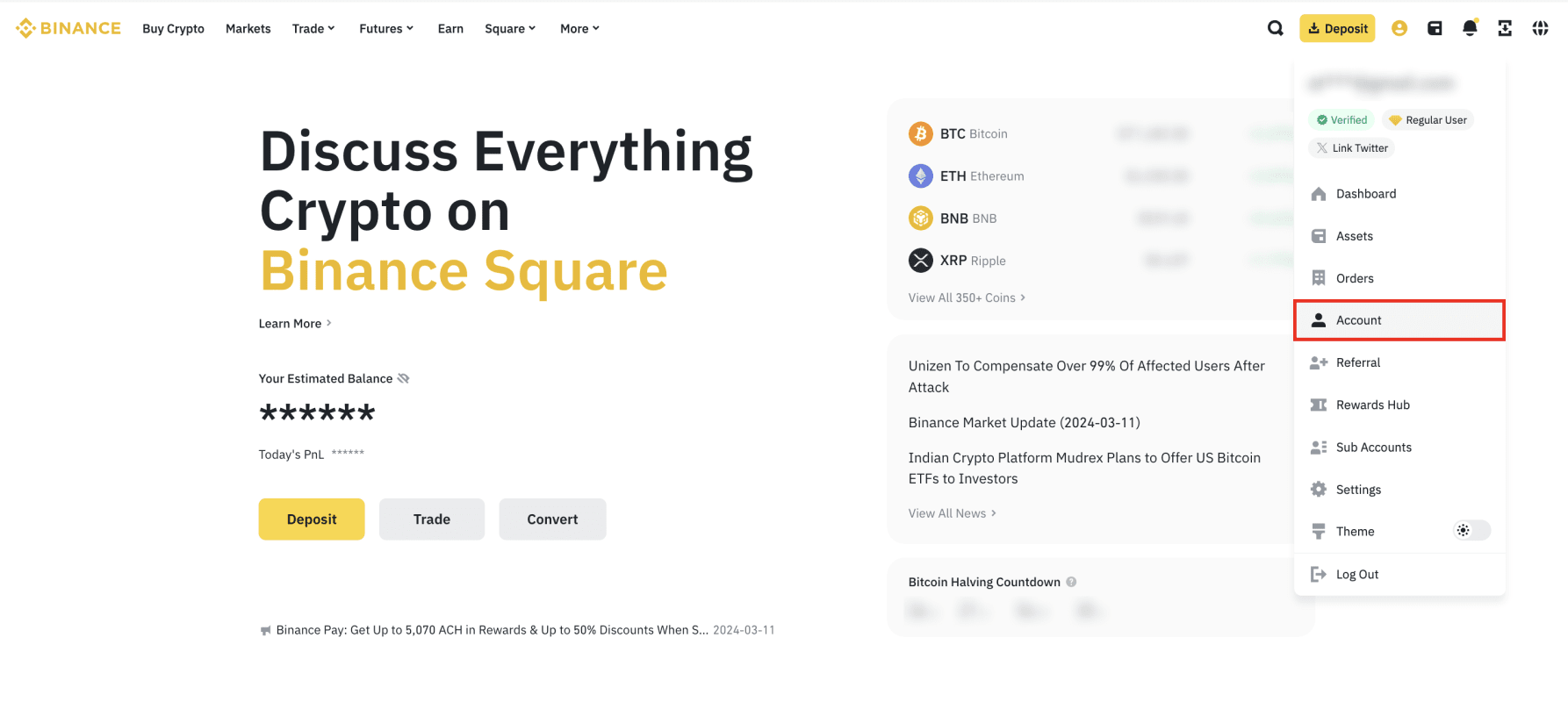
Log in to your Binance account and click the profile icon, then [Account].
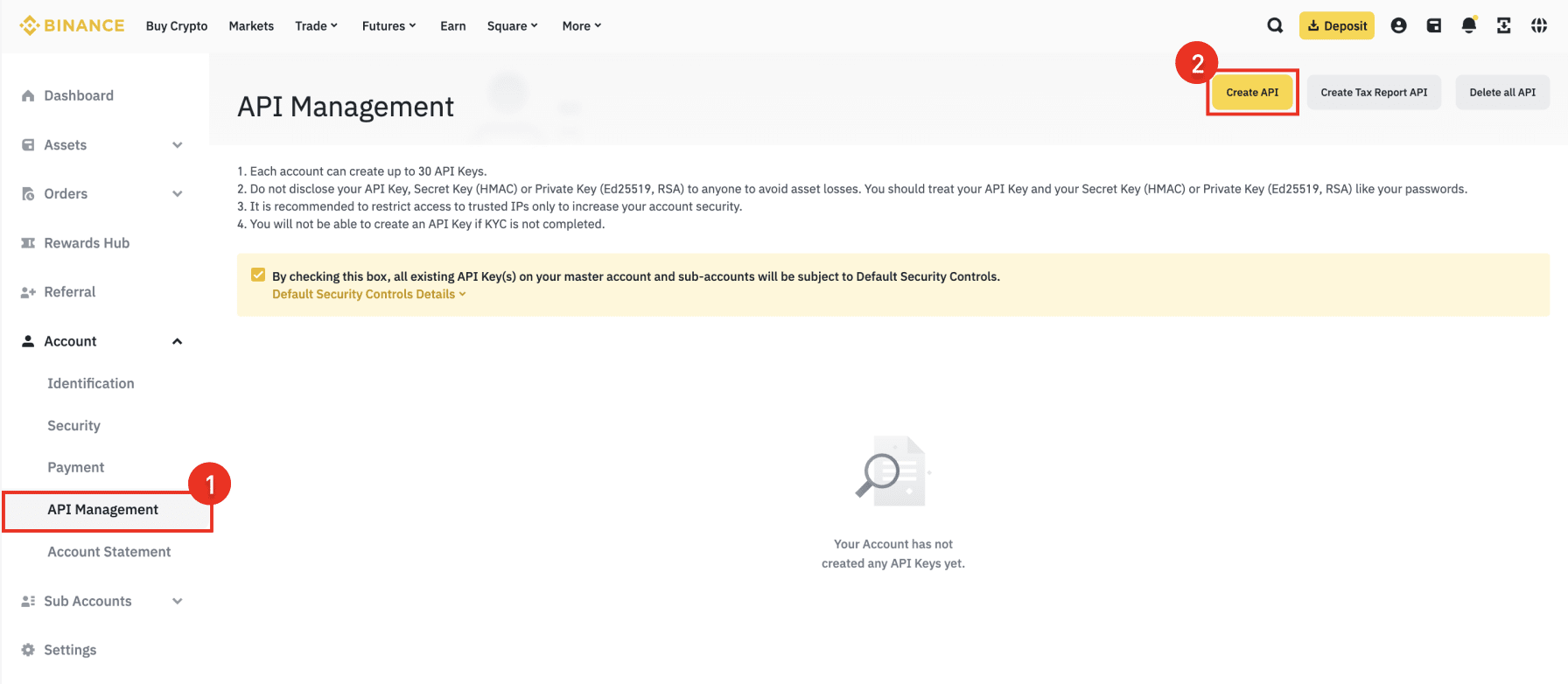
Go to [API Management] then click [Create API].
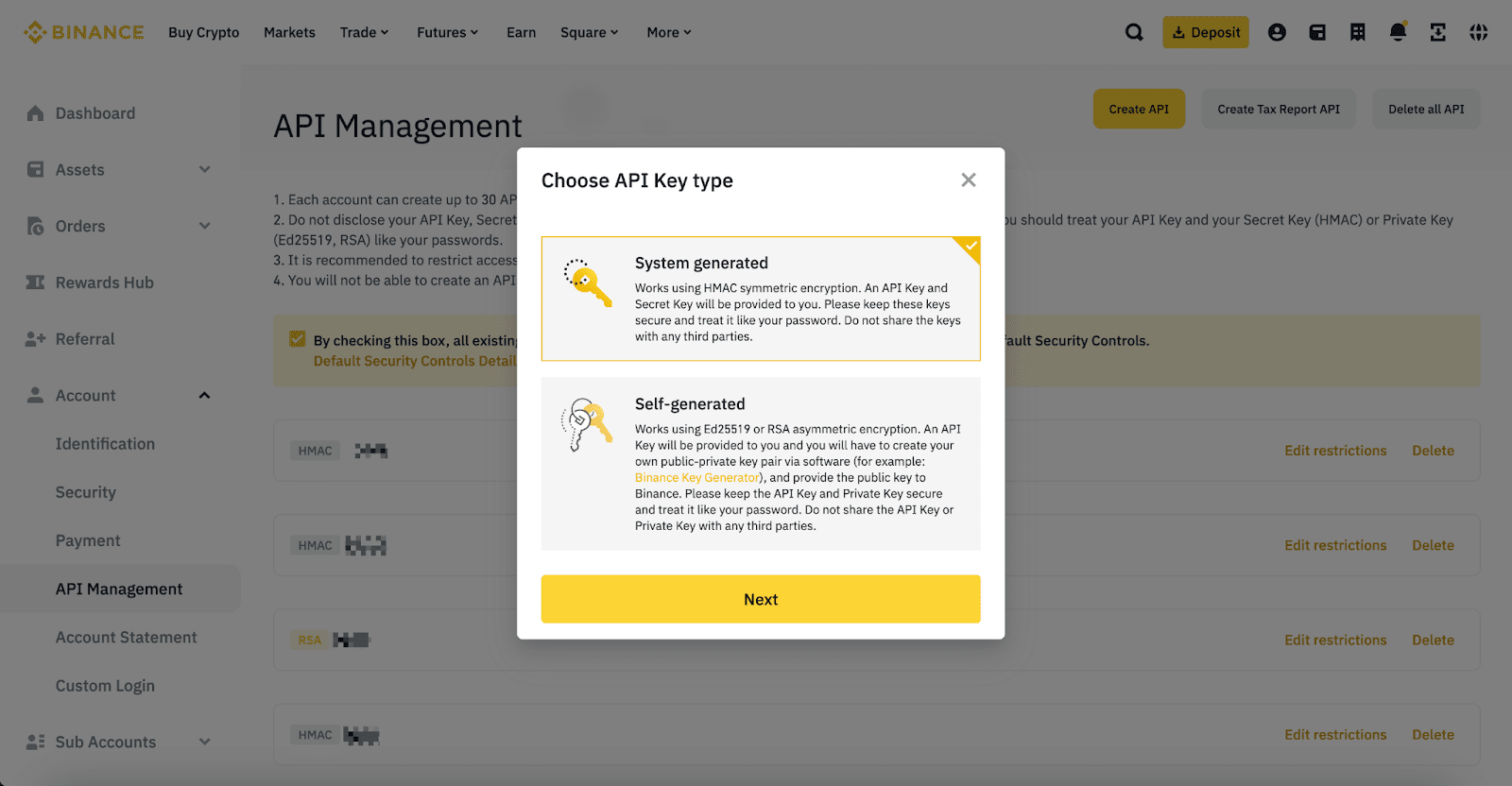
Select your preferred API Key type:
System-generated API keys (HMAC symmetric encryption) - You'll get the API key and the Secret Key.
Self-generated API keys (Ed25519 or RSA asymmetric encryption) - You'll receive an API key, but you have to create your own public-private key pair.
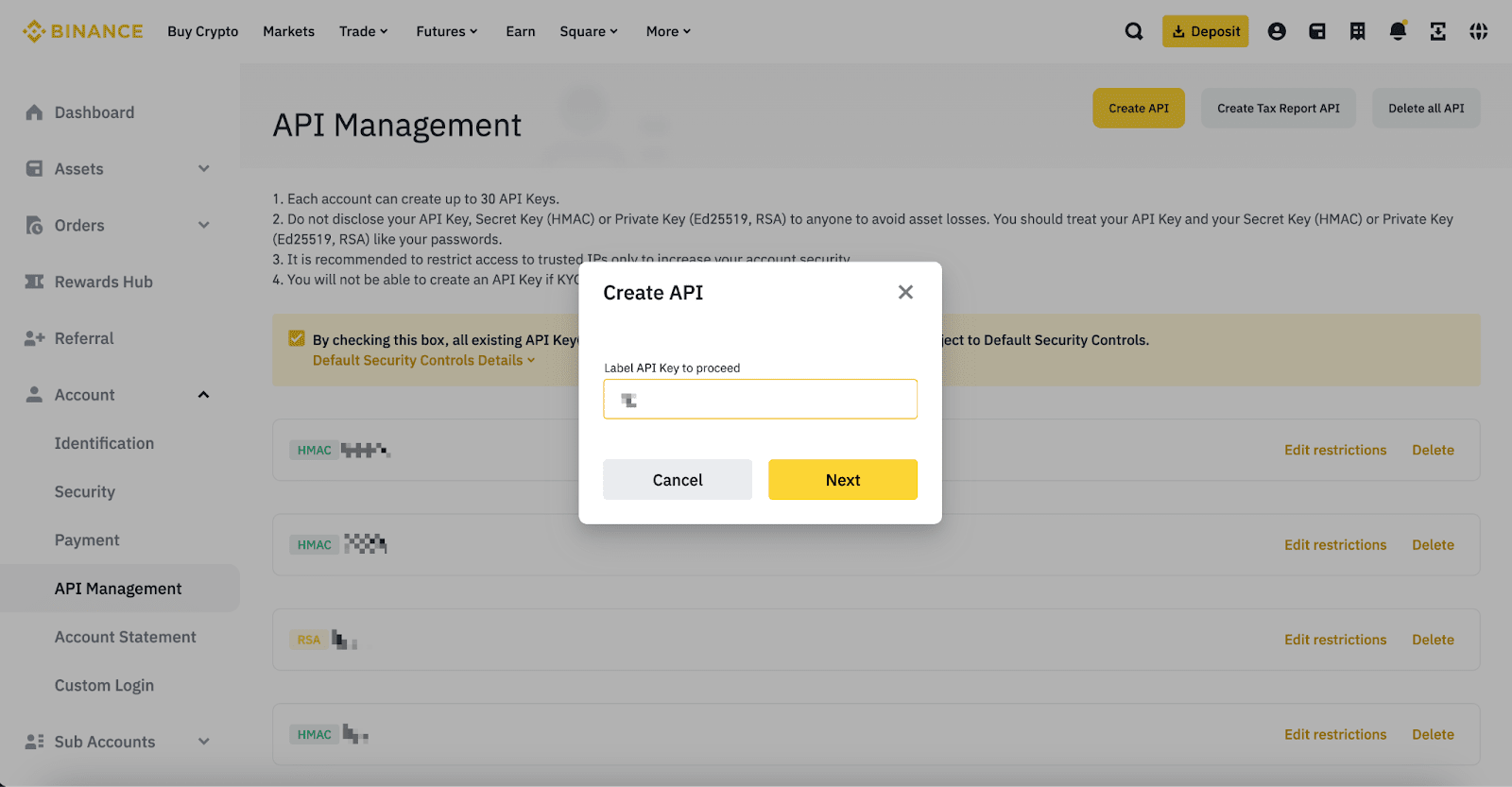
Enter a label/name for your API Key.
Verify with your 2FA devices and passkeys.
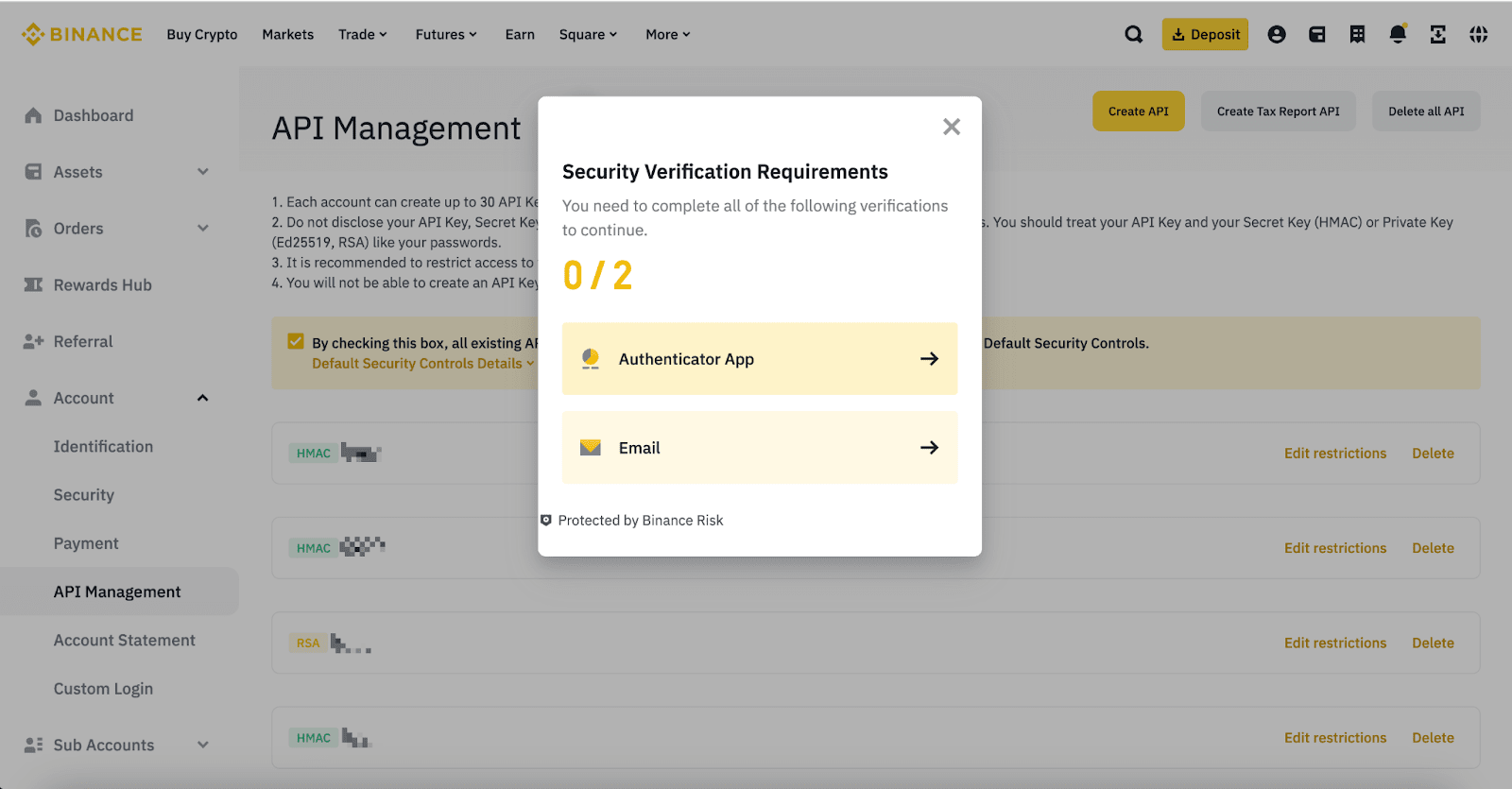
Your API key is now created.
For more details on Binance API, please refer to the Binance API Documentation.
Integration with Claude Desktop
Before integrating this MCP server with Claude Desktop, ensure you have the following installed:
Claude Desktop
Then build the server using the following command:
npm run build To add this MCP server to Claude Desktop:
Create or edit the Claude Desktop configuration file at:
macOS:
~/Library/Application Support/Claude/claude_desktop_config.jsonWindows:
%APPDATA%\Claude\claude_desktop_config.jsonLinux:
~/.config/Claude/claude_desktop_config.json
Add the following configuration:
{
"mcpServers": {
"binance-mcp": {
"command": "node",
"args": [
"/Users/Username/Desktop/binance-mcp/build/index.js"
],
"env": {
"BINANCE_API_KEY": "BINANCE_API_KEY",
"BINANCE_API_SECRET": "BINANCE_API_SECRET"
},
"disabled": false,
"autoApprove": []
}
}
}Make sure to pass the correct location of the index.js file in the args field.
Restart Claude Desktop for the changes to take effect.
Usage (For Connecting MCP HOST other than Claude)
Start the Server
To start the MCP server, run:
npm start # or node index.jsFunctions
Binance API Functions
Get Binance Account Information -
binanceAccountInfoRetrieves comprehensive information about your Binance account, including balances, trading permissions, and account status.
Get Binance Account Snapshot -
binanceAccountSnapshotGets a snapshot of your Binance account status, including current BTC price information. Includes history for the last 30 days.
Check Binance Order Book -
binanceOrderBook{ "symbol": "BTCUSDT" }Retrieves the current order book for a specified trading pair, showing available buy and sell orders up to 50 levels deep.
Place Spot Market Order -
binanceSpotPlaceOrder{ "symbol": "BTCUSDT", "side": "BUY", "quantity": 0.001, // OR "quoteOrderQty": 100 }Places a market order for immediate execution at the best available price. Use
quantityto specify the amount of base asset orquoteOrderQtyto specify the amount in quote currency. Suitable for small orders.Place TWAP Order -
binanceTimeWeightedAveragePriceFutureAlgo{ "symbol": "BTCUSDT", "side": "BUY", "quantity": 1.0, "duration": 3600 }Places a Time-Weighted Average Price (TWAP) order that executes gradually over a specified duration to minimize market impact. Suitable for large orders that might otherwise cause significant price movements.
Model Context Protocol (MCP)
The Model Context Protocol (MCP) is an open standard designed to enhance the way applications interact with AI models and blockchain-based computational systems. MCP establishes structured context that improves the efficiency of automated transactions and decentralized applications.
Benefits of MCP:
Standardization: Defines a unified approach for application interactions.
Efficiency: Reduces computational overhead and improves transaction speed.
Interoperability: Supports integration across multiple platforms and blockchain ecosystems.
Error Handling
When a transaction fails, the server returns an error message with details. Check the console logs for more debugging information. Common error scenarios include:
Insufficient funds in the wallet
Invalid recipient address
Network congestion or RPC issues
Binance API authentication errors
Trading limit restrictions
License
This project is open-source under the MIT License.
For contributions, bug reports, or feature requests, submit an issue on GitHub.
Available Tools
1 toolcrypto-priceC
Get the current price of a cryptocurrency
| Name | Required | Description | Default |
|---|---|---|---|
| symbol | Yes |
TDQS
Does the description disclose side effects, auth requirements, rate limits, or destructive behavior?
With no annotations provided, the description carries full burden for behavioral disclosure. While 'Get' implies a read-only operation, the description doesn't address important behavioral aspects like rate limits, data freshness, error conditions, authentication requirements, or what happens with invalid symbols. It provides minimal behavioral context beyond the basic operation.
Agents need to know what a tool does to the world before calling it. Descriptions should go beyond structured annotations to explain consequences.
Is the description appropriately sized, front-loaded, and free of redundancy?
The description is perfectly concise - a single sentence that communicates the essential purpose without any wasted words. It's front-loaded with the core functionality and doesn't contain unnecessary elaboration. Every word earns its place in this minimal but complete statement of purpose.
Shorter descriptions cost fewer tokens and are easier for agents to parse. Every sentence should earn its place.
Given the tool's complexity, does the description cover enough for an agent to succeed on first attempt?
Given the tool's simplicity (1 parameter, no output schema, no annotations), the description is incomplete. It doesn't address what the tool returns (price format, currency, timestamp), error handling, or practical constraints. For a price lookup tool, users need to know what data they'll receive and under what conditions the tool might fail.
Complex tools with many parameters or behaviors need more documentation. Simple tools need less. This dimension scales expectations accordingly.
Does the description clarify parameter syntax, constraints, interactions, or defaults beyond what the schema provides?
The input schema has 0% description coverage, so the description must compensate. It mentions 'cryptocurrency' which relates to the 'symbol' parameter, but doesn't explain what format the symbol should be (e.g., 'BTC', 'bitcoin'), whether it's case-sensitive, or provide examples. The description adds minimal semantic value beyond what's implied by the tool name.
Input schemas describe structure but not intent. Descriptions should explain non-obvious parameter relationships and valid value ranges.
Does the description clearly state what the tool does and how it differs from similar tools?
The description clearly states the action ('Get') and resource ('current price of a cryptocurrency'), making the tool's purpose immediately understandable. It specifies the scope ('current') but doesn't need to differentiate from siblings since none exist. The description goes beyond a tautology by explaining what the tool does rather than just restating the name.
Agents choose between tools based on descriptions. A clear purpose with a specific verb and resource helps agents select the right tool.
Does the description explain when to use this tool, when not to, or what alternatives exist?
The description provides no guidance on when to use this tool versus alternatives, prerequisites, or limitations. It simply states what the tool does without context about appropriate use cases or constraints. Since there are no sibling tools, the lack of differentiation isn't penalized, but the complete absence of usage guidance keeps the score low.
Agents often have multiple tools that could apply. Explicit usage guidance like "use X instead of Y when Z" prevents misuse.
TDQS
With only one tool, there is no possibility of ambiguity or overlap between tools. The tool's purpose is clearly defined as fetching cryptocurrency prices, making it impossible for an agent to confuse it with another tool.
Since there is only one tool, naming consistency is inherently perfect. The tool name 'crypto-price' follows a clear noun-noun pattern that is straightforward and descriptive for its single function.
A single tool is too few for a server named 'Binance MCP Server', which implies broader cryptocurrency exchange functionality. This minimal set feels thin and inadequate for the expected scope, such as trading, account management, or market data beyond just price.
The tool surface is severely incomplete for a Binance server, covering only price retrieval. Obvious gaps include trading operations, balance checks, order management, and other exchange features, which will likely cause agent failures in typical cryptocurrency tasks.
Maintenance
Resources
Unclaimed servers have limited discoverability.
Looking for Admin?
If you are the server author, to access and configure the admin panel.
Related MCP Connectors
Binance - 340 tools for market data, order books, and trading pairs
Crypto trading intelligence MCP — 34+ endpoints, x402 pay-per-use, AI agent strategy & execution
Token swaps and honeypot/rug checks for AI agents on 8 chains, paid per-call in USDC via x402.
Gasless, MEV-protected onchain token swaps for AI agents on 14 EVM chains, built on CoW Protocol.
Related MCP Servers
- AlicenseNot gradedqualityDmaintenanceThis server provides a robust interface for Binance spot trading operations, including secure management of API credentials, execution and management of spot orders, and monitoring of account balances and open orders.2114MIT
- AlicenseCqualityFmaintenanceA backend service for executing transactions on Binance Smart Chain, enabling secure transfers of BNB and BEP-20 tokens, smart contract interactions, and token creation through structured MCP integration.1214105MIT
- -licenseNot gradedqualityNot gradedmaintenanceA backend service that executes transactions across multiple blockchains, enabling users to manage wallets, transfer tokens, and interact with smart contracts using the Model Context Protocol framework.1
- -licenseNot gradedqualityNot gradedmaintenanceBackend service that enables users to connect with Binance exchange for viewing portfolio data, converting tokens, and executing trades with minimal market impact through the Model Context Protocol framework.24
Latest Blog Posts
- Who's Calling? MCP Hosts Are an Identity Blind Spot (And the Spec Knows It)By Om-Shree-0709 on .mcpAgent IdentityOAuth 2.1
- Your AI Chatbot Just Exposed Your CEO's Salary to an InternBy Om-Shree-0709 on .Agent IdentityMCP SecurityOAuth Delegation
- Why MCP Servers Need Execution Sandboxing (And Why Your Current Stack Isn't Enough)By Om-Shree-0709 on .Agentic AiPrompt InjectionWebAssembly
MCP directory API
We provide all the information about MCP servers via our MCP API.
curl -X GET 'https://glama.ai/api/mcp/v1/servers/TermiX-official/binance-mcp'
If you have feedback or need assistance with the MCP directory API, please join our Discord server