
Ableton Live MCP Server
# Ableton Live MCP Server
## 📌 Overview
The **Ableton Live MCP Server** is a server implementing the
[Model Context Protocol (MCP)](https://modelcontextprotocol.io) to facilitate
communication between LLMs and **Ableton Live**. It uses **OSC (Open Sound
Control)** to send and receive messages to/from Ableton Live. It is based on
[AbletonOSC](https://github.com/ideoforms/AbletonOSC) implementation and
exhaustively maps available OSC adresses to
[**tools**](https://modelcontextprotocol.io/docs/concepts/tools) accessible to
MCP clients.
[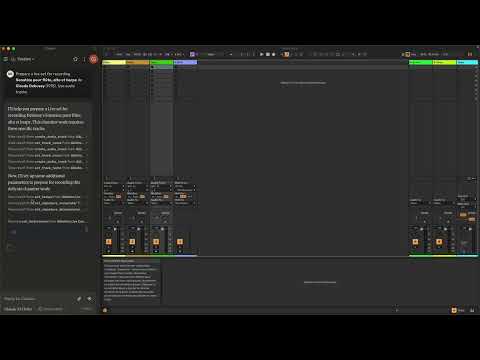](https://www.youtube.com/watch?v=12MzsQ3V7cs)
This project consists of two main components:
- `mcp_ableton_server.py`: The MCP server handling the communication between
clients and the OSC daemon.
- `osc_daemon.py`: The OSC daemon responsible for relaying commands to Ableton
Live and processing responses.
## ✨ Features
- Provides an MCP-compatible API for controlling Ableton Live from MCP clients.
- Uses **python-osc** for sending and receiving OSC messages.
- Based on the OSC implementation from
[AbletonOSC](https://github.com/ideoforms/AbletonOSC).
- Implements request-response handling for Ableton Live commands.
## ⚡ Installation
### Requirements
- Python 3.8+
- `python-osc` (for OSC communication)
- `fastmcp` (for MCP support)
- `uv` (recommended Python package installer)
- [AbletonOSC](https://github.com/ideoforms/AbletonOSC) as a control surface
### Installation Steps
1. Install `uv` (https://docs.astral.sh/uv/getting-started/installation):
```bash
curl -LsSf https://astral.sh/uv/install.sh | sh
```
2. Clone the repository:
```bash
git clone https://github.com/your-username/mcp_ableton_server.git
cd mcp_ableton_server
```
3. Install the project and its dependencies:
```bash
uv sync
```
4. Install AbletonOSC Follow the instructions at
[AbletonOSC](https://github.com/ideoforms/AbletonOSC)
## 🚀 Usage
### Running the OSC Daemon
The OSC daemon will handle OSC communication between the MCP server and Ableton
Live:
```bash
uv run osc_daemon.py
```
This will:
- Listen for MCP client connections on port **65432**.
- Forward messages to Ableton Live via OSC on port **11000**.
- Receive OSC responses from Ableton on port **11001**.
### Example Usage
In Claude desktop, ask Claude:
- _Prepare a set to record a rock band_
- _Set the input routing channel of all tracks that have "voice" in their name
to Ext. In 2_
## ⚙️ Configuration
By default, the server and daemon run on **localhost (127.0.0.1)** with the
following ports:
- **MCP Server Socket:** 65432
- **Ableton Live OSC Port (Send):** 11000
- **Ableton Live OSC Port (Receive):** 11001
To modify these, edit the `AbletonOSCDaemon` class in `osc_daemon.py`:
```python
self.socket_host = '127.0.0.1'
self.socket_port = 65432
self.ableton_host = '127.0.0.1'
self.ableton_port = 11000
self.receive_port = 11001
```
### Claude Desktop Configuration
To use this server with Claude Desktop, you need to configure it in your Claude
Desktop settings. The configuration file location varies by operating system:
- macOS: `~/Library/Application Support/Claude/claude_desktop_config.json`
- Windows: `%APPDATA%/Claude/claude_desktop_config.json`
Add the following configuration to your `mcpServers` section:
```json
{
"mcpServers": {
"Ableton Live Controller": {
"command": "/path/to/your/project/.venv/bin/python",
"args": ["/path/to/your/project/mcp_ableton_server.py"]
}
}
```
This configuration ensures that:
- The server runs with all dependencies properly managed
- The project remains portable and reproducible
## Contributing
Feel free to submit issues, feature requests, or pull requests to improve this
project.
## License
This project is licensed under the **MIT License**. See the `LICENSE` file for
details.
## Acknowledgments
- [Model Context Protocol (MCP)](https://modelcontextprotocol.io)
- [python-osc](https://github.com/attwad/python-osc) for OSC handling
- Daniel John Jones for OSC implementation with
[AbletonOSC](https://github.com/ideoforms/AbletonOSC)
- Ableton Third Party Remote Scripts
- Julien Bayle @[Structure Void](https://structure-void.com/) for endless
inspirations and resources.
## TODO
- Explore _resources_ and _prompts_ primitives opportunities.
- Build a standalone Ableton Live MCP client.
---
TDQS
Scored across 1 tool
With only one tool, there is no possibility of ambiguity or overlap between tools. The single tool 'get_track_names' has a clearly defined and distinct purpose.
A single tool inherently has perfect naming consistency, as there are no other tools to compare it against. The name 'get_track_names' follows a clear verb_noun pattern.
A single tool for an 'Ableton Live MCP Server' feels severely underpowered and incomplete. This server appears to control a complex digital audio workstation, yet only offers track name retrieval with no ability to modify tracks, manage clips, control playback, or perform other essential DAW operations.
The tool surface is extremely incomplete for an Ableton Live integration. There are massive gaps: no track creation/deletion, no clip manipulation, no transport controls (play/stop/record), no device management, no mixer controls, and no session/scene operations. This single read-only tool provides almost no practical workflow coverage.