

A
licenseA
qualityD
maintenanceEnables AI assistants to control Ableton Live through natural language by querying tracks, analyzing sessions, and exporting stems via AbletonOSC integration.
9
1
MIT

Click on "Deploy Server".
Wait a few minutes for the server to deploy. Once ready, it will show a "Started" state.
In the chat, type @ followed by the MCP server name and your instructions, e.g., "@Ableton Live MCP Server set the tempo to 120 bpm"
That's it! The server will respond to your query, and you can continue using it as needed.
Here is a step-by-step guide with screenshots.
The Ableton Live MCP Server is a server implementing the Model Context Protocol (MCP) to facilitate communication between LLMs and Ableton Live. It uses OSC (Open Sound Control) to send and receive messages to/from Ableton Live. It is based on AbletonOSC implementation and exhaustively maps available OSC adresses to tools accessible to MCP clients.
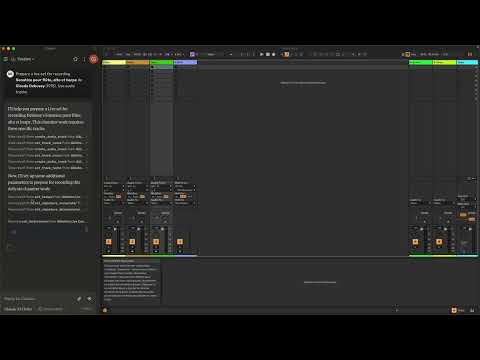
This project consists of two main components:
mcp_ableton_server.py: The MCP server handling the communication between
clients and the OSC daemon.
osc_daemon.py: The OSC daemon responsible for relaying commands to Ableton
Live and processing responses.
Related MCP server: ableton-live-mcp-server
Provides an MCP-compatible API for controlling Ableton Live from MCP clients.
Uses python-osc for sending and receiving OSC messages.
Based on the OSC implementation from AbletonOSC.
Implements request-response handling for Ableton Live commands.
Python 3.8+
python-osc (for OSC communication)
fastmcp (for MCP support)
uv (recommended Python package installer)
AbletonOSC as a control surface
Install uv (https://docs.astral.sh/uv/getting-started/installation):
curl -LsSf https://astral.sh/uv/install.sh | shClone the repository:
git clone https://github.com/your-username/mcp_ableton_server.git
cd mcp_ableton_server
Install the project and its dependencies:
uv syncInstall AbletonOSC Follow the instructions at AbletonOSC
The OSC daemon will handle OSC communication between the MCP server and Ableton Live:
uv run osc_daemon.pyThis will:
Listen for MCP client connections on port 65432.
Forward messages to Ableton Live via OSC on port 11000.
Receive OSC responses from Ableton on port 11001.
In Claude desktop, ask Claude:
Prepare a set to record a rock band
Set the input routing channel of all tracks that have "voice" in their name to Ext. In 2
By default, the server and daemon run on localhost (127.0.0.1) with the following ports:
MCP Server Socket: 65432
Ableton Live OSC Port (Send): 11000
Ableton Live OSC Port (Receive): 11001
To modify these, edit the AbletonOSCDaemon class in osc_daemon.py:
self.socket_host = '127.0.0.1'
self.socket_port = 65432
self.ableton_host = '127.0.0.1'
self.ableton_port = 11000
self.receive_port = 11001To use this server with Claude Desktop, you need to configure it in your Claude Desktop settings. The configuration file location varies by operating system:
macOS: ~/Library/Application Support/Claude/claude_desktop_config.json
Windows: %APPDATA%/Claude/claude_desktop_config.json
Add the following configuration to your mcpServers section:
{
  "mcpServers": {
    "Ableton Live Controller": {
      "command": "/path/to/your/project/.venv/bin/python",
      "args": ["/path/to/your/project/mcp_ableton_server.py"]
    }
  }
This configuration ensures that:
The server runs with all dependencies properly managed
The project remains portable and reproducible
Feel free to submit issues, feature requests, or pull requests to improve this project.
This project is licensed under the MIT License. See the LICENSE file for
details.
python-osc for OSC handling
Daniel John Jones for OSC implementation with AbletonOSC
Ableton Third Party Remote Scripts
Julien Bayle @Structure Void for endless inspirations and resources.
Explore resources and prompts primitives opportunities.
Build a standalone Ableton Live MCP client.
Get the names of tracks in Ableton Live.

Args:
    index_min: Optional minimum track index
    index_max: Optional maximum track index

Returns:
    A formatted string containing track names
| Name | Required | Description | Default |
|---|---|---|---|
| index_min | No | ||
| index_max | No |
Does the description disclose side effects, auth requirements, rate limits, or destructive behavior?
With no annotations provided, the description carries full burden for behavioral disclosure. It mentions the return format ('formatted string') but lacks critical details like whether this is a read-only operation, potential errors, performance characteristics, or how it interacts with Ableton Live's state.
Agents need to know what a tool does to the world before calling it. Descriptions should go beyond structured annotations to explain consequences.
Is the description appropriately sized, front-loaded, and free of redundancy?
The description is efficiently structured with clear sections (Args, Returns) and uses minimal, purposeful sentences. Every element serves a clear function without unnecessary elaboration.
Shorter descriptions cost fewer tokens and are easier for agents to parse. Every sentence should earn its place.
Given the tool's complexity, does the description cover enough for an agent to succeed on first attempt?
For a simple read operation with 2 parameters and no output schema, the description covers the basic purpose and parameters adequately. However, it lacks important context about the return format details, error conditions, and behavioral characteristics that would help an agent use it effectively.
Complex tools with many parameters or behaviors need more documentation. Simple tools need less. This dimension scales expectations accordingly.
Does the description clarify parameter syntax, constraints, interactions, or defaults beyond what the schema provides?
The description explicitly documents both parameters (index_min, index_max) with their optional nature and purpose, adding significant value beyond the schema which has 0% description coverage. This compensates well for the schema's lack of parameter documentation.
Input schemas describe structure but not intent. Descriptions should explain non-obvious parameter relationships and valid value ranges.
Does the description clearly state what the tool does and how it differs from similar tools?
The description clearly states the verb 'Get' and resource 'names of tracks in Ableton Live', making the purpose specific and understandable. However, without sibling tools, there's no opportunity to distinguish from alternatives, preventing a perfect score.
Agents choose between tools based on descriptions. A clear purpose with a specific verb and resource helps agents select the right tool.
Does the description explain when to use this tool, when not to, or what alternatives exist?
The description provides no guidance on when to use this tool versus alternatives, prerequisites, or constraints. It simply states what the tool does without context for usage decisions.
Agents often have multiple tools that could apply. Explicit usage guidance like "use X instead of Y when Z" prevents misuse.
Recent tool additions, removals, and schema changes observed during successful MCP inspections.
v1.0.0get_track_namesScored across 1 tool
With only one tool, there is no possibility of ambiguity or overlap between tools. The single tool 'get_track_names' has a clearly defined and distinct purpose.
A single tool inherently has perfect naming consistency, as there are no other tools to compare it against. The name 'get_track_names' follows a clear verb_noun pattern.
A single tool for an 'Ableton Live MCP Server' feels severely underpowered and incomplete. This server appears to control a complex digital audio workstation, yet only offers track name retrieval with no ability to modify tracks, manage clips, control playback, or perform other essential DAW operations.
The tool surface is extremely incomplete for an Ableton Live integration. There are massive gaps: no track creation/deletion, no clip manipulation, no transport controls (play/stop/record), no device management, no mixer controls, and no session/scene operations. This single read-only tool provides almost no practical workflow coverage.
Create, co-edit, analyze, publish, and export collaborative step-sequencer sessions through MCP.
Session players for AI agents: you write the notes, 40+ AI instruments play them. Stems, DAW tools
OpenAI-compatible LLM MCP (7 tools); chat via balance key or x402 USDC on Base
Remote MCP for RunComfy: ComfyUI deployments, hosted models, LoRA training. 31 tools.