F
licenseNot graded
qualityD
maintenanceProvides SEO automation with tools for keyword research, SERP analysis, and competitor analysis through Google Ads API integration, enabling AI assistants to access these capabilities via MCP.
50
-

Click on "Deploy Server".
Wait a few minutes for the server to deploy. Once ready, it will show a "Started" state.
In the chat, type @ followed by the MCP server name and your instructions, e.g., "@MCP Ahrefs show me the top 5 backlinks for example.com"
That's it! The server will respond to your query, and you can continue using it as needed.
Here is a step-by-step guide with screenshots.
Ahrefs MCP Server for SAAGA
Need help getting started? Have your AI coding assistant guide you!
Simply tell your AI assistant: "I have a MCP Ahrefs project. Please read and follow WORKING_WITH_SAAGA_PROMPT.md to help me understand and work with this MCP server."
For quick reference, the .ai-prompts.md file contains a condensed version of key patterns.
For detailed technical documentation, see docs/DECORATOR_PATTERNS.md.
Related MCP server: Ahrefs Universal MCP Server
Ready to test your MCP server? The MCP Inspector Guide provides:
Step-by-step setup instructions with virtual environment troubleshooting
Test examples for all included tools
JSON mode instructions for parallel tools
Common issues and solutions
Quick start:
source .venv/bin/activate  # Or use: uv shell
uv run mcp dev mcp_ahrefs/server/app.pyThis project includes a convenient test script for testing your MCP server with Claude:
# Test with a simple prompt
./test_mcp_with_claude.sh "List all available tools"

# Test a specific tool
./test_mcp_with_claude.sh "Run the echo_tool with message 'Hello World'"

# Test with multiple tools
./test_mcp_with_claude.sh "Test calculate_fibonacci with n=10 and echo_tool with message 'Done'"

# On Windows
.\test_mcp_with_claude.ps1 "List all available tools"
The script automatically:
Uses the generated mcp.integration_test.json configuration (created by cookiecutter)
Runs Claude with the Sonnet model
Includes proper MCP configuration flags
Provides colored output for better readability
This project includes comprehensive integration tests that validate tools work correctly with real MCP client interactions:
# Run all integration tests
test-mcp-integration

# Run with verbose output
test-mcp-integration --verbose

# Test specific tool
test-mcp-integration --tool echo_tool

# List all available tools
test-mcp-integration --list

# Cross-platform scripts also available
./test_mcp_integration.sh        # Unix/Mac
.\test_mcp_integration.ps1 # WindowsThe integration tests validate:
Tool Discovery: All tools are discoverable with correct schemas (no "kwargs" parameters)
Parameter Conversion: String parameters from MCP are converted to appropriate types
Error Handling: Invalid parameters and exceptions return proper error responses
SAAGA Integration: Decorators work correctly in the full MCP protocol flow
Protocol Compliance: Tools work with real MCP client connections
When you add a new tool, generate integration tests for it:
# Generate test template
generate-mcp-tests my_new_tool

# This creates a test template you can customize
# Add it to tests/integration/test_mcp_integration.pyUnit Tests (test_decorators.py): Test SAAGA decorators in isolation
Integration Tests (test_mcp_integration.py): Test complete MCP protocol flow with real client
Run both test suites to ensure full coverage:
# Run all tests
pytest

# Run only unit tests
pytest tests/test_decorators.py

# Run only integration tests
test-mcp-integrationThis MCP server was generated using the SAAGA MCP Server Cookie Cutter template. It includes:
FastMCP Integration: Modern MCP framework with dual transport support
SAAGA Decorators: Automatic exception handling, logging, and parallelization
Platform-Aware Configuration: Cross-platform configuration management
Streamlit Admin UI: Web-based configuration and monitoring interface
SQLite Logging: Comprehensive logging with database persistence
Python 3.12 or higher
UV - An extremely fast Python package manager
# Install UV (if not already installed)
curl -LsSf https://astral.sh/uv/install.sh | sh  # On macOS/Linux
# Or visit https://github.com/astral-sh/uv for Windows instructions

git clone <your-repository-url>
cd mcp_ahrefs
uv venv
uv syncgit clone <your-repository-url>
cd mcp_ahrefs
uv venv
uv sync --extra devThe server can be run in two modes:
# Run with default settings
uv run python -m mcp_ahrefs.server.app

# Run with custom log level
uv run python -m mcp_ahrefs.server.app --log-level DEBUG

# Run the server directly
uv run python mcp_ahrefs/server/app.py

uv run mcp_ahrefs-server# Run with SSE transport
uv run python -m mcp_ahrefs.server.app --transport sse --port 3001
# Run with custom host and port
uv run python -m mcp_ahrefs.server.app --transport sse --host 0.0.0.0 --port 8080uv run python -m mcp_ahrefs.server.app --helpAvailable options:
--transport: Choose between "stdio" (default) or "sse"
--host: Host to bind to for SSE transport (default: 127.0.0.1)
--port: Port to bind to for SSE transport (default: 3001)
--log-level: Logging level - DEBUG, INFO, WARNING, ERROR (default: INFO)
Add the following to your Claude Desktop MCP settings (claude_desktop_config.json):
{
  "mcpServers": {
    "mcp_ahrefs": {
      "command": "uv",
      "args": ["run", "python", "-m", "mcp_ahrefs.server.app"],
      "cwd": "/Users/jakub/Ragnarson/saaga/mcp_ahrefs"
    }
  }
}{
"mcpServers": {
"mcp_ahrefs": {
"command": "uv",
"args": [
"run", "python", "-m", "mcp_ahrefs.server.app",
"--log-level", "DEBUG"
],
"cwd": "/Users/jakub/Ragnarson/saaga/mcp_ahrefs",
"env": {
"UV_PROJECT_ENVIRONMENT": "/Users/jakub/Ragnarson/saaga/mcp_ahrefs/.venv"
}
}
}
}{
"mcpServers": {
"mcp_ahrefs": {
"command": "/Users/jakub/Ragnarson/saaga/mcp_ahrefs/.venv/bin/python",
"args": ["-m", "mcp_ahrefs.server.app"]
}
}
}{
"mcpServers": {
"mcp_ahrefs": {
"command": "uv",
"args": ["--directory=/Users/jakub/Ragnarson/saaga/mcp_ahrefs", "run" ,"mcp_ahrefs-server"]
}
}
}macOS: ~/Library/Application Support/Claude/claude_desktop_config.json
Linux: ~/.config/Claude/claude_desktop_config.json
Windows: %APPDATA%/Claude/claude_desktop_config.json
Launch the Streamlit admin interface:
uv run streamlit run mcp_ahrefs/ui/app.py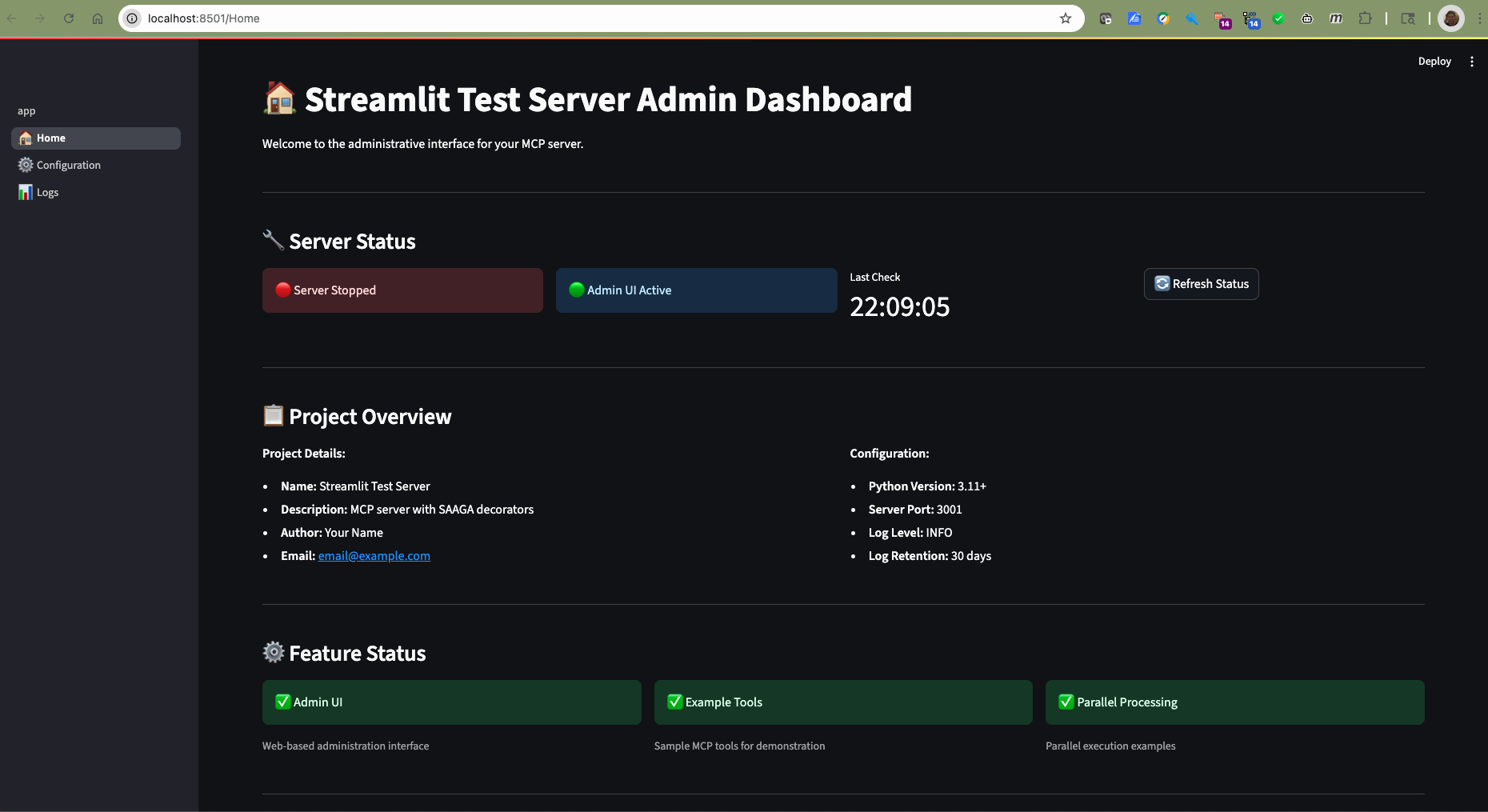
The dashboard provides:
Real-time server status monitoring
Project information and configuration overview
Quick access to common actions
System resource usage
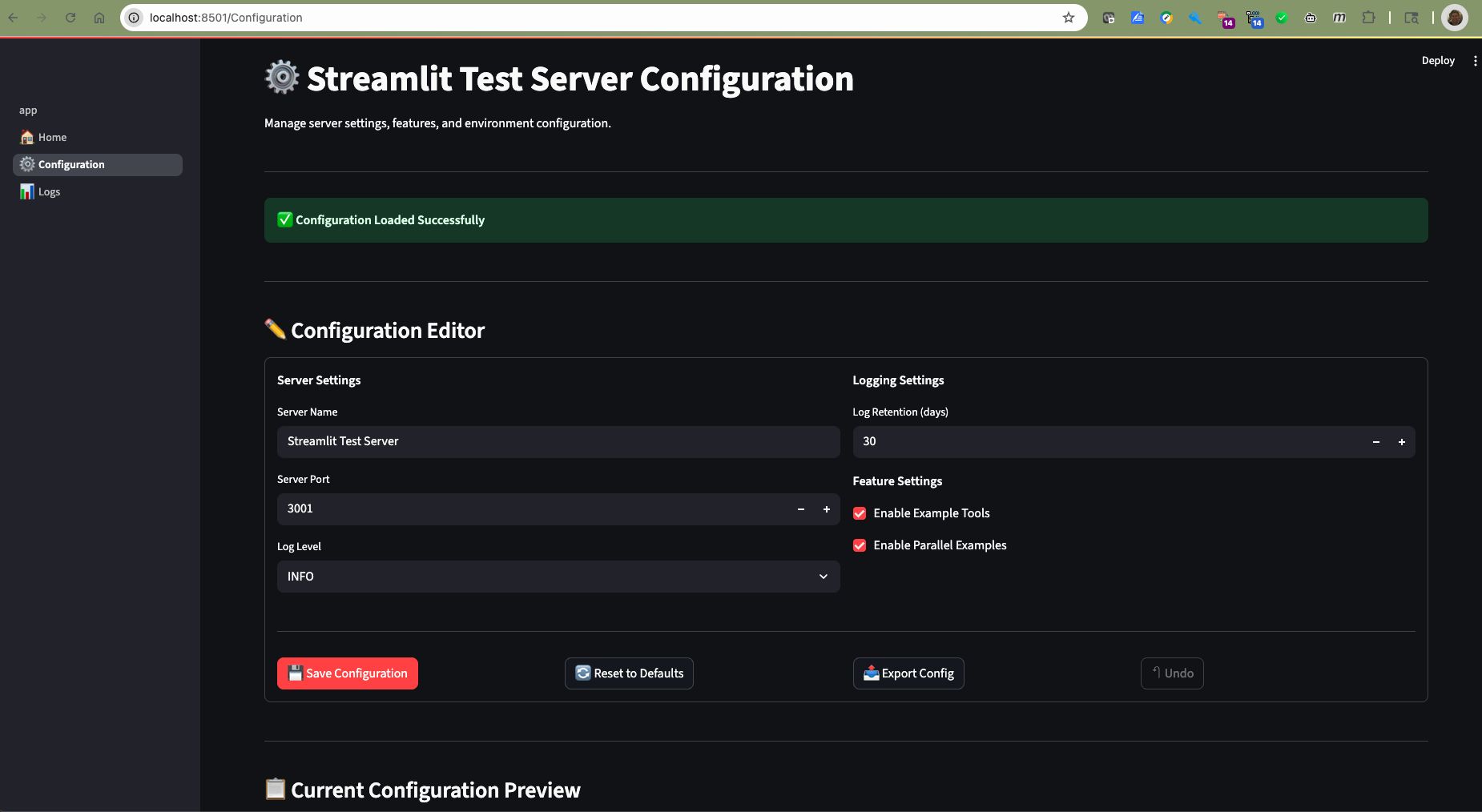
The configuration editor features:
Live configuration editing with validation
Diff preview showing pending changes
Export/import functionality (JSON & YAML formats)
Reset to defaults with confirmation dialog
Automatic server restart notifications
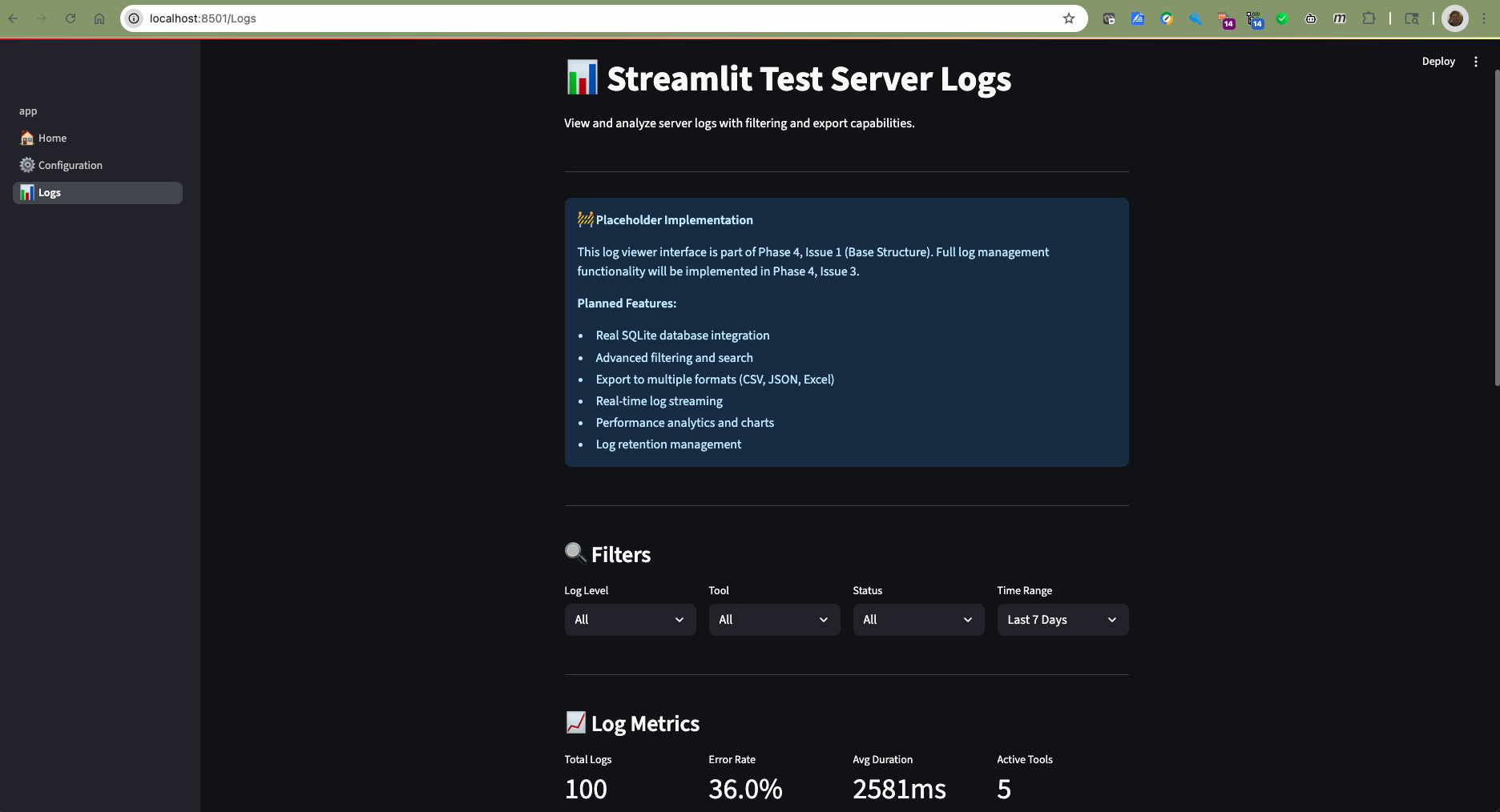
The log viewer includes:
Date range filtering for historical analysis
Status filtering (success/error/all)
Tool-specific filtering
Export capabilities for further analysis
Real-time log updates
When working with this MCP Ahrefs MCP server in an AI coding assistant (like Claude, Cursor, or GitHub Copilot):
This server uses SAAGA decorators that automatically wrap all MCP tools with:
Exception handling: All errors are caught and returned as structured error responses
Comprehensive logging: All tool invocations are logged with timing and parameters
Optional parallelization: Tools marked for parallel execution run concurrently
Tool Registration Pattern: Tools are registered with decorators already applied. Do NOT manually wrap tools with decorators - this is handled automatically in server/app.py.
Parameter Types: MCP passes all parameters as strings from the client. Ensure your tools handle type conversion:
def my_tool(count: str) -> dict:
    # Convert string to int
    count_int = int(count)
    return {"result": count_int * 2}
Error Handling: Tools can raise exceptions freely - the exception_handler decorator will catch them and return proper error responses.
Async Support: Both sync and async tools are supported. The decorators automatically detect and handle both patterns.
Logging: Check logs at the platform-specific data directory for debugging:
macOS: ~/Library/Application Support/mcp_ahrefs/logs.db
Linux: ~/.local/share/mcp_ahrefs/logs.db
Windows: %APPDATA%/mcp_ahrefs/logs.db
Adding a new tool:
# In mcp_ahrefs/tools/my_new_tool.py
def my_new_tool(param: str) -> dict:
    """Description of what this tool does."""
    # Implementation
    return {"result": "processed"}

# In mcp_ahrefs/tools/__init__.py
from .my_new_tool import my_new_tool
example_tools.append(my_new_tool)
Testing with MCP Inspector:
# From the project root
uv run mcp dev mcp_ahrefs/server/app.py
Debugging a tool:
Check the SQLite logs for error messages
Run with --log-level DEBUG for verbose output
Test directly with MCP Inspector to see parameter handling
The server uses the standard MCP SDK (from mcp.server.fastmcp import FastMCP)
Function signatures are preserved through careful decorator implementation
The register_tools() function in server/app.py handles all decorator application
Tools should return JSON-serializable Python objects (dict, list, str, int, etc.)
Configuration files are stored in platform-specific locations:
macOS: ~/Library/Application Support/mcp_ahrefs/
Linux: ~/.local/share/mcp_ahrefs/
Windows: %APPDATA%/mcp_ahrefs/
log_level: Logging level (INFO)
log_retention_days: Days to retain logs (30)
server_port: HTTP server port (3001)
mcp_ahrefs/
├── mcp_ahrefs/
│   ├── config.py              # Platform-aware configuration
│   ├── server/
│   │   └── app.py             # FastMCP server with decorators
│   ├── tools/                 # Your MCP tools
│   ├── decorators/            # SAAGA decorators
│   └── ui/                    # Streamlit admin UI
├── tests/                     # Test suite
├── docs/                      # Documentation
└── pyproject.toml # Project configurationCreate a new Python file in mcp_ahrefs/tools/
Define your tool function
Import and register it in server/app.py
Example:
# mcp_ahrefs/tools/my_tool.py
def my_tool(message: str) -> str:
    """Example MCP tool."""
    return f"Processed: {message}"

# The server will automatically apply SAAGA decoratorspytest tests/This project uses several code quality tools:
# Format code
black mcp_ahrefs/
isort mcp_ahrefs/

# Lint code
flake8 mcp_ahrefs/
mypy mcp_ahrefs/This server automatically applies three key decorators to your MCP tools:
Exception Handler: Graceful error handling with logging
Tool Logger: Comprehensive logging to SQLite database
Parallelize: Optional parallel processing for compute-intensive tools
Logs are stored in a SQLite database with the following schema:
timestamp: When the tool was called
tool_name: Name of the MCP tool
duration_ms: Execution time in milliseconds
status: Success/failure status
input_args: Tool input arguments
output_summary: Summary of tool output
error_message: Error details (if any)
Fork the repository
Create a feature branch
Make your changes
Add tests for new functionality
Run the test suite
Submit a pull request
This project is licensed under the MIT License - see the LICENSE file for details.
For issues and questions:
Create an issue on GitHub
Check the documentation in the docs/ directory
Review the test suite for usage examples
FastMCP for the MCP framework
SAAGA for the decorator patterns
Cookiecutter for the templating system
Calculate the nth Fibonacci number.
This is a more computationally intensive example that demonstrates
how tools can handle more complex operations.

Args:
    n: The position in the Fibonacci sequence (must be >= 0)

Returns:
    Dictionary containing the Fibonacci number and calculation info
| Name | Required | Description | Default |
|---|---|---|---|
| n | Yes |
| Name | Required | Description |
|---|---|---|
| result | Yes |
Does the description disclose side effects, auth requirements, rate limits, or destructive behavior?
With no annotations provided, the description carries full burden for behavioral disclosure. It mentions computational intensity but doesn't address performance characteristics, error handling, input validation beyond the n>=0 constraint, or system impact. Significant behavioral gaps remain.
Agents need to know what a tool does to the world before calling it. Descriptions should go beyond structured annotations to explain consequences.
Is the description appropriately sized, front-loaded, and free of redundancy?
Well-structured with purpose statement, context note, and clear Args/Returns sections. The 'computationally intensive' sentence could be more integrated but doesn't significantly detract from overall efficiency.
Shorter descriptions cost fewer tokens and are easier for agents to parse. Every sentence should earn its place.
Given the tool's complexity, does the description cover enough for an agent to succeed on first attempt?
For a single-parameter mathematical function with output schema, the description covers basics adequately but lacks context about performance trade-offs, typical use cases, or how it differs from similar computational tools. The presence of an output schema reduces but doesn't eliminate the need for more operational context.
Complex tools with many parameters or behaviors need more documentation. Simple tools need less. This dimension scales expectations accordingly.
Does the description clarify parameter syntax, constraints, interactions, or defaults beyond what the schema provides?
With 0% schema description coverage and only 1 parameter, the description fully compensates by clearly explaining n as 'position in the Fibonacci sequence' with the constraint 'must be >= 0'. This adds essential meaning beyond the bare schema.
Input schemas describe structure but not intent. Descriptions should explain non-obvious parameter relationships and valid value ranges.
Does the description clearly state what the tool does and how it differs from similar tools?
The description clearly states the tool's purpose with specific verb ('calculate') and resource ('nth Fibonacci number'), distinguishing it from siblings like echo_tool or get_time. It precisely defines what mathematical operation it performs.
Agents choose between tools based on descriptions. A clear purpose with a specific verb and resource helps agents select the right tool.
Does the description explain when to use this tool, when not to, or what alternatives exist?
No guidance is provided about when to use this tool versus alternatives like simulate_heavy_computation or process_batch_data. The description mentions it's 'computationally intensive' but doesn't specify appropriate contexts or exclusions.
Agents often have multiple tools that could apply. Explicit usage guidance like "use X instead of Y when Z" prevents misuse.
Echo back the input message.
This is a simple example tool that demonstrates basic MCP tool functionality.
It will be automatically decorated with SAAGA decorators for exception handling
and logging.

Args:
    message: The message to echo back

Returns:
    The echoed message with a prefix
| Name | Required | Description | Default |
|---|---|---|---|
| message | Yes |
| Name | Required | Description |
|---|---|---|
| result | Yes |
Does the description disclose side effects, auth requirements, rate limits, or destructive behavior?
With no annotations provided, the description carries the full burden of behavioral disclosure. It mentions the tool will be 'automatically decorated with SAAGA decorators for exception handling and logging,' which adds useful context about error handling. However, it doesn't disclose performance characteristics, rate limits, or other behavioral traits beyond basic functionality.
Agents need to know what a tool does to the world before calling it. Descriptions should go beyond structured annotations to explain consequences.
Is the description appropriately sized, front-loaded, and free of redundancy?
The description is appropriately sized and well-structured with clear sections (purpose, context, args, returns). Every sentence earns its place, though the SAAGA decorator explanation could be considered slightly extraneous for a simple tool description. It's front-loaded with the core functionality.
Shorter descriptions cost fewer tokens and are easier for agents to parse. Every sentence should earn its place.
Given the tool's complexity, does the description cover enough for an agent to succeed on first attempt?
Given the tool's simplicity (single parameter, no annotations, but has output schema), the description is reasonably complete. It explains what the tool does, documents the parameter, and describes the return value. The output schema existence means the description doesn't need to fully explain return values, but it still provides helpful context about the prefix addition.
Complex tools with many parameters or behaviors need more documentation. Simple tools need less. This dimension scales expectations accordingly.
Does the description clarify parameter syntax, constraints, interactions, or defaults beyond what the schema provides?
The schema description coverage is 0%, so the description must compensate. It explicitly documents the single parameter ('message: The message to echo back') and provides return value information ('The echoed message with a prefix'), adding meaningful semantics beyond what the bare schema provides. This adequately compensates for the lack of schema descriptions.
Input schemas describe structure but not intent. Descriptions should explain non-obvious parameter relationships and valid value ranges.
Does the description clearly state what the tool does and how it differs from similar tools?
The description clearly states the tool's purpose with a specific verb ('echo back') and resource ('input message'), distinguishing it from siblings like 'calculate_fibonacci' or 'get_time' which perform different operations. The first sentence directly explains what the tool does without being tautological.
Agents choose between tools based on descriptions. A clear purpose with a specific verb and resource helps agents select the right tool.
Does the description explain when to use this tool, when not to, or what alternatives exist?
The description provides no guidance on when to use this tool versus alternatives like 'simulate_heavy_computation' or 'process_batch_data'. It only mentions it's a 'simple example tool' but doesn't specify appropriate use cases or exclusions, leaving the agent without context for tool selection.
Agents often have multiple tools that could apply. Explicit usage guidance like "use X instead of Y when Z" prevents misuse.
Get the current time.
Returns the current time in a human-readable format.

Returns:
    Current time as a string
| Name | Required | Description | Default |
|---|---|---|---|
No parameters | |||
| Name | Required | Description |
|---|---|---|
| result | Yes |
Does the description disclose side effects, auth requirements, rate limits, or destructive behavior?
No annotations are provided, so the description carries the full burden. It discloses that the tool returns the current time in a human-readable format as a string, which is basic behavioral information. However, it lacks details on potential traits like timezone handling, latency, or error conditions. The description does not contradict annotations, but it provides minimal behavioral context beyond the core functionality.
Agents need to know what a tool does to the world before calling it. Descriptions should go beyond structured annotations to explain consequences.
Is the description appropriately sized, front-loaded, and free of redundancy?
The description is appropriately sized and front-loaded: it starts with the core purpose ('Get the current time.'), followed by return format details. Each sentence earns its place by clarifying the output without redundancy. It is concise and well-structured for a simple tool.
Shorter descriptions cost fewer tokens and are easier for agents to parse. Every sentence should earn its place.
Given the tool's complexity, does the description cover enough for an agent to succeed on first attempt?
Given the tool's low complexity (0 parameters, no annotations, but has an output schema), the description is complete enough. It explains what the tool does and the return format, and since an output schema exists, it does not need to detail return values further. However, it could improve by adding minor context like timezone information, but it meets most needs for this simple tool.
Complex tools with many parameters or behaviors need more documentation. Simple tools need less. This dimension scales expectations accordingly.
Does the description clarify parameter syntax, constraints, interactions, or defaults beyond what the schema provides?
The tool has 0 parameters, and the input schema has 100% description coverage (though empty). The description does not need to add parameter semantics, as there are none. According to the rules, for 0 parameters, the baseline is 4, as the description adequately covers the lack of inputs without unnecessary detail.
Input schemas describe structure but not intent. Descriptions should explain non-obvious parameter relationships and valid value ranges.
Does the description clearly state what the tool does and how it differs from similar tools?
The description clearly states the tool's purpose: 'Get the current time' and 'Returns the current time in a human-readable format.' This is a specific verb ('Get') and resource ('current time'), but it does not explicitly distinguish from sibling tools like 'calculate_fibonacci' or 'random_number', which serve different purposes. The purpose is unambiguous but lacks sibling differentiation.
Agents choose between tools based on descriptions. A clear purpose with a specific verb and resource helps agents select the right tool.
Does the description explain when to use this tool, when not to, or what alternatives exist?
The description provides no guidance on when to use this tool versus alternatives. It does not mention any context, prerequisites, or exclusions for usage. With sibling tools like 'echo_tool' or 'simulate_heavy_computation', there is no indication of when 'get_time' is preferred, leaving the agent without usage instructions.
Agents often have multiple tools that could apply. Explicit usage guidance like "use X instead of Y when Z" prevents misuse.
Parallelized version of process_batch_data.
This function accepts a list of keyword argument dictionaries and executes
process_batch_data concurrently for each set of arguments.
Original function signature: process_batch_data(items: List, operation: str)
Args:
kwargs_list (List[Dict[str, Any]]): A list of dictionaries, where each
dictionary provides the keyword arguments
for a single call to process_batch_data.
Returns:
List[Any]: A list containing the results of each call to process_batch_data,
in the same order as the input kwargs_list.
Original docstring: Process a batch of data items.
This is an example of a tool that benefits from parallelization.
It will be automatically decorated with the parallelize decorator
in addition to exception handling and logging.

Args:
    items: List of strings to process
    operation: Operation to perform ('upper', 'lower', 'reverse')

Returns:
    Processed items with metadata
| Name | Required | Description | Default |
|---|---|---|---|
| kwargs_list | Yes |
| Name | Required | Description |
|---|---|---|
| result | Yes |
Does the description disclose side effects, auth requirements, rate limits, or destructive behavior?
With no annotations provided, the description carries the full burden. It discloses that the tool is 'automatically decorated with the parallelize decorator in addition to exception handling and logging,' which adds valuable behavioral context beyond basic functionality. However, it lacks details on error handling specifics, performance characteristics, or resource usage.
Agents need to know what a tool does to the world before calling it. Descriptions should go beyond structured annotations to explain consequences.
Is the description appropriately sized, front-loaded, and free of redundancy?
The description is appropriately sized but not optimally structured. It front-loads the parallelization aspect but includes redundant information like the original docstring, which could be condensed. Some sentences (e.g., about automatic decoration) earn their place, but others could be more streamlined.
Shorter descriptions cost fewer tokens and are easier for agents to parse. Every sentence should earn its place.
Given the tool's complexity, does the description cover enough for an agent to succeed on first attempt?
Given the tool's complexity (parallel processing), no annotations, and an output schema present, the description is fairly complete. It covers purpose, parameters, returns, and behavioral traits like parallelization and logging. However, it could benefit from more details on error propagation or concurrency limits to be fully comprehensive.
Complex tools with many parameters or behaviors need more documentation. Simple tools need less. This dimension scales expectations accordingly.
Does the description clarify parameter syntax, constraints, interactions, or defaults beyond what the schema provides?
Schema description coverage is 0%, but the description compensates well by explaining that `kwargs_list` is a list of dictionaries providing keyword arguments for calls to `process_batch_data`. It also references the original function's parameters (`items` and `operation`), adding meaning beyond the minimal schema. With only one parameter, this is above the baseline of 3.
Input schemas describe structure but not intent. Descriptions should explain non-obvious parameter relationships and valid value ranges.
Does the description clearly state what the tool does and how it differs from similar tools?
The description clearly states this is a 'parallelized version' of `process_batch_data` that executes calls concurrently, which is a specific verb+resource combination. It distinguishes itself from the original function by emphasizing parallelization, though it doesn't explicitly differentiate from sibling tools like `simulate_heavy_computation`.
Agents choose between tools based on descriptions. A clear purpose with a specific verb and resource helps agents select the right tool.
Does the description explain when to use this tool, when not to, or what alternatives exist?
The description implies usage when parallelization is beneficial for processing multiple data batches, as noted in the original docstring. However, it doesn't provide explicit guidance on when to use this tool versus alternatives like `simulate_heavy_computation` or when not to use it (e.g., for single operations).
Agents often have multiple tools that could apply. Explicit usage guidance like "use X instead of Y when Z" prevents misuse.
Generate a random number within a specified range.
Args:
    min_value: Minimum value (default: 1)
    max_value: Maximum value (default: 100)

Returns:
    Dictionary containing the random number and range info
| Name | Required | Description | Default |
|---|---|---|---|
| min_value | No | ||
| max_value | No |
| Name | Required | Description |
|---|---|---|
| result | Yes |
Does the description disclose side effects, auth requirements, rate limits, or destructive behavior?
With no annotations provided, the description carries the full burden of behavioral disclosure. It mentions the return format ('Dictionary containing the random number and range info'), which adds value beyond the input schema. However, it doesn't cover aspects like whether the tool is deterministic, has rate limits, or requires specific permissions, leaving gaps in behavioral context.
Agents need to know what a tool does to the world before calling it. Descriptions should go beyond structured annotations to explain consequences.
Is the description appropriately sized, front-loaded, and free of redundancy?
The description is appropriately sized and front-loaded, starting with the core purpose. The structured 'Args' and 'Returns' sections are efficient, but the repetition of default values in both the description and schema could be slightly streamlined. Overall, it's concise with minimal waste.
Shorter descriptions cost fewer tokens and are easier for agents to parse. Every sentence should earn its place.
Given the tool's complexity, does the description cover enough for an agent to succeed on first attempt?
Given the tool's low complexity, 2 parameters, no annotations, and the presence of an output schema (which handles return values), the description is mostly complete. It covers the purpose, parameters, and return format adequately. However, it could improve by addressing behavioral traits like randomness characteristics or error handling for invalid ranges.
Complex tools with many parameters or behaviors need more documentation. Simple tools need less. This dimension scales expectations accordingly.
Does the description clarify parameter syntax, constraints, interactions, or defaults beyond what the schema provides?
The description adds meaningful semantics beyond the input schema, which has 0% description coverage. It explains that 'min_value' is the 'Minimum value' and 'max_value' is the 'Maximum value', including default values, which compensates for the schema's lack of descriptions. Since there are only 2 parameters, this is sufficient for a high score, though it doesn't detail constraints like integer-only inputs.
Input schemas describe structure but not intent. Descriptions should explain non-obvious parameter relationships and valid value ranges.
Does the description clearly state what the tool does and how it differs from similar tools?
The description clearly states the tool's purpose with a specific verb ('Generate') and resource ('random number'), and distinguishes it from siblings by focusing on random number generation rather than calculation, time retrieval, or data processing. It precisely communicates what the tool does without being vague or tautological.
Agents choose between tools based on descriptions. A clear purpose with a specific verb and resource helps agents select the right tool.
Does the description explain when to use this tool, when not to, or what alternatives exist?
The description provides no guidance on when to use this tool versus alternatives like 'calculate_fibonacci' or 'simulate_heavy_computation'. It lacks explicit context, exclusions, or comparisons with sibling tools, leaving the agent without usage direction beyond the basic purpose.
Agents often have multiple tools that could apply. Explicit usage guidance like "use X instead of Y when Z" prevents misuse.
Parallelized version of simulate_heavy_computation.
This function accepts a list of keyword argument dictionaries and executes
simulate_heavy_computation concurrently for each set of arguments.
Original function signature: simulate_heavy_computation(complexity: int)
Args:
kwargs_list (List[Dict[str, Any]]): A list of dictionaries, where each
dictionary provides the keyword arguments
for a single call to simulate_heavy_computation.
Returns:
List[Any]: A list containing the results of each call to simulate_heavy_computation,
in the same order as the input kwargs_list.
Original docstring: Simulate a heavy computation task.
This tool demonstrates parallelization benefits by performing
a computationally intensive task that can be parallelized.

Args:
    complexity: Complexity level (1-10, higher = more computation)

Returns:
    Dictionary containing computation results
| Name | Required | Description | Default |
|---|---|---|---|
| kwargs_list | Yes |
| Name | Required | Description |
|---|---|---|
| result | Yes |
Does the description disclose side effects, auth requirements, rate limits, or destructive behavior?
No annotations are provided, so the description carries the full burden. It mentions 'parallelized' and 'concurrently,' which hints at performance benefits, but lacks details on behavioral traits like error handling, resource usage, rate limits, or whether it's read-only/destructive. The original docstring included in the description adds some context about simulating heavy computation, but overall disclosure is minimal for a tool with potential computational impacts.
Agents need to know what a tool does to the world before calling it. Descriptions should go beyond structured annotations to explain consequences.
Is the description appropriately sized, front-loaded, and free of redundancy?
The description is moderately concise but includes redundant elements like the original docstring, which repeats information. It's front-loaded with key points but could be more streamlined by integrating the original details more efficiently without duplication.
Shorter descriptions cost fewer tokens and are easier for agents to parse. Every sentence should earn its place.
Given the tool's complexity, does the description cover enough for an agent to succeed on first attempt?
Given the complexity (parallel computation tool), no annotations, and an output schema exists (implied by 'Has output schema: true'), the description is fairly complete. It covers purpose, parameters, and returns, but lacks behavioral context like performance implications or error handling, which would be beneficial for a tool of this nature.
Complex tools with many parameters or behaviors need more documentation. Simple tools need less. This dimension scales expectations accordingly.
Does the description clarify parameter syntax, constraints, interactions, or defaults beyond what the schema provides?
Schema description coverage is 0%, but the description compensates well by explaining that 'kwargs_list' is a list of dictionaries where each provides keyword arguments for the original function, and it references the original signature with 'complexity: int.' This adds significant meaning beyond the bare schema, though it doesn't fully detail all possible keyword arguments or their constraints.
Input schemas describe structure but not intent. Descriptions should explain non-obvious parameter relationships and valid value ranges.
Does the description clearly state what the tool does and how it differs from similar tools?
The description clearly states this is a 'parallelized version' that 'executes simulate_heavy_computation concurrently for each set of arguments,' which is a specific verb+resource combination. It distinguishes itself from the original function but doesn't explicitly differentiate from sibling tools like 'process_batch_data' or 'calculate_fibonacci,' which might also involve computation.
Agents choose between tools based on descriptions. A clear purpose with a specific verb and resource helps agents select the right tool.
Does the description explain when to use this tool, when not to, or what alternatives exist?
The description implies usage for parallelizing multiple calls to the original function, but doesn't explicitly state when to use this vs. alternatives like the original function or other sibling tools. No exclusions or specific contexts are provided, leaving usage somewhat ambiguous.
Agents often have multiple tools that could apply. Explicit usage guidance like "use X instead of Y when Z" prevents misuse.
Recent tool additions, removals, and schema changes observed during successful MCP inspections.
calculate_fibonacciecho_toolget_timeprocess_batch_datarandom_numbersimulate_heavy_computationScored across 6 tools
Multiple tools have overlapping computational purposes that could cause confusion. calculate_fibonacci and simulate_heavy_computation both perform intensive calculations, while process_batch_data and simulate_heavy_computation both offer parallelized processing. The echo_tool and get_time are distinct but the computational tools lack clear boundaries.
Most tools follow a consistent verb_noun naming pattern (calculate_fibonacci, echo_tool, get_time, process_batch_data, random_number, simulate_heavy_computation). The only minor deviation is 'echo_tool' using 'tool' as a suffix while others don't, but overall the naming is quite predictable.
With 6 tools, the count is reasonable for a utility server, but feels borderline thin for a server named 'MCP Ahrefs' which suggests SEO/web analytics functionality. These generic utility tools don't align well with the implied domain, making the count feel mismatched to the server name.
For a server named 'MCP Ahrefs' (implying SEO/backlink analytics), there are significant gaps - no tools for domain analysis, backlink checking, keyword research, or any actual Ahrefs-like functionality. As a generic utility set, it lacks coherent coverage of any specific domain, making it incomplete for any focused purpose.
Audit, rank-track and analyze SEO for sites via an authenticated MCP server.
Ahrefs: Ahrefs API: SEO powerhouse featuring keyword research, backlink analysis, and SERP tracking.
SEO Backlinks MCP — backlink intelligence via DataForSEO Backlinks API
SEO MCP: Search Console, GA4, SERP and domain data, rank tracking, AI citations and site fixes.