


A
licenseB
qualityF
maintenanceA Model Context Protocol server that enables Claude to execute Python code using boto3 to query and manage AWS resources directly from conversations.
1
24
MIT

模型上下文协议 (MCP)服务器,使 Claude 等 AI 助手能够与您的 AWS 环境进行交互。这允许在对话过程中使用自然语言查询和管理您的 AWS 资源。想想 Amazon Q 更好的替代方案吧。

🔍 使用自然语言查询和修改 AWS 资源
☁️ 支持多个 AWS 配置文件和 SSO 身份验证
🌐 多区域支持
🔐 安全凭证处理(没有凭证暴露给外部服务,使用您的本地凭证)
🏃♂️ 使用您的 AWS 凭证进行本地执行
Related MCP server: AWS MCP Server
克隆存储库:
git clone https://github.com/RafalWilinski/aws-mcp
cd aws-mcp
安装依赖项:
pnpm install
# or
npm install打开 Claude 桌面应用程序并转到“设置”->“开发者”->“编辑配置”
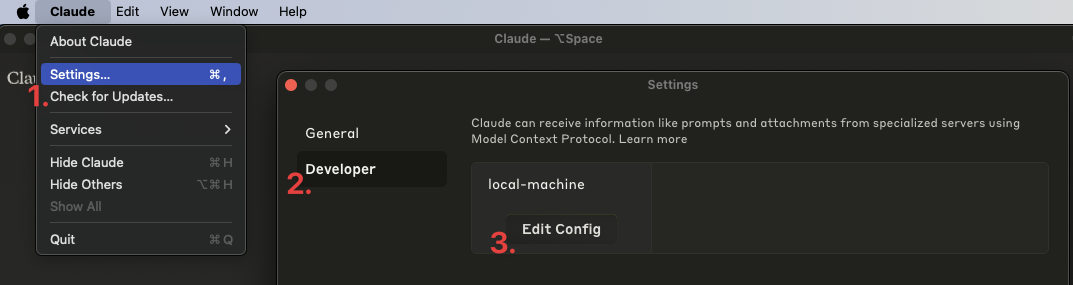
将以下条目添加到您的claude_desktop_config.json中:
{
  "mcpServers": {
    "aws": {
      "command": "npm", // OR pnpm
      "args": [
        "--silent",
        "--prefix",
        "/Users/<YOUR USERNAME>/aws-mcp",
        "start"
      ]
    }
  }
}重要提示:将/Users/<YOUR USERNAME>/aws-mcp替换为您的项目目录的实际路径。
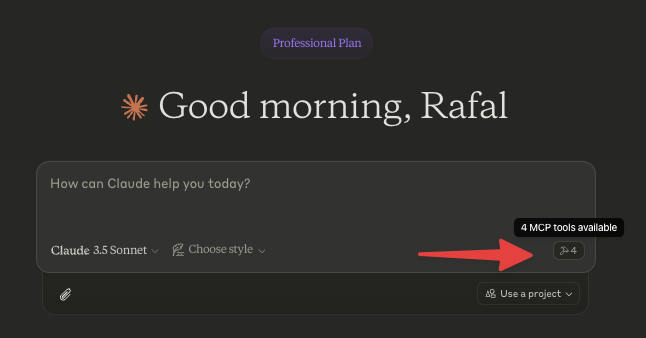
重启 Claude 桌面应用。你应该会看到如下内容:
首先选择一个 AWS 配置文件,或者通过询问以下问题来采取行动:
“列出可用的 AWS 配置文件”
“列出我账户中的所有 EC2 实例”
“显示 S3 存储桶及其大小”
“us-east-1 部署了哪些 Lambda 函数?”
“列出所有 ECS 集群及其服务”
nvm一起使用首先从源代码构建并添加以下配置:
{
  "mcpServers": {
    "aws": {
      "command": "/Users/<USERNAME>/.nvm/versions/node/v20.10.0/bin/node",
      "args": [
        "<WORKSPACE_PATH>/aws-mcp/node_modules/tsx/dist/cli.mjs",
        "<WORKSPACE_PATH>/aws-mcp/index.ts",
        "--prefix",
        "<WORKSPACE_PATH>/aws-mcp",
        "start"
      ]
    }
  }
}查看日志:
tail -n 50 -f ~/Library/Logs/Claude/mcp-server-aws.log
# or
tail -n 50 -f ~/Library/Logs/Claude/mcp.log[ ] MFA 支持
[ ] 缓存 SSO 凭证以防止过于急切地刷新它们
List all AWS credentials/configs/profiles that are configured/usable on this machine
| Name | Required | Description | Default |
|---|---|---|---|
No parameters | |||
Does the description disclose side effects, auth requirements, rate limits, or destructive behavior?
No annotations are provided, so the description carries the full burden of behavioral disclosure. It implies a read-only operation by using 'List,' but doesn't specify if it requires permissions, how it handles errors, or what the output format looks like. For a tool with zero annotation coverage, this lack of detail on behavior is a notable shortfall.
Agents need to know what a tool does to the world before calling it. Descriptions should go beyond structured annotations to explain consequences.
Is the description appropriately sized, front-loaded, and free of redundancy?
The description is a single, efficient sentence that directly states the tool's function without any fluff. It is front-loaded with the core action and resource, making it easy to parse. Every word contributes to understanding the purpose, earning a top score for conciseness.
Shorter descriptions cost fewer tokens and are easier for agents to parse. Every sentence should earn its place.
Given the tool's complexity, does the description cover enough for an agent to succeed on first attempt?
Given the tool's simplicity (0 parameters, no output schema, no annotations), the description is adequate but has clear gaps. It explains what the tool does but lacks details on usage guidelines, behavioral traits, and output format. For a basic list tool, this is minimally viable but could be more complete by addressing when to use it and what to expect in return.
Complex tools with many parameters or behaviors need more documentation. Simple tools need less. This dimension scales expectations accordingly.
Does the description clarify parameter syntax, constraints, interactions, or defaults beyond what the schema provides?
The tool has 0 parameters, and schema description coverage is 100%, so there are no parameters to document. The description doesn't need to add parameter semantics, but it does imply the scope ('on this machine'), which is useful context. Baseline for 0 parameters is 4, as the description adequately covers the tool's intent without unnecessary parameter details.
Input schemas describe structure but not intent. Descriptions should explain non-obvious parameter relationships and valid value ranges.
Does the description clearly state what the tool does and how it differs from similar tools?
The description clearly states the tool's purpose: 'List all AWS credentials/configs/profiles that are configured/usable on this machine.' It specifies the verb ('List') and resource ('AWS credentials/configs/profiles'), making the action explicit. However, it does not explicitly differentiate from sibling tools like 'select-profile' or 'run-aws-code', which could involve similar resources, so it doesn't reach a perfect score.
Agents choose between tools based on descriptions. A clear purpose with a specific verb and resource helps agents select the right tool.
Does the description explain when to use this tool, when not to, or what alternatives exist?
The description provides no guidance on when to use this tool versus alternatives. It doesn't mention sibling tools or contexts where this tool is preferred, such as for inventory purposes before selecting a profile. Without any usage context, the agent must infer when to invoke it, which is a significant gap.
Agents often have multiple tools that could apply. Explicit usage guidance like "use X instead of Y when Z" prevents misuse.
Run AWS code
| Name | Required | Description | Default |
|---|---|---|---|
| code | Yes | Your job is to answer questions about AWS environment by writing Javascript code using AWS SDK V2. The code must be adhering to a few rules: - Must be preferring promises over callbacks - Think step-by-step before writing the code, approach it logically - MUST written in Javascript (NodeJS) using AWS-SDK V2 - Avoid hardcoded values like ARNs - Code written should be as parallel as possible enabling the fastest and the most optimal execution - Code should be handling errors gracefully, especially when doing multiple SDK calls (e.g. when mapping over an array). Each error should be handled and logged with a reason, script should continue to run despite errors - DO NOT require or import "aws-sdk", it is already available as "AWS" variable - Access to 3rd party libraries apart from "aws-sdk" is not allowed or possible - For base64 encoding, use btoa() function instead of Buffer (Buffer is not available in this environment) - Data returned from AWS-SDK must be returned as JSON containing only the minimal amount of data that is needed to answer the question. All extra data must be filtered out - Code MUST "return" a value: string, number, boolean or JSON object. If code does not return anything, it will be considered as FAILED - Whenever tool/function call fails, retry it 3 times before giving up with an improved version of the code based on the returned feedback - When listing resources, ensure pagination is handled correctly so that all resources are returned - Do not include any comments in the code - When doing reduce, don't forget to provide an initial value - Try to write code that returns as few data as possible to answer without any additional processing required after the code is run - This tool can ONLY write code that interacts with AWS. It CANNOT generate charts, tables, graphs, etc. Please use artifacts for that instead Be concise, professional and to the point. Do not give generic advice, always reply with detailed & contextual data sourced from the current AWS environment. Assume user always wants to proceed, do not ask for confirmation. I'll tip you $200 if you do this right. | |
| profileName | No | Name of the AWS profile to use | |
| reasoning | Yes | The reasoning behind the code | |
| region | No | Region to use (if not provided, us-east-1 is used) |
Does the description disclose side effects, auth requirements, rate limits, or destructive behavior?
With no annotations provided, the description carries the full burden of behavioral disclosure but offers minimal information. 'Run AWS code' doesn't reveal whether this is a read or write operation, what permissions are required, whether it has side effects, or what happens on failure. The extensive rules in the schema's code parameter description are implementation requirements rather than behavioral characteristics of the tool itself.
Agents need to know what a tool does to the world before calling it. Descriptions should go beyond structured annotations to explain consequences.
Is the description appropriately sized, front-loaded, and free of redundancy?
The description is extremely concise at just three words, with zero wasted space. It's front-loaded with the essential information (though that information is inadequate). There are no unnecessary sentences or redundant phrasing to critique from a conciseness perspective.
Shorter descriptions cost fewer tokens and are easier for agents to parse. Every sentence should earn its place.
Given the tool's complexity, does the description cover enough for an agent to succeed on first attempt?
For a tool with 4 parameters, no annotations, and no output schema, the description is completely inadequate. It doesn't explain what the tool does, when to use it, what behaviors to expect, or what results it produces. The extensive rules in the schema's code parameter description don't compensate for the missing contextual information about the tool's purpose and operation.
Complex tools with many parameters or behaviors need more documentation. Simple tools need less. This dimension scales expectations accordingly.
Does the description clarify parameter syntax, constraints, interactions, or defaults beyond what the schema provides?
The description adds no parameter semantics beyond what's already in the schema, which has 100% coverage with detailed descriptions for all four parameters. The baseline score of 3 reflects that the schema does the heavy lifting, though the tool description itself contributes nothing additional about parameter meaning or usage.
Input schemas describe structure but not intent. Descriptions should explain non-obvious parameter relationships and valid value ranges.
Does the description clearly state what the tool does and how it differs from similar tools?
The description 'Run AWS code' is a tautology that merely restates the tool name without specifying what the tool actually does. It doesn't explain that this tool executes JavaScript code against AWS environments using the AWS SDK, nor does it differentiate from sibling tools like list-credentials or select-profile. The description fails to provide a clear verb+resource combination that would help an agent understand the tool's function.
Agents choose between tools based on descriptions. A clear purpose with a specific verb and resource helps agents select the right tool.
Does the description explain when to use this tool, when not to, or what alternatives exist?
The description provides no guidance on when to use this tool versus alternatives. There's no mention of prerequisites, appropriate contexts, or exclusions. While the input schema's code parameter description contains extensive implementation rules, these are technical constraints rather than usage guidelines for an AI agent deciding when to invoke this tool versus other AWS-related tools.
Agents often have multiple tools that could apply. Explicit usage guidance like "use X instead of Y when Z" prevents misuse.
Selects AWS profile to use for subsequent interactions. If needed, does SSO authentication
| Name | Required | Description | Default |
|---|---|---|---|
| profile | Yes | Name of the AWS profile to select | |
| region | No | Region to use (if not provided, us-east-1 is used) |
Does the description disclose side effects, auth requirements, rate limits, or destructive behavior?
With no annotations provided, the description carries the full burden of behavioral disclosure. It adds useful context about SSO authentication ('If needed, does SSO authentication'), which is not inferable from the input schema. However, it lacks details on side effects (e.g., whether this persists across sessions), error handling, or what 'subsequent interactions' specifically entails, leaving gaps in behavioral understanding.
Agents need to know what a tool does to the world before calling it. Descriptions should go beyond structured annotations to explain consequences.
Is the description appropriately sized, front-loaded, and free of redundancy?
The description is extremely concise (two short sentences) and front-loaded with the primary purpose. Every word earns its place, with no redundant or vague phrasing, making it efficient and easy to parse.
Shorter descriptions cost fewer tokens and are easier for agents to parse. Every sentence should earn its place.
Given the tool's complexity, does the description cover enough for an agent to succeed on first attempt?
Given the tool's moderate complexity (configures context for AWS operations) and lack of annotations or output schema, the description is mostly complete. It covers the purpose, conditional SSO behavior, and usage context. However, it misses details on return values or error cases, which could be important for a tool that sets state, slightly reducing completeness.
Complex tools with many parameters or behaviors need more documentation. Simple tools need less. This dimension scales expectations accordingly.
Does the description clarify parameter syntax, constraints, interactions, or defaults beyond what the schema provides?
The schema description coverage is 100%, so the schema already fully documents both parameters ('profile' and 'region'). The description does not add any meaning beyond what the schema provides (e.g., it doesn't explain profile naming conventions or region implications), resulting in the baseline score of 3 for adequate but no extra value.
Input schemas describe structure but not intent. Descriptions should explain non-obvious parameter relationships and valid value ranges.
Does the description clearly state what the tool does and how it differs from similar tools?
The description clearly states the specific action ('Selects AWS profile') and resource ('for subsequent interactions'), with explicit mention of SSO authentication as a conditional behavior. It distinguishes from sibling tools like 'list-credentials' (which lists rather than selects) and 'run-aws-code' (which executes code rather than configuring context).
Agents choose between tools based on descriptions. A clear purpose with a specific verb and resource helps agents select the right tool.
Does the description explain when to use this tool, when not to, or what alternatives exist?
The description provides clear context for when to use this tool ('for subsequent interactions') and implies it should be used before other AWS operations. However, it does not explicitly state when not to use it or name alternatives (e.g., when to use 'list-credentials' instead), which prevents a perfect score.
Agents often have multiple tools that could apply. Explicit usage guidance like "use X instead of Y when Z" prevents misuse.
Recent tool additions, removals, and schema changes observed during successful MCP inspections.
v1.0.0list-credentialsrun-aws-codeselect-profileScored across 3 tools
Each tool has a clearly distinct purpose with no overlap: list-credentials handles credential enumeration, run-aws-code executes AWS code, and select-profile manages profile selection and authentication. An agent can easily differentiate between these three functions.
All tool names follow a consistent verb-noun pattern with hyphens (list-credentials, run-aws-code, select-profile), making them predictable and readable throughout the set.
With only 3 tools, the server feels under-scoped for AWS operations, which typically involve many services and actions. This limited set may not support common workflows like managing resources (e.g., S3, EC2) or performing CRUD operations, making it insufficient for the domain.
The tool set is severely incomplete for AWS functionality, lacking core operations such as creating, updating, or deleting resources, querying service status, or handling specific AWS services. This will cause significant agent failures in typical AWS tasks.
A comprehensive Model Context Protocol (MCP) server that enables AI assistants to interact with yo…
Hosted Amazon Seller and Vendor MCP server for Claude, ChatGPT, Cursor, Codex, Gemini, Copilot.
Hosted Amazon Seller Central and Amazon Ads MCP server for Claude, ChatGPT, Cursor, and agents.
Talk to your public-facing AI from any MCP client — Claude, ChatGPT, Cursor, Cline, Windsurf.