


A
licenseB
qualityF
maintenanceA Model Context Protocol server that enables Claude to execute Python code using boto3 to query and manage AWS resources directly from conversations.
1
24
MIT

Claude와 같은 AI 비서가 AWS 환경과 상호 작용할 수 있도록 하는 모델 컨텍스트 프로토콜(MCP) 서버입니다. 이를 통해 대화 중에 AWS 리소스에 대한 자연어 쿼리 및 관리가 가능합니다. 더 나은 Amazon Q 대안을 생각해 보세요.

🔍 자연어를 사용하여 AWS 리소스 쿼리 및 수정
☁️ 여러 AWS 프로필 및 SSO 인증 지원
🌐 다중 지역 지원
🔐 안전한 자격 증명 처리(자격 증명은 외부 서비스에 노출되지 않으며, 로컬 자격 증명이 사용됩니다)
🏃♂️ AWS 자격 증명을 사용한 로컬 실행
Related MCP server: AWS MCP Server
저장소를 복제합니다.
지엑스피1
종속성 설치:
pnpm install
# or
npm installClaude 데스크톱 앱을 열고 설정 -> 개발자 -> 구성 편집으로 이동합니다.
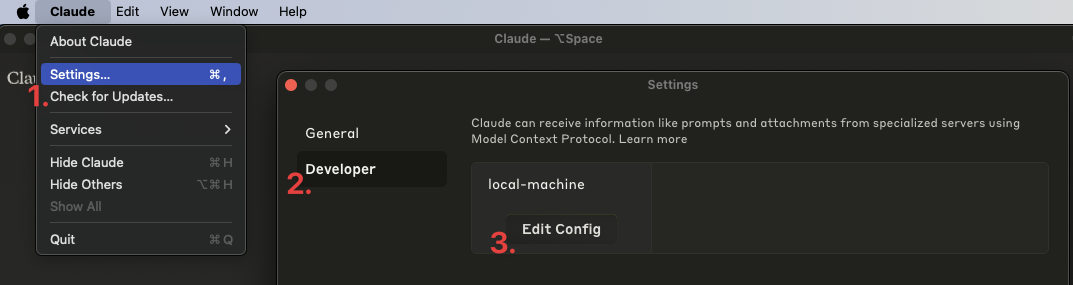
claude_desktop_config.json 에 다음 항목을 추가하세요.
{
  "mcpServers": {
    "aws": {
      "command": "npm", // OR pnpm
      "args": [
        "--silent",
        "--prefix",
        "/Users/<YOUR USERNAME>/aws-mcp",
        "start"
      ]
    }
  }
}
중요: /Users/<YOUR USERNAME>/aws-mcp 프로젝트 디렉토리의 실제 경로로 바꾸세요.
Claude 데스크톱 앱을 다시 시작하세요. 다음과 같은 화면이 표시됩니다.
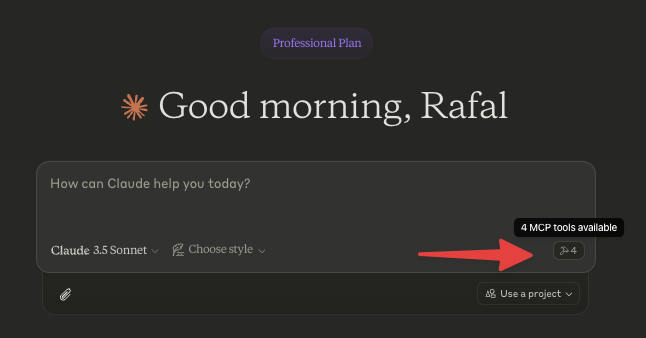
AWS 프로필을 선택하여 시작하거나 다음을 질문하여 작업으로 이동하세요.
"사용 가능한 AWS 프로필 나열"
"내 계정의 모든 EC2 인스턴스 나열"
"S3 버킷과 그 크기를 보여주세요"
"us-east-1에 어떤 람다 함수가 배포되어 있나요?"
"모든 ECS 클러스터와 해당 서비스 나열"
nvm 과 함께 사용먼저 소스에서 빌드하고 다음 구성을 추가합니다.
{
  "mcpServers": {
    "aws": {
      "command": "/Users/<USERNAME>/.nvm/versions/node/v20.10.0/bin/node",
      "args": [
        "<WORKSPACE_PATH>/aws-mcp/node_modules/tsx/dist/cli.mjs",
        "<WORKSPACE_PATH>/aws-mcp/index.ts",
        "--prefix",
        "<WORKSPACE_PATH>/aws-mcp",
        "start"
      ]
    }
  }
}로그를 보려면:
tail -n 50 -f ~/Library/Logs/Claude/mcp-server-aws.log
# or
tail -n 50 -f ~/Library/Logs/Claude/mcp.log[ ] MFA 지원
[ ] SSO 자격 증명을 캐시하여 너무 자주 새로 고치지 않도록 방지합니다.
List all AWS credentials/configs/profiles that are configured/usable on this machine
| Name | Required | Description | Default |
|---|---|---|---|
No parameters | |||
Does the description disclose side effects, auth requirements, rate limits, or destructive behavior?
No annotations are provided, so the description carries the full burden of behavioral disclosure. It implies a read-only operation by using 'List,' but doesn't specify if it requires permissions, how it handles errors, or what the output format looks like. For a tool with zero annotation coverage, this lack of detail on behavior is a notable shortfall.
Agents need to know what a tool does to the world before calling it. Descriptions should go beyond structured annotations to explain consequences.
Is the description appropriately sized, front-loaded, and free of redundancy?
The description is a single, efficient sentence that directly states the tool's function without any fluff. It is front-loaded with the core action and resource, making it easy to parse. Every word contributes to understanding the purpose, earning a top score for conciseness.
Shorter descriptions cost fewer tokens and are easier for agents to parse. Every sentence should earn its place.
Given the tool's complexity, does the description cover enough for an agent to succeed on first attempt?
Given the tool's simplicity (0 parameters, no output schema, no annotations), the description is adequate but has clear gaps. It explains what the tool does but lacks details on usage guidelines, behavioral traits, and output format. For a basic list tool, this is minimally viable but could be more complete by addressing when to use it and what to expect in return.
Complex tools with many parameters or behaviors need more documentation. Simple tools need less. This dimension scales expectations accordingly.
Does the description clarify parameter syntax, constraints, interactions, or defaults beyond what the schema provides?
The tool has 0 parameters, and schema description coverage is 100%, so there are no parameters to document. The description doesn't need to add parameter semantics, but it does imply the scope ('on this machine'), which is useful context. Baseline for 0 parameters is 4, as the description adequately covers the tool's intent without unnecessary parameter details.
Input schemas describe structure but not intent. Descriptions should explain non-obvious parameter relationships and valid value ranges.
Does the description clearly state what the tool does and how it differs from similar tools?
The description clearly states the tool's purpose: 'List all AWS credentials/configs/profiles that are configured/usable on this machine.' It specifies the verb ('List') and resource ('AWS credentials/configs/profiles'), making the action explicit. However, it does not explicitly differentiate from sibling tools like 'select-profile' or 'run-aws-code', which could involve similar resources, so it doesn't reach a perfect score.
Agents choose between tools based on descriptions. A clear purpose with a specific verb and resource helps agents select the right tool.
Does the description explain when to use this tool, when not to, or what alternatives exist?
The description provides no guidance on when to use this tool versus alternatives. It doesn't mention sibling tools or contexts where this tool is preferred, such as for inventory purposes before selecting a profile. Without any usage context, the agent must infer when to invoke it, which is a significant gap.
Agents often have multiple tools that could apply. Explicit usage guidance like "use X instead of Y when Z" prevents misuse.
Run AWS code
| Name | Required | Description | Default |
|---|---|---|---|
| code | Yes | Your job is to answer questions about AWS environment by writing Javascript code using AWS SDK V2. The code must be adhering to a few rules: - Must be preferring promises over callbacks - Think step-by-step before writing the code, approach it logically - MUST written in Javascript (NodeJS) using AWS-SDK V2 - Avoid hardcoded values like ARNs - Code written should be as parallel as possible enabling the fastest and the most optimal execution - Code should be handling errors gracefully, especially when doing multiple SDK calls (e.g. when mapping over an array). Each error should be handled and logged with a reason, script should continue to run despite errors - DO NOT require or import "aws-sdk", it is already available as "AWS" variable - Access to 3rd party libraries apart from "aws-sdk" is not allowed or possible - For base64 encoding, use btoa() function instead of Buffer (Buffer is not available in this environment) - Data returned from AWS-SDK must be returned as JSON containing only the minimal amount of data that is needed to answer the question. All extra data must be filtered out - Code MUST "return" a value: string, number, boolean or JSON object. If code does not return anything, it will be considered as FAILED - Whenever tool/function call fails, retry it 3 times before giving up with an improved version of the code based on the returned feedback - When listing resources, ensure pagination is handled correctly so that all resources are returned - Do not include any comments in the code - When doing reduce, don't forget to provide an initial value - Try to write code that returns as few data as possible to answer without any additional processing required after the code is run - This tool can ONLY write code that interacts with AWS. It CANNOT generate charts, tables, graphs, etc. Please use artifacts for that instead Be concise, professional and to the point. Do not give generic advice, always reply with detailed & contextual data sourced from the current AWS environment. Assume user always wants to proceed, do not ask for confirmation. I'll tip you $200 if you do this right. | |
| profileName | No | Name of the AWS profile to use | |
| reasoning | Yes | The reasoning behind the code | |
| region | No | Region to use (if not provided, us-east-1 is used) |
Does the description disclose side effects, auth requirements, rate limits, or destructive behavior?
With no annotations provided, the description carries the full burden of behavioral disclosure but offers minimal information. 'Run AWS code' doesn't reveal whether this is a read or write operation, what permissions are required, whether it has side effects, or what happens on failure. The extensive rules in the schema's code parameter description are implementation requirements rather than behavioral characteristics of the tool itself.
Agents need to know what a tool does to the world before calling it. Descriptions should go beyond structured annotations to explain consequences.
Is the description appropriately sized, front-loaded, and free of redundancy?
The description is extremely concise at just three words, with zero wasted space. It's front-loaded with the essential information (though that information is inadequate). There are no unnecessary sentences or redundant phrasing to critique from a conciseness perspective.
Shorter descriptions cost fewer tokens and are easier for agents to parse. Every sentence should earn its place.
Given the tool's complexity, does the description cover enough for an agent to succeed on first attempt?
For a tool with 4 parameters, no annotations, and no output schema, the description is completely inadequate. It doesn't explain what the tool does, when to use it, what behaviors to expect, or what results it produces. The extensive rules in the schema's code parameter description don't compensate for the missing contextual information about the tool's purpose and operation.
Complex tools with many parameters or behaviors need more documentation. Simple tools need less. This dimension scales expectations accordingly.
Does the description clarify parameter syntax, constraints, interactions, or defaults beyond what the schema provides?
The description adds no parameter semantics beyond what's already in the schema, which has 100% coverage with detailed descriptions for all four parameters. The baseline score of 3 reflects that the schema does the heavy lifting, though the tool description itself contributes nothing additional about parameter meaning or usage.
Input schemas describe structure but not intent. Descriptions should explain non-obvious parameter relationships and valid value ranges.
Does the description clearly state what the tool does and how it differs from similar tools?
The description 'Run AWS code' is a tautology that merely restates the tool name without specifying what the tool actually does. It doesn't explain that this tool executes JavaScript code against AWS environments using the AWS SDK, nor does it differentiate from sibling tools like list-credentials or select-profile. The description fails to provide a clear verb+resource combination that would help an agent understand the tool's function.
Agents choose between tools based on descriptions. A clear purpose with a specific verb and resource helps agents select the right tool.
Does the description explain when to use this tool, when not to, or what alternatives exist?
The description provides no guidance on when to use this tool versus alternatives. There's no mention of prerequisites, appropriate contexts, or exclusions. While the input schema's code parameter description contains extensive implementation rules, these are technical constraints rather than usage guidelines for an AI agent deciding when to invoke this tool versus other AWS-related tools.
Agents often have multiple tools that could apply. Explicit usage guidance like "use X instead of Y when Z" prevents misuse.
Selects AWS profile to use for subsequent interactions. If needed, does SSO authentication
| Name | Required | Description | Default |
|---|---|---|---|
| profile | Yes | Name of the AWS profile to select | |
| region | No | Region to use (if not provided, us-east-1 is used) |
Does the description disclose side effects, auth requirements, rate limits, or destructive behavior?
With no annotations provided, the description carries the full burden of behavioral disclosure. It adds useful context about SSO authentication ('If needed, does SSO authentication'), which is not inferable from the input schema. However, it lacks details on side effects (e.g., whether this persists across sessions), error handling, or what 'subsequent interactions' specifically entails, leaving gaps in behavioral understanding.
Agents need to know what a tool does to the world before calling it. Descriptions should go beyond structured annotations to explain consequences.
Is the description appropriately sized, front-loaded, and free of redundancy?
The description is extremely concise (two short sentences) and front-loaded with the primary purpose. Every word earns its place, with no redundant or vague phrasing, making it efficient and easy to parse.
Shorter descriptions cost fewer tokens and are easier for agents to parse. Every sentence should earn its place.
Given the tool's complexity, does the description cover enough for an agent to succeed on first attempt?
Given the tool's moderate complexity (configures context for AWS operations) and lack of annotations or output schema, the description is mostly complete. It covers the purpose, conditional SSO behavior, and usage context. However, it misses details on return values or error cases, which could be important for a tool that sets state, slightly reducing completeness.
Complex tools with many parameters or behaviors need more documentation. Simple tools need less. This dimension scales expectations accordingly.
Does the description clarify parameter syntax, constraints, interactions, or defaults beyond what the schema provides?
The schema description coverage is 100%, so the schema already fully documents both parameters ('profile' and 'region'). The description does not add any meaning beyond what the schema provides (e.g., it doesn't explain profile naming conventions or region implications), resulting in the baseline score of 3 for adequate but no extra value.
Input schemas describe structure but not intent. Descriptions should explain non-obvious parameter relationships and valid value ranges.
Does the description clearly state what the tool does and how it differs from similar tools?
The description clearly states the specific action ('Selects AWS profile') and resource ('for subsequent interactions'), with explicit mention of SSO authentication as a conditional behavior. It distinguishes from sibling tools like 'list-credentials' (which lists rather than selects) and 'run-aws-code' (which executes code rather than configuring context).
Agents choose between tools based on descriptions. A clear purpose with a specific verb and resource helps agents select the right tool.
Does the description explain when to use this tool, when not to, or what alternatives exist?
The description provides clear context for when to use this tool ('for subsequent interactions') and implies it should be used before other AWS operations. However, it does not explicitly state when not to use it or name alternatives (e.g., when to use 'list-credentials' instead), which prevents a perfect score.
Agents often have multiple tools that could apply. Explicit usage guidance like "use X instead of Y when Z" prevents misuse.
Recent tool additions, removals, and schema changes observed during successful MCP inspections.
v1.0.0list-credentialsrun-aws-codeselect-profileScored across 3 tools
Each tool has a clearly distinct purpose with no overlap: list-credentials handles credential enumeration, run-aws-code executes AWS code, and select-profile manages profile selection and authentication. An agent can easily differentiate between these three functions.
All tool names follow a consistent verb-noun pattern with hyphens (list-credentials, run-aws-code, select-profile), making them predictable and readable throughout the set.
With only 3 tools, the server feels under-scoped for AWS operations, which typically involve many services and actions. This limited set may not support common workflows like managing resources (e.g., S3, EC2) or performing CRUD operations, making it insufficient for the domain.
The tool set is severely incomplete for AWS functionality, lacking core operations such as creating, updating, or deleting resources, querying service status, or handling specific AWS services. This will cause significant agent failures in typical AWS tasks.
A comprehensive Model Context Protocol (MCP) server that enables AI assistants to interact with yo…
Hosted Amazon Seller and Vendor MCP server for Claude, ChatGPT, Cursor, Codex, Gemini, Copilot.
Hosted Amazon Seller Central and Amazon Ads MCP server for Claude, ChatGPT, Cursor, and agents.
Talk to your public-facing AI from any MCP client — Claude, ChatGPT, Cursor, Cline, Windsurf.