F
licenseB
qualityB
maintenanceA Model Context Protocol server that allows AI assistants to execute and manage JMeter performance tests through natural language commands.
6
74
-

Una implementación de servidor de Protocolo de contexto de modelo (MCP) para ejecutar pruebas de carga k6.
Integración sencilla con el marco del Protocolo de Contexto de Modelo
Compatibilidad con duraciones de pruebas personalizadas y usuarios virtuales (VU)
API fácil de usar para ejecutar pruebas de carga k6
Configurable a través de variables de entorno
Salida de ejecución de pruebas en tiempo real
Related MCP server: JMeter MCP Server
Antes de comenzar, asegúrese de tener instalado lo siguiente:
Python 3.12 o superior
Herramienta de prueba de carga k6 ( Guía de instalación )
Gestor de paquetes uv ( Guía de instalación )
Clonar el repositorio:
git clone https://github.com/yourusername/k6-mcp-server.gitInstale las dependencias necesarias:
uv pip install -r requirements.txtConfigurar variables de entorno (opcional): Cree un archivo .env en la raíz del proyecto:
K6_BIN=/path/to/k6 # Optional: defaults to 'k6' in system PATHCree un script de prueba k6 (por ejemplo, test.js ):
import http from "k6/http";
import { sleep } from "k6";

export default function () {
  http.get("http://test.k6.io");
  sleep(1);
}
Configure el servidor MCP utilizando las siguientes especificaciones en su cliente MCP favorito (Claude Desktop, Cursor, Windsurf y más):
{
  "mcpServers": {
    "k6": {
      "command": "/Users/naveenkumar/.local/bin/uv",
      "args": [
        "--directory",
        "/Users/naveenkumar/Gits/k6-mcp-server",
        "run",
        "k6_server.py"
      ]
    }
  }
}
Ahora, pídale al LLM que ejecute la prueba; por ejemplo, run k6 test for hello.js . El servidor k6 mcp utilizará una de las siguientes herramientas para iniciar la prueba.
execute_k6_test : ejecuta una prueba con opciones predeterminadas (duración de 30 s, 10 VU)
execute_k6_test_with_options : Ejecutar una prueba con duración y VU personalizadas
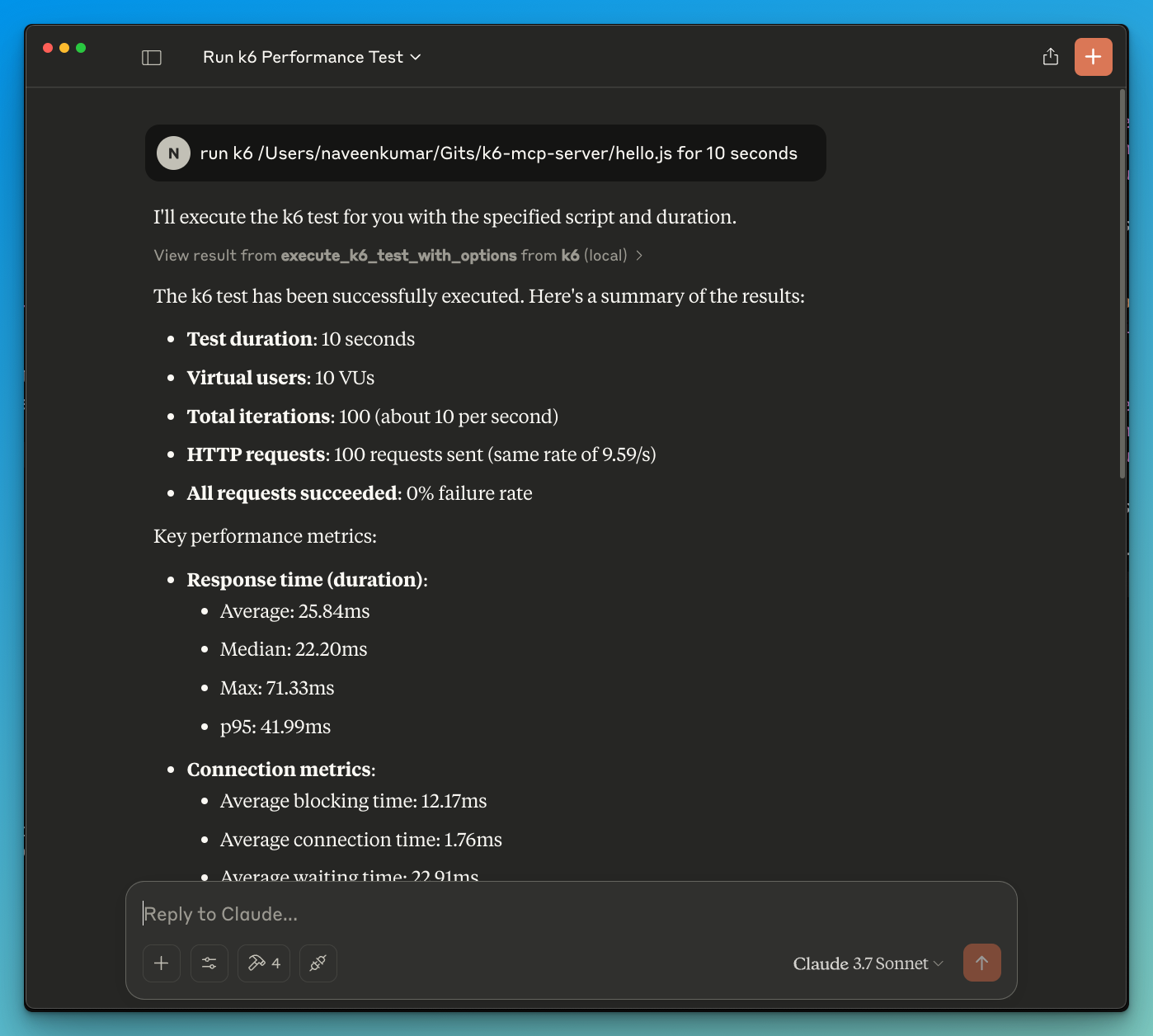
execute_k6_test(
    script_file: str,
    duration: str = "30s",  # Optional
    vus: int = 10          # Optional
)execute_k6_test_with_options(
script_file: str,
duration: str,
vus: int
)¡Agradecemos sus contribuciones! No dude en enviar una solicitud de incorporación de cambios.
Este proyecto está licenciado bajo la licencia MIT: consulte el archivo de LICENCIA para obtener más detalles.
Execute a k6 load test.
Args: script_file: Path to the k6 test script (.js) duration: Duration of the test (e.g., "30s", "1m", "5m") vus: Number of virtual users to simulate
| Name | Required | Description | Default |
|---|---|---|---|
| script_file | Yes | ||
| duration | No | 30s | |
| vus | No |
Does the description disclose side effects, auth requirements, rate limits, or destructive behavior?
No annotations are provided, so the description carries the full burden. It states the tool executes a load test, implying a potentially resource-intensive operation, but does not disclose behavioral traits such as permissions needed, rate limits, whether it runs synchronously/asynchronously, or what happens on failure. This is a significant gap for a tool with mutation-like behavior.
Agents need to know what a tool does to the world before calling it. Descriptions should go beyond structured annotations to explain consequences.
Is the description appropriately sized, front-loaded, and free of redundancy?
The description is appropriately sized and front-loaded with the main purpose, followed by parameter explanations in a structured 'Args:' section. Every sentence earns its place by clarifying parameters, though it could be slightly more concise by integrating the parameter details more seamlessly.
Shorter descriptions cost fewer tokens and are easier for agents to parse. Every sentence should earn its place.
Given the tool's complexity, does the description cover enough for an agent to succeed on first attempt?
Given the complexity of executing a load test (a mutation-like operation), no annotations, and no output schema, the description is incomplete. It covers the basic purpose and parameters but lacks critical context such as return values, error handling, or execution behavior. This is adequate as a minimum but has clear gaps for safe agent use.
Complex tools with many parameters or behaviors need more documentation. Simple tools need less. This dimension scales expectations accordingly.
Does the description clarify parameter syntax, constraints, interactions, or defaults beyond what the schema provides?
Schema description coverage is 0%, so the description must compensate. It provides clear semantics for all three parameters: 'script_file' as a path to a .js file, 'duration' with examples of time formats, and 'vus' as the number of virtual users. This adds substantial value beyond the bare schema, though it could include more details like valid ranges or constraints.
Input schemas describe structure but not intent. Descriptions should explain non-obvious parameter relationships and valid value ranges.
Does the description clearly state what the tool does and how it differs from similar tools?
The description clearly states the tool's purpose: 'Execute a k6 load test' with a specific verb ('execute') and resource ('k6 load test'). It distinguishes from the sibling tool 'execute_k6_test_with_options' by being the basic version, though this distinction is implied rather than explicit. The purpose is not vague or tautological.
Agents choose between tools based on descriptions. A clear purpose with a specific verb and resource helps agents select the right tool.
Does the description explain when to use this tool, when not to, or what alternatives exist?
The description implies usage by specifying parameters for a basic load test, but does not explicitly state when to use this tool versus the sibling 'execute_k6_test_with_options'. No exclusions or alternatives are mentioned, leaving the agent to infer that this is for simpler tests without additional options.
Agents often have multiple tools that could apply. Explicit usage guidance like "use X instead of Y when Z" prevents misuse.
Execute a k6 load test with custom duration and VUs.
Args: script_file: Path to the k6 test script (.js) duration: Duration of the test (e.g., "30s", "1m", "5m") vus: Number of virtual users to simulate
| Name | Required | Description | Default |
|---|---|---|---|
| script_file | Yes | ||
| duration | Yes | ||
| vus | Yes |
Does the description disclose side effects, auth requirements, rate limits, or destructive behavior?
With no annotations provided, the description carries full burden for behavioral disclosure. It states the tool executes a load test but doesn't mention critical behaviors like whether it's destructive (e.g., impacts system performance), requires specific permissions, has rate limits, or what happens upon execution (e.g., returns results, runs in background). This leaves significant gaps for a mutation tool.
Agents need to know what a tool does to the world before calling it. Descriptions should go beyond structured annotations to explain consequences.
Is the description appropriately sized, front-loaded, and free of redundancy?
The description is appropriately sized and front-loaded with the core purpose in the first sentence. The parameter explanations are concise and directly relevant. However, the 'Args:' section formatting is slightly redundant with the schema but still earns its place by clarifying semantics.
Shorter descriptions cost fewer tokens and are easier for agents to parse. Every sentence should earn its place.
Given the tool's complexity, does the description cover enough for an agent to succeed on first attempt?
Given no annotations, no output schema, and a mutation tool (executing tests), the description is incomplete. It lacks information on return values, error handling, prerequisites (e.g., script availability), and behavioral implications. For a tool that likely affects system resources, this is inadequate.
Complex tools with many parameters or behaviors need more documentation. Simple tools need less. This dimension scales expectations accordingly.
Does the description clarify parameter syntax, constraints, interactions, or defaults beyond what the schema provides?
Schema description coverage is 0%, so the description must compensate. It effectively adds meaning by explaining all three parameters: 'script_file' as a path to a .js file, 'duration' with format examples, and 'vus' as number of virtual users. This provides clear semantics beyond the bare schema, though it could be more detailed (e.g., constraints on values).
Input schemas describe structure but not intent. Descriptions should explain non-obvious parameter relationships and valid value ranges.
Does the description clearly state what the tool does and how it differs from similar tools?
The description clearly states the tool's purpose: 'Execute a k6 load test with custom duration and VUs.' It specifies the verb ('execute'), resource ('k6 load test'), and key customizable parameters. However, it doesn't explicitly differentiate from its sibling 'execute_k6_test' (mentioned in context), which would be needed for a perfect score.
Agents choose between tools based on descriptions. A clear purpose with a specific verb and resource helps agents select the right tool.
Does the description explain when to use this tool, when not to, or what alternatives exist?
The description provides no guidance on when to use this tool versus its sibling 'execute_k6_test' or any alternatives. It mentions custom parameters but doesn't explain scenarios where this tool is preferred over simpler versions or when it should be avoided.
Agents often have multiple tools that could apply. Explicit usage guidance like "use X instead of Y when Z" prevents misuse.
Recent tool additions, removals, and schema changes observed during successful MCP inspections.
execute_k6_testexecute_k6_test_with_optionsScored across 2 tools
The two tools are essentially identical in purpose and functionality, both executing k6 load tests with the exact same parameters (script_file, duration, vus). The only difference is the tool name, which creates confusion rather than clarity. An agent would have no meaningful basis to choose between them.
Both tools follow a consistent snake_case pattern with 'execute_k6_test' as the base, which is readable. However, the second tool's name 'execute_k6_test_with_options' is redundant since the first tool already accepts options (duration and VUs), making the naming somewhat inconsistent in logic despite matching the format.
With only 2 tools, the server feels thin for a load testing domain, as it lacks operations like listing tests, getting results, or managing test configurations. The tools are redundant, so the effective count is even lower, failing to cover basic workflows beyond a single execution action.
The server is severely incomplete for k6 load testing, missing essential operations such as retrieving test results, monitoring test status, or managing test scripts. It only offers execution with no way to access outcomes, leaving agents unable to perform a full testing lifecycle.
A comprehensive Model Context Protocol (MCP) server that enables AI assistants to interact with yo…
MCP server for building and testing AI agents with multi-model experimentation and insights.
A Model Context Protocol server for Wix AI tools
AI-native mock API server with MCP. Create REST/SOAP mocks from Claude, Cursor, or Windsurf.