Glama

PolicyGuard

Security & Governance MCP Server for AI Agents

Python 3.10+ MCP License: MIT

PolicyGuard is an MCP (Model Context Protocol) server that provides policy-based access control, incident tracking, and compliance monitoring for AI agents.

Note: This project demonstrates working integration with kagent (AI agent platform) and can be extended with kgateway (API gateway) for additional network-level security.


Table of Contents


Related MCP server: promptspeak-mcp-server

Overview

As AI agents become more autonomous, organizations need controls to govern their behavior. PolicyGuard is my first MCP server project - built to explore how security and governance can be implemented at the MCP layer.

The Problem

AI agents can call any tool they have access to. Without governance:

  • Agents might perform destructive operations

  • No audit trail of agent actions

  • No way to enforce security policies

  • No visibility into compliance

The Solution

PolicyGuard adds a security layer that agents call before taking action:

User Request → AI Agent → PolicyGuard (validate_action) → Allowed/Denied

Features

Feature

Description

Policy Enforcement

Validate actions against security rules

Trust Levels

low, medium, high, admin hierarchy

Pattern Matching

Wildcard patterns like delete_*, *_production

Auto-Registration

Unknown agents get minimal trust

Incident Tracking

Automatic violation logging

Audit Trail

Complete action history

Compliance Dashboard

Security metrics at a glance


Architecture

┌─────────────────────────────────────────────────────────────────┐
│                         AI Agent / LLM                          │
│                                                                 │
│  "Before any action, call validate_action to check permission" │
└─────────────────────────────────────────────────────────────────┘
                              │
                              │ MCP Protocol
                              ▼
┌─────────────────────────────────────────────────────────────────┐
│                     PolicyGuard MCP Server                      │
│                                                                 │
│  ┌─────────────┐  ┌─────────────┐  ┌─────────────┐             │
│  │  validate   │  │   create    │  │   report    │             │
│  │   action    │  │   policy    │  │  incident   │             │
│  └─────────────┘  └─────────────┘  └─────────────┘             │
│  ┌─────────────┐  ┌─────────────┐  ┌─────────────┐             │
│  │  register   │  │  get_audit  │  │    get      │             │
│  │   agent     │  │    log      │  │ compliance  │             │
│  └─────────────┘  └─────────────┘  └─────────────┘             │
└─────────────────────────────────────────────────────────────────┘
                              │
                              ▼
                    ┌───────────────────┐
                    │   JSON Storage    │
                    │   (policies,      │
                    │    agents,        │
                    │    audit_log,     │
                    │    incidents)     │
                    └───────────────────┘

MCP Tools

PolicyGuard exposes 6 tools via MCP:

1. validate_action ⭐ Primary Tool

Check if an action is allowed before executing it.

{
  "action_type": "tool_call",
  "target": "delete_records",
  "agent_id": "my-agent"
}

Response:

{
  "action_id": "act_a1b2c3d4e5f6",
  "allowed": false,
  "reason": "Delete operations require admin trust level"
}

2. register_agent

Register an agent with a trust level.

{
  "agent_id": "data-processor",
  "name": "Data Agent",
  "trust_level": "medium"
}

3. create_policy

Create security rules.

{
  "policy_id": "block-deletes",
  "name": "Block Deletes",
  "rules": "[{\"condition\": {\"tool_pattern\": \"delete_*\"}, \"action\": \"deny\"}]"
}

4. get_audit_log

Query action history.

5. get_compliance_status

Get security dashboard metrics.

6. report_incident

Manually report security incidents.


Quick Start

Prerequisites

  • Python 3.10+

  • pip

Local Installation

# Clone
git clone https://github.com/PrateekKumar1709/policyguard.git
cd policyguard

# Setup
python3 -m venv .venv
source .venv/bin/activate
pip install -e .

# Run
python src/main.py

Test the Tools

import json
from src.tools.validate_action import validate_action
from src.tools.register_agent import register_agent

# Register an agent
result = json.loads(register_agent.fn(
    agent_id="test-agent",
    name="Test Agent",
    trust_level="medium"
))
print(f"Registered: {result['agent_id']}")

# Validate an action
result = json.loads(validate_action.fn(
    action_type="tool_call",
    target="read_data",
    agent_id="test-agent"
))
print(f"Allowed: {result['allowed']}")

HTTP Mode

python src/main.py --transport http --port 8000

Kubernetes Deployment

PolicyGuard includes a Helm chart for Kubernetes deployment.

Using Kind

# Create cluster
kind create cluster --name policyguard

# Build and load image
docker build -t policyguard:latest .
kind load docker-image policyguard:latest --name policyguard

# Deploy
kubectl create namespace policyguard
helm install policyguard ./helm/policyguard -n policyguard

# Verify
kubectl get pods -n policyguard

Port Forward

kubectl port-forward -n policyguard svc/policyguard 8000:8000

Testing

Unit Tests

pytest tests/ -v

Test Results

tests/test_tools.py::TestValidateAction::test_allow_read_for_low_trust PASSED
tests/test_tools.py::TestValidateAction::test_deny_delete_for_low_trust PASSED
tests/test_tools.py::TestValidateAction::test_allow_delete_for_admin PASSED
tests/test_tools.py::TestValidateAction::test_deny_suspended_agent PASSED
tests/test_tools.py::TestRegisterAgent::test_register_new_agent PASSED
tests/test_tools.py::TestCreatePolicy::test_create_valid_policy PASSED
... (16 tests total)
============================== 16 passed ==============================

E2E Test Output

[1/6] register_agent      ✅ SUCCESS
[2/6] create_policy       ✅ SUCCESS  
[3/6] validate_action     ✅ ALLOWED (read_data)
[4/6] validate_action     ✅ DENIED (delete_records)
[5/6] report_incident     ✅ SUCCESS
[6/6] get_compliance_status ✅ SUCCESS

ALL 6 MCP TOOLS WORKING!

kagent Integration

PolicyGuard integrates with kagent for Kubernetes-native AI agent management.

Screenshots

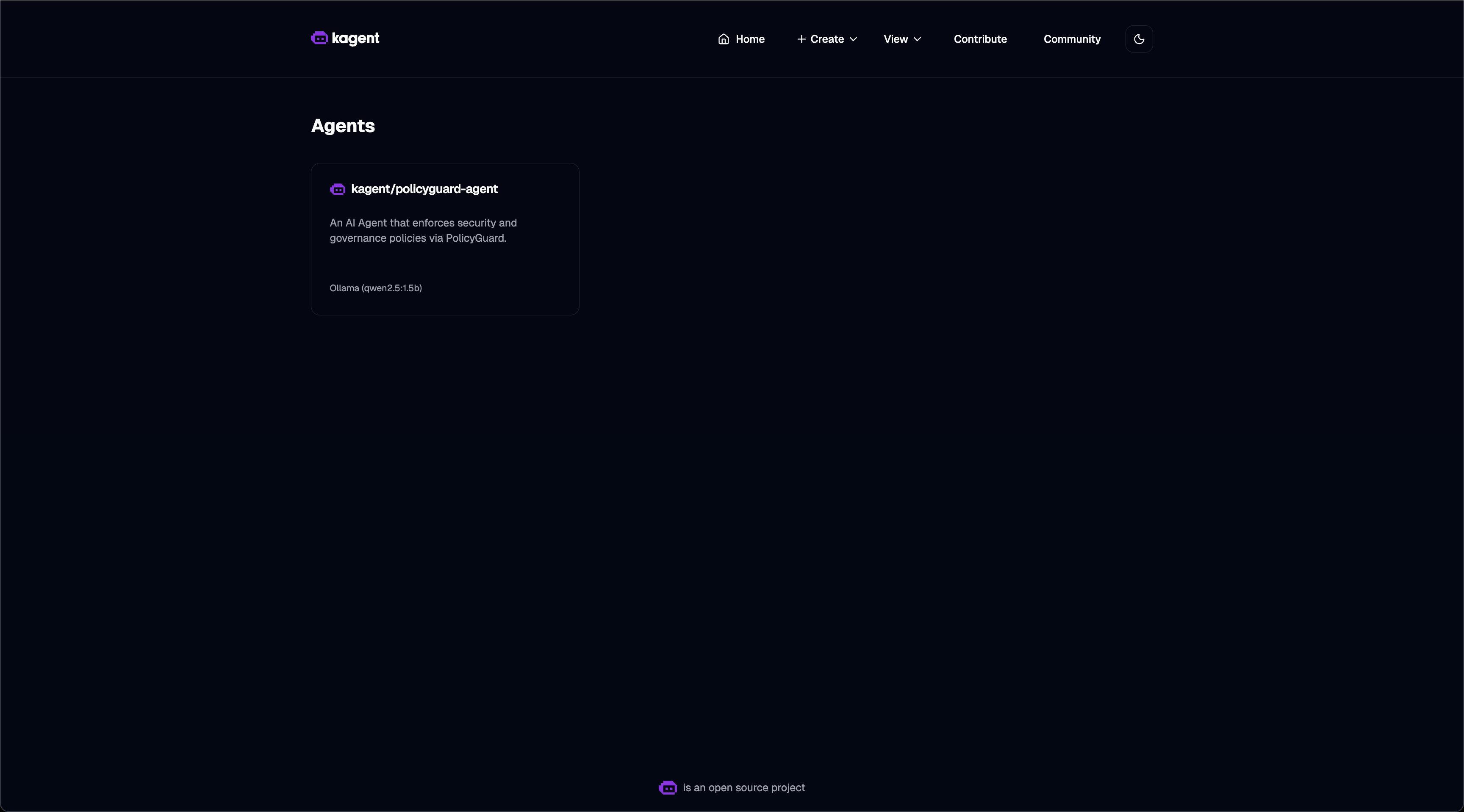
Agent List - PolicyGuard agent registered and ready:
Agent List

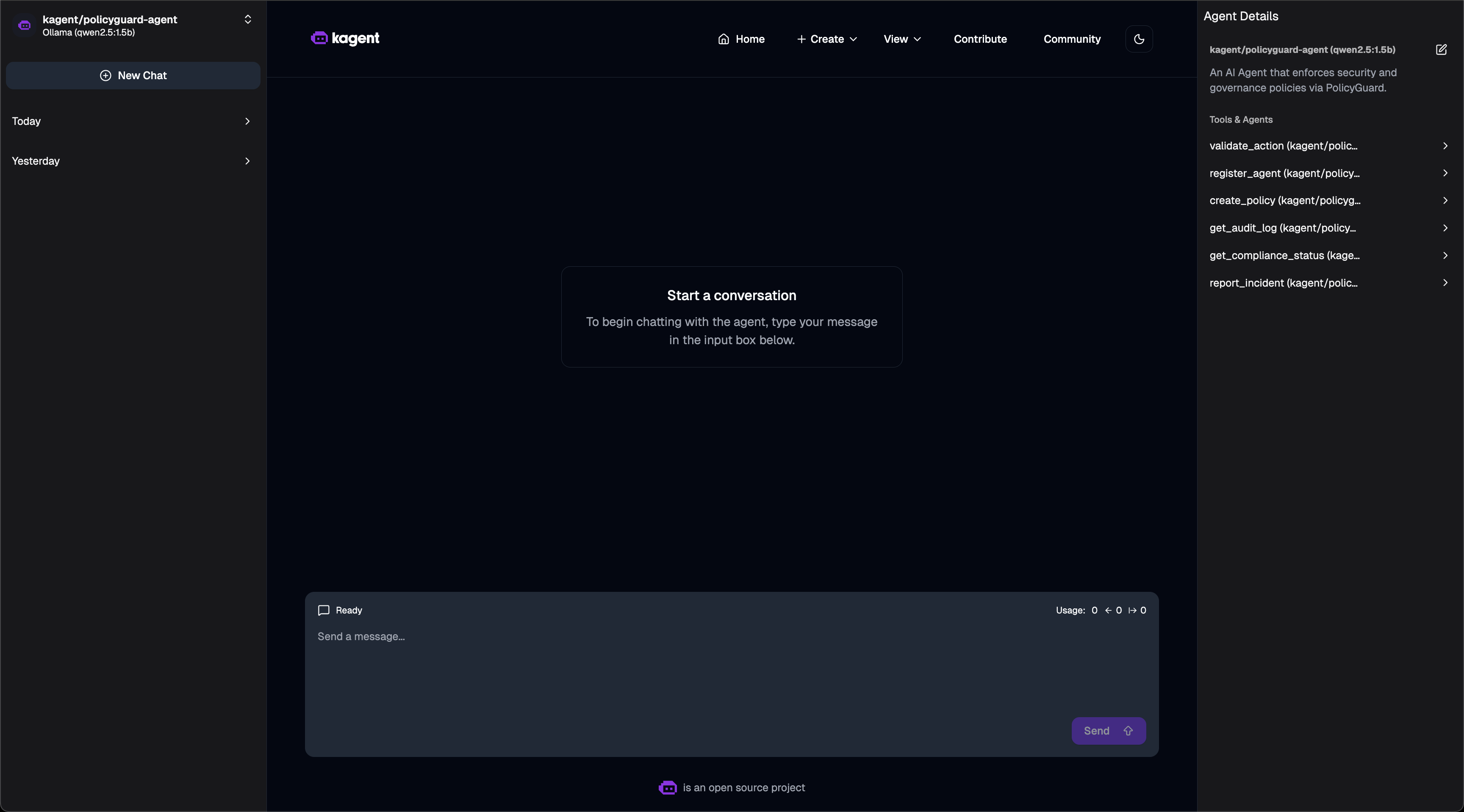
Agent Tools - 6 PolicyGuard MCP tools available:
Agent Tools

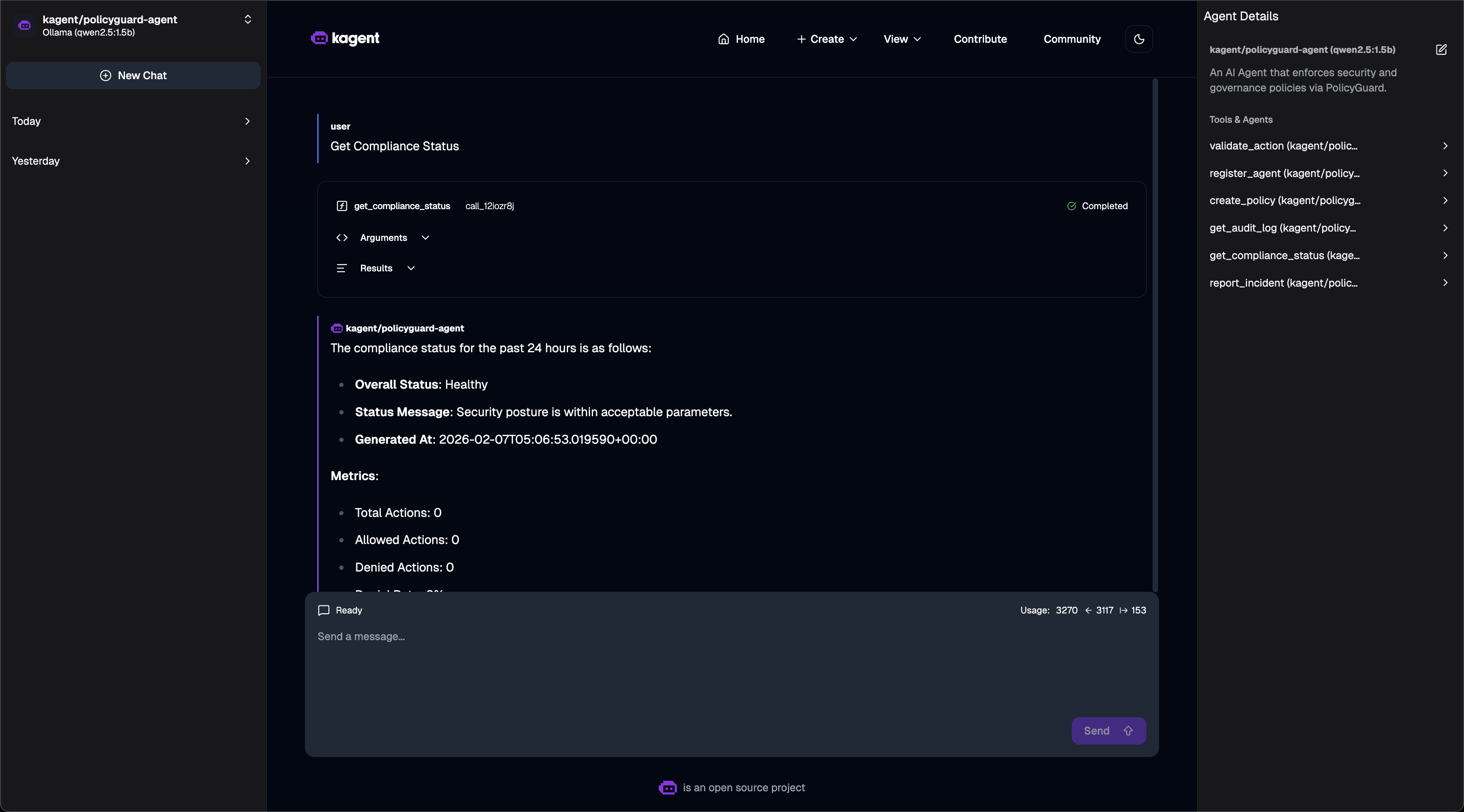
Compliance Dashboard - Asking for compliance status:
Compliance Chat

Policy Validation - Action denied based on policy:
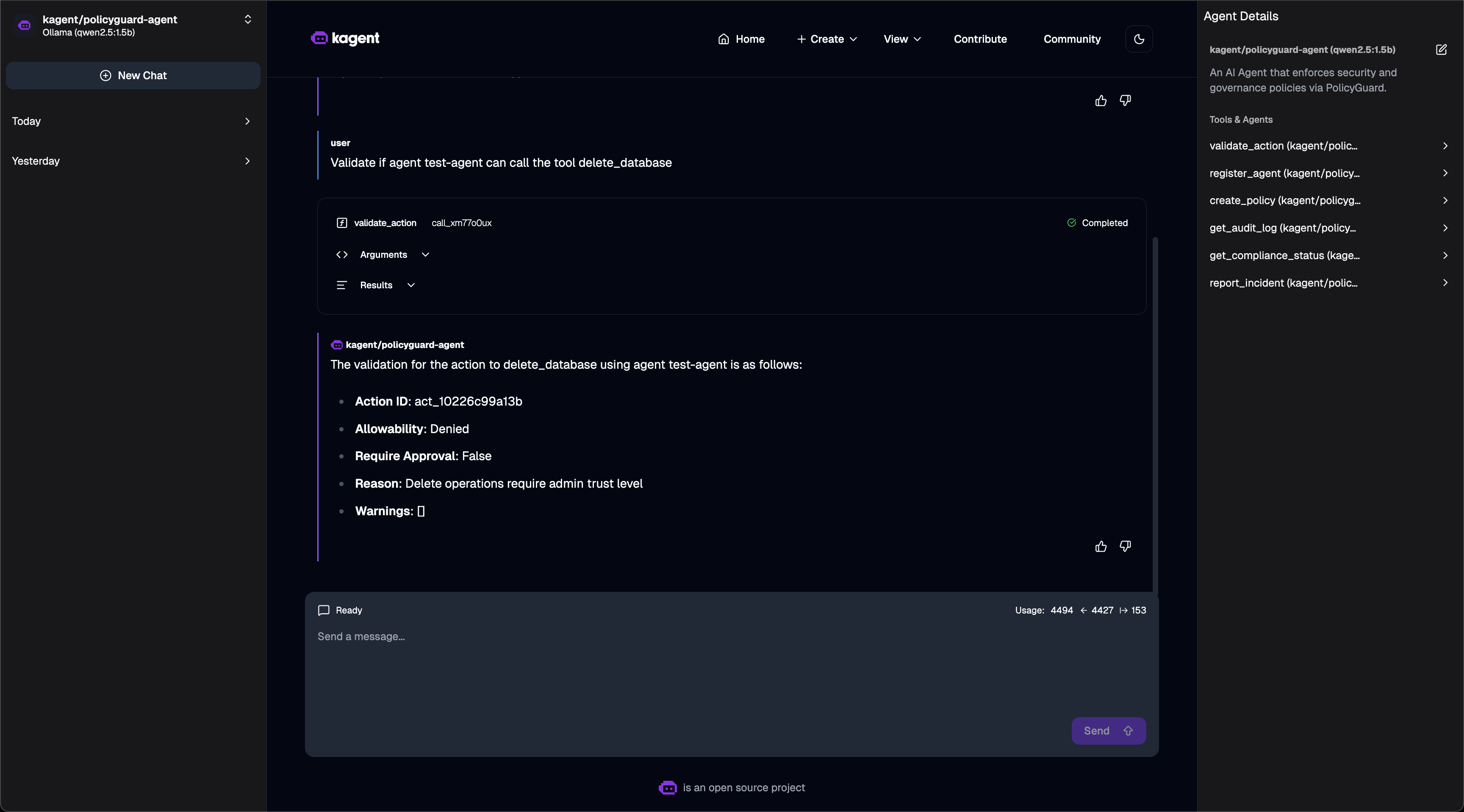
Validation Chat

Quick Setup

# 1. Install kagent CRDs
helm install kagent-crds ./kagent-reference/helm/kagent-crds -n kagent --create-namespace

# 2. Install kagent with Ollama (free local LLM)
helm upgrade --install kagent ./kagent-reference/helm/kagent -n kagent \
  --set providers.default=ollama \
  --set providers.ollama.model=qwen2.5:1.5b \
  --set tag=0.7.13

# 3. Deploy PolicyGuard
helm install policyguard ./helm/policyguard -n policyguard --create-namespace

# 4. Create RemoteMCPServer
kubectl apply -f - <<EOF
apiVersion: kagent.dev/v1alpha2
kind: RemoteMCPServer
metadata:
  name: policyguard
  namespace: kagent
spec:
  protocol: STREAMABLE_HTTP
  url: http://policyguard.policyguard:8000/mcp
  timeout: 30s
EOF

# 5. Create PolicyGuard Agent
kubectl apply -f - <<EOF
apiVersion: kagent.dev/v1alpha2
kind: Agent
metadata:
  name: policyguard-agent
  namespace: kagent
spec:
  description: "Security agent using PolicyGuard"
  type: Declarative
  declarative:
    modelConfig: "default-model-config"
    systemMessage: |
      You are a PolicyGuard Security Agent. Use the PolicyGuard tools to:
      - validate_action: Check if actions are allowed
      - register_agent: Register new agents
      - create_policy: Define security rules
      - get_compliance_status: View compliance dashboard
    tools:
    - type: McpServer
      mcpServer:
        name: policyguard
        kind: RemoteMCPServer
        apiGroup: kagent.dev
        toolNames:
        - validate_action
        - register_agent
        - create_policy
        - get_audit_log
        - get_compliance_status
        - report_incident
EOF

Verified Working

# Check status
$ kubectl get agents,remotemcpservers -n kagent
NAME                TYPE          READY   ACCEPTED
policyguard-agent   Declarative   True    True

NAME          PROTOCOL          URL                                       ACCEPTED
policyguard   STREAMABLE_HTTP   http://policyguard.policyguard:8000/mcp   True

# Invoke agent via CLI
$ kagent invoke -t "Get compliance status" --agent policyguard-agent

Response:
- Security Posture: Healthy
- Total Policies: 1, Enabled: 1  
- Total Incidents: 0
- Agents Registered: 0

# Test validation
$ kagent invoke -t "Can test-agent delete the database?" --agent policyguard-agent

Response:
The action delete_database was not allowed for test-agent.
Reason: Delete operations require admin trust level.

Access kagent UI

kubectl port-forward -n kagent svc/kagent-ui 8080:8080
# Open http://localhost:8080

Security Model

Trust Levels

Level

Score

Use Case

low

1

Unknown agents, read-only

medium

2

Verified agents

high

3

Trusted agents

admin

4

Full access

Policy Rules

{
  "condition": {
    "tool_pattern": "delete_*",
    "trust_level_below": "admin"
  },
  "action": "deny",
  "message": "Delete requires admin"
}

Evaluation Order

  1. Agent suspended? → DENY

  2. Tool in denied list? → DENY

  3. Tool not in allowed list? → DENY

  4. Policy match? → Apply rule

  5. Default → ALLOW


Project Structure

policyguard/
├── helm/
│   └── policyguard/          # Helm chart
│       ├── Chart.yaml
│       ├── values.yaml
│       └── templates/
├── src/
│   ├── main.py               # Entry point
│   ├── core/
│   │   ├── server.py         # MCP server
│   │   └── utils.py          # Utilities
│   └── tools/
│       ├── validate_action.py
│       ├── register_agent.py
│       ├── create_policy.py
│       ├── get_audit_log.py
│       ├── get_compliance_status.py
│       └── report_incident.py
├── tests/
│   └── test_tools.py         # 16 unit tests
├── Dockerfile
├── pyproject.toml
└── README.md

Technologies Used

  • FastMCP - Python MCP server SDK

  • Pydantic - Data validation

  • Helm - Kubernetes packaging

  • pytest - Testing


Future Improvements

  • Database backend (PostgreSQL)

  • Web dashboard UI

  • Prometheus metrics

  • RBAC integration

  • Policy versioning


License

MIT License


Hackathon

MCP_HACK//26 - "MCP & AI Agents Starter Track"

This is my first MCP server project! I built PolicyGuard to learn:

  • How MCP servers work

  • How to expose tools to AI agents

  • How to deploy MCP servers on Kubernetes

  • How security/governance can be implemented at the MCP layer

What I Built

  • ✅ 6 MCP tools for security governance

  • ✅ Policy engine with pattern matching

  • ✅ Trust level system

  • ✅ Audit logging and incident tracking

  • ✅ Helm chart for Kubernetes

  • ✅ 16 unit tests

  • ✅ kagent integration examples

Available Tools

6 tools
create_policyA

Create or update a security policy for agent governance.

Policies define rules that control what agents can do. Each policy contains conditions and actions (allow/deny/require_approval).

Args: policy_id: Unique identifier for the policy (e.g., "prod-db-access") name: Human-readable name (e.g., "Production Database Access Control") description: Description of what this policy controls rules: JSON array of rule objects. Each rule has: - condition: Object with matching criteria - tool_pattern: Glob pattern for tool names (e.g., "database_*") - action_type: Type of action (e.g., "tool_call") - trust_level_at_least: Minimum trust level required - trust_level_below: Trigger if trust below this level - action: "allow", "deny", or "require_approval" - message: Message to show when rule matches priority: Higher priority policies are evaluated first (default: 100) enabled: Whether the policy is active (default: true)

Returns: JSON string with creation result: - success: Whether creation succeeded - policy_id: The policy's ID - message: Status message

Example: create_policy( policy_id="prevent-deletions", name="Prevent Dangerous Deletions", description="Block delete operations for non-admin agents", rules='[{"condition": {"tool_pattern": "delete_*", "trust_level_below": "admin"}, "action": "deny", "message": "Delete operations require admin access"}]' )

ParametersJSON Schema
NameRequiredDescriptionDefault
policy_idYes
nameYes
descriptionYes
rulesYes
priorityNo
enabledNo

Output Schema

ParametersJSON Schema
NameRequiredDescription
resultYes

TDQS

A4/5.0
Behavior3/5

Does the description disclose side effects, auth requirements, rate limits, or destructive behavior?

With no annotations provided, the description carries the full burden of behavioral disclosure. It clearly indicates this is a write operation ('Create or update') and describes the policy structure, but doesn't mention important behavioral aspects like authentication requirements, rate limits, idempotency, or what happens when updating existing policies versus creating new ones. The example helps but doesn't cover all behavioral traits.

Agents need to know what a tool does to the world before calling it. Descriptions should go beyond structured annotations to explain consequences.

Conciseness4/5

Is the description appropriately sized, front-loaded, and free of redundancy?

The description is well-structured with clear sections (purpose, args, returns, example) and front-loads the core purpose. While comprehensive, some sentences could be more concise (e.g., the rules explanation is detailed but necessary given complexity). No wasted text, though the formatting with line breaks could be optimized for pure conciseness.

Shorter descriptions cost fewer tokens and are easier for agents to parse. Every sentence should earn its place.

Completeness4/5

Given the tool's complexity, does the description cover enough for an agent to succeed on first attempt?

For a 6-parameter mutation tool with no annotations, the description provides substantial context including parameter details, return format, and a complete example. The presence of an output schema reduces the need to fully document return values. The main gap is lack of behavioral context around permissions, side effects, and error conditions, but overall it's quite complete for the tool's complexity.

Complex tools with many parameters or behaviors need more documentation. Simple tools need less. This dimension scales expectations accordingly.

Parameters5/5

Does the description clarify parameter syntax, constraints, interactions, or defaults beyond what the schema provides?

Given 0% schema description coverage, the description provides excellent parameter semantics that fully compensate. It documents all 6 parameters with clear explanations, including detailed breakdown of the complex 'rules' parameter structure with its nested condition and action components. Default values for 'priority' and 'enabled' are explicitly stated, and the example demonstrates proper usage.

Input schemas describe structure but not intent. Descriptions should explain non-obvious parameter relationships and valid value ranges.

Purpose5/5

Does the description clearly state what the tool does and how it differs from similar tools?

The description clearly states the tool's purpose with specific verbs ('Create or update') and resource ('security policy for agent governance'). It distinguishes itself from sibling tools like get_audit_log or report_incident by focusing on policy creation/update rather than retrieval or reporting functions.

Agents choose between tools based on descriptions. A clear purpose with a specific verb and resource helps agents select the right tool.

Usage Guidelines3/5

Does the description explain when to use this tool, when not to, or what alternatives exist?

The description implies usage context through the explanation of what policies do ('define rules that control what agents can do'), but doesn't explicitly state when to use this tool versus alternatives. No guidance is provided about prerequisites, dependencies, or specific scenarios where this tool should be selected over other policy-related tools (though none appear in the sibling list).

Agents often have multiple tools that could apply. Explicit usage guidance like "use X instead of Y when Z" prevents misuse.

get_audit_logA

Retrieve audit log entries for compliance and investigation.

The audit log records all action validations, policy violations, and administrative actions performed through Guardian Agent.

Args: agent_id: Filter by specific agent ID (optional) action_type: Filter by action type like "tool_call", "resource_access" (optional) time_range: Time range to query - "1h", "24h", "7d", "30d" (default: "24h") status: Filter by status - "allowed", "denied", or "" for all (optional) limit: Maximum number of entries to return (default: 100)

Returns: JSON string with: - entries: Array of audit log entries - count: Number of entries returned - total: Total entries matching filter (before limit) - time_range: The time range used - filters_applied: Summary of filters used

Example: # Get all denied actions in the last hour get_audit_log(time_range="1h", status="denied")

# Get all actions by a specific agent
get_audit_log(agent_id="prod-agent-01", time_range="7d")
ParametersJSON Schema
NameRequiredDescriptionDefault
agent_idNo
action_typeNo
time_rangeNo24h
statusNo
limitNo

Output Schema

ParametersJSON Schema
NameRequiredDescription
resultYes

TDQS

A3.6/5.0
Behavior3/5

Does the description disclose side effects, auth requirements, rate limits, or destructive behavior?

With no annotations provided, the description carries the full burden of behavioral disclosure. It describes what the tool retrieves (audit log entries with specific filters) and includes return format details, which is helpful. However, it lacks critical behavioral traits: it doesn't mention whether this is a read-only operation, if it requires specific permissions, rate limits, pagination behavior beyond the 'limit' parameter, or error conditions. The description adds value but leaves significant gaps.

Agents need to know what a tool does to the world before calling it. Descriptions should go beyond structured annotations to explain consequences.

Conciseness4/5

Is the description appropriately sized, front-loaded, and free of redundancy?

The description is well-structured with purpose statement, parameter documentation, return format, and examples. It's appropriately sized for a 5-parameter tool with output details. While efficient, the initial purpose sentence could be more front-loaded with key distinguishing information, and some sections (like the Returns block) are slightly verbose but still valuable.

Shorter descriptions cost fewer tokens and are easier for agents to parse. Every sentence should earn its place.

Completeness4/5

Given the tool's complexity, does the description cover enough for an agent to succeed on first attempt?

Given the tool's moderate complexity (5 parameters, no annotations, but has output schema), the description is reasonably complete. It fully documents parameters and return format, and the output schema reduces the need to explain return values in detail. However, it lacks behavioral context (permissions, safety, rate limits) and sibling differentiation, which are important gaps for a compliance/investigation tool.

Complex tools with many parameters or behaviors need more documentation. Simple tools need less. This dimension scales expectations accordingly.

Parameters5/5

Does the description clarify parameter syntax, constraints, interactions, or defaults beyond what the schema provides?

Schema description coverage is 0%, so the description must fully compensate. It does this excellently: it documents all 5 parameters with clear semantics, optional/default status, allowed values (e.g., time_range options, status values), and practical examples. The description adds substantial meaning beyond what the bare schema provides, making parameters fully understandable.

Input schemas describe structure but not intent. Descriptions should explain non-obvious parameter relationships and valid value ranges.

Purpose4/5

Does the description clearly state what the tool does and how it differs from similar tools?

The description clearly states the tool's purpose: 'Retrieve audit log entries for compliance and investigation.' It specifies the verb ('Retrieve') and resource ('audit log entries'), and mentions the system context ('Guardian Agent'). However, it doesn't explicitly differentiate from sibling tools like 'get_compliance_status' or 'report_incident', which might have overlapping compliance/investigation domains.

Agents choose between tools based on descriptions. A clear purpose with a specific verb and resource helps agents select the right tool.

Usage Guidelines2/5

Does the description explain when to use this tool, when not to, or what alternatives exist?

The description provides no guidance on when to use this tool versus alternatives. It doesn't mention sibling tools like 'get_compliance_status' or 'validate_action', nor does it specify prerequisites, exclusions, or typical use cases beyond generic 'compliance and investigation'. The examples show how to call it, but not when it's the appropriate choice.

Agents often have multiple tools that could apply. Explicit usage guidance like "use X instead of Y when Z" prevents misuse.

get_compliance_statusA

Get compliance status and security health metrics.

Generates a compliance report showing policy violations, security incidents, and overall governance health for the specified time period.

Args: time_range: Time range - "1h", "24h", "7d", "30d" (default: "24h") include_incidents: Include active incidents in report (default: true) include_policy_summary: Include policy overview (default: true)

Returns: JSON string with compliance report: - status: Overall status ("healthy", "warning", "critical") - metrics: Key security metrics - incidents: Active security incidents (if requested) - policies: Policy summary (if requested) - recommendations: Suggested actions to improve security

Example: # Get daily compliance status get_compliance_status(time_range="24h")

# Get weekly report with all details
get_compliance_status(time_range="7d", include_incidents=True)
ParametersJSON Schema
NameRequiredDescriptionDefault
time_rangeNo24h
include_incidentsNo
include_policy_summaryNo

Output Schema

ParametersJSON Schema
NameRequiredDescription
resultYes

TDQS

A4.3/5.0
Behavior4/5

Does the description disclose side effects, auth requirements, rate limits, or destructive behavior?

With no annotations provided, the description carries full burden and does well by disclosing key behavioral traits: it's a read-only operation (implied by 'Get' and 'Generates'), describes the report content structure, mentions default values for parameters, and provides example usage patterns. However, it doesn't mention potential limitations like rate limits, authentication requirements, or data freshness constraints.

Agents need to know what a tool does to the world before calling it. Descriptions should go beyond structured annotations to explain consequences.

Conciseness4/5

Is the description appropriately sized, front-loaded, and free of redundancy?

The description is well-structured with clear sections (purpose, args, returns, examples) and appropriately sized. Every sentence adds value, though the example section could be slightly more concise. The information is front-loaded with the core purpose stated first, followed by supporting details.

Shorter descriptions cost fewer tokens and are easier for agents to parse. Every sentence should earn its place.

Completeness5/5

Given the tool's complexity, does the description cover enough for an agent to succeed on first attempt?

Given the tool's complexity (3 parameters, no annotations, but has output schema), the description is complete enough. It explains the purpose, parameters, return structure, and provides usage examples. The output schema existence means the description doesn't need to exhaustively document return values, and it provides adequate context for an agent to understand and use the tool effectively.

Complex tools with many parameters or behaviors need more documentation. Simple tools need less. This dimension scales expectations accordingly.

Parameters5/5

Does the description clarify parameter syntax, constraints, interactions, or defaults beyond what the schema provides?

With 0% schema description coverage, the description fully compensates by providing detailed parameter documentation in the 'Args' section, including all 3 parameters with their purposes, acceptable values, and defaults. It adds substantial meaning beyond what the bare schema provides, explaining what each parameter controls in the compliance report generation.

Input schemas describe structure but not intent. Descriptions should explain non-obvious parameter relationships and valid value ranges.

Purpose5/5

Does the description clearly state what the tool does and how it differs from similar tools?

The description clearly states the tool's purpose with specific verbs ('Get compliance status and security health metrics', 'Generates a compliance report') and resources ('policy violations, security incidents, overall governance health'). It distinguishes from siblings like 'get_audit_log' or 'report_incident' by focusing on comprehensive compliance assessment rather than logging or incident reporting.

Agents choose between tools based on descriptions. A clear purpose with a specific verb and resource helps agents select the right tool.

Usage Guidelines3/5

Does the description explain when to use this tool, when not to, or what alternatives exist?

The description implies usage through the example scenarios ('Get daily compliance status', 'Get weekly report with all details'), but doesn't explicitly state when to use this tool versus alternatives like 'get_audit_log' or 'validate_action'. It provides context about time periods and detail levels but lacks explicit guidance on tool selection among siblings.

Agents often have multiple tools that could apply. Explicit usage guidance like "use X instead of Y when Z" prevents misuse.

register_agentA

Register a new agent with Guardian for security policy evaluation.

Registered agents get proper trust levels and can have custom tool permissions. Unregistered agents are treated as 'low' trust.

Args: agent_id: Unique identifier for the agent (e.g., "prod-assistant-01") name: Human-readable name (e.g., "Production Assistant") description: Description of the agent's purpose trust_level: Trust level - "low", "medium", "high", or "admin" allowed_tools: JSON array of allowed tool patterns (e.g., '["read_*", "query_*"]') denied_tools: JSON array of denied tool patterns (e.g., '["delete_*", "drop_*"]') metadata: JSON object with additional agent metadata

Returns: JSON string with registration result: - success: Whether registration succeeded - agent_id: The agent's ID - message: Status message - warnings: Any warnings about the registration

Example: register_agent( agent_id="data-analyst-01", name="Data Analyst Bot", description="Runs analytical queries on warehouse", trust_level="medium", allowed_tools='["query_*", "read_*"]', denied_tools='["delete_*", "drop_*", "truncate_*"]' )

ParametersJSON Schema
NameRequiredDescriptionDefault
agent_idYes
nameYes
descriptionNo
trust_levelNomedium
allowed_toolsNo[]
denied_toolsNo[]
metadataNo{}

Output Schema

ParametersJSON Schema
NameRequiredDescription
resultYes

TDQS

A4.5/5.0
Behavior4/5

Does the description disclose side effects, auth requirements, rate limits, or destructive behavior?

With no annotations provided, the description carries the full burden of behavioral disclosure. It effectively describes key behaviors: this is a registration/mutation operation (implied by 'register'), it affects trust levels and tool permissions, and it returns a structured JSON result. It doesn't mention authentication requirements, rate limits, or error conditions, but provides substantial operational context beyond basic purpose.

Agents need to know what a tool does to the world before calling it. Descriptions should go beyond structured annotations to explain consequences.

Conciseness4/5

Is the description appropriately sized, front-loaded, and free of redundancy?

The description is well-structured with clear sections: purpose statement, parameter explanations, return format, and example. While somewhat lengthy, every sentence adds value. The front-loaded purpose statement is strong, though the detailed parameter explanations could be more concise while maintaining clarity.

Shorter descriptions cost fewer tokens and are easier for agents to parse. Every sentence should earn its place.

Completeness5/5

Given the tool's complexity, does the description cover enough for an agent to succeed on first attempt?

Given the tool's complexity (7 parameters, mutation operation), no annotations, and the presence of an output schema, the description provides comprehensive context. It explains the tool's purpose, all parameters with semantics, the return format, and includes a practical example. The output schema means the description doesn't need to detail return values, and it adequately covers what's needed for effective use.

Complex tools with many parameters or behaviors need more documentation. Simple tools need less. This dimension scales expectations accordingly.

Parameters5/5

Does the description clarify parameter syntax, constraints, interactions, or defaults beyond what the schema provides?

The schema has 0% description coverage, so the description must fully compensate. It provides detailed semantic explanations for all 7 parameters, including examples, format requirements (e.g., 'JSON array', 'JSON object'), and allowed values for 'trust_level'. This adds significant value beyond the bare schema, making parameter usage clear and actionable.

Input schemas describe structure but not intent. Descriptions should explain non-obvious parameter relationships and valid value ranges.

Purpose5/5

Does the description clearly state what the tool does and how it differs from similar tools?

The description clearly states the tool's purpose: 'Register a new agent with Guardian for security policy evaluation.' It specifies the verb ('register'), resource ('agent'), and context ('Guardian for security policy evaluation'), distinguishing it from sibling tools like 'create_policy' or 'get_audit_log' which handle different security functions.

Agents choose between tools based on descriptions. A clear purpose with a specific verb and resource helps agents select the right tool.

Usage Guidelines4/5

Does the description explain when to use this tool, when not to, or what alternatives exist?

The description provides clear context for when to use this tool: to register agents for security policy evaluation, with implications about trust levels and tool permissions. It mentions that 'Unregistered agents are treated as 'low' trust,' which helps understand the consequences of not using it. However, it doesn't explicitly state when NOT to use it or name specific alternatives among the sibling tools.

Agents often have multiple tools that could apply. Explicit usage guidance like "use X instead of Y when Z" prevents misuse.

report_incidentA

Report a security incident for investigation and tracking.

Use this tool to log security incidents such as policy violations, suspicious agent behavior, or potential security threats.

Args: incident_type: Type of incident: - "policy_violation": Agent violated a security policy - "suspicious_activity": Unusual or potentially malicious behavior - "unauthorized_access": Attempt to access restricted resources - "rate_limit_exceeded": Agent exceeded rate limits - "data_exfiltration": Potential data leak detected - "configuration_error": Security misconfiguration detected - "other": Other security concern severity: Incident severity: - "low": Minor issue, no immediate action needed - "medium": Notable issue, should be reviewed - "high": Serious issue, needs prompt attention - "critical": Emergency, immediate action required description: Detailed description of the incident agent_id: ID of the agent involved (if applicable) evidence: JSON object with supporting evidence/data recommended_action: Suggested remediation steps

Returns: JSON string with: - incident_id: Unique incident identifier - success: Whether the incident was logged - message: Status message - agent_suspended: Whether the agent was auto-suspended

Example: report_incident( incident_type="suspicious_activity", severity="high", description="Agent attempted to access 50 databases in 1 minute", agent_id="rogue-agent-01", evidence='{"databases_accessed": 50, "time_window": "60s"}', recommended_action="Review agent permissions and suspend if needed" )

ParametersJSON Schema
NameRequiredDescriptionDefault
incident_typeYes
severityYes
descriptionYes
agent_idNo
evidenceNo{}
recommended_actionNo

Output Schema

ParametersJSON Schema
NameRequiredDescription
resultYes

TDQS

A4.5/5.0
Behavior4/5

Does the description disclose side effects, auth requirements, rate limits, or destructive behavior?

With no annotations provided, the description carries the full burden of behavioral disclosure. It effectively describes the tool's behavior: it logs incidents for investigation and tracking, and the 'Returns' section details outcomes like incident ID generation, success status, and potential agent suspension. This covers key behavioral aspects without contradictions.

Agents need to know what a tool does to the world before calling it. Descriptions should go beyond structured annotations to explain consequences.

Conciseness4/5

Is the description appropriately sized, front-loaded, and free of redundancy?

The description is well-structured with sections for purpose, usage, arguments, returns, and an example. It is appropriately sized for a 6-parameter tool, though it could be slightly more concise by integrating the example more tightly. Every sentence adds value, such as clarifying parameter options and output format.

Shorter descriptions cost fewer tokens and are easier for agents to parse. Every sentence should earn its place.

Completeness5/5

Given the tool's complexity, does the description cover enough for an agent to succeed on first attempt?

Given the tool's complexity (6 parameters, no annotations, but with an output schema), the description is highly complete. It explains the tool's purpose, usage, all parameters in detail, return values, and includes a practical example. The output schema is referenced in the 'Returns' section, making the description comprehensive for agent use.

Complex tools with many parameters or behaviors need more documentation. Simple tools need less. This dimension scales expectations accordingly.

Parameters5/5

Does the description clarify parameter syntax, constraints, interactions, or defaults beyond what the schema provides?

The schema description coverage is 0%, so the description must compensate fully. It does so by providing detailed semantics for all 6 parameters, including enumerated values for 'incident_type' and 'severity', and clear explanations for others like 'description' and 'evidence'. This adds significant value beyond the basic schema.

Input schemas describe structure but not intent. Descriptions should explain non-obvious parameter relationships and valid value ranges.

Purpose5/5

Does the description clearly state what the tool does and how it differs from similar tools?

The description clearly states the tool's purpose: 'Report a security incident for investigation and tracking.' It specifies the verb ('report') and resource ('security incident'), and distinguishes it from siblings like 'create_policy' or 'get_audit_log' by focusing on incident reporting rather than policy management or log retrieval.

Agents choose between tools based on descriptions. A clear purpose with a specific verb and resource helps agents select the right tool.

Usage Guidelines4/5

Does the description explain when to use this tool, when not to, or what alternatives exist?

The description provides clear context for when to use the tool: 'Use this tool to log security incidents such as policy violations, suspicious agent behavior, or potential security threats.' It lists specific incident types, giving practical guidance. However, it does not explicitly state when not to use it or name alternatives among sibling tools.

Agents often have multiple tools that could apply. Explicit usage guidance like "use X instead of Y when Z" prevents misuse.

validate_actionA

Validate whether an agent can perform a specific action.

This is the PRIMARY security gate. Agents should call this BEFORE performing any sensitive action to ensure compliance with security policies.

Args: action_type: Type of action (e.g., "tool_call", "resource_access", "data_read", "data_write") target: Target of the action (e.g., tool name, resource URI, database name) agent_id: Unique identifier of the requesting agent parameters: JSON string of action-specific parameters (optional) context: Additional context about why this action is needed (optional)

Returns: JSON string with validation result: - action_id: Unique ID for this validation (for audit correlation) - allowed: Whether the action is permitted - require_approval: If true, action needs human approval first - reason: Explanation of the decision - warnings: Any non-blocking warnings

Example: validate_action( action_type="tool_call", target="database_delete", agent_id="prod-agent-01", parameters='{"table": "users"}', context="Cleanup stale records" )

ParametersJSON Schema
NameRequiredDescriptionDefault
action_typeYes
targetYes
agent_idYes
parametersNo{}
contextNo

Output Schema

ParametersJSON Schema
NameRequiredDescription
resultYes

TDQS

A4.8/5.0
Behavior4/5

Does the description disclose side effects, auth requirements, rate limits, or destructive behavior?

With no annotations provided, the description carries the full burden of behavioral disclosure. It effectively communicates this is a security validation tool that returns structured decisions (allowed/require_approval) and generates audit correlation IDs. However, it doesn't mention potential side effects like audit logging, rate limits, or authentication requirements that might be relevant for security tools.

Agents need to know what a tool does to the world before calling it. Descriptions should go beyond structured annotations to explain consequences.

Conciseness5/5

Is the description appropriately sized, front-loaded, and free of redundancy?

The description is well-structured and front-loaded with the core purpose and usage guidance, followed by organized parameter documentation and a complete example. Every sentence adds value: the security gate positioning, the workflow guidance, parameter explanations, return format details, and illustrative example all serve distinct purposes without redundancy.

Shorter descriptions cost fewer tokens and are easier for agents to parse. Every sentence should earn its place.

Completeness5/5

Given the tool's complexity, does the description cover enough for an agent to succeed on first attempt?

Given the tool's security-critical nature, 5 parameters with 0% schema coverage, and no annotations, the description provides comprehensive context. It explains the tool's role in the security workflow, documents all parameters with examples, details the return format (though an output schema exists), and includes a complete usage example. This fully compensates for the lack of structured metadata.

Complex tools with many parameters or behaviors need more documentation. Simple tools need less. This dimension scales expectations accordingly.

Parameters5/5

Does the description clarify parameter syntax, constraints, interactions, or defaults beyond what the schema provides?

With 0% schema description coverage, the description fully compensates by providing detailed parameter explanations with examples for all 5 parameters. Each parameter gets clear semantic meaning beyond the basic schema types (e.g., action_type examples like 'tool_call', 'resource_access'; target examples like 'tool name', 'resource URI'; parameters as 'JSON string of action-specific parameters').

Input schemas describe structure but not intent. Descriptions should explain non-obvious parameter relationships and valid value ranges.

Purpose5/5

Does the description clearly state what the tool does and how it differs from similar tools?

The description clearly states the tool's purpose with specific verbs ('validate whether an agent can perform a specific action') and distinguishes it from siblings by emphasizing it's the 'PRIMARY security gate' for pre-action compliance checks. It explicitly differentiates from audit/logging tools like get_audit_log and policy management tools like create_policy.

Agents choose between tools based on descriptions. A clear purpose with a specific verb and resource helps agents select the right tool.

Usage Guidelines5/5

Does the description explain when to use this tool, when not to, or what alternatives exist?

The description provides explicit guidance on when to use this tool ('BEFORE performing any sensitive action') and why ('to ensure compliance with security policies'). It establishes a clear workflow relationship with other tools by positioning this as a prerequisite gatekeeper function.

Agents often have multiple tools that could apply. Explicit usage guidance like "use X instead of Y when Z" prevents misuse.

TDQS

A4.3/5.0
Disambiguation5/5

Each tool has a distinct and clearly defined purpose: create_policy defines policies, get_audit_log retrieves logs, get_compliance_status provides reports, register_agent manages agents, report_incident logs incidents, and validate_action checks permissions. There is no overlap or ambiguity in their functions.

Naming Consistency5/5

All tool names follow a consistent verb_noun pattern (e.g., create_policy, get_audit_log, register_agent). The verbs are appropriate and descriptive, and there are no deviations or mixed conventions, making the set highly predictable.

Tool Count5/5

With 6 tools, the server is well-scoped for agent governance and security policy management. Each tool serves a clear role in the lifecycle (e.g., policy creation, agent registration, action validation, incident reporting, auditing, and compliance), with no redundant or missing tools.

Completeness5/5

The tool set provides complete coverage for the security policy domain: create_policy for policy management, validate_action for enforcement, get_audit_log and get_compliance_status for monitoring, register_agent for agent setup, and report_incident for incident handling. There are no obvious gaps, enabling full agent governance workflows.

Maintenance

ActivityInactive
ResponsivenessSyncing

Resources

Unclaimed servers have limited discoverability.

Looking for Admin?

If you are the server author, to access and configure the admin panel.

Related MCP Connectors

Related MCP Servers

  • F
    license
    A
    quality
    D
    maintenance
    Provides real-time policy enforcement for AI coding agents by intercepting and validating their actions against organizational standards like naming conventions, security policies, and compliance rules before execution. Prevents violations through immediate feedback and auto-correction suggestions.
    5
  • A
    license
    Not graded
    quality
    B
    maintenance
    An enforcement layer that validates AI agent actions against governance policies, including path permissions and content scanning, at runtime. It enables secure, role-based execution of file operations and commands with zero token overhead by processing policies independently from the agent's context.
    68
    3
    MIT
  • A
    license
    A
    quality
    A
    maintenance
    Policy-based governance for AI agent tool calls. YAML policies, approval gates, risk assessment, and audit logging across LangChain, OpenAI, Anthropic, and MCP.
    5
    15
    MIT

Latest Blog Posts

MCP directory API

We provide all the information about MCP servers via our MCP API.

curl -X GET 'https://glama.ai/api/mcp/v1/servers/PrateekKumar1709/policyguard'

If you have feedback or need assistance with the MCP directory API, please join our Discord server