
-
licenseNot graded
qualityC
maintenanceAn MCP server that bridges AI assistants with SQL databases, enabling natural language querying across multiple database types with built-in optimization and security.
3
-

Dieses Repository demonstriert einen fortgeschritteneren Ansatz zur Integration von Large Language Models (LLMs) in Datenbanken mithilfe des Model Context Protocol (MCP). Während generische MCP-PostgreSQL-Server es LLMs ermöglichen, Datenbanken über reine SQL-Abfragen zu erkunden, verfolgt dieses Projekt einen anderen Ansatz und erstellt einen benutzerdefinierten MCP-Server mit einer domänenspezifischen API, die auf die Anforderungen der Anwendung zugeschnitten ist.
Diese Implementierung verwendet FastMCP , eine Hochleistungsimplementierung des Model Context Protocol, die eine verbesserte Effizienz und Zuverlässigkeit für toolbasierte Interaktionen mit LLMs bietet.
Dieses Projekt basiert auf dem RAGmonsters -Datensatz. RAGmonsters ist ein Open-Source-Projekt, das einen umfangreichen, fiktiven Datensatz von Monstern mit verschiedenen Attributen, Fähigkeiten und Beziehungen bereitstellt – speziell entwickelt für die Demonstration und das Testen von Retrieval-Augmented Generation (RAG)-Systemen.
Generische MCP-PostgreSQL-Server stellen LLMs ein query zur Verfügung, das ihnen Folgendes ermöglicht:
Datenbankschemata erkunden
Formulieren Sie SQL-Abfragen basierend auf Fragen in natürlicher Sprache
Führen Sie diese Abfragen für die Datenbank aus
Obwohl dieser Ansatz funktioniert, weist er für reale Anwendungen mehrere Einschränkungen auf:
Kognitive Belastung : Der LLM muss das gesamte Datenbankschema verstehen
Ineffizienz : Oft sind mehrere SQL-Abfragen erforderlich, um eine einzelne Frage zu beantworten
Sicherheitsbedenken : Der Zugriff auf reine SQL-Daten erfordert eine sorgfältige und zeitnahe Entwicklung, um Injektionsangriffe zu verhindern.
Leistung : Komplexe Abfragen können ineffizient sein, wenn der LLM die Indizierungsstrategie der Datenbank nicht versteht
Wissenslücke im Fachgebiet : Dem LLM fehlt das Verständnis für Geschäftsregeln und domänenspezifische Einschränkungen
RAGmonsters ist ein offener Datensatz, der speziell zum Testen und Demonstrieren von Retrieval-Augmented Generation (RAG)-Systemen entwickelt wurde. Er enthält Informationen über fiktive Monster mit vielfältigen Attributen, Fähigkeiten und Beziehungen und eignet sich somit perfekt für Demonstrationen von Abfragen in natürlicher Sprache.
Die PostgreSQL-Version von RAGmonsters bietet eine gut strukturierte relationale Datenbank mit mehreren Tabellen und Beziehungen, darunter:
Monster mit verschiedenen Attributen (Angriffskraft, Verteidigung, Gesundheit usw.)
Fähigkeiten, die Monster besitzen können
Elemente (Feuer, Wasser, Erde usw.) mit komplexen Beziehungen
Lebensräume, in denen Monster zu finden sind
Evolutionsketten und Beziehungen zwischen Monstern
Dieser umfangreiche, vernetzte Datensatz eignet sich ideal, um die Leistungsfähigkeit domänenspezifischer APIs im Vergleich zum allgemeinen SQL-Zugriff zu demonstrieren.
Dieses Projekt zeigt, wie ein benutzerdefinierter MCP-Server erstellt wird, der eine übergeordnete, domänenspezifische API für den RAGmonsters-Datensatz bereitstellt. Anstatt reine SQL-Funktionen bereitzustellen, bietet unser MCP-Server spezielle Funktionen, die:
Abstrakte Datenbankkomplexität : Verstecken Sie das zugrunde liegende Schema und die SQL-Details
Bereitstellung domänenspezifischer Vorgänge : Bieten Sie Funktionen an, die mit Geschäftskonzepten übereinstimmen
Für allgemeine Abfragen optimieren : Implementieren Sie effiziente Abfragemuster für häufig gestellte Fragen
Geschäftsregeln durchsetzen : Einbetten domänenspezifischer Logik und Einschränkungen
Verbessern Sie die Sicherheit : Reduzieren Sie die Angriffsfläche, indem Sie den direkten SQL-Zugriff entfernen
Related MCP server: scopedb-mcp
Das Projekt umfasst zwei Hauptschnittstellen für die Interaktion mit dem RAGmonsters-Datensatz:
Eine datenorientierte Schnittstelle zum Erkunden und Filtern des RAGmonsters-Datensatzes über die MCP-API:
Durchsuchen Sie alle Monster mit Filtern nach Kategorie, Lebensraum und Seltenheit
Detaillierte Informationen zu jedem Monster anzeigen
Interaktive Benutzeroberfläche, erstellt mit Bootstrap
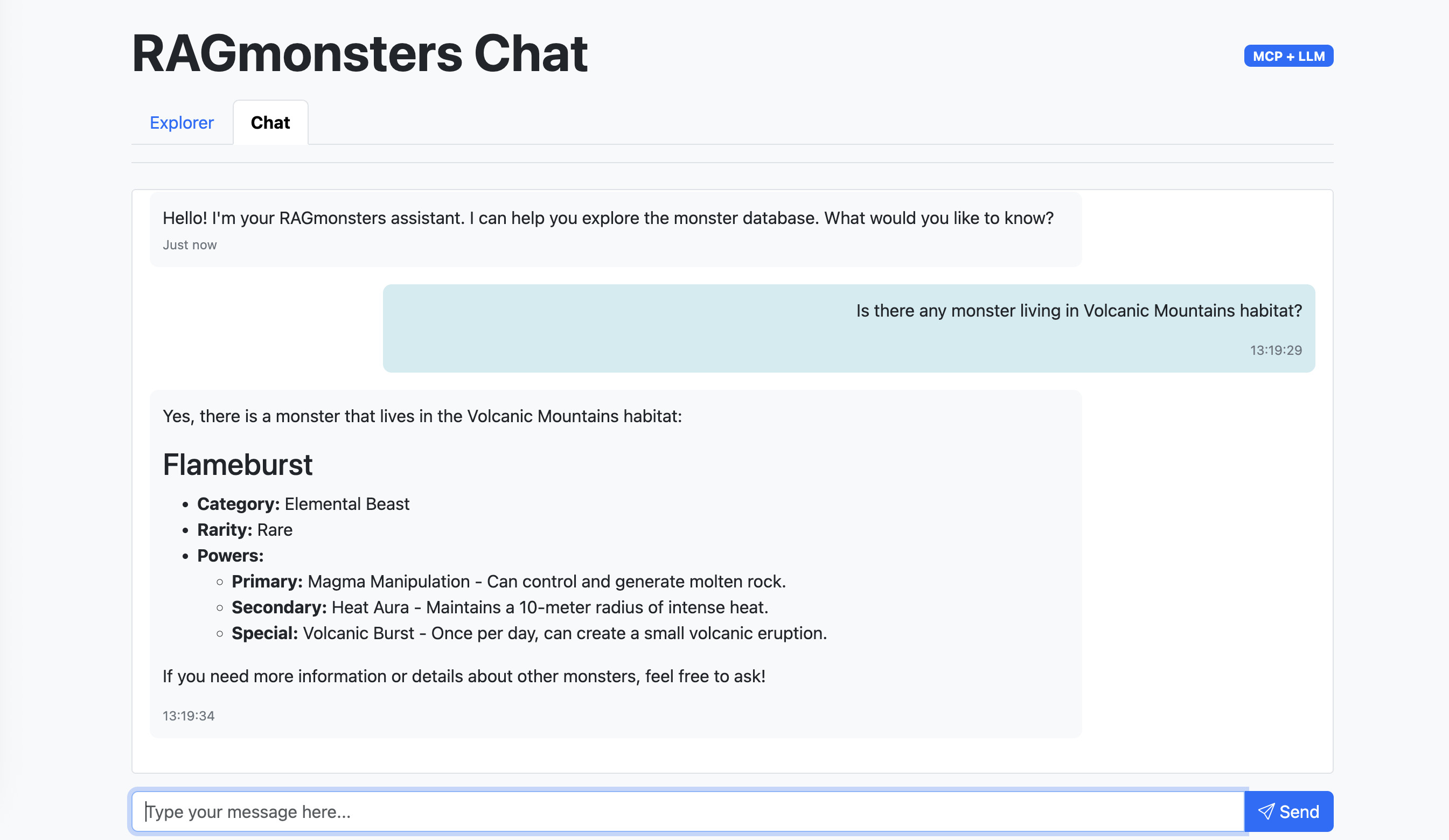
Eine natürliche Sprachschnittstelle zur Interaktion mit dem RAGmonsters-Datensatz:
Stellen Sie Fragen zu Monstern in natürlicher Sprache
Erhalten Sie Markdown-formatierte Antworten mit umfangreicher Formatierung
Unterstützt durch das ReAct-Agentenmuster von LangGraph
Nahtlose Integration mit den MCP-Tools
Über diese Schnittstelle können Benutzer:
Durchsuchen Sie alle Monster im Datensatz
Filtern Sie Monster nach Lebensraum, Kategorie und Seltenheit
Sehen Sie sich detaillierte Informationen zu jedem Monster an, einschließlich Kräften, Fähigkeiten, Stärken und Schwächen
User: "What are the top 3 monsters with the highest attack power that are vulnerable to fire?"

LLM: (Must understand schema, joins, and SQL syntax)
1. First query to understand the schema
2. Second query to find monsters with attack power
3. Third query to find vulnerabilities
4. Final query to join and filter resultsUser: "What are the top 3 monsters with the highest attack power that are vulnerable to fire?"
LLM: (Uses our domain-specific API)
1. Single call: getMonsters({ vulnerableTo: "fire", sortBy: "attackPower", limit: 3 })├── .env.example # Example environment variables
├── package.json # Node.js project configuration
├── README.md # This documentation
├── img/ # Images for documentation
├── scripts/
│ ├── testMcpServer.js # Test script for the MCP server
│ └── testLogger.js # Logger for test script
├── src/
│ ├── index.js # Main application server
│ ├── mcp-server/ # Custom MCP server implementation with FastMCP
│ │ ├── index.js # Server entry point
│ │ ├── tools/ # Domain-specific tools
│ │ │ ├── index.js # Tool registration
│ │ │ └── monsters.js # Monster-related operations
│ │ └── utils/ # Helper utilities
│ │ └── logger.js # Logging functionality
│ ├── llm.js # LangChain integration for LLM
│ └── public/ # Web interface files
│ ├── index.html # Monster explorer interface
│ └── chat.html # Chat interface for LLM interactionsBenutzerdefinierter MCP-Server mit FastMCP : Hochleistungsfähige domänenspezifische API für RAGmonsters-Daten
Optimierte Abfragen : Vorgefertigte, effiziente Datenbankoperationen
Business-Logik-Schicht : In die API eingebettete Domänenregeln und -einschränkungen
Strukturiertes Antwortformat : Konsistente JSON-Antworten für den LLM-Verbrauch
Umfassende Protokollierung : Detaillierte Protokollierung für Debugging und Überwachung
Test Suite : Skripte zur Überprüfung der Serverfunktionalität und LLM-Integration
LLM-Integration :
LangChain.js-Integration mit OpenAI und anderen kompatiblen LLM-Anbietern
LangGraph ReAct-Agentenmuster für effiziente Toolnutzung
Automatische Handhabung von Tool-Aufrufen und -Antworten
Webschnittstellen :
Explorer-Oberfläche zum Durchsuchen und Filtern von Monstern
Chat-Schnittstelle mit Markdown-Rendering für natürliche Sprachinteraktion
LangChain.js-Integration : Vollständig integrierte LLM-Interaktionen mit MCP-Tools
Webschnittstelle : Explorer- und Chat-Schnittstellen für die Interaktion mit dem RAGmonsters-Datensatz
Bereit zur Bereitstellung : Konfiguriert für die einfache Bereitstellung auf Plattformen wie Clever Cloud
Verbesserte Leistung : Optimierte Abfragen und Caching-Strategien
Bessere Benutzererfahrung : Genauere und schnellere Antworten
Reduzierte Token-Nutzung : LLM muss keine komplexen SQL- oder Schemainformationen verarbeiten
Verbesserte Sicherheit : Kein direkter SQL-Zugriff bedeutet geringeres Risiko von Injektionsangriffen
Wartbarkeit : Änderungen am Datenbankschema erfordern kein erneutes Training des LLM
Skalierbarkeit : Kann größere und komplexere Datenbanken verarbeiten
Dieses Repository klonen
Abhängigkeiten installieren: npm install
Kopieren Sie .env.example nach .env und konfigurieren Sie Ihre PostgreSQL-Verbindungszeichenfolge und LLM-API-Schlüssel
Führen Sie das MCP-Server-Testskript aus: npm run test
Führen Sie das LLM-Integrationstestskript aus: npm run test:llm
Starten Sie den Server: npm start
Der MCP-Server bietet die folgenden Tools:
getMonsters - Holen Sie sich eine Liste von Monstern mit optionaler Filterung, Sortierung und Paginierung
Parameter: Filter (Kategorie, Lebensraum, Seltenheit), Sortierung (Feld, Richtung), Grenze, Offset
Rückgabe: Array von Monsterobjekten mit grundlegenden Informationen
getMonsterById - Erhalten Sie detaillierte Informationen zu einem bestimmten Monster anhand der ID
Parameter: monsterId
Rückgabe: Detailliertes Monsterobjekt mit allen Attributen, Kräften, Fähigkeiten, Stärken und Schwächen
add - Einfaches Dienstprogramm zum Addieren zweier Zahlen (zum Testen)
Parameter: a, b
Gibt zurück: Summe der beiden Zahlen
Dieses Projekt verwendet einen modernen Ansatz zur LLM-Integration mit domänenspezifischen Tools:
Die Anwendung verwendet das ReAct-Agentenmuster (Reasoning and Acting) von LangGraph, das:
Verarbeitet Benutzeranfragen, um die Absicht zu verstehen
Bestimmt, welche Tools basierend auf der Abfrage verwendet werden sollen
Führt automatisch die entsprechenden Tools aus
Fasst die Ergebnisse zu einer kohärenten Antwort zusammen
Bewältigt bei Bedarf mehrstufiges Denken
Das Projekt enthält ein Testskript, das zeigt, wie LangChain.js verwendet wird, um ein LLM in den MCP-Server zu integrieren:
npm run test:llmDieses Skript:
Stellt eine Verbindung zum MCP-Server über StdioClientTransport her
Lädt alle verfügbaren MCP-Tools mit den MCP-Adaptern von LangChain
Erstellt einen LangChain-Agenten mit der OpenAI-API
Verarbeitet eine natürlichsprachliche Abfrage über Monster
Zeigt, wie das LLM Tool-Aufrufe durchführt, um Informationen abzurufen
Protokolliert detaillierte Informationen zur Interaktion
Sie können die Testabfragen im Skript ändern, um verschiedene Funktionen des Systems zu untersuchen. Das Skript befindet sich unter scripts/testLlmWithMcpServer.js .
Node.js 23 oder höher
PostgreSQL-Datenbank mit RAGmonsters-Daten
Zugriff auf eine LLM-API (z. B. OpenAI)
FastMCP-Paket (in Abhängigkeiten enthalten)
Erstellen Sie eine .env Datei mit den folgenden Variablen:
# PostgreSQL connection string
POSTGRESQL_ADDON_URI=postgres://username:password@host:port/database

# LLM API configuration
LLM_API_KEY=your_openai_api_key
LLM_API_MODEL=gpt-4o-mini
LLM_API_URL=https://api.openai.com/v1LLM_API_KEY : Ihr OpenAI-API-Schlüssel oder ein kompatibler Anbieterschlüssel
LLM_API_MODEL : Das zu verwendende Modell (Standard: gpt-4o-mini)
LLM_API_URL : Der API-Endpunkt (Standard: OpenAI-Endpunkt)
Die Anwendung unterstützt jede OpenAI-kompatible API, einschließlich selbst gehosteter Modelle und alternativer Anbieter.
Installieren Sie die Clever Cloud CLI:
npm install -g clever-toolsMelden Sie sich bei Ihrem Clever Cloud-Konto an:
clever loginErstellen Sie eine neue Anwendung:
clever create --type node <APP_NAME>Fügen Sie Ihre Domäne hinzu (optional, aber empfohlen):
clever domain add <YOUR_DOMAIN_NAME>Erstellen Sie ein PostgreSQL-Add-on und verknüpfen Sie es mit Ihrer Anwendung:
clever addon create <APP_NAME>-pg --plan dev
clever service link-addon <APP_NAME>-pg
Dadurch wird die Umgebungsvariable POSTGRESQL_ADDON_URI automatisch in Ihrer Anwendung festgelegt.
Legen Sie die erforderlichen Umgebungsvariablen fest:
clever env set LLM_API_KEY "your-openai-api-key"
clever env set LLM_API_MODEL "gpt-4o-mini" # Optional, defaults to gpt-4o-mini
clever env set LLM_API_URL "https://api.your-llm-provider.com" # Optional, for alternative OpenAI-compatible providers
Stellen Sie Ihre Anwendung bereit:
clever deployÖffnen Sie Ihre Anwendung:
clever openSie können die Bereitstellung auch direkt über die Clever Cloud Console durchführen:
Erstellen Sie eine neue Anwendung in der Konsole
Wählen Sie Node.js als Laufzeitumgebung
Erstellen Sie ein PostgreSQL-Add-on und verknüpfen Sie es mit Ihrer Anwendung
Legen Sie die erforderlichen Umgebungsvariablen in der Konsole fest:
LLM_API_KEY : Ihr OpenAI-API-Schlüssel
LLM_API_MODEL : (Optional) Das zu verwendende Modell, standardmäßig gpt-4o-mini
Stellen Sie Ihre Anwendung mithilfe der Git- oder GitHub-Integration bereit
Die Umgebungsvariable POSTGRESQL_ADDON_URI wird von Clever Cloud automatisch gesetzt, wenn Sie ein PostgreSQL-Add-on mit Ihrer Anwendung verknüpfen
Die Anwendung erfordert Node.js 20 oder höher, das auf Clever Cloud verfügbar ist
Die Anwendung wird automatisch auf Port 8080 ausgeführt, dem Standardport für Node.js-Anwendungen auf Clever Cloud
Dieses Projekt ist unter der MIT-Lizenz lizenziert – Einzelheiten finden Sie in der Datei LICENSE.
RAGmonster für den Beispieldatensatz
Model Context Protocol für die MCP-Spezifikation
FastMCP für die performante MCP-Implementierung
Clever Cloud für Hosting-Funktionen
Add two numbers
| Name | Required | Description | Default |
|---|---|---|---|
| a | Yes | ||
| b | Yes |
Does the description disclose side effects, auth requirements, rate limits, or destructive behavior?
No annotations are provided, so the description carries the full burden. 'Add two numbers' accurately describes a pure, stateless, non-destructive operation. For such a simple arithmetic tool, this is sufficient transparency, though it could explicitly state that it has no side effects.
Agents need to know what a tool does to the world before calling it. Descriptions should go beyond structured annotations to explain consequences.
Is the description appropriately sized, front-loaded, and free of redundancy?
The description is a single, front-loaded sentence that conveys the essential action without any unnecessary words. It is highly concise and structured effectively.
Shorter descriptions cost fewer tokens and are easier for agents to parse. Every sentence should earn its place.
Given the tool's complexity, does the description cover enough for an agent to succeed on first attempt?
Given the tool's extreme simplicity (add two numbers), the description is largely complete. It could mention the return value (the sum), but that is easily inferred. The lack of output schema does not significantly degrade completeness here.
Complex tools with many parameters or behaviors need more documentation. Simple tools need less. This dimension scales expectations accordingly.
Does the description clarify parameter syntax, constraints, interactions, or defaults beyond what the schema provides?
Schema description coverage is 0% – the description does not explain the two parameters 'a' and 'b' or their roles beyond what the schema already provides. With no additional meaning added, this dimension is severely lacking.
Input schemas describe structure but not intent. Descriptions should explain non-obvious parameter relationships and valid value ranges.
Does the description clearly state what the tool does and how it differs from similar tools?
The description clearly states 'Add two numbers', specifying the verb 'add' and the resource 'two numbers'. This distinguishes it from sibling tools like sub, mul, div, mod, and sqrt, which perform different operations.
Agents choose between tools based on descriptions. A clear purpose with a specific verb and resource helps agents select the right tool.
Does the description explain when to use this tool, when not to, or what alternatives exist?
The description provides no guidance on when to use this tool versus alternatives. For example, it does not explain when addition is preferred over subtraction or multiplication. The usage context is entirely implied.
Agents often have multiple tools that could apply. Explicit usage guidance like "use X instead of Y when Z" prevents misuse.
Get a list of all available habitats in the database
| Name | Required | Description | Default |
|---|---|---|---|
No parameters | |||
Does the description disclose side effects, auth requirements, rate limits, or destructive behavior?
No annotations are provided, so the description carries the full burden of behavioral disclosure. It states it retrieves a list but doesn't specify if it's read-only, safe, paginated, or has any side effects. For a tool with zero annotation coverage, this is a significant gap in transparency.
Agents need to know what a tool does to the world before calling it. Descriptions should go beyond structured annotations to explain consequences.
Is the description appropriately sized, front-loaded, and free of redundancy?
The description is a single, efficient sentence that directly states the tool's function without any fluff. It's appropriately sized and front-loaded, making it easy to parse quickly.
Shorter descriptions cost fewer tokens and are easier for agents to parse. Every sentence should earn its place.
Given the tool's complexity, does the description cover enough for an agent to succeed on first attempt?
Given the tool's simplicity (0 parameters, no output schema, no annotations), the description is minimally adequate. However, it lacks details on behavioral aspects like safety or output format, which would be helpful for an agent to use it correctly, especially without annotations.
Complex tools with many parameters or behaviors need more documentation. Simple tools need less. This dimension scales expectations accordingly.
Does the description clarify parameter syntax, constraints, interactions, or defaults beyond what the schema provides?
The input schema has 0 parameters with 100% coverage, so no parameter documentation is needed. The description doesn't add param info, which is fine here, but it could hint at any implicit constraints (e.g., sorting or limits), though not required. Baseline is high due to no parameters.
Input schemas describe structure but not intent. Descriptions should explain non-obvious parameter relationships and valid value ranges.
Does the description clearly state what the tool does and how it differs from similar tools?
The description clearly states the verb ('Get') and resource ('list of all available habitats'), making the purpose understandable. However, it doesn't differentiate from sibling tools like 'getMonsterByHabitat' or 'getMonsters', which also retrieve data but with different scopes or filters, so it lacks sibling distinction.
Agents choose between tools based on descriptions. A clear purpose with a specific verb and resource helps agents select the right tool.
Does the description explain when to use this tool, when not to, or what alternatives exist?
The description provides no guidance on when to use this tool versus alternatives. It doesn't mention scenarios where this tool is preferred over siblings like 'getMonsterByHabitat' (which filters by habitat) or 'getMonsters' (which retrieves monsters instead of habitats), leaving the agent without usage context.
Agents often have multiple tools that could apply. Explicit usage guidance like "use X instead of Y when Z" prevents misuse.
Get monsters by habitat (exact match only). IMPORTANT: for best results, first call getHabitats to get a list of available habitats, then find the most appropriate one to use with this tool.
| Name | Required | Description | Default |
|---|---|---|---|
| habitat | Yes | Exact habitat name (must match exactly). For best results, first call getHabitats to get a list of available habitats, then find the most appropriate one to use with this tool. | |
| limit | No | Maximum number of results to return (default: 10) |
Does the description disclose side effects, auth requirements, rate limits, or destructive behavior?
No annotations are provided, so the description carries the full burden of behavioral disclosure. It mentions the 'exact match only' constraint, which is useful behavioral context beyond basic functionality. However, it lacks details on error handling, rate limits, authentication needs, or what the return format looks like (e.g., list of monsters with specific fields).
Agents need to know what a tool does to the world before calling it. Descriptions should go beyond structured annotations to explain consequences.
Is the description appropriately sized, front-loaded, and free of redundancy?
The description is concise and well-structured: two sentences that efficiently convey purpose and usage guidelines without wasted words. The first sentence states the core functionality, and the second provides critical procedural advice, both earning their place.
Shorter descriptions cost fewer tokens and are easier for agents to parse. Every sentence should earn its place.
Given the tool's complexity, does the description cover enough for an agent to succeed on first attempt?
Given the tool's moderate complexity (2 parameters, no output schema, no annotations), the description is fairly complete. It covers purpose, usage guidelines, and a key behavioral constraint ('exact match only'). However, without annotations or an output schema, it could benefit from more details on return values or error cases, but it's adequate for basic use.
Complex tools with many parameters or behaviors need more documentation. Simple tools need less. This dimension scales expectations accordingly.
Does the description clarify parameter syntax, constraints, interactions, or defaults beyond what the schema provides?
Schema description coverage is 100%, so the schema already documents both parameters ('habitat' and 'limit') with descriptions. The description repeats the guidance about calling 'getHabitats' for the 'habitat' parameter but doesn't add new semantic meaning beyond what the schema provides. Baseline 3 is appropriate when the schema does the heavy lifting.
Input schemas describe structure but not intent. Descriptions should explain non-obvious parameter relationships and valid value ranges.
Does the description clearly state what the tool does and how it differs from similar tools?
The description clearly states the tool's purpose: 'Get monsters by habitat (exact match only).' It specifies the verb ('Get'), resource ('monsters'), and constraint ('by habitat, exact match only'). However, it doesn't explicitly differentiate from siblings like 'getMonsters' (which might fetch all monsters) or 'getMonsterByName' (which filters by name rather than habitat).
Agents choose between tools based on descriptions. A clear purpose with a specific verb and resource helps agents select the right tool.
Does the description explain when to use this tool, when not to, or what alternatives exist?
The description provides explicit usage guidance: 'for best results, first call getHabitats to get a list of available habitats, then find the most appropriate one to use with this tool.' This tells the agent when to use this tool (after retrieving habitat list) and references a sibling tool ('getHabitats') as a prerequisite, offering clear alternatives and context.
Agents often have multiple tools that could apply. Explicit usage guidance like "use X instead of Y when Z" prevents misuse.
Get detailed information about a specific monster by ID
| Name | Required | Description | Default |
|---|---|---|---|
| monsterId | Yes | ID of the monster to retrieve |
Does the description disclose side effects, auth requirements, rate limits, or destructive behavior?
No annotations are provided, so the description carries the full burden of behavioral disclosure. It states the tool retrieves 'detailed information' but doesn't specify what that includes (e.g., stats, abilities, weaknesses), whether it's a read-only operation, error handling for invalid IDs, or performance characteristics like rate limits. This leaves significant gaps for agent understanding.
Agents need to know what a tool does to the world before calling it. Descriptions should go beyond structured annotations to explain consequences.
Is the description appropriately sized, front-loaded, and free of redundancy?
The description is a single, efficient sentence that directly states the tool's purpose without unnecessary words. It is front-loaded with the core action and resource, making it easy to parse quickly.
Shorter descriptions cost fewer tokens and are easier for agents to parse. Every sentence should earn its place.
Given the tool's complexity, does the description cover enough for an agent to succeed on first attempt?
For a simple lookup tool with one parameter and no output schema, the description is minimally adequate. However, it lacks details on the returned data structure (e.g., what 'detailed information' entails) and behavioral aspects like error cases, which would help an agent use it correctly. The absence of annotations exacerbates these gaps.
Complex tools with many parameters or behaviors need more documentation. Simple tools need less. This dimension scales expectations accordingly.
Does the description clarify parameter syntax, constraints, interactions, or defaults beyond what the schema provides?
The schema description coverage is 100%, with the parameter 'monsterId' clearly documented as 'ID of the monster to retrieve'. The description adds no additional semantic context beyond what the schema provides, such as format examples or valid ranges. Given the high schema coverage, the baseline score of 3 is appropriate.
Input schemas describe structure but not intent. Descriptions should explain non-obvious parameter relationships and valid value ranges.
Does the description clearly state what the tool does and how it differs from similar tools?
The description clearly states the verb ('Get detailed information') and resource ('about a specific monster by ID'), making the purpose unambiguous. However, it doesn't explicitly differentiate from sibling tools like 'getMonsterByName' or 'getMonsterByHabitat', which also retrieve monster information but use different identifiers.
Agents choose between tools based on descriptions. A clear purpose with a specific verb and resource helps agents select the right tool.
Does the description explain when to use this tool, when not to, or what alternatives exist?
The description provides no guidance on when to use this tool versus alternatives. It doesn't mention sibling tools like 'getMonsterByName' (for name-based lookup) or 'getMonsterByHabitat' (for habitat-based filtering), nor does it specify prerequisites such as needing a valid monster ID.
Agents often have multiple tools that could apply. Explicit usage guidance like "use X instead of Y when Z" prevents misuse.
Get monsters by name (partial match, returns up to 5 matches)
| Name | Required | Description | Default |
|---|---|---|---|
| name | Yes | Name of the monster to search for (can be partial) |
Does the description disclose side effects, auth requirements, rate limits, or destructive behavior?
With no annotations provided, the description carries the full burden. It discloses key behavioral traits: partial matching and a limit of 5 results, which are valuable beyond basic 'get' functionality. However, it lacks details on error handling, authentication needs, or rate limits, leaving gaps for a tool with no annotation coverage.
Agents need to know what a tool does to the world before calling it. Descriptions should go beyond structured annotations to explain consequences.
Is the description appropriately sized, front-loaded, and free of redundancy?
The description is extremely concise and front-loaded: a single sentence that efficiently conveys the core functionality and key constraints. Every word earns its place, with no wasted text or redundancy.
Shorter descriptions cost fewer tokens and are easier for agents to parse. Every sentence should earn its place.
Given the tool's complexity, does the description cover enough for an agent to succeed on first attempt?
Given the tool's low complexity (1 parameter, no output schema, no annotations), the description is minimally complete. It covers the basic operation and behavioral constraints but lacks details on output format or error cases. For a simple lookup tool, this is adequate but leaves room for improvement in contextual richness.
Complex tools with many parameters or behaviors need more documentation. Simple tools need less. This dimension scales expectations accordingly.
Does the description clarify parameter syntax, constraints, interactions, or defaults beyond what the schema provides?
Schema description coverage is 100%, so the schema already documents the 'name' parameter as 'Name of the monster to search for (can be partial).' The description adds no additional meaning beyond this, merely restating 'partial match.' Baseline 3 is appropriate as the schema handles parameter documentation adequately.
Input schemas describe structure but not intent. Descriptions should explain non-obvious parameter relationships and valid value ranges.
Does the description clearly state what the tool does and how it differs from similar tools?
The description clearly states the tool's purpose: 'Get monsters by name' specifies the verb (get) and resource (monsters). It distinguishes from siblings like getMonsterById and getMonsters by focusing on name-based retrieval. However, it doesn't explicitly differentiate from getMonsterByHabitat, which is a similar lookup but by different criteria.
Agents choose between tools based on descriptions. A clear purpose with a specific verb and resource helps agents select the right tool.
Does the description explain when to use this tool, when not to, or what alternatives exist?
The description implies usage context through 'partial match, returns up to 5 matches,' suggesting it's for fuzzy name searches with result limits. However, it doesn't explicitly state when to use this versus alternatives like getMonsterById (exact ID match) or getMonsters (full list). No guidance on prerequisites or exclusions is provided.
Agents often have multiple tools that could apply. Explicit usage guidance like "use X instead of Y when Z" prevents misuse.
Get a list of monsters with optional filtering, sorting, and pagination
| Name | Required | Description | Default |
|---|---|---|---|
| filters | No | Optional filters for the query | |
| limit | No | Maximum number of results to return (default: 10) | |
| offset | No | Number of results to skip for pagination (default: 0) | |
| sort | No | Optional sorting parameters |
Does the description disclose side effects, auth requirements, rate limits, or destructive behavior?
No annotations are provided, so the description carries the full burden of behavioral disclosure. It mentions filtering, sorting, and pagination but doesn't describe important traits like whether this is a read-only operation, what happens with invalid filters, rate limits, authentication requirements, or the format of returned results. For a list retrieval tool with zero annotation coverage, this leaves significant gaps.
Agents need to know what a tool does to the world before calling it. Descriptions should go beyond structured annotations to explain consequences.
Is the description appropriately sized, front-loaded, and free of redundancy?
The description is a single, efficient sentence that front-loads the core purpose ('Get a list of monsters') and then succinctly lists the key capabilities. Every word earns its place with no redundancy or unnecessary elaboration.
Shorter descriptions cost fewer tokens and are easier for agents to parse. Every sentence should earn its place.
Given the tool's complexity, does the description cover enough for an agent to succeed on first attempt?
Given no annotations and no output schema, the description is incomplete for a tool with four parameters and nested objects. It doesn't explain what the returned list looks like, how errors are handled, or important behavioral aspects like default values or constraints. For a list retrieval tool with filtering capabilities, more context is needed to be fully helpful.
Complex tools with many parameters or behaviors need more documentation. Simple tools need less. This dimension scales expectations accordingly.
Does the description clarify parameter syntax, constraints, interactions, or defaults beyond what the schema provides?
Schema description coverage is 100%, so the schema already documents all four parameters thoroughly. The description adds minimal value by mentioning 'optional filtering, sorting, and pagination' which aligns with the schema but doesn't provide additional semantic context beyond what's already in the parameter descriptions. This meets the baseline for high schema coverage.
Input schemas describe structure but not intent. Descriptions should explain non-obvious parameter relationships and valid value ranges.
Does the description clearly state what the tool does and how it differs from similar tools?
The description clearly states the verb ('Get') and resource ('list of monsters'), making the purpose immediately understandable. It distinguishes itself from siblings like getMonsterById or getMonsterByName by indicating it returns a list rather than a single entity. However, it doesn't explicitly differentiate from getMonsterByHabitat which also involves filtering.
Agents choose between tools based on descriptions. A clear purpose with a specific verb and resource helps agents select the right tool.
Does the description explain when to use this tool, when not to, or what alternatives exist?
The description implies usage through 'optional filtering, sorting, and pagination', suggesting this tool is for general queries rather than specific lookups. However, it doesn't explicitly state when to use this versus alternatives like getMonsterByHabitat or getMonsterById, nor does it provide any exclusions or prerequisites for usage.
Agents often have multiple tools that could apply. Explicit usage guidance like "use X instead of Y when Z" prevents misuse.
Recent tool additions, removals, and schema changes observed during successful MCP inspections.
v1.0.0addgetHabitatsgetMonsterByHabitatgetMonsterByIdgetMonsterByNamegetMonstersScored across 6 tools
Most tools have distinct purposes, but 'getMonsterByHabitat' and 'getMonsters' could cause confusion since both retrieve monsters with filtering capabilities. The descriptions clarify that 'getMonsterByHabitat' is for exact habitat matching while 'getMonsters' offers broader filtering, but agents might still misselect between them.
The naming is mixed with inconsistent patterns: 'add' uses a generic verb, 'getHabitats' and 'getMonsters' follow a verb_noun plural pattern, while 'getMonsterByHabitat', 'getMonsterById', and 'getMonsterByName' use a verb_noun_preposition format. This creates readability but lacks uniformity across all tools.
With 6 tools, the count is reasonable for a PostgreSQL-based monster database server. It covers core operations like adding data and querying monsters in various ways, though it might benefit from additional tools for updates or deletions to be fully scoped.
The tool set covers querying and adding data well, but there are notable gaps for a database server: no update or delete tools for monsters or habitats, and no tool for creating habitats. This limits full lifecycle management and could cause agent failures in more complex workflows.
Hosted MCP server for AI-driven data ops. Create apps, manage schemas, and CRUD structured data.
Text-to-SQL MCP server: read-only queries on PostgreSQL, MySQL and SQL Server with your real schema
Hosted MCP server for live public-data APIs and Skills for AI agents.
The Grafbase MCP server sits in front of a GraphQL API and exposes an MCP protocol-compliant interface that allows AI agents and LLMs to explore and query GraphQL APIs using natural language. It provides tools to search schemas, introspect types and fields, and execute GraphQL queries while minimizing context bloat by returning only relevant schema subsets, with built-in support for authentication, authorization, and configurable access control.