
-
licenseNot graded
qualityC
maintenanceAn MCP server that bridges AI assistants with SQL databases, enabling natural language querying across multiple database types with built-in optimization and security.
3
-

This server provides a domain-specific API for querying the RAGmonsters monster dataset through natural language interactions, eliminating the need for raw SQL queries.
Core Tools:
Query monsters with filtering and sorting - Use getMonsters to search by rarity, habitat, or category with pagination support
Retrieve detailed monster information - Use getMonsterById for comprehensive details (attributes, powers, abilities, strengths, weaknesses)
Search monsters by name - Perform partial/fuzzy name matching (returns up to 5 matches)
Find monsters by habitat - Use getMonsterByHabitat with exact habitat names
Explore available habitats - Use getHabitats to discover all habitat types in the database
Perform basic arithmetic - Add two numbers (testing utility)
Key Features:
Natural language interaction - Chat interface powered by LLMs using LangGraph's ReAct agent pattern
Web-based exploration - Browse and filter monsters through a dedicated explorer interface
Enhanced performance & security - Optimized queries, no direct SQL exposure, reduced LLM cognitive load, and deterministic behavior
Robust LLM integration - Seamless integration with LangChain.js and strict typing for predictable responses
Deployment ready - Configured for cloud platforms like Clever Cloud with PostgreSQL integration
Mentioned for hosting capabilities, allowing deployment of the MCP server on Clever Cloud infrastructure
Integrates with GitHub repositories for accessing the RAGmonsters dataset, which serves as the foundation for the MCP server's functionality
Integrates with LangChain.js for LLM interactions, enabling structured communication between the custom MCP server and language models
Referenced as an LLM API provider that can be used with the MCP server for natural language interactions with the database
Provides domain-specific API access to PostgreSQL databases, specifically optimized for the RAGmonsters dataset with custom query operations
Click on "Deploy Server".
Wait a few minutes for the server to deploy. Once ready, it will show a "Started" state.
In the chat, type @ followed by the MCP server name and your instructions, e.g., "@RAGmonsters Custom PostgreSQL MCP Server show me the top 5 monsters by attack power"
That's it! The server will respond to your query, and you can continue using it as needed.
Here is a step-by-step guide with screenshots.
This repository demonstrates a more advanced approach to integrating Large Language Models (LLMs) with databases using the Model Context Protocol (MCP). While generic MCP PostgreSQL servers allow LLMs to explore databases through raw SQL queries, this project takes a different approach by creating a custom MCP server that provides a domain-specific API tailored to the application's needs.
This implementation uses FastMCP, a high-performance implementation of the Model Context Protocol, which provides improved efficiency and reliability for tool-based interactions with LLMs.
This project uses the RAGmonsters dataset as its foundation. RAGmonsters is an open-source project that provides a rich, fictional dataset of monsters with various attributes, abilities, and relationships - specifically designed for demonstrating and testing Retrieval-Augmented Generation (RAG) systems.
Generic MCP PostgreSQL servers provide LLMs with a query tool that allows them to:
Explore database schemas
Formulate SQL queries based on natural language questions
Execute those queries against the database
While this approach works, it has several limitations for real-world applications:
Cognitive Load: The LLM must understand the entire database schema
Inefficiency: Multiple SQL queries are often needed to answer a single question
Security Concerns: Raw SQL access requires careful prompt engineering to prevent injection attacks
Performance: Complex queries may be inefficient if the LLM doesn't understand the database's indexing strategy
Domain Knowledge Gap: The LLM lacks understanding of business rules and domain-specific constraints
RAGmonsters is an open dataset specifically designed for testing and demonstrating Retrieval-Augmented Generation (RAG) systems. It contains information about fictional monsters with rich attributes, abilities, and relationships - making it perfect for natural language querying demonstrations.
The PostgreSQL version of RAGmonsters provides a well-structured relational database with multiple tables and relationships, including:
Monsters with various attributes (attack power, defense, health, etc.)
Abilities that monsters can possess
Elements (fire, water, earth, etc.) with complex relationships
Habitats where monsters can be found
Evolution chains and relationships between monsters
This rich, interconnected dataset is ideal for demonstrating the power of domain-specific APIs versus generic SQL access.
This project demonstrates how to build a custom MCP server that provides a higher-level, domain-specific API for the RAGmonsters dataset. Instead of exposing raw SQL capabilities, our MCP server offers purpose-built functions that:
Abstract Database Complexity: Hide the underlying schema and SQL details
Provide Domain-Specific Operations: Offer functions that align with business concepts
Optimize for Common Queries: Implement efficient query patterns for frequently asked questions
Enforce Business Rules: Embed domain-specific logic and constraints
Improve Security: Limit the attack surface by removing direct SQL access
Related MCP server: scopedb-mcp
The project includes two main interfaces for interacting with the RAGmonsters dataset:
A data-focused interface for exploring and filtering the RAGmonsters dataset through the MCP API:
Browse all monsters with filtering by category, habitat, and rarity
View detailed information about each monster
Interactive UI built with Bootstrap
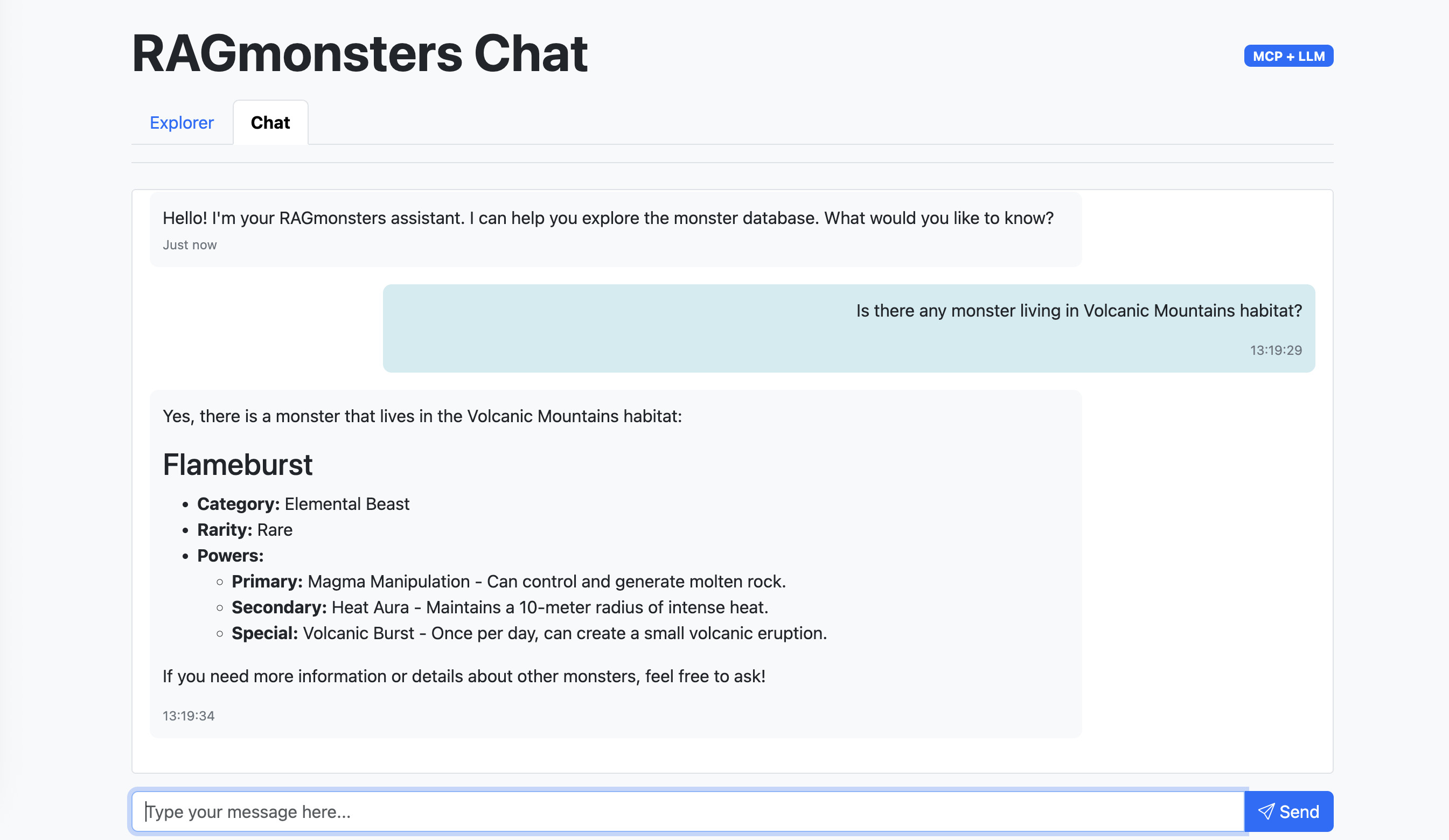
A natural language interface for interacting with the RAGmonsters dataset:
Ask questions about monsters in natural language
Get Markdown-formatted responses with rich formatting
Powered by LangGraph's ReAct agent pattern
Seamless integration with the MCP tools
This interface allows users to:
Browse all monsters in the dataset
Filter monsters by habitat, category, and rarity
View detailed information about each monster, including powers, abilities, strengths, and weaknesses
User: "What are the top 3 monsters with the highest attack power that are vulnerable to fire?"

LLM: (Must understand schema, joins, and SQL syntax)
1. First query to understand the schema
2. Second query to find monsters with attack power
3. Third query to find vulnerabilities
4. Final query to join and filter resultsUser: "What are the top 3 monsters with the highest attack power that are vulnerable to fire?"
LLM: (Uses our domain-specific API)
1. Single call: getMonsters({ vulnerableTo: "fire", sortBy: "attackPower", limit: 3 })├── .env.example # Example environment variables
├── package.json # Node.js project configuration
├── README.md # This documentation
├── img/ # Images for documentation
├── scripts/
│ ├── testMcpServer.js # Test script for the MCP server
│ └── testLogger.js # Logger for test script
├── src/
│ ├── index.js # Main application server
│ ├── mcp-server/ # Custom MCP server implementation with FastMCP
│ │ ├── index.js # Server entry point
│ │ ├── tools/ # Domain-specific tools (Actions)
│ │ │ ├── index.js # Tool registration
│ │ │ └── monsters.js # Monster-related operations
│ │ ├── resources/ # Static knowledge (Knowledge)
│ │ │ ├── index.js # Resource registration
│ │ │ └── monsters.js # Monster-related resources
│ │ ├── prompts/ # Workflow templates (Guidance)
│ │ │ ├── index.js # Prompt registration
│ │ │ └── monsters.js # Monster-related prompts
│ │ └── utils/ # Helper utilities
│ │ ├── db.js # Database utilities
│ │ └── logger.js # Logging functionality
│ ├── llm.js # LangChain integration for LLM
│ └── public/ # Web interface files
│ ├── index.html # Monster explorer interface
│ └── chat.html # Chat interface for LLM interactionsCustom MCP Server with FastMCP: High-performance domain-specific API for RAGmonsters data
Optimized Queries: Pre-built efficient database operations
Business Logic Layer: Domain rules and constraints embedded in the API
Structured Response Format: Consistent JSON responses for LLM consumption
Comprehensive Logging: Detailed logging for debugging and monitoring
Test Suite: Scripts to verify server functionality and LLM integration
LLM Integration:
LangChain.js integration with OpenAI and other compatible LLM providers
LangGraph ReAct agent pattern for efficient tool use
Automatic handling of tool calls and responses
Web Interfaces:
Explorer interface for browsing and filtering monsters
Chat interface with Markdown rendering for natural language interaction
LangChain.js Integration: Fully integrated LLM interactions with MCP tools
Web Interface: Explorer and chat interfaces for interacting with the RAGmonsters dataset
Deployment Ready: Configured for easy deployment on platforms like Clever Cloud
Improved Performance: Optimized queries and caching strategies
Better User Experience: More accurate and faster responses
Reduced Token Usage: LLM doesn't need to process complex SQL or schema information
Enhanced Security: No direct SQL access means reduced risk of injection attacks
Maintainability: Changes to the database schema don't require retraining the LLM
Scalability: Can handle larger and more complex databases
Clone this repository
Install dependencies: npm install
Copy .env.example to .env and configure your PostgreSQL connection string and LLM API keys
Run the MCP server test script: npm run test
Run the LLM integration test script: npm run test:llm
Start the server: npm start
The MCP server provides the following tools:
getMonsters - Get a list of monsters with optional filtering, sorting, and pagination
Parameters: filters (category, habitat, biome, rarity), sort (field, direction), limit, offset
Returns: Array of monster objects with basic information
getMonsterById - Get detailed information about a specific monster by ID
Parameters: monsterId
Returns: Detailed monster object with all attributes, powers, abilities, strengths, and weaknesses
getHabitats - Get a list of all available habitats in the database
Parameters: None
Returns: Array of habitat names
getCategories - Get a list of all available categories in the database
Parameters: None
Returns: Array of category names
getBiomes - Get a list of all available biomes in the database
Parameters: None
Returns: Array of biome names
getRarities - Get a list of all available rarities in the database
Parameters: None
Returns: Array of rarity names
getMonsterByHabitat - Get monsters by habitat (exact match only)
Parameters: habitat
Returns: Array of monster objects matching the habitat
getMonsterByName - Get monsters by name (partial match)
Parameters: name
Returns: Array of monster objects matching the name
compareMonsters - Compare two monsters side-by-side
Parameters: monsterNameA, monsterNameB
Returns: Comparison data including category, habitat, rarity, and stats
Resources provide static knowledge that the LLM can access for context. Data is cached at server startup for optimal performance.
ragmonsters://schema - Database schema definition
Describes available tables, columns, and data types
ragmonsters://categories - List of monster categories
All available categories (e.g., Aquatic, Elemental, Spirit/Ethereal)
ragmonsters://subcategories - List of monster subcategories
Subcategories grouped by their parent category
ragmonsters://habitats - List of monster habitats
All habitats where monsters can be found
Prompts are workflow templates that guide the LLM through multi-step analysis using the available tools.
analyze_monster_weakness - Weakness analysis workflow
Fetches monster details, identifies vulnerabilities
Finds counter-monsters and ranks them by effectiveness
Provides battle strategy recommendations
compare_monsters - Monster comparison framework
Deep matchup analysis between two monsters
Analyzes powers, abilities, flaws, and environmental factors
Provides verdict with situational considerations
explore_habitat - Habitat ecosystem analysis
Maps monster population in a habitat
Identifies apex predators and power hierarchy
Provides danger assessment and exploration guidance
build_team - Team composition strategy
Builds optimal monster teams for specific objectives
Considers category diversity and power synergies
Recommends roles and backup alternatives
This project uses a modern approach to LLM integration with domain-specific tools:
The application uses LangGraph's ReAct (Reasoning and Acting) agent pattern, which:
Processes user queries to understand intent
Determines which tools to use based on the query
Automatically executes the appropriate tools
Synthesizes results into a coherent response
Handles multi-step reasoning when needed
The project includes a test script that demonstrates how to use LangChain.js to integrate an LLM with the MCP server:
npm run test:llmThis script:
Connects to the MCP server using the StdioClientTransport
Loads all available MCP tools using LangChain's MCP adapters
Creates a LangChain agent with the OpenAI API
Processes a natural language query about monsters
Shows how the LLM makes tool calls to retrieve information
Logs detailed information about the interaction
You can modify the test queries in the script to explore different capabilities of the system. The script is located at scripts/testLlmWithMcpServer.js.
Node.js 23 or later
PostgreSQL database with RAGmonsters data
Access to an LLM API (e.g., OpenAI)
FastMCP package (included in dependencies)
Create a .env file with the following variables:
# PostgreSQL connection string
POSTGRESQL_ADDON_URI=postgres://username:password@host:port/database

# LLM API configuration
LLM_API_KEY=your_openai_api_key
LLM_API_MODEL=gpt-4o-mini
LLM_API_URL=https://api.openai.com/v1LLM_API_KEY: Your OpenAI API key or compatible provider key
LLM_API_MODEL: The model to use (default: gpt-4o-mini)
LLM_API_URL: The API endpoint (default: OpenAI's endpoint)
The application supports any OpenAI-compatible API, including self-hosted models and alternative providers.
This server implements the "Smarter MCP" design principles:
Tools are scoped to specific tasks:
getMonsters: For search and discovery (returning summaries).
getMonsterById: For retrieving deep details.
We enforce strict types using Zod schemas:
Enums: category and rarity are restricted to known values (e.g., 'Aquatic', 'Rare') rather than open strings.
Resources: The ragmonsters://schema resource exposes the data shape to the LLM.
Sorting: All queries use deterministic tie-breakers (e.g., sorting by name also sorts by ID) to ensure consistent pagination.
Prompts: The ragmonsters://answering-style prompt guides the LLM to answer consistently.
Explicit Columns: Database queries select specific columns (name, category, etc.) rather than SELECT *, preventing accidental exposure of internal data.
Input Validation: Limits are capped (max 50) and validated by Zod schema.
Sanitization: String inputs are handled via parameterized queries to prevent injection.
Structured Summaries: Responses include a natural-language summary field (e.g., "Found 3 Aquatic monsters...") alongside the raw JSON data.
Metadata: Responses include source ("RAGmonsters DB") and policy fields to explain provenance.
Next Steps: The API returns next hints (e.g., suggesting getMonsterById) to guide the agent's next action.
We have also implemented the "Capability Modeling" best practices to clearly separate Actions (Tools), Knowledge (Resources), and Guidance (Prompts).
Tools perform database queries and return structured data:
getMonsters, getMonsterById: Core retrieval operations
getHabitats, getCategories, getBiomes, getRarities: Reference data lookups
getMonsterByHabitat, getMonsterByName: Specialized search operations
compareMonsters(nameA, nameB): Side-by-side comparison with analysis
Resources provide static reference data cached at server startup:
ragmonsters://schema: Database schema for understanding data structure
ragmonsters://categories: All monster categories
ragmonsters://subcategories: Subcategories grouped by parent category
ragmonsters://habitats: All available habitats
Prompts are workflow templates that guide multi-step analysis:
analyze_monster_weakness: Structured weakness analysis and counter-strategy generation
compare_monsters: Detailed matchup framework for comparing two monsters
explore_habitat: Ecosystem analysis for habitat exploration
build_team: Team composition strategy for specific objectives
Install the Clever Cloud CLI:
npm install -g clever-toolsLogin to your Clever Cloud account:
clever loginCreate a new application:
clever create --type node <APP_NAME>Add your domain (optional but recommended):
clever domain add <YOUR_DOMAIN_NAME>Create a PostgreSQL add-on and link it to your application:
clever addon create <APP_NAME>-pg --plan dev
clever service link-addon <APP_NAME>-pg
This will automatically set the POSTGRESQL_ADDON_URI environment variable in your application.
Set the required environment variables:
clever env set LLM_API_KEY "your-openai-api-key"
clever env set LLM_API_MODEL "gpt-4o-mini" # Optional, defaults to gpt-4o-mini
clever env set LLM_API_URL "https://api.your-llm-provider.com" # Optional, for alternative OpenAI-compatible providers
Deploy your application:
clever deployOpen your application:
clever openYou can also deploy directly from the Clever Cloud Console:
Create a new application in the console
Select Node.js as the runtime
Create a PostgreSQL add-on and link it to your application
Set the required environment variables in the console:
LLM_API_KEY: Your OpenAI API key
LLM_API_MODEL: (Optional) The model to use, defaults to gpt-4o-mini
Deploy your application using Git or GitHub integration
The POSTGRESQL_ADDON_URI environment variable is automatically set by Clever Cloud when you link a PostgreSQL add-on to your application
The application requires Node.js 20 or later, which is available on Clever Cloud
The application will automatically run on port 8080, which is the default port for Node.js applications on Clever Cloud
This project is licensed under the MIT License - see the LICENSE file for details.
RAGmonsters for the sample dataset
Model Context Protocol for the MCP specification
FastMCP for the high-performance MCP implementation
Clever Cloud for hosting capabilities
Add two numbers
| Name | Required | Description | Default |
|---|---|---|---|
| a | Yes | ||
| b | Yes |
Does the description disclose side effects, auth requirements, rate limits, or destructive behavior?
No annotations are provided, so the description carries the full burden. 'Add two numbers' accurately describes a pure, stateless, non-destructive operation. For such a simple arithmetic tool, this is sufficient transparency, though it could explicitly state that it has no side effects.
Agents need to know what a tool does to the world before calling it. Descriptions should go beyond structured annotations to explain consequences.
Is the description appropriately sized, front-loaded, and free of redundancy?
The description is a single, front-loaded sentence that conveys the essential action without any unnecessary words. It is highly concise and structured effectively.
Shorter descriptions cost fewer tokens and are easier for agents to parse. Every sentence should earn its place.
Given the tool's complexity, does the description cover enough for an agent to succeed on first attempt?
Given the tool's extreme simplicity (add two numbers), the description is largely complete. It could mention the return value (the sum), but that is easily inferred. The lack of output schema does not significantly degrade completeness here.
Complex tools with many parameters or behaviors need more documentation. Simple tools need less. This dimension scales expectations accordingly.
Does the description clarify parameter syntax, constraints, interactions, or defaults beyond what the schema provides?
Schema description coverage is 0% – the description does not explain the two parameters 'a' and 'b' or their roles beyond what the schema already provides. With no additional meaning added, this dimension is severely lacking.
Input schemas describe structure but not intent. Descriptions should explain non-obvious parameter relationships and valid value ranges.
Does the description clearly state what the tool does and how it differs from similar tools?
The description clearly states 'Add two numbers', specifying the verb 'add' and the resource 'two numbers'. This distinguishes it from sibling tools like sub, mul, div, mod, and sqrt, which perform different operations.
Agents choose between tools based on descriptions. A clear purpose with a specific verb and resource helps agents select the right tool.
Does the description explain when to use this tool, when not to, or what alternatives exist?
The description provides no guidance on when to use this tool versus alternatives. For example, it does not explain when addition is preferred over subtraction or multiplication. The usage context is entirely implied.
Agents often have multiple tools that could apply. Explicit usage guidance like "use X instead of Y when Z" prevents misuse.
Get a list of all available habitats in the database
| Name | Required | Description | Default |
|---|---|---|---|
No parameters | |||
Does the description disclose side effects, auth requirements, rate limits, or destructive behavior?
No annotations are provided, so the description carries the full burden of behavioral disclosure. It states it retrieves a list but doesn't specify if it's read-only, safe, paginated, or has any side effects. For a tool with zero annotation coverage, this is a significant gap in transparency.
Agents need to know what a tool does to the world before calling it. Descriptions should go beyond structured annotations to explain consequences.
Is the description appropriately sized, front-loaded, and free of redundancy?
The description is a single, efficient sentence that directly states the tool's function without any fluff. It's appropriately sized and front-loaded, making it easy to parse quickly.
Shorter descriptions cost fewer tokens and are easier for agents to parse. Every sentence should earn its place.
Given the tool's complexity, does the description cover enough for an agent to succeed on first attempt?
Given the tool's simplicity (0 parameters, no output schema, no annotations), the description is minimally adequate. However, it lacks details on behavioral aspects like safety or output format, which would be helpful for an agent to use it correctly, especially without annotations.
Complex tools with many parameters or behaviors need more documentation. Simple tools need less. This dimension scales expectations accordingly.
Does the description clarify parameter syntax, constraints, interactions, or defaults beyond what the schema provides?
The input schema has 0 parameters with 100% coverage, so no parameter documentation is needed. The description doesn't add param info, which is fine here, but it could hint at any implicit constraints (e.g., sorting or limits), though not required. Baseline is high due to no parameters.
Input schemas describe structure but not intent. Descriptions should explain non-obvious parameter relationships and valid value ranges.
Does the description clearly state what the tool does and how it differs from similar tools?
The description clearly states the verb ('Get') and resource ('list of all available habitats'), making the purpose understandable. However, it doesn't differentiate from sibling tools like 'getMonsterByHabitat' or 'getMonsters', which also retrieve data but with different scopes or filters, so it lacks sibling distinction.
Agents choose between tools based on descriptions. A clear purpose with a specific verb and resource helps agents select the right tool.
Does the description explain when to use this tool, when not to, or what alternatives exist?
The description provides no guidance on when to use this tool versus alternatives. It doesn't mention scenarios where this tool is preferred over siblings like 'getMonsterByHabitat' (which filters by habitat) or 'getMonsters' (which retrieves monsters instead of habitats), leaving the agent without usage context.
Agents often have multiple tools that could apply. Explicit usage guidance like "use X instead of Y when Z" prevents misuse.
Get monsters by habitat (exact match only). IMPORTANT: for best results, first call getHabitats to get a list of available habitats, then find the most appropriate one to use with this tool.
| Name | Required | Description | Default |
|---|---|---|---|
| habitat | Yes | Exact habitat name (must match exactly). For best results, first call getHabitats to get a list of available habitats, then find the most appropriate one to use with this tool. | |
| limit | No | Maximum number of results to return (default: 10) |
Does the description disclose side effects, auth requirements, rate limits, or destructive behavior?
No annotations are provided, so the description carries the full burden of behavioral disclosure. It mentions the 'exact match only' constraint, which is useful behavioral context beyond basic functionality. However, it lacks details on error handling, rate limits, authentication needs, or what the return format looks like (e.g., list of monsters with specific fields).
Agents need to know what a tool does to the world before calling it. Descriptions should go beyond structured annotations to explain consequences.
Is the description appropriately sized, front-loaded, and free of redundancy?
The description is concise and well-structured: two sentences that efficiently convey purpose and usage guidelines without wasted words. The first sentence states the core functionality, and the second provides critical procedural advice, both earning their place.
Shorter descriptions cost fewer tokens and are easier for agents to parse. Every sentence should earn its place.
Given the tool's complexity, does the description cover enough for an agent to succeed on first attempt?
Given the tool's moderate complexity (2 parameters, no output schema, no annotations), the description is fairly complete. It covers purpose, usage guidelines, and a key behavioral constraint ('exact match only'). However, without annotations or an output schema, it could benefit from more details on return values or error cases, but it's adequate for basic use.
Complex tools with many parameters or behaviors need more documentation. Simple tools need less. This dimension scales expectations accordingly.
Does the description clarify parameter syntax, constraints, interactions, or defaults beyond what the schema provides?
Schema description coverage is 100%, so the schema already documents both parameters ('habitat' and 'limit') with descriptions. The description repeats the guidance about calling 'getHabitats' for the 'habitat' parameter but doesn't add new semantic meaning beyond what the schema provides. Baseline 3 is appropriate when the schema does the heavy lifting.
Input schemas describe structure but not intent. Descriptions should explain non-obvious parameter relationships and valid value ranges.
Does the description clearly state what the tool does and how it differs from similar tools?
The description clearly states the tool's purpose: 'Get monsters by habitat (exact match only).' It specifies the verb ('Get'), resource ('monsters'), and constraint ('by habitat, exact match only'). However, it doesn't explicitly differentiate from siblings like 'getMonsters' (which might fetch all monsters) or 'getMonsterByName' (which filters by name rather than habitat).
Agents choose between tools based on descriptions. A clear purpose with a specific verb and resource helps agents select the right tool.
Does the description explain when to use this tool, when not to, or what alternatives exist?
The description provides explicit usage guidance: 'for best results, first call getHabitats to get a list of available habitats, then find the most appropriate one to use with this tool.' This tells the agent when to use this tool (after retrieving habitat list) and references a sibling tool ('getHabitats') as a prerequisite, offering clear alternatives and context.
Agents often have multiple tools that could apply. Explicit usage guidance like "use X instead of Y when Z" prevents misuse.
Get detailed information about a specific monster by ID
| Name | Required | Description | Default |
|---|---|---|---|
| monsterId | Yes | ID of the monster to retrieve |
Does the description disclose side effects, auth requirements, rate limits, or destructive behavior?
No annotations are provided, so the description carries the full burden of behavioral disclosure. It states the tool retrieves 'detailed information' but doesn't specify what that includes (e.g., stats, abilities, weaknesses), whether it's a read-only operation, error handling for invalid IDs, or performance characteristics like rate limits. This leaves significant gaps for agent understanding.
Agents need to know what a tool does to the world before calling it. Descriptions should go beyond structured annotations to explain consequences.
Is the description appropriately sized, front-loaded, and free of redundancy?
The description is a single, efficient sentence that directly states the tool's purpose without unnecessary words. It is front-loaded with the core action and resource, making it easy to parse quickly.
Shorter descriptions cost fewer tokens and are easier for agents to parse. Every sentence should earn its place.
Given the tool's complexity, does the description cover enough for an agent to succeed on first attempt?
For a simple lookup tool with one parameter and no output schema, the description is minimally adequate. However, it lacks details on the returned data structure (e.g., what 'detailed information' entails) and behavioral aspects like error cases, which would help an agent use it correctly. The absence of annotations exacerbates these gaps.
Complex tools with many parameters or behaviors need more documentation. Simple tools need less. This dimension scales expectations accordingly.
Does the description clarify parameter syntax, constraints, interactions, or defaults beyond what the schema provides?
The schema description coverage is 100%, with the parameter 'monsterId' clearly documented as 'ID of the monster to retrieve'. The description adds no additional semantic context beyond what the schema provides, such as format examples or valid ranges. Given the high schema coverage, the baseline score of 3 is appropriate.
Input schemas describe structure but not intent. Descriptions should explain non-obvious parameter relationships and valid value ranges.
Does the description clearly state what the tool does and how it differs from similar tools?
The description clearly states the verb ('Get detailed information') and resource ('about a specific monster by ID'), making the purpose unambiguous. However, it doesn't explicitly differentiate from sibling tools like 'getMonsterByName' or 'getMonsterByHabitat', which also retrieve monster information but use different identifiers.
Agents choose between tools based on descriptions. A clear purpose with a specific verb and resource helps agents select the right tool.
Does the description explain when to use this tool, when not to, or what alternatives exist?
The description provides no guidance on when to use this tool versus alternatives. It doesn't mention sibling tools like 'getMonsterByName' (for name-based lookup) or 'getMonsterByHabitat' (for habitat-based filtering), nor does it specify prerequisites such as needing a valid monster ID.
Agents often have multiple tools that could apply. Explicit usage guidance like "use X instead of Y when Z" prevents misuse.
Get monsters by name (partial match, returns up to 5 matches)
| Name | Required | Description | Default |
|---|---|---|---|
| name | Yes | Name of the monster to search for (can be partial) |
Does the description disclose side effects, auth requirements, rate limits, or destructive behavior?
With no annotations provided, the description carries the full burden. It discloses key behavioral traits: partial matching and a limit of 5 results, which are valuable beyond basic 'get' functionality. However, it lacks details on error handling, authentication needs, or rate limits, leaving gaps for a tool with no annotation coverage.
Agents need to know what a tool does to the world before calling it. Descriptions should go beyond structured annotations to explain consequences.
Is the description appropriately sized, front-loaded, and free of redundancy?
The description is extremely concise and front-loaded: a single sentence that efficiently conveys the core functionality and key constraints. Every word earns its place, with no wasted text or redundancy.
Shorter descriptions cost fewer tokens and are easier for agents to parse. Every sentence should earn its place.
Given the tool's complexity, does the description cover enough for an agent to succeed on first attempt?
Given the tool's low complexity (1 parameter, no output schema, no annotations), the description is minimally complete. It covers the basic operation and behavioral constraints but lacks details on output format or error cases. For a simple lookup tool, this is adequate but leaves room for improvement in contextual richness.
Complex tools with many parameters or behaviors need more documentation. Simple tools need less. This dimension scales expectations accordingly.
Does the description clarify parameter syntax, constraints, interactions, or defaults beyond what the schema provides?
Schema description coverage is 100%, so the schema already documents the 'name' parameter as 'Name of the monster to search for (can be partial).' The description adds no additional meaning beyond this, merely restating 'partial match.' Baseline 3 is appropriate as the schema handles parameter documentation adequately.
Input schemas describe structure but not intent. Descriptions should explain non-obvious parameter relationships and valid value ranges.
Does the description clearly state what the tool does and how it differs from similar tools?
The description clearly states the tool's purpose: 'Get monsters by name' specifies the verb (get) and resource (monsters). It distinguishes from siblings like getMonsterById and getMonsters by focusing on name-based retrieval. However, it doesn't explicitly differentiate from getMonsterByHabitat, which is a similar lookup but by different criteria.
Agents choose between tools based on descriptions. A clear purpose with a specific verb and resource helps agents select the right tool.
Does the description explain when to use this tool, when not to, or what alternatives exist?
The description implies usage context through 'partial match, returns up to 5 matches,' suggesting it's for fuzzy name searches with result limits. However, it doesn't explicitly state when to use this versus alternatives like getMonsterById (exact ID match) or getMonsters (full list). No guidance on prerequisites or exclusions is provided.
Agents often have multiple tools that could apply. Explicit usage guidance like "use X instead of Y when Z" prevents misuse.
Get a list of monsters with optional filtering, sorting, and pagination
| Name | Required | Description | Default |
|---|---|---|---|
| filters | No | Optional filters for the query | |
| limit | No | Maximum number of results to return (default: 10) | |
| offset | No | Number of results to skip for pagination (default: 0) | |
| sort | No | Optional sorting parameters |
Does the description disclose side effects, auth requirements, rate limits, or destructive behavior?
No annotations are provided, so the description carries the full burden of behavioral disclosure. It mentions filtering, sorting, and pagination but doesn't describe important traits like whether this is a read-only operation, what happens with invalid filters, rate limits, authentication requirements, or the format of returned results. For a list retrieval tool with zero annotation coverage, this leaves significant gaps.
Agents need to know what a tool does to the world before calling it. Descriptions should go beyond structured annotations to explain consequences.
Is the description appropriately sized, front-loaded, and free of redundancy?
The description is a single, efficient sentence that front-loads the core purpose ('Get a list of monsters') and then succinctly lists the key capabilities. Every word earns its place with no redundancy or unnecessary elaboration.
Shorter descriptions cost fewer tokens and are easier for agents to parse. Every sentence should earn its place.
Given the tool's complexity, does the description cover enough for an agent to succeed on first attempt?
Given no annotations and no output schema, the description is incomplete for a tool with four parameters and nested objects. It doesn't explain what the returned list looks like, how errors are handled, or important behavioral aspects like default values or constraints. For a list retrieval tool with filtering capabilities, more context is needed to be fully helpful.
Complex tools with many parameters or behaviors need more documentation. Simple tools need less. This dimension scales expectations accordingly.
Does the description clarify parameter syntax, constraints, interactions, or defaults beyond what the schema provides?
Schema description coverage is 100%, so the schema already documents all four parameters thoroughly. The description adds minimal value by mentioning 'optional filtering, sorting, and pagination' which aligns with the schema but doesn't provide additional semantic context beyond what's already in the parameter descriptions. This meets the baseline for high schema coverage.
Input schemas describe structure but not intent. Descriptions should explain non-obvious parameter relationships and valid value ranges.
Does the description clearly state what the tool does and how it differs from similar tools?
The description clearly states the verb ('Get') and resource ('list of monsters'), making the purpose immediately understandable. It distinguishes itself from siblings like getMonsterById or getMonsterByName by indicating it returns a list rather than a single entity. However, it doesn't explicitly differentiate from getMonsterByHabitat which also involves filtering.
Agents choose between tools based on descriptions. A clear purpose with a specific verb and resource helps agents select the right tool.
Does the description explain when to use this tool, when not to, or what alternatives exist?
The description implies usage through 'optional filtering, sorting, and pagination', suggesting this tool is for general queries rather than specific lookups. However, it doesn't explicitly state when to use this versus alternatives like getMonsterByHabitat or getMonsterById, nor does it provide any exclusions or prerequisites for usage.
Agents often have multiple tools that could apply. Explicit usage guidance like "use X instead of Y when Z" prevents misuse.
Recent tool additions, removals, and schema changes observed during successful MCP inspections.
v1.0.0addgetHabitatsgetMonsterByHabitatgetMonsterByIdgetMonsterByNamegetMonstersScored across 6 tools
Most tools have distinct purposes, but 'getMonsterByHabitat' and 'getMonsters' could cause confusion since both retrieve monsters with filtering capabilities. The descriptions clarify that 'getMonsterByHabitat' is for exact habitat matching while 'getMonsters' offers broader filtering, but agents might still misselect between them.
The naming is mixed with inconsistent patterns: 'add' uses a generic verb, 'getHabitats' and 'getMonsters' follow a verb_noun plural pattern, while 'getMonsterByHabitat', 'getMonsterById', and 'getMonsterByName' use a verb_noun_preposition format. This creates readability but lacks uniformity across all tools.
With 6 tools, the count is reasonable for a PostgreSQL-based monster database server. It covers core operations like adding data and querying monsters in various ways, though it might benefit from additional tools for updates or deletions to be fully scoped.
The tool set covers querying and adding data well, but there are notable gaps for a database server: no update or delete tools for monsters or habitats, and no tool for creating habitats. This limits full lifecycle management and could cause agent failures in more complex workflows.
Hosted MCP server for AI-driven data ops. Create apps, manage schemas, and CRUD structured data.
Text-to-SQL MCP server: read-only queries on PostgreSQL, MySQL and SQL Server with your real schema
Hosted MCP server for live public-data APIs and Skills for AI agents.
The Grafbase MCP server sits in front of a GraphQL API and exposes an MCP protocol-compliant interface that allows AI agents and LLMs to explore and query GraphQL APIs using natural language. It provides tools to search schemas, introspect types and fields, and execute GraphQL queries while minimizing context bloat by returning only relevant schema subsets, with built-in support for authentication, authorization, and configurable access control.