
Tap
<p align="center">
<img src="extension/icons/icon.svg" width="120" height="120" alt="Taprun">
</p>
<h1 align="center">Taprun</h1>
<h4 align="center">
The action layer your agent drives in your own logged-in browser — for the exception-heavy, compliance-critical last 20% that clean APIs can't reach. Compiled once, replayed forever at zero LLM tokens.
</h4>
<p align="center">
<a href="https://taprun.dev/?utm_source=readme&utm_medium=docs&utm_campaign=homepage"><b>Homepage</b></a> |
<a href="https://taprun.dev/blog/?utm_source=readme&utm_medium=docs&utm_campaign=blog"><b>Blog</b></a> |
<a href="https://github.com/LeonTing1010/tap-skills"><b>Verified Claims</b></a> |
<a href="https://taprun.dev/?utm_source=readme&utm_medium=docs&utm_campaign=drift-alerts#drift-alerts"><b>📬 Drift Alerts</b></a> |
<a href="README.zh-CN.md"><b>中文</b></a>
</p>
<p align="center">
<a href="https://github.com/LeonTing1010/tap/actions/workflows/ci.yml"><img src="https://img.shields.io/github/actions/workflow/status/LeonTing1010/tap/ci.yml?style=flat-square&label=CI" alt="CI"></a>
<a href="https://github.com/LeonTing1010/tap/releases/latest"><img src="https://img.shields.io/github/v/release/LeonTing1010/tap?style=flat-square" alt="Release"></a>
<a href="https://github.com/LeonTing1010/tap/stargazers"><img src="https://img.shields.io/github/stars/LeonTing1010/tap?style=flat-square" alt="Stars"></a>
<a href="LICENSE"><img src="https://img.shields.io/github/license/LeonTing1010/tap?style=flat-square" alt="License"></a>
<a href="https://chromewebstore.google.com/detail/tap/llcidejeoobdegbkolbjhfoeckphldce"><img src="https://img.shields.io/chrome-web-store/v/llcidejeoobdegbkolbjhfoeckphldce?style=flat-square&label=Chrome%20Web%20Store" alt="Chrome Web Store"></a>
</p>
<p align="center">
<img src="docs/assets/hero.svg" width="720" alt="Taprun: AI compiles a Hacker News tap once for $0.42, then replays forever at $0 per run">
</p>
---
**Your agent's closed-loop action layer for the browser — the login-gated, exception-heavy, compliance-critical last 20% that clean APIs and cloud agents can't reach. Driven in your own Chrome, captured once, replayed forever at zero LLM tokens.**
As APIs get walled off and metered, the work that survives lives behind logins, OTP walls, and human-gesture gates — the exceptions, approvals, and compliance steps a cloud agent architecturally can't touch. Taprun is the action layer for exactly that: your agent drives your real, already-logged-in Chrome, closes the loop (act → verify the effect → re-run on drift), and hands you a deterministic replay you own.
Every other browser agent re-runs a live LLM — and re-burns tokens — on every execution. Taprun's AI agent inspects the page **once** and emits a deterministic `.flow.json` program; every replay after that is pure data dispatch — same result every call, **$0 in tokens, no agent in the loop**. It runs in your real Chrome, so cookies and login sessions stay on your machine by architecture. `tap verify` catches breakage before your data goes stale.
Works with Claude Code, CodeBuddy, Cursor, Cline, Windsurf, and any MCP host — install straight from the chat window. Forge a tap from any URL on demand — no catalog needed.
```
Capture: AI inspects the site → compiles a .flow.json program (one-time cost)
Run: The program executes instantly, same result every time ($0, zero AI)
Verify: tap verify checks the snapshot equivalence predicate (catches drift)
Repair: re-run capture against the same site/name; the next (only when needed)
verify rebaselines after human review
```
## How Taprun Compares
| | Taprun | AI Browser Agents | Traditional Scrapers |
|--|-----|-------------------|---------------------|
| **AI cost per run** | $0 (compile once) | Tokens every run | Free |
| **Accuracy** | Deterministic | Varies per run | Deterministic |
| **Silent failure detection** | Per-tap CEL `snapshot_equivalent` predicate + 4-arm verdict | None | None |
| **Breakage diagnostics** | `tap verify` — exact diff of what changed | None | Manual spot checks |
| **Detection risk** | Low (real browser sessions) | High | High |
| **Runtimes** | 2 (Chrome extension + Playwright) | 1 | 1 |
| **Code inspectable** | .flow.json — bare JSON, 18-op closed vocabulary, git diff | Black box / ephemeral | Fragile scripts |
| **MCP native** | Yes (authoring layer only — execution is zero tokens) | No | No |
## Get Started
### 1. Attach to your agent — from the chat window
**Claude Code / CodeBuddy** — paste two lines into the chat, nothing else:
```
/plugin marketplace add LeonTing1010/taprun
/plugin install tap@taprun
```
That installs the Taprun MCP server **plus** the skills that teach your agent when to use it and the hook that routes walled fetches to Taprun — no terminal, no config file. (CodeBuddy wires plugin MCP servers at startup only, so **fully restart it once** after installing; Claude Code picks them up with `/reload-plugins`.)
**Any other MCP host** (Cursor · VS Code · Claude Desktop) — one command writes the config for you:
```bash
npx -y @taprun/cli embed cursor # or: vscode | claude-desktop | claude-code | codebuddy | qwen
```
The binary self-copies to `~/.tap/bin` and your agent's MCP config is written. Re-check anytime with `tap embed --verify`.
> **Using a coding agent that isn't in that list?** `tap embed` targets are *data, not code*: drop a row into `~/.tap/embed-targets.json` and the new agent works immediately — no engine release. Each row names one of four install *kinds* (`cc-plugin` for Claude-Code-plugin hosts, `cli-mcp-add` for CLIs with a `<cli> mcp add`, `ide-deeplink`, `desktop-bundle`), e.g. `[{"id":"kode","kind":"cc-plugin","display":"Kode CLI","tier":1,"cli":"kode"}]`. Same doctrine as the rest of Taprun — the engine stays closed and mechanical; you extend it in local data.
Now pick your runtime — **the extension is only needed to reuse your *live* logged-in Chrome:**
- **Public pages / open APIs / CI — nothing more to install.** The MCP server runs over `npx`; you're done. Append `--no-extension` for a fully in-chat Playwright runtime with its own isolated profile (no browser gesture, no click).
- **Logged-in sites** (your bank / internal dashboard / Xiaohongshu / Zhihu) — just tell your agent **"set up tap for logged-in sites"** right in the chat. The **tap-setup** skill drives the whole bridge from the chat: it materializes the stable binary (from the engine `npx` already downloaded — no second download) and registers the native-messaging manifest, then opens the extension page. The single **[Add to Chrome](https://chromewebstore.google.com/detail/tap/llcidejeoobdegbkolbjhfoeckphldce)** click is the only step that isn't a chat action — it *is* the trust gate that lets Taprun reuse your existing login, and the in-flight call resumes automatically once it lands.
- **Claude Desktop**: download [`tap.mcpb`](https://github.com/LeonTing1010/tap/releases/latest) and double-click.
<details>
<summary><b>Other install paths</b> (brew · curl · manual MCP JSON · raw binaries)</summary>
```bash
brew install LeonTing1010/tap/taprun # Homebrew (macOS / Linux)
curl -fsSL https://taprun.dev/install.sh | sh # permanent binary
npx -y @taprun/cli --version # zero-install (any Node host)
```
Manual MCP config, if you'd rather write it yourself:
```json
{ "mcpServers": { "tap": { "command": "npx", "args": ["-y", "@taprun/cli", "mcp", "stdio"] } } }
```
| Platform | Download |
|----------|----------|
| macOS (Apple Silicon) | [tap-macos-arm64](https://github.com/LeonTing1010/tap/releases/latest) |
| macOS (Intel) | [tap-macos-x64](https://github.com/LeonTing1010/tap/releases/latest) |
| Linux | [tap-linux-x64](https://github.com/LeonTing1010/tap/releases/latest) |
| Windows | [tap-windows-x64.exe](https://github.com/LeonTing1010/tap/releases/latest) |
</details>
### 2. Prove it works (~2 minutes, no login)
Run the first entry of the [claims ledger](https://github.com/LeonTing1010/tap-skills) — the exact verification its nightly CI runs:
```bash
mkdir -p ~/.tap/flows/github
curl -fsSL https://raw.githubusercontent.com/LeonTing1010/tap-skills/main/claims/2026-07-11-github-trending-has-no-api/plan.json \
-o ~/.tap/flows/github/trending-no-api.flow.json
tap github/trending-no-api
```
`"state": "committed"` plus today's trending repos at zero tokens = your install works **and** the claim holds.
### 3. Forge your own
```bash
tap capture https://news.ycombinator.com hn/front --intent "front-page stories with points"
tap hn/front # replay forever, $0
```
Or just ask your AI agent:
```
You: What's trending on GitHub today?
Agent: Here are today's top repos — React compiler hit 734 stars...
You: Capture a tap for Douban top 250 movies
Agent: Done. Run `tap douban/top250` anytime — $0 per run.
```
### Optional: Drive the binary from your own code (TypeScript / Python)
Skip MCP — call the `tap` binary from your own loop:
```bash
tap capture <url> hackernews/top --intent "front-page top stories"
tap hackernews/top --args '{}' # JSON-on-stdout, exit 0 on success
tap verify hackernews/top # 3-arm verdict (live / drifted / unreachable)
```
The CLI emits `ToolResult<T>` envelopes as JSON — same shape the MCP surface returns — so any language with a subprocess library can drive it. See `tap --help` for the full verb list.
### Have an existing Playwright / Puppeteer / Stagehand script?
Don't rewrite. Convert with one of the open-source adapters — drop your existing source in, get a Taprun-compatible `.flow.json` plan out:
```bash
# Existing Playwright script (47M weekly npm downloads — most likely the one you have)
npm install @taprun/from-playwright @taprun/spec
node -e "import('@taprun/from-playwright').then(m => console.log(m.playwrightToTap(require('fs').readFileSync('tests/login.spec.ts','utf8'), {site:'example', name:'login'})))"
# Or scaffold a new starter from scratch
npx create-tap-script github/trending https://github.com/trending
```
| Adapter | Source format | Coverage |
|---|---|---|
| [`@taprun/from-playwright`](https://www.npmjs.com/package/@taprun/from-playwright) | `.ts/.js` Playwright tests | 8 page.* APIs (goto/click/fill/type/press/waitForSelector/waitForTimeout/screenshot) |
| [`@taprun/from-puppeteer`](https://www.npmjs.com/package/@taprun/from-puppeteer) | `.ts/.js` Puppeteer scripts | 7 page.* APIs + page.keyboard.press |
| [`@taprun/from-stagehand`](https://www.npmjs.com/package/@taprun/from-stagehand) | `.ts/.js` Stagehand scripts | Hybrid: deterministic page.* mapped to plan ops; NL `act/extract/observe` flagged for honest verify verdicts |
| [`create-tap-script`](https://www.npmjs.com/package/create-tap-script) | (none — scaffolder) | Generates a starter `.flow.json` envelope from `<site>/<name> <url>` |
The format itself is documented at [`@taprun/spec`](https://www.npmjs.com/package/@taprun/spec) — the public protocol surface package: TypeScript types for the v2 Plan (18-op closed union + discriminated read/write Plan union) + JSON Schema 2020-12 with `$id` resolvable at `taprun.dev/spec/plan-v1/schema.json`, bidirectionally drift-guarded against the TS types. Third-party tooling (IDE `$schema` autocomplete, ajv-equivalent validators in Python/Ruby/Go, governance layers, alternative runtimes, MCP hosts with plan-aware permission scoping) builds against this package without depending on the proprietary Taprun engine. Plan-v1 reference: [taprun.dev/spec/plan-v1](https://taprun.dev/spec/plan-v1/). Source for all five packages: [`packages/`](packages/) (see [`packages/README.md`](packages/README.md) for the workspace overview).
## What Can You Do?
**Read** — Extract data from any website
```bash
tap reddit/hot # Reddit front page
tap bilibili/trending # Bilibili trending
tap arxiv/search --keyword "LLM" # arXiv papers
```
**Write** — Operate any website
```bash
tap xiaohongshu/publish --title "My Note" --images photo.jpg
tap zhihu/publish --title "My Article" --content "..."
```
**Watch** — Monitor changes
```bash
tap verify github/trending # spot drift; schedule via cron / launchd
```
**Compose** — Chain like Unix pipes
```bash
tap github/trending | tap filter --field stars --gt 500 | tap table
```
**Forge** — Create new automations with AI
```bash
tap capture https://news.ycombinator.com hackernews/hot --intent "top stories" # API detected — compiled without AI
tap capture https://example.com mysite/home --intent "..." # BYOK Claude / GPT for the long tail
```
Bring your own model — works with Claude, OpenAI, DeepSeek, or any
OpenAI-compatible endpoint including **local Ollama / LM Studio** for
fully offline forge:
```bash
tap config set ai.baseUrl http://localhost:11434/v1
tap config set ai.key ollama
tap config set ai.model llama3.1
tap capture https://arxiv.org/list/cs.AI/recent arxiv/recent --intent "recent papers" # 0 bytes leave your machine
```
## How It Works
```
┌─ Chrome extension (your real browser sessions)
You → AI → Taprun ──────┤
capture └─ Playwright (headless, server, CI/CD)
```
1. **You describe** what you want (URL × natural-language intent)
2. **AI compiles** it into a `.flow.json` program — bare JSON, 18-op closed vocabulary, version-controlled
3. **Taprun runs** the program on either runtime — forever, at $0
Every successful compilation makes the next one faster. Need a tap for a new site? Your agent forges one on demand with `capture` — no catalog required.
## Verified Claims
**[tap-skills](https://github.com/LeonTing1010/tap-skills)** is no longer a skills catalog — it's a **claims ledger**: dated, falsifiable claims about the live web, each vendoring its own deterministic plan, re-verified **nightly by CI at zero LLM tokens**. A claim that drifts flips to 🟡 publicly, the same night.
Verify the first claim yourself (~2 minutes, no login, no browser):
```bash
mkdir -p ~/.tap/flows/github
curl -fsSL https://raw.githubusercontent.com/LeonTing1010/tap-skills/main/claims/2026-07-11-github-trending-has-no-api/plan.json \
-o ~/.tap/flows/github/trending-no-api.flow.json
npx -y @taprun/cli github/trending-no-api
```
You get the exact verification the nightly CI gets — deterministic replay, same result. The 140-skill v1 catalog is preserved untouched on the [`v1-archive`](https://github.com/LeonTing1010/tap-skills/tree/v1-archive) branch; pre-built catalogs only rot, so plans are forged on demand with `capture` instead.
```bash
tap verify <site>/<name> # Snapshot equivalence — catches silent failures before your data goes stale
tap list # See everything available
tap show <site>/<name> # Print the saved tap's plan as JSON
```
## Local-first by architecture
Zero-token replay is the headline; local-first is the guarantee underneath it. Taprun runs in **your** browser — the Chrome extension reuses your live login sessions, so cookies, auth tokens, and credentials never leave your machine. A structural choice, not a marketing claim:
| Concern | Cloud-first browser SDKs | Taprun (local-first) |
|---|---|---|
| Where do logged-in cookies live? | On the cloud vendor's servers | Only in your local browser |
| What does the AI see? | The full session + your data | Only the page DOM during forge time |
| Compliance with `noindex` / robots.txt / TOS | Vendor signs ToS for you | Your account, your terms |
| Internal / intranet sites | Need VPN tunneling | Just open the page |
| Decommission risk | Vendor goes down → your scrapers stop | Local code keeps running |
| Layer | Protection |
|-------|-----------|
| **Sandbox** | Programs run with zero permissions — no file, network, or system access |
| **Static Analysis** | CI blocks dangerous patterns before they reach users |
| **Local-only** | Your data, sessions, and API keys never leave your machine — architecturally |
See [SECURITY.md](SECURITY.md) for the full threat model.
## Contributing
The easiest way to contribute: **forge a new tap.** One `.flow.json` file is all it takes.
See [CONTRIBUTING.md](CONTRIBUTING.md) for details.
## Roadmap
- [x] Community skills catalog — retired 2026-07 in favor of the [claims ledger](https://github.com/LeonTing1010/tap-skills) (v1 catalog archived)
- [x] 2 runtimes — Chrome extension + Playwright (headless / CI)
- [x] Unix pipes — `tap A | tap B`
- [x] Watch mode — monitor changes over time
- [x] Verify — `tap verify` snapshot-equivalence check with a 4-arm drift verdict (equivalent / drifted / first_snapshot / unreachable)
- [x] Single-command MCP server — `tap mcp stdio` (or `tap mcp http`) for any MCP host
- [ ] Android runtime
- [ ] iOS runtime
- [ ] Concurrency control — deterministic coordination for M agents operating shared accounts in parallel
## Support
- [GitHub Discussions](https://github.com/LeonTing1010/tap/discussions) — Q&A, ideas, show & tell
- [support@taprun.dev](mailto:support@taprun.dev) — licensing, private feedback, consulting
- [Issues](https://github.com/LeonTing1010/tap/issues) — bug reports
## Privacy
Taprun is local-first by architecture. It drives **your own** browser on **your own** machine — credentials, cookies, and page data never leave it. The engine ships no telemetry and makes no outbound network calls except the ones your own saved taps explicitly direct (`op:fetch`). Saved taps, secrets, and traces live under `~/.tap/` on your machine only.
Full policy: **[taprun.dev/privacy](https://taprun.dev/privacy)**.
## License
Chrome Extension & docs: [MIT](LICENSE). Claims ledger: [MIT](https://github.com/LeonTing1010/tap-skills/blob/main/LICENSE).
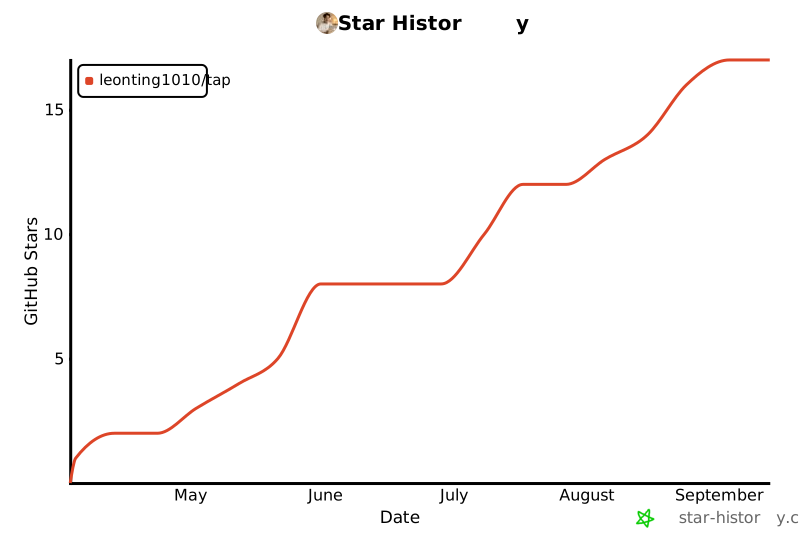
## Star History
[](https://star-history.com/#LeonTing1010/tap&Date)
TDQS
Scored across 11 tools
Tools have mostly distinct purposes, but forge_inspect and inspect both deal with page inspection, and tap_doctor/tap_fix overlap in diagnosis/repair. Descriptions help disambiguate, but some overlap exists.
Naming follows consistent verb_noun pattern with 'forge_' and 'tap_' prefixes. 'inspect' stands alone without prefix, and 'tap_expand_tools' is slightly wordy but still consistent with the prefix pattern.
11 tools is well-scoped for the tap automation domain, covering forging, running, diagnosing, fixing, inspecting, and environment checks without being overwhelming or sparse.
Covers the core lifecycle: draft, save, run, list, inspect, diagnose, fix, and runtime switching. Missing explicit delete or view detailed tap schema, but most critical operations are present.