
Unity-MCP
by IvanMurzak
README.md
<div align="center" width="100%">
<p align="center"><img src="https://raw.githubusercontent.com/IvanMurzak/Unity-MCP/main/docs/img/readme/hero.svg" alt="AI Game Developer for Unity: Skills, MCP tools and a CLI that connect AI agents to the Unity Editor and to your running game" width="100%"></p>
[](https://openupm.com/packages/com.ivanmurzak.unity.mcp/) [](https://openupm.com/packages/com.ivanmurzak.unity.mcp/) [](https://www.npmjs.com/package/unity-mcp-cli) [](https://unity.com/releases/editor/archive)\
[](https://github.com/IvanMurzak/Unity-MCP/actions/workflows/release.yml) [](https://discord.gg/cfbdMZX99G) [](https://github.com/IvanMurzak/Unity-MCP/blob/main/LICENSE) [](https://stand-with-ukraine.pp.ua)
<p>
<a href="https://claude.ai/download"><img src="https://raw.githubusercontent.com/IvanMurzak/Unity-MCP/main/docs/img/mcp-clients/claude-64.png" alt="Claude" title="Claude" height="36"></a>
<a href="https://openai.com/index/introducing-codex/"><img src="https://raw.githubusercontent.com/IvanMurzak/Unity-MCP/main/docs/img/mcp-clients/codex-64.png" alt="Codex" title="Codex" height="36"></a>
<a href="https://www.cursor.com/"><img src="https://raw.githubusercontent.com/IvanMurzak/Unity-MCP/main/docs/img/mcp-clients/cursor-64.png" alt="Cursor" title="Cursor" height="36"></a>
<a href="https://code.visualstudio.com/docs/copilot/overview"><img src="https://raw.githubusercontent.com/IvanMurzak/Unity-MCP/main/docs/img/mcp-clients/github-copilot-64.png" alt="GitHub Copilot" title="GitHub Copilot" height="36"></a>
<a href="https://gemini.google.com/"><img src="https://raw.githubusercontent.com/IvanMurzak/Unity-MCP/main/docs/img/mcp-clients/gemini-64.png" alt="Gemini" title="Gemini" height="36"></a>
<a href="https://antigravity.google/"><img src="https://raw.githubusercontent.com/IvanMurzak/Unity-MCP/main/docs/img/mcp-clients/antigravity-64.png" alt="Antigravity" title="Antigravity" height="36"></a>
<a href="https://code.visualstudio.com/"><img src="https://raw.githubusercontent.com/IvanMurzak/Unity-MCP/main/docs/img/mcp-clients/vs-code-64.png" alt="VS Code" title="VS Code" height="36"></a>
<a href="https://www.jetbrains.com/rider/"><img src="https://raw.githubusercontent.com/IvanMurzak/Unity-MCP/main/docs/img/mcp-clients/rider-64.png" alt="Rider" title="Rider" height="36"></a>
<a href="https://visualstudio.microsoft.com/"><img src="https://raw.githubusercontent.com/IvanMurzak/Unity-MCP/main/docs/img/mcp-clients/visual-studio-64.png" alt="Visual Studio" title="Visual Studio" height="36"></a>
<a href="https://opencode.ai/"><img src="https://raw.githubusercontent.com/IvanMurzak/Unity-MCP/main/docs/img/mcp-clients/open-code-64.png" alt="Open Code" title="Open Code" height="36"></a>
<a href="https://github.com/cline/cline"><img src="https://raw.githubusercontent.com/IvanMurzak/Unity-MCP/main/docs/img/mcp-clients/cline-64.png" alt="Cline" title="Cline" height="36"></a>
<a href="https://github.com/Kilo-Org/kilocode"><img src="https://raw.githubusercontent.com/IvanMurzak/Unity-MCP/main/docs/img/mcp-clients/kilo-code-64.png" alt="Kilo Code" title="Kilo Code" height="36"></a>
</p>
<b>[中文](https://github.com/IvanMurzak/Unity-MCP/blob/main/docs/README.zh-CN.md) | [日本語](https://github.com/IvanMurzak/Unity-MCP/blob/main/docs/README.ja.md) | [Español](https://github.com/IvanMurzak/Unity-MCP/blob/main/docs/README.es.md) | [فارسی](https://github.com/IvanMurzak/Unity-MCP/blob/main/docs/README.fa.md) | [हिन्दी](https://github.com/IvanMurzak/Unity-MCP/blob/main/docs/README.hi.md) | [العربية](https://github.com/IvanMurzak/Unity-MCP/blob/main/docs/README.ar.md)</b>
</div>
**AI Game Developer** (Unity-MCP) connects your AI agent to Unity. Claude Code, Codex, Cursor, GitHub Copilot, Gemini or any other [MCP](https://modelcontextprotocol.io/) client can read and change scenes, prefabs, assets and C# code, run tests and take screenshots in the **Unity Editor**, and call tools you write **inside your compiled game**. It ships as a free Unity package (`com.ivanmurzak.unity.mcp`), a command-line tool (`unity-mcp-cli`) and optional extensions.
**Status:** [latest release](https://github.com/IvanMurzak/Unity-MCP/releases/latest) and [changelog](https://github.com/IvanMurzak/Unity-MCP/blob/main/Unity-MCP-Plugin/Packages/com.ivanmurzak.unity.mcp/CHANGELOG.md). The plugin and `unity-mcp-cli` share one version. Tested and supported on **Windows, macOS and Linux**. Requires Unity **2022.3** or newer; CI runs EditMode, PlayMode and standalone-build tests on Unity 2022.3, 6000.0, 6000.3 and 6000.6.
## How it works
<p align="center"><img src="https://raw.githubusercontent.com/IvanMurzak/Unity-MCP/main/docs/img/readme/architecture.svg" alt="An AI agent or unity-mcp-cli talks MCP to a server, ai-game.dev Cloud by default or a local gamedev-mcp-server, which calls the tools of the Unity Editor plugin and of your running game" width="100%"></p>
The plugin registers its tools with an MCP server; your agent calls them through that server. Instead of MCP tools, the agent can also use generated **Skills**. You choose where the server runs:
| | **Local** (Custom mode, no account) | **Cloud** (default setting) |
| --- | --- | --- |
| Server | [GameDev-MCP-Server](https://github.com/IvanMurzak/GameDev-MCP-Server) started by the plugin on `127.0.0.1`, or one you host | `https://ai-game.dev/mcp` |
| Account | Not needed | Sign in to ai-game.dev |
| Your project data | Stays on your machine | Tool calls pass through a stateless relay that does not inspect or persist their contents; it records MCP event metadata, used within a rolling 90-day window ([Privacy Policy](https://ai-game.dev/legal/privacy)) |
| Cost | Free | Free |
**Why Cloud is the default:** it needs no open ports and avoids port conflicts with other programs, and it is free. Local is an equal option for offline or air-gapped work. Details: [Security and privacy](#security-and-privacy).
## Features
✅ **Covers the Editor** — the agent can do virtually anything you can do in the Unity Editor\
✅ **Compact and efficient** — tools built for agents: fewer calls and fewer tokens, so the agent works faster and cheaper ([measured in the Unity Editor](https://github.com/IvanMurzak/Unity-MCP/blob/main/docs/benchmark.md))\
✅ **RQL** — read and change scenes, objects, assets and settings with one query language\
✅ **C# and tests** — compile and run C# with Roslyn; run EditMode and PlayMode tests\
✅ **Skills or MCP** — generate Skills in one click, or connect as an MCP client\
✅ **Any agent** — Claude Code, Codex, Cursor, Copilot, Gemini and other MCP clients\
✅ **Runtime** — the same tools inside your built game: NPC logic, live debugging\
✅ **Your own tools** — any C# method becomes a tool with one `[AiTool]` attribute\
✅ **CLI** — install, open, query, compile and test from the terminal or CI\
✅ **Extensions** — optional tool packs, from Animation to Timeline
## Quick start
Requires **Unity 2022.3** or newer.
**1. Install the plugin** (recommended: the Installer, nothing else to install):
[](https://github.com/IvanMurzak/Unity-MCP/releases/latest/download/AI-Game-Dev-Installer.unitypackage)
Open the downloaded `.unitypackage` with your project open (double-click it, or **Assets ▸ Import Package ▸ Custom Package**).
<details>
<summary>Other ways to install: OpenUPM / Package Manager, or the CLI for scripting and CI</summary>
- **OpenUPM** — `openupm add com.ivanmurzak.unity.mcp`, or without any CLI: add a scoped registry in **Edit ▸ Project Settings ▸ Package Manager** (URL `https://package.openupm.com`, scopes `com.ivanmurzak` and `extensions.unity`), then **Window ▸ Package Manager ▸ + ▸ Add package by name** → `com.ivanmurzak.unity.mcp`.
- **unity-mcp-cli** (Node.js 22.14+) — for scripts and CI, no Editor needed:
```bash
npm install -g unity-mcp-cli
unity-mcp-cli install-plugin ./MyUnityProject # add the plugin to Packages/manifest.json
unity-mcp-cli open ./MyUnityProject # open the project in Unity
```
<p align="center"><img src="https://raw.githubusercontent.com/IvanMurzak/Unity-MCP/main/docs/img/readme/terminal.svg" alt="Terminal session: install unity-mcp-cli, add the plugin, sign in, configure Claude Code and open the project" width="100%"></p>
</details>
**2. Connect your agent** — pick one; both are fully supported:
| | **Local** (no account) | **Cloud** (default setting) |
| --- | --- | --- |
| In **Window ▸ AI Game Dev** | connection **Custom** | connection **Cloud**, then **Authorize** (browser sign-in) |
| Agent config | **Configure** for your agent | **Configure** for your agent |
| Same from the CLI | `unity-mcp-cli setup-mcp claude-code ./MyUnityProject --transport stdio` | `unity-mcp-cli login`, then `unity-mcp-cli setup-mcp claude-code ./MyUnityProject` |
**Auto-generate** Skills in the same window is the alternative to MCP. Other agents: [client setup](#client-setup).
**3. Local only: choose who may call your tools.** The local server starts with auth `none`: it listens only on `127.0.0.1` and rejects foreign browser origins, but any program on your machine can reach it. If other people or untrusted programs use the machine, switch to `token` in one step: **Window ▸ AI Game Dev** → **Authorization Token** → `token`. The server restarts with a generated secret; press **Configure** again so your agent sends it.
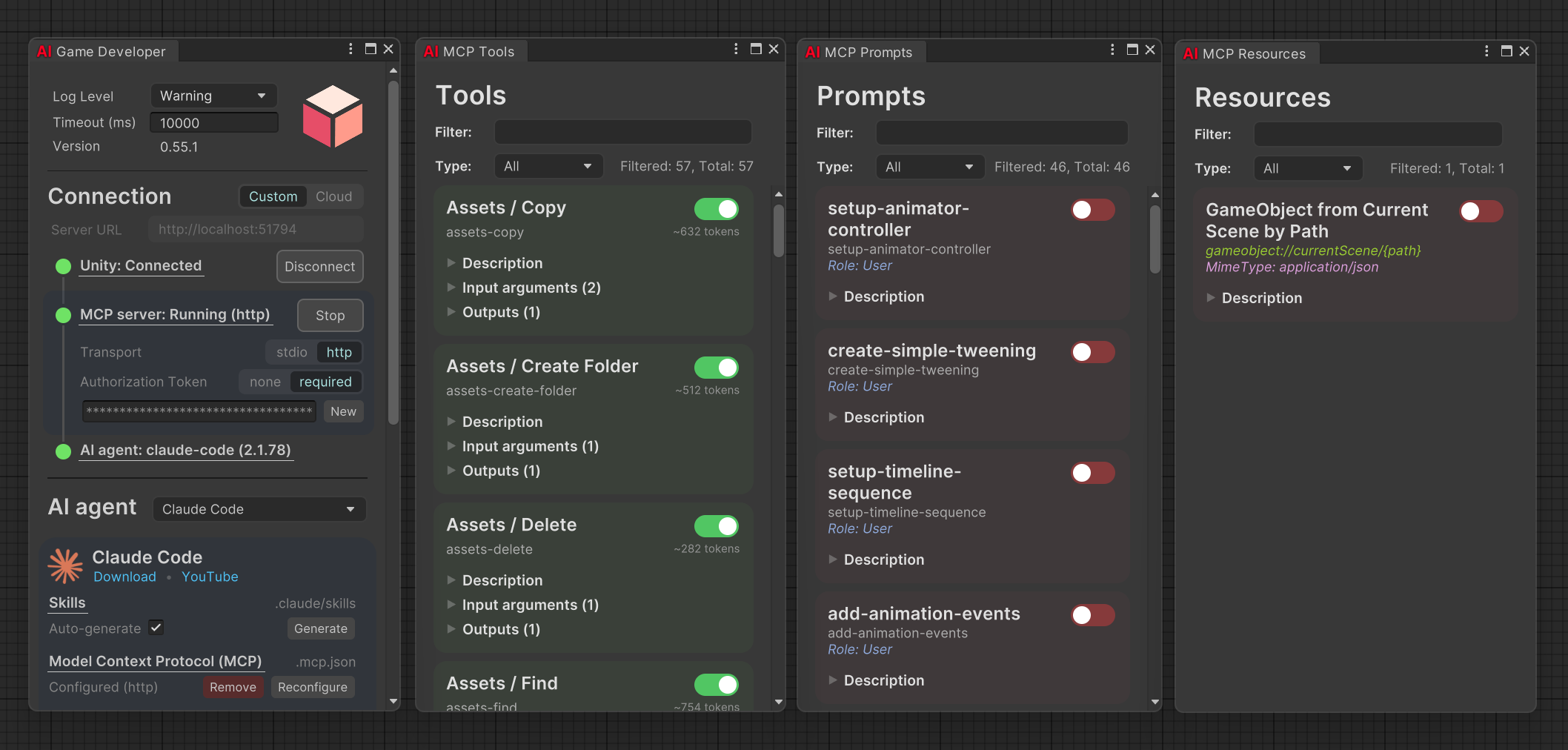
Ask your agent *"Create 3 cubes in a circle with radius 2"* and watch it happen. Full steps, manual MCP configuration and uninstall: **[Installation guide](https://github.com/IvanMurzak/Unity-MCP/blob/main/docs/installation.md)**.
https://github.com/user-attachments/assets/228baf4d-4f00-4dce-939d-fb985ebdd8dd
## Usage
**Talk to your agent.** Describe the result you want; the more precise, the better.
```text
Explain my scene hierarchy
Create metallic golden material and attach it to a new sphere
Find every enemy prefab without a Rigidbody and add one
```
**What your agent can do** (tools shown by default):
| Capability | Tool | Example prompt |
| --- | --- | --- |
| Scenes and GameObjects | `rql-query`, `rql-mutate` | *"List every disabled GameObject in the open scene"* |
| Assets and prefabs | `rql-query`, `rql-mutate` | *"Create a red material and assign it to all cubes"* |
| Console and Editor state | `rql-query` | *"What errors are in the console?"* |
| C# in the Editor | `script-execute` | *"Run C# that places 100 trees at random points on the terrain"* |
| Tests | `tests-run` | *"Run the EditMode tests and fix what fails"* |
| Screenshots | `screenshot-isolated` | *"Show me the Player model from the front"* |
| Packages and Asset Store | `package-*`, `assetstore-*` | *"Install Cinemachine"* |
| Tool list | `unity-tool-list` | *"Which tools can you use here?"* |
You do not learn RQL: the agent writes it and asks `rql-schema` for every source, type and call it needs. Measured in the Unity Editor: the same tasks took about 5× fewer prompt tokens and fewer tool calls than one-tool-per-action tools, at the same success rate ([benchmark](https://github.com/IvanMurzak/Unity-MCP/blob/main/docs/benchmark.md)). On a sandbox game world, with RQL an agent needs about 2–3 tool calls and 7–8k tokens per task at 100% success, versus 30–37 calls and 125–170k tokens at 67–91% success with plain reflection tools ([results](https://github.com/IvanMurzak/RQL/blob/main/RESULTS.md#33-rql-vs-conventional-reflection-tools)). More tools are installed but hidden until you show them. Full list: **[Default MCP tools](https://github.com/IvanMurzak/Unity-MCP/blob/main/docs/default-mcp-tools.md)** or [ai-game.dev/docs/tools](https://ai-game.dev/docs/tools).
**From the terminal** (starts a headless editor when none is running):
```bash
unity-mcp-cli rql 'objects | where name starts-with "Tree" | count'
unity-mcp-cli compile ./MyGame
unity-mcp-cli test ./MyGame --mode PlayMode
```
**Your own tool.** A class with `[AiToolType]` and a method with `[AiTool]` is all it takes:
```csharp
[AiToolType]
public class Tool_Score
{
[AiTool("score-reset", Title = "Reset the score")]
[Description("Sets the player's score to zero.")]
public string Reset()
{
return MainThread.Instance.Run(() =>
{
ScoreManager.Instance.Score = 0;
return "[Success] Score reset.";
});
}
}
```
Prompts, runtime (in-game) tools and a full example: **[Custom tools and runtime](https://github.com/IvanMurzak/Unity-MCP/blob/main/docs/custom-tools.md)**.
## Client setup
The **Configure** button in the AI Game Developer window, or `unity-mcp-cli setup-mcp <agent> ./MyUnityProject`, writes these files for you (Cloud by default, local with `--transport stdio`). By hand, for a local server: set the plugin to **Custom**, take `<port>` from the window, and use the binary for your platform from `<project>/Library/mcp-server/<rid>/` (`win-x64/gamedev-mcp-server.exe`, `osx-arm64/gamedev-mcp-server`, `linux-x64/gamedev-mcp-server`, …).
<details>
<summary><b>Claude Code</b> — <code>.mcp.json</code> in the project root</summary>
```json
{
"mcpServers": {
"ai-game-developer": {
"command": "<project>/Library/mcp-server/win-x64/gamedev-mcp-server.exe",
"args": ["port=<port>", "client-transport=stdio"]
}
}
}
```
</details>
<details>
<summary><b>Cursor</b> — <code>.cursor/mcp.json</code></summary>
```json
{
"mcpServers": {
"ai-game-developer": {
"type": "stdio",
"command": "<project>/Library/mcp-server/win-x64/gamedev-mcp-server.exe",
"args": ["port=<port>", "client-transport=stdio"]
}
}
}
```
</details>
<details>
<summary><b>Codex</b> — <code>.codex/config.toml</code></summary>
```toml
[mcp_servers.ai-game-developer]
enabled = true
command = "<project>/Library/mcp-server/win-x64/gamedev-mcp-server.exe"
args = ["port=<port>", "client-transport=stdio"]
tool_timeout_sec = 300
```
</details>
Other agents and manual setup: [Installation guide](https://github.com/IvanMurzak/Unity-MCP/blob/main/docs/installation.md).
## Security and privacy
**Most private setup:** connection **Custom** (local server on `127.0.0.1`, no account, project data stays on your machine) with **Authorization Token** set to `token` in **Window ▸ AI Game Dev**, then **Configure** again so your agent sends the secret.
✅ **The plugin opens no port** — it connects out to the MCP server.\
✅ **Local server on loopback** — `gamedev-mcp-server` binds to `127.0.0.1` unless you set `MCP_BIND` for hosting.\
✅ **Origin checks** — browser requests with a non-allowed `Origin` are rejected (403) in every auth mode.\
✅ **Auth modes** — `none` (local default), `token` (one shared secret the agent and the plugin must both send), `oauth` (ai-game.dev account).\
✅ **Cloud relay** — a stateless relay: it routes tool calls between your agent and the Editor without inspecting or persisting their contents, and does not collect conversations, source code, project files, assets or scene data. It records MCP event metadata (event type, timing, status, session identifiers, the tool, prompt or resource name, error details), used within a rolling 90-day window ([Privacy Policy](https://ai-game.dev/legal/privacy)).\
⚠️ **Not protected** — in `none` mode any process on your machine that reaches the port can call tools, and tools run with Editor rights (`script-execute` runs C#). Use `token` mode on shared machines.
Server options and Docker: [MCP server and connection](https://github.com/IvanMurzak/Unity-MCP/blob/main/docs/mcp-server.md).
## Extensions
Extensions are optional UPM packages that add tools for specific Unity features.
```bash
unity-mcp-cli install-extension com.ivanmurzak.unity.mcp.cinemachine ./MyUnityProject
```
| Extension | Adds | Requires |
| --- | --- | --- |
| [Animation](https://github.com/IvanMurzak/Unity-MCP/blob/main/extensions/Animation/README.md) | AnimationClips and AnimatorControllers | |
| [Cinemachine](https://github.com/IvanMurzak/Unity-MCP/blob/main/extensions/Cinemachine/README.md) | Virtual cameras, targets and the camera pipeline | `com.unity.cinemachine` 3.1.6+ |
| [InputSystem](https://github.com/IvanMurzak/Unity-MCP/blob/main/extensions/InputSystem/README.md) | Input action assets, maps, actions and bindings | `com.unity.inputsystem` 1.8.2+ |
| [Navigation](https://github.com/IvanMurzak/Unity-MCP/blob/main/extensions/Navigation/README.md) | NavMesh surfaces, baking, agents and links | `com.unity.ai.navigation` 1.1.7+ |
| [ParticleSystem](https://github.com/IvanMurzak/Unity-MCP/blob/main/extensions/ParticleSystem/README.md) | ParticleSystem emission, shape, curves and gradients | |
| [ProBuilder](https://github.com/IvanMurzak/Unity-MCP/blob/main/extensions/ProBuilder/README.md) | Editable meshes: shapes, extrude, bevel, materials | `com.unity.probuilder` 5.2.4+ |
| [Splines](https://github.com/IvanMurzak/Unity-MCP/blob/main/extensions/Splines/README.md) | Spline containers, knots and tangents | `com.unity.splines` 2.8.4+ |
| [Terrain](https://github.com/IvanMurzak/Unity-MCP/blob/main/extensions/Terrain/README.md) | Terrains: heightmaps, sculpting and sampling | |
| [Tilemap](https://github.com/IvanMurzak/Unity-MCP/blob/main/extensions/Tilemap/README.md) | Grids and tilemaps: paint, fill and read tiles | `com.unity.2d.tilemap.extras` 3.1.3+ |
| [Timeline](https://github.com/IvanMurzak/Unity-MCP/blob/main/extensions/Timeline/README.md) | Timeline assets, tracks, clips and markers | `com.unity.timeline` 1.8.12+ |
Required Unity packages install with the extension. You can also install extensions from the **Extensions** section of the AI Game Developer window.
## Documentation
| Page | What is in it |
| --- | --- |
| [Installation guide](https://github.com/IvanMurzak/Unity-MCP/blob/main/docs/installation.md) | Install options, connecting an agent, manual MCP config, team settings, uninstall |
| [Benchmark](https://github.com/IvanMurzak/Unity-MCP/blob/main/docs/benchmark.md) | Unity Editor and sandbox measurements: tokens, tool calls and success with RQL tools |
| [Default MCP tools](https://github.com/IvanMurzak/Unity-MCP/blob/main/docs/default-mcp-tools.md) | Every built-in tool, RQL sources, tools removed in 1.0.0 and their RQL equivalents |
| [Custom tools and runtime](https://github.com/IvanMurzak/Unity-MCP/blob/main/docs/custom-tools.md) | Write tools and prompts; use MCP inside your game |
| [MCP server and connection](https://github.com/IvanMurzak/Unity-MCP/blob/main/docs/mcp-server.md) | Cloud and Custom modes, plugin environment variables, local server |
| [Docker deployment](https://github.com/IvanMurzak/Unity-MCP/blob/main/docs/DOCKER_DEPLOYMENT.md) | Run the MCP server in a container |
| [Disable in CI](https://github.com/IvanMurzak/Unity-MCP/blob/main/docs/ci-disable.md) | Keep the plugin out of ordinary CI test runs |
| [CLI reference](https://github.com/IvanMurzak/Unity-MCP/blob/main/cli/README.md) | Every `unity-mcp-cli` command and option |
| [Wiki](https://github.com/IvanMurzak/Unity-MCP/wiki) | Tutorials, guides and FAQ |
| [Development guide](https://github.com/IvanMurzak/Unity-MCP/blob/main/docs/dev/Development.md) | Repository layout, code style, tests and CI for contributors |
Related: [GameDev-MCP-Server](https://github.com/IvanMurzak/GameDev-MCP-Server) (the shared MCP server) · [ai-game.dev](https://ai-game.dev) · [Discord](https://discord.gg/cfbdMZX99G)
## Contributing
Ideas, bug reports and pull requests are welcome. Read the [Development guide](https://github.com/IvanMurzak/Unity-MCP/blob/main/docs/dev/Development.md), fork the repository, open `./Unity-MCP-Plugin` in Unity, and send a pull request to `main`. If the project helps you, please give it a star.
## License
**Free for game development, commercial games included.** The plugin is [Apache-2.0](https://github.com/IvanMurzak/Unity-MCP/blob/main/LICENSE). It uses [RQL](https://github.com/IvanMurzak/RQL) and [Code-Exec](https://github.com/IvanMurzak/Code-Exec), licensed under PolyForm Shield 1.0.0: that license restricts only companies that build competing AI tools for game development. Game developers can use everything freely.
Maintenance
ActivityActive
ResponsivenessMixed handling