

F
licenseNot graded
qualityD
maintenanceA Model Context Protocol server that enables AI assistants to explore and interact with Cursor IDE's SQLite databases, providing access to project data, chat history, and composer information.
25
-

The SAP HANA MCP Server enables AI agents and development tools to securely interact with SAP HANA databases through the Model Context Protocol (MCP).
Database Operations:
Execute custom SQL queries, including parameterized queries for prepared statements
Retrieve sample data and count rows in tables
Test database connectivity and view configuration settings
Schema Management:
List all schemas, tables within schemas, and describe table structures
List and describe indexes for tables
Explore database schema through natural language commands
System Administration:
Monitor memory usage statistics and system information
Get current database user information
Debug environment variables
Integration & Security:
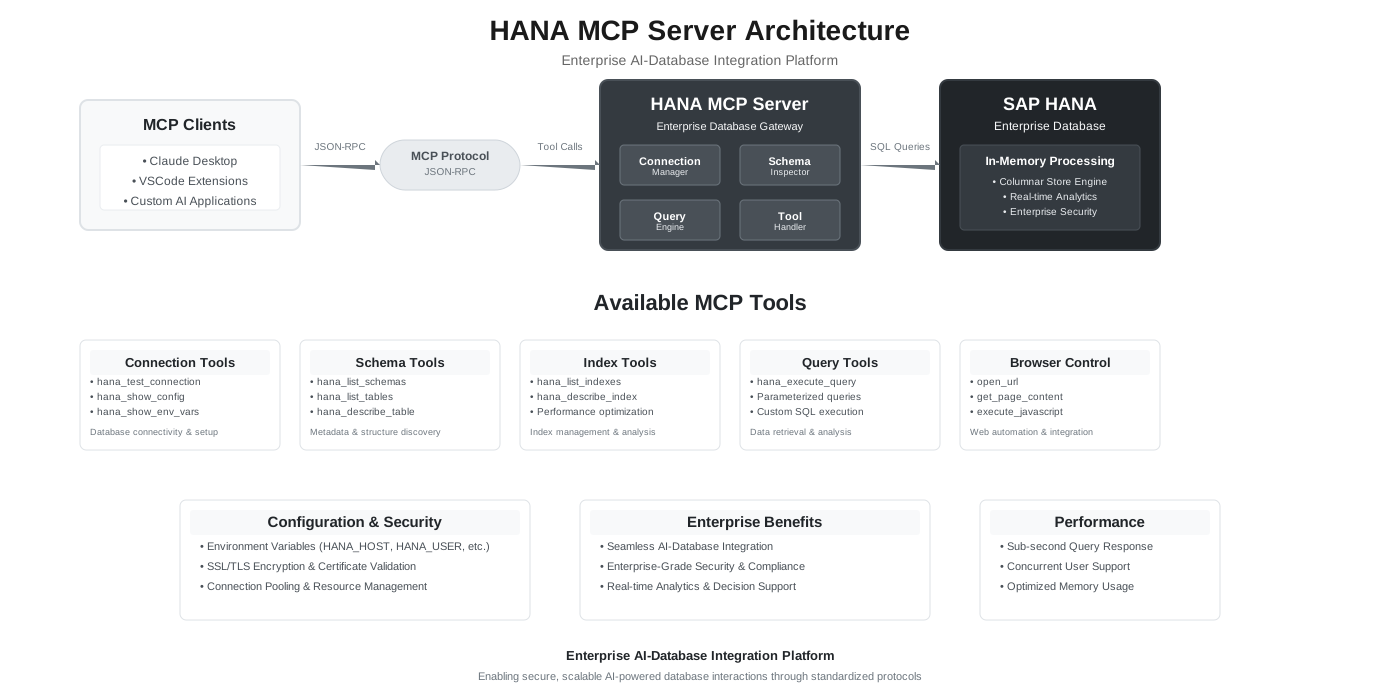
Seamlessly integrates with Claude Desktop, VSCode extensions, and custom AI applications
Features enterprise-grade security with SSL/TLS support and secure credential management
Provides both command-line interface and React-based web UI
Uses JSON-RPC 2.0 with modular architecture for easy extension
Uses .env files for configuration management of server settings and connection parameters
Uses Flask to implement the REST API layer of the MCP server architecture
Utilizes pandas as a prerequisite library, likely for data manipulation and analysis within the model execution context
Built on Python 3.8+ as the core programming language for the server implementation
Provides integration with SAP HANA Cloud Database, allowing for machine learning operations and model management directly with the SAP HANA Cloud environment
Click on "Deploy Server".
Wait a few minutes for the server to deploy. Once ready, it will show a "Started" state.
In the chat, type @ followed by the MCP server name and your instructions, e.g., "@HANA Cloud MCP Server show me the top 5 customers by total sales"
That's it! The server will respond to your query, and you can continue using it as needed.
Here is a step-by-step guide with screenshots.




SAP HANA MCP Server implements the Model Context Protocol for SAP HANA and SAP HANA Cloud. AI clients discover schema, run SQL with guardrails, and optionally merge business/domain metadata so agents interpret codes and tables consistently—without replacing your database as the system of record.
Document | Purpose |
This README | Prerequisites, install, how to wire each client, capability summary, configuration cheat sheet, troubleshooting |
Release history — features and fixes by version (latest | |
Index of | |
Authoritative env reference: every variable, defaults, hard bounds, HTTP auth, security notes | |
Copy-paste: connection profiles (single-container, MDC), semantics JSON, paging pointers | |
Local HTTP MCP: |
Related MCP server: mcp4odata
Node.js 18+
A SAP HANA or SAP HANA Cloud database reachable on the SQL port from the machine running the server
An MCP client (Claude Desktop, Claude Code, VS Code, Cursor, Cline, Windsurf, or custom HTTP client)
Credentials supplied via env (see Security)
Method | Use when |
| Default — no global install |
| You need |
Clone + | Developing or pinning a local build |
HTTP entrypoint (from a clone): npm run start:http — default bind 127.0.0.1:3100, path /mcp. See Hosted & HTTP.
Audience | Transport | Next step |
Chat / lite users | stdio | |
Developers (Claude Code, VS Code, Cline, Cursor, Windsurf) | stdio | |
Business apps with AI agents (you host MCP over HTTP) | HTTP |
Config file path:
macOS: ~/Library/Application Support/Claude/claude_desktop_config.json
Windows: %APPDATA%\claude\claude_desktop_config.json
Linux: ~/.config/claude/claude_desktop_config.json
Register the server; put connection settings in env (see Configuration; full profile JSON in configuration-samples.md). The example below includes HANA_INSTANCE_NUMBER / HANA_DATABASE_NAME for MDC—remove them if you use a single-container database.
{
  "mcpServers": {
    "HANA Database": {
      "command": "npx",
      "args": ["-y", "hana-mcp-server"],
      "env": {
        "HANA_HOST": "your-hana-host.com",
        "HANA_PORT": "443",
        "HANA_USER": "your-username",
        "HANA_PASSWORD": "your-password",
        "HANA_SCHEMA": "your-schema",
        "HANA_SSL": "true",
        "HANA_ENCRYPT": "true",
        "HANA_VALIDATE_CERT": "true",
        "HANA_CONNECTION_TYPE": "auto",
        "HANA_INSTANCE_NUMBER": "10",
        "HANA_DATABASE_NAME": "HQQ",
        "LOG_LEVEL": "info",
        "ENABLE_FILE_LOGGING": "true",
        "ENABLE_CONSOLE_LOGGING": "false"
      }
    }
  }
}
If the CLI is on PATH, you may use "command": "hana-mcp-server" and omit args.
Restart Claude Desktop.
Optional: HANA MCP UI — npx hana-mcp-ui for editing envs and deploying to Claude Desktop.
stdio only; same env keys as above. Canonical example — Claude Code (~/.claude.json or project .mcp.json). The env block below includes HANA_DATABASE_NAME for MDC tenant HANA; omit it for most single-container setups.
{
  "mcpServers": {
    "hana": {
      "type": "stdio",
      "timeout": 600,
      "command": "npx",
      "args": ["-y", "hana-mcp-server"],
      "env": {
        "HANA_HOST": "<host>",
        "HANA_PORT": "31013",
        "HANA_USER": "<user>",
        "HANA_PASSWORD": "<password>",
        "HANA_SCHEMA": "SAPABAP1",
        "HANA_DATABASE_NAME": "HQQ",
        "HANA_SSL": "false",
        "HANA_ENCRYPT": "false",
        "HANA_VALIDATE_CERT": "false",
        "LOG_LEVEL": "info",
        "ENABLE_FILE_LOGGING": "true",
        "ENABLE_CONSOLE_LOGGING": "false"
      }
    }
  }
}
Use the same command, args, and env in VS Code, Cline, Cursor, and Windsurf. After any change to env, restart the MCP server connection in the IDE.
Run the HTTP transport from a checkout of this repository (after npm install). The published npx hana-mcp-server path is stdio only.
npm run start:httpCursor / local IDE over HTTP: set HANA_* in the shell (or process manager) that runs start:http, then add an HTTP MCP entry with url http://127.0.0.1:3100/mcp ("type": "fetch" or "type": "http", depending on Cursor version). See docs/local-http-mcp.md and ./scripts/start-http-mcp.sh.
Topic | Detail |
Endpoint |
|
Tuning |
|
Health |
|
CORS |
|
Variable | Role |
|
|
| Issuer / JWKS (omit on SAP BTP with bound XSUAA) |
| Optional expected |
| Optional scope list |
SAP BTP: bind XSUAA, MCP_HTTP_AUTH_ENABLED=true, assign role collections. Details: ENVIRONMENT.md §7.
Secrets: HANA_PASSWORD, JWT material, and URLs with embedded credentials belong in env or a secret manager — not in git.
Supply chain: Prefer npx -y from the published package in CI and shared desktops instead of a mutable global install.
HTTP: Enable JWT validation for anything beyond localhost; put the service behind a reverse proxy for TLS termination and network policy.
Further notes: ENVIRONMENT.md §9.
34 tools across six areas, all verified on HANA Cloud.
Area | Tools | What you get |
Connection & config |
| Verify connectivity, inspect configuration, see current user / schema / database / version |
Schema browsing |
| Paginated schema/table lists, column metadata, cross-schema search, optional business-meaning overlay |
SQL execution |
| Parameterized SQL with optional row/column/cell caps, paging ( |
Structural analysis |
| PK/UK/FK/check constraints, indexes, views with SQL definition, synonyms, effective privileges, CREATE statement DDL |
Code objects |
| Stored procedures, scalar/table functions, SAP BW/S4 calculation views ( |
Data & performance |
| Row counts, sample rows, distinct/null stats, query execution plan, object dependency graph, partition info, top expensive statements |
DML guard | — | INSERT / UPDATE / DELETE / TRUNCATE blocked by default; opt-in individually via |
Resources |
| MCP resource URIs for schema and table enumeration; |
Domain knowledge | via | Optional JSON semantics overlay (table descriptions, column meanings, code-value maps) — configuration-samples.md |
Variables apply to stdio (env in the client config) and HTTP (process environment). Restart after changes.
Source of truth for names, defaults, and clamp ranges: docs/ENVIRONMENT.md.
Copy-paste connection JSON (single-container / MDC): docs/configuration-samples.md#connection-profiles-env-json.
Parameter | Description | Example |
| Hostname or IP |
|
| Database user |
|
| Database password | (secret) |
Parameter | Default | Notes |
|
| MDC SQL ports often |
| — | Default when a tool omits |
|
|
|
| — | MDC instance id (e.g. |
| — | Tenant name for MDC (e.g. |
|
| TLS and cert validation flags for the driver |
Parameter | Default | Notes |
|
|
|
|
|
|
|
| Often |
*Code default; examples frequently set file logging to true.
Parameter | Default | Purpose |
|
| Set to |
|
| Statement timeout (ms); |
|
| Max rows per |
|
| Max columns per row returned (active when limits enabled) |
|
| Truncate long cell text (active when limits enabled) |
|
| Default |
|
| List tools: default and max page size |
|
| Cap embedded names in |
|
| Snapshot id lifetime for query paging |
|
| HANA connection pool size (1–20) |
INSERT, UPDATE, and DELETE are blocked by default. Set each to true to permit:
Parameter | Default | Purpose |
|
| Permit |
|
| Permit |
|
| Permit |
HANA_SEMANTICS_*)Parameter | Default | Purpose |
| — | File path to dictionary JSON (wins over URL) |
| — | HTTPS URL to same format |
|
| Cache / reload behavior |
Samples: configuration-samples.md.
Symptom | Check |
| Client cannot find |
Connection refused |
|
Auth failed / no client | Password, user, |
TLS errors |
|
Wrong or empty objects | MDC: tenant drives visibility; identical schema names can differ by tenant |
SQL needs another database prefix |
|
Debug: LOG_LEVEL=debug, ENABLE_CONSOLE_LOGGING=true, restart.
npx (spawn ENOENT)GUI clients launched from the Dock or Start Menu (Claude Desktop, Cursor, VS Code, …) inherit a minimal PATH and may not see Node tooling installed under /opt/homebrew/bin, ~/.nvm/..., mise, or volta. This affects every npx-based MCP, not just this server. The error appears in MCP client logs as:
Connection failed: spawn npx ENOENTPick one fix:
Symlink npx / node into a GUI-visible path (macOS, Homebrew):
ln -s "$(which npx)"  /usr/local/bin/npx
ln -s "$(which node)" /usr/local/bin/node
Use absolute paths in the MCP config — most portable, no PATH dependency. Resolve paths with which node and npm root -g:
{
  "mcpServers": {
    "hana": {
      "type": "stdio",
      "command": "/opt/homebrew/bin/node",
      "args": ["/opt/homebrew/lib/node_modules/hana-mcp-server/hana-mcp-server.js"],
      "env": { "HANA_HOST": "...", "HANA_USER": "...", "HANA_PASSWORD": "..." }
    }
  }
}
Requires a one-time npm install -g hana-mcp-server.
Inject PATH into the MCP env block — keeps the npx form:
"env": {
  "PATH": "/opt/homebrew/bin:/usr/local/bin:/usr/bin:/bin",
  "HANA_HOST": "...",
  "HANA_USER": "...",
  "HANA_PASSWORD": "..."
}
Restart the MCP client after the change. If npx then fails with EPERM on ~/.npm/_cacache, the npm cache has root-owned files from a previous sudo npm — fix with sudo chown -R "$(whoami)" ~/.npm or set "NPM_CONFIG_CACHE": "/tmp/hana-mcp-npm-cache" in the same env block.
npx hana-mcp-ui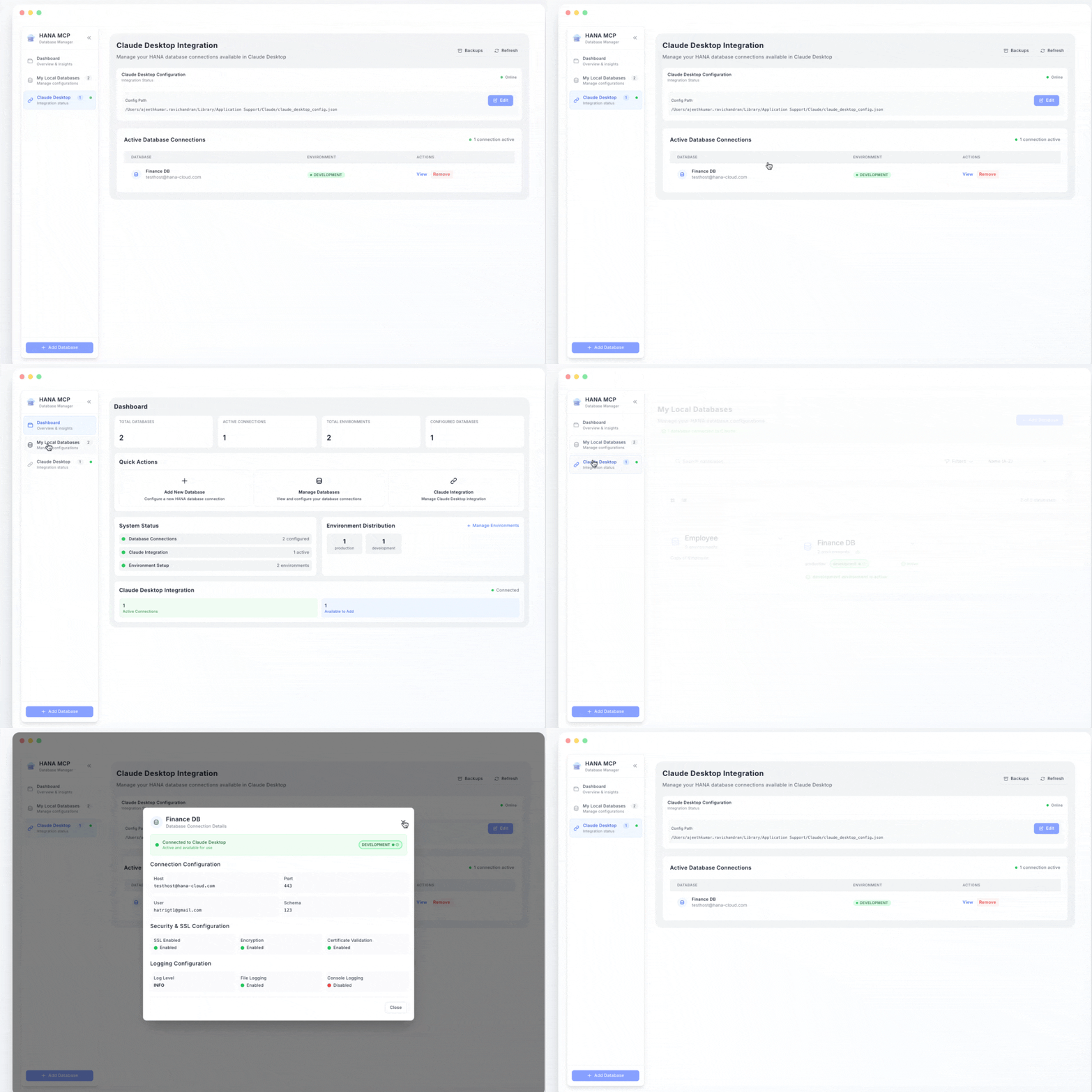
hana-mcp-server/
├── src/
│   ├── server/           # MCP lifecycle, resources, HTTP transport
│   ├── tools/            # 34 tools: schema, SQL, discovery, config
│   ├── database/         # HANA client, connection pool, executor, query runner
│   ├── semantics/        # Optional semantics / domain JSON loader
│   ├── utils/            # Logger, config, validators, formatters
│   ├── query-snapshot-store.js
│   └── constants/        # MCP constants, tool definitions
├── tests/
├── docs/                 # README index, ENVIRONMENT.md, configuration-samples.md, diagrams
└── hana-mcp-server.js # stdio entry pointRuntime | Node.js 18+ |
Platforms | macOS, Linux, Windows |
Dependencies |
|
Issues: GitHub Issues
UI: HANA MCP UI
MIT — see LICENSE.
Describe the structure of a specific index
| Name | Required | Description | Default |
|---|---|---|---|
| schema_name | No | Name of the schema containing the table (optional) | |
| table_name | Yes | Name of the table containing the index | |
| index_name | Yes | Name of the index to describe |
Does the description disclose side effects, auth requirements, rate limits, or destructive behavior?
With no annotations provided, the description carries the full burden of behavioral disclosure. It states the tool describes index structure but doesn't reveal any behavioral traits such as whether it's a read-only operation, potential performance impacts, error handling, or output format. This leaves significant gaps in understanding how the tool behaves beyond its basic purpose.
Agents need to know what a tool does to the world before calling it. Descriptions should go beyond structured annotations to explain consequences.
Is the description appropriately sized, front-loaded, and free of redundancy?
The description is extremely concise and front-loaded with a single, clear sentence that directly states the tool's purpose. There is no wasted language or unnecessary elaboration, making it efficient and easy to parse for an AI agent.
Shorter descriptions cost fewer tokens and are easier for agents to parse. Every sentence should earn its place.
Given the tool's complexity, does the description cover enough for an agent to succeed on first attempt?
Given the tool's complexity (describing database index structure) and lack of annotations and output schema, the description is insufficiently complete. It doesn't cover behavioral aspects, usage context, or what information is returned, leaving the agent with inadequate guidance for effective tool invocation in a database management scenario.
Complex tools with many parameters or behaviors need more documentation. Simple tools need less. This dimension scales expectations accordingly.
Does the description clarify parameter syntax, constraints, interactions, or defaults beyond what the schema provides?
The input schema has 100% description coverage, clearly documenting all three parameters (schema_name, table_name, index_name) with their types and optionality. The description adds no additional semantic context beyond what the schema provides, such as explaining relationships between parameters or usage examples, so it meets the baseline for high schema coverage without compensating value.
Input schemas describe structure but not intent. Descriptions should explain non-obvious parameter relationships and valid value ranges.
Does the description clearly state what the tool does and how it differs from similar tools?
The description clearly states the tool's purpose with a specific verb ('describe') and resource ('structure of a specific index'), making it easy to understand what it does. However, it doesn't explicitly differentiate from sibling tools like 'hana_describe_table' or 'hana_list_indexes', which would require mentioning it focuses on detailed structural metadata rather than listing or describing tables.
Agents choose between tools based on descriptions. A clear purpose with a specific verb and resource helps agents select the right tool.
Does the description explain when to use this tool, when not to, or what alternatives exist?
The description provides no guidance on when to use this tool versus alternatives. It doesn't mention sibling tools like 'hana_list_indexes' for listing indexes or 'hana_describe_table' for table details, nor does it specify prerequisites or contexts for usage, leaving the agent to infer appropriate scenarios.
Agents often have multiple tools that could apply. Explicit usage guidance like "use X instead of Y when Z" prevents misuse.
Describe the structure of a specific table
| Name | Required | Description | Default |
|---|---|---|---|
| schema_name | No | Name of the schema containing the table (optional) | |
| table_name | Yes | Name of the table to describe |
Does the description disclose side effects, auth requirements, rate limits, or destructive behavior?
No annotations are provided, so the description carries the full burden of behavioral disclosure. It states what the tool does but lacks critical details: it doesn't specify if this is a read-only operation, what permissions are required, what the output format looks like (e.g., column names, types, constraints), or any error conditions (e.g., invalid table names). For a tool with no annotation coverage, this is a significant gap in transparency.
Agents need to know what a tool does to the world before calling it. Descriptions should go beyond structured annotations to explain consequences.
Is the description appropriately sized, front-loaded, and free of redundancy?
The description is a single, efficient sentence that front-loads the core purpose ('Describe the structure of a specific table') with zero wasted words. It avoids redundancy and is appropriately sized for a simple tool, making it easy for an agent to parse quickly.
Shorter descriptions cost fewer tokens and are easier for agents to parse. Every sentence should earn its place.
Given the tool's complexity, does the description cover enough for an agent to succeed on first attempt?
Given the lack of annotations and output schema, the description is incomplete for effective tool use. It doesn't explain what 'describe' entails (e.g., returns metadata like columns and data types), potential side effects, or error handling. For a tool with no structured output information, the description should compensate by detailing return values or usage constraints, which it fails to do.
Complex tools with many parameters or behaviors need more documentation. Simple tools need less. This dimension scales expectations accordingly.
Does the description clarify parameter syntax, constraints, interactions, or defaults beyond what the schema provides?
Schema description coverage is 100%, with clear documentation for both parameters (schema_name and table_name). The description adds minimal value beyond the schema, as it only implies that table_name is the key input without providing additional context like format examples or relationships between parameters. This meets the baseline for high schema coverage but doesn't enhance understanding.
Input schemas describe structure but not intent. Descriptions should explain non-obvious parameter relationships and valid value ranges.
Does the description clearly state what the tool does and how it differs from similar tools?
The description clearly states the verb ('describe') and resource ('structure of a specific table'), making the purpose immediately understandable. It distinguishes this from siblings like hana_list_tables (which lists tables) and hana_describe_index (which describes indexes). However, it doesn't explicitly mention the database system (HANA) or differentiate from hana_execute_query, which could also provide structural information through queries.
Agents choose between tools based on descriptions. A clear purpose with a specific verb and resource helps agents select the right tool.
Does the description explain when to use this tool, when not to, or what alternatives exist?
The description provides no guidance on when to use this tool versus alternatives. It doesn't mention prerequisites (e.g., needing a valid table name), compare it to hana_list_tables for discovery or hana_execute_query for custom queries, or specify use cases like schema exploration or query planning. The agent must infer usage from the tool name and context alone.
Agents often have multiple tools that could apply. Explicit usage guidance like "use X instead of Y when Z" prevents misuse.
Execute a custom SQL query against the HANA database
| Name | Required | Description | Default |
|---|---|---|---|
| query | Yes | The SQL query to execute | |
| parameters | No | Optional parameters for the query (for prepared statements) |
Does the description disclose side effects, auth requirements, rate limits, or destructive behavior?
With no annotations provided, the description carries the full burden of behavioral disclosure. It states the tool executes a custom SQL query but lacks critical details: it doesn't specify if this is read-only or can perform mutations, potential risks like data modification or deletion, authentication requirements, or response handling (e.g., result format, error messages). This is inadequate for a tool that could have significant side effects.
Agents need to know what a tool does to the world before calling it. Descriptions should go beyond structured annotations to explain consequences.
Is the description appropriately sized, front-loaded, and free of redundancy?
The description is a single, efficient sentence that directly states the tool's function without unnecessary words. It is front-loaded and appropriately sized, making it easy to parse quickly.
Shorter descriptions cost fewer tokens and are easier for agents to parse. Every sentence should earn its place.
Given the tool's complexity, does the description cover enough for an agent to succeed on first attempt?
Given the complexity of executing custom SQL queries (which could involve reads, writes, or schema changes), no annotations, and no output schema, the description is insufficient. It doesn't address behavioral traits, return values, or error conditions, leaving significant gaps for an AI agent to understand how to use the tool safely and effectively.
Complex tools with many parameters or behaviors need more documentation. Simple tools need less. This dimension scales expectations accordingly.
Does the description clarify parameter syntax, constraints, interactions, or defaults beyond what the schema provides?
The input schema has 100% description coverage, clearly documenting both parameters ('query' and 'parameters'). The description adds no additional meaning beyond this, such as query syntax examples or parameter usage details. According to the rules, with high schema coverage, the baseline is 3 even without param info in the description.
Input schemas describe structure but not intent. Descriptions should explain non-obvious parameter relationships and valid value ranges.
Does the description clearly state what the tool does and how it differs from similar tools?
The description clearly states the action ('Execute') and target resource ('custom SQL query against the HANA database'), making the purpose unambiguous. However, it doesn't explicitly differentiate from sibling tools like hana_describe_table or hana_list_tables, which might also involve database queries but for specific purposes.
Agents choose between tools based on descriptions. A clear purpose with a specific verb and resource helps agents select the right tool.
Does the description explain when to use this tool, when not to, or what alternatives exist?
The description provides no guidance on when to use this tool versus alternatives. It doesn't mention prerequisites, such as needing a valid database connection, or contrast it with sibling tools like hana_list_tables for metadata queries versus this for custom SQL execution, leaving the agent to infer usage context.
Agents often have multiple tools that could apply. Explicit usage guidance like "use X instead of Y when Z" prevents misuse.
List all indexes for a specific table
| Name | Required | Description | Default |
|---|---|---|---|
| schema_name | No | Name of the schema containing the table (optional) | |
| table_name | Yes | Name of the table to list indexes for |
Does the description disclose side effects, auth requirements, rate limits, or destructive behavior?
No annotations are provided, so the description carries full burden for behavioral disclosure. It states it 'lists' indexes, implying a read-only operation, but doesn't clarify if this requires specific permissions, what format the output takes (e.g., list of names vs. detailed properties), or if there are limitations like pagination or performance considerations for large tables. The description adds minimal context beyond the basic action.
Agents need to know what a tool does to the world before calling it. Descriptions should go beyond structured annotations to explain consequences.
Is the description appropriately sized, front-loaded, and free of redundancy?
The description is a single, efficient sentence that directly states the tool's purpose without unnecessary words. It's front-loaded with the core action ('List all indexes'), making it easy to parse. Every word earns its place, with no redundancy or fluff.
Shorter descriptions cost fewer tokens and are easier for agents to parse. Every sentence should earn its place.
Given the tool's complexity, does the description cover enough for an agent to succeed on first attempt?
Given the lack of annotations and output schema, the description is incomplete for a tool that likely returns structured data about indexes. It doesn't hint at what information is included in the listing (e.g., index names, types, columns) or any behavioral aspects like error handling. For a database tool with potential complexity, more context is needed to guide effective use.
Complex tools with many parameters or behaviors need more documentation. Simple tools need less. This dimension scales expectations accordingly.
Does the description clarify parameter syntax, constraints, interactions, or defaults beyond what the schema provides?
Schema description coverage is 100%, with both parameters ('schema_name' and 'table_name') clearly documented in the schema. The description mentions 'for a specific table', aligning with the 'table_name' parameter, but adds no additional meaning about parameter usage, defaults, or constraints beyond what the schema provides. This meets the baseline for high schema coverage.
Input schemas describe structure but not intent. Descriptions should explain non-obvious parameter relationships and valid value ranges.
Does the description clearly state what the tool does and how it differs from similar tools?
The description clearly states the verb ('List') and resource ('all indexes for a specific table'), making the purpose immediately understandable. It distinguishes from siblings like 'hana_describe_index' (which likely provides detailed metadata) and 'hana_list_tables' (which lists tables rather than indexes). However, it doesn't explicitly mention the database system (HANA) or differentiate from 'hana_describe_table', which might also include index information.
Agents choose between tools based on descriptions. A clear purpose with a specific verb and resource helps agents select the right tool.
Does the description explain when to use this tool, when not to, or what alternatives exist?
The description provides no guidance on when to use this tool versus alternatives. It doesn't specify if this is for quick overviews vs. detailed analysis, or mention prerequisites like connection requirements. Siblings like 'hana_describe_index' and 'hana_describe_table' could potentially overlap in functionality, but no comparison is offered.
Agents often have multiple tools that could apply. Explicit usage guidance like "use X instead of Y when Z" prevents misuse.
List all schemas in the HANA database
| Name | Required | Description | Default |
|---|---|---|---|
No parameters | |||
Does the description disclose side effects, auth requirements, rate limits, or destructive behavior?
No annotations are provided, so the description carries the full burden of behavioral disclosure. It states the action ('List all schemas') but doesn't describe the return format (e.g., list of schema names, JSON structure), pagination, permissions needed, or error conditions. For a tool with zero annotation coverage, this is a significant gap in transparency.
Agents need to know what a tool does to the world before calling it. Descriptions should go beyond structured annotations to explain consequences.
Is the description appropriately sized, front-loaded, and free of redundancy?
The description is a single, efficient sentence with zero waste. It's front-loaded with the core action and resource, making it easy to parse. Every word earns its place, and there's no unnecessary elaboration.
Shorter descriptions cost fewer tokens and are easier for agents to parse. Every sentence should earn its place.
Given the tool's complexity, does the description cover enough for an agent to succeed on first attempt?
Given the tool's low complexity (0 parameters, no output schema), the description is minimally complete. It states what the tool does but lacks behavioral details (e.g., output format) that would be helpful for an agent. With no annotations or output schema, the description should ideally provide more context about the return value, but it's adequate for a simple list operation.
Complex tools with many parameters or behaviors need more documentation. Simple tools need less. This dimension scales expectations accordingly.
Does the description clarify parameter syntax, constraints, interactions, or defaults beyond what the schema provides?
The tool has 0 parameters, and schema description coverage is 100% (since there are no parameters). The description doesn't need to add parameter semantics, so it meets the baseline of 4 for zero-parameter tools. It correctly implies no inputs are required.
Input schemas describe structure but not intent. Descriptions should explain non-obvious parameter relationships and valid value ranges.
Does the description clearly state what the tool does and how it differs from similar tools?
The description clearly states the verb ('List') and resource ('all schemas in the HANA database'), making the purpose immediately understandable. It distinguishes from siblings like hana_list_tables and hana_list_indexes by specifying schemas rather than tables or indexes. However, it doesn't explicitly differentiate from other schema-related tools (none exist in siblings), so it's not a perfect 5.
Agents choose between tools based on descriptions. A clear purpose with a specific verb and resource helps agents select the right tool.
Does the description explain when to use this tool, when not to, or what alternatives exist?
The description provides no guidance on when to use this tool versus alternatives. It doesn't mention prerequisites (e.g., connection requirements), when not to use it, or how it relates to siblings like hana_describe_table or hana_execute_query. The agent must infer usage from the name alone.
Agents often have multiple tools that could apply. Explicit usage guidance like "use X instead of Y when Z" prevents misuse.
List all tables in a specific schema
| Name | Required | Description | Default |
|---|---|---|---|
| schema_name | No | Name of the schema to list tables from (optional) |
Does the description disclose side effects, auth requirements, rate limits, or destructive behavior?
With no annotations provided, the description carries full burden for behavioral disclosure. It states the tool lists tables but doesn't describe what the output looks like (e.g., format, pagination), whether it requires specific permissions, or any limitations (e.g., performance with large schemas). This leaves significant gaps for a tool that presumably returns data.
Agents need to know what a tool does to the world before calling it. Descriptions should go beyond structured annotations to explain consequences.
Is the description appropriately sized, front-loaded, and free of redundancy?
The description is a single, efficient sentence that front-loads the core purpose ('List all tables') without unnecessary words. Every part of the sentence contributes directly to understanding the tool's function, making it optimally concise.
Shorter descriptions cost fewer tokens and are easier for agents to parse. Every sentence should earn its place.
Given the tool's complexity, does the description cover enough for an agent to succeed on first attempt?
Given the lack of annotations and output schema, the description is incomplete. It doesn't address behavioral aspects like output format, error handling, or usage context relative to siblings. For a simple list tool, this might be minimally adequate, but the absence of output details and sibling differentiation is a notable gap.
Complex tools with many parameters or behaviors need more documentation. Simple tools need less. This dimension scales expectations accordingly.
Does the description clarify parameter syntax, constraints, interactions, or defaults beyond what the schema provides?
The schema description coverage is 100%, with the single parameter 'schema_name' documented as optional in the schema. The description adds minimal value beyond this, only implying the parameter's purpose without explaining edge cases (e.g., what happens if omitted, default behavior). Baseline 3 is appropriate given the schema does the heavy lifting.
Input schemas describe structure but not intent. Descriptions should explain non-obvious parameter relationships and valid value ranges.
Does the description clearly state what the tool does and how it differs from similar tools?
The description clearly states the action ('List all tables') and resource ('in a specific schema'), making the purpose immediately understandable. However, it doesn't differentiate from sibling tools like 'hana_list_schemas' or 'hana_describe_table' beyond the obvious scope difference, preventing a perfect score.
Agents choose between tools based on descriptions. A clear purpose with a specific verb and resource helps agents select the right tool.
Does the description explain when to use this tool, when not to, or what alternatives exist?
The description provides no guidance on when to use this tool versus alternatives like 'hana_list_schemas' (for listing schemas instead of tables) or 'hana_describe_table' (for detailed table info). It also doesn't mention prerequisites or exclusions, leaving usage context entirely implicit.
Agents often have multiple tools that could apply. Explicit usage guidance like "use X instead of Y when Z" prevents misuse.
Show the HANA database configuration
| Name | Required | Description | Default |
|---|---|---|---|
No parameters | |||
Does the description disclose side effects, auth requirements, rate limits, or destructive behavior?
No annotations are provided, so the description carries the full burden of behavioral disclosure. It states the tool shows configuration but doesn't describe what 'configuration' includes (e.g., settings, parameters, status), whether it's read-only or has side effects, or how results are formatted. For a tool with zero annotation coverage, this leaves significant gaps in understanding its behavior.
Agents need to know what a tool does to the world before calling it. Descriptions should go beyond structured annotations to explain consequences.
Is the description appropriately sized, front-loaded, and free of redundancy?
The description is a single, efficient sentence with zero waste. It's front-loaded with the core purpose and uses clear language. Every word earns its place, making it easy to parse quickly.
Shorter descriptions cost fewer tokens and are easier for agents to parse. Every sentence should earn its place.
Given the tool's complexity, does the description cover enough for an agent to succeed on first attempt?
Given the lack of annotations and output schema, the description is incomplete for a tool that likely returns configuration details. It doesn't specify what 'configuration' entails, potential output formats, or any behavioral traits. For a tool with no structured data to rely on, this minimal description fails to provide sufficient context for effective use.
Complex tools with many parameters or behaviors need more documentation. Simple tools need less. This dimension scales expectations accordingly.
Does the description clarify parameter syntax, constraints, interactions, or defaults beyond what the schema provides?
The tool has 0 parameters, and schema description coverage is 100%, so there are no parameters to document. The description doesn't need to compensate for any gaps, and it appropriately doesn't mention parameters. A baseline of 4 is applied since no parameter information is required.
Input schemas describe structure but not intent. Descriptions should explain non-obvious parameter relationships and valid value ranges.
Does the description clearly state what the tool does and how it differs from similar tools?
The description clearly states the tool's purpose as 'Show the HANA database configuration' with a specific verb ('Show') and resource ('HANA database configuration'). It distinguishes itself from siblings like hana_list_tables or hana_execute_query by focusing on configuration rather than data or structure. However, it doesn't explicitly differentiate from hana_show_env_vars, which might share conceptual similarity.
Agents choose between tools based on descriptions. A clear purpose with a specific verb and resource helps agents select the right tool.
Does the description explain when to use this tool, when not to, or what alternatives exist?
The description provides no guidance on when to use this tool versus alternatives. It doesn't mention prerequisites, context (e.g., for troubleshooting or setup), or comparisons to siblings like hana_show_env_vars or hana_describe_table. Without this, users must infer usage from the tool name alone.
Agents often have multiple tools that could apply. Explicit usage guidance like "use X instead of Y when Z" prevents misuse.
Show all HANA-related environment variables (for debugging)
| Name | Required | Description | Default |
|---|---|---|---|
No parameters | |||
Does the description disclose side effects, auth requirements, rate limits, or destructive behavior?
With no annotations provided, the description carries full burden for behavioral disclosure. It states the tool shows environment variables for debugging, implying read-only behavior, but doesn't explicitly confirm this is a safe operation, doesn't mention authentication requirements, rate limits, or what format the output takes. The description provides basic intent but lacks important behavioral details.
Agents need to know what a tool does to the world before calling it. Descriptions should go beyond structured annotations to explain consequences.
Is the description appropriately sized, front-loaded, and free of redundancy?
The description is perfectly concise at just 8 words, with the core purpose stated first ('Show all HANA-related environment variables') and the additional context ('for debugging') efficiently appended parenthetically. Every word earns its place with zero redundancy or unnecessary elaboration.
Shorter descriptions cost fewer tokens and are easier for agents to parse. Every sentence should earn its place.
Given the tool's complexity, does the description cover enough for an agent to succeed on first attempt?
For a zero-parameter, read-oriented tool with no output schema, the description provides adequate but minimal context. It explains what the tool does and suggests a debugging use case, but doesn't describe the output format, scope limitations, or relationship to other debugging tools. Given the simplicity of the tool, the description is complete enough but could benefit from more operational detail.
Complex tools with many parameters or behaviors need more documentation. Simple tools need less. This dimension scales expectations accordingly.
Does the description clarify parameter syntax, constraints, interactions, or defaults beyond what the schema provides?
The tool has 0 parameters with 100% schema description coverage, so the schema already fully documents the parameter situation. The description appropriately doesn't discuss parameters since none exist, maintaining focus on the tool's purpose. This meets the baseline expectation for zero-parameter tools.
Input schemas describe structure but not intent. Descriptions should explain non-obvious parameter relationships and valid value ranges.
Does the description clearly state what the tool does and how it differs from similar tools?
The description clearly states the verb ('Show') and resource ('all HANA-related environment variables'), making the purpose immediately understandable. It distinguishes from siblings like hana_show_config by specifying 'environment variables' rather than configuration files. The parenthetical '(for debugging)' adds helpful context but doesn't fully differentiate from all siblings.
Agents choose between tools based on descriptions. A clear purpose with a specific verb and resource helps agents select the right tool.
Does the description explain when to use this tool, when not to, or what alternatives exist?
The description provides minimal guidance with '(for debugging)' suggesting a diagnostic context, but offers no explicit when-to-use rules, no exclusions, and no comparison to alternatives like hana_show_config. There's no mention of prerequisites, timing considerations, or when this tool would be preferred over other debugging methods.
Agents often have multiple tools that could apply. Explicit usage guidance like "use X instead of Y when Z" prevents misuse.
Test connection to HANA database
| Name | Required | Description | Default |
|---|---|---|---|
No parameters | |||
Does the description disclose side effects, auth requirements, rate limits, or destructive behavior?
With no annotations provided, the description carries the full burden of behavioral disclosure. It states the action ('Test connection') but doesn't explain what this entails—e.g., whether it performs authentication checks, network pings, returns success/failure status, or has side effects like logging. For a tool with zero annotation coverage, this is a significant gap in transparency.
Agents need to know what a tool does to the world before calling it. Descriptions should go beyond structured annotations to explain consequences.
Is the description appropriately sized, front-loaded, and free of redundancy?
The description is a single, clear sentence with no wasted words. It's front-loaded with the core purpose and efficiently communicates the essential action without unnecessary elaboration, making it highly concise and well-structured.
Shorter descriptions cost fewer tokens and are easier for agents to parse. Every sentence should earn its place.
Given the tool's complexity, does the description cover enough for an agent to succeed on first attempt?
Given the tool's simplicity (0 parameters, no output schema, no annotations), the description is minimally adequate. It states what the tool does but lacks details on behavior, output, or usage context. For a connection-testing tool, more information on what 'test' means and what results to expect would improve completeness, but it meets the basic threshold.
Complex tools with many parameters or behaviors need more documentation. Simple tools need less. This dimension scales expectations accordingly.
Does the description clarify parameter syntax, constraints, interactions, or defaults beyond what the schema provides?
The tool has 0 parameters, and the schema description coverage is 100%, so there are no parameters to document. The description doesn't need to add parameter semantics, and it appropriately doesn't mention any. A baseline of 4 is applied for zero-parameter tools, as there's nothing to compensate for.
Input schemas describe structure but not intent. Descriptions should explain non-obvious parameter relationships and valid value ranges.
Does the description clearly state what the tool does and how it differs from similar tools?
The description clearly states the tool's purpose with a specific verb ('Test') and resource ('connection to HANA database'), making it immediately understandable. However, it doesn't explicitly differentiate from sibling tools like 'hana_show_config' or 'hana_show_env_vars' which might also provide connection-related information, so it doesn't reach the highest score.
Agents choose between tools based on descriptions. A clear purpose with a specific verb and resource helps agents select the right tool.
Does the description explain when to use this tool, when not to, or what alternatives exist?
The description provides no guidance on when to use this tool versus alternatives. It doesn't mention prerequisites, timing (e.g., before executing queries), or how it differs from siblings like 'hana_show_config' that might show connection details. This lack of context leaves the agent with minimal usage direction.
Agents often have multiple tools that could apply. Explicit usage guidance like "use X instead of Y when Z" prevents misuse.
Recent tool additions, removals, and schema changes observed during successful MCP inspections.
hana_describe_indexhana_describe_tablehana_execute_queryhana_list_indexeshana_list_schemashana_list_tableshana_show_confighana_show_env_varshana_test_connectionScored across 9 tools
Each tool has a clearly distinct purpose targeting specific database operations like describing structures, listing resources, executing queries, or showing configuration. There is no overlap in functionality that would cause confusion between tools.
All tools follow a consistent 'hana_verb_noun' pattern with snake_case throughout, using clear verbs like describe, list, execute, show, and test. This predictable naming makes the tool set easy to navigate and understand.
With 9 tools, this server is well-scoped for database interaction, covering essential operations like connection testing, schema exploration, query execution, and configuration viewing. Each tool earns its place without feeling excessive or insufficient.
The tool set provides strong coverage for database exploration and querying, including CRUD-like operations via custom SQL. Minor gaps exist, such as no explicit tools for creating or modifying database objects, but agents can work around this using the execute_query tool for most needs.
Remote data science agents for Snowflake, Databricks & BigQuery in Claude/Cursor via MCP
A Model Context Protocol server for Wix AI tools
Enable secure connectivity between Sentry issues and debugging data, and LLM clients, using a Model Context Protocol (MCP) server.
A comprehensive Model Context Protocol (MCP) server that enables AI assistants to interact with yo…