

A
licenseB
qualityD
maintenanceA server that enhances Claude's reasoning capabilities by integrating DeepSeek R1's advanced reasoning engine to tackle complex reasoning tasks.
1
1
MIT

Mejore las capacidades de razonamiento de Claude con la integración del motor de razonamiento avanzado de DeepSeek R1. Este servidor le permite abordar tareas de razonamiento complejas aprovechando las capacidades de razonamiento del modelo DeepSeek R1.
Integra perfectamente el razonamiento de DeepSeek R1 con Claude.
Admite tareas complejas de razonamiento de varios pasos.
Diseñado para brindar precisión y eficiencia a la hora de generar respuestas bien pensadas.
Related MCP server: DeepSeek-Claude MCP Server
Para instalar DeepSeek-Claude para Claude Desktop automáticamente a través de Smithery :
npx -y @smithery/cli install @HarshJ23/deepseek-claude-MCP-server --client claudePython 3.12 o superior
administrador de paquetes uv
Clave API de DeepSeek (Regístrese en la plataforma DeepSeek )
Clonar el repositorio
git clone https://github.com/harshj23/deepseek-claude-MCP-server.git
cd deepseek-claude-MCP-server
Asegúrese de que la luz UV esté configurada
Windows : ejecute lo siguiente en PowerShell:
powershell -ExecutionPolicy ByPass -c "irm https://astral.sh/uv/install.ps1 | iex"Mac : Ejecute lo siguiente:
curl -LsSf https://astral.sh/uv/install.sh | shCrear entorno virtual
uv venv
source .venv/bin/activate
Instalar dependencias
uv add "mcp[cli]" httpxConfigurar la clave API
Obtain your api key from here : https://platform.deepseek.com/api_keysConfigurar el servidor MCP Edite el archivo claude_desktop_config.json para incluir la siguiente configuración:
{
    "mcpServers": {
        "deepseek-claude": {
            "command": "uv",
            "args": [
                "--directory",
                "C:\\ABSOLUTE\\PATH\\TO\\PARENT\\FOLDER\\deepseek-claude",
                "run",
                "server.py"
            ]
        }
    }
}
Ejecutar el servidor
uv run server.pyConfiguración de prueba
Verifique que el ícono de herramientas esté visible en la interfaz. 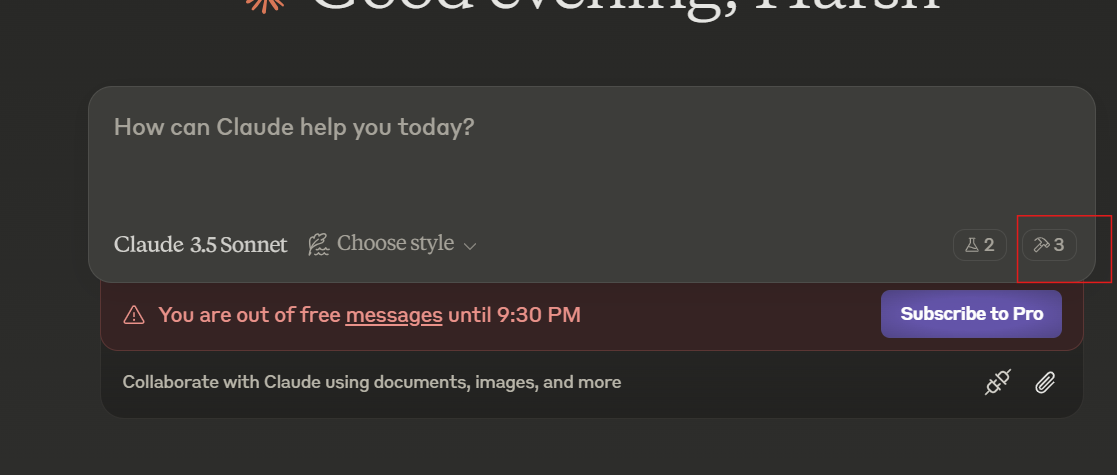
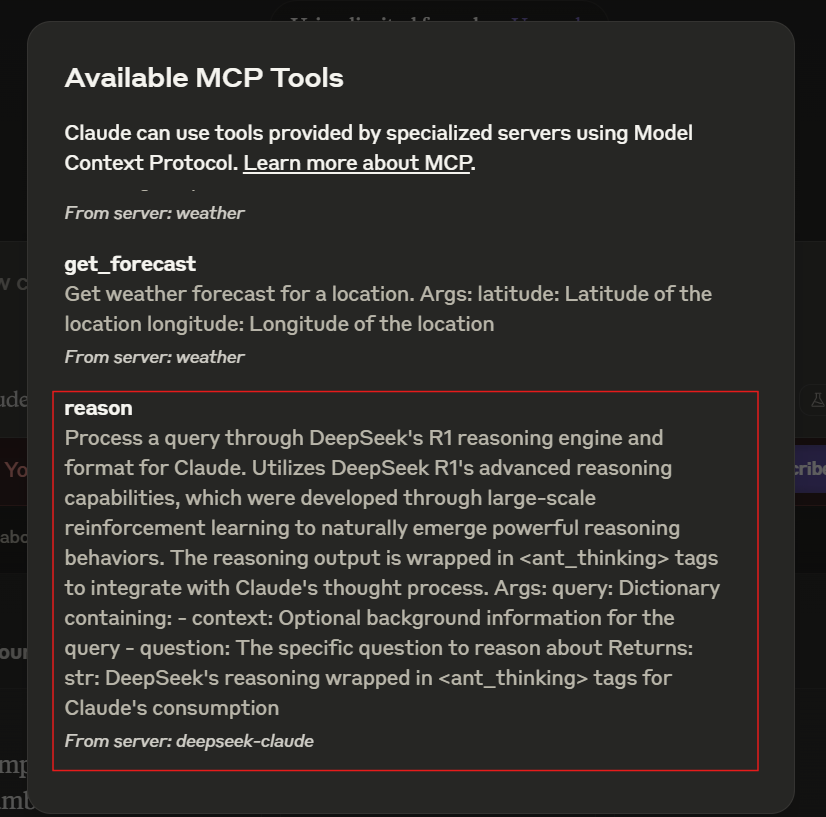
Si el servidor no está visible, consulte la guía de solución de problemas .
El servidor se inicia automáticamente al usar Claude Desktop. Asegúrese de que Claude Desktop esté configurado para detectar el servidor MCP.
Claude recibe una consulta que requiere un razonamiento avanzado.
La consulta se envía a DeepSeek R1 para su procesamiento.
DeepSeek R1 devuelve un razonamiento estructurado envuelto en etiquetas <ant_thinking> .
Claude integra el razonamiento en su respuesta final.
Este proyecto está licenciado bajo la Licencia MIT. Consulte el archivo de LICENCIA para más detalles.
Process a query using DeepSeek's R1 reasoning engine and prepare it for integration with Claude.

DeepSeek R1 leverages advanced reasoning capabilities that naturally evolved from large-scale
reinforcement learning, enabling sophisticated reasoning behaviors. The output is enclosed
within `<ant_thinking>` tags to align with Claude's thought processing framework.

Args:
    query (dict): Contains the following keys:
        - context (str): Optional background information for the query.
        - question (str): The specific question to be analyzed.

Returns:
    str: The reasoning output from DeepSeek, formatted with `<ant_thinking>` tags for seamless use with Claude.
| Name | Required | Description | Default |
|---|---|---|---|
| query | Yes |
Does the description disclose side effects, auth requirements, rate limits, or destructive behavior?
No annotations are provided, so the description carries the full burden of behavioral disclosure. It mentions the reasoning engine's capabilities and output formatting with tags, but fails to address critical aspects like rate limits, error handling, authentication needs, or performance characteristics. For a tool with no annotation coverage, this leaves significant gaps in understanding its operational behavior.
Agents need to know what a tool does to the world before calling it. Descriptions should go beyond structured annotations to explain consequences.
Is the description appropriately sized, front-loaded, and free of redundancy?
The description is well-structured with clear sections for purpose, technical background, parameters, and returns. It avoids unnecessary fluff, but the second sentence about R1's evolution could be trimmed for brevity without losing clarity. Overall, it's efficient and front-loaded with key information.
Shorter descriptions cost fewer tokens and are easier for agents to parse. Every sentence should earn its place.
Given the tool's complexity, does the description cover enough for an agent to succeed on first attempt?
Given no annotations, no output schema, and a nested parameter structure, the description is moderately complete. It covers the tool's purpose, parameter details, and return format, but lacks information on error cases, performance, or integration specifics. For a tool with such complexity, it should provide more operational context to be fully adequate.
Complex tools with many parameters or behaviors need more documentation. Simple tools need less. This dimension scales expectations accordingly.
Does the description clarify parameter syntax, constraints, interactions, or defaults beyond what the schema provides?
Schema description coverage is 0%, so the description must compensate. It adds meaningful semantics by detailing the 'query' parameter's structure with 'context' and 'question' keys, including that 'context' is optional. This goes beyond the bare schema, providing essential context for parameter usage, though it could specify data types or constraints more explicitly.
Input schemas describe structure but not intent. Descriptions should explain non-obvious parameter relationships and valid value ranges.
Does the description clearly state what the tool does and how it differs from similar tools?
The description clearly states the tool's purpose: 'Process a query using DeepSeek's R1 reasoning engine and prepare it for integration with Claude.' It specifies the verb ('process'), resource ('query'), and technology ('DeepSeek R1'), though it doesn't need to differentiate from siblings since none exist. The purpose is specific but could be more precise about what 'process' entails.
Agents choose between tools based on descriptions. A clear purpose with a specific verb and resource helps agents select the right tool.
Does the description explain when to use this tool, when not to, or what alternatives exist?
The description implies usage by mentioning integration with Claude and the reasoning capabilities, but it lacks explicit guidance on when to use this tool versus alternatives. With no sibling tools, this is less critical, but it doesn't provide context on prerequisites, limitations, or ideal scenarios for application.
Agents often have multiple tools that could apply. Explicit usage guidance like "use X instead of Y when Z" prevents misuse.
Recent tool additions, removals, and schema changes observed during successful MCP inspections.
reasonScored across 1 tool
With only one tool named 'reason', there is no possibility of confusion or overlap with other tools. The tool has a single, clearly defined purpose: processing queries through DeepSeek's R1 reasoning engine for Claude integration.
A single tool inherently demonstrates perfect naming consistency. The tool name 'reason' follows a clear verb-based pattern appropriate for its function, and there are no other tools to create inconsistency.
A single tool server is generally too minimal for most practical applications. While the tool itself performs a specific reasoning task, the server lacks complementary tools for broader reasoning workflows, making it feel incomplete as a standalone server.
The server is severely incomplete for a reasoning engine interface. It provides only query processing without any supporting tools for configuration, history management, different reasoning modes, or result validation. This creates significant gaps that will limit agent effectiveness.
Deterministic reasoning stack for AI agents: simulate, decide & compute, plus cross-domain tools.
Swift AI: Access a wide range of AI models⚡, including OpenAI 🤖,DeepSeek 🔍, Claude 🧠, Gemini 🌟, and.
Multi-model AI debates: GPT-4o, Claude, Gemini & 200+ models discuss, then synthesize insight.
One workspace of tools for Claude and ChatGPT: connect 600+ apps, generate media, build tools.