
Spacepal MCP Server
# Spacepal MCP server
Lets Claude, Cursor and other MCP clients work with your macOS Spaces through
[Spacepal](https://getspacepal.com): "switch to my Mail Space", "what's on Desktop 3?",
"name this desktop Research".
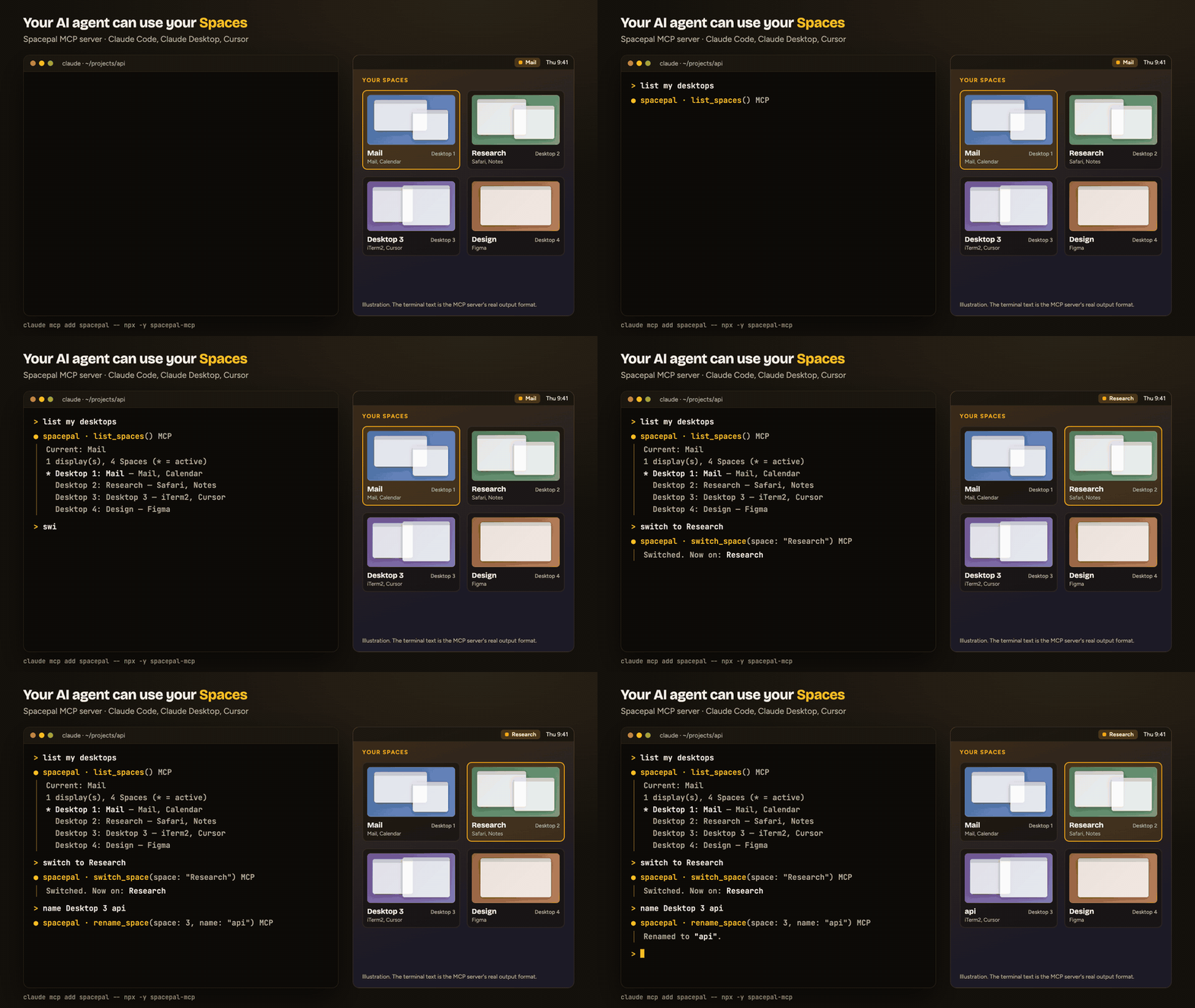
It runs locally over stdio. It reads the Space list Spacepal writes to
`~/Library/Application Support/Spacepal/state.json` and sends commands through the
`spacepal://` URL scheme. It makes no network calls.
## Several Claude Code sessions
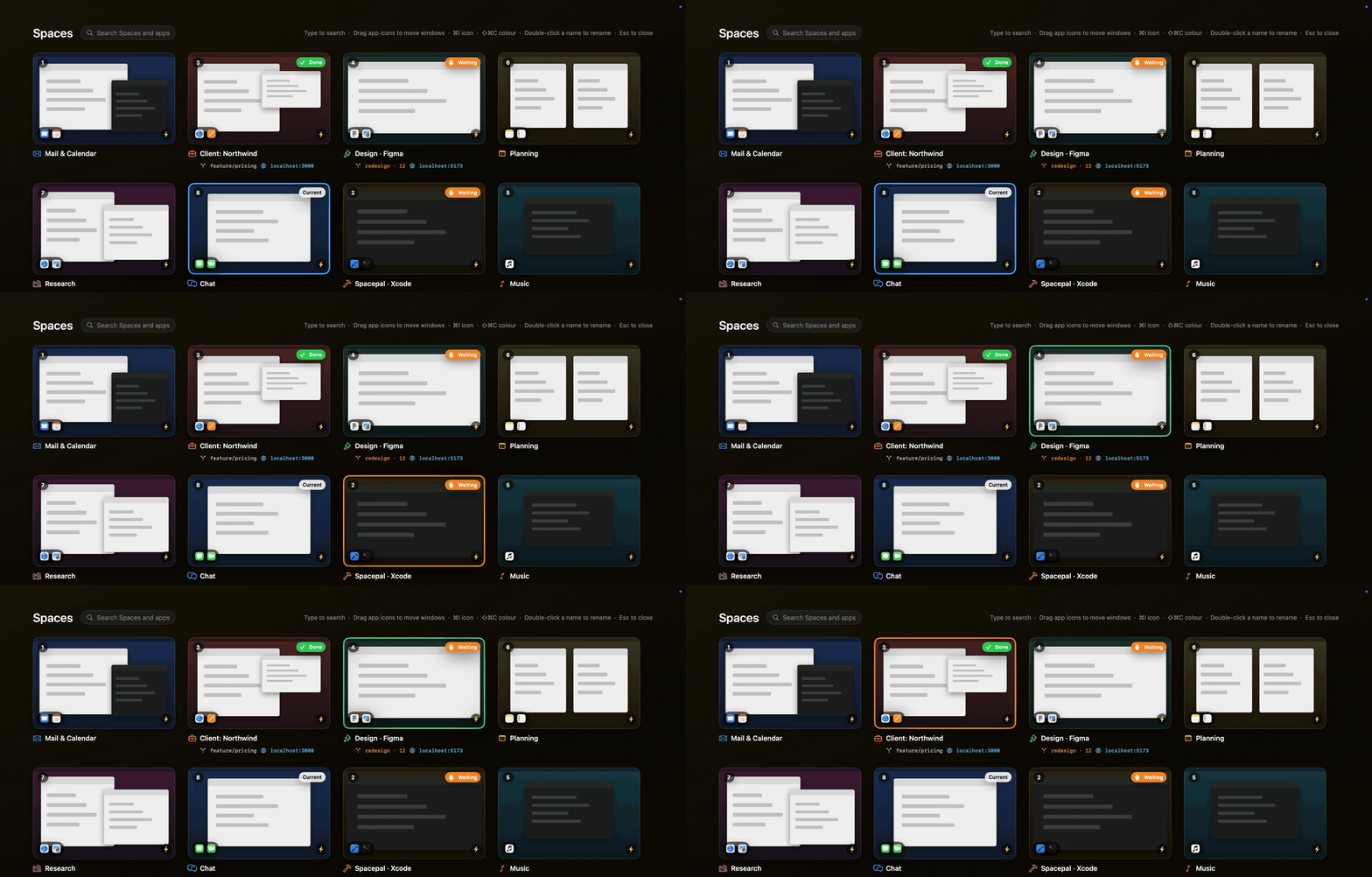
If you run Claude Code on several Spaces, Spacepal 1.2.12 and later marks the Space whose session is
waiting for you (a permission request or a question) or has finished, and `agent_sessions` lets an agent
see the same thing, for example to check whether the backend session is done. Turn it on in Spacepal:
Settings > General > Claude Code > Add to Claude Code. `list_spaces` also shows each project's git branch,
changed files and local dev servers.
More: [Spacepal for Claude Code](https://getspacepal.com/use-cases/claude-code/)
## Requirements
- macOS 14 or later, with Spacepal running (direct or Mac App Store build).
[Download Spacepal](https://getspacepal.com/download/?utm_source=mcp-readme&utm_medium=readme): 14-day free trial, no account; names, notes and switching stay free after it.
- Node.js 18 or later
## Tools
| Tool | What it does |
|---|---|
| `list_spaces` | Every Space with its number, name, display, apps, note, and which one is active |
| `current_space` | The Space you are on |
| `switch_space` | Switch by number or name, or step with `next`, `previous`, `back` |
| `move_window_to_space` | Send the frontmost window to a Space by number or name, or to `next` or `previous` |
| `open_url` | Open a link in a new browser window on a chosen Space, or on the project's own Space by default, so it does not land in a browser window on another Space |
| `agent_sessions` | The Claude Code sessions by Space: which one is waiting for the user (and why), which finished, and since when |
| `new_project_space` | Make a named Space for a project folder and start Claude Code there (direct version of Spacepal) |
| `rename_space` | Name a Space; an empty name restores "Desktop N" |
| `set_space_note` | Attach a short note to a Space |
| `open_overview` | Open Spacepal's overview grid |
| `list_profiles` | Names of your saved profiles |
| `apply_profile` | Apply a saved profile (names, colours, notes and automations) |
| `apply_template` | Name the Spaces from a starter template: Developer, Designer, Freelancer, Student, Streamer |
| `set_up_space` | Switch to a Space and run its automations: open its apps, URLs and files |
| `save_window_layout` | Save which Space and position every window is in |
| `restore_window_layout` | Put windows back from the last saved layout |
| `save_sessions` | Save terminal sessions and Chrome windows on one Space or all of them |
| `restore_sessions` | Reopen saved sessions on their Spaces |
| `place_window` | Put the front window in a half, a quarter, maximized, centred, or on the next display |
| `set_presentation_mode` | Hide Space names, notes and previews for a screen share, or show them again |
| `add_desktop` | Add a desktop on the current display |
| `remove_desktop` | Remove a desktop; its windows move to another one |
Every tool is marked with MCP hints, so clients can tell the read-only tools apart and ask
before `remove_desktop` or `apply_template`, which change your setup.
`move_window_to_space` acts on the frontmost window. In Claude Desktop that is usually
Claude's own window. It moves the window directly on macOS 14.0–14.4 and 26.4+, and by
dragging it on other versions. `restore_window_layout` can only move windows between
Spaces on 14.0–14.4 and 26.4+.
The MCP server is free. The tools follow the app's own limits: after Spacepal's 14-day
trial, names and notes stay free, while the overview, sessions and other Pro features need a
license.
## Install
### Claude Code
```sh
claude mcp add spacepal -- npx -y spacepal-mcp
```
### Claude Desktop
Add this to `~/Library/Application Support/Claude/claude_desktop_config.json`, then restart
Claude:
```json
{
"mcpServers": {
"spacepal": { "command": "npx", "args": ["-y", "spacepal-mcp"] }
}
}
```
### Cursor
Add the same block to `~/.cursor/mcp.json`, or to `.cursor/mcp.json` in a project:
```json
{
"mcpServers": {
"spacepal": { "command": "npx", "args": ["-y", "spacepal-mcp"] }
}
}
```
### From source
```sh
cd mcp && npm install
claude mcp add spacepal -- node "$PWD/index.js"
```
## Troubleshooting
- **"Spacepal is not running"**: open Spacepal from Applications.
- **Names are out of date**: Spacepal rewrites `state.json` when Spaces change. Open its
menu once to refresh it.
- **Switching does nothing**: check Spacepal > Settings > Setup. It needs Accessibility
permission.
MIT © Halberd LLC
TDQS
Scored across 19 tools
Most tools target distinct Space/window/profile actions, and descriptions explicitly distinguish close pairs such as switch_space vs set_up_space and apply_profile vs apply_template. A few boundaries still require careful reading, especially save/restore sessions vs save/restore window layouts and current_space vs list_spaces, but overlap is limited.
Nearly all tools use a consistent snake_case verb_noun pattern (list_spaces, move_window_to_space, apply_profile, restore_sessions). The main deviation is current_space, which is noun-like rather than verb-led; get_current_space would fit the convention better.
The server exposes 19 tools, which is on the heavy side for a single MCP surface and includes plausible consolidation candidates such as profile vs template application and separate session/layout save-restore pairs. The domain is broad enough that most tools correspond to real workflows, but the count sits in the 16-25 range that tends to feel heavy.
Coverage is strong across Space lifecycle, window placement, layout/session restoration, profiles/templates, overview, and presentation mode. Minor gaps remain around creating/saving profiles, directly setting Space colours, and managing automations, but none appear fatal for the stated purpose.