

A
licenseB
qualityD
maintenanceConnects Blender to Claude AI through the Model Context Protocol (MCP), enabling prompt-assisted 3D modeling, scene creation, and manipulation.
17
MIT

Enables direct interaction with Blender for 3D modeling, allowing creation and manipulation of objects, materials, scene lighting, and camera positioning. Supports executing Python code in Blender and accessing assets from Poly Haven.
Allows searching and downloading 3D models from Sketchfab directly into Blender scenes.
Click on "Deploy Server".
Wait a few minutes for the server to deploy. Once ready, it will show a "Started" state.
In the chat, type @ followed by the MCP server name and your instructions, e.g., "@BlenderMCP add a cube to the scene and apply a metallic material"
That's it! The server will respond to your query, and you can continue using it as needed.
Here is a step-by-step guide with screenshots.
BlenderMCP connects Blender to Claude AI through the Model Context Protocol (MCP), allowing Claude to directly interact with and control Blender. This integration enables prompt assisted 3D modeling, scene creation, and manipulation.
Give feedback, get inspired, and build on top of the MCP: Discord
Available for MacOS, Linux, & Windows
Other supporters:
All supporters:
View screenshots for Blender viewport to better understand the scene
Search and download Sketchfab models
Support for Poly Haven assets through their API
Support to generate 3D models using Hyper3D Rodin
For newcomers, you can go straight to Installation. For existing users, see the points below
Download the latest addon.py file and replace the older one, then add it to Blender
Delete the MCP server from Claude and add it back again, and you should be good to go!
Related MCP server: BlenderMCP
Two-way communication: Connect Claude AI to Blender through a socket-based server
Object manipulation: Create, modify, and delete 3D objects in Blender
Material control: Apply and modify materials and colors
Scene inspection: Get detailed information about the current Blender scene
Code execution: Run arbitrary Python code in Blender from Claude
The system consists of two main components:
Blender Addon (addon.py): A Blender addon that creates a socket server within Blender to receive and execute commands
MCP Server (src/blender_mcp/server.py): A Python server that implements the Model Context Protocol and connects to the Blender addon
Blender 3.0 or newer
Python 3.10 or newer
uv package manager:
If you're on Mac, please install uv as
brew install uvOn Windows
powershell -c "irm https://astral.sh/uv/install.ps1 | iex" and then
set Path=C:\Users\nntra\.local\bin;%Path%Otherwise installation instructions are on their website: Install uv
⚠️ Do not proceed before installing UV
Watch the setup instruction video (Assuming you have already installed uv)
Go to Claude > Settings > Developer > Edit Config > claude_desktop_config.json to include the following:
{
    "mcpServers": {
        "blender": {
            "command": "uvx",
            "args": [
                "blender-mcp"
            ]
        }
    }
}
For Mac users, go to Settings > MCP and paste the following
To use as a global server, use "add new global MCP server" button and paste
To use as a project specific server, create .cursor/mcp.json in the root of the project and paste
{
    "mcpServers": {
        "blender": {
            "command": "uvx",
            "args": [
                "blender-mcp"
            ]
        }
    }
}
For Windows users, go to Settings > MCP > Add Server, add a new server with the following settings:
{
    "mcpServers": {
        "blender": {
            "command": "cmd",
            "args": [
                "/c",
                "uvx",
                "blender-mcp"
            ]
        }
    }
}⚠️ Only run one instance of the MCP server (either on Cursor or Claude Desktop), not both
Download the addon.py file from this repo
Open Blender
Go to Edit > Preferences > Add-ons
Click "Install..." and select the addon.py file
Enable the addon by checking the box next to "Interface: Blender MCP"
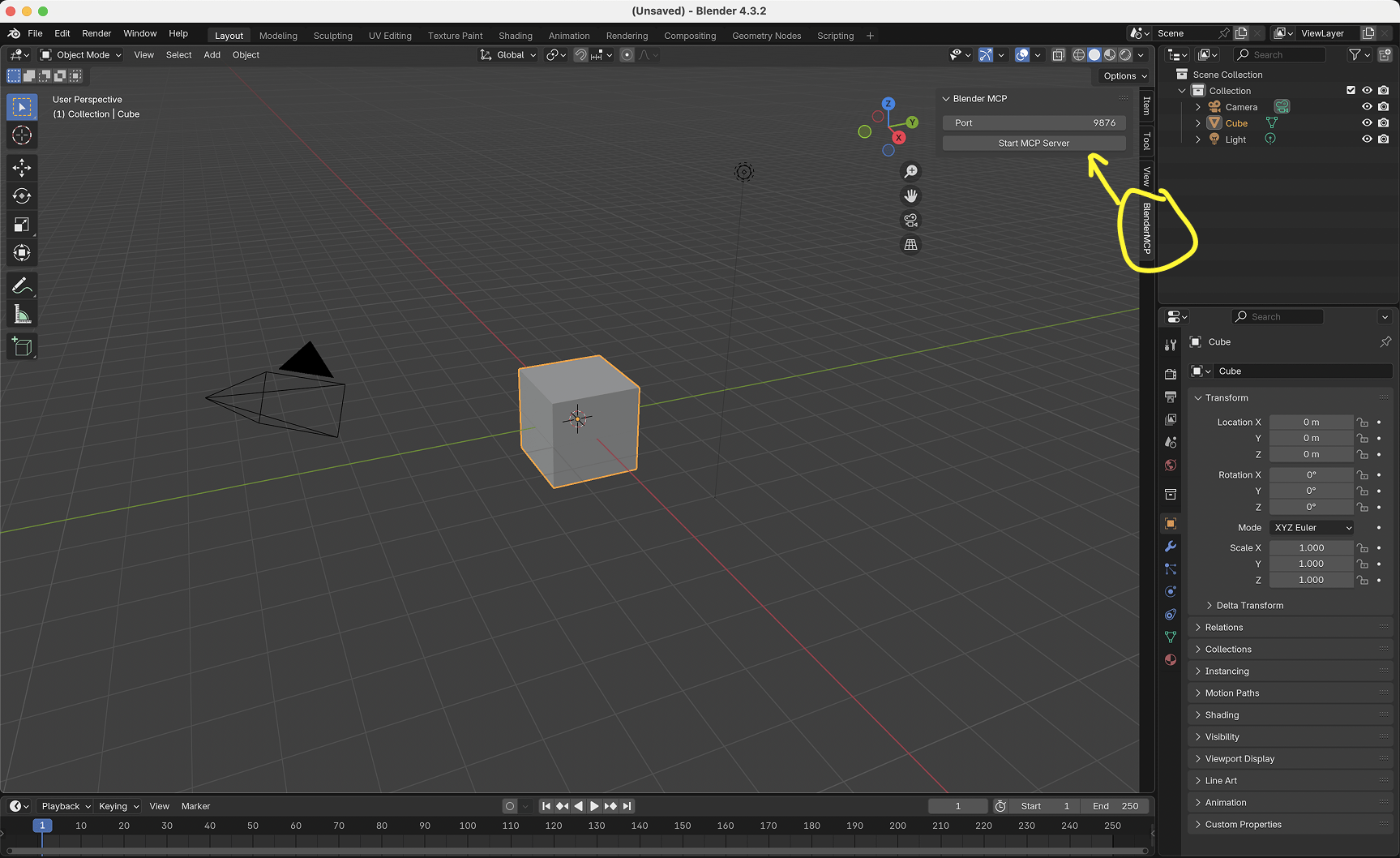
In Blender, go to the 3D View sidebar (press N if not visible)
Find the "BlenderMCP" tab
Turn on the Poly Haven checkbox if you want assets from their API (optional)
Click "Connect to Claude"
Make sure the MCP server is running in your terminal
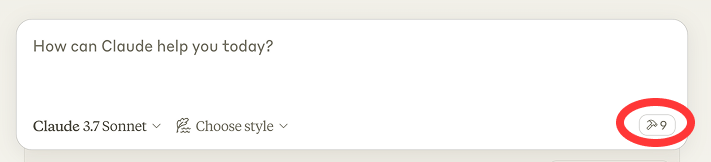
Once the config file has been set on Claude, and the addon is running on Blender, you will see a hammer icon with tools for the Blender MCP.
Get scene and object information
Create, delete and modify shapes
Apply or create materials for objects
Execute any Python code in Blender
Download the right models, assets and HDRIs through Poly Haven
AI generated 3D models through Hyper3D Rodin
Here are some examples of what you can ask Claude to do:
"Create a low poly scene in a dungeon, with a dragon guarding a pot of gold" Demo
"Create a beach vibe using HDRIs, textures, and models like rocks and vegetation from Poly Haven" Demo
Give a reference image, and create a Blender scene out of it Demo
"Generate a 3D model of a garden gnome through Hyper3D"
"Get information about the current scene, and make a threejs sketch from it" Demo
"Make this car red and metallic"
"Create a sphere and place it above the cube"
"Make the lighting like a studio"
"Point the camera at the scene, and make it isometric"
Hyper3D's free trial key allows you to generate a limited number of models per day. If the daily limit is reached, you can wait for the next day's reset or obtain your own key from hyper3d.ai and fal.ai.
Connection issues: Make sure the Blender addon server is running, and the MCP server is configured on Claude, DO NOT run the uvx command in the terminal. Sometimes, the first command won't go through but after that it starts working.
Timeout errors: Try simplifying your requests or breaking them into smaller steps
Poly Haven integration: Claude is sometimes erratic with its behaviour
Have you tried turning it off and on again?: If you're still having connection errors, try restarting both Claude and the Blender server
The system uses a simple JSON-based protocol over TCP sockets:
Commands are sent as JSON objects with a type and optional params
Responses are JSON objects with a status and result or message
The execute_blender_code tool allows running arbitrary Python code in Blender, which can be powerful but potentially dangerous. Use with caution in production environments. ALWAYS save your work before using it.
Poly Haven requires downloading models, textures, and HDRI images. If you do not want to use it, please turn it off in the checkbox in Blender.
Complex operations might need to be broken down into smaller steps
Contributions are welcome! Please feel free to submit a Pull Request.
This is a third-party integration and not made by Blender. Made by Siddharth
Download and import a Polyhaven asset into Blender.
Parameters:
asset_id: The ID of the asset to download
asset_type: The type of asset (hdris, textures, models)
resolution: The resolution to download (e.g., 1k, 2k, 4k)
file_format: Optional file format (e.g., hdr, exr for HDRIs; jpg, png for textures; gltf, fbx for models)
Returns a message indicating success or failure.
| Name | Required | Description | Default |
|---|---|---|---|
| asset_id | Yes | ||
| asset_type | Yes | ||
| resolution | No | 1k | |
| file_format | No |
Does the description disclose side effects, auth requirements, rate limits, or destructive behavior?
No annotations are provided, so the description must carry the behavioral burden. It does state that the tool downloads and imports into Blender and returns a success/failure message. However, it does not disclose side effects like modifying the current Blender scene, network requirements, or whether the operation could overwrite existing objects. This is adequate but leaves gaps.
Agents need to know what a tool does to the world before calling it. Descriptions should go beyond structured annotations to explain consequences.
Is the description appropriately sized, front-loaded, and free of redundancy?
The description is well-structured: a one-sentence purpose, a concise parameter block with examples, and a return-value note. It is front-loaded and every line adds value given the schema has no descriptions. The parameter list is slightly long but justified by the lack of schema documentation.
Shorter descriptions cost fewer tokens and are easier for agents to parse. Every sentence should earn its place.
Given the tool's complexity, does the description cover enough for an agent to succeed on first attempt?
All parameters are covered and the return behavior is stated, which is good for a tool with no output schema. However, the description omits useful context such as where asset_id comes from, whether the import modifies the existing scene, and any dependency on Blender being open. Given no annotations and no output schema, this is a clear gap.
Complex tools with many parameters or behaviors need more documentation. Simple tools need less. This dimension scales expectations accordingly.
Does the description clarify parameter syntax, constraints, interactions, or defaults beyond what the schema provides?
The input schema has 0% description coverage, so the parameter list in the description is the primary source of semantic information. It provides meaningful examples and allowed values for asset_type, resolution, and file_format, including asset-type-specific formats. Asset_id is under-specified (only 'The ID of the asset to download'), but the overall parameter documentation compensates well for the bare schema.
Input schemas describe structure but not intent. Descriptions should explain non-obvious parameter relationships and valid value ranges.
Does the description clearly state what the tool does and how it differs from similar tools?
The description opens with a specific verb and resource: 'Download and import a Polyhaven asset into Blender.' This clearly distinguishes the tool from siblings like search_polyhaven_assets (searching) and download_sketchfab_model (different source platform). No ambiguity about what this tool does.
Agents choose between tools based on descriptions. A clear purpose with a specific verb and resource helps agents select the right tool.
Does the description explain when to use this tool, when not to, or what alternatives exist?
The description makes it clear this is for Polyhaven assets, which implies when to use it versus Sketchfab or Hunyuan tools. However, it does not explicitly state when to prefer this over search_polyhaven_assets or set_texture, nor does it mention preconditions such as needing an asset_id from a prior search. Usage context is present but only implied.
Agents often have multiple tools that could apply. Explicit usage guidance like "use X instead of Y when Z" prevents misuse.
Download and import a Sketchfab model by its UID.
Parameters:
uid: The unique identifier of the Sketchfab model
Returns a message indicating success or failure. The model must be downloadable and you must have proper access rights.
| Name | Required | Description | Default |
|---|---|---|---|
| uid | Yes |
Does the description disclose side effects, auth requirements, rate limits, or destructive behavior?
With no annotations, the description only mentions return type (message) and prerequisites. It does not disclose side effects (e.g., scene modification), idempotency, rate limits, or error handling beyond success/failure.
Agents need to know what a tool does to the world before calling it. Descriptions should go beyond structured annotations to explain consequences.
Is the description appropriately sized, front-loaded, and free of redundancy?
Description is short and presents action first, then parameter and return. It could group the prerequisite line more efficiently, but overall is well-structured and not verbose.
Shorter descriptions cost fewer tokens and are easier for agents to parse. Every sentence should earn its place.
Given the tool's complexity, does the description cover enough for an agent to succeed on first attempt?
For a simple tool with one parameter and no output schema, description covers the basic action and prerequisites but lacks usage guidance and behavioral context, making it minimally complete.
Complex tools with many parameters or behaviors need more documentation. Simple tools need less. This dimension scales expectations accordingly.
Does the description clarify parameter syntax, constraints, interactions, or defaults beyond what the schema provides?
Coverage is 0%, so description must compensate. However, it merely restates 'uid: The unique identifier of the Sketchfab model' from the schema without adding format, examples, or constraints.
Input schemas describe structure but not intent. Descriptions should explain non-obvious parameter relationships and valid value ranges.
Does the description clearly state what the tool does and how it differs from similar tools?
The description clearly states it downloads and imports a Sketchfab model by UID, distinguishing it from sibling tools like search_sketchfab_models and download_polyhaven_asset.
Agents choose between tools based on descriptions. A clear purpose with a specific verb and resource helps agents select the right tool.
Does the description explain when to use this tool, when not to, or what alternatives exist?
Specifies prerequisites (model must be downloadable, proper access rights) and return value, but does not explicitly mention when to use this tool over alternatives or that the UID likely comes from search_sketchfab_models.
Agents often have multiple tools that could apply. Explicit usage guidance like "use X instead of Y when Z" prevents misuse.
Execute arbitrary Python code in Blender. Make sure to do it step-by-step by breaking it into smaller chunks.
Parameters:
code: The Python code to execute
| Name | Required | Description | Default |
|---|---|---|---|
| code | Yes |
Does the description disclose side effects, auth requirements, rate limits, or destructive behavior?
With no annotations, the burden falls on the description. It does disclose that the tool can run arbitrary Python code, which implies broad power and risk, and the 'step-by-step' warning hints that long or complex executions need caution. However, it does not mention possible destructive scene mutations, absence of undo, execution limits, or error behavior, so the disclosure is only partially complete.
Agents need to know what a tool does to the world before calling it. Descriptions should go beyond structured annotations to explain consequences.
Is the description appropriately sized, front-loaded, and free of redundancy?
The description is short and front-loaded with the core purpose. The step-by-step instruction is useful, and the parameter note is simple. The phrase 'step-by-step by breaking it into smaller chunks' is slightly redundant, but overall the text is efficient and easy to scan.
Shorter descriptions cost fewer tokens and are easier for agents to parse. Every sentence should earn its place.
Given the tool's complexity, does the description cover enough for an agent to succeed on first attempt?
For an arbitrary code execution tool with no annotations and no output schema, the description leaves important gaps: there is no indication of what the tool returns, how failures surface, what Python objects are available in scope, or whether the execution mutates the Blender scene permanently. The minimal description does not give an agent enough context to safely and correctly invoke this powerful tool in varied situations.
Complex tools with many parameters or behaviors need more documentation. Simple tools need less. This dimension scales expectations accordingly.
Does the description clarify parameter syntax, constraints, interactions, or defaults beyond what the schema provides?
Schema description coverage is 0%, so the description must compensate. The line 'code: The Python code to execute' adds only marginally more than the schema property title 'Code' and the tool name itself. It does not explain expected code environment details such as whether Blender's bpy module is pre-imported, how results or errors are returned, or whether there are execution limits.
Input schemas describe structure but not intent. Descriptions should explain non-obvious parameter relationships and valid value ranges.
Does the description clearly state what the tool does and how it differs from similar tools?
The description clearly states a specific action and resource: 'Execute arbitrary Python code in Blender.' The word 'arbitrary' signals this is a general-purpose escape hatch, and no sibling tool has the same role, so an agent can immediately distinguish it from the other scene, asset, and model-generation tools.
Agents choose between tools based on descriptions. A clear purpose with a specific verb and resource helps agents select the right tool.
Does the description explain when to use this tool, when not to, or what alternatives exist?
There is no guidance on when to prefer this tool over the many specialized sibling tools. The instruction to break work into smaller chunks is about how to structure execution, not about choosing this tool over alternatives. The only implied guidance is that 'arbitrary' means it can be used for tasks the other tools don't cover, but that is not made explicit.
Agents often have multiple tools that could apply. Explicit usage guidance like "use X instead of Y when Z" prevents misuse.
Generate 3D asset using Hyper3D by giving images of the wanted asset, and import the generated asset into Blender. The 3D asset has built-in materials. The generated model has a normalized size, so re-scaling after generation can be useful.
Parameters:
input_image_paths: The absolute paths of input images. Even if only one image is provided, wrap it into a list. Required if Hyper3D Rodin in MAIN_SITE mode.
input_image_urls: The URLs of input images. Even if only one image is provided, wrap it into a list. Required if Hyper3D Rodin in FAL_AI mode.
bbox_condition: Optional. If given, it has to be a list of ints of length 3. Controls the ratio between [Length, Width, Height] of the model.
Only one of {input_image_paths, input_image_urls} should be given at a time, depending on the Hyper3D Rodin's current mode. Returns a message indicating success or failure.
| Name | Required | Description | Default |
|---|---|---|---|
| input_image_paths | No | ||
| input_image_urls | No | ||
| bbox_condition | No |
Does the description disclose side effects, auth requirements, rate limits, or destructive behavior?
With no annotations, the description carries the behavioral disclosure burden. It usefully mentions built-in materials, normalized sizing that may require re-scaling, that the asset is imported into Blender, and that a success/failure message is returned. However, it does not disclose whether generation is asynchronous, whether a job ID is produced, or what side effects occur beyond the import, which could be significant for an agent deciding how to proceed.
Agents need to know what a tool does to the world before calling it. Descriptions should go beyond structured annotations to explain consequences.
Is the description appropriately sized, front-loaded, and free of redundancy?
The description is compact and well-structured: a clear one-line purpose, a few meaningful behavioral notes, and a bullet-like parameter section. Every sentence adds value without redundancy, and the most important invocation constraints are placed prominently.
Shorter descriptions cost fewer tokens and are easier for agents to parse. Every sentence should earn its place.
Given the tool's complexity, does the description cover enough for an agent to succeed on first attempt?
The description covers the key parameters and gives relevant behavioral context, but it does not explain how an agent can determine the current Hyper3D Rodin mode, what image requirements exist, or what the success/failure message contains. Since there is no output schema and sibling polling tools exist, the lack of async/job details leaves some ambiguity for correct invocation.
Complex tools with many parameters or behaviors need more documentation. Simple tools need less. This dimension scales expectations accordingly.
Does the description clarify parameter syntax, constraints, interactions, or defaults beyond what the schema provides?
The input schema has 0% description coverage, so the description fully compensates. It explains that input_image_paths must be absolute paths, that single values must still be wrapped in a list, that the three-element bbox_condition controls Length/Width/Height ratio, and that the two input parameters are mutually exclusive based on the current mode. This is strong parameter-level guidance.
Input schemas describe structure but not intent. Descriptions should explain non-obvious parameter relationships and valid value ranges.
Does the description clearly state what the tool does and how it differs from similar tools?
The description states a specific verb and resource: 'Generate 3D asset using Hyper3D by giving images' and 'import the generated asset into Blender.' It clearly distinguishes itself from the sibling text-based generation tool by emphasizing image input, so an agent can identify when this tool is relevant.
Agents choose between tools based on descriptions. A clear purpose with a specific verb and resource helps agents select the right tool.
Does the description explain when to use this tool, when not to, or what alternatives exist?
The description provides concrete guidance on parameter selection: input_image_paths is for MAIN_SITE mode, input_image_urls is for FAL_AI mode, and exactly one must be provided. It does not explicitly name alternative generation tools or state when not to use this tool, but the image-vs-text distinction is clear enough to infer the primary use case.
Agents often have multiple tools that could apply. Explicit usage guidance like "use X instead of Y when Z" prevents misuse.
Generate 3D asset using Hyper3D by giving description of the desired asset, and import the asset into Blender. The 3D asset has built-in materials. The generated model has a normalized size, so re-scaling after generation can be useful.
Parameters:
text_prompt: A short description of the desired model in English.
bbox_condition: Optional. If given, it has to be a list of floats of length 3. Controls the ratio between [Length, Width, Height] of the model.
Returns a message indicating success or failure.
| Name | Required | Description | Default |
|---|---|---|---|
| text_prompt | Yes | ||
| bbox_condition | No |
Does the description disclose side effects, auth requirements, rate limits, or destructive behavior?
With no annotations provided, the description carries the full burden of behavioral disclosure. It does well by disclosing that the tool imports the asset into Blender, that materials are built-in, that the model size is normalized and may need rescaling, and that it returns a success/failure message. It does not mention whether generation is asynchronous, whether it blocks, or how the imported object can be referenced afterward, but it provides substantial useful behavior context.
Agents need to know what a tool does to the world before calling it. Descriptions should go beyond structured annotations to explain consequences.
Is the description appropriately sized, front-loaded, and free of redundancy?
The description is compact and well-structured: purpose and side effect first, then relevant model characteristics, then parameter details, then return value. Every sentence adds information, and there is no redundant restatement of schema fields or filler.
Shorter descriptions cost fewer tokens and are easier for agents to parse. Every sentence should earn its place.
Given the tool's complexity, does the description cover enough for an agent to succeed on first attempt?
For a two-parameter tool with no annotations and no output schema, the description is nearly complete. It covers input semantics, generated asset characteristics, the Blender import side effect, and the return message. Minor gaps are lack of clarification about asynchronous behavior and how the agent can locate or reference the imported asset after success.
Complex tools with many parameters or behaviors need more documentation. Simple tools need less. This dimension scales expectations accordingly.
Does the description clarify parameter syntax, constraints, interactions, or defaults beyond what the schema provides?
Schema description coverage is 0%, so the description's parameter notes are essential. It explains that text_prompt must be a short English description, and that bbox_condition is optional, must be a list of floats of length 3, and controls the Length/Width/Height ratio. This adds meaningful semantic detail beyond the raw schema, though ranges or a more precise ratio explanation would strengthen it further.
Input schemas describe structure but not intent. Descriptions should explain non-obvious parameter relationships and valid value ranges.
Does the description clearly state what the tool does and how it differs from similar tools?
The description states a specific verb ('Generate'), the specific service (Hyper3D), the input mode (description/text), and the side effect (import into Blender). It also adds useful purpose details: built-in materials and normalized size. This clearly distinguishes it from image-based generation like generate_hyper3d_model_via_images, even though that sibling is not named.
Agents choose between tools based on descriptions. A clear purpose with a specific verb and resource helps agents select the right tool.
Does the description explain when to use this tool, when not to, or what alternatives exist?
The description implies when to use the tool: when you have a textual description of a 3D asset and want it generated and imported into Blender. However, it does not explicitly contrast with generate_hyper3d_model_via_images, import_generated_asset, or the other generation tools. No when-not-to-use guidance or alternative selection criteria are provided.
Agents often have multiple tools that could apply. Explicit usage guidance like "use X instead of Y when Z" prevents misuse.
Check if Hyper3D Rodin integration is enabled in Blender. Returns a message indicating whether Hyper3D Rodin features are available.
Don't emphasize the key type in the returned message, but sliently remember it.
| Name | Required | Description | Default |
|---|---|---|---|
No parameters | |||
Does the description disclose side effects, auth requirements, rate limits, or destructive behavior?
No annotations are provided, so the description must carry the behavioral burden. It does disclose that the tool returns a status message and includes an unusual instruction about not emphasizing the 'key type' and silently remembering it. However, 'key type' is undefined, and the description does not explicitly confirm the operation is read-only or mention any prerequisites or side effects.
Agents need to know what a tool does to the world before calling it. Descriptions should go beyond structured annotations to explain consequences.
Is the description appropriately sized, front-loaded, and free of redundancy?
The first two sentences are concise and front-loaded with the core purpose and return behavior. The third sentence about the 'key type' is short but confusing, contains a typo ('sliently'), and is not clearly connected to the rest of the description, preventing a higher score.
Shorter descriptions cost fewer tokens and are easier for agents to parse. Every sentence should earn its place.
Given the tool's complexity, does the description cover enough for an agent to succeed on first attempt?
For a zero-parameter status tool with no output schema, the description gives the essential high-level behavior: it checks integration availability and returns a message. Still, the meaning of 'key type' is unexplained and no guidance is offered about what the agent should do with that remembered information, leaving some context incomplete.
Complex tools with many parameters or behaviors need more documentation. Simple tools need less. This dimension scales expectations accordingly.
Does the description clarify parameter syntax, constraints, interactions, or defaults beyond what the schema provides?
The tool has zero parameters, so the schema already provides complete parameter information. The description adds no parameter details, but none are needed; this matches the baseline of 4 for tools with no parameters.
Input schemas describe structure but not intent. Descriptions should explain non-obvious parameter relationships and valid value ranges.
Does the description clearly state what the tool does and how it differs from similar tools?
The description states a specific action ('Check if Hyper3D Rodin integration is enabled'), a specific resource ('in Blender'), and the expected result ('Returns a message indicating whether Hyper3D Rodin features are available'). This clearly distinguishes it from sibling tools like get_sketchfab_status and get_hunyuan3d_status.
Agents choose between tools based on descriptions. A clear purpose with a specific verb and resource helps agents select the right tool.
Does the description explain when to use this tool, when not to, or what alternatives exist?
The intended use is reasonably clear from the tool name and the phrase 'Hyper3D Rodin integration', and sibling tools imply alternatives for other services. However, there is no explicit guidance about when to prefer this tool over siblings or exclusions, so the usage guidance remains mostly implied rather than stated.
Agents often have multiple tools that could apply. Explicit usage guidance like "use X instead of Y when Z" prevents misuse.
Get detailed information about a specific object in the Blender scene.
Parameters:
object_name: The name of the object to get information about
| Name | Required | Description | Default |
|---|---|---|---|
| object_name | Yes |
Does the description disclose side effects, auth requirements, rate limits, or destructive behavior?
With no annotations, the description is the only source for behavior. 'Get' implies a read-only operation, which is helpful, but there is no disclosure about errors, missing objects, or what 'detailed information' includes. This is adequate but leaves room for surprise.
Agents need to know what a tool does to the world before calling it. Descriptions should go beyond structured annotations to explain consequences.
Is the description appropriately sized, front-loaded, and free of redundancy?
The description is short and front-loaded with the core purpose, and the parameter note earns its place given the schema's lack of documentation. The parameter list is slightly redundant with the schema, but it does not waste words.
Shorter descriptions cost fewer tokens and are easier for agents to parse. Every sentence should earn its place.
Given the tool's complexity, does the description cover enough for an agent to succeed on first attempt?
For a one-parameter tool, the description provides the essential calling information and a clear purpose. However, with no output schema, it does not clarify what 'detailed information' returns, leaving an agent without expectations about the response contents.
Complex tools with many parameters or behaviors need more documentation. Simple tools need less. This dimension scales expectations accordingly.
Does the description clarify parameter syntax, constraints, interactions, or defaults beyond what the schema provides?
The input schema provides only the parameter name with no description (0% coverage), but the tool description adds a functional definition: 'object_name: The name of the object to get information about'. This meaningfully clarifies the sole parameter, though it does not address exact-name matching or behavior for nonexistent objects.
Input schemas describe structure but not intent. Descriptions should explain non-obvious parameter relationships and valid value ranges.
Does the description clearly state what the tool does and how it differs from similar tools?
The description clearly states the verb 'Get', the resource 'detailed information', and the specific scope 'specific object in the Blender scene'. It distinguishes this from scene-level tools like get_scene_info, though it does not explicitly name or contrast siblings.
Agents choose between tools based on descriptions. A clear purpose with a specific verb and resource helps agents select the right tool.
Does the description explain when to use this tool, when not to, or what alternatives exist?
No guidance is given about when to use this tool versus alternatives. Sibling tools like execute_blender_code or get_scene_info could overlap, but the description provides no exclusions or contextual selection criteria.
Agents often have multiple tools that could apply. Explicit usage guidance like "use X instead of Y when Z" prevents misuse.
Get a list of categories for a specific asset type on Polyhaven.
Parameters:
asset_type: The type of asset to get categories for (hdris, textures, models, all)
| Name | Required | Description | Default |
|---|---|---|---|
| asset_type | No | hdris |
Does the description disclose side effects, auth requirements, rate limits, or destructive behavior?
No annotations are provided, so the description carries the burden. It accurately signals a read-only operation ('Get a list'), but it does not disclose return format, network dependency, or error behavior. For a simple list operation this is adequate but not rich.
Agents need to know what a tool does to the world before calling it. Descriptions should go beyond structured annotations to explain consequences.
Is the description appropriately sized, front-loaded, and free of redundancy?
The description is compact, with the core action front-loaded and a structured parameter list. However, the parameter list partially duplicates the schema, even though it adds the allowed values.
Shorter descriptions cost fewer tokens and are easier for agents to parse. Every sentence should earn its place.
Given the tool's complexity, does the description cover enough for an agent to succeed on first attempt?
With one optional parameter and no output schema, the description covers the main semantic need: what categories are for and the allowed asset types. It lacks an explicit return-format note, but 'list of categories' implies an array of names. Minor gap: no statement about the default when asset_type is omitted, though the schema covers this.
Complex tools with many parameters or behaviors need more documentation. Simple tools need less. This dimension scales expectations accordingly.
Does the description clarify parameter syntax, constraints, interactions, or defaults beyond what the schema provides?
The description's Parameters section provides the accepted values for asset_type (hdris, textures, models, all), which the schema omits. This adds critical meaning beyond the schema's bare string type and default.
Input schemas describe structure but not intent. Descriptions should explain non-obvious parameter relationships and valid value ranges.
Does the description clearly state what the tool does and how it differs from similar tools?
The description states 'Get a list of categories for a specific asset type on Polyhaven' – a precise verb+resource. This clearly distinguishes it from siblings like search_polyhaven_assets, download_polyhaven_asset, and get_polyhaven_status, which concern asset search, download, and service status.
Agents choose between tools based on descriptions. A clear purpose with a specific verb and resource helps agents select the right tool.
Does the description explain when to use this tool, when not to, or what alternatives exist?
No guidance on when to use this tool versus alternatives. It does not specify a workflow (e.g., fetch categories before searching assets) or any exclusions. The parameter list is not usage guidance.
Agents often have multiple tools that could apply. Explicit usage guidance like "use X instead of Y when Z" prevents misuse.
Check if PolyHaven integration is enabled in Blender. Returns a message indicating whether PolyHaven features are available.
| Name | Required | Description | Default |
|---|---|---|---|
No parameters | |||
Does the description disclose side effects, auth requirements, rate limits, or destructive behavior?
With no annotations, the description carries the full burden. It states the tool 'returns a message' about feature availability, which implies a read-only status query, but it does not disclose whether it queries Blender state or makes network calls, nor possible errors. The non-mutating nature is inferred from 'Check' rather than stated.
Agents need to know what a tool does to the world before calling it. Descriptions should go beyond structured annotations to explain consequences.
Is the description appropriately sized, front-loaded, and free of redundancy?
Two short sentences with no filler. The primary action is front-loaded, and the return behavior is separated in the second sentence.
Shorter descriptions cost fewer tokens and are easier for agents to parse. Every sentence should earn its place.
Given the tool's complexity, does the description cover enough for an agent to succeed on first attempt?
For a zero-parameter status check, the description provides the essential purpose and return information. It lacks an explicit statement of the message format or error behavior, and no output schema compensates, so it is not fully specified.
Complex tools with many parameters or behaviors need more documentation. Simple tools need less. This dimension scales expectations accordingly.
Does the description clarify parameter syntax, constraints, interactions, or defaults beyond what the schema provides?
The tool has zero parameters, so there is nothing to document. The baseline of 4 applies because schema coverage is complete and the description correctly says nothing about parameters.
Input schemas describe structure but not intent. Descriptions should explain non-obvious parameter relationships and valid value ranges.
Does the description clearly state what the tool does and how it differs from similar tools?
The description uses the specific verb 'Check' with the resource 'PolyHaven integration in Blender', making the operation immediately clear. It names PolyHaven, distinguishing it from sibling status tools like get_sketchfab_status and get_hyper3d_status.
Agents choose between tools based on descriptions. A clear purpose with a specific verb and resource helps agents select the right tool.
Does the description explain when to use this tool, when not to, or what alternatives exist?
The description implies the tool is a capability check but gives no explicit guidance on when to invoke it or when to prefer a sibling status tool. There is no mention of using it before PolyHaven asset operations or an alternative. This is acceptable but relies on inference.
Agents often have multiple tools that could apply. Explicit usage guidance like "use X instead of Y when Z" prevents misuse.
Get detailed information about the current Blender scene
| Name | Required | Description | Default |
|---|---|---|---|
No parameters | |||
Does the description disclose side effects, auth requirements, rate limits, or destructive behavior?
With no annotations, the description must carry the full behavioral burden. 'Get' weakly implies a read-only operation, but it does not disclose what 'detailed information' contains, whether it errors under certain conditions, or whether it requires a valid Blender context. It provides very little beyond the tool name itself.
Agents need to know what a tool does to the world before calling it. Descriptions should go beyond structured annotations to explain consequences.
Is the description appropriately sized, front-loaded, and free of redundancy?
A single clear sentence with no filler or redundancy. The key components—verb, resource, and scope—are all present and front-loaded. Nothing extra needs to be trimmed.
Shorter descriptions cost fewer tokens and are easier for agents to parse. Every sentence should earn its place.
Given the tool's complexity, does the description cover enough for an agent to succeed on first attempt?
This is a zero-parameter tool with no annotations and no output schema, so the description is the only source of behavioral and return-value information. Saying only 'detailed information' leaves the agent uncertain about what fields or values will be returned, making the definition incomplete for a tool that provides scene info.
Complex tools with many parameters or behaviors need more documentation. Simple tools need less. This dimension scales expectations accordingly.
Does the description clarify parameter syntax, constraints, interactions, or defaults beyond what the schema provides?
The input schema is empty, so there are no parameters to document. With a parameter count of 0, the baseline of 4 is appropriate because no parameter meaning needs to be added by the description.
Input schemas describe structure but not intent. Descriptions should explain non-obvious parameter relationships and valid value ranges.
Does the description clearly state what the tool does and how it differs from similar tools?
The description states a clear verb ('Get') and resource ('current Blender scene'), making the basic purpose understandable. However, 'detailed information' is vague about exactly what scene data is included, and it does not explicitly differentiate from get_object_info, though scene vs. object is an implied distinction.
Agents choose between tools based on descriptions. A clear purpose with a specific verb and resource helps agents select the right tool.
Does the description explain when to use this tool, when not to, or what alternatives exist?
The context is implied: use this when you need detailed scene-level information. But there is no guidance on when not to use it, no mention of alternatives like get_object_info, and no prerequisites such as requiring an open Blender scene or active session.
Agents often have multiple tools that could apply. Explicit usage guidance like "use X instead of Y when Z" prevents misuse.
Check if Sketchfab integration is enabled in Blender. Returns a message indicating whether Sketchfab features are available.
| Name | Required | Description | Default |
|---|---|---|---|
No parameters | |||
Does the description disclose side effects, auth requirements, rate limits, or destructive behavior?
With no annotations, the description carries the behavioral transparency burden. It does communicate a non-mutating status check and a message return, but it does not state whether the check is local-only or queries Sketchfab, nor any side-effect or error behavior. This is adequate but not rich.
Agents need to know what a tool does to the world before calling it. Descriptions should go beyond structured annotations to explain consequences.
Is the description appropriately sized, front-loaded, and free of redundancy?
Two short sentences, front-loaded with the purpose and followed by the return behavior. No filler or duplication beyond a mild redundancy between 'enabled' and 'available'.
Shorter descriptions cost fewer tokens and are easier for agents to parse. Every sentence should earn its place.
Given the tool's complexity, does the description cover enough for an agent to succeed on first attempt?
For a zero-parameter status check with no output schema, the description covers the essential aspects: what is checked and what the caller receives. It could be more specific about the exact structure/form of the returned message, but nothing critical is missing.
Complex tools with many parameters or behaviors need more documentation. Simple tools need less. This dimension scales expectations accordingly.
Does the description clarify parameter syntax, constraints, interactions, or defaults beyond what the schema provides?
The tool has zero parameters, so there is nothing for the description to document. The schema already covers 100% of the empty parameter surface, earning the zero-parameter baseline of 4.
Input schemas describe structure but not intent. Descriptions should explain non-obvious parameter relationships and valid value ranges.
Does the description clearly state what the tool does and how it differs from similar tools?
The description uses a specific verb ('Check') and resource ('Sketchfab integration in Blender'), and clarifies the outcome ('Returns a message indicating whether Sketchfab features are available'). It is unambiguous and distinguishable from sibling status tools for other integrations by naming the exact integration.
Agents choose between tools based on descriptions. A clear purpose with a specific verb and resource helps agents select the right tool.
Does the description explain when to use this tool, when not to, or what alternatives exist?
Usage context is implied: an agent would call this when it needs to know whether Sketchfab is available in Blender. However, there is no explicit guidance about when not to use it, nor any comparison with sibling status tools like get_hyper3d_status or get_polyhaven_status.
Agents often have multiple tools that could apply. Explicit usage guidance like "use X instead of Y when Z" prevents misuse.
Capture a screenshot of the current Blender 3D viewport.
Parameters:
max_size: Maximum size in pixels for the largest dimension (default: 800)
Returns the screenshot as an Image.
| Name | Required | Description | Default |
|---|---|---|---|
| max_size | No |
Does the description disclose side effects, auth requirements, rate limits, or destructive behavior?
No annotations are provided, so the description carries the full burden. It discloses the basic behavior (captures viewport, returns an Image) but does not mention whether the scene is modified, what image format is used, or any viewport/display requirements. For a screenshot tool this is adequate but not deeply transparent.
Agents need to know what a tool does to the world before calling it. Descriptions should go beyond structured annotations to explain consequences.
Is the description appropriately sized, front-loaded, and free of redundancy?
The description is short and well-structured: a one-sentence purpose, a compact parameter definition, and a return note. Every part earns its place with no redundancy or filler.
Shorter descriptions cost fewer tokens and are easier for agents to parse. Every sentence should earn its place.
Given the tool's complexity, does the description cover enough for an agent to succeed on first attempt?
For a simple tool with one optional parameter and no output schema, the description is nearly complete: it states what it captures, how max_size behaves, and that it returns an Image. Minor missing details like image format or whether overlays are included keep it from a 5.
Complex tools with many parameters or behaviors need more documentation. Simple tools need less. This dimension scales expectations accordingly.
Does the description clarify parameter syntax, constraints, interactions, or defaults beyond what the schema provides?
Schema description coverage is 0%, so the description must compensate for the single parameter. It does so effectively by explaining that max_size is 'Maximum size in pixels for the largest dimension' and noting the default. This adds meaning beyond the bare schema property.
Input schemas describe structure but not intent. Descriptions should explain non-obvious parameter relationships and valid value ranges.
Does the description clearly state what the tool does and how it differs from similar tools?
The description states a clear, specific verb and resource: 'Capture a screenshot of the current Blender 3D viewport.' This unambiguously identifies the tool's function and distinguishes it from the generation/status/polyhaven/sketchfab siblings.
Agents choose between tools based on descriptions. A clear purpose with a specific verb and resource helps agents select the right tool.
Does the description explain when to use this tool, when not to, or what alternatives exist?
Usage is implied by the resource: use this when an image of the current Blender viewport is needed. However, there is no explicit guidance about when not to use it or how it relates to alternatives, though no sibling tool appears to provide the same screenshot capability.
Agents often have multiple tools that could apply. Explicit usage guidance like "use X instead of Y when Z" prevents misuse.
Import the asset generated by Hyper3D Rodin after the generation task is completed.
Parameters:
name: The name of the object in scene
task_uuid: For Hyper3D Rodin mode MAIN_SITE: The task_uuid given in the generate model step.
request_id: For Hyper3D Rodin mode FAL_AI: The request_id given in the generate model step.
Only give one of {task_uuid, request_id} based on the Hyper3D Rodin Mode! Return if the asset has been imported successfully.
| Name | Required | Description | Default |
|---|---|---|---|
| name | Yes | ||
| task_uuid | No | ||
| request_id | No |
Does the description disclose side effects, auth requirements, rate limits, or destructive behavior?
With no annotations, the description does the work: it states the prerequisite ('after the generation task is completed'), the mode-dependent parameter behavior, and that it returns a success/failure indicator. However, it does not disclose side effects on the scene, such as whether importing with an existing name replaces or adds an object, nor does it describe error behavior.
Agents need to know what a tool does to the world before calling it. Descriptions should go beyond structured annotations to explain consequences.
Is the description appropriately sized, front-loaded, and free of redundancy?
The description is tightly structured: one sentence of purpose, a bullet-style parameter list, a prominent mutual-exclusivity warning, and a return statement. Every line adds needed operational information with no filler.
Shorter descriptions cost fewer tokens and are easier for agents to parse. Every sentence should earn its place.
Given the tool's complexity, does the description cover enough for an agent to succeed on first attempt?
For a simple three-parameter tool with no output schema, it covers the prerequisite, parameter meaning, mode-based selection, and return status. Minor gaps remain: the exact return type is not specified ('Return if...' could be read as 'whether' versus 'the asset'), and behavior when neither/both ID fields are supplied is only partially covered by the instruction.
Complex tools with many parameters or behaviors need more documentation. Simple tools need less. This dimension scales expectations accordingly.
Does the description clarify parameter syntax, constraints, interactions, or defaults beyond what the schema provides?
The schema has 0% coverage for parameter descriptions, but the tool description fully documents all three parameters: name as the scene object name, task_uuid for MAIN_SITE mode, request_id for FAL_AI mode, plus the critical rule that exactly one of the two IDs should be provided based on mode.
Input schemas describe structure but not intent. Descriptions should explain non-obvious parameter relationships and valid value ranges.
Does the description clearly state what the tool does and how it differs from similar tools?
The description opens with a specific action and target: 'Import the asset generated by Hyper3D Rodin after the generation task is completed.' This clearly distinguishes the tool from the sibling import_generated_asset_hunyuan and from polling/status tools, so an agent knows exactly what this tool is for.
Agents choose between tools based on descriptions. A clear purpose with a specific verb and resource helps agents select the right tool.
Does the description explain when to use this tool, when not to, or what alternatives exist?
It gives a clear usage context: call after the generation task is completed, and choose task_uuid or request_id according to the Hyper3D Rodin mode (MAIN_SITE vs FAL_AI). It stops short of explicitly contrasting with alternative tools such as import_generated_asset_hunyuan, so it does not quite earn a 5.
Agents often have multiple tools that could apply. Explicit usage guidance like "use X instead of Y when Z" prevents misuse.
Check if the Hyper3D Rodin generation task is completed.
For Hyper3D Rodin mode MAIN_SITE: Parameters: - subscription_key: The subscription_key given in the generate model step.
Returns a list of status. The task is done if all status are "Done".
If "Failed" showed up, the generating process failed.
This is a polling API, so only proceed if the status are finally determined ("Done" or "Canceled").
For Hyper3D Rodin mode FAL_AI: Parameters: - request_id: The request_id given in the generate model step.
Returns the generation task status. The task is done if status is "COMPLETED".
The task is in progress if status is "IN_PROGRESS".
If status other than "COMPLETED", "IN_PROGRESS", "IN_QUEUE" showed up, the generating process might be failed.
This is a polling API, so only proceed if the status are finally determined ("COMPLETED" or some failed state).
| Name | Required | Description | Default |
|---|---|---|---|
| subscription_key | No | ||
| request_id | No |
Does the description disclose side effects, auth requirements, rate limits, or destructive behavior?
With no annotations, the description carries the full burden. It discloses that this is a polling API, explains expected status values, final versus in-progress states, and failure conditions. It does not cover error handling or whether the call blocks, but it provides substantial behavioral context.
Agents need to know what a tool does to the world before calling it. Descriptions should go beyond structured annotations to explain consequences.
Is the description appropriately sized, front-loaded, and free of redundancy?
The description is well organized with mode sections and bulleted parameters. The purpose is front-loaded, and each status and guideline is relevant. Minor redundancy in the polling warnings is acceptable given the two-mode structure.
Shorter descriptions cost fewer tokens and are easier for agents to parse. Every sentence should earn its place.
Given the tool's complexity, does the description cover enough for an agent to succeed on first attempt?
For a two-mode polling tool with no output schema and no annotations, the description covers the main behavioral contract: statuses, final states, and mode-specific inputs. It does not explain how to determine which mode applies or how to handle API errors, but it is largely complete for normal usage.
Complex tools with many parameters or behaviors need more documentation. Simple tools need less. This dimension scales expectations accordingly.
Does the description clarify parameter syntax, constraints, interactions, or defaults beyond what the schema provides?
The input schema has zero description coverage, so the description compensates by explaining that subscription_key belongs to MAIN_SITE and request_id belongs to FAL_AI, and that both come from a previous generate step. It could add format or requiredness details, but it gives enough meaning to choose the right parameter per mode.
Input schemas describe structure but not intent. Descriptions should explain non-obvious parameter relationships and valid value ranges.
Does the description clearly state what the tool does and how it differs from similar tools?
The description opens with a clear verb and resource: 'Check if the Hyper3D Rodin generation task is completed.' It also distinguishes the two Rodin modes, but does not explicitly differentiate this polling tool from the sibling get_hyper3d_status, so it stops short of a perfect score.
Agents choose between tools based on descriptions. A clear purpose with a specific verb and resource helps agents select the right tool.
Does the description explain when to use this tool, when not to, or what alternatives exist?
The description gives mode-specific instructions and explicitly states when to proceed based on final statuses ('Done', 'Canceled', 'COMPLETED', or failed states). It does not name alternative tools or when not to use this one, but the polling guidance is clear and actionable.
Agents often have multiple tools that could apply. Explicit usage guidance like "use X instead of Y when Z" prevents misuse.
Search for assets on Polyhaven with optional filtering.
Parameters:
asset_type: Type of assets to search for (hdris, textures, models, all)
categories: Optional comma-separated list of categories to filter by
Returns a list of matching assets with basic information.
| Name | Required | Description | Default |
|---|---|---|---|
| asset_type | No | all | |
| categories | No |
Does the description disclose side effects, auth requirements, rate limits, or destructive behavior?
With no annotations provided, the description carries the full burden of behavioral disclosure. It correctly conveys a read-only search operation and states that it 'Returns a list of matching assets with basic information', which is useful context. However, it does not mention pagination, result limits, required authentication, or that actual asset files are not downloaded by this tool.
Agents need to know what a tool does to the world before calling it. Descriptions should go beyond structured annotations to explain consequences.
Is the description appropriately sized, front-loaded, and free of redundancy?
The description is compact and front-loaded with the core purpose. The parameter list is minimal and useful, and the return statement is a single line. No redundant prose or filler exists.
Shorter descriptions cost fewer tokens and are easier for agents to parse. Every sentence should earn its place.
Given the tool's complexity, does the description cover enough for an agent to succeed on first attempt?
For a simple search tool with only two optional parameters and no output schema, the description covers the basic call contract. However, 'basic information' is vague about the exact return fields, and it does not tell the agent that valid category values can be obtained from get_polyhaven_categories. These are notable gaps given there is no output schema.
Complex tools with many parameters or behaviors need more documentation. Simple tools need less. This dimension scales expectations accordingly.
Does the description clarify parameter syntax, constraints, interactions, or defaults beyond what the schema provides?
Schema description coverage is 0%, so the description must compensate. It does so well by documenting asset_type with its allowed values (hdris, textures, models, all) and categories as an 'optional comma-separated list'. This adds real meaning beyond the bare schema property names and defaults.
Input schemas describe structure but not intent. Descriptions should explain non-obvious parameter relationships and valid value ranges.
Does the description clearly state what the tool does and how it differs from similar tools?
The description opens with a specific verb and resource: 'Search for assets on Polyhaven'. Combined with the asset_type values (hdris, textures, models, all), it clearly distinguishes this tool from sibling search tools like search_sketchfab_models and from download/category tools.
Agents choose between tools based on descriptions. A clear purpose with a specific verb and resource helps agents select the right tool.
Does the description explain when to use this tool, when not to, or what alternatives exist?
The description implies the tool should be used when the agent needs to discover Polyhaven assets, and it mentions optional filtering. However, it does not explicitly contrast with siblings such as get_polyhaven_categories or download_polyhaven_asset, nor does it state when not to use this tool.
Agents often have multiple tools that could apply. Explicit usage guidance like "use X instead of Y when Z" prevents misuse.
Search for models on Sketchfab with optional filtering.
Parameters:
query: Text to search for
categories: Optional comma-separated list of categories
count: Maximum number of results to return (default 20)
downloadable: Whether to include only downloadable models (default True)
Returns a formatted list of matching models.
| Name | Required | Description | Default |
|---|---|---|---|
| query | Yes | ||
| categories | No | ||
| count | No | ||
| downloadable | No |
Does the description disclose side effects, auth requirements, rate limits, or destructive behavior?
With no annotations, the description carries the burden of behavioral disclosure. It mentions that the tool returns a formatted list of matching models, which is helpful, but it does not disclose whether it calls an external API, potential rate limits, pagination behavior, or error conditions. The read-only nature is implied by 'search' but not made explicit.
Agents need to know what a tool does to the world before calling it. Descriptions should go beyond structured annotations to explain consequences.
Is the description appropriately sized, front-loaded, and free of redundancy?
The description is concise and front-loaded with the core purpose, followed by a clean bullet-style parameter list. Every sentence adds value and there is no redundant or filler content.
Shorter descriptions cost fewer tokens and are easier for agents to parse. Every sentence should earn its place.
Given the tool's complexity, does the description cover enough for an agent to succeed on first attempt?
The parameter documentation is complete, but the return value is only described as a 'formatted list', which is vague given that no output schema exists. Missing details include what fields each model entry contains, how categories combine, and what happens on errors or empty results. It is adequate for a basic search tool, but not fully complete.
Complex tools with many parameters or behaviors need more documentation. Simple tools need less. This dimension scales expectations accordingly.
Does the description clarify parameter syntax, constraints, interactions, or defaults beyond what the schema provides?
The schema description coverage is 0%, but the description compensates fully by explaining every parameter: query text, comma-separated categories, maximum result count, and downloadable filtering. This goes well beyond the bare schema definitions and gives the agent actionable meaning.
Input schemas describe structure but not intent. Descriptions should explain non-obvious parameter relationships and valid value ranges.
Does the description clearly state what the tool does and how it differs from similar tools?
The description clearly states the action ('Search for models on Sketchfab') and the resource, making the tool's purpose immediately understandable. It does not explicitly contrast itself with sibling tools, but the verb 'search' naturally distinguishes it from download, preview, and status tools.
Agents choose between tools based on descriptions. A clear purpose with a specific verb and resource helps agents select the right tool.
Does the description explain when to use this tool, when not to, or what alternatives exist?
The opening sentence gives clear context for when to use the tool: to search Sketchfab for models. It does not provide explicit exclusions or alternatives, but the sibling tool names make it evident that this is the search step before downloading or previewing.
Agents often have multiple tools that could apply. Explicit usage guidance like "use X instead of Y when Z" prevents misuse.
Apply a previously downloaded Polyhaven texture to an object.
Parameters:
object_name: Name of the object to apply the texture to
texture_id: ID of the Polyhaven texture to apply (must be downloaded first)
Returns a message indicating success or failure.
| Name | Required | Description | Default |
|---|---|---|---|
| object_name | Yes | ||
| texture_id | Yes |
Does the description disclose side effects, auth requirements, rate limits, or destructive behavior?
With no annotations, the description must carry the behavioral burden. It discloses the prerequisite of a prior download and states that the tool returns a success/failure message. However, it does not explain what happens on failure, whether existing textures are replaced, or whether the object must exist, leaving moderate behavioral gaps.
Agents need to know what a tool does to the world before calling it. Descriptions should go beyond structured annotations to explain consequences.
Is the description appropriately sized, front-loaded, and free of redundancy?
The description is compact, front-loaded with the main purpose, and structured cleanly into purpose, parameters, and return behavior. There is no filler or redundant content beyond what is needed given the 0% schema coverage.
Shorter descriptions cost fewer tokens and are easier for agents to parse. Every sentence should earn its place.
Given the tool's complexity, does the description cover enough for an agent to succeed on first attempt?
For a simple two-string-parameter tool, the description covers the essential inputs, the prerequisite, and the return behavior. It could be slightly more complete by noting that the object must exist or that the operation may overwrite the object's current texture, but the core invocation context is present.
Complex tools with many parameters or behaviors need more documentation. Simple tools need less. This dimension scales expectations accordingly.
Does the description clarify parameter syntax, constraints, interactions, or defaults beyond what the schema provides?
Schema description coverage is 0%, so the description must fully define the parameters. It does exactly that: object_name is the target object and texture_id is the already-downloaded Polyhaven texture ID. This adds the necessary meaning that the bare schema property names omit.
Input schemas describe structure but not intent. Descriptions should explain non-obvious parameter relationships and valid value ranges.
Does the description clearly state what the tool does and how it differs from similar tools?
The description starts with a specific verb-plus-resource statement: 'Apply a previously downloaded Polyhaven texture to an object.' The 'previously downloaded' qualifier clearly distinguishes this from the sibling download_polyhaven_asset and makes the scope of the tool immediately clear.
Agents choose between tools based on descriptions. A clear purpose with a specific verb and resource helps agents select the right tool.
Does the description explain when to use this tool, when not to, or what alternatives exist?
The description gives a clear usage condition: the texture 'must be downloaded first.' This implies the correct sequence with download_polyhaven_asset, but it does not explicitly name that sibling or state when not to use this tool, so it falls just short of full alternative routing guidance.
Agents often have multiple tools that could apply. Explicit usage guidance like "use X instead of Y when Z" prevents misuse.
Recent tool additions, removals, and schema changes observed during successful MCP inspections.
download_polyhaven_assetdownload_sketchfab_modelexecute_blender_codegenerate_hyper3d_model_via_imagesgenerate_hyper3d_model_via_textget_hyper3d_statusget_object_infoget_polyhaven_categoriesget_polyhaven_statusget_scene_infoget_sketchfab_statusget_viewport_screenshotimport_generated_assetpoll_rodin_job_statussearch_polyhaven_assetssearch_sketchfab_modelsset_textureScored across 17 tools
Most tools have distinct purposes, but there is some overlap and ambiguity. For example, 'import_generated_asset' and 'poll_rodin_job_status' both relate to Hyper3D generation, and 'download_polyhaven_asset' vs. 'set_texture' could cause confusion about texture handling. However, descriptions generally clarify the differences, preventing major misselection.
Tool names follow a consistent verb_noun pattern (e.g., 'download_polyhaven_asset', 'get_scene_info', 'search_sketchfab_models') with minor deviations like 'execute_blender_code' (verb_verb_noun) and 'poll_rodin_job_status' (verb_noun_noun). Overall, the naming is predictable and readable, though not perfectly uniform.
With 17 tools, the count is slightly high but reasonable for a Blender integration server covering asset downloads, scene management, and 3D generation. It includes core functionalities without being overly bloated, though some tools like multiple status checks could potentially be consolidated.
The tool set covers key areas: asset sourcing (Polyhaven, Sketchfab), 3D generation (Hyper3D), scene inspection, and basic operations. Minor gaps exist, such as no tools for editing objects or managing materials beyond textures, but agents can work around these with 'execute_blender_code' for custom actions.
Use AI models for chat, image, and video generation from Claude Code and other MCP hosts.
Build, run and publish 3D games in the Zero engine from Claude Code, Cursor or Codex, over MCP.
Create projects, nodes, and tasks in UluP Spaces by conversation with Claude.
Talk to your public-facing AI from any MCP client — Claude, ChatGPT, Cursor, Cline, Windsurf.