
F
licenseA
qualityD
maintenanceEnables browser automation using Python scripts, offering operations like taking webpage screenshots, retrieving HTML content, and executing JavaScript.
4
23
-

Click on "Deploy Server".
Wait a few minutes for the server to deploy. Once ready, it will show a "Started" state.
In the chat, type @ followed by the MCP server name and your instructions, e.g., "@Weixin MCP summarize this WeChat article: https://mp.weixin.qq.com/s/abc123def456"
That's it! The server will respond to your query, and you can continue using it as needed.
Here is a step-by-step guide with screenshots.
A minimalist MCP that allows large models to read WeChat public account articles.
🎭 Browser Simulation: Uses Playwright to fully simulate a browser environment
📝 Content Extraction: Automatically extracts title, author, publication time, and body content
⚡ Concise Implementation: Core functionality implemented with minimal code
Related MCP server: Browser MCP Server
User sends URL and requirements to the large model
Large model calls the MCP tool
MCP retrieves article content and sends it to the large model
Large model outputs natural language based on the article content
Python 3.10+
fastmcp - MCP framework
url-md (Rust single binary) - Anti-scraping + Markdown extraction in one step
pyyaml - frontmatter parsing
v0.3.0 Upgrade Note: The scraping layer has been simplified from 4
agent-browsersubprocesses + BeautifulSoup parsing to a single call tourl-md md <url>.url-mdinternally handles anti-scraping / WeChat body extraction / Markdown conversion / frontmatter generation. Dependencies are reduced, and thecontentfield is upgraded to Markdown (preserving image references / lists / heading levels). There are zero changes to the MCP protocol interface, so existing Claude/Cursor configurations do not need adjustment.v0.2.0 Upgrade Note: The original Playwright solution was broken by WeChat's strengthened anti-scraping (issue #3). The scraping layer was delegated to agent-browser (Apache-2.0 open-source Rust project). As of v0.3.0, it has migrated to
url-md.
# macOS / Linux
curl -fsSL https://raw.githubusercontent.com/Bwkyd/url-md/main/install.sh | bash

# Windows (PowerShell)
irm https://raw.githubusercontent.com/Bwkyd/url-md/main/install.ps1 | iex

# 验证
url-md --version
6 seconds from zero to ready. 7 MB single binary, no external dependencies like Chrome required (WeChat permanent links use the fast reqwest path).
pip install -r requirements.txt{
"mcpServers": {
"weixin-reader": {
"command": "python",
"args": [
"C:/Users/你的用户名/Desktop/wx-mcp/wx-mcp-server/src/server.py"
]
}
}
}Note: Please replace the path with your actual project path.
Use directly in Claude:
请帮我总结这篇文章:https://mp.weixin.qq.com/s/nEJhdxGea-KLZA_IGw9R5AClaude will automatically call the read_weixin_article tool to retrieve the article content and analyze it.
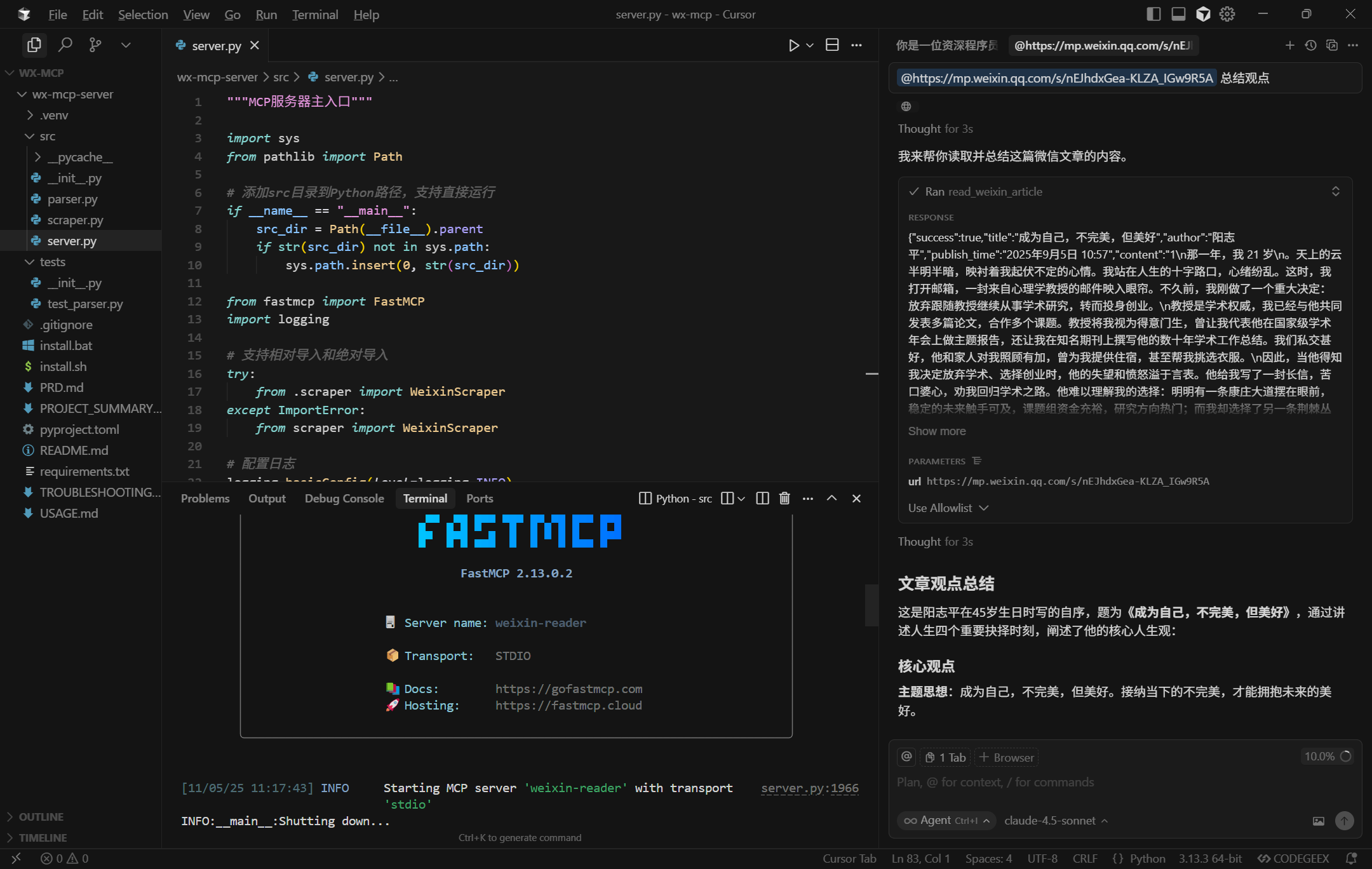
read_weixin_article(url: str)Read the content of a WeChat public account article.
Parameters:
url: WeChat article URL, format: https://mp.weixin.qq.com/s/xxx
Returns:
{
"success": true,
"title": "文章标题",
"author": "作者名",
"publish_time": "2025-11-05",
"content": "# 文章正文\n\n\n\n段落内容...",
"cover_url": "https://mmbiz.qpic.cn/.../wx_fmt=jpeg",
"error": null
}As of v0.3.0, the
contentfield is in Markdown format (it was plain text in v0.2.0 and earlier). If downstream agents/prompts are already handling it as plain text, you can strip the Markdown syntax before returning, or keep the Markdown to allow the LLM to understand it better natively.
⚠️ For personal learning and research only
⚠️ Comply with the WeChat Public Platform Service Agreement
⚠️ High-frequency scraping is not recommended (suggested interval > 2 seconds)
⚠️ Do not use for commercial purposes
This server cannot be deployed
Web search, data extraction and controlled browser automation for AI assistants via OAuth.
Hosted browser for agents: open pages, search the web, extract data, read PDFs and take screenshots.
AI-powered browser automation — navigate, click, fill forms, and extract data from any website.
Web data extraction and browser workflows for AI assistants.