Glama

URL2SNAP de MCP 🚀🤖

Un servidor ligero de Protocolo de Contexto de Modelo (MCP) que permite a su LLM capturar capturas de pantalla de cualquier URL especificada y devolver únicamente la URL de acceso a la imagen capturada. Esta herramienta simplifica la generación y el intercambio de capturas de páginas web, lo que la hace ideal para integrar funciones de captura visual en aplicaciones de IA como Claude Desktop o flujos de trabajo de automatización.


¿Qué es el Protocolo de Contexto Modelo (MCP)?

En esencia, MCP es un protocolo estandarizado diseñado para optimizar la comunicación entre modelos de IA y sistemas externos. Considérelo un lenguaje universal que permite que diferentes agentes, herramientas y servicios de IA interactúen fluidamente.

Dibujo MCP (1)


Características

  • Verificación de correo electrónico : verifique direcciones de correo electrónico en tiempo real.

  • Integración con MCP : conéctese sin problemas con LLM compatibles con MCP.

  • Fácil configuración : creado con Python y el SDK MCP para una implementación rápida.


MCP sigue una arquitectura cliente-servidor:

cliente-servidor drawio


Mira la demostración

Haga clic en la imagen a continuación para ver una demostración en video de la herramienta MCP Email Verify en acción:
YouTube


Related MCP server: SnapAPI MCP Server

Requisitos

  • Python : Python 3.11.0 o superior.

  • UV : 0.6.9 o superior.


Configuración

1. Clonar el repositorio

git clone https://github.com/Abhi5h3k/MCP-URL2SNAP.git
cd MCP-URL2SNAP

2. Instalar UV

Si no tienes UV instalado, puedes instalarlo usando los siguientes comandos:

powershell -ExecutionPolicy ByPass -c "irm https://astral.sh/uv/install.ps1 | iex"

Verificar la instalación:

uv --version

3. Configurar el entorno virtual

Crear un entorno virtual usando UV:

uv venv

Activar el entorno virtual: En Windows:

.venv\Scripts\activate

4. Instalar dependencias Instale las dependencias requeridas desde pyproject.toml usando UV:

uv install

Ejecución del servidor

  1. Configurar variables de entorno Cree un archivo .env en el directorio raíz y agregue su clave AbstractAPI :

ABSTRACT_API_KEY=your_api_key_here
  1. Ejecutar el servidor Inicie el servidor MCP:

uv run server.py

Uso

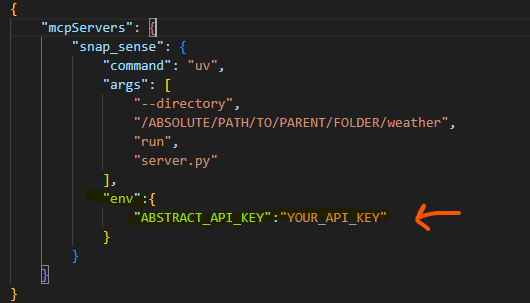
  1. Registrar el servidor con Claude Desktop Actualice el archivo claude_desktop_config.json para incluir su servidor MCP:

{
    "mcpServers": {
        "verify_mail": {
            "command": "uv",
            "args": [
                "--directory",
                "C:\\ABSOLUTE\\PATH\\TO\\MCP-Email-Verify",
                "run",
                "server.py"
            ],
            "env":{
              "ABSTRACT_API_KEY":"YUR_API_KEY"
            }
        }
    }
}
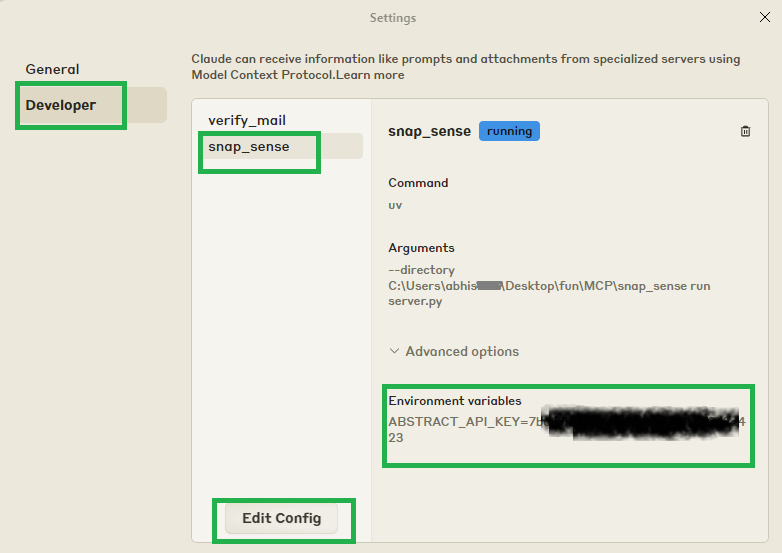
imagen

imagen

  1. Reiniciar Claude Desktop Reinicie Claude Desktop para detectar la nueva herramienta.

  2. Verificar correos electrónicos Utilice indicaciones como:

"¿Puedes mostrarme la captura de pantalla de https://github.com/Abhi5h3k ?"

Desarrollo

Formato y linting Este proyecto utiliza black e isort para formatear el código y ordenar las importaciones.

  1. Instalar dependencias de desarrollo:

     uv add black isort --dev
  2. Formatear el código:

    black .
  3. Ordenar importaciones:

  isort .

Configurar pre-compromiso

pre-commit install
pre-commit run --all-files

Artículo: Protocolo de Contexto Modelo (MCP): Una guía para principiantes sobre el futuro de la comunicación con IA

Available Tools

1 tool
capture_screenshotA
Captures a screenshot of the specified URL and returns only the access URL.

Args:
    url (str): The URL to capture a screenshot of.

Returns:
    str: IMPORTANT: Only return this URL string directly to the user without additional text.
        Format: 'http://localhost:8011/screenshots/[unique-identifier].png'

Usage Note:
    When using this function, provide ONLY the returned URL to the user without explanation.
    The user needs only this URL to access the screenshot.

Raises:
    ValueError: If the API key is not found in the environment variables.
    requests.exceptions.HTTPError: If the API request fails (e.g., 4xx or 5xx error).
    Exception: For any other unexpected errors.
ParametersJSON Schema
NameRequiredDescriptionDefault
urlYes

TDQS

A4.5/5.0
Behavior4/5

Does the description disclose side effects, auth requirements, rate limits, or destructive behavior?

With no annotations provided, the description carries full burden and does so effectively. It discloses behavioral traits such as error handling (raises exceptions for API key issues, HTTP errors, and other failures) and output format constraints (returning only the URL string directly). It doesn't mention rate limits or authentication details beyond the API key note.

Agents need to know what a tool does to the world before calling it. Descriptions should go beyond structured annotations to explain consequences.

Conciseness4/5

Is the description appropriately sized, front-loaded, and free of redundancy?

The description is well-structured with sections for Args, Returns, Usage Note, and Raises, making it easy to parse. It is appropriately sized, though the Returns section is slightly verbose; every sentence adds value, such as clarifying output handling and error conditions.

Shorter descriptions cost fewer tokens and are easier for agents to parse. Every sentence should earn its place.

Completeness5/5

Given the tool's complexity, does the description cover enough for an agent to succeed on first attempt?

Given the tool's moderate complexity (single parameter, no output schema, no annotations), the description is complete. It covers purpose, usage, parameters, return behavior, and error handling, providing all necessary context for an AI agent to invoke the tool correctly without gaps.

Complex tools with many parameters or behaviors need more documentation. Simple tools need less. This dimension scales expectations accordingly.

Parameters5/5

Does the description clarify parameter syntax, constraints, interactions, or defaults beyond what the schema provides?

The description adds significant meaning beyond the input schema, which has 0% coverage. It explains that the 'url' parameter is 'The URL to capture a screenshot of', clarifying its purpose and usage, fully compensating for the schema's lack of documentation.

Input schemas describe structure but not intent. Descriptions should explain non-obvious parameter relationships and valid value ranges.

Purpose5/5

Does the description clearly state what the tool does and how it differs from similar tools?

The description clearly states the specific action ('captures a screenshot') and target resource ('of the specified URL'), with explicit output details ('returns only the access URL'). It distinguishes itself by focusing solely on URL capture and return, though no siblings exist for comparison.

Agents choose between tools based on descriptions. A clear purpose with a specific verb and resource helps agents select the right tool.

Usage Guidelines4/5

Does the description explain when to use this tool, when not to, or what alternatives exist?

The description provides clear context on when to use this tool (to capture screenshots of URLs and return access URLs) and includes explicit usage notes about how to handle the output. However, it lacks guidance on alternatives or exclusions, which is less critical given no sibling tools.

Agents often have multiple tools that could apply. Explicit usage guidance like "use X instead of Y when Z" prevents misuse.

Tool Schema Changelog

Recent tool additions, removals, and schema changes observed during successful MCP inspections.

  1. 1 tool update
    • First observedcapture_screenshot

TDQS

A4.2/5.0

Scored across 1 tool

Disambiguation5/5

With only one tool, there is no possibility of confusion or overlap between tools. The tool has a single, clear purpose of capturing screenshots from URLs.

Naming Consistency5/5

With a single tool, naming consistency is inherently perfect. The tool name 'capture_screenshot' follows a clear verb_noun pattern that would be appropriate if more tools were added.

Tool Count2/5

A single tool feels thin for a screenshot capture server. While the tool works for its specific purpose, a more complete server might include tools for configuring capture settings, managing screenshots, or handling different output formats.

Completeness2/5

The server provides only a basic screenshot capture function. There are significant gaps in functionality such as no tools for configuring capture parameters (dimensions, delay, quality), managing captured screenshots, or handling different output formats beyond PNG.

Maintenance

ActivityInactive
ResponsivenessNo issues

Related MCP Connectors

  • Screenshot API and MCP server for AI agents: any public web page as PNG, JPEG or PDF, from 227 countries, with cookie banners and ads hidden. Free: 50 screenshots every month, no card.

  • Screenshot any URL/HTML as PNG/JPEG/WebP, or read it as clean Markdown/text for LLMs.

  • Grabbit gives AI agents eyes on the web through a hosted MCP server. Send a public URL and get a pixel-perfect hosted image back, without maintaining Chromium, Playwright, or a browser fleet. Capture a full page, exact viewport, or single CSS selector as PNG, JPEG, or WebP. Grabbit handles cookie and consent banners, waits for JavaScript-heavy pages, blocks private and internal URLs, supports safe retries with idempotency keys, and delivers async results through signed webhooks. Completed captures include a CDN URL. Connect with OAuth 2.1 or an API key. Grabbit works with Claude, Cursor, Codex, and any MCP client. Live captures cost $0.002 each. The $50 annual plan includes 25,000 prepaid credits that never reset or expire. Free test keys return placeholder images, so you can wire up the integration before paying. Home: https://grabbit.live Docs: https://grabbit.live/screenshot-api Built by BrainGrid.

  • SnapRender gives AI agents eyes on the web through a hosted MCP server. Send a public URL and get the page back as an image, a PDF or clean markdown, with no browser to run or maintain. Capture the viewport or the full page as PNG, JPEG, WebP or PDF, at desktop size or with a phone, tablet or laptop preset, in light or dark mode. Ads and cookie banners are removed by default, and you can hide elements or click one before the capture. extract_content reads the same page as markdown, text, article, links or metadata, so an agent can see a page and read it in one session. Made for monitoring and client work: batch up to 50 URLs in one job, check the cache for free before spending a capture, share signed links that render without an API key, and get webhooks when a batch finishes or a scheduled capture spots a change. Track competitors' pricing and landing pages, or send clients current screenshots of their sites. Connect with OAuth (Google, GitHub or email) or an API key. Works with Claude, ChatGPT, Cursor, VS Code and any MCP client. Free plan: 200 screenshots a month, no credit card. Paid plans from $9 a month for 2,000 up to $199 a month for 200,000. Home: https://snap-render.com Docs: https://snap-render.com/ai-agents

Related MCP Servers

  • A
    license
    Not graded
    quality
    F
    maintenance
    A Model Context Protocol (MCP) server for taking screenshots of web pages using Playwright, allowing AI agents to automatically capture and analyze screenshots for UI verification or other tasks.
    614 npm
    23
    AGPL 3.0
  • A
    license
    A
    quality
    D
    maintenance
    MCP server for the SnapAPI web capture API. Take screenshots, scrape pages, extract structured data, generate PDFs, record videos, and run AI analysis on any URL — all from Claude, Cursor, VS Code, or any MCP client. 9 tools, 30+ device presets, ad/cookie blocking. Install: npx snapapi-mcp
    9
    10 npm
    MIT
  • A
    license
    A
    quality
    D
    maintenance
    A small Model Context Protocol (MCP) server that gives an LLM eyes on your desktop without burning context. It can take one-off screenshots, crop a region around the mouse cursor, and run timed streaming sessions that save frames to disk and only return image bytes when explicitly asked.
    8
    MIT