Glama
withRefresh

WebEvalAgent MCP Server

Official
by withRefresh

web_eval_agent

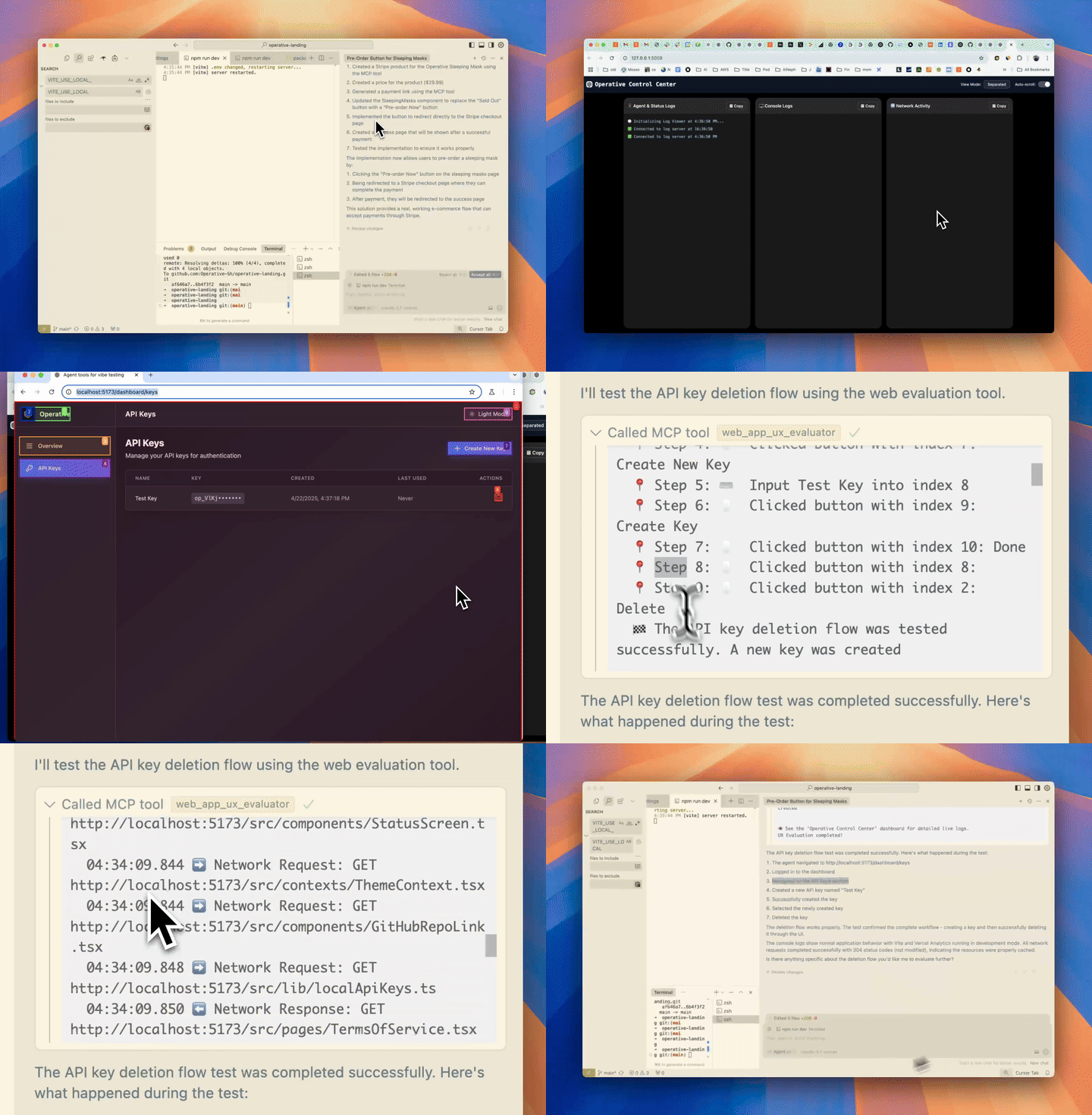
Assess and improve web application UX/UI by analyzing interaction flows, identifying issues, and providing actionable recommendations with detailed observations and screenshots.

Instructions

Evaluate the user experience / interface of a web application.

This tool allows the AI to assess the quality of user experience and interface design of a web application by performing specific tasks and analyzing the interaction flow.

Before this tool is used, the web application should already be running locally on a port.

Args: url: Required. The localhost URL of the web application to evaluate, including the port number. Example: http://localhost:3000, http://localhost:8080, http://localhost:4200, http://localhost:5173, etc. Try to avoid using the path segments of the URL, and instead use the root URL. task: Required. The specific UX/UI aspect to test (e.g., "test the checkout flow", "evaluate the navigation menu usability", "check form validation feedback") Be as detailed as possible in your task description. It could be anywhere from 2 sentences to 2 paragraphs. headless_browser: Optional. Whether to hide the browser window popup during evaluation. If headless_browser is True, only the operative control center browser will show, and no popup browser will be shown.

Returns: list[list[TextContent, ImageContent]]: A detailed evaluation of the web application's UX/UI, including observations, issues found, and recommendations for improvement and screenshots of the web application during the evaluation

Input Schema

NameRequiredDescriptionDefault
headless_browserNo
taskYes
urlYes

Input Schema (JSON Schema)

{ "properties": { "headless_browser": { "default": false, "title": "Headless Browser", "type": "boolean" }, "task": { "title": "Task", "type": "string" }, "url": { "title": "Url", "type": "string" } }, "required": [ "url", "task" ], "title": "web_eval_agentArguments", "type": "object" }

Implementation Reference

  • Registers the 'web_eval_agent' tool with the MCP framework using the @mcp.tool decorator. Includes the function signature serving as input schema (url, task, ctx, headless_browser), comprehensive docstring describing usage and parameters, API key validation, error handling, and delegation to the core handle_web_evaluation function.
    @mcp.tool(name=BrowserTools.WEB_EVAL_AGENT) async def web_eval_agent(url: str, task: str, ctx: Context, headless_browser: bool = False) -> list[TextContent]: """Evaluate the user experience / interface of a web application. This tool allows the AI to assess the quality of user experience and interface design of a web application by performing specific tasks and analyzing the interaction flow. Before this tool is used, the web application should already be running locally on a port. Args: url: Required. The localhost URL of the web application to evaluate, including the port number. Example: http://localhost:3000, http://localhost:8080, http://localhost:4200, http://localhost:5173, etc. Try to avoid using the path segments of the URL, and instead use the root URL. task: Required. The specific UX/UI aspect to test (e.g., "test the checkout flow", "evaluate the navigation menu usability", "check form validation feedback") Be as detailed as possible in your task description. It could be anywhere from 2 sentences to 2 paragraphs. headless_browser: Optional. Whether to hide the browser window popup during evaluation. If headless_browser is True, only the operative control center browser will show, and no popup browser will be shown. Returns: list[list[TextContent, ImageContent]]: A detailed evaluation of the web application's UX/UI, including observations, issues found, and recommendations for improvement and screenshots of the web application during the evaluation """ headless = headless_browser is_valid = await validate_api_key(api_key) if not is_valid: error_message_str = "❌ Error: API Key validation failed when running the tool.\n" error_message_str += " Reason: Free tier limit reached.\n" error_message_str += " πŸ‘‰ Please subscribe at https://operative.sh to continue." return [TextContent(type="text", text=error_message_str)] try: # Generate a new tool_call_id for this specific tool call tool_call_id = str(uuid.uuid4()) return await handle_web_evaluation( {"url": url, "task": task, "headless": headless, "tool_call_id": tool_call_id}, ctx, api_key ) except Exception as e: tb = traceback.format_exc() return [TextContent( type="text", text=f"Error executing web_eval_agent: {str(e)}\n\nTraceback:\n{tb}" )]
  • Core handler function implementing the web_eval_agent tool logic. Initializes logging dashboard, validates inputs, manages Playwright browser instance, generates evaluation prompt, executes browser agent task via run_browser_task, collects screenshots/console/network data, formats comprehensive report with timeline, and returns list of TextContent and ImageContent.
    async def handle_web_evaluation(arguments: Dict[str, Any], ctx: Context, api_key: str) -> list[TextContent]: """Handle web_eval_agent tool calls This function evaluates the user experience of a web application by using the browser-use agent to perform specific tasks and analyze the interaction flow. Args: arguments: The tool arguments containing 'url' and 'task' ctx: The MCP context for reporting progress api_key: The API key for authentication with the LLM service Returns: list[List[Any]]: The evaluation results, including console logs, network requests, and screenshots """ # Initialize log server immediately (if not already running) try: # stop_log_server() # Commented out stop_log_server start_log_server() # Give the server a moment to start await asyncio.sleep(1) # Open the dashboard in a new tab open_log_dashboard() except Exception: pass # Validate required arguments if "url" not in arguments or "task" not in arguments: return [TextContent( type="text", text="Error: Both 'url' and 'task' parameters are required. Please provide a URL to evaluate and a specific UX/UI task to test." )] url = arguments["url"] task = arguments["task"] tool_call_id = arguments.get("tool_call_id", str(uuid.uuid4())) headless = arguments.get("headless", True) send_log(f"Handling web evaluation call with context: {ctx}", "πŸ€”") # Ensure URL has a protocol (add https:// if missing) if not url.startswith(("http://", "https://", "file://", "data:", "chrome:", "javascript:")): url = "https://" + url send_log(f"Added https:// protocol to URL: {url}", "πŸ”—") if not url or not isinstance(url, str): return [TextContent( type="text", text="Error: 'url' must be a non-empty string containing the web application URL to evaluate." )] if not task or not isinstance(task, str): return [TextContent( type="text", text="Error: 'task' must be a non-empty string describing the UX/UI aspect to test." )] # Send initial status to dashboard send_log(f"πŸš€ Received web evaluation task: {task}", "πŸš€") send_log(f"πŸ”— Target URL: {url}", "πŸ”—") # Update the URL and task in the dashboard set_url_and_task(url, task) # Get the singleton browser manager and initialize it browser_manager = get_browser_manager() if not browser_manager.is_initialized: # Note: browser_manager.initialize will no longer need to start the log server # since we've already done it above await browser_manager.initialize() # Get the evaluation task prompt evaluation_task = get_web_evaluation_prompt(url, task) send_log("πŸ“ Generated evaluation prompt.", "πŸ“") # Run the browser task agent_result_data = None # Changed to agent_result_data try: # run_browser_task now returns a dictionary with result and screenshots # Updated comment agent_result_data = await run_browser_task( evaluation_task, headless=headless, # Pass the headless parameter tool_call_id=tool_call_id, api_key=api_key ) # Extract the final result string agent_final_result = agent_result_data.get("result", "No result provided") screenshots = agent_result_data.get("screenshots", []) # Added this line # Log detailed screenshot information send_log(f"Received {len(screenshots)} screenshots from run_browser_task", "πŸ“Έ") for i, screenshot in enumerate(screenshots): if 'screenshot' in screenshot and screenshot['screenshot']: b64_length = len(screenshot['screenshot']) send_log(f"Processing screenshot {i+1}: Step {screenshot.get('step', 'unknown')}, {b64_length} base64 chars", "πŸ”’") else: send_log(f"Screenshot {i+1} missing 'screenshot' data! Keys: {list(screenshot.keys())}", "⚠️") # Log the number of screenshots captured send_log(f"πŸ“Έ Captured {len(screenshots)} screenshots during evaluation", "πŸ“Έ") except Exception as browser_task_error: error_msg = f"Error during browser task execution: {browser_task_error}\n{traceback.format_exc()}" send_log(error_msg, "❌") agent_final_result = f"Error: {browser_task_error}" # Provide error as result screenshots = [] # Ensure screenshots is defined even on error # Format the agent result in a more user-friendly way, including console and network errors formatted_result = format_agent_result(agent_final_result, url, task, console_log_storage, network_request_storage) # Determine if the task was successful task_succeeded = True if agent_final_result.startswith("Error:"): task_succeeded = False elif "success=False" in agent_final_result and "is_done=True" in agent_final_result: task_succeeded = False # Use appropriate status emoji status_emoji = "βœ…" if task_succeeded else "❌" # Return a better formatted message to the MCP user # Including a reference to the dashboard for detailed logs confirmation_text = f"{formatted_result}\n\nπŸ‘οΈ See the 'Operative Control Center' dashboard for detailed live logs.\nWeb Evaluation completed!" send_log(f"Web evaluation task completed for {url}.", status_emoji) # Also send confirmation to dashboard # Log final screenshot count before constructing response send_log(f"Constructing final response with {len(screenshots)} screenshots", "🧩") # Create the final response structure response = [TextContent(type="text", text=confirmation_text)] # Debug the screenshot data structure one last time before adding to response for i, screenshot_data in enumerate(screenshots[1:]): if 'screenshot' in screenshot_data and screenshot_data['screenshot']: b64_length = len(screenshot_data['screenshot']) send_log(f"Adding screenshot {i+1} to response ({b64_length} chars)", "βž•") response.append(ImageContent( type="image", data=screenshot_data["screenshot"], mimeType="image/jpeg" )) else: send_log(f"Screenshot {i+1} can't be added to response - missing data!", "❌") send_log(f"Final response contains {len(response)} items ({len(response)-1} images)", "πŸ“¦") # MCP tool function expects list[list[TextContent, ImageContent]] - see docstring in mcp_server.py send_log(f"Returning wrapped response: list[ [{len(response)} items] ]", "🎁") # return [response] # This structure may be incorrect # The correct structure based on docstring is list[list[TextContent, ImageContent]] # i.e., a list containing a single list of mixed content items return [response]
  • Docstring of the registered web_eval_agent tool defining the input schema (parameters with types and descriptions), usage instructions, and output format (list of TextContent and ImageContent). Serves as the tool schema for MCP.
    """Evaluate the user experience / interface of a web application. This tool allows the AI to assess the quality of user experience and interface design of a web application by performing specific tasks and analyzing the interaction flow. Before this tool is used, the web application should already be running locally on a port. Args: url: Required. The localhost URL of the web application to evaluate, including the port number. Example: http://localhost:3000, http://localhost:8080, http://localhost:4200, http://localhost:5173, etc. Try to avoid using the path segments of the URL, and instead use the root URL. task: Required. The specific UX/UI aspect to test (e.g., "test the checkout flow", "evaluate the navigation menu usability", "check form validation feedback") Be as detailed as possible in your task description. It could be anywhere from 2 sentences to 2 paragraphs. headless_browser: Optional. Whether to hide the browser window popup during evaluation. If headless_browser is True, only the operative control center browser will show, and no popup browser will be shown. Returns: list[list[TextContent, ImageContent]]: A detailed evaluation of the web application's UX/UI, including observations, issues found, and recommendations for improvement and screenshots of the web application during the evaluation """
  • Enum defining the tool name constant BrowserTools.WEB_EVAL_AGENT = 'web_eval_agent' used in the @mcp.tool decorator for registration.
    class BrowserTools(str, Enum): WEB_EVAL_AGENT = "web_eval_agent" SETUP_BROWSER_STATE = "setup_browser_state" # Add new tool enum

Other Tools

Related Tools

Latest Blog Posts

MCP directory API

We provide all the information about MCP servers via our MCP API.

curl -X GET 'https://glama.ai/api/mcp/v1/servers/withRefresh/web-eval-agent'

If you have feedback or need assistance with the MCP directory API, please join our Discord server