
The WebEvalAgent MCP Server enables autonomous testing, debugging, and evaluation of web applications directly in your code editor.
Key capabilities:
Navigate web applications: Drive and interact with your web app in an actual browser (2x faster with operative backend)
Evaluate UX/UI: Perform detailed evaluations based on specified tasks, providing observations, issues, and improvement recommendations
Autonomous debugging: Test and debug web application code to ensure it works as expected
Data collection: Capture screenshots, network traffic, console logs and errors for comprehensive analysis
Maintain state: Preserve browser state (cookies, local storage) across evaluation runs, eliminating repeated logins for authenticated testing
Generate reports: Create detailed summaries of steps taken, observations, console logs, network requests, and a chronological timeline
Provides operating system compatibility for running the WebEvalAgent MCP Server, enabling autonomous web app execution and debugging capabilities.
Provides operating system compatibility for running the WebEvalAgent MCP Server, enabling autonomous web app execution and debugging capabilities.
Click on "Install Server".
Wait a few minutes for the server to deploy. Once ready, it will show a "Started" state.
In the chat, type
@followed by the MCP server name and your instructions, e.g., "@WebEvalAgent MCP Servertest my app at http://localhost:3000 with the task 'try the signup flow and report any UX issues'"
That's it! The server will respond to your query, and you can continue using it as needed.
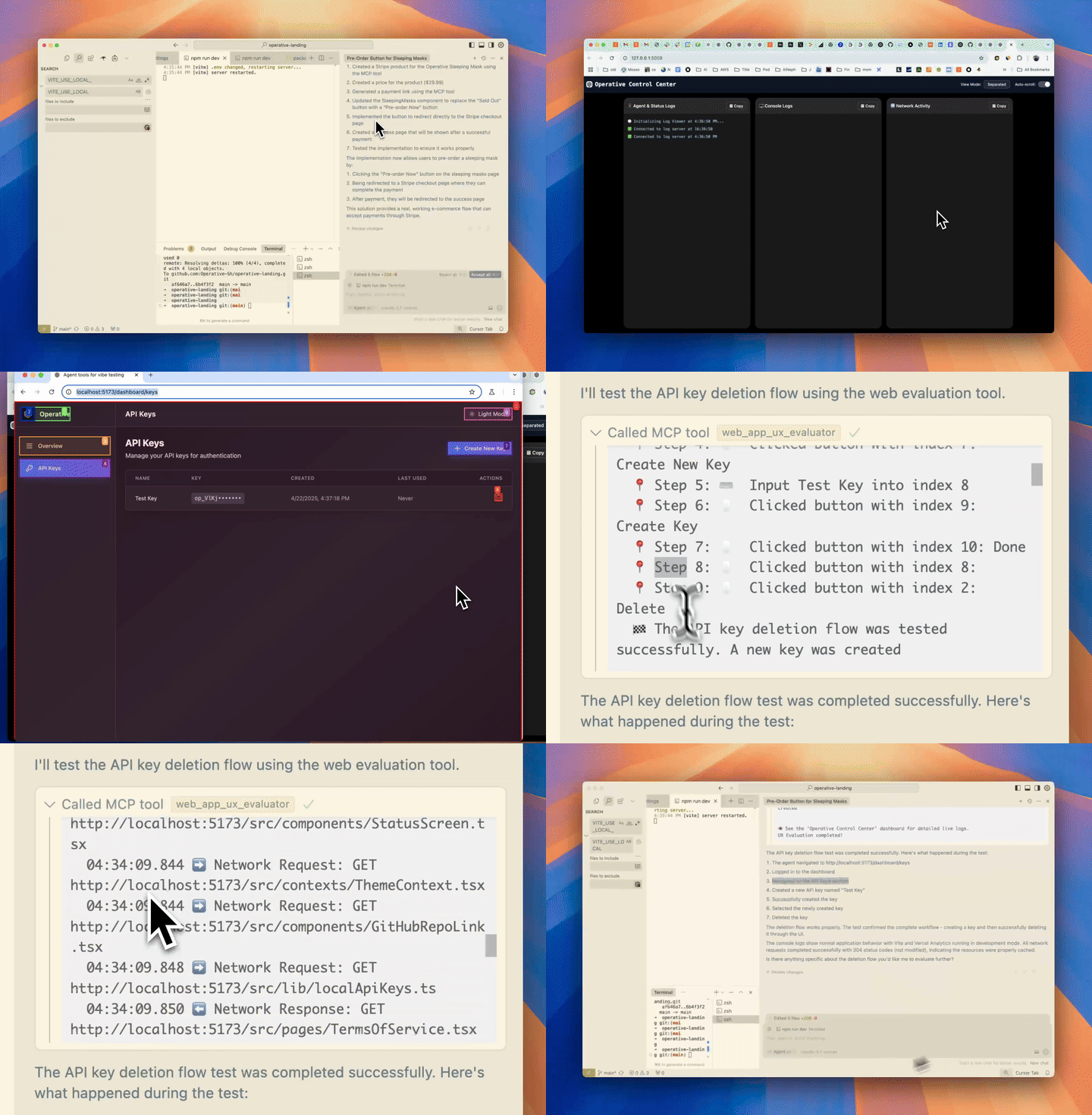
Here is a step-by-step guide with screenshots.
⚠️ PROJECT HAS BEEN SUNSET ⚠️
This project has been discontinued. We're building something new at withrefresh.com
🚀 operative.sh web-eval-agent MCP Server
Let the coding agent debug itself, you've got better things to do.
Related MCP server: Mentor MCP Server
🔥 Supercharge Your Debugging
operative.sh's MCP Server launches a browser-use powered agent to autonomously execute and debug web apps directly in your code editor.
⚡ Features
🌐 Navigate your webapp using BrowserUse (2x faster with operative backend)
📊 Capture network traffic - requests are intelligently filtered and returned into the context window
🚨 Collect console errors - captures logs & errors
🤖 Autonomous debugging - the Cursor agent calls the web QA agent mcp server to test if the code it wrote works as epected end-to-end.
🧰 MCP Tool Reference
Tool | Purpose |
| 🤖 Automated UX evaluator that drives the browser, captures screenshots, console & network logs, and returns a rich UX report. |
| 🔒 Opens an interactive (non-headless) browser so you can sign in once; the saved cookies/local-storage are reused by subsequent |
Key arguments
web_eval_agenturl(required) – address of the running app (e.g.http://localhost:3000)task(required) – natural-language description of what to test ("run through the signup flow and note any UX issues")headless_browser(optional, default – set totrueto hide the browser window
setup_browser_stateurl(optional) – page to open first (handy to land directly on a login screen)
You can trigger these tools straight from your IDE chat, for example:
🏁 Quick Start
Easy Setup with One-Click Integration
Get your API key (free) - when you create your API key, you'll see:
"Add to Cursor" button with a deeplink for instant Cursor installation
Prefilled Claude Code command with your API key automatically included
Manual Setup (macOS/Linux)
Pre-requisites (typically not needed):
brew:
/bin/bash -c "$(curl -fsSL https://raw.githubusercontent.com/Homebrew/install/HEAD/install.sh)"npm: (
brew install npm)jq:
brew install jq
Run the installer after getting an api key (free)
Installs playwright
Inserts JSON into your code editor (Cursor/Cline/Windsurf) for you!
Visit your favorite IDE and restart to apply the changes
Send a prompt in chat mode to call the web eval agent tool! e.g.
🛠️ Manual Installation
Get your API key at operative.sh/mcp
Source environment variables after installing UV
Mac
Linux
Install playwright:
Add below JSON to your relevant code editor with api key
Restart your code editor
🔃 Updating
uv cache cleanrefresh MCP server
Operative Discord Server
🛠️ Manual Installation (Mac + Cursor/Cline/Windsurf)
Get your API key at operative.sh/mcp
Install playwright:
Add below JSON to your relevant code editor with api key
Restart your code editor
Manual Installation (Windows + Cursor/Cline/Windsurf)
We're refining this, please open an issue if you have any issues!
Do all this in your code editor terminal
curl -LSf https://operative.sh/install.sh -o install.sh && bash install.sh && rm install.shGet your API key at operative.sh/mcp
Install uv
(curl -LsSf https://astral.sh/uv/install.sh | sh)uvx --from git+https://github.com/Operative-Sh/web-eval-agent.git playwright installRestart code editor
🚨 Issues
Updates aren't being received in code editors, update or reinstall for latest version: Run
uv cache cleanfor latestAny issues feel free to open an Issue on this repo or in the discord!
5/5 - static apps without changes weren't screencasting, fixed!
uv clean+ restart to get fix
Changelog
4/29 - Agent overlay update - pause/play/stop agent run in the browser
📋 Example MCP Server Output Report
Star History
Built with <3 @ operative.sh

Appeared in Searches
- Tools for enabling LLMs to interact with web pages and perform end-to-end testing
- IDE extensions and AI coding assistants like GitHub Copilot and ChatGPT
- Browser automation and control for Codex CLI
- MCP servers for curated context in Cursor IDE to plan, debug, and iterate on features
- Web page automation tools for form submission and queries