

F
licenseNot graded
qualityD
maintenanceA Python-based MCP server that enables interaction with Microsoft Fabric APIs for managing workspaces, lakehouses, warehouses, and tables through natural language.
17
-

Supports containerized deployment with health checks, monitoring, and Docker Compose orchestration for running the MCP server in production environments.
Enables workspace-level Git integration for version control of Microsoft Fabric notebooks, pipelines, and environments.
Enables Git integration for Microsoft Fabric workspaces, allowing connection to GitHub repositories for version control of notebooks and data pipelines.
Supports CI/CD workflows for automated workspace provisioning, testing, and deployment pipelines with rollback capabilities.
Enables GitHub Copilot to manage Microsoft Fabric workspaces, execute Spark jobs, and provision analytics resources through the built-in terminal using Azure CLI authentication.
Integrates with Grafana dashboards for monitoring and observability of Microsoft Fabric resources, Spark applications, and MCP server metrics.
Supports creation and management of Jupyter notebooks in Microsoft Fabric with predefined templates for analytics and machine learning workflows.
Provides enterprise deployment on Azure Kubernetes Service (AKS) with horizontal pod autoscaling, load balancing, and comprehensive monitoring capabilities.
Runtime environment for the MCP server, enabling server-side execution of Microsoft Fabric operations and API integrations.
Distributed as an npm package (mcp-for-microsoft-fabric-analytics) for Node.js-based integrations and JavaScript/TypeScript development.
Exposes Prometheus metrics endpoints for custom monitoring of Fabric operations, job execution, and server performance.
Available as a Python package (fabric-analytics-mcp) for easy installation and integration with Python-based workflows and tools.
Provides Python client libraries and test scripts for interacting with the Livy API and Microsoft Fabric Spark workloads.
Built with TypeScript for type-safe development of Microsoft Fabric integrations with comprehensive schema validation.
Uses Zod for schema validation and input sanitization of all MCP tool parameters and API requests.
Click on "Deploy Server".
Wait a few minutes for the server to deploy. Once ready, it will show a "Started" state.
In the chat, type @ followed by the MCP server name and your instructions, e.g., "@Fabric-Analytics-MCP list all my workspaces with their current status"
That's it! The server will respond to your query, and you can continue using it as needed.
Here is a step-by-step guide with screenshots.






A comprehensive Model Context Protocol (MCP) server that provides analytics capabilities and tools for interacting with Microsoft Fabric data platform. This server enables AI assistants like Claude to seamlessly access, analyze, and monitor Microsoft Fabric resources through standardized MCP protocols, bringing the power of Microsoft Fabric directly to your AI conversations.
🔒 Security "Cancel the problematic Spark application"
Related MCP server: power-bi-mcp
🏗️ Complete Workspace Management - Create, delete, and manage Fabric workspaces with capacity assignment
🔄 Enhanced CRUD Operations - Create, read, update, and delete all Fabric items (notebooks, lakehouses, datasets, reports)
📓 Advanced Notebook Management - Create, execute, and manage Fabric notebooks with 5 predefined templates
⚡ Livy API Integration - Full Spark session and batch job management with real-time monitoring
📊 Comprehensive Spark Monitoring - Real-time monitoring across workspaces, items, and applications
🤖 Multi-AI Assistant Support - Works with Claude Desktop, GitHub Copilot, and other MCP-compatible AI tools
🔐 Enhanced Azure CLI Authentication - Zero-config setup with automatic token management
�️ Enterprise Authentication - Multiple auth methods (Bearer, Service Principal, Device Code, Interactive, Azure CLI)
📈 Analytics & Insights - Generate comprehensive monitoring dashboards with real-time metrics
🧪 End-to-End Testing - Complete test suite with real workspace creation and job execution
🔄 Advanced Token Management - Automatic token validation, refresh, and expiration handling "List all Fabric capacities I can use" "Assign workspace 1234abcd-abcd-1234-abcd-123456789000 to capacity f9998888-7777-6666-5555-444433332222" "Show all workspaces in capacity f9998888-7777-6666-5555-444433332222" "Unassign workspace 1234abcd-abcd-1234-abcd-123456789000 from its capacity"
- **☸️ Enterprise Deployment** - Full Kubernetes and Azure deployment support with auto-scaling
- **🔄 Docker Support** - Containerized deployment with health checks and monitoring
- **📊 Monitoring & Observability** - Built-in Prometheus metrics and Grafana dashboards
- **🔀 Synapse to Fabric Migration** - Automated migration of Spark notebooks from Azure Synapse Analytics
- **🎯 52 Total Tools** - Comprehensive coverage of Fabric operations including migration (up from 48 tools)

## 🏗️ **New Workspace Management Features**

### **🆕 Latest Updates - Comprehensive Workspace Operations**

The MCP server now includes **21 new workspace management tools** that enable complete workspace lifecycle management:

### **🌟 Core Workspace Operations**
- **fabric_list_workspaces** - List all accessible workspaces with detailed metadata
- **fabric_create_workspace** - Create new workspaces with custom configuration
- **fabric_delete_workspace** - Delete workspaces with confirmation and cleanup
- **fabric_update_workspace** - Update workspace properties and settings
- **fabric_get_workspace** - Get detailed workspace information and status

### **⚡ Capacity & Resource Management**
- **fabric_list_capacities** - List all available Fabric capacities
- **fabric_assign_workspace_to_capacity** - Attach workspaces to dedicated capacity
- **fabric_unassign_workspace_from_capacity** - Move workspaces to shared capacity
- **fabric_list_capacity_workspaces** - List all workspaces in a capacity

### **👥 Access Control & Security**
- **fabric_get_workspace_role_assignments** - View workspace permissions
- **fabric_add_workspace_role_assignment** - Grant workspace access to users/groups
- **fabric_update_workspace_role_assignment** - Modify user permissions
- **fabric_remove_workspace_role_assignment** - Remove workspace access

### **🔄 Advanced Operations**
- **fabric_get_workspace_git_status** - Check Git integration status
- **fabric_connect_workspace_to_git** - Enable Git integration for workspace
- **fabric_disconnect_workspace_from_git** - Disable Git integration
- **fabric_update_workspace_git_connection** - Modify Git repository settings

### **🛠️ Environment & Pipeline Management**
- **fabric_list_workspace_environments** - List all environments in workspace
- **fabric_create_workspace_environment** - Create new environments
- **fabric_delete_workspace_environment** - Remove environments
- **fabric_list_workspace_data_pipelines** - List data integration pipelines
- **fabric_create_workspace_data_pipeline** - Create new data pipelines

### **🎯 Real-World Scenarios Enabled**

**🚀 Automated Workspace Provisioning:**
"Create a new workspace called 'Analytics-Q1-2025' and assign it to our premium capacity"
**📊 Multi-Workspace Analytics:**"List all workspaces in our tenant and show their capacity assignments"
**🔒 Access Management:**"Add user john.doe@company.com as Admin to the Analytics workspace"
**🏗️ Environment Setup:**"Create a development environment in the Analytics workspace with Python and R libraries"
**🔄 Git Integration:**"Connect the Analytics workspace to our GitHub repository for version control"
### **🤖 GitHub Copilot Integration**

**Perfect for GitHub Copilot** - The enhanced workspace management works seamlessly with **GitHub Copilot's built-in terminal**, making it ideal for:

- **🔧 Azure CLI Authentication** - Uses your existing `az login` session
- **💻 Terminal-Based Operations** - Natural workflow within your coding environment
- **⚡ Rapid Prototyping** - Quickly create test workspaces and environments
- **🏗️ Infrastructure as Code** - Manage Fabric resources alongside your codebase
- **🔄 CI/CD Integration** - Automate workspace provisioning in deployment pipelines

**GitHub Copilot Example Commands:**

```bash
# Using Azure CLI auth, create a new workspace for our ML project
# List all workspaces and their Git integration status
# Set up a complete analytics environment with lakehouse and notebooksThe MCP server now includes 4 specialized migration tools that automate the migration of Spark notebooks and pipelines from Azure Synapse Analytics to Microsoft Fabric:
fabric_list_synapse_workspaces - List all Synapse workspaces in your Azure subscription
fabric_discover_synapse_workspace - Inventory notebooks, pipelines, linked services, and Spark jobs from Synapse
fabric_transform_notebooks - Transform Synapse notebooks to Fabric format (mssparkutils → notebookutils)
fabric_migrate_synapse_to_fabric - Complete end-to-end migration with discovery, transformation, and provisioning
Automatic Code Transformation - Converts Synapse-specific code to Fabric equivalents:
mssparkutils → notebookutils
Synapse magic commands → Fabric magic commands
ABFSS path rewriting to OneLake
Spark pool configuration cleanup
Comprehensive Asset Discovery - Inventories all migrat assets:
Jupyter notebooks (ipynb format)
Data pipelines and workflows
Linked services and connections
Spark job definitions
Safe Testing with Dry Run - Preview all changes before applying:
Test transformations without provisioning
Validate transformed code
Review change reports
End-to-End Automation - Complete migration pipeline:
Discovery → Transformation → Provisioning → Validation
Automatic lakehouse creation
OneLake shortcut provisioning
Comprehensive migration reports
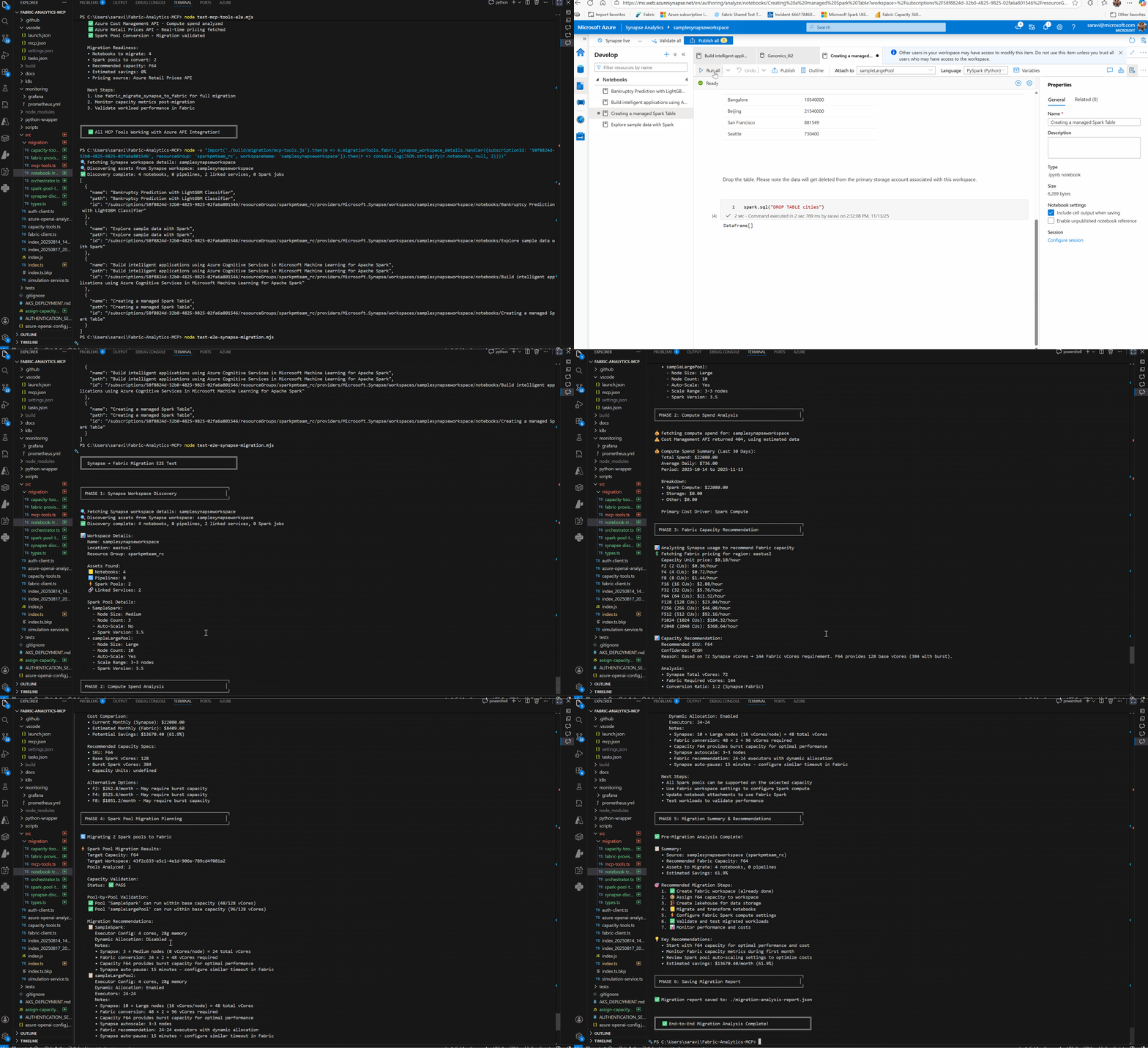
📋 Explore Before Migrating:
"List all my Synapse workspaces and show me what notebooks are in workspace 'analytics-synapse'"🔄 Preview Transformations:
"Discover assets from my Synapse workspace 'analytics-synapse' and show me how the code would be transformed (dry run)"🚀 Complete Migration:
"Migrate all notebooks from Synapse workspace 'analytics-synapse' to Fabric workspace 'abcd-1234' and create a lakehouse called 'MigratedData'"📊 Detailed Migration Guide: See MIGRATION.md for comprehensive migration documentation including:
Step-by-step workflows
Transformation rule details
Best practices and troubleshooting
Complete examples
The MCP server now includes comprehensive end-to-end testing that creates real workspaces, assigns them to capacities, and executes actual jobs to validate the complete workflow:
# One-command end-to-end test
npm run test:e2e
What it tests:
✅ Workspace Creation - Creates real Fabric workspaces
✅ Capacity Assignment - Attaches workspaces to your Fabric capacity
✅ Item Creation - Creates notebooks, lakehouses, and other items
✅ Job Execution - Runs actual Spark jobs and monitors completion
✅ Resource Cleanup - Automatically removes all test resources
Recommended for AI Assistant Usage:
{
  "mcpServers": {
    "fabric-analytics": {
      "command": "node",
      "args": ["C:\\path\\to\\your\\build\\index.js"],
      "cwd": "C:\\path\\to\\your\\project",
      "env": {
        "FABRIC_AUTH_METHOD": "bearer_token",
        "FABRIC_TOKEN": "your_bearer_token_here",
        "FABRIC_WORKSPACE_ID": "your_workspace_id",
        "ENABLE_HEALTH_SERVER": "false"
      }
    }
  }
}
💡 Get Bearer Token: Visit Power BI Embed Setup to generate tokens
⚠️ Important: Tokens expire after ~1 hour and need to be refreshed
If you experience 60-second timeouts during startup, this is due to interactive authentication flows blocking Claude Desktop's sandboxed environment. Solution:
Use Bearer Token Method (Recommended):
Set FABRIC_AUTH_METHOD: "bearer_token" in your config
Provide FABRIC_TOKEN with a valid bearer token
This bypasses interactive authentication entirely
Alternative - Per-Tool Authentication:
Provide token directly in tool calls: bearerToken: "your_token_here"
Or use simulation mode: bearerToken: "simulation"
Troubleshooting:
Server now has 10-second timeout protection to prevent hanging
Falls back to simulation mode if authentication fails
Enhanced error messages provide clear guidance
🎯 Quick Fix: The server automatically prioritizes
FABRIC_TOKENenvironment variable over interactive authentication flows, preventing Claude Desktop timeouts.
# Clone and run locally
git clone https://github.com/santhoshravindran7/Fabric-Analytics-MCP.git
cd Fabric-Analytics-MCP
npm install && npm run build && npm start# Using Docker Compose
docker-compose up -d
# Or standalone Docker
docker build -t fabric-analytics-mcp .
docker run -p 3000:3000 -e FABRIC_CLIENT_ID=xxx fabric-analytics-mcp# One-command enterprise deployment
export ACR_NAME="your-registry" FABRIC_CLIENT_ID="xxx" FABRIC_CLIENT_SECRET="yyy" FABRIC_TENANT_ID="zzz"
./scripts/setup-azure-resources.sh && ./scripts/build-and-push.sh && ./scripts/deploy-to-aks.sh# Serverless deployment on Azure
az mcp server create --name "fabric-analytics-mcp" --repository "santhoshravindran7/Fabric-Analytics-MCP"📚 Detailed Guides:
Tool: list-fabric-items
Description: List items in a Microsoft Fabric workspace (Lakehouses, Notebooks, etc.)
Parameters:
bearerToken: Microsoft Fabric bearer token
workspaceId: Microsoft Fabric workspace ID
itemType: Filter by item type (optional)
Tool: create-fabric-item
Description: Create new items in Microsoft Fabric workspace
Parameters:
bearerToken: Microsoft Fabric bearer token
workspaceId: Microsoft Fabric workspace ID
itemType: Type of item (Lakehouse, Notebook, Dataset, Report, Dashboard)
displayName: Display name for the new item
description: Optional description
Tool: get-fabric-item
Description: Get detailed information about a specific Microsoft Fabric item
Parameters:
bearerToken: Microsoft Fabric bearer token
workspaceId: Microsoft Fabric workspace ID
itemId: ID of the item to retrieve
Tool: update-fabric-item
Description: Update existing items in Microsoft Fabric workspace
Parameters:
bearerToken: Microsoft Fabric bearer token
workspaceId: Microsoft Fabric workspace ID
itemId: ID of the item to update
displayName: New display name (optional)
description: New description (optional)
Tool: delete-fabric-item
Description: Delete items from Microsoft Fabric workspace
Parameters:
bearerToken: Microsoft Fabric bearer token
workspaceId: Microsoft Fabric workspace ID
itemId: ID of the item to delete
Tool: query-fabric-dataset
Description: Execute SQL or KQL queries against Microsoft Fabric datasets
Parameters:
bearerToken: Microsoft Fabric bearer token (optional - uses simulation if not provided)
workspaceId: Microsoft Fabric workspace ID
datasetName: Name of the dataset to query
query: SQL or KQL query to execute
Tool: execute-fabric-notebook
Description: Execute a notebook in Microsoft Fabric workspace
Parameters:
bearerToken: Microsoft Fabric bearer token
workspaceId: Microsoft Fabric workspace ID
notebookId: ID of the notebook to execute
parameters: Optional parameters to pass to the notebook
Tool: get-fabric-metrics
Description: Retrieve performance and usage metrics for Microsoft Fabric items
Parameters:
workspaceId: Microsoft Fabric workspace ID
itemId: Item ID (dataset, report, etc.)
timeRange: Time range for metrics (1h, 24h, 7d, 30d)
metrics: List of metrics to analyze
Tool: analyze-fabric-model
Description: Analyze a Microsoft Fabric data model and get optimization recommendations
Parameters:
workspaceId: Microsoft Fabric workspace ID
itemId: Item ID to analyze
Tool: generate-fabric-report
Description: Generate comprehensive analytics reports for Microsoft Fabric workspaces
Parameters:
workspaceId: Microsoft Fabric workspace ID
reportType: Type of report (performance, usage, health, summary)
Tool: create-livy-session
Description: Create a new Livy session for interactive Spark/SQL execution
Parameters:
bearerToken: Microsoft Fabric bearer token
workspaceId: Microsoft Fabric workspace ID
lakehouseId: Microsoft Fabric lakehouse ID
sessionConfig: Optional session configuration
Tool: get-livy-session
Description: Get details of a Livy session
Parameters:
bearerToken: Microsoft Fabric bearer token
workspaceId: Microsoft Fabric workspace ID
lakehouseId: Microsoft Fabric lakehouse ID
sessionId: Livy session ID
Tool: list-livy-sessions
Description: List all Livy sessions in a lakehouse
Parameters:
bearerToken: Microsoft Fabric bearer token
workspaceId: Microsoft Fabric workspace ID
lakehouseId: Microsoft Fabric lakehouse ID
Tool: delete-livy-session
Description: Delete a Livy session
Parameters:
bearerToken: Microsoft Fabric bearer token
workspaceId: Microsoft Fabric workspace ID
lakehouseId: Microsoft Fabric lakehouse ID
sessionId: Livy session ID
Tool: execute-livy-statement
Description: Execute SQL or Spark statements in a Livy session
Parameters:
bearerToken: Microsoft Fabric bearer token
workspaceId: Microsoft Fabric workspace ID
lakehouseId: Microsoft Fabric lakehouse ID
sessionId: Livy session ID
code: SQL or Spark code to execute
kind: Statement type (sql, spark, etc.)
Tool: get-livy-statement
Description: Get status and results of a Livy statement
Parameters:
bearerToken: Microsoft Fabric bearer token
workspaceId: Microsoft Fabric workspace ID
lakehouseId: Microsoft Fabric lakehouse ID
sessionId: Livy session ID
statementId: Statement ID
Tool: create-livy-batch
Description: Create a new Livy batch job for long-running operations
Parameters:
bearerToken: Microsoft Fabric bearer token
workspaceId: Microsoft Fabric workspace ID
lakehouseId: Microsoft Fabric lakehouse ID
batchConfig: Batch job configuration
Tool: get-livy-batch
Description: Get details of a Livy batch job
Parameters:
bearerToken: Microsoft Fabric bearer token
workspaceId: Microsoft Fabric workspace ID
lakehouseId: Microsoft Fabric lakehouse ID
batchId: Batch job ID
Tool: list-livy-batches
Description: List all Livy batch jobs in a lakehouse
Parameters:
bearerToken: Microsoft Fabric bearer token
workspaceId: Microsoft Fabric workspace ID
lakehouseId: Microsoft Fabric lakehouse ID
Tool: delete-livy-batch
Description: Delete a Livy batch job
Parameters:
bearerToken: Microsoft Fabric bearer token
workspaceId: Microsoft Fabric workspace ID
lakehouseId: Microsoft Fabric lakehouse ID
batchId: Batch job ID
Tool: get-workspace-spark-applications
Description: Get all Spark applications in a Microsoft Fabric workspace
Parameters:
bearerToken: Microsoft Fabric bearer token
workspaceId: Microsoft Fabric workspace ID
continuationToken: Optional token for pagination
Tool: get-notebook-spark-applications
Description: Get all Spark applications for a specific notebook
Parameters:
bearerToken: Microsoft Fabric bearer token
workspaceId: Microsoft Fabric workspace ID
notebookId: Notebook ID
continuationToken: Optional token for pagination
Tool: get-lakehouse-spark-applications
Description: Get all Spark applications for a specific lakehouse
Parameters:
bearerToken: Microsoft Fabric bearer token
workspaceId: Microsoft Fabric workspace ID
lakehouseId: Lakehouse ID
continuationToken: Optional token for pagination
Tool: get-spark-job-definition-applications
Description: Get all Spark applications for a specific Spark Job Definition
Parameters:
bearerToken: Microsoft Fabric bearer token
workspaceId: Microsoft Fabric workspace ID
sparkJobDefinitionId: Spark Job Definition ID
continuationToken: Optional token for pagination
Tool: get-spark-application-details
Description: Get detailed information about a specific Spark application
Parameters:
bearerToken: Microsoft Fabric bearer token
workspaceId: Microsoft Fabric workspace ID
livyId: Livy session ID
Tool: cancel-spark-application
Description: Cancel a running Spark application
Parameters:
bearerToken: Microsoft Fabric bearer token
workspaceId: Microsoft Fabric workspace ID
livyId: Livy session ID
Tool: get-spark-monitoring-dashboard
Description: Generate a comprehensive monitoring dashboard with analytics
Parameters:
bearerToken: Microsoft Fabric bearer token
workspaceId: Microsoft Fabric workspace ID
The MCP server provides comprehensive notebook management capabilities with predefined templates and custom notebook support.
Tool: create-fabric-notebook
Description: Create new Fabric notebooks from predefined templates or custom definitions
Parameters:
bearerToken: Microsoft Fabric bearer token
workspaceId: Microsoft Fabric workspace ID
displayName: Display name for the new notebook
template: Template type (blank, sales_analysis, nyc_taxi_analysis, data_exploration, machine_learning, custom)
customNotebook: Custom notebook definition (required if template is 'custom')
environmentId: Optional environment ID to attach
lakehouseId: Optional default lakehouse ID
lakehouseName: Optional default lakehouse name
Available Templates:
blank: Basic notebook with minimal setup
sales_analysis: Comprehensive sales data analysis with sample dataset
nyc_taxi_analysis: NYC taxi trip data analysis with sample dataset
data_exploration: Structured data exploration template
machine_learning: Complete ML workflow template
custom: Use your own notebook definition
Tool: get-fabric-notebook-definition
Description: Retrieve the notebook definition (cells, metadata) from an existing Fabric notebook
Parameters:
bearerToken: Microsoft Fabric bearer token
workspaceId: Microsoft Fabric workspace ID
notebookId: ID of the notebook to retrieve
format: Format to return (ipynb or fabricGitSource)
Tool: update-fabric-notebook-definition
Description: Update the notebook definition (cells, metadata) of an existing Fabric notebook
Parameters:
bearerToken: Microsoft Fabric bearer token
workspaceId: Microsoft Fabric workspace ID
notebookId: ID of the notebook to update
notebookDefinition: Updated notebook definition object
Tool: run-fabric-notebook
Description: Execute a Fabric notebook on-demand with optional parameters and configuration
Parameters:
bearerToken: Microsoft Fabric bearer token
workspaceId: Microsoft Fabric workspace ID
notebookId: ID of the notebook to run
parameters: Optional notebook parameters (key-value pairs with types)
configuration: Optional execution configuration (environment, lakehouse, pools, etc.)
Features:
📓 Base64 encoded notebook payload support
🔧 Comprehensive metadata management
🌐 Environment and lakehouse integration
🎛️ Parameterized notebook execution
⚡ Spark configuration support
🔤 Support for multiple programming languages (Python, Scala, SQL, R)
Choose your preferred installation method:
# Install via pip (easiest method)
pip install fabric-analytics-mcp

# Verify installation
fabric-analytics --version

# Start the server
fabric-analytics-mcp start# Install globally via npm
npm install -g mcp-for-microsoft-fabric-analytics
# Verify installation
fabric-analytics --version
# Start the server
fabric-analytics
# Or using npx (no installation required)
npx mcp-for-microsoft-fabric-analyticsFor automated setup with environment configuration:
Unix/Linux/macOS:
# Download and run universal installer
curl -fsSL https://raw.githubusercontent.com/santhoshravindran7/Fabric-Analytics-MCP/main/scripts/install-universal.sh | bash

# Or with options for full setup
curl -fsSL https://raw.githubusercontent.com/santhoshravindran7/Fabric-Analytics-MCP/main/scripts/install-universal.sh | bash -s -- --method pip --config --env --test
Windows (PowerShell):
# Download and run Windows installer
iex ((New-Object System.Net.WebClient).DownloadString('https://raw.githubusercontent.com/santhoshravindran7/Fabric-Analytics-MCP/main/scripts/install-windows.ps1'))

# Or with options for full setup
& ([scriptblock]::Create((iwr https://raw.githubusercontent.com/santhoshravindran7/Fabric-Analytics-MCP/main/scripts/install-windows.ps1).Content)) -Method pip -Config -Environment -Test# Clone repository
git clone https://github.com/santhoshravindran7/Fabric-Analytics-MCP.git
cd Fabric-Analytics-MCP
# Build and run with Docker
docker build -t fabric-analytics-mcp .
docker run -d --name fabric-mcp -p 3000:3000 --env-file .env fabric-analytics-mcp📖 See Docker Installation Guide for detailed Docker and Kubernetes deployment options.
# Clone and build from source
git clone https://github.com/santhoshravindran7/Fabric-Analytics-MCP.git
cd Fabric-Analytics-MCP
npm install
npm run build # ✅ All configuration files included!Set up your environment variables:
export FABRIC_AUTH_METHOD=bearer_token  # or service_principal, interactive
export FABRIC_CLIENT_ID=your-client-id
export FABRIC_CLIENT_SECRET=your-client-secret
export FABRIC_TENANT_ID=your-tenant-id
export FABRIC_DEFAULT_WORKSPACE_ID=your-workspace-idAdd to your Claude Desktop config:
Windows: %APPDATA%\Claude\claude_desktop_config.json
macOS: ~/Library/Application Support/Claude/claude_desktop_config.json
{
  "mcpServers": {
    "fabric-analytics": {
      "command": "fabric-analytics-mcp",
      "args": ["start"],
      "env": {
        "FABRIC_AUTH_METHOD": "bearer_token"
      }
    }
  }
}{
"mcpServers": {
"fabric-analytics": {
"command": "fabric-analytics",
"env": {
"FABRIC_AUTH_METHOD": "bearer_token"
}
}
}
}{
"mcpServers": {
"fabric-analytics": {
"command": "node",
"args": ["/ABSOLUTE/PATH/TO/PROJECT/build/index.js"]
}
}
}Restart Claude Desktop and try these queries:
"List all workspaces I have access to"
"Find workspace named 'Analytics'"
"List all items in my Fabric workspace [your-workspace-id]"
"Create a new lakehouse called 'Analytics Hub'"
"Show me all running Spark applications"
"Execute this SQL query: SELECT * FROM my_table LIMIT 10"
npm start # Production mode
npm run dev # Development mode with auto-reloadFor comprehensive testing of Spark functionality, install Python dependencies:
pip install -r livy_requirements.txtAvailable Test Scripts:
livy_api_test.ipynb - Interactive notebook for step-by-step testing
comprehensive_livy_test.py - Full-featured test with error handling
spark_monitoring_test.py - Spark application monitoring tests
mcp_spark_monitoring_demo.py - MCP server integration demo
Add this configuration to your Claude Desktop config file:
Windows: %APPDATA%\Claude\claude_desktop_config.json
macOS: ~/Library/Application Support/Claude/claude_desktop_config.json
{
  "mcpServers": {
    "fabric-analytics": {
      "command": "node",
      "args": ["/ABSOLUTE/PATH/TO/PROJECT/build/index.js"]
    }
  }
}🎉 You're ready! Restart Claude Desktop and start asking questions about your Microsoft Fabric data!
For testing the Livy API functionality, additional Python dependencies are required:
# Install Python dependencies for Livy API testing
pip install -r livy_requirements.txtlivy_api_test.ipynb - Interactive Jupyter notebook for step-by-step testing
comprehensive_livy_test.py - Full-featured test with error handling
simple_livy_test.py - Simple test following example patterns
livy_batch_test.py - Batch job testing capabilities
spark_monitoring_test.py - Spark application monitoring tests
npm startnpm run devAdd the following configuration to your Claude Desktop config file:
Windows: %APPDATA%\Claude\claude_desktop_config.json
macOS: ~/Library/Application Support/Claude/claude_desktop_config.json
{
  "mcpServers": {
    "fabric-analytics": {
      "command": "node",
      "args": ["/ABSOLUTE/PATH/TO/PROJECT/build/index.js"]
    }
  }
}Once connected to Claude Desktop, you can ask natural language questions like:
"List all Lakehouses in my workspace"
"Create a new Notebook called 'Data Analysis'"
"Update the description of my lakehouse"
"Delete the test notebook from my workspace"
"Create a sales analysis notebook with sample data"
"Generate a new NYC taxi analysis notebook"
"Create a machine learning notebook template"
"Get the definition of my existing notebook"
"Run my notebook with specific parameters"
"Update my notebook with new cells"
"Query the sales dataset to get total revenue by region"
"Execute my analytics notebook with today's date"
"Get performance metrics for the last 24 hours"
"Analyze my data model and provide optimization recommendations"
"Generate a usage report for my workspace"
"Create a Livy session for interactive Spark analysis"
"Execute SQL query 'SELECT * FROM my_table LIMIT 10'"
"Run Spark code to show all tables"
"Monitor my batch job progress"
"Show me all Spark applications in my workspace"
"What's the status of my notebook Spark jobs?"
"Generate a comprehensive Spark monitoring dashboard"
"Show me recent failed applications"
"Cancel the problematic Spark application"
"List all Fabric capacities I can use"
"Assign workspace 1234abcd-abcd-1234-abcd-123456789000 to capacity f9998888-7777-6666-5555-444433332222"
"Show all workspaces in capacity f9998888-7777-6666-5555-444433332222"
"Unassign workspace 1234abcd-abcd-1234-abcd-123456789000 from its capacity"
Manage Microsoft Fabric capacity assignments directly from your AI assistant. These tools let you inspect available capacities, attach/detach workspaces, and audit capacity usage.
fabric_list_capacities – Enumerate all capacities you can access (ID, SKU, region, state)
fabric_assign_workspace_to_capacity – Attach a workspace to a dedicated capacity
fabric_unassign_workspace_from_capacity – Return a workspace to shared capacity
fabric_list_capacity_workspaces – List all workspaces currently hosted on a given capacity
If authentication fails or you're in simulation mode, capacity responses are simulated.
Real capacity operations require appropriate Fabric / Power BI admin permissions.
You can provide a bearer token per call (bearerToken field) or rely on global auth.
Tool | Required Parameters | Optional |
fabric_list_capacities | (none) | bearerToken |
fabric_assign_workspace_to_capacity | capacityId, workspaceId | bearerToken |
fabric_unassign_workspace_from_capacity | workspaceId | bearerToken |
fabric_list_capacity_workspaces | capacityId | bearerToken |
Unexpected token 'P')If Claude Desktop or another MCP client reports an error like:
Error: Unexpected token 'P', "Please set"... is not valid JSON
SyntaxError: Unexpected token 'P', "Please set"... is not valid JSON
This is the EXACT issue reported in GitHub issue where the user saw "Unexpected token 'P', 'Please set'..." errors.
This almost always means something wrote plain text to STDOUT (which must contain ONLY JSON-RPC frames). Common causes:
Added console.log debug statements in server code
A dependency emitting warnings to STDOUT
Early logging before transport initialization
✅ A startup guard now redirects console.log / console.info to STDERR automatically
✅ Debug output has been consolidated behind the DEBUG_MCP_RUN=1 flag
✅ All diagnostic messages go to STDERR, keeping STDOUT clean for JSON-RPC protocol
Avoid adding raw console.log statements—prefer console.error (goes to STDERR)
If you must allow stdout logging temporarily (NOT recommended), set:
ALLOW_UNSAFE_STDOUT=true
Remove after debugging
Regenerate the build (npm run build) after changes to ensure compiled output matches source
If the capacity tools don't show up when the client lists tools:
Ensure you rebuilt after pulling changes: npm run build
Confirm you're launching the server from build/index.js and not an older snapshot
Verify no MCP client-side allowlist is filtering tool names
Run a quick enumeration test: ask the assistant "List all available tools"
If still missing, delete the build/ folder and rebuild to clear stale artifacts
Azure CLI auth may fail silently without an active az login session
Bearer tokens expire (~1 hour); refresh if operations suddenly fail
For local testing: falling back to simulation still lets you prototype tool flows
Set the following (sent to STDERR, safe for MCP framing):
DEBUG_MCP_RUN=1Optionally add structured auth tracing:
DEBUG_AUTH=1Need a new troubleshooting topic? Open an issue or PR so others benefit from the resolution.
This MCP server supports multiple authentication methods powered by Microsoft Authentication Library (MSAL):
🤖 For Claude Desktop: Use Bearer Token Authentication (Method #1) for the best experience and compatibility.
🔧 Claude Desktop Fix: Recent updates prevent authentication timeouts by prioritizing bearer tokens and adding timeout protection for interactive authentication flows.
Perfect for AI assistants and interactive usage:
For Claude Desktop:
Visit Power BI Embed Setup
Generate a bearer token for your workspace
Add to your claude_desktop_config.json
No timeout issues - bypasses interactive authentication entirely
For Testing:
# All test scripts will prompt for authentication method
python enhanced_auth_test.pyUse Azure AD application credentials:
Client ID (Application ID)
Client Secret
Tenant ID (Directory ID)
Environment Variables Setup:
export FABRIC_AUTH_METHOD="service_principal"
export FABRIC_CLIENT_ID="your-app-client-id"
export FABRIC_CLIENT_SECRET="your-app-client-secret"
export FABRIC_TENANT_ID="your-tenant-id"
export FABRIC_DEFAULT_WORKSPACE_ID="your-workspace-id"
Claude Desktop Configuration:
{
  "mcpServers": {
    "fabric-analytics": {
      "command": "node",
      "args": ["/path/to/build/index.js"],
      "env": {
        "FABRIC_AUTH_METHOD": "service_principal",
        "FABRIC_CLIENT_ID": "your-client-id",
        "FABRIC_CLIENT_SECRET": "your-client-secret",
        "FABRIC_TENANT_ID": "your-tenant-id"
      }
    }
  }
}Sign in with browser on another device (great for headless environments):
export FABRIC_AUTH_METHOD="device_code"
export FABRIC_CLIENT_ID="your-client-id"
export FABRIC_TENANT_ID="your-tenant-id"Automatic browser-based authentication:
export FABRIC_AUTH_METHOD="interactive"
export FABRIC_CLIENT_ID="your-client-id"
export FABRIC_TENANT_ID="your-tenant-id"Use your existing Azure CLI login for seamless local testing:
export FABRIC_AUTH_METHOD="azure_cli"Prerequisites:
Install Azure CLI: winget install Microsoft.AzureCLI (Windows) or Download
Login to Azure: az login
Set active subscription: az account set --subscription "your-subscription-name"
Benefits:
✅ Zero Configuration - Uses your existing Azure login
✅ Instant Setup - No app registration or client secrets needed
✅ Multi-Account Support - Switch Azure accounts easily
✅ Perfect for Development - Seamless local testing experience
Quick Test:
# Verify Azure CLI setup
npm run test:azure-cli

# Start MCP server with Azure CLI auth
$env:FABRIC_AUTH_METHOD="azure_cli"; npm start
💡 Pro Tip: Azure CLI authentication is perfect for developers who want to quickly test the MCP server without complex Azure AD app setup. Just
az loginand you're ready to go!
📚 Detailed Guides:
Authentication Setup Guide - Complete Azure AD setup
Claude Desktop Config Examples - Ready-to-use configurations
Check your authentication status:
"Check my Fabric authentication status"
"What authentication method am I using?"
"Test my Microsoft Fabric authentication setup"Never commit authentication tokens to version control
Use Service Principal authentication for production deployments
Device Code flow is perfect for CI/CD and headless environments
Interactive authentication is ideal for development and testing
All tokens are automatically validated and include expiration checking
Note: The MCP server seamlessly handles token validation and provides clear error messages for authentication issues.
Deploy the MCP server as a scalable service on Azure Kubernetes Service for enterprise production use.
Azure CLI installed and configured
Docker installed
kubectl installed
Azure subscription with AKS permissions
# Build the Docker image
npm run docker:build

# Tag and push to Azure Container Registry
npm run docker:push# Create Azure resources and deploy
./scripts/deploy-to-aks.shOnce deployed, your MCP server will be available at:
https://your-aks-cluster.region.cloudapp.azure.com/mcpThe AKS deployment includes:
Horizontal Pod Autoscaler (3-10 pods based on CPU/memory)
Azure Load Balancer for high availability
SSL/TLS termination with Azure Application Gateway
ConfigMaps for environment configuration
Secrets for secure credential storage
Health checks and readiness probes
Resource limits and quality of service guarantees
All Kubernetes manifests are located in the /k8s directory:
namespace.yaml - Dedicated namespace
deployment.yaml - Application deployment with scaling
service.yaml - Load balancer service
ingress.yaml - External access and SSL
configmap.yaml - Configuration management
secret.yaml - Secure credential storage
hpa.yaml - Horizontal Pod Autoscaler
Configure the deployment by setting these environment variables:
export AZURE_SUBSCRIPTION_ID="your-subscription-id"
export AZURE_RESOURCE_GROUP="fabric-mcp-rg"
export AKS_CLUSTER_NAME="fabric-mcp-cluster"
export ACR_NAME="fabricmcpregistry"
export DOMAIN_NAME="your-domain.com"The AKS deployment includes enterprise-grade security:
Non-root container execution
Read-only root filesystem
Secret management via Azure Key Vault integration
Network policies for traffic isolation
RBAC with minimal required permissions
Pod security standards enforcement
Azure Monitor integration for logs and metrics
Application Insights for performance monitoring
Prometheus metrics endpoint for custom monitoring
Auto-scaling based on CPU (70%) and memory (80%) thresholds
Health checks for automatic pod restart
The deployment scripts support:
Azure DevOps pipelines
GitHub Actions workflows
Automated testing before deployment
Blue-green deployments for zero downtime
Rollback capabilities for quick recovery
📚 Detailed Guide: See AKS_DEPLOYMENT.md for complete setup instructions.
Microsoft Azure now offers a preview service for hosting MCP servers natively. This eliminates the need for custom infrastructure management.
Azure subscription with MCP preview access
Azure CLI with MCP extensions
# Login to Azure
az login

# Enable MCP preview features
az extension add --name mcp-preview

# Deploy the MCP server
az mcp server create \
  --name "fabric-analytics-mcp" \
  --resource-group "your-rg" \
  --source-type "github" \
  --repository "santhoshravindran7/Fabric-Analytics-MCP" \
  --branch "main" \
--auth-method "service-principal"# Set up service principal authentication
az mcp server config set \
--name "fabric-analytics-mcp" \
--setting "FABRIC_CLIENT_ID=your-client-id" \
--setting "FABRIC_CLIENT_SECRET=your-secret" \
--setting "FABRIC_TENANT_ID=your-tenant-id"# Get the server endpoint
az mcp server show --name "fabric-analytics-mcp" --query "endpoint"Automatic scaling based on usage
Built-in monitoring and logging
Integrated security with Azure AD
Zero infrastructure management
Global CDN for low latency
Automatic SSL/TLS certificates
Azure MCP Server offers:
Pay-per-request pricing model
Automatic hibernation during idle periods
Resource sharing across multiple clients
No minimum infrastructure costs
📚 Learn More: Azure MCP Server Documentation
Note: Azure MCP Server is currently in preview. Check Azure Preview Terms for service availability and limitations.
This MCP server is built with:
TypeScript for type-safe development
MCP SDK for Model Context Protocol implementation
Zod for schema validation and input sanitization
Node.js runtime environment
The server uses the following configuration files:
tsconfig.json - TypeScript compiler configuration
package.json - Node.js package configuration
.vscode/mcp.json - MCP server configuration for VS Code
├── src/
│   ├── index.ts              # Main MCP server implementation
│   └── fabric-client.ts      # Microsoft Fabric API client
├── build/                    # Compiled JavaScript output
├── tests/                    # Test scripts and notebooks
├── .vscode/                  # VS Code configuration
├── package.json
├── tsconfig.json
└── README.mdTo add new tools to the server:
Define the input schema using Zod
Implement the tool using server.tool()
Add error handling and validation
Update documentation
This server includes:
✅ Production Ready:
Full Microsoft Fabric Livy API integration
Spark session lifecycle management
Statement execution with SQL and Spark support
Batch job management for long-running operations
Comprehensive error handling and retry logic
Real-time polling and result retrieval
🧪 Demonstration Features:
CRUD operations (configurable for real APIs)
Analytics and metrics (extensible framework)
Data model analysis (template implementation)
The MCP server includes comprehensive end-to-end testing that creates real workspaces, items, and jobs to validate complete functionality using Azure CLI authentication.
# 1. Set up end-to-end testing environment
npm run setup:e2e

# 2. Run the comprehensive end-to-end test
npm run test:e2eThe end-to-end test creates a complete workflow in your Microsoft Fabric tenant:
🔐 Validates Azure CLI Authentication - Uses your existing az login session
🏗️ Creates a Test Workspace - New workspace with unique naming
⚡ Attaches to Capacity - Links workspace to your Fabric capacity (optional)
📓 Creates Notebooks & Lakehouses - Test items for validation
🏃 Runs Real Jobs - Executes notebook with actual Spark code
📊 Monitors Execution - Tracks job status and completion
🧹 Cleans Up Resources - Removes all created test resources
The setup script creates a .env.e2e configuration file:
# Example configuration
FABRIC_CAPACITY_ID=your-capacity-id-here    # Optional: for capacity testing
E2E_TEST_TIMEOUT=300000                      # 5 minutes per operation
E2E_CLEANUP_ON_FAILURE=true                 # Clean up on test failure
E2E_RETRY_COUNT=3 # Retry failed operations✅ Real Resource Creation - Creates actual Fabric workspaces and items
✅ Azure CLI Integration - Uses your existing Azure authentication
✅ Capacity Assignment - Tests workspace-to-capacity attachment
✅ Job Execution - Runs real Spark jobs and monitors completion
✅ Automatic Cleanup - Removes all test resources automatically
✅ Comprehensive Logging - Detailed logging of all operations
✅ Error Handling - Robust error handling and recovery
Azure CLI installed and logged in:
az loginMicrosoft Fabric Access with permissions to:
Create workspaces
Create notebooks and lakehouses
Run Spark jobs
(Optional) Assign workspaces to capacity
Fabric Capacity (optional but recommended):
Set FABRIC_CAPACITY_ID in .env.e2e for capacity testing
Without capacity, workspace will use shared capacity
# Complete setup and run
npm run setup:e2e && npm run test:e2e

# Or run individual steps
npm run setup:e2e          # Set up environment
npm run test:e2e           # Run end-to-end test

# Direct execution
node setup-e2e.cjs         # Setup script
node test-end-to-end.cjs # Test scriptThe test provides comprehensive output including:
🚀 Starting End-to-End Test for Microsoft Fabric Analytics MCP Server
✅ MCP Server Startup (1234ms)
✅ Azure CLI Authentication
✅ Workspace Creation
✅ Capacity Attachment
✅ Notebook Creation
✅ Lakehouse Creation
✅ Item Validation
✅ Job Execution

📊 TEST SUMMARY
================
✅ MCP Server Startup (2341ms)
✅ Azure CLI Authentication
✅ Workspace Creation
✅ Capacity Attachment
✅ Notebook Creation
✅ Lakehouse Creation
✅ Item Validation
✅ Job Execution

Total: 8 | Passed: 8 | Failed: 0Creates Real Resources: The test creates actual workspaces and items in your Fabric tenant
Requires Permissions: Ensure you have necessary Fabric permissions
Uses Capacity: Jobs may consume capacity units if using dedicated capacity
Automatic Cleanup: All resources are automatically deleted after testing
Network Dependent: Requires stable internet connection for API calls
# Install Python dependencies for API testing
pip install -r livy_requirements.txtlivy_api_test.ipynb - Interactive Jupyter notebook for step-by-step testing
comprehensive_livy_test.py - Full-featured test with error handling
simple_livy_test.py - Simple test following example patterns
livy_batch_test.py - Batch job testing capabilities
spark_monitoring_test.py - Spark application monitoring tests
Interactive Testing:
jupyter notebook livy_api_test.ipynbCommand Line Testing:
python simple_livy_test.py
python spark_monitoring_test.py
Comprehensive Testing:
We welcome contributions! Here's how to get started:
Fork the repository
Create a feature branch (git checkout -b feature/amazing-feature)
Make your changes and add tests if applicable
Commit your changes (git commit -m 'Add amazing feature')
Push to the branch (git push origin feature/amazing-feature)
Open a Pull Request
Follow TypeScript best practices
Add JSDoc comments for new functions
Update tests for any new functionality
Update documentation as needed
See CONTRIBUTING.md for detailed guidelines
Never commit authentication tokens to version control
Use environment variables for sensitive configuration
Follow Microsoft Fabric security best practices
Report security issues privately via GitHub security advisories
See SECURITY.md for our full security policy
This project is licensed under the MIT License - see the LICENSE file for details.
For issues and questions:
📖 Check the MCP documentation
📚 Review Microsoft Fabric API documentation
🐛 Open an issue in this repository
💬 Join the community discussions
Microsoft Fabric Analytics team for the comprehensive data platform and analytics capabilities
Microsoft Fabric Platform teams for the robust API platform and infrastructure
Bogdan Crivat and Chris Finlan for the inspiring brainstorming conversation that gave me the idea to open-source this project
Anthropic for the Model Context Protocol specification
This project began as my weekend hack project exploring AI integration with Microsoft Fabric. During a casual conversation with Chris and Bogdan about making AI tooling more accessible. What started as a personal experiment over a weekend is now available for everyone to build upon.
This server cannot be deployed
MCP server unifying ERPs, CRMs, APIs and knowledge base for Claude, ChatGPT and Gemini.
Official Microsoft MCP Server to query Microsoft Entra data using natural language
MCP server that lets AI assistants use all OneSchema features exposed via the public API.
GibsonAI MCP server: manage your databases with natural language