
Daytona MCP 解释器
模型上下文协议服务器在临时 Daytona 沙箱中提供 Python 代码执行功能。
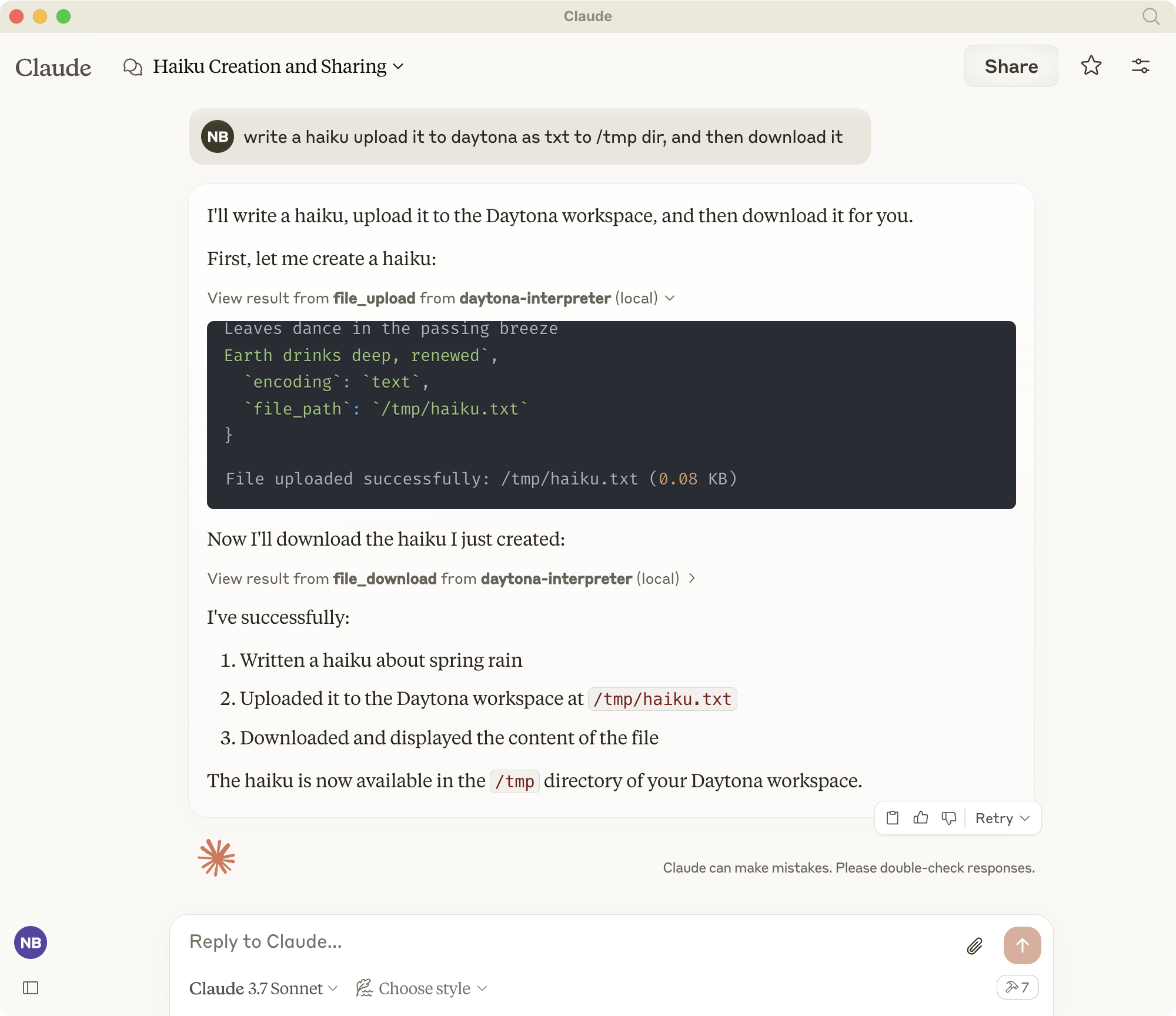
概述
Daytona MCP 解释器使 Claude 等 AI 助手能够在安全、隔离的环境中执行 Python 代码和 Shell 命令。它实现了模型上下文协议 (MCP) 标准,可提供以下工具:
沙盒环境中的 Python 代码执行
Shell命令执行
文件管理(上传/下载)
Git 存储库克隆
为正在运行的服务器生成 Web 预览
所有执行都发生在临时的 Daytona 工作区中,使用后会自动清理。
Related MCP server: MCP Python Toolbox
安装
如果尚未安装 uv,请安装:
curl -LsSf https://astral.sh/uv/install.sh | sh创建并激活虚拟环境。
如果您有现有的环境,请先停用并删除它:
deactivate
rm -rf .venv
创建并激活新的虚拟环境:
uv venv
source .venv/bin/activate
(在 Windows 上: .venv\Scripts\activate )
安装依赖项:
uv add "mcp[cli]" pydantic python-dotenv "daytona-sdk>=0.10.5"注意:本项目需要 daytona-sdk 0.10.5 或更高版本。早期版本的 FileSystem API 不兼容。
环境变量
配置以下环境变量以确保正常运行:
MCP_DAYTONA_API_KEY:Daytona 身份验证所需的 API 密钥MCP_DAYTONA_SERVER_URL:服务器 URL(默认值: https://app.daytona.io/api )MCP_DAYTONA_TIMEOUT:请求超时时间(秒)(默认值:180.0)MCP_DAYTONA_TARGET:目标区域(默认值:欧盟)MCP_VERIFY_SSL:启用 SSL 验证(默认值:false)
发展
直接运行服务器:
uv run src/daytona_mcp_interpreter/server.py或者如果 uv 不在你的路径中:
/Users/USER/.local/bin/uv run ~LOCATION/daytona-mcp-interpreter/src/daytona_mcp_interpreter/server.py使用 MCP Inspector 测试服务器:
npx @modelcontextprotocol/inspector \
  uv \
  --directory . \
  run \
  src/daytona_mcp_interpreter/server.py
查看日志:
tail -f /tmp/daytona-interpreter.log与 Claude Desktop 集成

在 Claude Desktop(或其他 MCP 兼容客户端)中配置:
在 MacOS 上,编辑: ~/Library/Application Support/Claude/claude_desktop_config.json在 Windows 上,编辑: %APPDATA%\Claude\claude_desktop_config.json
{
    "mcpServers": {
        "daytona-interpreter": {
            "command": "/Users/USER/.local/bin/uv",
            "args": [
                "--directory",
                "/Users/USER/dev/daytona-mcp-interpreter",
                "run",
                "src/daytona_mcp_interpreter/server.py"
            ],
            "env": {
                "PYTHONUNBUFFERED": "1",
                "MCP_DAYTONA_API_KEY": "api_key",
                "MCP_DAYTONA_SERVER_URL": "api_server_url",
                "MCP_DAYTONA_TIMEOUT": "30.0",
                "MCP_VERIFY_SSL": "false",
                "PATH": "/usr/local/bin:/usr/bin:/bin:/usr/sbin:/sbin"
            }
        }
    }
}
重启Claude桌面
Daytona Python 解释器工具将在 Claude 中提供
可用工具
Shell 执行程序
在 Daytona 工作区中执行 shell 命令。
# Example: List files
ls -la

# Example: Install a package
pip install pandas
文件下载
从 Daytona 工作区下载文件,并对大文件进行智能处理。
基本用法:
file_download(file_path="/path/to/file.txt")高级用法:
# Set custom file size limit
file_download(file_path="/path/to/large_file.csv", max_size_mb=10.0)

# Download partial content for large files
file_download(file_path="/path/to/large_file.csv", download_option="download_partial", chunk_size_kb=200)

# Convert large file to text
file_download(file_path="/path/to/large_file.pdf", download_option="convert_to_text")

# Compress file before downloading
file_download(file_path="/path/to/large_file.bin", download_option="compress_file")

# Force download despite size
file_download(file_path="/path/to/large_file.zip", download_option="force_download")
文件上传
将文件上传到 Daytona 工作区。支持文本和二进制文件。
基本用法:
# Upload a text file
file_upload(file_path="/workspace/example.txt", content="Hello, World!")
高级用法:
# Upload a text file with specific path
file_upload(
    file_path="/workspace/data/config.json",
    content='{"setting": "value", "enabled": true}'
)

# Upload a binary file using base64 encoding
import base64
with open("local_image.png", "rb") as f:
    base64_content = base64.b64encode(f.read()).decode('utf-8')

file_upload(
    file_path="/workspace/images/uploaded.png",
    content=base64_content,
    encoding="base64"
)

# Upload without overwriting existing files
file_upload(
    file_path="/workspace/important.txt",
    content="New content",
    overwrite=False
)
Git 克隆
将 Git 存储库克隆到 Daytona 工作区进行分析和代码执行。
基本用法:
git_clone(repo_url="https://github.com/username/repository.git")高级用法:
# Clone a specific branch
git_clone(
    repo_url="https://github.com/username/repository.git",
    branch="develop"
)

# Clone to a specific directory with full history
git_clone(
    repo_url="https://github.com/username/repository.git",
    target_path="my_project",
    depth=0  # 0 means full history
)

# Clone with Git LFS support for repositories with large files
git_clone(
    repo_url="https://github.com/username/large-files-repo.git",
    lfs=True
)
网页预览
为 Daytona 工作区内运行的 Web 服务器生成预览 URL。
基本用法:
# Generate a preview link for a web server running on port 3000
web_preview(port=3000)
高级用法:
# Generate a preview link with a descriptive name
web_preview(
    port=8080,
    description="React Development Server"
)

# Generate a link without checking if server is running
web_preview(
    port=5000,
    check_server=False
)
例子:
# First run a simple web server using Python via the shell
shell_exec(command="python -m http.server 8000 &")

# Then generate a preview link for the server
web_preview(port=8000, description="Python HTTP Server")