
Balldontlie MCP 服务器
MCP 服务器实现集成了Balldontlie API ,提供有关 NBA、NFL 和 MLB 的球员、球队和比赛的信息。
工具
获取团队
获取 NBA、NFL 或 MLB 球队列表
输入:
league(枚举['NBA','NFL','MLB']):获取球队的体育联盟
获取玩家
获取 NBA、NFL 或 MLB 球员名单
输入:
league(枚举['NBA','NFL','MLB']):招募球员的体育联盟firstName(字符串,可选):要搜索的玩家的名字lastName(字符串,可选):要搜索的玩家的姓氏cursor(数字,可选):分页光标
获取游戏
获取 NBA、NFL 或 MLB 的比赛列表
输入:
league(枚举['NBA','NFL','MLB']):获取比赛的体育联盟dates(string[],可选):获取特定日期的游戏,格式:YYYY-MM-DDteamIds(string[],可选):获取特定游戏的游戏cursor(数字,可选):分页光标
获取游戏
获取以下联盟 NBA、MLB、NFL 中的特定比赛
输入:
league(枚举['NBA','NFL','MLB']):获取比赛的体育联盟gameId(数字):来自 get_games 工具的游戏 ID
Related MCP server: MLB Projections MCP Server
提示
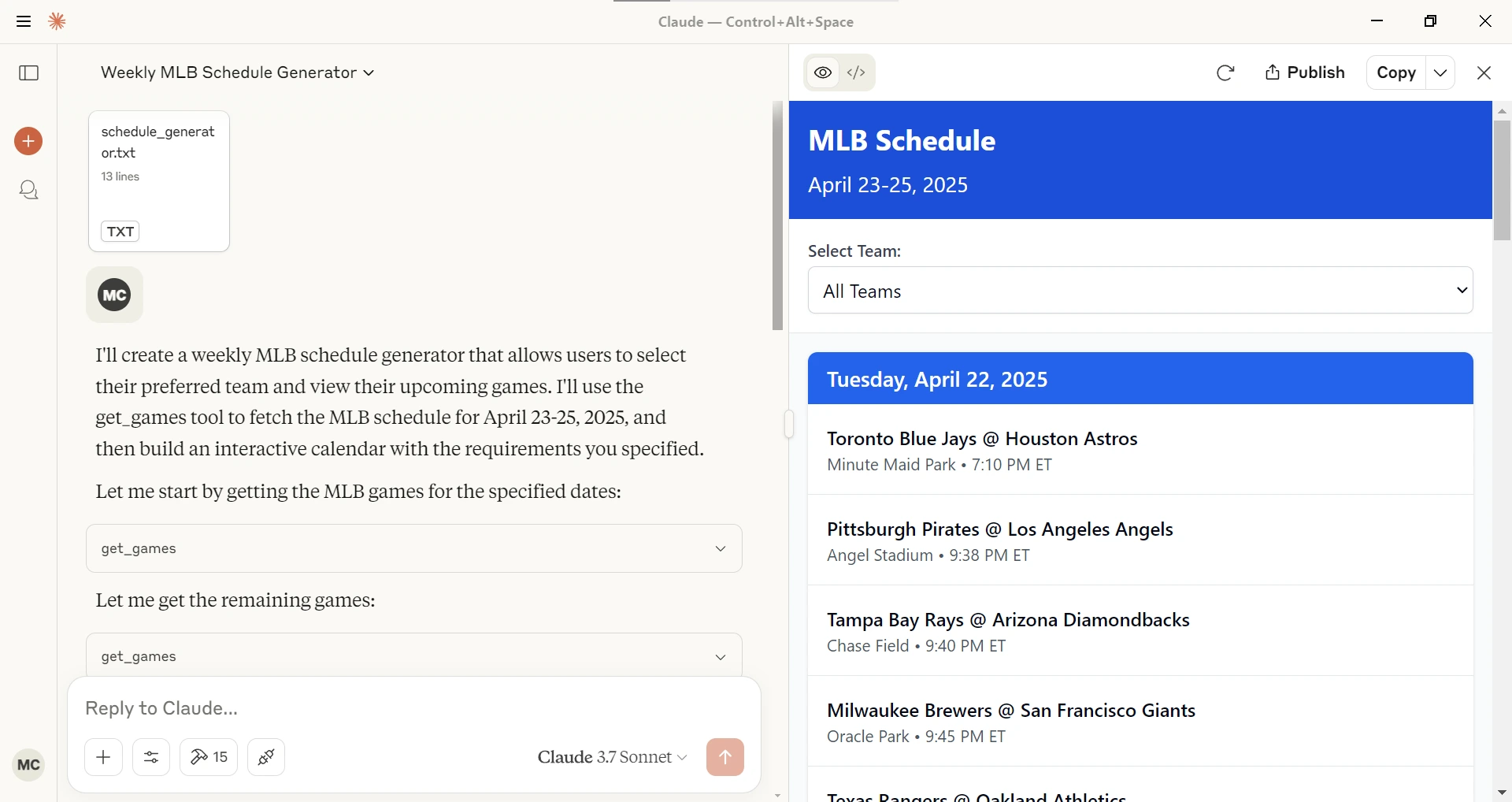
时间表生成器
给定一个联盟(NBA、MLB、NFL),开始日期和结束日期会在 Claude Desktop 中生成一个交互式时间表。
配置
获取 API 密钥
在Balldontlie.io注册账户
免费计划足以满足此 MCP 服务器的需求
通过 Smithery 安装
要通过Smithery自动为 Claude Desktop 安装 balldontlie-mcp:
npx -y @smithery/cli install @mikechao/balldontlie-mcp --client claude与 Claude Desktop 一起使用
将其添加到您的claude_desktop_config.json中:
{
  "mcp-servers": {
    "balldontlie": {
      "command": "npx",
      "args": [
        "-y",
        "balldontlie-mcp"
      ],
      "env": {
        "BALLDONTLIE_API_KEY": "YOUR API KEY HERE"
      }
    }
  }
}
与 LibreChat 一起使用
mcpServers:
  balldontlie:
    command: sh
    args:
      - -c
      - BALLDONTLIE_API_KEY=your-api-key-here npx -y balldontlie-mcp
执照
此 MCP 服务器采用 MIT 许可证。这意味着您可以自由使用、修改和分发该软件,但须遵守 MIT 许可证的条款和条件。更多详情,请参阅项目仓库中的 LICENSE 文件。
免责声明
此库与 balldontlie.io 无官方关联。它是 balldontlie api 的第三方实现,并带有 MCP 服务器。