

A
licenseNot graded
qualityD
maintenanceAn MCP (Model Context Protocol) server that lets users send SMS messages through Twilio API directly from Claude Desktop via natural language commands.
9 npm
5
MIT

Integrates with Aligo's SmartSMS service to send text messages via their API, requiring proper authentication credentials to send real or test messages.
Click on "Deploy Server".
Wait a few minutes for the server to deploy. Once ready, it will show a "Started" state.
In the chat, type @ followed by the MCP server name and your instructions, e.g., "@Aligo SMS MCP Server send a text to 01012345678 saying 'Meeting starts at 2 PM today'"
That's it! The server will respond to your query, and you can continue using it as needed.
Here is a step-by-step guide with screenshots.
A server that can access the Aligo SMS API using the Model Context Protocol (MCP). MCP-compatible AI agents, such as Claude AI, can send SMS messages or query related information.
{
  "mcpServers": {
    "aligo-sms-mcp": {
      "command": "npx",
      "args": [
        "-y",
        "github:hongsw/aligo-sms-mcp-server",
        "mcp-server"
      ]
    }
  }
}
Related MCP server: Twilio MCP Server
Your API key settings are stored in the .garakrc file. Create the following file in your home directory:
https://smartsms.aligo.in/admin/api/auth.html
ALIGO_API_KEY=발급받은_API_키
ALIGO_USER_ID=발급받은_사용자_아이디
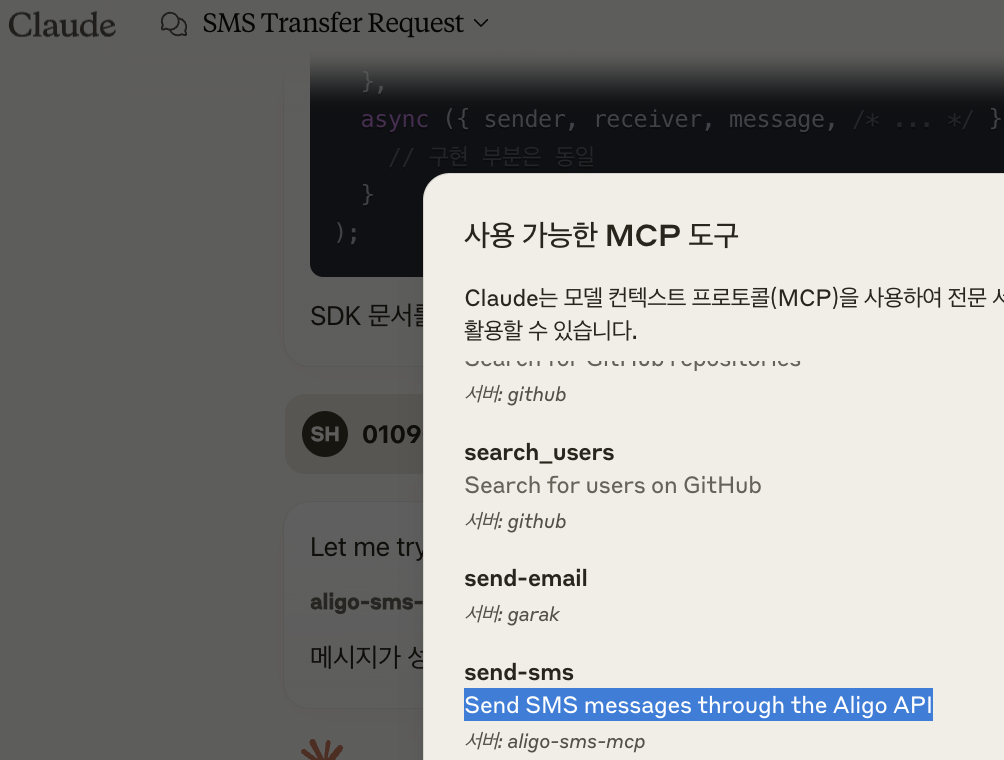
ALIGO_TEST_MODE=Y # 테스트 모드 (Y/N)Find the tool list icon and click on it

After completing the above settings, you will see the following screen.
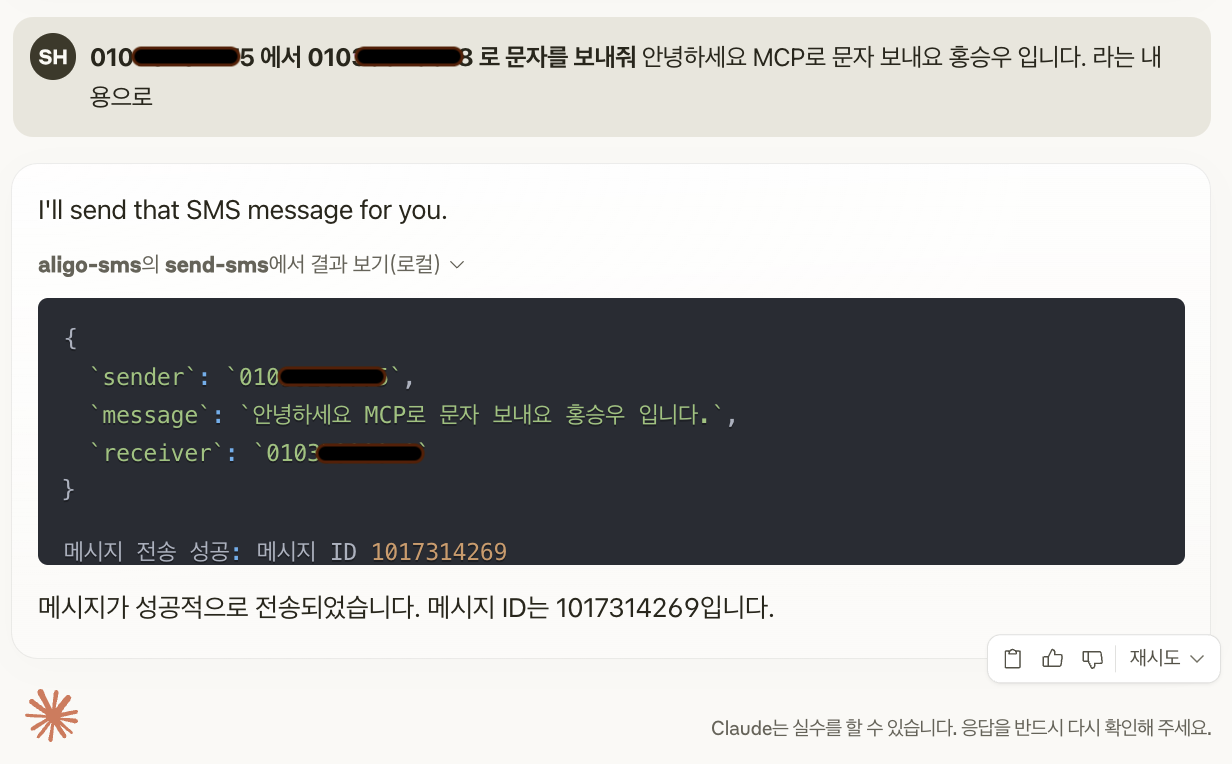
010xxxxyyyy 에서 010xxxxyyyy 로 문자를 보내줘 "안녕하세요 MCP 22222입니다." 라는 내용으로
If you send using the above prompt,
Contributions are welcome! Please feel free to submit a Pull Request.
This project is licensed under the MIT License - see the LICENSE file for details.
Aligo for providing the SMS API
Model Context Protocol for standardizing tools and resource access
Send SMS messages through the Aligo API
| Name | Required | Description | Default |
|---|---|---|---|
| destination | No | Optional formatted destination with names (01011112222|홍길동,01033334444|아무개) | |
| image_path | No | Optional image file path for MMS | |
| message | Yes | SMS message content | |
| msg_type | No | Message type: SMS, LMS, or MMS | |
| receiver | Yes | Recipient's phone number, or comma-separated list for multiple recipients | |
| schedule_date | No | Optional schedule date (YYYYMMDD) | |
| schedule_time | No | Optional schedule time (HHMM) | |
| sender | Yes | Sender's phone number (registered with Aligo) | |
| title | No | Message title (required for LMS/MMS) |
Does the description disclose side effects, auth requirements, rate limits, or destructive behavior?
With no annotations provided, the description carries the full burden of behavioral disclosure but only states the basic action. It fails to mention critical aspects like whether this is a mutation (likely yes, as it sends messages), potential costs, rate limits, error handling, or response format, leaving significant gaps in understanding the tool's behavior.
Agents need to know what a tool does to the world before calling it. Descriptions should go beyond structured annotations to explain consequences.
Is the description appropriately sized, front-loaded, and free of redundancy?
The description is a single, efficient sentence with zero wasted words. It's appropriately sized and front-loaded, clearly stating the core function without unnecessary elaboration.
Shorter descriptions cost fewer tokens and are easier for agents to parse. Every sentence should earn its place.
Given the tool's complexity, does the description cover enough for an agent to succeed on first attempt?
Given the tool's complexity (9 parameters, mutation operation) and lack of annotations or output schema, the description is incomplete. It doesn't address behavioral traits, usage context, or return values, making it inadequate for an agent to fully understand how to invoke and interpret results from this tool.
Complex tools with many parameters or behaviors need more documentation. Simple tools need less. This dimension scales expectations accordingly.
Does the description clarify parameter syntax, constraints, interactions, or defaults beyond what the schema provides?
Schema description coverage is 100%, so the schema fully documents all 9 parameters. The description adds no additional parameter information beyond what's in the schema, such as explaining interactions between parameters (e.g., 'title' required for LMS/MMS) or usage examples. Baseline 3 is appropriate when schema does the heavy lifting.
Input schemas describe structure but not intent. Descriptions should explain non-obvious parameter relationships and valid value ranges.
Does the description clearly state what the tool does and how it differs from similar tools?
The description clearly states the action ('Send SMS messages') and target ('through the Aligo API'), providing a specific verb+resource combination. However, it doesn't distinguish from siblings since there are none, and it could be more precise about the full capability (handling SMS, LMS, and MMS).
Agents choose between tools based on descriptions. A clear purpose with a specific verb and resource helps agents select the right tool.
Does the description explain when to use this tool, when not to, or what alternatives exist?
No guidance is provided on when to use this tool versus alternatives, prerequisites, or constraints. The description lacks context about appropriate use cases, rate limits, or authentication requirements, offering no usage direction beyond the basic function.
Agents often have multiple tools that could apply. Explicit usage guidance like "use X instead of Y when Z" prevents misuse.
Recent tool additions, removals, and schema changes observed during successful MCP inspections.
v1.0.0send-smsScored across 1 tool
With only one tool, there is no possibility of ambiguity or overlap between tools. The single tool 'send-sms' has a clear and distinct purpose, making it impossible for an agent to misselect between multiple options.
The single tool name 'send-sms' follows a consistent verb-noun pattern, using kebab-case. Since there is only one tool, there is no inconsistency in naming conventions, and the pattern is straightforward and predictable.
The server has only one tool, which feels thin for an SMS service domain. While it covers the core functionality of sending SMS, typical SMS APIs include additional operations like checking status, managing templates, or retrieving messages, making this set under-scoped for the apparent purpose.
The tool set is severely incomplete for an SMS service. It only provides 'send-sms', lacking essential operations such as checking delivery status, retrieving sent messages, managing contacts, or handling errors, which are common in SMS APIs and necessary for robust agent workflows.
The Mobile Text Alerts SMS MCP server enables your AI to send SMS messages & manage contacts
The Telnyx MCP server is an official implementation of the Model Context Protocol that enables AI clients (like Claude Desktop, Cursor, and OpenAI Agents) to interact with Telnyx's telephony, messaging, and AI assistant APIs. It provides comprehensive capabilities including making and managing phone calls, sending SMS/MMS messages, purchasing and configuring phone numbers, creating AI assistants with custom instructions, managing cloud storage buckets, scraping and embedding website content, and handling integration secrets. The server exists as both a local implementation and a remotely hosted version, allowing developers to integrate real-world communication infrastructure directly into AI applications.
Taiwan SMS MCP server for Claude Code, Codex and Cursor. NCC-compliant, 30 free SMS on signup.
Phone, SMS and email for AI agents. One remote MCP endpoint, OAuth login, zero install.