# Nova - Resources/Repeater-Fields
*Source: https://nova.laravel.com/docs/v5/resources/repeater-fields*
---
- [Community](https://discord.com/invite/laravel)
- [Blog](https://blog.laravel.com)
##### Get Started
- [Installation](/docs/v5/installation)
- [Release Notes](/docs/v5/releases)
- [Upgrade Guide](/docs/v5/upgrade)
##### Resources
- [The Basics](/docs/v5/resources/the-basics)
- [Fields](/docs/v5/resources/fields)
- [Dependent Fields](/docs/v5/resources/dependent-fields)
- [Date Fields](/docs/v5/resources/date-fields)
- [File Fields](/docs/v5/resources/file-fields)
- [Repeater Fields](/docs/v5/resources/repeater-fields)
- [Field Panels](/docs/v5/resources/panels)
- [Relationships](/docs/v5/resources/relationships)
- [Validation](/docs/v5/resources/validation)
- [Authorization](/docs/v5/resources/authorization)
##### Search
- [The Basics](/docs/v5/search/the-basics)
- [Global Search](/docs/v5/search/global-search)
- [Scout Integration](/docs/v5/search/scout-integration)
##### Filters
- [Defining Filters](/docs/v5/filters/defining-filters)
- [Registering Filters](/docs/v5/filters/registering-filters)
##### Lenses
- [Defining Lenses](/docs/v5/lenses/defining-lenses)
- [Registering Lenses](/docs/v5/lenses/registering-lenses)
##### Actions
- [Defining Actions](/docs/v5/actions/defining-actions)
- [Registering Actions](/docs/v5/actions/registering-actions)
##### Metrics
- [Defining Metrics](/docs/v5/metrics/defining-metrics)
- [Registering Metrics](/docs/v5/metrics/registering-metrics)
##### Digging Deeper
- [Dashboards](/docs/v5/customization/dashboards)
- [Menus](/docs/v5/customization/menus)
- [Notifications](/docs/v5/customization/notifications)
- [Authentication](/docs/v5/customization/authentication)
- [Impersonation](/docs/v5/customization/impersonation)
- [Tools](/docs/v5/customization/tools)
- [Resource Tools](/docs/v5/customization/resource-tools)
- [Cards](/docs/v5/customization/cards)
- [Fields](/docs/v5/customization/fields)
- [Filters](/docs/v5/customization/filters)
- [CSS / JavaScript](/docs/v5/customization/frontend)
- [Assets](/docs/v5/customization/assets)
- [Localization](/docs/v5/customization/localization)
- [Stubs](/docs/v5/customization/stubs)
On this page
- [Overview](#overview)
- [Repeatables](#repeatables)
- [Generating Repeatables](#generating-repeatables)
- [Confirming Repeatable Removal](#confirming-repeatable-removal)
- [Repeater Presets](#repeater-presets)
- [JSON Preset](#json-preset)
- [HasMany Preset](#hasmany-preset)
- [Upserting Repeatables Using Unique Fields](#upserting-repeatables-using-unique-fields)
- [Repeater Field Capabilities](#repeater-field-capabilities)
- [Supported Fields](#supported-fields)
- [Partially-Supported Fields](#partially-supported-fields)
Resources
# Repeater Fields
Repeater fields allow you to create and edit repeatable, structured data.
## [](#overview) Overview
The `Repeater` field allows you to create and edit repeatable, structured data and store that data in a JSON column or `HasMany` relationship:
app/Nova/Invoice.php
Copy
Ask AI
```
namespace App\Nova;
use App\Nova\Repeaters;
use Laravel\Nova\Fields\ID;
use Laravel\Nova\Fields\Repeater;
use Laravel\Nova\Http\Requests\NovaRequest;
class Invoice extends Resource
{
/**
* Get the fields displayed by the resource.
*
* @return array<int, \Laravel\Nova\Fields\Field>
*/
public function fields(NovaRequest $request): array
{
return [
ID::make(),
Repeater::make('Line Items')
->repeatables([
Repeaters\LineItem::make(),
]),
];
}
}
```
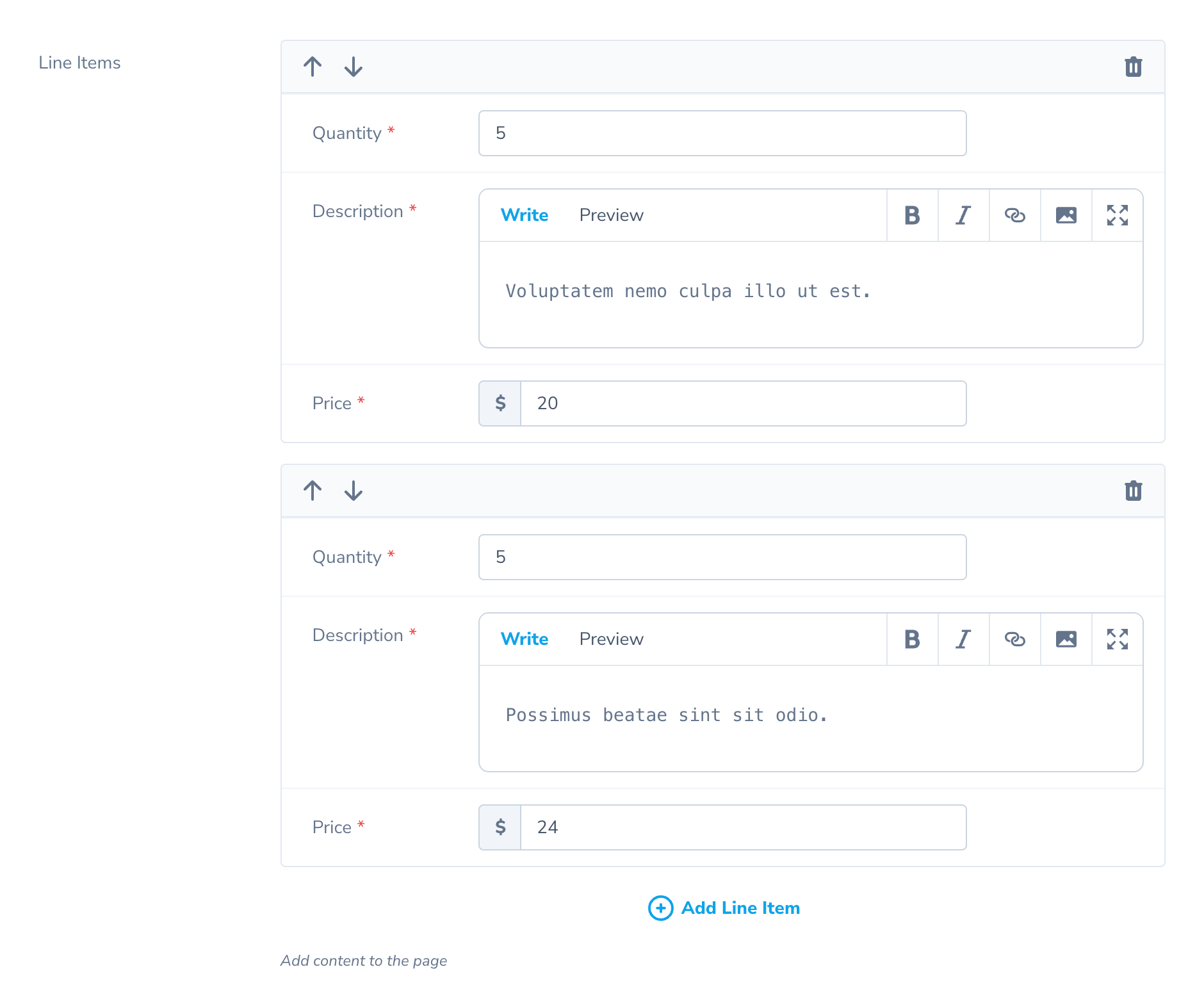
After defining a `Repeater` field, your resource will have an elegant interface for adding and editing repeatable items in the field:
## [](#repeatables) Repeatables
A `Repeatable` object represents the repeatable data for a `Repeater` field. It defines the set of fields used for the repeatable item. It also optionally defines an Eloquent `Model` class when the `Repeater` is using the `HasMany` preset.
The `Repeater` field is not limited to a single type of repeatable. It also supports multiple “repeatable” types, which may contain their own unique field sets and models. These repeatables could be used to create interfaces for editing flexible content areas, similar to those offered by content management systems.
### [](#generating-repeatables) Generating Repeatables
To generate a new `Repeatable`, invoke the `nova:repeatable` Artisan command:
Copy
Ask AI
```
php artisan nova:repeatable LineItem
```
After invoking the command above, Nova generates a new file at `app/Nova/Repeater/LineItem.php`. This file contains a `fields` method in which you may list any supported Nova field. For example, below we will define a `Repeatable` representing a line item for an invoice:
app/Nova/Repeaters/LineItem.php
Copy
Ask AI
```
namespace App\Nova\Repeaters;
use Laravel\Nova\Http\Requests\NovaRequest;
use Laravel\Nova\Fields\Currency;
use Laravel\Nova\Fields\Number;
use Laravel\Nova\Fields\Repeater\Repeatable;
use Laravel\Nova\Fields\Textarea;
class LineItem extends Repeatable
{
/**
* Get the fields displayed by the repeatable.
*
* @return array<int, \Laravel\Nova\Fields\Field>
*/
public function fields(NovaRequest $request): array
{
return [
Number::make('Quantity')->rules('required', 'numeric'),
Textarea::make('Description')->rules('required', 'max:255'),
Currency::make('Price')->rules('required', 'numeric'),
];
}
}
```
### [](#confirming-repeatable-removal) Confirming Repeatable Removal
You may instruct Nova to present a confirmation modal before removing a repeatable by invoking the `confirmRemoval` method when defining the repeatable:
Copy
Ask AI
```
use App\Nova\Repeaters;
use Laravel\Nova\Fields\Repeater;
use Laravel\Nova\Http\Requests\NovaRequest;
// ...
/**
* Get the fields displayed by the resource.
*
* @return array<int, \Laravel\Nova\Fields\Field>
*/
public function fields(NovaRequest $request): array
{
return [
Repeater::make('Attachments')->repeatables([
Repeaters\File::make()->confirmRemoval(),
Repeaters\Note::make(),
Repeaters\Video::make()->confirmRemoval(),
]),
];
}
```
## [](#repeater-presets) Repeater Presets
The `Repeater` field includes two storage “presets” out-of-the-box: `Json` and `HasMany`. Each preset defines how the repeatable data is stored and retrieved from your database.
For example, an `Invoice` resource could use a `Repeater` field to edit the line items for an invoice. Using the `Laravel\Nova\Fields\Repeater\JSON` preset, those line items would be stored in a `line_items` JSON column. However, when using the `HasMany` preset, the line items would be stored in a separate ‘line_items’ database table, with fields corresponding to each database column.
### [](#json-preset) JSON Preset
The `JSON` preset stores repeatables in a `JSON` column in your database. For example, the line items for an invoice could be store in a `line_items` column. When a resource with a `Repeater` field using the `JSON` preset is saved, the repeatables are serialized and saved to the column.
To use the `JSON` preset, simply invoke the `asJson` method on your `Repeater` field definition:
Copy
Ask AI
```
use App\Nova\Repeaters;
// ...
/**
* Get the fields displayed by the resource.
*
* @return array<int, \Laravel\Nova\Fields\Field>
*/
public function fields(NovaRequest $request): array
{
return [
Repeater::make('Line Items', 'line_items')
->repeatables([
Repeaters\LineItem::make(),
])
->asJson(),
];
}
```
Before using this preset, you should ensure that the underlying Eloquent attribute for the resource’s repeater column is configured to cast to an `array` (or equivalent) within your Eloquent model class:
app/Models/Invoce.php
Copy
Ask AI
```
/**
* The attributes that should be cast.
*
* @var array<string, mixed>
*/
protected $casts = [
'line_items' => 'array',
];
```
### [](#hasmany-preset) HasMany Preset
The `HasMany` preset stores repeatables via Eloquent using a `HasMany` relationship. For example, instead of storing the line items for an invoice in JSON format, the data would be saved in a separate `line_items` database table, complete with dedicated columns mapping to each field in the repeatable. The `Repeater` field will automatically manage these relations when editing your resources.
To use the `HasMany` preset, simply invoke the `asHasMany` method on your `Repeater` field definition:
Copy
Ask AI
```
use App\Nova\Repeaters;
// ...
/**
* Get the fields displayed by the resource.
*
* @return array<int, \Laravel\Nova\Fields\Field>
*/
public function fields(NovaRequest $request): array
{
return [
Repeater::make('Line Items', 'lineItems')
->repeatables([
Repeaters\LineItem::make(),
])
->asHasMany(),
];
}
```
The `HasMany` preset requires each repeatable to specify the underlying model it represents by setting the `model` property on the `Repeatable`. For example, a `LineItem` repeatable would need to specify the underlying `\App\Models\LineItem` model it represents:
app/Nova/Repeaters/LineItem.php
Copy
Ask AI
```
/**
* The underlying model the repeatable represents.
*
* @var class-string
*/
public static $model = \App\Models\LineItem::class;
```
## [](#upserting-repeatables-using-unique-fields) Upserting Repeatables Using Unique Fields
By default, when editing your repeatables configured with the `HasMany` preset, Nova will delete all of the related items and recreate them every time you save your resource. To instruct Nova to “upsert” the repeatable data instead, you should ensure you have a unique identifier column on your related models. Typically, this will be an auto-incrementing column or a UUID. You may then use the `uniqueField` method to specify which column contains the unique key for the database table:
Copy
Ask AI
```
use App\Nova\Repeaters;
// ...
/**
* Get the fie
*[Content truncated for length]*
