# Nova - Metrics/Registering-Metrics
*Source: https://nova.laravel.com/docs/v5/metrics/registering-metrics*
---
- [Community](https://discord.com/invite/laravel)
- [Blog](https://blog.laravel.com)
##### Get Started
- [Installation](/docs/v5/installation)
- [Release Notes](/docs/v5/releases)
- [Upgrade Guide](/docs/v5/upgrade)
##### Resources
- [The Basics](/docs/v5/resources/the-basics)
- [Fields](/docs/v5/resources/fields)
- [Dependent Fields](/docs/v5/resources/dependent-fields)
- [Date Fields](/docs/v5/resources/date-fields)
- [File Fields](/docs/v5/resources/file-fields)
- [Repeater Fields](/docs/v5/resources/repeater-fields)
- [Field Panels](/docs/v5/resources/panels)
- [Relationships](/docs/v5/resources/relationships)
- [Validation](/docs/v5/resources/validation)
- [Authorization](/docs/v5/resources/authorization)
##### Search
- [The Basics](/docs/v5/search/the-basics)
- [Global Search](/docs/v5/search/global-search)
- [Scout Integration](/docs/v5/search/scout-integration)
##### Filters
- [Defining Filters](/docs/v5/filters/defining-filters)
- [Registering Filters](/docs/v5/filters/registering-filters)
##### Lenses
- [Defining Lenses](/docs/v5/lenses/defining-lenses)
- [Registering Lenses](/docs/v5/lenses/registering-lenses)
##### Actions
- [Defining Actions](/docs/v5/actions/defining-actions)
- [Registering Actions](/docs/v5/actions/registering-actions)
##### Metrics
- [Defining Metrics](/docs/v5/metrics/defining-metrics)
- [Registering Metrics](/docs/v5/metrics/registering-metrics)
##### Digging Deeper
- [Dashboards](/docs/v5/customization/dashboards)
- [Menus](/docs/v5/customization/menus)
- [Notifications](/docs/v5/customization/notifications)
- [Authentication](/docs/v5/customization/authentication)
- [Impersonation](/docs/v5/customization/impersonation)
- [Tools](/docs/v5/customization/tools)
- [Resource Tools](/docs/v5/customization/resource-tools)
- [Cards](/docs/v5/customization/cards)
- [Fields](/docs/v5/customization/fields)
- [Filters](/docs/v5/customization/filters)
- [CSS / JavaScript](/docs/v5/customization/frontend)
- [Assets](/docs/v5/customization/assets)
- [Localization](/docs/v5/customization/localization)
- [Stubs](/docs/v5/customization/stubs)
On this page
- [Overview](#overview)
- [Detail Metrics](#detail-metrics)
- [Dashboard Metrics](#dashboard-metrics)
- [Authorization](#authorization)
- [Default Metric Range](#default-metric-range)
- [Metric Sizes](#metric-sizes)
- [Metric Help Text / Tooltips](#metric-help-text-%2F-tooltips)
- [Refreshing Metrics](#refreshing-metrics)
- [Refresh After Actions](#refresh-after-actions)
- [Refresh After Filter Changes](#refresh-after-filter-changes)
Metrics
# Registering Metrics
Learn how to register metrics in Nova.
## [](#overview) Overview
Once you have defined a metric, you are ready to attach it to a resource. Each resource generated by Nova contains a `cards` method. To attach a metric to a resource, you should simply add it to the array of metrics / cards returned by this method:
Construct
Make
Copy
Ask AI
```
use App\Nova\Metrics\UsersPerDay;
use Laravel\Nova\Http\Requests\NovaRequest;
// ...
/**
* Get the cards available for the resource.
*
* @return array<int, \Laravel\Nova\Card>
*/
public function cards(NovaRequest $request): array
{
return [
new UsersPerDay,
];
}
```
### [](#detail-metrics) Detail Metrics
In addition to placing metrics on the resource index page, you may also attach a metric to the resource detail page. For example, if you are building a podcasting application, you may wish to display the total number of podcasts created by a specific user over time. To instruct a metric to be displayed on the detail page instead of the index page, invoke the `onlyOnDetail` method when registering your metric:
app/Nova/~Resource.php
Copy
Ask AI
```
use Laravel\Nova\Http\Requests\NovaRequest;
// ...
/**
* Get the cards available for the request.
*
* @return array<int, \Laravel\Nova\Card>
*/
public function cards(NovaRequest $request): array
{
return [
Metrics\PodcastCount::make()
->onlyOnDetail(),
];
}
```
Of course, you will need to modify your metric’s query to only gather metric data on the resource for which it is currently being displayed. To accomplish this, your metric’s `calculate` method may access the `resourceId` property on the incoming `$request`:
app/Nova/Metrics/~Metric.php
Copy
Ask AI
```
use App\Models\Podcast;
use Laravel\Nova\Http\Requests\NovaRequest;
use Laravel\Nova\Metrics\TrendResult;
// ...
/**
* Calculate the value of the metric.
*/
public function calculate(NovaRequest $request): TrendResult
{
return $this->count(
$request,
Podcast::where('user_id', $request->resourceId)
);
}
```
### [](#dashboard-metrics) Dashboard Metrics
You are also free to add metrics to your primary Nova “dashboard”, which is the default page that Nova displays after login. By default, this page displays some helpful links to the Nova documentation via the built-in `Help` card. To add a metric to your dashboard, add the metric to the array of cards returned by the `cards` method of your Dashboard class:
app/Nova/Dashbaords/~Dashboard.php
Copy
Ask AI
```
use App\Nova\Metrics\NewUsers;
// ...
/**
* Get the cards that should be displayed on the Nova dashboard.
*
* @return array<int, \Laravel\Nova\Card>
*/
public function cards(): array
{
return [
new NewUsers,
];
}
```
## [](#authorization) Authorization
If you would like to only expose a given metric to certain users, you may invoke the `canSee` method when registering your metric. The `canSee` method accepts a closure which should return `true` or `false`. The closure will receive the incoming HTTP request:
Copy
Ask AI
```
use App\Models\User;
use App\Nova\Metrics\UsersPerDay;
// ...
UsersPerDay::make()
->canSee(function ($request) {
return $request->user()->can('viewUsersPerDay', User::class);
}),
```
In the example above, we are using Laravel’s `Authorizable` trait’s `can` method on our `User` model to determine if the authorized user is authorized for the `viewUsersPerDay` action. However, since proxying to authorization policy methods is a common use-case for `canSee`, you may use the `canSeeWhen` method to achieve the same behavior. The `canSeeWhen` method has the same method signature as the `Illuminate\Foundation\Auth\Access\Authorizable` trait’s `can` method:
Copy
Ask AI
```
use App\Models\User;
use App\Nova\Metrics\UsersPerDay;
// ...
UsersPerDay::make()
->canSeeWhen(
'viewUsersPerDay', User::class
),
```
## [](#default-metric-range) Default Metric Range
You may wish to initially load a certain metric range by default. You can pass the range’s array key to the `defaultRange` method of the metric to accomplish this:
app/Nova/~Resource.php
Copy
Ask AI
```
use Laravel\Nova\Http\Requests\NovaRequest;
// ...
/**
* Get the cards available for the request.
*
* @return array<int, \Laravel\Nova\Card>
*/
public function cards(NovaRequest $request): array
{
return [
Metrics\NewUsers::make()
->defaultRange('YTD'),
];
}
```
## [](#metric-sizes) Metric Sizes
By default, metrics take up one-third of the Nova content area. However, you are free to make them larger. To accomplish this, call the `width` method when registering the metric:
app/Nova/~Resource.php
Copy
Ask AI
```
use Laravel\Nova\Http\Requests\NovaRequest;
// ...
/**
* Get the cards available for the request.
*
* @return array<int, \Laravel\Nova\Card>
*/
public function cards(NovaRequest $request): array
{
return [
// Two-thirds of the content area...
Metrics\UsersPerDay::make()->width('2/3'),
// Full width...
Metrics\UsersPerDay::make()->width('full'),
];
}
```
When the metric width is set to `full`, the height of the card will become dynamic. You may explicitly define this behaviour by calling the `fixedHeight` or `dynamicHeight` methods:
app/Nova/~Resource.php
Copy
Ask AI
```
use Laravel\Nova\Http\Requests\NovaRequest;
// ...
/**
* Get the cards available for the request.
*
* @return array<int, \Laravel\Nova\Card>
*/
public function cards(NovaRequest $request): array
{
return [
Metrics\UsersPerDay::make()->width('full')->fixedHeight(),
Metrics\UsersPerDay::make()->width('full')->dynamicHeight(),
];
}
```
## [](#metric-help-text-/-tooltips) Metric Help Text / Tooltips
Sometimes a metric needs to offer the user more context about how the value is calculated or other details related to the metric’s value. To provide this context, Nova allows you to define a help text “tooltip”, which can be registered similarly to [Field Help Text](./../resources/fields#field-help-text):
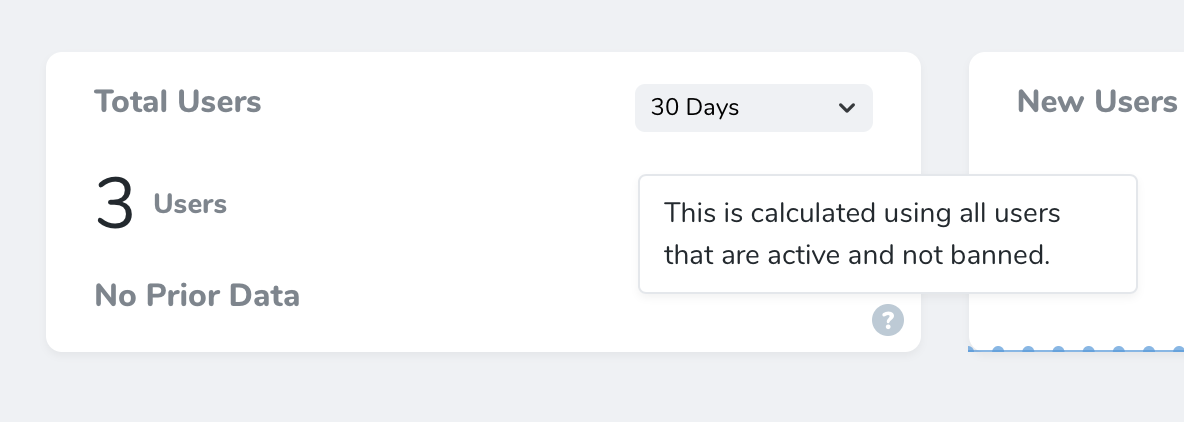
To enable the tooltip, invoke the `help` method while registering your metric. The `help` method receives the help text as its only argument:
app/Nova/~Resource.php
Copy
Ask AI
```
use Laravel\Nova\Http\Requests\NovaRequest;
// ...
/**
* Get the cards available for the request.
*
* @return array<int, \Laravel\Nova\Card>
*/
public function cards(NovaRequest $request): array
{
return [
Metrics\TotalUsers::make()
->help('This is calculated using all users that are active and not banned.'),
];
}
```
You may also use HTML when defining your help text. For example, you may pass a rendered Blade template to the `help` method:
Copy
Ask AI
```
use App\Nova\Metrics\TotalUsers;
// ...
TotalUsers::make()
->help(view('nova.metrics.total-users.tooltip')->render()),
```
## [](#refreshing-metrics) Refreshing Metrics
Laravel Nova will automatically fetch updated results (without requiring the user to refresh the page) for metrics attached to a resource based on following events:
| Event | Behaviour |
| --- | --- |
| Resource Delet
*[Content truncated for length]*
