# Nova - Metrics/Defining-Metrics
*Source: https://nova.laravel.com/docs/v5/metrics/defining-metrics*
---
- [Community](https://discord.com/invite/laravel)
- [Blog](https://blog.laravel.com)
##### Get Started
- [Installation](/docs/v5/installation)
- [Release Notes](/docs/v5/releases)
- [Upgrade Guide](/docs/v5/upgrade)
##### Resources
- [The Basics](/docs/v5/resources/the-basics)
- [Fields](/docs/v5/resources/fields)
- [Dependent Fields](/docs/v5/resources/dependent-fields)
- [Date Fields](/docs/v5/resources/date-fields)
- [File Fields](/docs/v5/resources/file-fields)
- [Repeater Fields](/docs/v5/resources/repeater-fields)
- [Field Panels](/docs/v5/resources/panels)
- [Relationships](/docs/v5/resources/relationships)
- [Validation](/docs/v5/resources/validation)
- [Authorization](/docs/v5/resources/authorization)
##### Search
- [The Basics](/docs/v5/search/the-basics)
- [Global Search](/docs/v5/search/global-search)
- [Scout Integration](/docs/v5/search/scout-integration)
##### Filters
- [Defining Filters](/docs/v5/filters/defining-filters)
- [Registering Filters](/docs/v5/filters/registering-filters)
##### Lenses
- [Defining Lenses](/docs/v5/lenses/defining-lenses)
- [Registering Lenses](/docs/v5/lenses/registering-lenses)
##### Actions
- [Defining Actions](/docs/v5/actions/defining-actions)
- [Registering Actions](/docs/v5/actions/registering-actions)
##### Metrics
- [Defining Metrics](/docs/v5/metrics/defining-metrics)
- [Registering Metrics](/docs/v5/metrics/registering-metrics)
##### Digging Deeper
- [Dashboards](/docs/v5/customization/dashboards)
- [Menus](/docs/v5/customization/menus)
- [Notifications](/docs/v5/customization/notifications)
- [Authentication](/docs/v5/customization/authentication)
- [Impersonation](/docs/v5/customization/impersonation)
- [Tools](/docs/v5/customization/tools)
- [Resource Tools](/docs/v5/customization/resource-tools)
- [Cards](/docs/v5/customization/cards)
- [Fields](/docs/v5/customization/fields)
- [Filters](/docs/v5/customization/filters)
- [CSS / JavaScript](/docs/v5/customization/frontend)
- [Assets](/docs/v5/customization/assets)
- [Localization](/docs/v5/customization/localization)
- [Stubs](/docs/v5/customization/stubs)
On this page
- [Value Metrics](#value-metrics)
- [Value Query Types](#value-query-types)
- [Average](#average)
- [Sum](#sum)
- [Max](#max)
- [Min](#min)
- [Value Ranges](#value-ranges)
- [Zero Result Values](#zero-result-values)
- [Formatting the Value](#formatting-the-value)
- [Transforming a Value Result](#transforming-a-value-result)
- [Manually Building Value Results](#manually-building-value-results)
- [Trend Metrics](#trend-metrics)
- [Trend Query Types](#trend-query-types)
- [Count](#count)
- [Average](#average-2)
- [Sum](#sum-2)
- [Max](#max-2)
- [Min](#min-2)
- [Trend Ranges](#trend-ranges)
- [Displaying the Current Value](#displaying-the-current-value)
- [Displaying the Trend Sum](#displaying-the-trend-sum)
- [Formatting the Trend Value](#formatting-the-trend-value)
- [Manually Building Trend Results](#manually-building-trend-results)
- [Partition Metrics](#partition-metrics)
- [Partition Query Types](#partition-query-types)
- [Average](#average-3)
- [Sum](#sum-3)
- [Max](#max-3)
- [Min](#min-3)
- [Customizing Partition Labels](#customizing-partition-labels)
- [Customizing Partition Colors](#customizing-partition-colors)
- [Manually Building Partition Results](#manually-building-partition-results)
- [Progress Metric](#progress-metric)
- [Sum](#sum-4)
- [Unwanted Progress](#unwanted-progress)
- [Formatting the Progress Value](#formatting-the-progress-value)
- [Manually Building Progress Results](#manually-building-progress-results)
- [Table Metrics](#table-metrics)
- [Adding Actions to Table Rows](#adding-actions-to-table-rows)
- [Displaying Icons on Table Rows](#displaying-icons-on-table-rows)
- [Customizing Table Metric Empty Text](#customizing-table-metric-empty-text)
- [Caching](#caching)
- [Customizing Metric Names](#customizing-metric-names)
Metrics
# Defining Metrics
Learn how to define metrics in Nova.
Nova metrics allow you to quickly gain insight on key business indicators for your application. For example, you may define a metric to display the total number of users added to your application per day, or the amount of weekly sales for a given product.
Nova offers several types of built-in metrics: value, trend, partition, and progress. We’ll examine each type of metric and demonstrate their usage below.
## [](#value-metrics) Value Metrics
Value metrics display a single value and, if desired, its change compared to a previous time interval. For example, a value metric might display the total number of users created in the last thirty days compared with the previous thirty days:
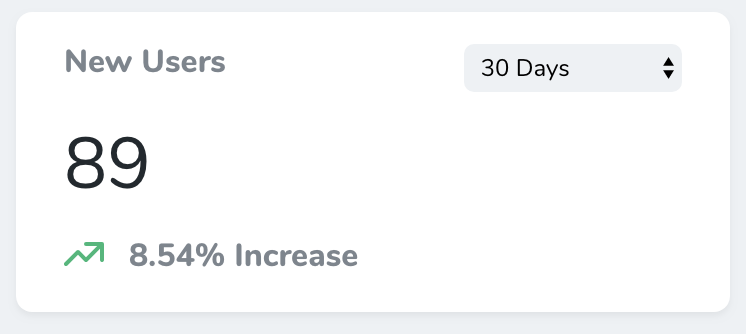
Value metrics may be generated using the `nova:value` Artisan command. By default, all new metrics will be placed in the `app/Nova/Metrics` directory:
Copy
Ask AI
```
php artisan nova:value NewUsers
```
Once your value metric class has been generated, you’re ready to customize it. Each value metric class contains a `calculate` method. This method should return a `Laravel\Nova\Metrics\ValueResult` instance. Don’t worry, Nova ships with a variety of helpers for quickly generating metric results.
In this example, we are using the `count` helper, which will automatically perform a `count` query against the specified Eloquent model for the selected range, as well as automatically retrieve the count for the “previous” range:
app/Nova/Metrics/NewUsers.php
Copy
Ask AI
```
namespace App\Nova\Metrics;
use App\Models\User;
use Laravel\Nova\Http\Requests\NovaRequest;
use Laravel\Nova\Metrics\Value;
use Laravel\Nova\Metrics\ValueResult;
use Laravel\Nova\Nova;
class NewUsers extends Value
{
/**
* Calculate the value of the metric.
*/
public function calculate(NovaRequest $request): ValueResult
{
return $this->count($request, User::class);
}
/**
* Get the ranges available for the metric.
*/
public function ranges(): array
{
return [
30 => Nova::__('30 Days'),
60 => Nova::__('60 Days'),
365 => Nova::__('365 Days'),
'TODAY' => Nova::__('Today'),
'MTD' => Nova::__('Month To Date'),
'QTD' => Nova::__('Quarter To Date'),
'YTD' => Nova::__('Year To Date'),
];
}
}
```
### [](#value-query-types) Value Query Types
Value metrics don’t only ship with a `count` helper. You may also use a variety of other aggregate functions when building your metric. Let’s explore each of them now.
#### [](#average) Average
The `average` method may be used to calculate the average of a given column compared to the previous time interval / range:
app/Nova/Metrics/~Metric.php
Copy
Ask AI
```
use App\Models\Post;
use Laravel\Nova\Http\Requests\NovaRequest;
use Laravel\Nova\Metrics\ValueResult;
// ...
/**
* Calculate the value of the metric.
*/
public function calculate(NovaRequest $request): ValueResult
{
return $this->average($request, Post::class, 'word_count');
}
```
#### [](#sum) Sum
The `sum` method may be used to calculate the sum of a given column compared to the previous time interval / range:
app/Nova/Metrics/~Metric.php
Copy
Ask AI
```
use App\Models\Order;
use Laravel\Nova\Http\Requests\NovaRequest;
use Laravel\Nova\Metrics\ValueResult;
// ...
/**
* Calculate the value of the metric.
*/
public function calculate(NovaRequest $request): ValueResult
{
return $this->sum($request, Order::class, 'price');
}
```
#### [](#max) Max
The `max` method may be used to calculate the maximum value of a given column compared to the previous time interval / range:
app/Nova/Metrics/~Metric.php
Copy
Ask AI
```
use App\Models\Order;
use Laravel\Nova\Http\Requests\NovaRequest;
use Laravel\Nova\Metrics\ValueResult;
// ...
/**
* Calculate the value of the metric.
*/
public function calculate(NovaRequest $request): ValueResult
{
return $this->max($request, Order::class, 'total');
}
```
#### [](#min) Min
The `min` method may be used to calculate the minimum value of a given column compared to the previous time interval / range:
app/Nova/Metrics/~Metric.php
Copy
Ask AI
```
use App\Models\Order;
use Laravel\Nova\Http\Requests\NovaRequest;
use Laravel\Nova\Metrics\ValueResult;
// ...
/**
* Calculate the value of the metric.
*/
public function calculate(NovaRequest $request): ValueResult
{
return $this->min($request, Order::class, 'total');
}
```
### [](#value-ranges) Value Ranges
Every value metric class contains a `ranges` method. This method determines the ranges that will be available in the value metric’s range selection menu. The array’s keys determine the number of days that should be included in the query, while the values determine the “human readable” text that will be placed in the range selection menu. Of course, you are not required to define any ranges at all:
app/Nova/Metrics/~Metric.php
Copy
Ask AI
```
use Laravel\Nova\Nova;
/**
* Get the ranges available for the metric.
*/
public function ranges(): array
{
return [
30 => Nova::__('30 Days'),
60 => Nova::__('60 Days'),
365 => Nova::__('365 Days'),
'TODAY' => Nova::__('Today'),
'YESTERDAY' => Nova::__('Yesterday'),
'MTD' => Nova::__('Month To Date'),
'QTD' => Nova::__('Quarter To Date'),
'YTD' => Nova::__('Year To Date'),
'ALL' => Nova::__('All Time'),
];
}
```
You may customize these ranges to suit your needs; however, if you are using the built-in “Today”, “Yesterday”, “Month To Date”, “Quarter To Date”, “Year To Date”, or “All Time” ranges, you should not change their keys.
### [](#zero-result-values) Zero Result Values
By default, Nova will handle results of `0` as a result containing no data. This may not always be correct, which is why you can use
*[Content truncated for length]*
