# Nova - Resources/The-Basics
*Source: https://nova.laravel.com/docs/v5/resources/the-basics*
---
- [Community](https://discord.com/invite/laravel)
- [Blog](https://blog.laravel.com)
##### Get Started
- [Installation](/docs/v5/installation)
- [Release Notes](/docs/v5/releases)
- [Upgrade Guide](/docs/v5/upgrade)
##### Resources
- [The Basics](/docs/v5/resources/the-basics)
- [Fields](/docs/v5/resources/fields)
- [Dependent Fields](/docs/v5/resources/dependent-fields)
- [Date Fields](/docs/v5/resources/date-fields)
- [File Fields](/docs/v5/resources/file-fields)
- [Repeater Fields](/docs/v5/resources/repeater-fields)
- [Field Panels](/docs/v5/resources/panels)
- [Relationships](/docs/v5/resources/relationships)
- [Validation](/docs/v5/resources/validation)
- [Authorization](/docs/v5/resources/authorization)
##### Search
- [The Basics](/docs/v5/search/the-basics)
- [Global Search](/docs/v5/search/global-search)
- [Scout Integration](/docs/v5/search/scout-integration)
##### Filters
- [Defining Filters](/docs/v5/filters/defining-filters)
- [Registering Filters](/docs/v5/filters/registering-filters)
##### Lenses
- [Defining Lenses](/docs/v5/lenses/defining-lenses)
- [Registering Lenses](/docs/v5/lenses/registering-lenses)
##### Actions
- [Defining Actions](/docs/v5/actions/defining-actions)
- [Registering Actions](/docs/v5/actions/registering-actions)
##### Metrics
- [Defining Metrics](/docs/v5/metrics/defining-metrics)
- [Registering Metrics](/docs/v5/metrics/registering-metrics)
##### Digging Deeper
- [Dashboards](/docs/v5/customization/dashboards)
- [Menus](/docs/v5/customization/menus)
- [Notifications](/docs/v5/customization/notifications)
- [Authentication](/docs/v5/customization/authentication)
- [Impersonation](/docs/v5/customization/impersonation)
- [Tools](/docs/v5/customization/tools)
- [Resource Tools](/docs/v5/customization/resource-tools)
- [Cards](/docs/v5/customization/cards)
- [Fields](/docs/v5/customization/fields)
- [Filters](/docs/v5/customization/filters)
- [CSS / JavaScript](/docs/v5/customization/frontend)
- [Assets](/docs/v5/customization/assets)
- [Localization](/docs/v5/customization/localization)
- [Stubs](/docs/v5/customization/stubs)
On this page
- [Introduction](#introduction)
- [Defining Resources](#defining-resources)
- [Registering Resources](#registering-resources)
- [Customizing Resource Menus](#customizing-resource-menus)
- [Grouping Resources](#grouping-resources)
- [Resource Table Style Customization](#resource-table-style-customization)
- [Table Styles](#table-styles)
- [Column Borders](#column-borders)
- [Resource Table Click Action](#resource-table-click-action)
- [Eager Loading](#eager-loading)
- [Resource Default Attribute Values](#resource-default-attribute-values)
- [Resource Replication](#resource-replication)
- [Resource Events](#resource-events)
- [Resource Hooks](#resource-hooks)
- [Preventing Conflicts](#preventing-conflicts)
- [Disabling Traffic Cop](#disabling-traffic-cop)
- [Resource Polling](#resource-polling)
- [Toggling Resource Polling](#toggling-resource-polling)
- [Redirection](#redirection)
- [After Creating Redirection](#after-creating-redirection)
- [After Updating Redirection](#after-updating-redirection)
- [After Deletion Redirection](#after-deletion-redirection)
- [Pagination](#pagination)
- [Customizing Pagination](#customizing-pagination)
- [CSV Export](#csv-export)
- [Resource Index Search Debounce](#resource-index-search-debounce)
- [Keyboard Shortcuts](#keyboard-shortcuts)
Resources
# The Basics
Learn how to define, register, and customize Nova resources.
## [](#introduction) Introduction
Laravel Nova is a beautiful administration dashboard for Laravel applications. Of course, the primary feature of Nova is the ability to administer your underlying database records using Eloquent. Nova accomplishes this by allowing you to define a Nova “resource” that corresponds to each Eloquent model in your application.
## [](#defining-resources) Defining Resources
By default, Nova resources are stored in the `app/Nova` directory of your application. You may generate a new resource using the `nova:resource` Artisan command:
Copy
Ask AI
```
php artisan nova:resource Post
```
The most basic and fundamental property of a resource is its `model` property. This property tells Nova which Eloquent model the resource corresponds to:
app/Nova/Post.php
Copy
Ask AI
```
namespace App\Nova;
class Post extends Resource
{
/**
* The model the resource corresponds to.
*
* @var class-string
*/
public static $model = \App\Models\Post::class;
}
```
Freshly created Nova resources only contain an `ID` field definition. Don’t worry, we’ll add more fields to our resource soon.
Nova contains a few reserved words which may not be used for resource names:
- Card
- Dashboard
- Field
- Impersonate
- Metric
- Resource
- Search
- Script
- Style
- Tool
## [](#registering-resources) Registering Resources
By default, all resources within the `app/Nova` directory will automatically be registered with Nova. You are not required to manually register them.
Before resources are available within your Nova dashboard, they must first be registered with Nova. Resources are typically registered in your application’s `app/Providers/NovaServiceProvider.php` file. This file contains various configuration and bootstrapping code related to your Nova installation.
**As mentioned above, you are not required to manually register your resources; however, if you choose to do so, you may do so by overriding the `resources` method of your `NovaServiceProvider`**.
There are two approaches to manually registering resources. You may use the `resourcesIn` method to instruct Nova to register all Nova resources within a given directory. Alternatively, you may use the `resources` method to manually register individual resources:
app/Providers/NovaServiceProvider.php
Copy
Ask AI
```
use App\Nova\User;
use App\Nova\Post;
// ...
/**
* Register the application's Nova resources.
*/
protected function resources(): void
{
Nova::resourcesIn(app_path('Nova'));
Nova::resources([
User::class,
Post::class,
]);
}
```
Once your resources are registered with Nova, they will be available in the Nova sidebar:
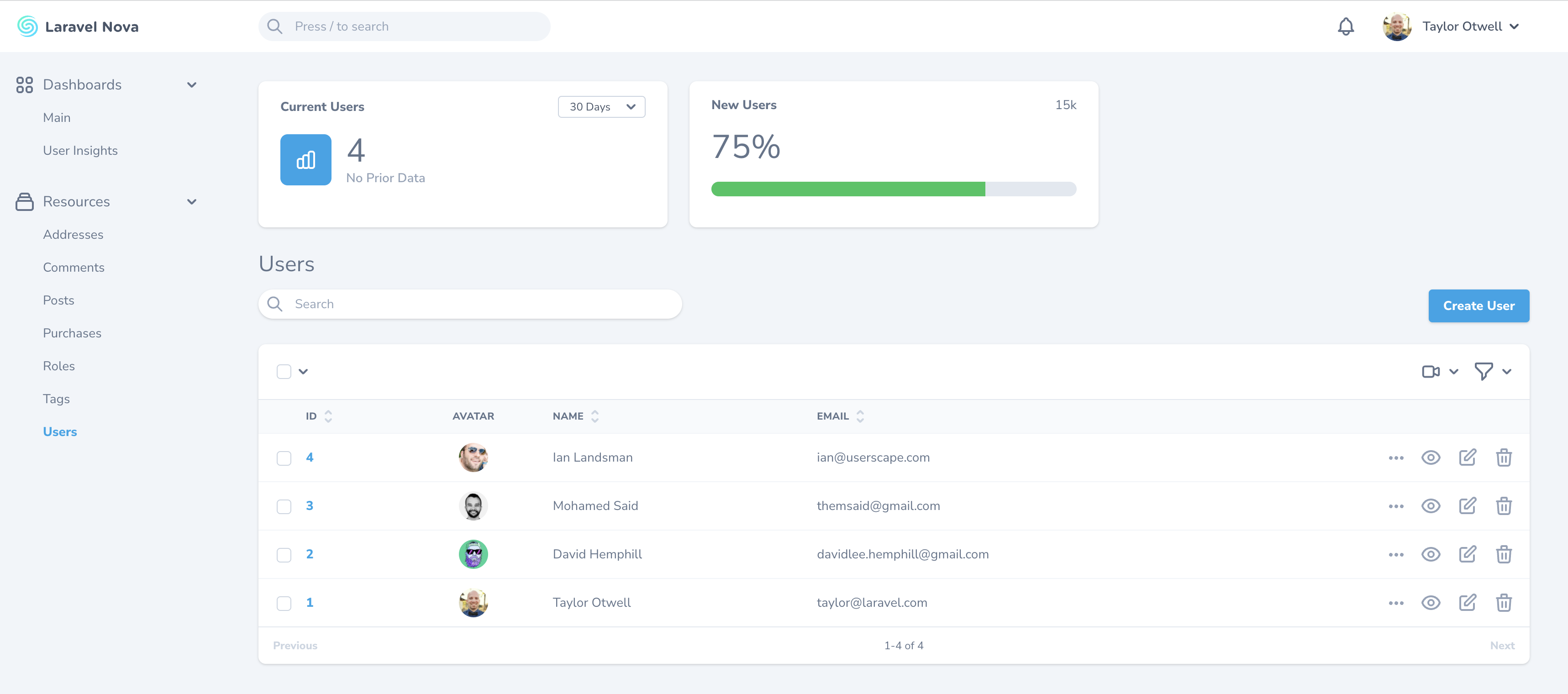
Dashboard
If you do not want a resource to appear in the sidebar, you may override the `displayInNavigation` property of your resource class:
app/Nova/Post.php
Copy
Ask AI
```
/**
* Indicates if the resource should be displayed in the sidebar.
*
* @var bool
*/
public static $displayInNavigation = false;
```
#### [](#customizing-resource-menus) Customizing Resource Menus
You can customize the resource’s menu by defining a `menu` method on your resource class:
app/Nova/Post.php
Copy
Ask AI
```
use Illuminate\Http\Request;
// ...
/**
* Get the menu that should represent the resource.
*
* @param \Illuminate\Http\Request $request
* @return \Laravel\Nova\Menu\MenuItem
*/
public function menu(Request $request)
{
return parent::menu($request)->withBadge(function () {
return static::$model::count();
});
}
```
Please refer to the documentation on [menu customization](./../customization/menus) for more information.
## [](#grouping-resources) Grouping Resources
If you would like to separate resources into different sidebar groups, you may override the `group` property of your resource class:
app/Nova/Post.php
Copy
Ask AI
```
/**
* The logical group associated with the resource.
*
* @var string
*/
public static $group = 'Admin';
```
## [](#resource-table-style-customization) Resource Table Style Customization
Nova supports a few visual customization options for your resources.
### [](#table-styles) Table Styles
Sometimes it’s convenient to show more data on your resource index tables. To accomplish this, you can use the “tight” table style option designed to increase the visual density of your table rows. To accomplish this, override the static `$tableStyle` property or the static `tableStyle` method on your resource class:
app/Nova/Post.php
Copy
Ask AI
```
/**
* The visual style used for the table. Available options are 'tight' and 'default'.
*
* @var string
*/
public static $tableStyle = 'tight';
```
This will display your table rows with less visual height, enabling more data to be shown:
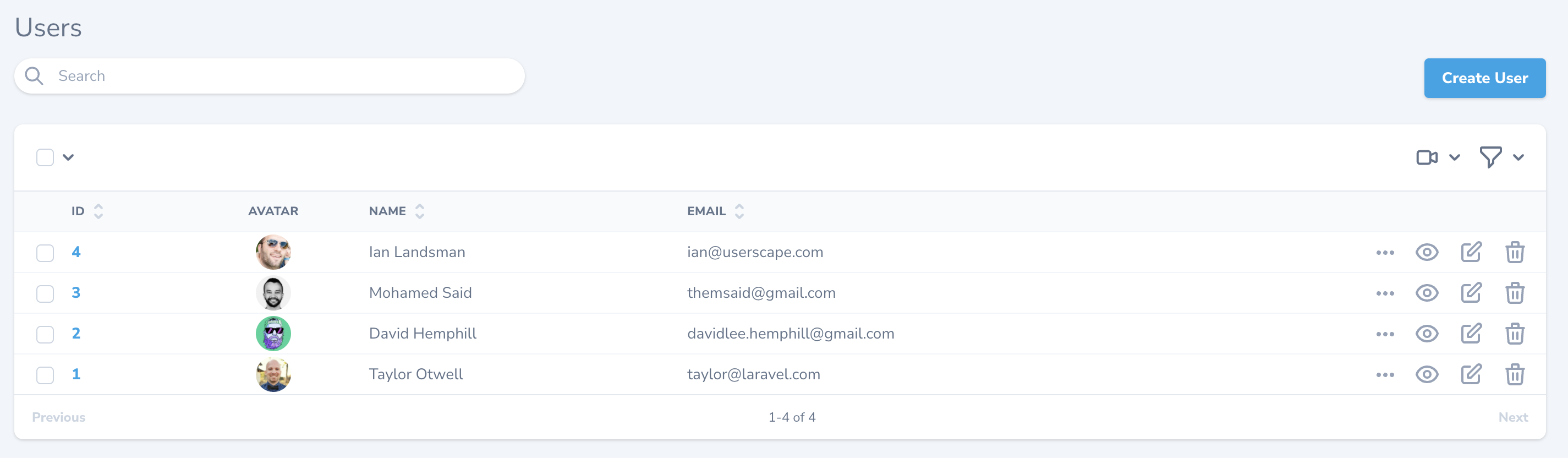
Tight Table Style
### [](#column-borders) Column Borders
You can instruct Nova to display column borders by overriding the static `$showColumnBorders` property or the static `showColumnBorders` method on your resource class:
app/Nova/Post.php
Copy
Ask AI
```
/**
* Whether to show borders for each column on the X-axis.
*
* @var bool
*/
public static $showColumnBorders = true;
```
Setting this property to `true` will instruct Nova to display the table with borders on every table item:
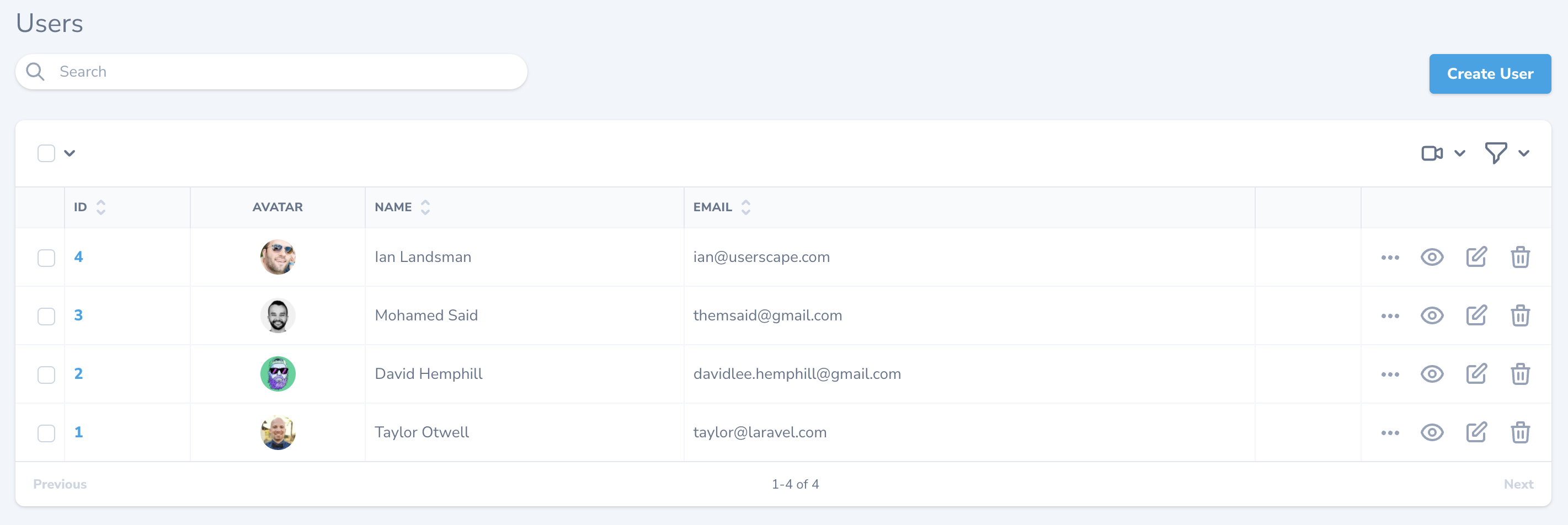
Table Column Borders
## [](#resource-table-click-action) Resource Table Click Action
By default, when clicking on a resource table row, Nova will navigate to the detail view for the resource. However, you may want Nova to navigate to the edit form instead. You can customize this behavior by changing the `clickAction` property or the static `clickAction` method on your resource class:
Property
Method
Copy
Ask AI
```
/**
* The click action to use when clicking on the resource in the table.
*
* Can be one of: 'detail' (default), 'edit', 'select', 'preview', or 'ignore'.
*
* @var string
*/
public static $clickAction = 'edit';
```
Choosing the
*[Content truncated for length]*
