---
createdAt: 2024-08-11
updatedAt: 2025-08-23
title: vue-i18n vs Intlayer
description: Compare vue-i18n with Intlayer for internationalization (i18n) in Vue/Nuxt apps
keywords:
- vue-i18n
- Intlayer
- Internationalization
- i18n
- Blog
- Vue
- Nuxt
- JavaScript
slugs:
- blog
- vue-i18n-vs-intlayer
---
# vue-i18n VS Intlayer | Vue Internationalization (i18n)
This guide compares two popular i18n options for **Vue 3** (and **Nuxt**): **vue-i18n** and **Intlayer**.
We focus on modern Vue tooling (Vite, Composition API) and evaluate:
1. **Architecture & content organization**
2. **TypeScript & safety**
3. **Missing translation handling**
4. **Routing & URL strategy**
5. **Performance & loading behavior**
6. **Developer experience (DX), tooling & maintenance**
7. **SEO & large-project scalability**
<TOC/>
> **tl;dr**: Both can localize Vue apps. If you want **component-scoped content**, **strict TypeScript types**, **build-time missing-key checks**, **tree-shaken dictionaries**, and **batteries-included router/SEO helpers** plus **Visual Editor & AI translations**, **Intlayer** is the more complete, modern choice.
---
## High-level positioning
- **vue-i18n** - The de-facto i18n library for Vue. Flexible message formatting (ICU-style), SFC `<i18n>` blocks for local messages, and a big ecosystem. Safety and large-scale maintenance are mostly on you.
- **Intlayer** - Component-centric content model for Vue/Vite/Nuxt with **strict TS typing**, **build-time checks**, **tree-shaking**, **router & SEO helpers**, optional **Visual Editor/CMS**, and **AI-assisted translations**.
---
## Side-by-Side Feature Comparison (Vue-focused)
| Feature | **Intlayer** | **vue-i18n** |
| ------------------------------------------- | -------------------------------------------------------------------------------- | ---------------------------------------------------------------------------- |
| **Translations near components** | ✅ Yes, content collocated per component (e.g., `MyComp.content.ts`) | ✅ Yes, via SFC `<i18n>` blocks (optional) |
| **TypeScript integration** | ✅ Advanced, auto-generated **strict** types & key autocompletion | ✅ Good typings; **strict key safety requires additional setup/disciplines** |
| **Missing translation detection** | ✅ **Build-time** warnings/errors and TS surfacing | ⚠️ Runtime fallbacks/warnings |
| **Rich content (components/Markdown)** | ✅ Direct support for rich nodes and Markdown content files | ⚠️ Limited (components via `<i18n-t>`, Markdown via external plugins) |
| **AI-powered translation** | ✅ Built-in workflows using your own AI provider keys | ❌ Not built-in |
| **Visual Editor / CMS** | ✅ Free Visual Editor & optional CMS | ❌ Not built-in (use external platforms) |
| **Localized routing** | ✅ Helpers for Vue Router/Nuxt to generate localized paths, URLs, and `hreflang` | ⚠️ Not core (use Nuxt i18n or custom Vue Router setup) |
| **Dynamic route generation** | ✅ Yes | ❌ Not provided (Nuxt i18n provides) |
| **Pluralization & formatting** | ✅ Enumeration patterns; Intl-based formatters | ✅ ICU-style messages; Intl formatters |
| **Content formats** | ✅ `.ts`, `.js`, `.json`, `.md`, `.txt` (YAML WIP) | ✅ `.json`, `.js` (plus SFC `<i18n>` blocks) |
| **ICU support** | ⚠️ WIP | ✅ Yes |
| **SEO helpers (sitemap, robots, metadata)** | ✅ Built-in helpers (framework-agnostic) | ❌ Not core (Nuxt i18n/community) |
| **SSR/SSG** | ✅ Works with Vue SSR and Nuxt; does not block static rendering | ✅ Works with Vue SSR/Nuxt |
| **Tree-shaking (ship only used content)** | ✅ Per-component at build time | ⚠️ Partial; requires manual code-splitting/async messages |
| **Lazy loading** | ✅ Per-locale / per-dictionary | ✅ Async locale messages supported |
| **Purge unused content** | ✅ Yes (build-time) | ❌ Not built-in |
| **Large-project maintainability** | ✅ Encourages modular, design-system-friendly structure | ✅ Possible, but needs strong file/namespace discipline |
| **Ecosystem / community** | ⚠️ Smaller but growing fast | ✅ Large and mature in the Vue ecosystem |
---
## Deep-dive comparison
### 1) Architecture & scalability
- **vue-i18n**: Common setups use **centralized catalogs** per locale (optionally split into files/namespaces). SFC `<i18n>` blocks allow local messages but teams often revert to shared catalogs as projects grow.
- **Intlayer**: Promotes **per-component dictionaries** stored next to the component they serve. This reduces cross-team conflicts, keeps content discoverable, and naturally limits drift/unused keys.
**Why it matters:** In large Vue apps or design systems, **modular content** scales better than monolithic catalogs.
---
### 2) TypeScript & safety
- **vue-i18n**: Good TS support; **strict key typing** typically needs custom schemas/generics and careful conventions.
- **Intlayer**: **Generates strict types** from your content, giving **IDE autocompletion** and **compile-time errors** for typos/missing keys.
**Why it matters:** Strong typing catches issues **before** runtime.
---
### 3) Missing translation handling
- **vue-i18n**: **Runtime** warnings/fallbacks (e.g., fall back locale or key).
- **Intlayer**: **Build-time** detection with warnings/errors across locales and keys.
**Why it matters:** Build-time enforcement keeps production UI clean and consistent.
---
### 4) Routing & URL strategy (Vue Router/Nuxt)
- **Both** can work with localized routes.
- **Intlayer** provides helpers to **generate localized paths**, **manage locale prefixes**, and emit **`<link rel="alternate" hreflang>`** for SEO. With Nuxt, it complements the framework’s routing.
**Why it matters:** Fewer custom glue layers and **cleaner SEO** across locales.
---
### 5) Performance & loading behavior
- **vue-i18n**: Supports async locale messages; avoiding over-bundling is on you (split catalogs carefully).
- **Intlayer**: **Tree-shakes** at build and **lazy-loads per dictionary/locale**. Unused content doesn’t ship.
**Why it matters:** Smaller bundles and faster startup for multi-locale Vue apps.
---
### 6) Developer experience & tooling
- **vue-i18n**: Mature docs and community; you’ll typically rely on **external localization platforms** for editorial workflows.
- **Intlayer**: Ships a **free Visual Editor**, optional **CMS** (Git-friendly or externalized), a **VSCode extension**, **CLI/CI** utilities, and **AI-assisted translations** using your own provider keys.
**Why it matters:** Lower ops cost and a shorter dev–content loop.
---
### 7) SEO, SSR & SSG
- **Both** work with Vue SSR and Nuxt.
- **Intlayer**: Adds **SEO helpers** (sitemaps/metadata/`hreflang`) that are framework-agnostic and play nicely with Vue/Nuxt builds.
**Why it matters:** International SEO without bespoke wiring.
---
## Why Intlayer? (Problem & approach)
Most i18n stacks (including **vue-i18n**) start from **centralized catalogs**:
```bash
.
├── locales
│ ├── en.json
│ ├── es.json
│ └── fr.json
└── src
└── components
└── MyComponent.vue
```
Or with per-locale folders:
```bash
.
├── locales
│ ├── en
│ │ ├── footer.json
│ │ └── navbar.json
│ ├── fr
│ │ ├── footer.json
│ │ └── navbar.json
│ └── es
│ ├── footer.json
│ └── navbar.json
└── src
└── components
└── MyComponent.vue
```
This often slows development as apps grow:
1. **For a new component** you create/edit remote catalogs, wire namespaces, and translate (often via manual copy/paste from AI tools).
2. **When changing components** you hunt down shared keys, translate, keep locales in sync, remove dead keys, and align JSON structures.
**Intlayer** scopes content **per-component** and keeps it **next to the code**, like we already do with CSS, stories, tests, and docs:
```bash
.
└── components
└── MyComponent
├── MyComponent.content.ts
└── MyComponent.vue
```
**Content declaration** (per component):
```ts fileName="./components/MyComponent/MyComponent.content.ts"
import { t, type Dictionary } from "intlayer";
const componentExampleContent = {
key: "component-example",
content: {
greeting: t({
en: "Hello World",
es: "Hola Mundo",
fr: "Bonjour le monde",
}),
},
} satisfies Dictionary;
export default componentExampleContent;
```
**Usage in Vue** (Composition API):
```vue fileName="./components/MyComponent/MyComponent.vue"
<script setup lang="ts">
import { useIntlayer } from "vue-intlayer"; // Vue integration
const { greeting } = useIntlayer("component-example");
</script>
<template>
<span>{{ greeting }}</span>
</template>
```
This approach:
- **Speeds development** (declare once; IDE/AI autocompletes).
- **Cleans the codebase** (1 component = 1 dictionary).
- **Eases duplication/migration** (copy a component and its content together).
- **Avoids dead keys** (unused components don’t import content).
- **Optimizes loading** (lazy-loaded components bring their content with them).
---
## Additional features of Intlayer (Vue-relevant)
- **Cross-framework support**: Works with Vue, Nuxt, Vite, React, Express, and more.
- **JavaScript-powered content management**: Declare in code with full flexibility.
- **Per-locale declaration file**: Seed all locales and let tooling generate the rest.
- **Type-safe environment**: Strong TS config with autocompletion.
- **Simplified content retrieval**: A single hook/composable to fetch all content for a dictionary.
- **Organized codebase**: 1 component = 1 dictionary in the same folder.
- **Enhanced routing**: Helpers for **Vue Router/Nuxt** localized paths and metadata.
- **Markdown support**: Import remote/local Markdown per locale; expose frontmatter to code.
- **Free Visual Editor & optional CMS**: Authoring without a paid localization platform; Git-friendly sync.
- **Tree-shakable content**: Ships only what’s used; supports lazy loading.
- **Static rendering friendly**: Does not block SSG.
- **AI-powered translations**: Translate to 231 languages using your own AI provider/API key.
- **MCP server & VSCode extension**: Automate i18n workflows and authoring inside your IDE.
- **Interoperability**: Bridges with **vue-i18n**, **react-i18next**, and **react-intl** when needed.
---
## When to choose which?
- **Choose vue-i18n** if you want the **standard Vue approach**, you’re comfortable managing catalogs/namespaces yourself, and your app is **small to mid-size** (or you already rely on Nuxt i18n).
- **Choose Intlayer** if you value **component-scoped content**, **strict TypeScript**, **build-time guarantees**, **tree-shaking**, and **batteries-included** routing/SEO/editor tooling-especially for **large, modular Vue/Nuxt codebases**, design-systems, etc.
---
## Interoperability with vue-i18n
`intlayer` can also help to manage your `vue-i18n` namespaces.
Using `intlayer`, you can declare your content in the format of your favorite i18n library, and intlayer will generate your namespaces in the location of your choice (example: `/messages/{{locale}}/{{namespace}}.json`).
Refer to [`dictionaryOutput` and `i18nextResourcesDir` options](https://intlayer.org/doc/concept/configuration#content-configuration) for more details.
---
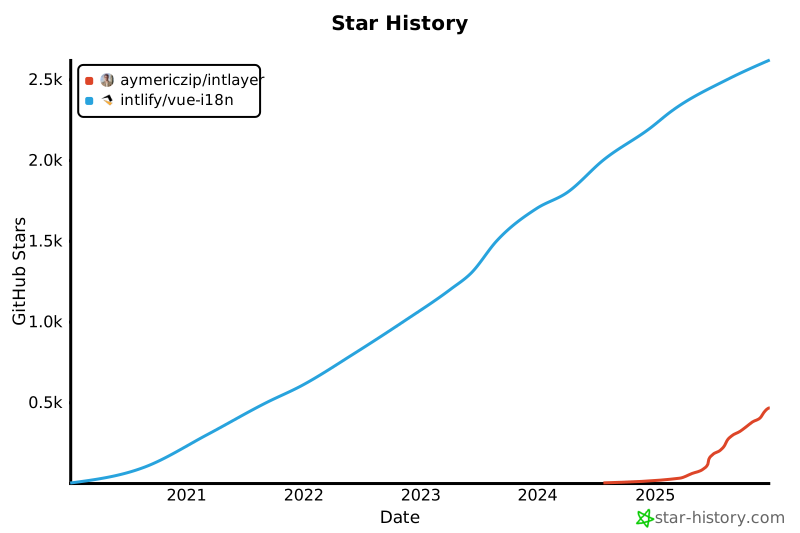
## GitHub STARs
GitHub stars are a strong indicator of a project's popularity, community trust, and long-term relevance. While not a direct measure of technical quality, they reflect how many developers find the project useful, follow its progress, and are likely to adopt it. For estimating the value of a project, stars help compare traction across alternatives and provide insights into ecosystem growth.
[](https://www.star-history.com/#intlify/vue-i18n&aymericzip/intlayer)
---
## Conclusion
Both **vue-i18n** and **Intlayer** localize Vue apps well. The difference is **how much you must build yourself** to achieve a robust, scalable setup:
- With **Intlayer**, **modular content**, **strict TS**, **build-time safety**, **tree-shaken bundles**, and **router/SEO/editor tooling** come **out of the box**.
- If your team prioritizes **maintainability and speed** in a multi-locale, component-driven Vue/Nuxt app, Intlayer offers the **most complete** experience today.
Refer to ['Why Intlayer?' doc](https://intlayer.org/doc/why) for more details.
