---
createdAt: 2025-08-23
updatedAt: 2025-09-29
title: next-i18next vs next-intl vs Intlayer
description: Compare next-i18next with next-intl and Intlayer for the internationalization (i18n) of a Next.js app
keywords:
- next-intl
- next-i18next
- Intlayer
- Internationalization
- Blog
- Next.js
- JavaScript
- React
slugs:
- blog
- next-i18next-vs-next-intl-vs-intlayer
---
# next-i18next VS next-intl VS intlayer | Next.js Internationalization (i18n)

Let’s take a look into the similarities and differences between three i18n options for Next.js: next-i18next, next-intl, and Intlayer.
This is not a full tutorial. It’s a comparison to help you pick.
We focus on **Next.js 13+ App Router** (with **React Server Components**) and evaluate:
<TOC/>
> **tl;dr**: All three can localize a Next.js app. If you want **component-scoped content**, **strict TypeScript types**, **build-time missing-key checks**, **tree-shaken dictionaries**, and **first-class App Router + SEO helpers**, **Intlayer** is the most complete, modern choice.
> One confusion often made by developers is to think that `next-intl` is the Next.js version of `react-intl`. It's not, `next-intl` is maintained by [Amann](https://github.com/amannn), while `react-intl` is maintained by [FormatJS](https://github.com/formatjs/formatjs).
---
## In short
- **next-intl** - Lightweight, straightforward message formatting with solid Next.js support. Centralized catalogs are common; DX is simple, but safety and large-scale maintenance remain mostly your responsibility.
- **next-i18next** - i18next in Next.js clothing. Mature ecosystem and features via plugins (e.g., ICU), but configuration can be verbose and catalogs tend to centralize as projects grow.
- **Intlayer** - Component-centric content model for Next.js, **strict TS typing**, **build-time checks**, **tree-shaking**, **built-in middleware & SEO helpers**, optional **Visual Editor/CMS**, and **AI-assisted translations**.
---
| Library | GitHub Stars | Total Commits | Last Commit | First Version | NPM Version | NPM Downloads |
| ---------------------- | -------------------------------------------------------------------------------------------------------------------------------------------------------------------------------- | ------------------------------------------------------------------------------------------------------------------------------------------------------------------------------------ | ----------------------------------------------------------------------------------------------------------------------------------------------------- | ------------- | ------------------------------------------------------------------------------------------------------------------- | ------------------------------------------------------------------------------------------------------------------------------ |
| `aymericzip/intlayer` | [](https://github.com/aymericzip/intlayer/stargazers) | [](https://github.com/aymericzip/intlayer/commits) | [](https://github.com/aymericzip/intlayer/commits) | April 2024 | [](https://www.npmjs.com/package/intlayer) | [](https://www.npmjs.com/package/intlayer) |
| `amannn/next-intl` | [](https://github.com/amannn/next-intl/stargazers) | [](https://github.com/amannn/next-intl/commits) | [](https://github.com/amannn/next-intl/commits) | Nov 2020 | [](https://www.npmjs.com/package/next-intl) | [](https://www.npmjs.com/package/next-intl) |
| `i18next/i18next` | [](https://github.com/i18next/i18next/stargazers) | [](https://github.com/i18next/i18next/commits) | [](https://github.com/i18next/i18next/commits) | Jan 2012 | [](https://www.npmjs.com/package/i18next) | [](https://www.npmjs.com/package/i18next) |
| `i18next/next-i18next` | [](https://github.com/i18next/next-i18next/stargazers) | [](https://github.com/i18next/next-i18next/commits) | [](https://github.com/i18next/next-i18next/commits) | Nov 2018 | [](https://www.npmjs.com/package/next-i18next) | [](https://www.npmjs.com/package/next-i18next) |
> Badges update automatically. Snapshots will vary over time.
---
## Side-by-Side Feature Comparison (Next.js focused)
| Feature | `next-intlayer` (Intlayer) | `next-intl` | `next-i18next` |
| --------------------------------------------- | ----------------------------------------------------------------------------------------------------------------------------------- | -------------------------------------------------------------------------------------------------------- | -------------------------------------------------------------------------------------------------------- |
| **Translations Near Components** | ✅ Yes, content collocated with each component | ❌ No | ❌ No |
| **TypeScript Integration** | ✅ Advanced, auto-generated strict types | ✅ Good | ⚠️ Basic |
| **Missing Translation Detection** | ✅ TypeScript error hightlight and build-time error/warning | ⚠️ Runtime fallback | ⚠️ Runtime fallback |
| **Rich Content (JSX/Markdown/components)** | ✅ Direct support | ❌ Not designed for rich nodes | ⚠️ Limited |
| **AI-powered Translation** | ✅ Yes, supports multiple AI providers. Usable using your own API keys. Considers the context of your application and content scope | ❌ No | ❌ No |
| **Visual Editor** | ✅ Yes, local Visual Editor + optional CMS; can externalize codebase content; embeddable | ❌ No / available via external localization platforms | ❌ No / available via external localization platforms |
| **Localized Routing** | ✅ Yes, supports localized paths out of the box (works with Next.js & Vite) | ✅ Built-in, App Router supports `[locale]` segment | ✅ Built-in |
| **Dynamic Route Generation** | ✅ Yes | ✅ Yes | ✅ Yes |
| **Pluralization** | ✅ Enumeration-based patterns | ✅ Good | ✅ Good |
| **Formatting (dates, numbers, currencies)** | ✅ Optimized formatters (Intl under the hood) | ✅ Good (Intl helpers) | ✅ Good (Intl helpers) |
| **Content Format** | ✅ .tsx, .ts, .js, .json, .md, .txt, (.yaml WIP) | ✅ .json, .js, .ts | ⚠️ .json |
| **ICU support** | ⚠️ WIP | ✅ Yes | ⚠️ Via plugin (`i18next-icu`) |
| **SEO Helpers (hreflang, sitemap)** | ✅ Built-in tools: helpers for sitemap, robots.txt, metadata | ✅ Good | ✅ Good |
| **Ecosystem / Community** | ⚠️ Smaller but growing fast and reactive | ✅ Good | ✅ Good |
| **Server-side Rendering & Server Components** | ✅ Yes, streamlined for SSR / React Server Components | ⚠️ Supported at page level but need to pass t-functions on component tree for children server components | ⚠️ Supported at page level but need to pass t-functions on component tree for children server components |
| **Tree-shaking (load only used content)** | ✅ Yes, per-component at build time via Babel/SWC plugins | ⚠️ Partial | ⚠️ Partial |
| **Lazy loading** | ✅ Yes, per-locale / per-dictionary | ✅ Yes (per-route/per-locale), need namespace management | ✅ Yes (per-route/per-locale), need namespace management |
| **Purge unused content** | ✅ Yes, per-dictionary at build time | ❌ No, can be managed manually with namespace management | ❌ No, can be managed manually with namespace management |
| **Management of Large Projects** | ✅ Encourages modular, suited for design-system | ✅ Modular with setup | ✅ Modular with setup |
| **Testing Missing Translations (CLI/CI)** | ✅ CLI: `npx intlayer content test` (CI-friendly audit) | ⚠️ Not built-in; docs suggest `npx @lingual/i18n-check` | ⚠️ Not built-in; rely on i18next tools / runtime `saveMissing` |
---
## Introduction
Next.js gives you built-in support for internationalized routing (e.g. locale segments). But that feature doesn’t do translations on its own. You still need a library to render localized content to your users.
Many i18n libraries exist, but in the Next.js world today, three are gaining traction: next-i18next, next-intl, and Intlayer.
---
## Architecture & scalability
- **next-intl / next-i18next**: Default to **centralized catalogs** per locale (plus **namespaces** in i18next). Works fine early on, but often becomes a big shared surface area with rising coupling and key churn.
- **Intlayer**: Encourages **per-component** (or per-feature) dictionaries **co-located** with the code they serve. This lowers cognitive load, eases duplication/migration of UI pieces, and reduces cross-team conflicts. Unused content is naturally easier to spot and purge.
**Why it matters:** In large codebases or design-system setups, **modular content** scales better than monolithic catalogs.
---
## Bundle sizes & dependencies
After building the application, the bundle is the JavaScript that the browser will load to render the page. Bundle size is therefore important for application performance.
Two components are important in the context of a multi-language application bundle:
- The application code
- The content loaded by the browser
## Application Code
The importance of application code is minimal in this case. All three solutions are tree-shakable, meaning that unused parts of the code are not included in the bundle.
Here's a comparison of the JavaScript bundle size loaded by the browser for a multi-language application with the three solutions.
If we don't need any formatter in the application, the list of exported functions after tree-shaking will be:
- **next-intlayer**: `useIntlayer`, `useLocale`, `NextIntlClientProvider`, (Bundle size is 180.6 kB -> 78.6 kB (gzip))
- **next-intl**: `useTranslations`, `useLocale`, `NextIntlClientProvider`, (Bundle size is 101.3 kB -> 31.4 kB (gzip))
- **next-i18next**: `useTranslation`, `useI18n`, `I18nextProvider`, (Bundle size is 80.7 kB -> 25.5 kB (gzip))
These functions are only wrappers around React context/state, so the total impact of the i18n library on bundle size is minimal.
> Intlayer is slightly bigger than `next-intl` and `next-i18next` because it includes more logic in the `useIntlayer` function. This is related to markdown and `intlayer-editor` integration.
## Content and Translations
This part is often ignored by developers, but let's consider the case of an application composed of 10 pages in 10 languages. Let's assume that each page integrates 100% unique content to simplify the calculation (in reality, much content is redundant between pages, e.g., page title, header, footer, etc.).
A user wanting to visit the `/fr/about` page will load the content of one page in a given language. Ignoring content optimization would mean loading 8,200% `((1 + (((10 pages - 1) × (10 languages - 1)))) × 100)` of the application content unnecessarily. Do you see the problem? Even if this content remains text, and while you probably prefer to think about optimizing your site's images, you're sending useless content across the globe and making users' computers process it for nothing.
Two important issues:
- **Splitting by route:**
> If I'm on the `/about` page, I don't want to load the content of the `/home` page
- **Splitting by locale:**
> If I'm on the `/fr/about` page, I don't want to load the content of the `/en/about` page
Again, all three solutions are aware of these issues and allow managing these optimizations. The difference between the three solutions is the DX (Developer Experience).
`next-intl` and `next-i18next` use a centralized approach to manage translations, allowing splitting JSON by locale and by sub-files. In `next-i18next`, we call the JSON files 'namespaces'; `next-intl` allows declaring messages. In `intlayer`, we call the JSON files 'dictionaries'.
- In the case of `next-intl`, like `next-i18next`, content is loaded at the page/layout level, then this content is loaded into a context provider. This means the developer must manually manage the JSON files that will be loaded for each page.
> In practice, this implies that developers often skip this optimization, preferring to load all content in the page's context provider for simplicity.
- In the case of `intlayer`, all content is loaded in the application. Then a plugin (`@intlayer/babel` / `@intlayer/swc`) takes care of optimizing the bundle by loading only the content used on the page. The developer therefore doesn't need to manually manage the dictionaries that will be loaded. This allows better optimization, better maintainability, and reduces development time.
As the application grows (especially when multiple developers work on the application), it's common to forget to remove content that's no longer used from JSON files.
> Note that all JSON is loaded in all cases (next-intl, next-i18next, intlayer).
This is why Intlayer's approach is more performant: if a component is no longer used, its dictionary is not loaded in the bundle.
How the library handles fallbacks is also important. Let's consider that the application is in English by default, and the user visits the `/fr/about` page. If translations are missing in French, we'll consider the English fallback.
In the case of `next-intl` and `next-i18next`, the library requires loading the JSON related to the current locale, but also to the fallback locale. Thus, considering that all content has been translated, each page will load 100% unnecessary content. **In comparison, `intlayer` processes the fallback at dictionary build time. Thus, each page will load only the content used.**
> Note: To optimize the bundle using `intlayer`, you need to set the `importMode: 'dynamic'` option in your `intlayer.config.ts` file. And ensure the plugin `@intlayer/babel` / `@intlayer/swc` is installed (installed by default using `vite-intlayer`).
Here an example of the impact of bundle size optimization using `intlayer` in a vite + react application:
| Optimized bundle | Bundle not optimized |
| ----------------------------------------------------------------------------------------------------- | ------------------------------------------------------------------------------------------------------------------------ |
|  |  |
---
## TypeScript & safety
<Columns>
<Column>
**next-i18next**
- Base typings for hooks. **strict key typing requires extra tooling/config**.
</Column>
<Column>
**next-intl**
- Solid TypeScript support, but **keys aren’t strictly typed by default**. you’ll maintain safety patterns manually.
</Column>
<Column>
**intlayer**
- **Generates strict types** from your content. **IDE autocompletion** and **compile-time errors** catch typos and missing keys before deploy.
</Column>
</Columns>
**Why it matters:** Strong typing shifts failures **left** (CI/build) instead of **right** (runtime).
---
## Missing translation handling
<Columns>
<Column>
**next-i18next**
- Relies on **runtime fallbacks**. Build doesn’t fail.
</Column>
<Column>
**next-intl**
- Relies on **runtime fallbacks**. Build doesn’t fail.
</Column>
<Column>
**intlayer**
- **Build-time detection** with **warnings/errors** for missing locales or keys.
</Column>
</Columns>
**Why it matters:** Catching gaps during build prevents 'undefined' strings in production.
---
## Routing, middleware & URL strategy
<Columns>
<Column>
**next-i18next**
- Allows localized routing. But middleware is not built-in.
</Column>
<Column>
**next-intl**
- Allows localized routing.
- Provides middleware.
</Column>
<Column>
**intlayer**
- Allows localized routing.
- Provides middleware.
</Column>
</Columns>
**Why it matters:** Helps for SEO and discovery, as well as user experience.
---
## Server Components (RSC) alignment
<Columns>
<Column>
**next-i18next**
- Support page and layout server components.
- Do not provide synchronous API for children server components.
</Column>
<Column>
**next-intl**
- Support page and layout server components.
- Do not provide synchronous API for children server components.
</Column>
<Column>
**intlayer**
- Support page and layout server components.
- Provide synchronous API for children server components.
</Column>
</Columns>
**Why it matters:** Server component suport is a key feature of Next.js 13+, helping for performance. Passing props the locale or the `t` function from the parent to the child server components make your components less reusable.
---
## Integration with localization platforms (TMS)
Large organizations often rely on Translation Management Systems (TMS) like **Crowdin**, **Phrase**, **Lokalise**, **Localizely**, or **Localazy**.
- **Why companies care**
- **Collaboration & roles**: Multiple actors are involved: developers, product managers, translators, reviewers, marketing teams.
- **Scale & efficiency**: continuous localization, in‑context review.
- **next-intl / next-i18next**
- Typically use **centralized JSON catalogs**, so export/import with TMS is straightforward.
- Mature ecosystems and examples/integrations for the platforms above.
- **Intlayer**
- Encourages **decentralized, per-component dictionaries** and supports **TypeScript/TSX/JS/JSON/MD** content.
- This improves modularity in code, but can make plug‑and‑play TMS integration harder when a tool expects centralized, flat JSON files.
- Intlayer provides alternatives: **AI‑assisted translations** (using your own provider keys), a **Visual Editor/CMS**, and **CLI/CI** workflows to catch and prefill gaps.
> Note: `next-intl` and `i18next` also accepts TypeScript catalogs. If your team stores messages in `.ts` files or decentralizes them by feature, you can face similar TMS friction. However, many `next-intl` setups remain centralized in a `locales/` folder, which is a bit easier to refactor to JSON for TMS.
---
## Developer Experience
This part makes a deep comparison between the three solutions. Rather than considering simple cases, as described in the 'getting started' documentation for each solution, we will consider a real use case, more similar to a real project.
### App structure
The app structure is important to ensure good maintainability for your codebase.
<Tab defaultTab="next-intl" group='techno'>
<TabItem label="next-i18next" value="next-i18next">
```bash
.
├── i18n.config.ts
└── src
├── locales
│ ├── en
│ │ ├── common.json
│ │ └── about.json
│ └── fr
│ ├── common.json
│ └── about.json
├── app
│ ├── i18n
│ │ └── server.ts
│ └── [locale]
│ ├── layout.tsx
│ └── about.tsx
└── components
├── I18nProvider.tsx
├── ClientComponent.tsx
└── ServerComponent.tsx
```
</TabItem>
<TabItem label="next-intl" value="next-intl">
```bash
.
├── i18n.ts
├── locales
│ ├── en
│ │ ├── home.json
│ │ └── navbar.json
│ ├── fr
│ │ ├── home.json
│ │ └── navbar.json
│ └── es
│ ├── home.json
│ └── navbar.json
└── src
├── middleware.ts
├── app
│ ├── i18n
│ │ └── server.ts
│ └── [locale]
│ └── home.tsx
└── components
└── Navbar
└── index.tsx
```
</TabItem>
<TabItem label="intlayer" value="intlayer">
```bash
.
├── intlayer.config.ts
└── src
├── middleware.ts
├── app
│ └── [locale]
│ ├── layout.tsx
│ └── home
│ ├── index.tsx
│ └── index.content.ts
└── components
└── Navbar
├── index.tsx
└── index.content.ts
```
</TabItem>
</Tab>
#### Comparison
- **next-intl / next-i18next**: Centralized catalogs (JSON; namespaces/messages). Clear structure, integrates well with translation platforms, but can lead to more cross-file edits as apps grow.
- **Intlayer**: Per-component `.content.{ts|js|json}` dictionaries co-located with components. Easier component reuse and local reasoning; adds files and relies on build-time tooling.
#### Setup and Loading Content
As mentioned previously, you must optimize how each JSON file is imported into your code.
How the library handles content loading is important.
<Tab defaultTab="next-intl" group='techno'>
<TabItem label="next-i18next" value="next-i18next">
```ts fileName="i18n.config.ts"
export const locales = ["en", "fr"] as const;
export type Locale = (typeof locales)[number];
export const defaultLocale: Locale = "en";
export const rtlLocales = ["ar", "he", "fa", "ur"] as const;
export const isRtl = (locale: string) =>
(rtlLocales as readonly string[]).includes(locale);
export function localizedPath(locale: string, path: string) {
return locale === defaultLocale ? path : "/" + locale + path;
}
const ORIGIN = "https://example.com";
export function abs(locale: string, path: string) {
return ORIGIN + localizedPath(locale, path);
}
```
```ts fileName="src/app/i18n/server.ts"
import { createInstance } from "i18next";
import { initReactI18next } from "react-i18next/initReactI18next";
import resourcesToBackend from "i18next-resources-to-backend";
import { defaultLocale } from "@/i18n.config";
// Load JSON resources from src/locales/<locale>/<namespace>.json
const backend = resourcesToBackend(
(locale: string, namespace: string) =>
import(`../../locales/${locale}/${namespace}.json`)
);
export async function initI18next(
locale: string,
namespaces: string[] = ["common"]
) {
const i18n = createInstance();
await i18n
.use(initReactI18next)
.use(backend)
.init({
lng: locale,
fallbackLng: defaultLocale,
ns: namespaces,
defaultNS: "common",
interpolation: { escapeValue: false },
react: { useSuspense: false },
});
return i18n;
}
```
```tsx fileName="src/components/I18nProvider.tsx"
"use client";
import * as React from "react";
import { I18nextProvider } from "react-i18next";
import { createInstance } from "i18next";
import { initReactI18next } from "react-i18next/initReactI18next";
import resourcesToBackend from "i18next-resources-to-backend";
import { defaultLocale } from "@/i18n.config";
const backend = resourcesToBackend(
(locale: string, namespace: string) =>
import(`../../locales/${locale}/${namespace}.json`)
);
type Props = {
locale: string;
namespaces?: string[];
resources?: Record<string, any>; // { ns: bundle }
children: React.ReactNode;
};
export default function I18nProvider({
locale,
namespaces = ["common"],
resources,
children,
}: Props) {
const [i18n] = React.useState(() => {
const i = createInstance();
i.use(initReactI18next)
.use(backend)
.init({
lng: locale,
fallbackLng: defaultLocale,
ns: namespaces,
resources: resources ? { [locale]: resources } : undefined,
defaultNS: "common",
interpolation: { escapeValue: false },
react: { useSuspense: false },
});
return i;
});
return <I18nextProvider i18n={i18n}>{children}</I18nextProvider>;
}
```
```tsx fileName="src/app/[locale]/layout.tsx"
import type { ReactNode } from "react";
import { locales, defaultLocale, isRtl, type Locale } from "@/i18n.config";
export const dynamicParams = false;
export function generateStaticParams() {
return locales.map((locale) => ({ locale }));
}
export default function LocaleLayout({
children,
params,
}: {
children: ReactNode;
params: { locale: string };
}) {
const locale: Locale = (locales as readonly string[]).includes(params.locale)
? (params.locale as any)
: defaultLocale;
const dir = isRtl(locale) ? "rtl" : "ltr";
return (
<html lang={locale} dir={dir}>
<body>{children}</body>
</html>
);
}
```
```tsx fileName="src/app/[locale]/about.tsx"
import I18nProvider from "@/components/I18nProvider";
import { initI18next } from "@/app/i18n/server";
import type { Locale } from "@/i18n.config";
import ClientComponent from "@/components/ClientComponent";
import ServerComponent from "@/components/ServerComponent";
// Force static rendering for the page
export const dynamic = "force-static";
export default async function AboutPage({
params: { locale },
}: {
params: { locale: Locale };
}) {
const namespaces = ["common", "about"] as const;
const i18n = await initI18next(locale, [...namespaces]);
const tAbout = i18n.getFixedT(locale, "about");
return (
<I18nProvider locale={locale} namespaces={[...namespaces]}>
<main>
<h1>{tAbout("title")}</h1>
<ClientComponent />
<ServerComponent t={tAbout} locale={locale} count={0} />
</main>
</I18nProvider>
);
}
```
</TabItem>
<TabItem label="next-intl" value="next-intl">
```tsx fileName="src/i18n.ts"
import { getRequestConfig } from "next-intl/server";
import { notFound } from "next/navigation";
export const locales = ["en", "fr", "es"] as const;
export const defaultLocale = "en" as const;
async function loadMessages(locale: string) {
// Load only the namespaces your layout/pages need
const [common, about] = await Promise.all([
import(`../locales/${locale}/common.json`).then((m) => m.default),
import(`../locales/${locale}/about.json`).then((m) => m.default),
]);
return { common, about } as const;
}
export default getRequestConfig(async ({ locale }) => {
if (!locales.includes(locale as any)) notFound();
return {
messages: await loadMessages(locale),
};
});
```
```tsx fileName="src/app/[locale]/layout.tsx"
import type { ReactNode } from "react";
import { locales } from "@/i18n";
import {
getLocaleDirection,
unstable_setRequestLocale,
} from "next-intl/server";
export const dynamic = "force-static";
export function generateStaticParams() {
return locales.map((locale) => ({ locale }));
}
export default async function LocaleLayout({
children,
params,
}: {
children: ReactNode;
params: Promise<{ locale: string }>;
}) {
const { locale } = await params;
// Set the active request locale for this server render (RSC)
unstable_setRequestLocale(locale);
const dir = getLocaleDirection(locale);
return (
<html lang={locale} dir={dir}>
<body>{children}</body>
</html>
);
}
```
```tsx fileName="src/app/[locale]/about/page.tsx"
import { getTranslations, getMessages, getFormatter } from "next-intl/server";
import { NextIntlClientProvider } from "next-intl";
import pick from "lodash/pick";
import ServerComponent from "@/components/ServerComponent";
import ClientComponentExample from "@/components/ClientComponentExample";
export const dynamic = "force-static";
export default async function AboutPage({
params,
}: {
params: Promise<{ locale: string }>;
}) {
const { locale } = await params;
// Messages are loaded server-side. Push only what's needed to the client.
const messages = await getMessages();
const clientMessages = pick(messages, ["common", "about"]);
// Strictly server-side translations/formatting
const tAbout = await getTranslations("about");
const tCounter = await getTranslations("about.counter");
const format = await getFormatter();
const initialFormattedCount = format.number(0);
return (
<NextIntlClientProvider locale={locale} messages={clientMessages}>
<main>
<h1>{tAbout("title")}</h1>
<ClientComponentExample />
<ServerComponent
formattedCount={initialFormattedCount}
label={tCounter("label")}
increment={tCounter("increment")}
/>
</main>
</NextIntlClientProvider>
);
}
```
</TabItem>
<TabItem label="intlayer" value="intlayer">
```tsx fileName="intlayer.config.ts"
import { type IntlayerConfig, Locales } from "intlayer";
const config: IntlayerConfig = {
internationalization: {
locales: [Locales.ENGLISH, Locales.FRENCH, Locales.SPANISH],
defaultLocale: Locales.ENGLISH,
},
};
export default config;
```
```tsx fileName="src/app/[locale]/layout.tsx"
import { getHTMLTextDir } from "intlayer";
import {
IntlayerClientProvider,
generateStaticParams,
type NextLayoutIntlayer,
} from "next-intlayer";
export const dynamic = "force-static";
const LocaleLayout: NextLayoutIntlayer = async ({ children, params }) => {
const { locale } = await params;
return (
<html lang={locale} dir={getHTMLTextDir(locale)}>
<body>
<IntlayerClientProvider locale={locale}>
{children}
</IntlayerClientProvider>
</body>
</html>
);
};
export default LandingLayout;
```
```tsx fileName="src/app/[locale]/about/page.tsx"
import { PageContent } from "@components/PageContent";
import type { NextPageIntlayer } from "next-intlayer";
import { IntlayerServerProvider, useIntlayer } from "next-intlayer/server";
import { ClientComponent, ServerComponent } from "@components";
const LandingPage: NextPageIntlayer = async ({ params }) => {
const { locale } = await params;
const { title } = useIntlayer("about", locale);
return (
<IntlayerServerProvider locale={locale}>
<main>
<h1>{title}</h1>
<ClientComponent />
<ServerComponent />
</main>
</IntlayerServerProvider>
);
};
export default LandingPage;
```
</TabItem>
</Tab>
#### Comparison
All three support per-locale content loading and providers.
- With **next-intl/next-i18next**, you typically load selected messages/namespaces per route and place providers where needed.
- With **Intlayer**, adds build-time analysis to infer usage, which can reduce manual wiring and may allow a single root provider.
Choose between explicit control and automation based on team preference.
### Usage in a client component
Let's take an example of a client component rendering a counter.
<Tab defaultTab="next-intl" group='techno'>
<TabItem label="next-i18next" value="next-i18next">
**Translations (one JSON per namespace under `src/locales/...`)**
```json fileName="src/locales/en/about.json"
{
"title": "About",
"description": "About page description",
"counter": {
"label": "Counter",
"increment": "Increment"
}
}
```
```json fileName="src/locales/fr/about.json"
{
"title": "À propos",
"description": "Description de la page À propos",
"counter": {
"label": "Compteur",
"increment": "Incrémenter"
}
}
```
**Client component (loads only the required namespace)**
```tsx fileName="src/components/ClientComponent.tsx"
"use client";
import React, { useState } from "react";
import { useTranslation } from "react-i18next";
const ClientComponent = () => {
const { t, i18n } = useTranslation("about");
const [count, setCount] = useState(0);
const numberFormat = new Intl.NumberFormat(i18n.language);
return (
<div>
<p>{numberFormat.format(count)}</p>
<button
aria-label={t("counter.label")}
onClick={() => setCount((c) => c + 1)}
>
{t("counter.increment")}
</button>
</div>
);
};
export default ClientComponent;
```
> Ensure the page/provider includes only the namespaces you need (e.g. `about`).
> If you use React < 19, memoize heavy formatters like `Intl.NumberFormat`.
</TabItem>
<TabItem label="next-intl" value="next-intl">
**Translations (shape reused; load them into next-intl messages as you prefer)**
```json fileName="locales/en/about.json"
{
"counter": {
"label": "Counter",
"increment": "Increment"
}
}
```
```json fileName="locales/fr/about.json"
{
"counter": {
"label": "Compteur",
"increment": "Incrémenter"
}
}
```
**Client component**
```tsx fileName="src/components/ClientComponentExample.tsx"
"use client";
import React, { useState } from "react";
import { useTranslations, useFormatter } from "next-intl";
const ClientComponentExample = () => {
// Scope directly to the nested object
const t = useTranslations("about.counter");
const format = useFormatter();
const [count, setCount] = useState(0);
return (
<div>
<p>{format.number(count)}</p>
<button
aria-label={t("label")}
onClick={() => setCount((count) => count + 1)}
>
{t("increment")}
</button>
</div>
);
};
```
> Don't forget to add "about" message on the page client message
</TabItem>
<TabItem label="intlayer" value="intlayer">
**Content**
```ts fileName="src/components/ClientComponentExample/index.content.ts"
import { t, type Dictionary } from "intlayer";
const counterContent = {
key: "counter",
content: {
label: t({ en: "Counter", fr: "Compteur" }),
increment: t({ en: "Increment", fr: "Incrémenter" }),
},
} satisfies Dictionary;
export default counterContent;
```
**Client component**
```tsx fileName="src/components/ClientComponentExample/index.tsx"
"use client";
import React, { useState } from "react";
import { useNumber, useIntlayer } from "next-intlayer";
const ClientComponentExample = () => {
const [count, setCount] = useState(0);
const { label, increment } = useIntlayer("counter"); // returns strings
const { number } = useNumber();
return (
<div>
<p>{number(count)}</p>
<button aria-label={label} onClick={() => setCount((count) => count + 1)}>
{increment}
</button>
</div>
);
};
```
</TabItem>
</Tab>
#### Comparison
- **Number formatting**
- **next-i18next**: no `useNumber`; use `Intl.NumberFormat` (or i18next-icu).
- **next-intl**: `useFormatter().number(value)`.
- **Intlayer**: `useNumber()` built-in.
- **Keys**
- Keep a nested structure (`about.counter.label`) and scope your hook accordingly (`useTranslation("about")` + `t("counter.label")` or `useTranslations("about.counter")` + `t("label")`).
- **File locations**
- **next-i18next** expects JSON in `public/locales/{lng}/{ns}.json`.
- **next-intl** is flexible; load messages however you configure.
- **Intlayer** stores content in TS/JS dictionaries and resolves by key.
---
### Usage in a server component
We will take the case of a UI component. This component is a server component, and should be able to be inserted as a child of a client component. (page (server component) -> client component -> server component). As this component can be inserted as a child of a client component, it cannot be async.
<Tab defaultTab="next-intl" group='techno'>
<TabItem label="next-i18next" value="next-i18next">
```tsx fileName="src/components/ServerComponent.tsx"
type ServerComponentProps = {
t: (key: string) => string;
locale: string;
count: number;
};
const ServerComponent = ({ t, locale, count }: ServerComponentProps) => {
const formatted = new Intl.NumberFormat(locale).format(count);
return (
<div>
<p>{formatted}</p>
<button aria-label={t("counter.label")}>{t("counter.increment")}</button>
</div>
);
};
export default ServerComponent;
```
</TabItem>
<TabItem label="next-intl" value="next-intl">
```tsx fileName="src/components/ServerComponent.tsx"
type ServerComponentProps = {
t: (key: string) => string;
locale: string;
count: number;
formatter: Intl.NumberFormat;
};
const ServerComponent = ({
t,
locale,
count,
formatter,
}: ServerComponentProps) => {
const formatted = formatter.format(count);
return (
<div>
<p>{formatted}</p>
<button aria-label={t("counter.label")}>{t("counter.increment")}</button>
</div>
);
};
export default ServerComponent;
```
> As the server component cannot be async, you need to pass the translations and formatter function as props.
>
> In your page / layout:
>
> - `import { getTranslations, getFormatter } from "next-intl/server";`
> - `const t = await getTranslations("about.counter");`
> - `const formatter = await getFormatter().then((formatter) => formatter.number());`
</TabItem>
<TabItem label="intlayer" value="intlayer">
```tsx fileName="src/components/ServerComponent.tsx"
import { useIntlayer, useNumber } from "next-intlayer/server";
type ServerComponentProps = {
count: number;
};
const ServerComponent = ({ count }: ServerComponentProps) => {
const { label, increment } = useIntlayer("counter");
const { number } = useNumber();
return (
<div>
<p>{number(count)}</p>
<button aria-label={label}>{increment}</button>
</div>
);
};
```
</TabItem>
</Tab>
> Intlayer exposes **server-safe** hooks via `next-intlayer/server`. To work, `useIntlayer` and `useNumber` use hooks-like syntax, similar to the client hooks, but depend under the hood on the server context (`IntlayerServerProvider`).
### Metadata / Sitemap / Robots
Translating content is great. But people usually forget that the main goal of internationalization is to make your website more visible to the world. I18n is an incredible lever to improve your website visibility.
Here's a list of good practices regarding multilingual SEO.
- set hreflang meta tags in the `<head>` tag
> It helps search engines to understand what languages are available on the page
- list all pages translations in the sitemap.xml using `http://www.w3.org/1999/xhtml` XML schema
>
- do not forget to exclude prefixed pages from the robots.txt (e.g. `/dashboard`, and `/fr/dashboard`, `/es/dashboard`)
>
- use custom Link component to redirect to the most localized page (e.g. in french `<a href="/fr/about">A propos</a>` )
>
Developers often forget to properly reference their pages across locales.
<Tab defaultTab="next-intl" group='techno'>
<TabItem label="next-i18next" value="next-i18next">
```ts fileName="i18n.config.ts"
export const locales = ["en", "fr"] as const;
export type Locale = (typeof locales)[number];
export const defaultLocale: Locale = "en";
export function localizedPath(locale: string, path: string) {
return locale === defaultLocale ? path : "/" + locale + path;
}
const ORIGIN = "https://example.com";
export function abs(locale: string, path: string) {
return ORIGIN + localizedPath(locale, path);
}
```
```tsx fileName="src/app/[locale]/about/layout.tsx"
import type { Metadata } from "next";
import { locales, defaultLocale, localizedPath } from "@/i18n.config";
type GenerateMetadataParams = {
params: Promise<{
locale: string;
}>;
};
export const generateMetadata = async ({
params,
}: GenerateMetadataParams): Promise<Metadata> => {
const { locale } = await params;
// Import the correct JSON bundle from src/locales
const messages = (await import("@/locales/" + locale + "/about.json"))
.default;
const languages = Object.fromEntries(
locales.map((locale) => [locale, localizedPath(locale, "/about")])
);
return {
title: messages.title,
description: messages.description,
alternates: {
canonical: localizedPath(locale, "/about"),
languages: { ...languages, "x-default": "/about" },
},
};
};
export default async function AboutPage() {
return <h1>About</h1>;
}
```
```ts fileName="src/app/sitemap.ts"
import type { MetadataRoute } from "next";
import { locales, defaultLocale, abs } from "@/i18n.config";
export const sitemap = (): MetadataRoute.Sitemap => {
const languages = Object.fromEntries(
locales.map((locale) => [locale, abs(locale, "/about")])
);
return [
{
url: abs(defaultLocale, "/about"),
lastModified: new Date(),
changeFrequency: "monthly",
priority: 0.7,
alternates: { languages },
},
];
};
```
```ts fileName="src/app/robots.ts"
import type { MetadataRoute } from "next";
import { locales, defaultLocale, localizedPath } from "@/i18n.config";
const ORIGIN = "https://example.com";
const expandAllLocales = (path: string) => [
localizedPath(defaultLocale, path),
...locales
.filter((locale) => locale !== defaultLocale)
.map((locale) => localizedPath(locale, path)),
];
export const robots = (): MetadataRoute.Robots => {
const disallow = [
...expandAllLocales("/dashboard"),
...expandAllLocales("/admin"),
];
return {
rules: { userAgent: "*", allow: ["/"], disallow },
host: ORIGIN,
sitemap: ORIGIN + "/sitemap.xml",
};
};
```
</TabItem>
<TabItem label="next-intl" value="next-intl">
```tsx fileName="src/app/[locale]/about/layout.tsx"
import type { Metadata } from "next";
import { locales, defaultLocale } from "@/i18n";
import { getTranslations } from "next-intl/server";
const localizedPath = (locale: string, path: string) => {
return locale === defaultLocale ? path : "/" + locale + path;
};
type GenerateMetadataParams = {
params: Promise<{
locale: string;
}>;
};
export const generateMetadata = async ({
params,
}: GenerateMetadataParams): Promise<Metadata> => {
const { locale } = await params;
const t = await getTranslations({ locale, namespace: "about" });
const url = "/about";
const languages = Object.fromEntries(
locales.map((locale) => [locale, localizedPath(locale, url)])
);
return {
title: t("title"),
description: t("description"),
alternates: {
canonical: localizedPath(locale, url),
languages: { ...languages, "x-default": url },
},
};
};
// ... Rest of the page code
```
```tsx fileName="src/app/sitemap.ts"
import type { MetadataRoute } from "next";
import { locales, defaultLocale } from "@/i18n";
const origin = "https://example.com";
const formatterLocalizedPath = (locale: string, path: string) =>
locale === defaultLocale ? origin + path : origin + "/" + locale + path;
export const sitemap = (): MetadataRoute.Sitemap => {
const aboutLanguages = Object.fromEntries(
locales.map((l) => [l, formatterLocalizedPath(l, "/about")])
);
return [
{
url: formatterLocalizedPath(defaultLocale, "/about"),
lastModified: new Date(),
changeFrequency: "monthly",
priority: 0.7,
alternates: { languages: aboutLanguages },
},
];
};
```
```tsx fileName="src/app/robots.ts"
import type { MetadataRoute } from "next";
import { locales, defaultLocale } from "@/i18n";
const origin = "https://example.com";
const withAllLocales = (path: string) => [
path,
...locales
.filter((locale) => locale !== defaultLocale)
.map((locale) => "/" + locale + path),
];
export const robots = (): MetadataRoute.Robots => {
const disallow = [
...withAllLocales("/dashboard"),
...withAllLocales("/admin"),
];
return {
rules: { userAgent: "*", allow: ["/"], disallow },
host: origin,
sitemap: origin + "/sitemap.xml",
};
};
```
</TabItem>
<TabItem label="intlayer" value="intlayer">
```typescript fileName="src/app/[locale]/about/layout.tsx"
import { getIntlayer, getMultilingualUrls } from "intlayer";
import type { Metadata } from "next";
import type { LocalPromiseParams } from "next-intlayer";
export const generateMetadata = async ({
params,
}: LocalPromiseParams): Promise<Metadata> => {
const { locale } = await params;
const metadata = getIntlayer("page-metadata", locale);
const multilingualUrls = getMultilingualUrls("/about");
return {
...metadata,
alternates: {
canonical: multilingualUrls[locale as keyof typeof multilingualUrls],
languages: { ...multilingualUrls, "x-default": "/about" },
},
};
};
// ... Rest of the page code
```
```tsx fileName="src/app/sitemap.ts"
import { getMultilingualUrls } from "intlayer";
import type { MetadataRoute } from "next";
const sitemap = (): MetadataRoute.Sitemap => [
{
url: "https://example.com/about",
alternates: {
languages: { ...getMultilingualUrls("https://example.com/about") },
},
},
];
```
```tsx fileName="src/app/robots.ts"
import { getMultilingualUrls } from "intlayer";
import type { MetadataRoute } from "next";
const getAllMultilingualUrls = (urls: string[]) =>
urls.flatMap((url) => Object.values(getMultilingualUrls(url)) as string[]);
const robots = (): MetadataRoute.Robots => ({
rules: {
userAgent: "*",
allow: ["/"],
disallow: getAllMultilingualUrls(["/dashboard"]),
},
host: "https://example.com",
sitemap: "https://example.com/sitemap.xml",
});
export default robots;
```
</TabItem>
</Tab>
> Intlayer provides a `getMultilingualUrls` function to generate multilingual URLs for your sitemap.
### Middleware for locale routing
<Tab defaultTab="next-intl" group='techno'>
<TabItem label="next-i18next" value="next-i18next">
Add a middleware to handle locale detection and routing:
```ts fileName="src/middleware.ts"
import { NextResponse, type NextRequest } from "next/server";
import { defaultLocale, locales } from "@/i18n.config";
const PUBLIC_FILE = /\.[^/]+$/; // exclude files with extensions
export function middleware(request: NextRequest) {
const { pathname } = request.nextUrl;
if (
pathname.startsWith("/_next") ||
pathname.startsWith("/api") ||
pathname.startsWith("/static") ||
PUBLIC_FILE.test(pathname)
) {
return;
}
const hasLocale = locales.some(
(l) => pathname === "/" + l || pathname.startsWith("/" + l + "/")
);
if (!hasLocale) {
const locale = defaultLocale;
const url = request.nextUrl.clone();
url.pathname = "/" + locale + (pathname === "/" ? "" : pathname);
return NextResponse.redirect(url);
}
}
export const config = {
matcher: [
// Match all paths except the ones starting with these and files with an extension
"/((?!api|_next|static|.*\\..*).*)",
],
};
```
</TabItem>
<TabItem label="next-intl" value="next-intl">
Add a middleware to handle locale detection and routing:
```ts fileName="src/middleware.ts"
import createMiddleware from "next-intl/middleware";
import { locales, defaultLocale } from "@/i18n";
export default createMiddleware({
locales: [...locales],
defaultLocale,
localeDetection: true,
});
export const config = {
// Skip API, Next internals and static assets
matcher: ["/((?!api|_next|.*\\..*).*)"],
};
```
</TabItem>
<TabItem label="intlayer" value="intlayer">
Intlayer provides built-in middleware handling through the `next-intlayer` package configuration.
```ts fileName="src/middleware.ts"
import { intlayerProxy } from "next-intlayer/proxy";
export const middleware = intlayerProxy();
// applies this middleware only to files in the app directory
export const config = {
matcher: "/((?!api|_next|static|.*\\..*).*)",
};
```
The set up of the middleware centralized in the `intlayer.config.ts` file.
</TabItem>
</Tab>
### Setup checklist and good practices
<Tab defaultTab="next-intl" group='techno'>
<TabItem label="next-i18next" value="next-i18next">
- Ensure `lang` and `dir` are set on the root `<html>` in `src/app/[locale]/layout.tsx`.
- Split translations into namespaces (for example `common.json`, `about.json`) under `src/locales/<locale>/`.
- Only load required namespaces in client components using `useTranslation('<ns>')` and by scoping `I18nProvider` with the same namespaces.
- Keep pages static when possible: export `export const dynamic = 'force-static'` on pages; set `dynamicParams = false` and implement `generateStaticParams`.
- Use sync server components nested under client boundaries by passing already-computed strings or the `t` function and the `locale`.
- For SEO, set `alternates.languages` in metadata, list localized URLs in `sitemap.ts`, and disallow duplicate localized routes in `robots.ts`.
- Prefer locale-aware formatters (e.g., `Intl.NumberFormat(locale)`) and memoize them on the client if using React < 19.
</TabItem>
<TabItem label="next-intl" value="next-intl">
- **Set html `lang` and `dir`**: In `src/app/[locale]/layout.tsx`, compute `dir` via `getLocaleDirection(locale)` and set `<html lang={locale} dir={dir}>`.
- **Split messages by namespace**: Organize JSON per locale and namespace (e.g., `common.json`, `about.json`).
- **Minimize client payload**: On pages, send only required namespaces to `NextIntlClientProvider` (e.g., `pick(messages, ['common', 'about'])`).
- **Prefer static pages**: Export `export const dynamic = 'force-static'` and generate static params for all `locales`.
- **Synchronous server components**: Keep server components sync by passing precomputed strings (translated labels, formatted numbers) rather than async calls or non-serializable functions.
</TabItem>
<TabItem label="intlayer" value="intlayer">
- **Modular content**: Co-locate content dictionaries with components using `.content.{ts|js|json}` files.
- **Type safety**: Leverage TypeScript integration for compile-time content validation.
- **Build-time optimization**: Use Intlayer's build tools for automatic tree-shaking and bundle optimization.
- **Integrated tooling**: Take advantage of built-in routing, SEO helpers, and visual editor support.
</TabItem>
</Tab>
---
## And the winner is…
It’s not simple. Each option has trade-offs. Here’s how I see it:
<Columns>
<Column>
**next-i18next**
- mature, full of features, lots of community plugins, but higher setup cost. If you need **i18next’s plugin ecosystem** (e.g., advanced ICU rules via plugins) and your team already knows i18next, accepting **more configuration** for flexibility.
</Column>
<Column>
**next-intl**
- simplest, lightweight, fewer decisions forced on you. If you want a **minimal** solution, you’re comfortable with centralized catalogs, and your app is **small to mid-size**.
</Column>
<Column>
**Intlayer**
- built for modern Next.js, with modular content, type safety, tooling, and less boilerplate. If you value **component-scoped content**, **strict TypeScript**, **build-time guarantees**, **tree-shaking**, and **batteries-included** routing/SEO/editor tooling - especially for **Next.js App Router**, design-systems and **large, modular codebases**.
</Column>
</Columns>
If you prefer minimal setup and accept some manual wiring, next-intl is a good pick. If you need all the features and don't mind complexity, next-i18next works. But if you want a modern, scalable, modular solution with built tools, Intlayer aims to give you that out of the box.
> **Alternative for enterprise teams**: If you need a well-proven solution that works perfectly with established localization platforms like **Crowdin**, **Phrase**, or other professional translation management systems, consider **next-intl** or **next-i18next** for their mature ecosystem and proven integrations.
> **Future roadmap**: Intlayer also plans to develop plugins that work on top of **i18next** and **next-intl** solutions. This will give you the advantages of Intlayer for automation, syntax, and content management while keeping the security and stability provided by these established solutions in your application code.
## GitHub STARs
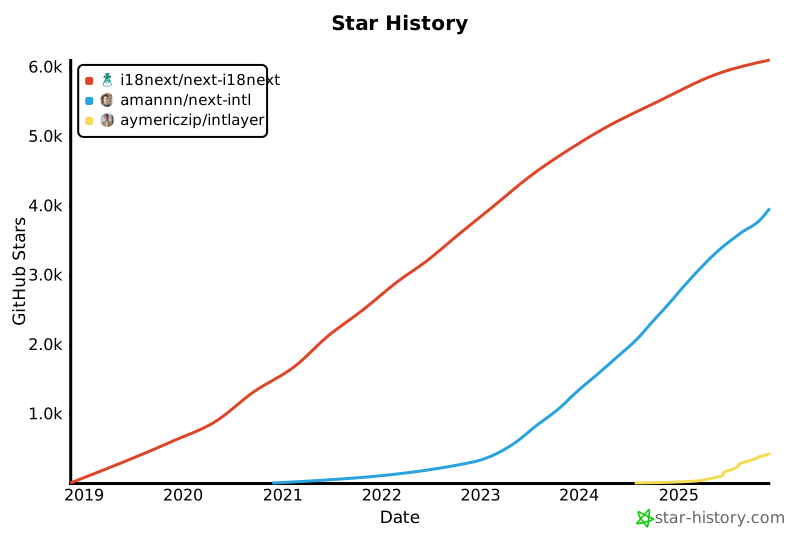
GitHub stars are a strong indicator of a project's popularity, community trust, and long-term relevance. While not a direct measure of technical quality, they reflect how many developers find the project useful, follow its progress, and are likely to adopt it. For estimating the value of a project, stars help compare traction across alternatives and provide insights into ecosystem growth.
[](https://www.star-history.com/#i18next/next-i18next&amannn/next-intl&aymericzip/intlayer)
---
## Conclusion
All three libraries succeed at core localization. The difference is **how much work you must do** to achieve a robust, scalable setup in **modern Next.js**:
- With **Intlayer**, **modular content**, **strict TS**, **build-time safety**, **tree-shaken bundles**, and **first-class App Router + SEO tooling** are **defaults**, not chores.
- If your team prizes **maintainability and speed** in a multi-locale, component-driven app, Intlayer offers the **most complete** experience today.
Refer to ['Why Intlayer?' doc](https://intlayer.org/doc/why) for more details.
