
Uses .ENV files for configuration and secure storage of AWS credentials and API keys needed for the MCP server operation.
Integrates with GitHub repositories for code access and deployment, allowing users to clone the necessary code components for the MCP server implementation.
Incorporates Google's A2A (Agent-to-Agent) protocol for enabling robust multi-agent communication between AI systems.
Leverages the OpenAI Agents SDK to create intelligent agents capable of understanding and executing user prompts for AWS resource management tasks.
Provides integration with YouTube for demonstration video hosting, allowing users to view the MCP-AWS functionality in action.
Click on "Install Server".
Wait a few minutes for the server to deploy. Once ready, it will show a "Started" state.
In the chat, type
@followed by the MCP server name and your instructions, e.g., "@MCP-AWSlaunch a new EC2 instance for my web server"
That's it! The server will respond to your query, and you can continue using it as needed.
Here is a step-by-step guide with screenshots.
🚀 Multi-Agent System: A2A & MCP Integration POC
POC: Integrating A2A, MCP, and OpenAI Agents for AWS Tasks 🖥️✨
🎥 Demo Video
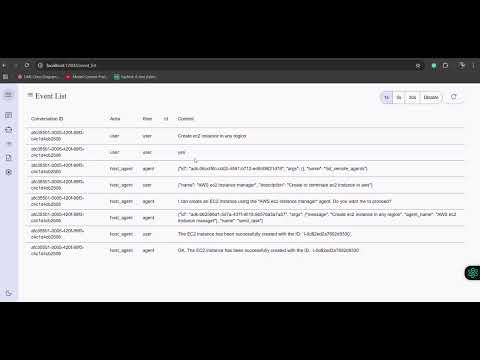
Watch the demo video to see MCP-AWS in action! 🚀
Related MCP server: AWS MCP Server
🌟 Features
🚀 Seamless Protocol Integration: Demonstrates the successful integration of the Agent-to-Agent (A2A) protocol with a Model Context Protocol (MCP) server for robust multi-agent communication.
🧠 Leverages OpenAI Agents SDK: Built upon the powerful OpenAI Agents SDK to create intelligent agents capable of understanding and acting on user prompts.
☁️ Automated Cloud Management: Enables direct provisioning and termination of AWS EC2 instances through simple user interactions, showcasing practical tool execution via the MCP.
🛠️ Tools in the MCP Server
The MCP server is a custom server with two tools:
initiate_aws_ec2_instance: Creates an AWS EC2 instance.terminate_aws_ec2_instance: Terminates an AWS EC2 instance by its ID.
🚀 Getting Started
Prerequisites
Python 3.12+ (for local setup) or Docker (for containerized setup)
AWS IAM Role: Create an IAM role with the necessary permissions to manage EC2 instances.
Environment Variables: Prepare a
.envfile with the following variables:AWS_ACCESS_KEY_IDAWS_SECRET_ACCESS_KEYAWS_DEFAULT_REGIONOPENAI_API_KEYAMI_IDINSTANCE_TYPEKEY_NAMESECURITY_GROUP_IDSAWS_REGION
🏃♂️ Running the App
Clone the repository at the root:
git clone https://github.com/anirban1592/google_openai_mcp.git
cd google_openai_mcp
Create
.envfile as shown in prerequisitesRun the remote agent example:
cd openai-agent/
uv run .
Clone the A2A client code(by google) at the root dir:
git clone https://github.com/google/A2A.git
cd demo/ui
Create an environment file with your API key or enter it directly in the UI when prompted:
echo "GOOGLE_API_KEY=your_api_key_here" >> .envRun the front end example:
uv run main.pyRefer to the attached video to see it in action
💬 Using the AI Agent
To create an EC2 instance:
Enter your command: Create an EC2 instanceTo terminate an EC2 instance:
Enter your command: Terminate EC2 instance with ID <instance-id>
⚠️ Word of Caution
IAM Role and Credentials: Please create AWS IAM roles and credentials at your own risk. Ensure you follow AWS best practices for security.
Billing and Security: This app is a proof of concept (POC) and is intended for learning purposes only. We are not responsible for any billing issues or security incidents.
📚 Learnings
This project demonstrates:
How to integrate MCP servers with OpenAI Agents SDK
How to build a simple AI-driven application for AWS resource management
Enjoy exploring the power of AI and MCP servers! 🌟
This server cannot be installed
Resources
Unclaimed servers have limited discoverability.
Looking for Admin?
If you are the server author, to access and configure the admin panel.