
The MCP Outline Server enables AI assistants to interact with Outline's document management system with these capabilities:
Document Operations: Create, read, update, move, archive/unarchive, delete, and restore documents, including nested hierarchies
Search and Navigation: Search by keywords, list collections, view document structures, and retrieve document IDs from titles
Export Functions: Export documents or collections in markdown, JSON, or HTML format
Comment Management: View, add, and retrieve comments on documents with pagination support
Collection Management: Create, update, delete, and organize collections containing documents
Relationship Tools: View backlinks (documents that link to a specific document)
AI Integration: Query document content using natural language questions
Click on "Install Server".
Wait a few minutes for the server to deploy. Once ready, it will show a "Started" state.
In the chat, type
@followed by the MCP server name and your instructions, e.g., "@MCP Outline Serversearch for documents about quarterly planning"
That's it! The server will respond to your query, and you can continue using it as needed.
Here is a step-by-step guide with screenshots.
MCP Outline Server


A Model Context Protocol server for interacting with Outline document management.
Features
Document operations: Search, read, create, edit, archive documents
Collections: List, create, manage document hierarchies
Comments: Add and view threaded comments
Backlinks: Find documents referencing a specific document
MCP Resources: Direct content access via URIs (outline://document/{id}, outline://collection/{id}, etc.)
Automatic rate limiting: Transparent handling of API limits with retry logic
Related MCP server: Notion MCP Server
Prerequisites
Before using this MCP server, you need:
An Outline account (cloud hosted or self-hosted)
API key from Outline web UI: Settings → API Keys → Create New
Python 3.10+ (for non-Docker installations)
Getting your API key: Log into Outline → Click your profile → Settings → API Keys → "New API Key". Copy the generated token.
Installation
Using uv (Recommended)
Using pip
Using Docker
Or build from source:
Configuration
Variable | Required | Default | Notes |
| Yes | - | Get from Outline web UI: Settings → API Keys → Create New |
| No |
| For self-hosted: |
| No |
|
|
| No |
|
|
| No |
|
|
| No |
| Max concurrent connections in pool |
| No |
| Max idle connections in pool |
| No |
| Read timeout in seconds |
| No |
| Connection timeout in seconds |
| No |
| Write timeout in seconds |
| No |
| Transport mode: |
| No |
| Server host. Use |
| No |
| HTTP server port (only for |
Access Control
Configure server permissions to control what operations are allowed:
Read-Only Mode
Set OUTLINE_READ_ONLY=true to enable viewer-only access. Only search, read, export, and collaboration viewing tools are available. All write operations (create, update, move, archive, delete) are disabled.
Use cases:
Shared access for team members who should only view content
Safe integration with AI assistants that should not modify documents
Public or demo instances where content should be protected
Available tools:
Search & Discovery:
search_documents,list_collections,get_collection_structure,get_document_id_from_titleDocument Reading:
read_document,export_documentComments:
list_document_comments,get_commentCollaboration:
get_document_backlinksCollections:
export_collection,export_all_collectionsAI:
ask_ai_about_documents(if not disabled withOUTLINE_DISABLE_AI_TOOLS)
Disable Delete Operations
Set OUTLINE_DISABLE_DELETE=true to allow create and update workflows while preventing accidental data loss. Only delete operations are disabled.
Use cases:
Production environments where documents should not be deleted
Protecting against accidental deletions
Safe content editing workflows
Disabled tools:
delete_document,delete_collectionbatch_delete_documents
Important: OUTLINE_READ_ONLY=true takes precedence over OUTLINE_DISABLE_DELETE. If both are set, the server operates in read-only mode.
Adding to Your Client
Prerequisites: Install
uvwithpip install uvor from astral.sh/uv
Edit ~/Library/Application Support/Claude/claude_desktop_config.json (or %APPDATA%\Claude\claude_desktop_config.json on Windows):
Go to Settings → MCP and click Add Server:
Create a .vscode/mcp.json file in your workspace with the following configuration:
For self-hosted Outline instances, add OUTLINE_API_URL to the env object.
Optional: Use input variables for sensitive credentials:
VS Code will automatically discover and load MCP servers from this configuration file. For more details, see the official VS Code MCP documentation.
In Cline extension settings, add to MCP servers:
If you prefer to use pip instead:
Then in your client config, replace "command": "uvx" with "command": "mcp-outline" and remove the "args" line:
For remote access or Docker containers, use HTTP transport. This runs the MCP server on port 3000:
Then connect from client:
Note: OUTLINE_API_URL should point to where your Outline instance is running, not localhost:3000.
Tools
Note: Tool availability depends on your Access Control settings. Some tools are disabled in read-only mode or when delete operations are restricted.
Search & Discovery
search_documents(query, collection_id?, limit?, offset?)- Search documents by keywords with paginationlist_collections()- List all collectionsget_collection_structure(collection_id)- Get document hierarchy within a collectionget_document_id_from_title(query, collection_id?)- Find document ID by title search
Document Reading
read_document(document_id)- Get document contentexport_document(document_id)- Export document as markdown
Document Management
create_document(title, collection_id, text?, parent_document_id?, publish?)- Create new documentupdate_document(document_id, title?, text?, append?)- Update document (append mode available)move_document(document_id, collection_id?, parent_document_id?)- Move document to different collection or parent
Document Lifecycle
archive_document(document_id)- Archive documentunarchive_document(document_id)- Restore document from archivedelete_document(document_id, permanent?)- Delete document (or move to trash)restore_document(document_id)- Restore document from trashlist_archived_documents()- List all archived documentslist_trash()- List all documents in trash
Comments & Collaboration
add_comment(document_id, text, parent_comment_id?)- Add comment to document (supports threaded replies)list_document_comments(document_id, include_anchor_text?, limit?, offset?)- View document comments with paginationget_comment(comment_id, include_anchor_text?)- Get specific comment detailsget_document_backlinks(document_id)- Find documents that link to this document
Collection Management
create_collection(name, description?, color?)- Create new collectionupdate_collection(collection_id, name?, description?, color?)- Update collection propertiesdelete_collection(collection_id)- Delete collectionexport_collection(collection_id, format?)- Export collection (default: outline-markdown)export_all_collections(format?)- Export all collections
Batch Operations
batch_create_documents(documents)- Create multiple documents at oncebatch_update_documents(updates)- Update multiple documents at oncebatch_move_documents(document_ids, collection_id?, parent_document_id?)- Move multiple documentsbatch_archive_documents(document_ids)- Archive multiple documentsbatch_delete_documents(document_ids, permanent?)- Delete multiple documents
AI-Powered
ask_ai_about_documents(question, collection_id?, document_id?)- Ask natural language questions about your documents
Resources
outline://collection/{id}- Collection metadata (name, description, color, document count)outline://collection/{id}/tree- Hierarchical document tree structureoutline://collection/{id}/documents- Flat list of documents in collectionoutline://document/{id}- Full document content (markdown)outline://document/{id}/backlinks- Documents that link to this document
Development
Quick Start with Self-Hosted Outline
Setup
Testing
Running Locally
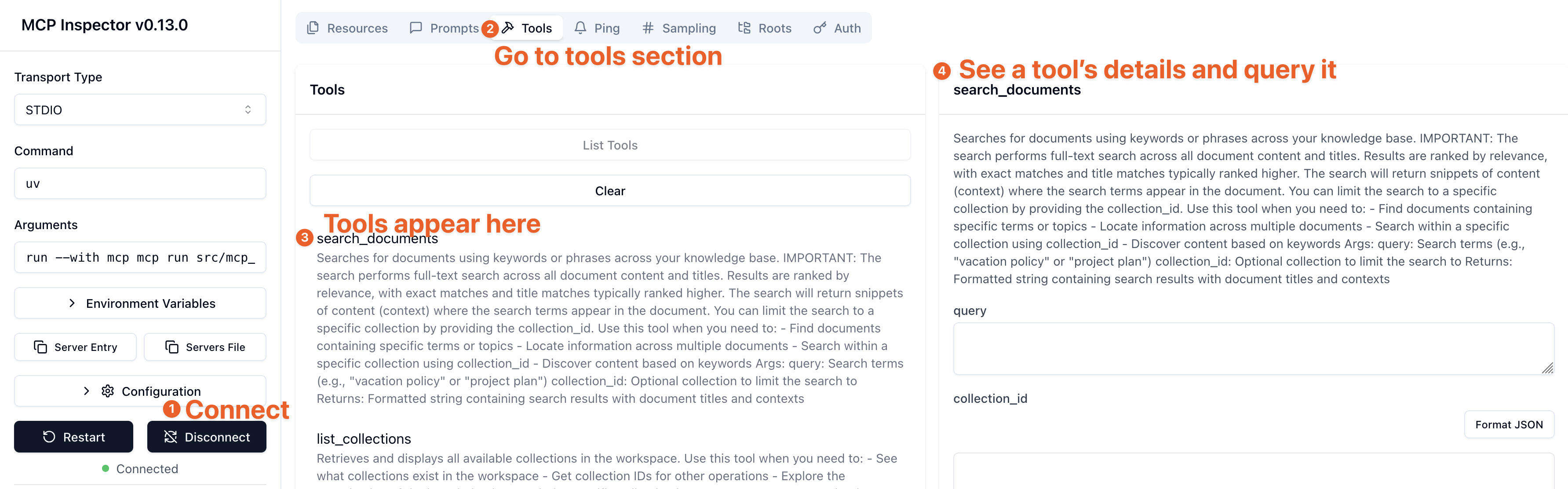
Testing with MCP Inspector
Use the MCP Inspector to test the server tools visually via an interactive UI.
For local development (with stdio):
For Docker Compose (with HTTP):
Architecture Notes
Rate Limiting: Automatically handled via header tracking (RateLimit-Remaining, RateLimit-Reset) with exponential backoff retry (up to 3 attempts). No configuration needed.
Transport Modes:
stdio(default): Direct process communicationsse: HTTP Server-Sent Events (use for web clients)streamable-http: Streamable HTTP transport
Connection Pooling: Shared httpx connection pool across instances (configurable: OUTLINE_MAX_CONNECTIONS=100, OUTLINE_MAX_KEEPALIVE=20)
Troubleshooting
Server not connecting?
Check your API credentials:
Common issues:
Verify
OUTLINE_API_KEYis set correctly in your MCP client configurationCheck
OUTLINE_API_URLpoints to your Outline instance (default:https://app.getoutline.com/api)For self-hosted Outline, ensure the URL ends with
/apiVerify your API key hasn't expired or been revoked
Tools not appearing in client?
Read-only mode enabled? Check if
OUTLINE_READ_ONLY=trueis disabling write toolsDelete operations disabled? Check if
OUTLINE_DISABLE_DELETE=trueis hiding delete toolsAI tools missing? Check if
OUTLINE_DISABLE_AI_TOOLS=trueis disabling AI featuresRestart your MCP client after changing environment variables
API rate limiting errors?
The server automatically handles rate limiting with retry logic. If you see persistent rate limit errors:
Reduce concurrent operations
Check if multiple clients are using the same API key
Contact Outline support if limits are too restrictive for your use case
Docker container issues?
Container won't start:
Ensure
OUTLINE_API_KEYis set:docker run -e OUTLINE_API_KEY=your_key ...Check logs:
docker logs <container-id>
Can't connect from client:
Use
0.0.0.0for MCP_HOST:-e MCP_HOST=0.0.0.0Verify port mapping:
-p 3000:3000Check transport mode:
-e MCP_TRANSPORT=streamable-http
Need more help?
Contributing
Contributions welcome! See CONTRIBUTING.md for setup instructions.
License
This project is licensed under the MIT License - see the LICENSE file for details.
Acknowledgments
Built with MCP Python SDK
Uses Outline API for document management