
Allows for the management of security engineering tasks and case tracking through ClickUp boards.
Enables searching security events, pivoting on indicators, and performing endpoint response actions like isolation and forensic collection.
Integrates with GitHub engineering boards to manage and track security-related issues and investigative workflows.
Provides tools to create, update, and review security cases, including managing observables and incident timelines.
Facilitates security case management and workflow tracking through Trello integration.
Click on "Install Server".
Wait a few minutes for the server to deploy. Once ready, it will show a "Started" state.
In the chat, type
@followed by the MCP server name and your instructions, e.g., "@SamiGPTtriage alert 405 and enrich any found IOCs"
That's it! The server will respond to your query, and you can continue using it as needed.
Here is a step-by-step guide with screenshots.
SamiGPT
SamiGPT is an AI-powered security investigation and incident response platform that provides security operations teams with intelligent automation for case management, SIEM analysis, and CTI enrichment through the Model Context Protocol (MCP).
Note: This project is currently under active development. Features, APIs, and documentation may change as development progresses.
Demo
Watch the demo video to see SamiGPT in action:
Performance & Cost
Key Metrics:
~ $0.18 per alert
~ 50 seconds to investigate an alert per agent/tab
For detailed cost and usage data, see: Cost Data CSV
For detailed documentation and presentation materials:
Quick Start
SamiGPT can be used in two ways:
Method 1: AI Controller (Web Interface)
The AI Controller provides a web-based interface and uses the Cursor IDE cursor-agent binary for command execution.
Prerequisites:
Cursor IDE must be installed (download from cursor.sh)
Verify
cursor-agentbinary is available:which cursor-agent # Should show path like: /usr/local/bin/cursor-agent or ~/.local/bin/cursor-agent
Steps:
Activate virtual environment:
source venv/bin/activate # On Windows: venv\Scripts\activateStart the AI Controller web interface:
python3 cursor_agent.py --web --port 8081 --host 127.0.0.1Open your browser: Navigate to
http://127.0.0.1:8081to access the web interface.
Method 2: MCP Server (Direct Integration)
Use the MCP server directly to connect SamiGPT tools to Cursor, Claude Desktop, or other MCP-compatible tools.
Steps:
Activate virtual environment:
source venv/bin/activate # On Windows: venv\Scripts\activateStart the MCP server:
python -m src.mcp.mcp_serverConfigure your AI tool (see "Connect MCP Server to AI Tools" section below for detailed instructions)
Note: The MCP server method doesn't require the Cursor IDE cursor-agent binary - it works directly with any MCP-compatible tool.
Overview
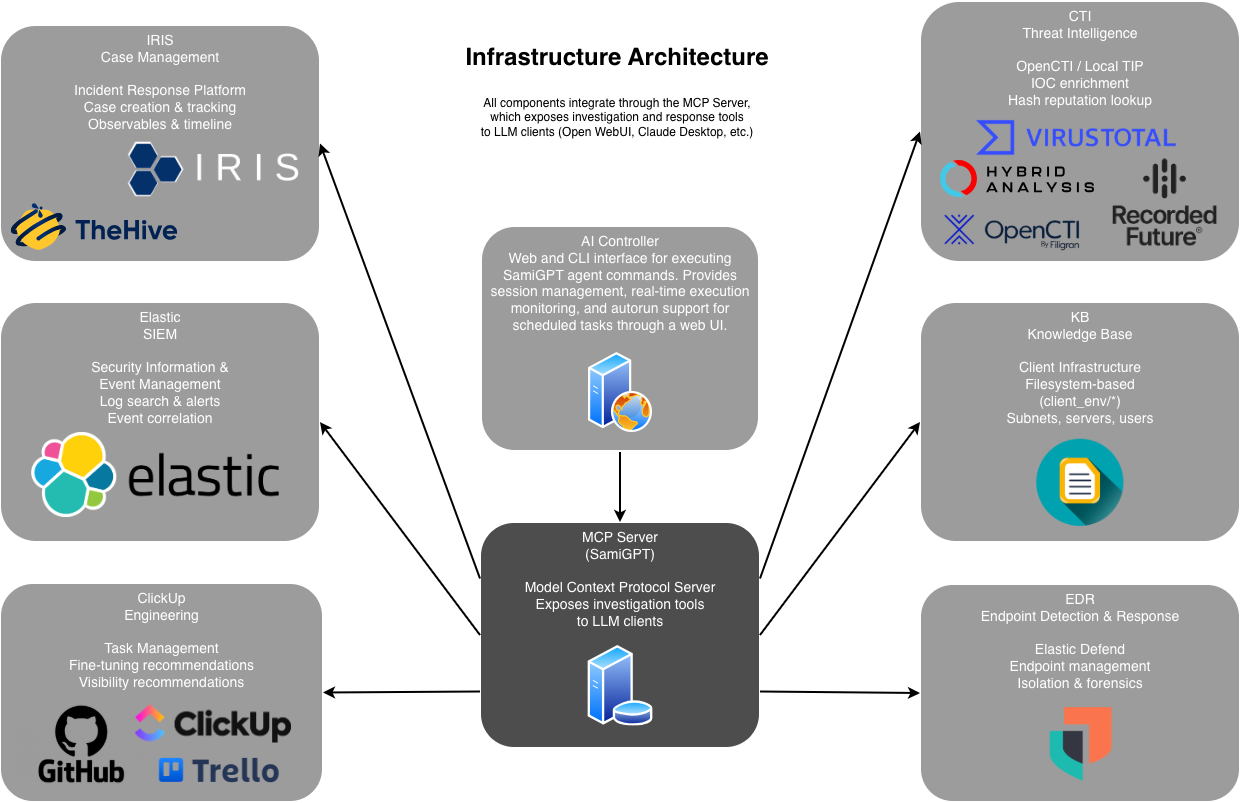
SamiGPT acts as an MCP server that exposes security investigation and response capabilities as tools that can be used by AI agents, LLM tools, and automated workflows. It provides a unified, vendor-neutral API layer that connects to:
Case Management Systems (TheHive, IRIS)
SIEM Platforms (Elastic)
EDR Solutions (Elastic Defend)
Threat Intelligence (OpenCTI, Local TIP)
The platform enables automated triage, investigation, correlation, and response workflows through intelligent agent profiles organized by SOC tier (SOC1, SOC2).
Features
Core Capabilities
Automated Alert Triage: Intelligent initial assessment and classification of security alerts
Case Management: Create, update, and manage security cases with observables, comments, and timeline tracking
SIEM Integration: Search security events, pivot on indicators, and correlate activities across environments
EDR Response: Endpoint isolation, process termination, and forensic artifact collection
Threat Intelligence: IOC enrichment and reputation analysis
Multi-Tier SOC Workflows: Structured workflows for SOC1 (triage) and SOC2 (investigation)
Agent Profiles & Runbooks
SamiGPT includes pre-configured agent profiles with specialized runbooks:
SOC1 Agents: Initial alert triage, enrichment, and false positive identification
SOC2 Agents: Deep investigation, correlation, and case analysis
Workflows
SamiGPT uses structured workflows organized by SOC tier. The following diagrams illustrate the execution flow:
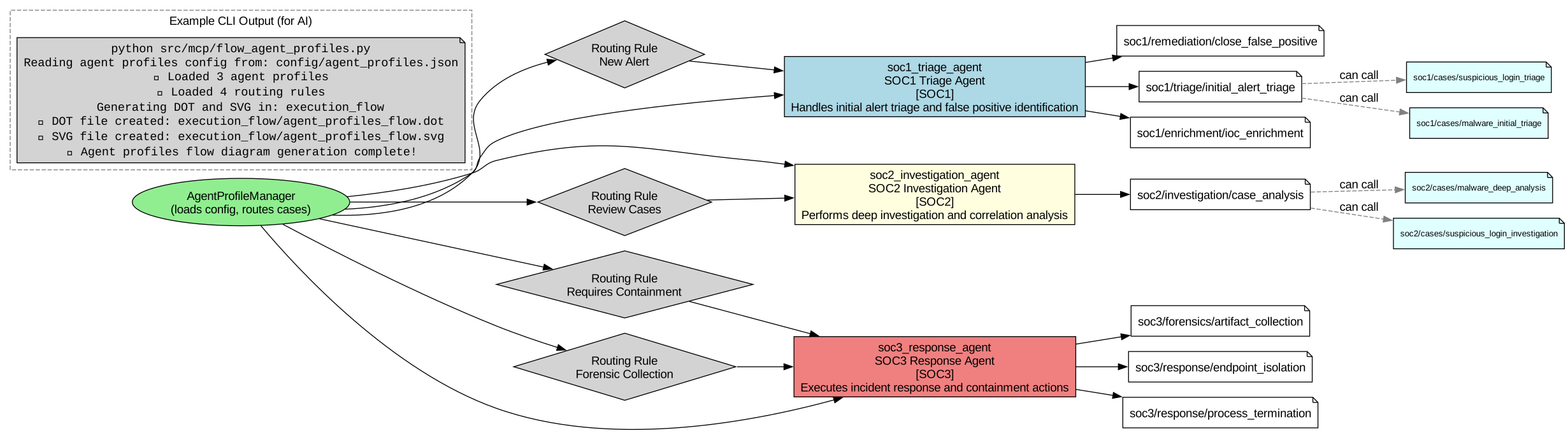
Agent Profiles Flow
This diagram shows how agent profiles are organized and how routing rules direct cases to the appropriate SOC tier agents.
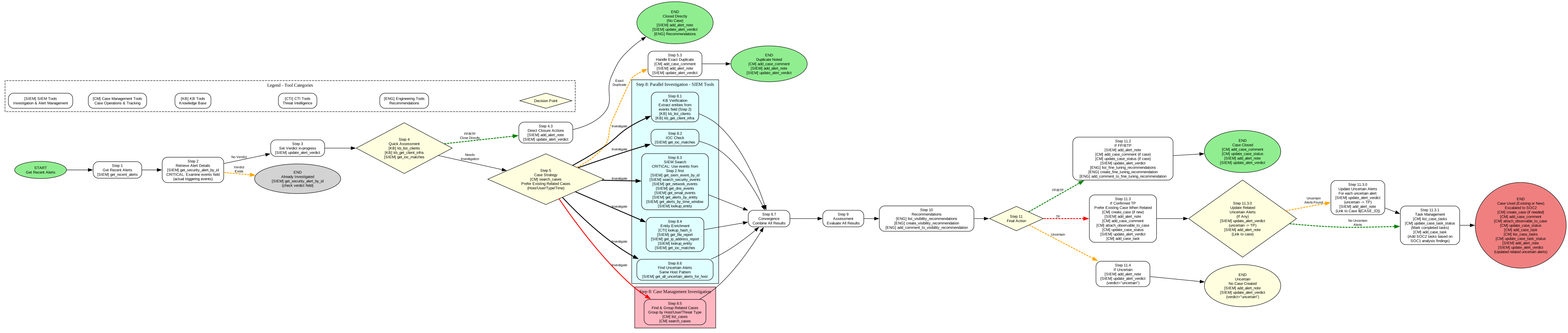
Initial Alert Triage (SOC1)
The initial alert triage workflow handles new security alerts, performs quick assessment, enrichment, and determines whether to create a case or close as false positive.
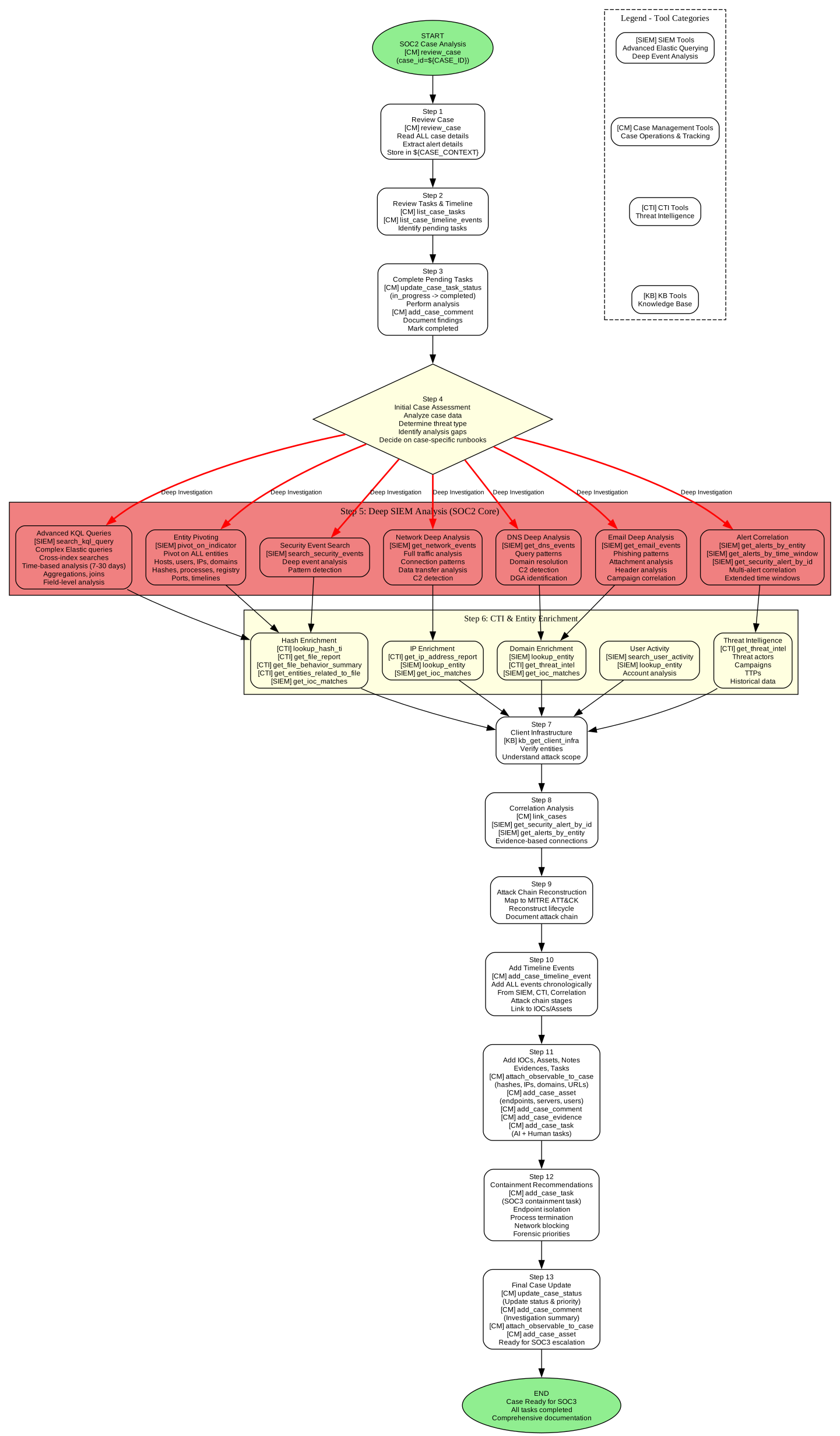
Case Analysis (SOC2)
The SOC2 case analysis workflow performs deep investigation, SIEM analysis, CTI enrichment, correlation, and prepares cases for SOC3 escalation.
Installation
Prerequisites
Python 3.9 or higher
pip package manager
Setup
Clone the repository:
git clone <repository-url> cd SamiGPTCreate and activate virtual environment:
python3 -m venv venv source venv/bin/activate # On Windows: venv\Scripts\activateInstall dependencies:
pip install --upgrade pip pip install -r requirements.txtConfigure integrations (see Configuration section below)
Connect MCP Server to AI Tools
If you're using Method 2: MCP Server (see Quick Start above), configure your AI tool to connect to the MCP server:
Cursor Integration
Open Cursor Settings → Features → Model Context Protocol
Add SamiGPT server configuration:
{ "mcpServers": { "sami-gpt": { "command": "python", "args": ["-m", "src.mcp.mcp_server"], "cwd": "/absolute/path/to/SamiGPT" } } }Restart Cursor and start using SamiGPT tools in chat
Claude Desktop Integration
Edit ~/Library/Application Support/Claude/claude_desktop_config.json (macOS) or %APPDATA%\Claude\claude_desktop_config.json (Windows):
Other MCP-Compatible Tools
The MCP server can also be connected to:
Open WebUI (via MCP configuration)
Other LLM tools that support the Model Context Protocol
Architecture
Infrastructure Overview
Directory Structure
Design Principles
Vendor-Neutral APIs: All integrations implement generic interfaces, allowing easy swapping of security tools
Separation of Concerns: AI/orchestrator layer only interacts with generic APIs, never vendor-specific code
Modular Integration: Each vendor integration is self-contained with HTTP client, models, mappers, and client implementation
Configuration
Configuration is managed through config.json and can be edited via the web interface or directly.
Configuration File Structure
See config.json.example for the complete configuration schema. Key sections:
iris/thehive: Case management configurationelastic: SIEM configurationedr: EDR platform configurationcti: Threat intelligence configurationeng: Engineering board configuration (ClickUp, Trello, GitHub)ai_controller: AI controller web interface settingslogging: Logging configuration
Usage Examples
Basic Case Operations
SIEM Investigation
EDR Response
Agent Profile Execution
Logging
SamiGPT provides comprehensive logging:
MCP Server Logs:
logs/mcp/mcp_all.log,mcp_requests.log,mcp_responses.log,mcp_errors.logApplication Logs:
logs/debug.log,logs/error.log,logs/warning.log
Development
Adding a New Integration
Create integration directory under
src/integrations/Implement generic interface from
src/api/Add HTTP client, models, and mappers
Register in configuration
Example structure:
Running Tests
Contributing
When contributing:
Keep all vendor-specific code under
src/integrations/Ensure all integrations implement the generic APIs in
src/api/Add tests for new integrations
Update documentation as needed
License
MIT
Support
For issues, questions, or contributions, please open an issue on the repository.
Acknowledgments
The following projects helped and inspired us during the literature review:
AI-Powered SOC Detection System - ML-powered SOC platform with autonomous threat detection
ADK Runbooks - Security investigation runbooks and workflows