
Click on "Install Server".
Wait a few minutes for the server to deploy. Once ready, it will show a "Started" state.
In the chat, type
@followed by the MCP server name and your instructions, e.g., "@Ketchup Draw MCP Serverdraw a cute cat in cyberpunk style"
That's it! The server will respond to your query, and you can continue using it as needed.
Here is a step-by-step guide with screenshots.
Ketchup Draw MCP Server


这是一个 MCP (Model Context Protocol) 服务器,集成了 Ketchup AI 的专业绘图能力和 URUSAI! 的图床服务。
它可以让 Claude Desktop 等 MCP 客户端具备“画图”能力:不仅仅是生成图片,还能自动优化提示词,并将生成的图片自动上传至云端,返回可永久访问的 URL。
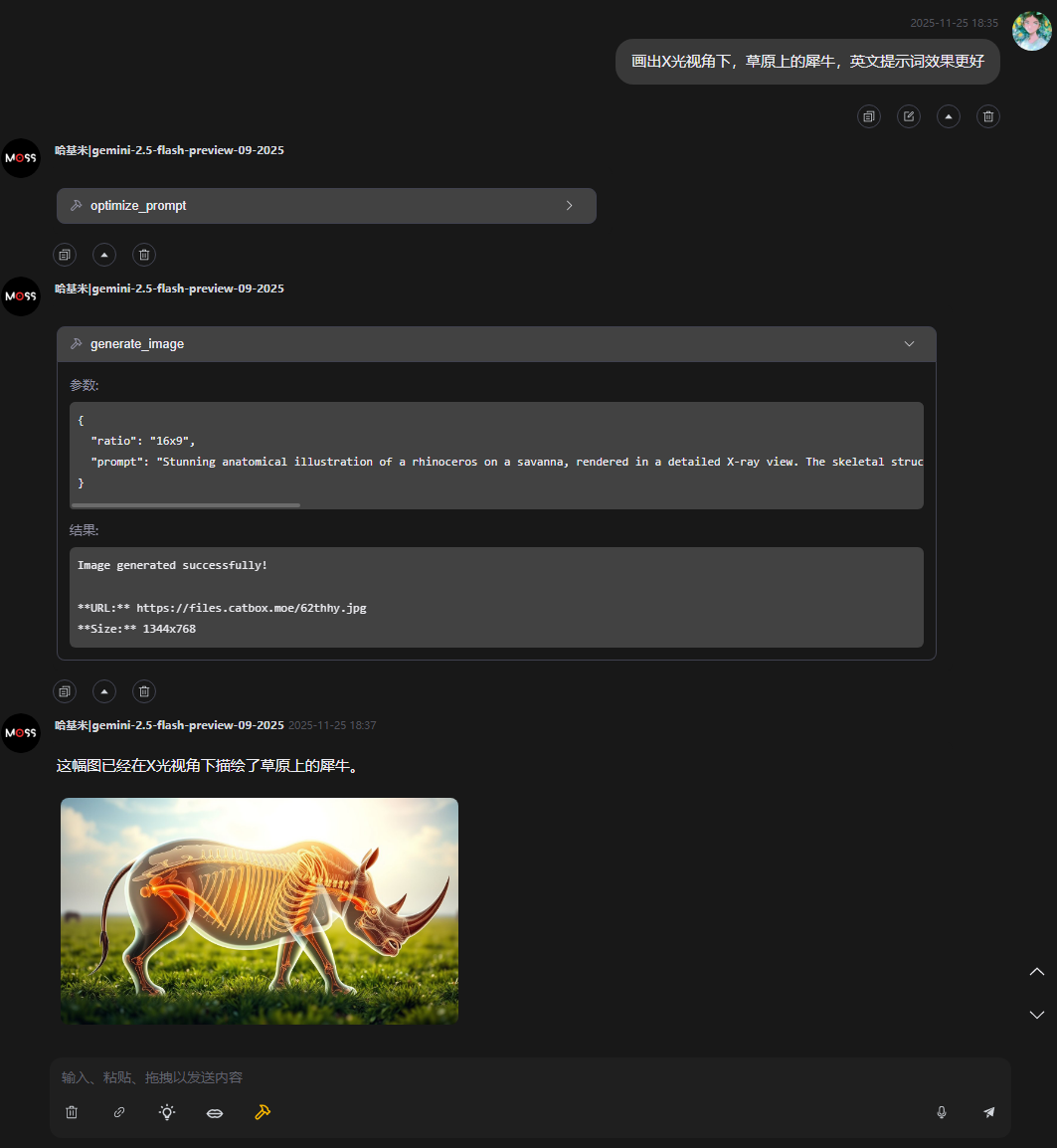
✨ 特性
智能提示词优化 (Prompt Engineering): 将简单的中文/英文短语(如“一只可爱的狗”)自动改写为包含光影、风格、细节描述的专业绘图提示词。
高质量绘图 (AI Generation): 调用 Ketchup AI 引擎生成高分辨率图像。
自动图床上传 (Auto Upload): 生成的图片会自动上传至 URUSAI!,并在对话中直接展示图片预览,同时提供永久链接。
代理支持 (Proxy Support): 内置
undici代理配置,完美解决国内网络环境下无法访问 URUSAI! 或 API 的问题。
🧰 工具详情 (Tools)
本服务器向 MCP 客户端暴露了以下两个工具,大模型可根据上下文自动调用:
1. optimize_prompt
用于将用户的简短描述转化为专业的英文绘图提示词。
描述: Optimize a simple drawing prompt into a detailed professional prompt using Ketchup AI.
输入参数 (Input Schema):
参数名 | 类型 | 必填 | 说明 |
|
| ✅ | 需要优化的原始提示词(例如:"cyberpunk city at night" 或 "赛博朋克城市") |
2. generate_image
用于执行实际的绘图操作并上传。
描述: Generate an image using Ketchup AI and upload it to URUSAI!. Returns the image URL.
输入参数 (Input Schema):
参数名 | 类型 | 必填 | 说明 |
|
| ✅ | 详细的绘图提示词(建议先调用 |
|
| ✅ | 图片比例,必须是下方列表中的值之一(如 |
📐 支持的图片比例 (ratio)
在调用 generate_image 时,ratio 参数支持以下枚举值:
比例代码 | 尺寸 (WxH) | 适用场景 |
1x1 | 1024 x 1024 | 头像、Instagram |
16x9 | 1344 x 768 | 壁纸、视频封面 |
9x16 | 768 x 1344 | 手机壁纸、Stories |
4x3 | 1152 x 896 | 传统照片 |
3x4 | 896 x 1152 | 肖像 |
21x9 | 1536 x 640 | 电影宽银幕 |
9x21 | 640 x 1536 | 长条幅 |
3x2 | 1280 x 832 | 风景 |
2x3 | 832 x 1280 | 海报 |
🚀 使用方法 (Claude Desktop)
无需克隆代码,直接修改 Claude Desktop 的配置文件即可使用 npx 运行。
1. 找到配置文件
Windows:
%APPDATA%\Claude\claude_desktop_config.jsonmacOS:
~/Library/Application Support/Claude/claude_desktop_config.json
2. 添加配置
将以下内容添加到 mcpServers 对象中:
⚠️ 网络配置重要提示: 由于 URUSAI! 和 Ketchup AI 的服务器在海外,如果你在中国大陆,必须配置
env中的HTTPS_PROXY。
请将
127.0.0.1:7890替换为你本地代理软件(如 Clash, v2rayN 等)的实际 HTTP 端口。如果没有配置代理,图片上传大概率会失败。
🛠️ 本地开发
如果你想贡献代码或进行本地调试: