
Zeek-MCP

ジーク-MCP
このリポジトリは、会話型 AI クライアントと統合できる MCP サーバー (モデル コンテキスト プロトコル) を構築するためのユーティリティ セットを提供します。
目次
Related MCP server: Wireshark MCP
前提条件
Python 3.7以上
Zeekがインストールされ、
PATHで利用可能 (execzeekツール用)pip (Python 依存関係のインストール用)
インストール
1. リポジトリをクローンする
git clone https://github.com/Gabbo01/Zeek-MCP
cd Zeek-MCP2. 依存関係をインストールする
仮想環境を使用することをお勧めします。
python -m venv venv
source venv/bin/activate # Linux/macOS
venv\Scripts\activate # Windows
pip install -r requirements.txt注:
requirements.txtがない場合は、直接インストールしてください。pip install pandas mcp
使用法
リポジトリは、2 つの主要な MCP ツールとコマンドライン エントリ ポイントを公開します。
3. MCPサーバーを実行する
python Bridge_Zeek_MCP.py --mcp-host 127.0.0.1 --mcp-port 8081 --transport sse--mcp-host: MCP サーバーのホスト (デフォルト:127.0.0.1)。--mcp-port: MCP サーバーのポート (デフォルト:8081)。--transport: トランスポート プロトコルsse(Server-Sent Events) またはstdioいずれか。

4. MCPツールを使用する
次のツールを呼び出して、MCP ツールの使用をサポートできる LLM を使用する必要があります。
execzeek(pcap_path: str) -> str**説明:**作業ディレクトリ内の既存の
.logファイルを削除した後、指定された PCAP ファイルに対して Zeek を実行します。**戻り値:**生成された
.logファイル名をリストする文字列、またはエラーの場合は"1"。
parselogs(logfile: str) -> DataFrame**説明:**単一の Zeek
.logファイルを解析し、解析されたコンテンツを返します。
これらのエンドポイントは、HTTP (SSE トランスポートを使用している場合) 経由、または LLM クライアント (例: Claude Desktop) に埋め込むことによって操作できます。
クロードデスクトップ統合:
Claude Desktop を Zeek MCP クライアントとして設定するには、 Claude -> Settings -> Developer -> Edit Config -> claude_desktop_config.jsonに移動し、以下を追加します。
{
"mcpServers": {
"Zeek-mcp": {
"command": "python",
"args": [
"/ABSOLUTE_PATH_TO/Bridge_Zeek_MCP.py",
]
}
}
}あるいは、このファイルを直接編集します。
/Users/YOUR_USER/Library/Application Support/Claude/claude_desktop_config.json5ire統合:
バックエンドで複数のモデルをサポートする別のMCPクライアントは5ireです。Zeek-MCPを設定するには、5ireを開き、 Tools 」→ Newに移動して、以下の設定を行います。
ツールキー: ZeekMCP
名前: Zeek-MCP
コマンド:
python /ABSOLUTE_PATH_TO/Bridge_Zeek_MCP.py
あるいは、Chainlit フレームワークを使用し、ドキュメントに従って MCP サーバーを統合することもできます。
例
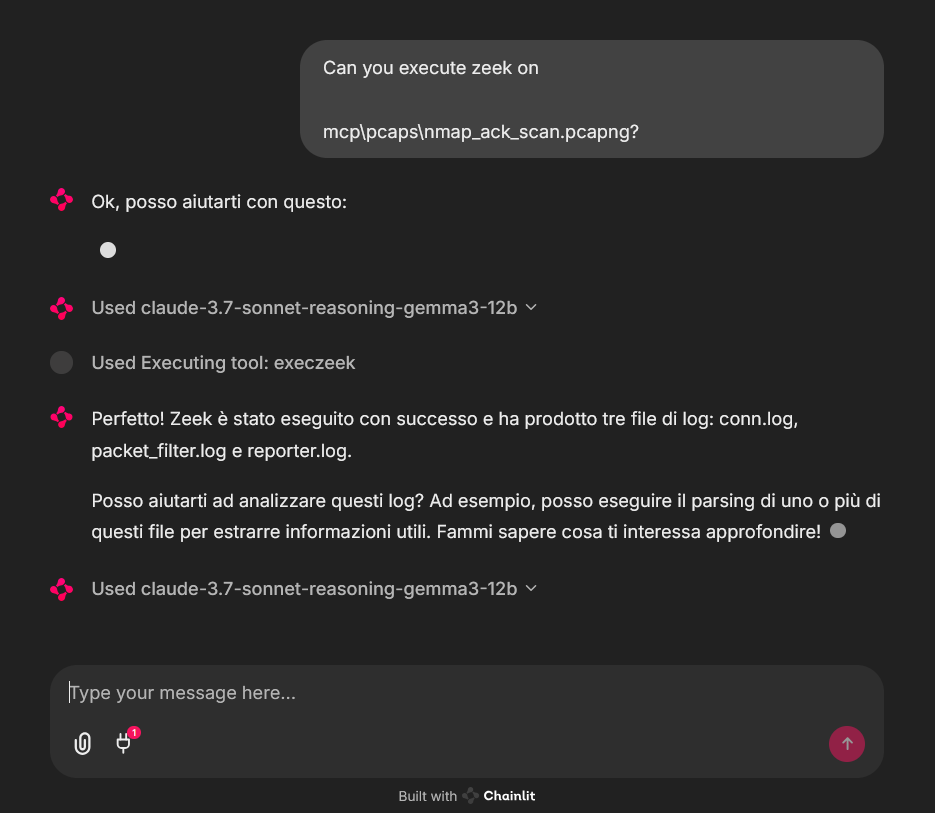
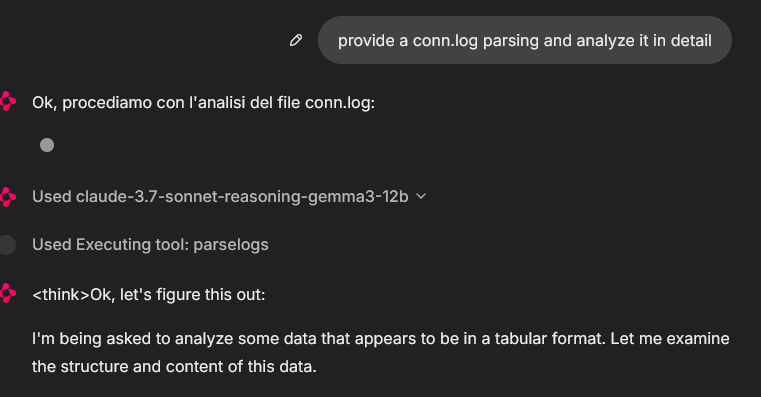
Chainlit チャットボット クライアントからの MCP ツールの使用例。サンプル pcap ファイルが使用されました (pcaps フォルダーにいくつかあります)
In that case the used model was claude-3.7-sonnet-reasoning-gemma3-12b
ライセンス
詳細については、 LICENSE参照してください。
This server cannot be installed
Maintenance
Resources
Unclaimed servers have limited discoverability.
Looking for Admin?
If you are the server author, to access and configure the admin panel.
Related MCP Connectors
A comprehensive Model Context Protocol (MCP) server that enables AI assistants to interact with yo…
A Model Context Protocol server for Wix AI tools
Enable secure connectivity between Sentry issues and debugging data, and LLM clients, using a Model Context Protocol (MCP) server.
MCP server for Pentest-Tools.com: run scans, manage findings and reports via your preffered LLM.
Related MCP Servers
- AlicenseBqualityFmaintenanceA Model Context Protocol server that provides LLMs with real-time network traffic analysis capabilities, enabling tasks like threat hunting, network diagnostics, and anomaly detection through Wireshark's tshark.7577MIT
- AlicenseNot gradedqualityDmaintenanceA Model Context Protocol server that integrates Wireshark's network analysis capabilities with AI systems like Claude, allowing direct analysis of network packet data without manual copying.31MIT
- AlicenseAqualityDmaintenanceA Model Context Protocol server that provides network packet capture and analysis capabilities through Wireshark/tshark integration, enabling AI assistants to perform network security analysis and troubleshooting.435MIT
- FlicenseNot gradedqualityDmaintenanceAn automated security operations center MCP server that uses LLMs and network analysis tools like Tshark to detect threats in traffic data. It enables users to automatically ingest PCAP files, query specific packets, and generate intelligent security analysis reports.
Latest Blog Posts
- Who's Calling? MCP Hosts Are an Identity Blind Spot (And the Spec Knows It)By Om-Shree-0709 on .mcpAgent IdentityOAuth 2.1
- Your AI Chatbot Just Exposed Your CEO's Salary to an InternBy Om-Shree-0709 on .Agent IdentityMCP SecurityOAuth Delegation
- Why MCP Servers Need Execution Sandboxing (And Why Your Current Stack Isn't Enough)By Om-Shree-0709 on .Agentic AiPrompt InjectionWebAssembly
MCP directory API
We provide all the information about MCP servers via our MCP API.
curl -X GET 'https://glama.ai/api/mcp/v1/servers/Gabbo01/Zeek-MCP'
If you have feedback or need assistance with the MCP directory API, please join our Discord server
