
Click on "Install Server".
Wait a few minutes for the server to deploy. Once ready, it will show a "Started" state.
In the chat, type
@followed by the MCP server name and your instructions, e.g., "@focus_mcp_sqlshow me the total sales by region for last quarter"
That's it! The server will respond to your query, and you can continue using it as needed.
Here is a step-by-step guide with screenshots.
FOCUS DATA MCP Server [中文]
A Model Context Protocol (MCP) server enables artificial intelligence assistants to convert natural language into SQL statements.
There are already so many Text-to-SQL frameworks. Why do we still need another one?
In simple terms, focus_mcp_sql adopts a two-step SQL generation solution, which enables control over the hallucinations of LLM and truly builds the trust of non-technical users in the generated SQL results.
Below is the comparison table between focus_mcp_sql and others:
Comparison Analysis Table
Here’s a side-by-side comparison of focus_mcp_sql with other LLM-based frameworks:
Feature | Traditional LLM Frameworks | focus_mcp_sql |
Generation Process | Black box, direct SQL generation | Transparent, two-step (keywords + SQL) |
Hallucination Risk | High, depends on model quality | Low, controllable (keyword verification) |
Speed | Slow, relies on large model inference | Fast, deterministic keyword-to-SQL |
Cost | High, requires advanced models | Low, reduces reliance on large models |
Non-Technical User Friendliness | Low, hard to verify results | High, easy keyword checking |
Features
-Initialize the model -Convert natural language to SQL statements
Related MCP server: X Tools for Claude MCP
Prerequisites
jdk 23 or higher. Download jdk
gradle 8.12 or higher. Download gradle
register Datafocus to obtain bearer token:
Register an account in Datafocus
Create an application
Enter the application
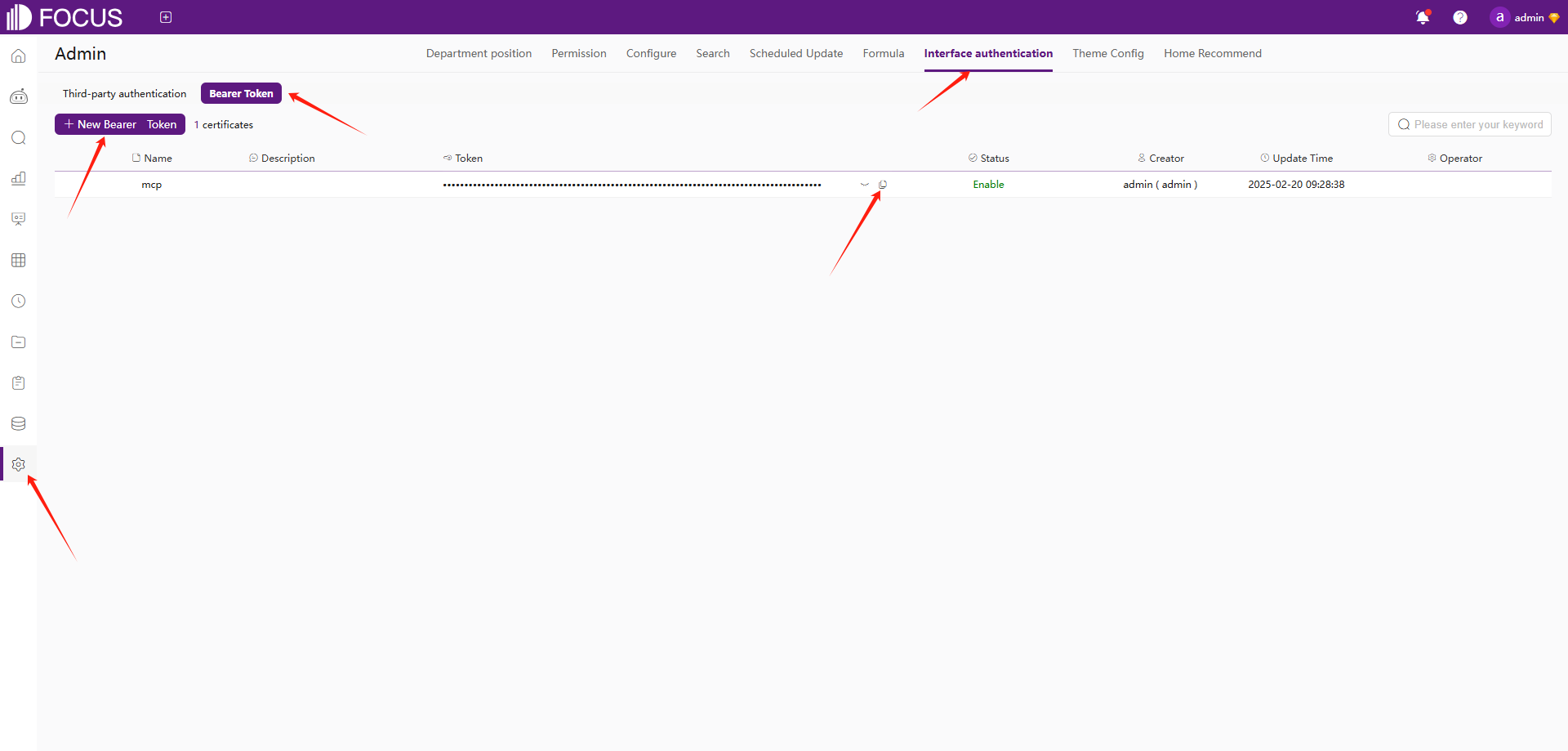
Admin -> Interface authentication -> Bearer Token -> New Bearer Token
Installation
Clone this repository:
git clone https://github.com/FocusSearch/focus_mcp_sql.git
cd focus_mcp_sql
Build the server:
gradle clean
gradle bootJar

The jar path: build/libs/focus_mcp_sql.jar
MCP Configuration
Add the server to your MCP settings file:
{
  "mcpServers": {
    "focus_mcp_data": {
      "command": "java",
      "args": [
        "-jar",
        "path/to/focus_mcp_sql/focus_mcp_sql.jar"
      ],
      "autoApprove": [
        "gptText2sqlStart",
        "gptText2sqlChat"
      ]
    }
  }
}
Available Tools
1. gptText2sqlStart
initial model.
Parameters:
model(required): table modelbearer(required): bearer tokenlanguage(optional): language ['english','chinese']
Example:
{
  "model": {
    "tables": [
      {
        "columns": [
          {
            "columnDisplayName": "name",
            "dataType": "string",
            "aggregation": "",
            "columnName": "name"
          },
          {
            "columnDisplayName": "address",
            "dataType": "string",
            "aggregation": "",
            "columnName": "address"
          },
          {
            "columnDisplayName": "age",
            "dataType": "int",
            "aggregation": "SUM",
            "columnName": "age"
          },
          {
            "columnDisplayName": "date",
            "dataType": "timestamp",
            "aggregation": "",
            "columnName": "date"
          }
        ],
        "tableDisplayName": "test",
        "tableName": "test"
      }
    ],
    "relations": [

    ],
    "type": "mysql",
    "version": "8.0"
  },
  "bearer": "ZTllYzAzZjM2YzA3NDA0ZGE3ZjguNDJhNDjNGU4NzkyYjY1OTY0YzUxYWU5NmU="
}
model 参数说明:
名称 | 位置 | 类型 | 必选 | 说明 |
model | body | object | 是 | none |
» type | body | string | 是 | 数据库类型 |
» version | body | string | 是 | 数据库版本 |
» tables | body | [object] | 是 | 表结构列表 |
»» tableDisplayName | body | string | 否 | 表显示名 |
»» tableName | body | string | 否 | 表原始名 |
»» columns | body | [object] | 否 | 表列列表 |
»»» columnDisplayName | body | string | 是 | 列显示名 |
»»» columnName | body | string | 是 | 列原始名 |
»»» dataType | body | string | 是 | 列数据类型 |
»»» aggregation | body | string | 是 | 列聚合方式 |
» relations | body | [object] | 是 | 表关联关系列表 |
»» conditions | body | [object] | 否 | 关联条件 |
»»» dstColName | body | string | 否 | dimension 表关联列原始名 |
»»» srcColName | body | string | 否 | fact 表关联列原始名 |
»» dimensionTable | body | string | 否 | dimension 表原始名 |
»» factTable | body | string | 否 | fact 表原始名 |
»» joinType | body | string | 否 | 关联类型 |
2. gptText2sqlChat
Convert natural language to SQL.
Parameters:
chatId(required): chat idinput(required): Natural languagebearer(required): bearer token
Example:
{
  "chatId": "03975af5de4b4562938a985403f206d4",
  "input": "what is the max age",
  "bearer": "ZTllYzAzZjM2YzA3NDA0ZGE3ZjguNDJhNDjNGU4NzkyYjY1OTY0YzUxYWU5NmU="
}
Response Format
All tools return responses in the following format:
{
  "errCode": 0,
  "exception": "",
  "msgParams": null,
  "promptMsg": null,
  "success": true,
  "data": {
  }
}
Visual Studio Code Cline Sample
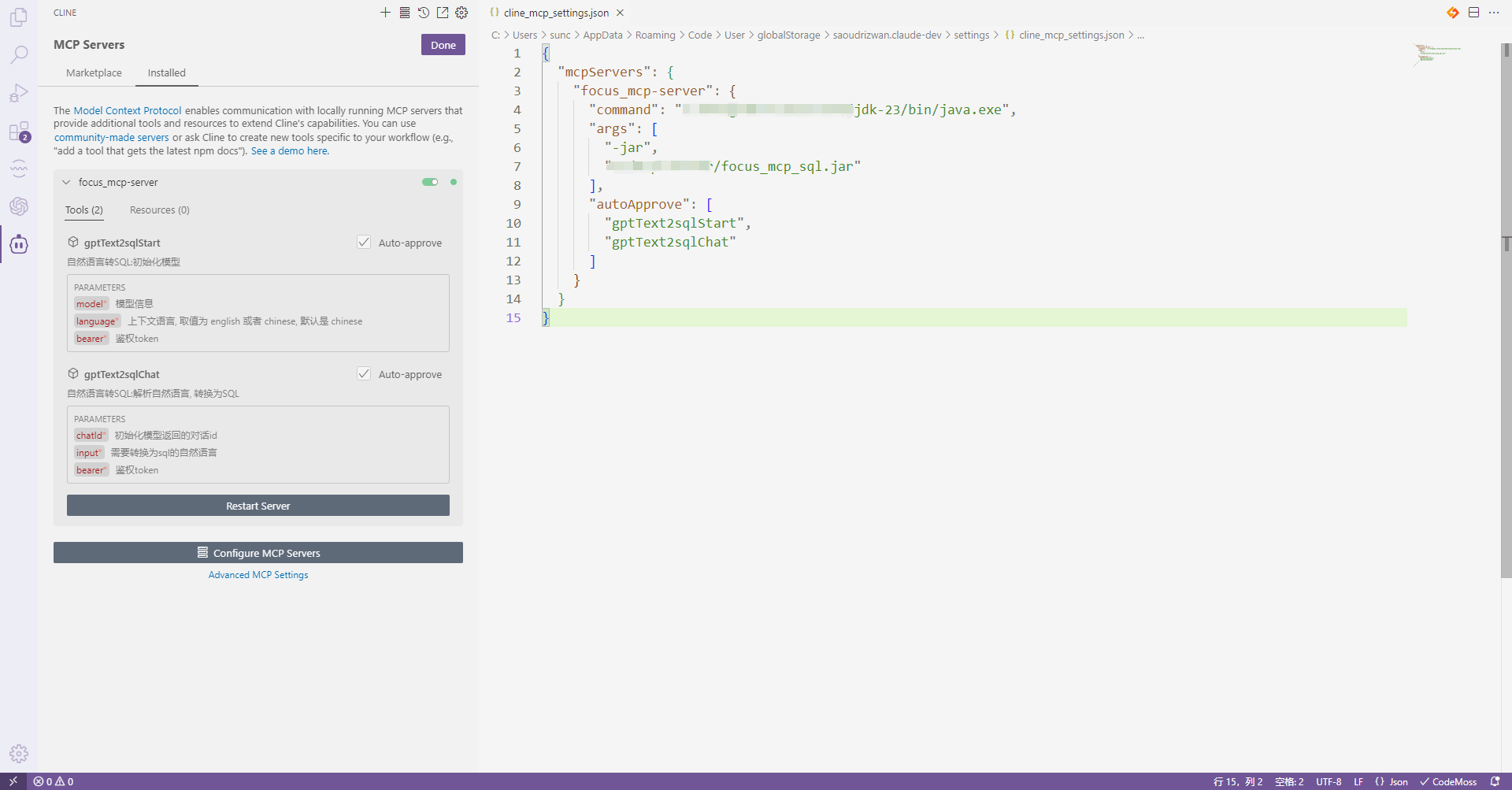
vsCode install cline plugin
mcp server config
use
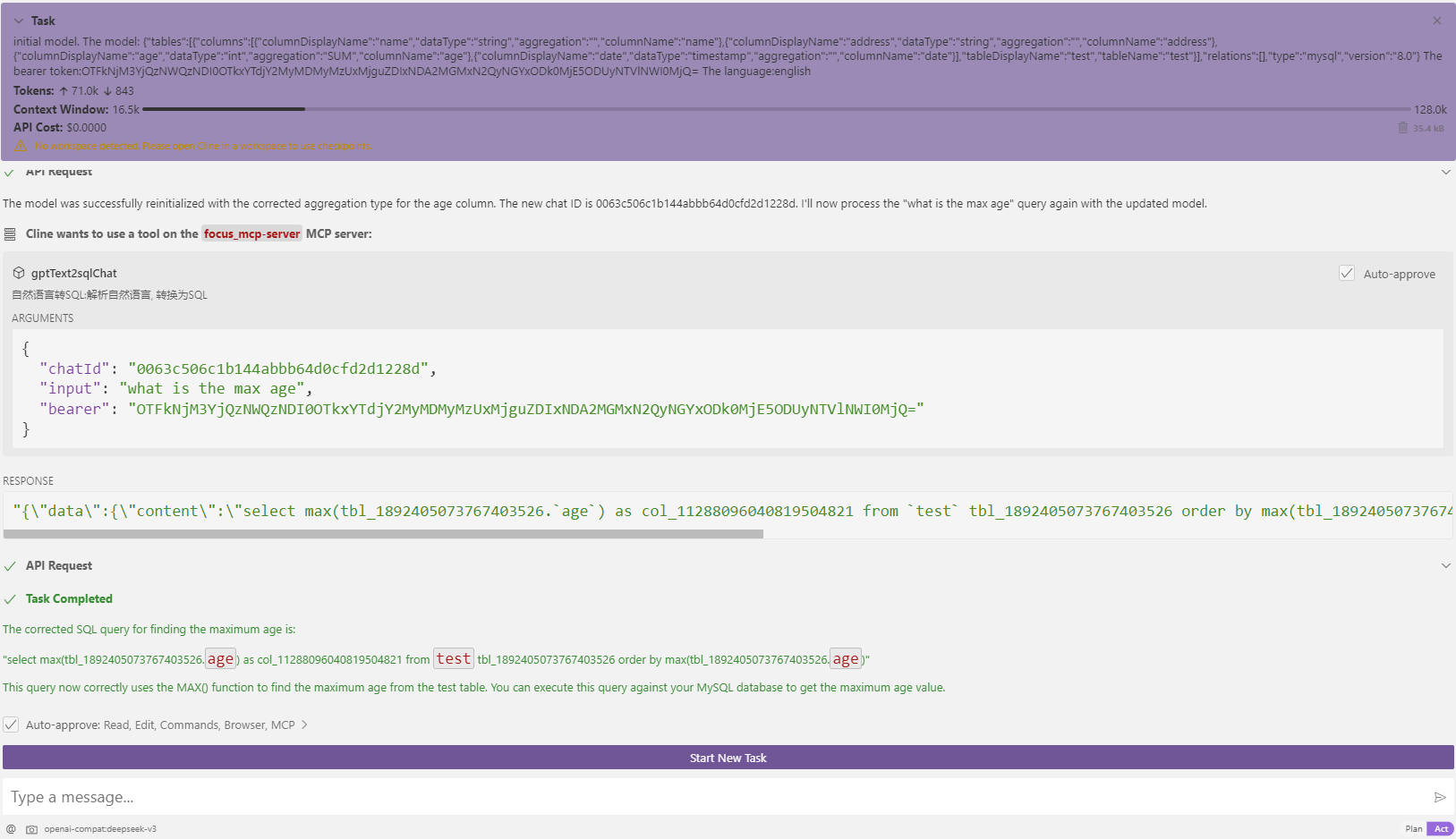
initial model


transfer: what is the max age
Contact:



This server cannot be installed
Resources
Unclaimed servers have limited discoverability.
Looking for Admin?
If you are the server author, to access and configure the admin panel.