🚀 LW MCP Agents
LW MCP Agents is a lightweight, modular framework for building and orchestrating AI agents using the Model Context Protocol (MCP). It empowers you to rapidly design multi-agent systems where each agent can specialize, collaborate, delegate, and reason—without writing complex orchestration logic.
Build scalable, composable AI systems using only configuration files.
🔍 Why Use LW MCP Agents?
✅ Plug-and-Play Agents: Launch intelligent agents with zero boilerplate using simple JSON configs.
✅ Multi-Agent Orchestration: Chain agents together to solve complex tasks—no extra code required.
✅ Share & Reuse: Distribute and run agent configurations across environments effortlessly.
✅ MCP-Native: Seamlessly integrates with any MCP-compatible platform, including Claude Desktop.
Related MCP server: code-mode-toon
🧠 What Can You Build?
Research agents that summarize documents or search the web
Orchestrators that delegate tasks to domain-specific agents
Systems that scale reasoning recursively and aggregate capabilities dynamically
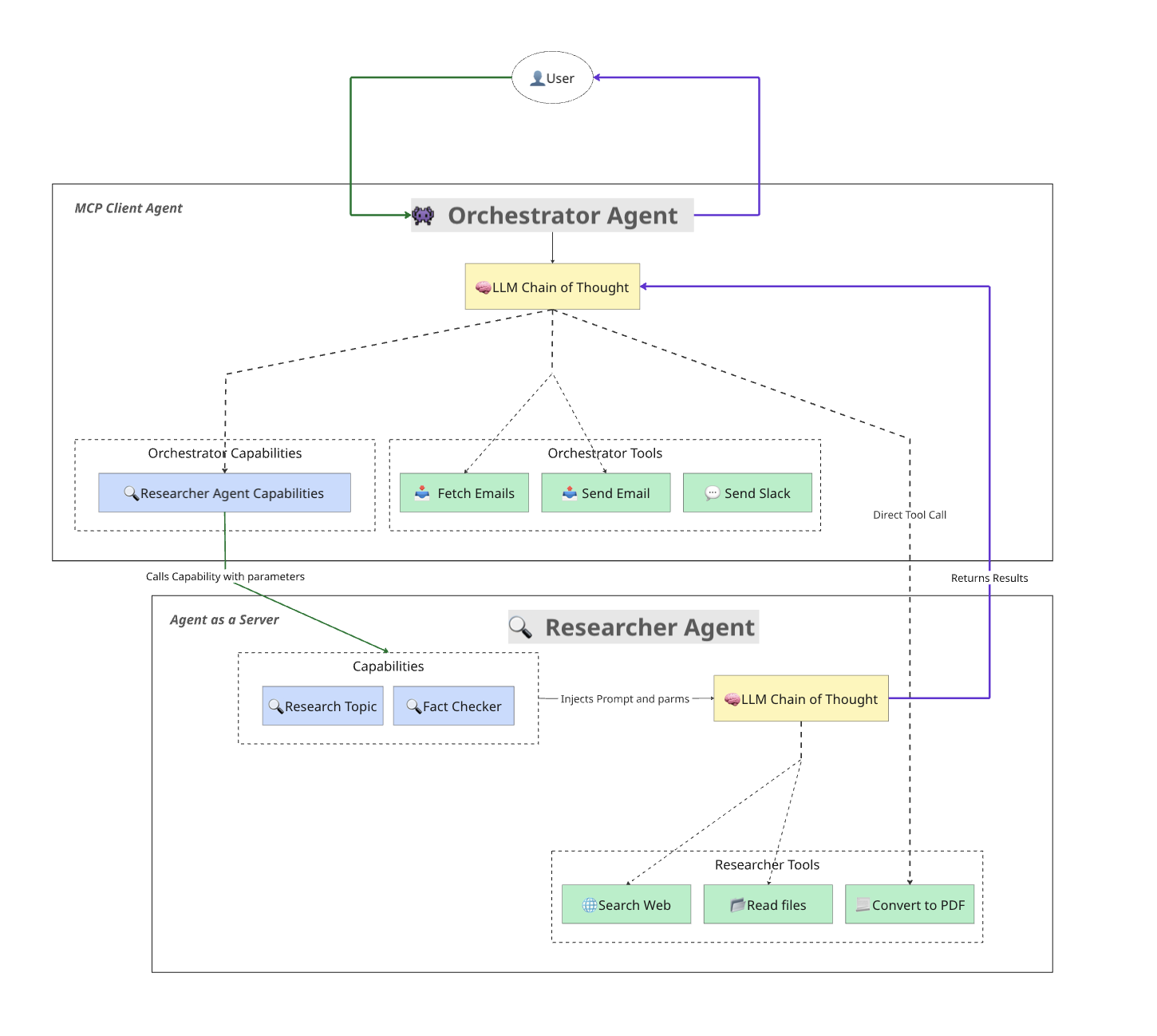
🏗️ Architecture at a Glance
📚 Table of Contents
🚀 Getting Started
🔧 Installation
git clone https://github.com/Autumn-AIs/LW-MCP-agents.git
cd LW-MCP-agents
python -m venv venv
source venv/bin/activate  # Windows: venv\Scripts\activate
pip install -r requirements.txt
▶️ Run Your First Agent
python src/agent/agent_runner.py --config examples/base_agent/base_agent_config.json
🤖 Try a Multi-Agent Setup
Terminal 1 (Research Agent Server):
python src/agent/agent_runner.py --config examples/orchestrator_researcher/research_agent_config.json --server-mode
Terminal 2 (Orchestrator Agent):
python src/agent/agent_runner.py --config examples/orchestrator_researcher/master_orchestrator_config.json
Your orchestrator now intelligently delegates research tasks to the research agent.
🖥️ Claude Desktop Integration
Configure agents to run inside Claude Desktop:
1. Locate your Claude config file:
macOS: ~/Library/Application Support/Claude/claude_desktop_config.json
Windows: %APPDATA%\Claude\claude_desktop_config.json
Linux: ~/.config/Claude/claude_desktop_config.json
2. Add your agent under mcpServers:
{
  "mcpServers": {
    "research-agent": {
      "command": "/bin/bash",
      "args": ["-c", "/path/to/venv/bin/python /path/to/agent_runner.py --config=/path/to/agent_config.json --server-mode"],
      "env": {
        "PYTHONPATH": "/path/to/project",
        "PATH": "/path/to/venv/bin:/usr/local/bin:/usr/bin"
      }
    }
  }
}
📦 Example Agents
💡 Contribute your own example! Submit a PR or reach out to the maintainers.
⚙️ Running Agents
🔹 Basic Command
python src/agent/agent_runner.py --config <your_config.json>
🔸 Advanced Options
Option | Description |
--server-mode
| Exposes the agent as an MCP server |
--server-name
| Assigns a custom MCP server name |
🛠️ Custom Agent Creation
🧱 Minimal Config
{
  "agent_name": "my-agent",
  "llm_provider": "groq",
  "llm_api_key": "YOUR_API_KEY",
  "server_mode": false
}
🧠 Adding Capabilities
Define specialized functions the agent can reason over:
"capabilities": [
  {
    "name": "summarize_document",
    "description": "Summarize a document in a concise way",
    "input_schema": {
      "type": "object",
      "properties": {
        "document_text": { "type": "string" },
        "max_length": { "type": "integer", "default": 200 }
      },
      "required": ["document_text"]
    },
    "prompt_template": "Summarize the following document in {max_length} words:\n\n{document_text}"
  }
]
🔄 Orchestrator Agent
{
  "agent_name": "master-orchestrator",
  "servers": {
    "research-agent": {
      "command": "python",
      "args": ["src/agent/agent_runner.py", "--config=research_agent_config.json", "--server-mode"]
    }
  }
}
🧬 How It Works
🧩 Capabilities as Reasoning Units
Each capability:
Fills in a prompt using provided arguments
Executes internal reasoning using LLMs
Uses tools or external agents
Returns the result
📖 Research Example
[INFO] agent:master-orchestrator - Executing tool: research_topic
[INFO] agent:research-agent - Using tool: brave_web_search
[INFO] agent:research-agent - Finished capability: research_topic
🧱 Technical Architecture
🧠 Key Components
Component | Role |
AgentServer
| Starts, configures, and runs an agent |
MCPServerWrapper
| Wraps the agent to expose it over MCP |
CapabilityRegistry
| Loads reasoning tasks from config |
ToolRegistry
| Discovers tools from other agents |
🌐 Architecture Highlights
Hierarchical Design: Compose systems of agents with recursive reasoning
Delegated Capabilities: Agents delegate intelligently to peers
Tool Sharing: Tools available in one agent become accessible to others
Code-Free Composition: Create entire systems via configuration
🙌 Acknowledgements
This project draws inspiration from the brilliant work on mcp-agents by LastMile AI.

