
Provides file and URL reputation analysis across 70+ antivirus engines, enabling comprehensive malware detection and threat assessment through natural language queries.
Click on "Install Server".
Wait a few minutes for the server to deploy. Once ready, it will show a "Started" state.
In the chat, type
@followed by the MCP server name and your instructions, e.g., "@FastMCP ThreatIntelcheck the reputation of 8.8.8.8 and give me a summary"
That's it! The server will respond to your query, and you can continue using it as needed.
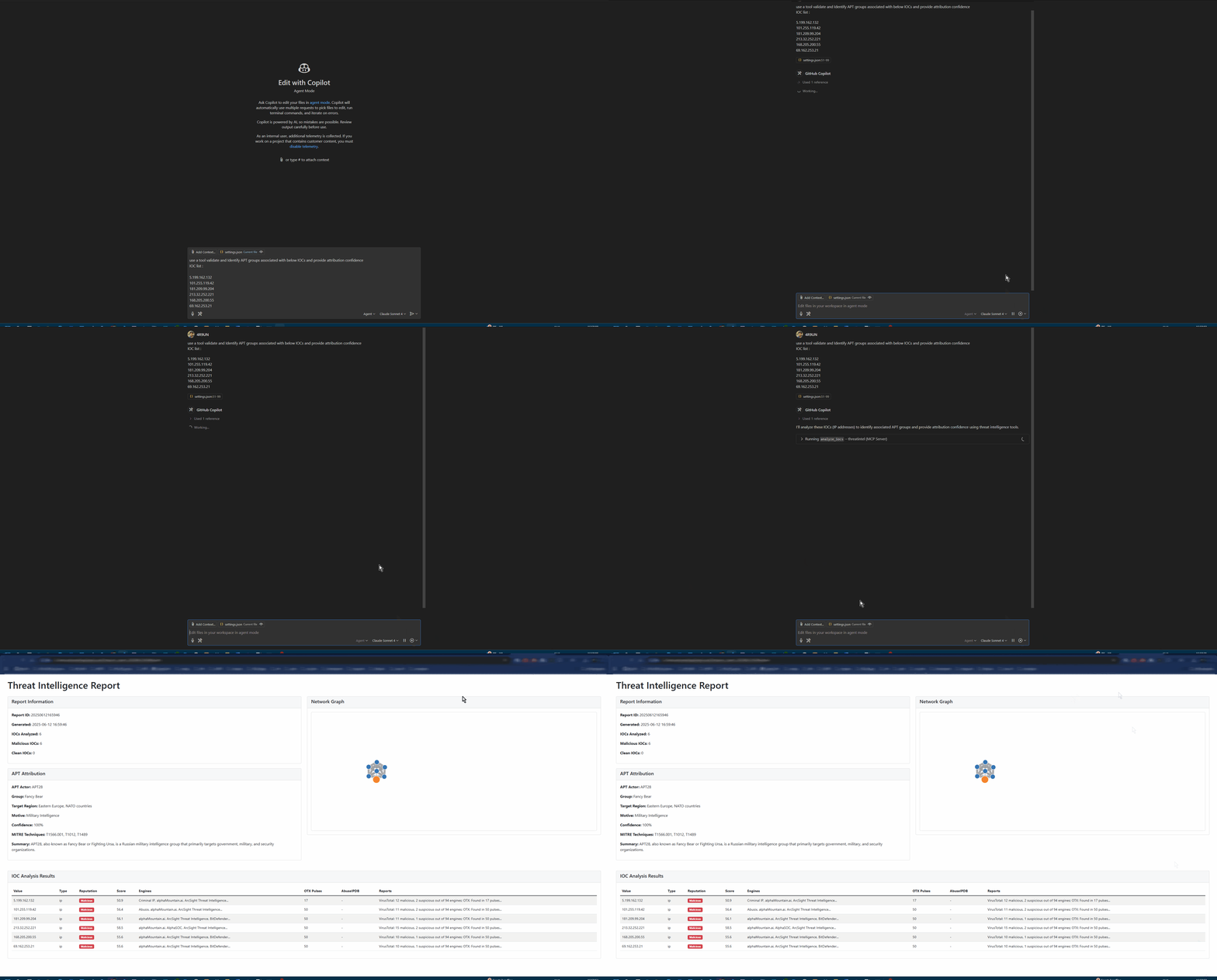
Here is a step-by-step guide with screenshots.
🛡️ FastMCP ThreatIntel - AI-Powered Threat Intelligence





🚀 MCP AI Powered Threat Intelligence - Revolutionizing Cybersecurity Built by
A comprehensive Model Context Protocol (MCP) server that provides enterprise-grade threat intelligence capabilities through natural language AI prompts. Analyze IPs, domains, URLs, and file hashes across multiple threat intelligence platforms with advanced APT attribution and interactive reporting.
✨ Why FastMCP ThreatIntel?
🎯 Purpose-Built for Modern Security Teams
🤖 AI-First Design: Natural language queries with intelligent IOC detection
🔗 MCP Integration: Seamless integration with Claude Desktop, VSCode (Roo-Cline), and other AI assistants
⚡ Lightning Fast: UV-powered development with optimized async processing
🏢 Enterprise Ready: Production-grade Docker containers and Kubernetes support
🔍 Multi-Source Intelligence
VirusTotal: File and URL reputation analysis with 70+ antivirus engines
AlienVault OTX: Community-driven threat intelligence and IOC feeds
AbuseIPDB: IP reputation and geolocation with abuse confidence scoring
IPinfo: Enhanced geolocation, ASN, and infrastructure data
🤖 AI-Powered Analysis
Natural Language Interface: Query threats using plain English
Advanced APT Attribution: Confidence-scored attribution with MITRE ATT&CK mapping
Intelligent IOC Detection: Auto-detects IP addresses, domains, URLs, and file hashes
Context-Aware Reporting: Generates comprehensive threat intelligence reports
📊 Rich Reporting & Visualization
Interactive HTML Reports: Modern, responsive design with dark/light modes
D3.js Network Graphs: Visual IOC relationship mapping
Multiple Output Formats: Markdown, JSON, HTML, and STIX-compliant outputs
Export Capabilities: PDF, CSV, and JSON export for integration
🚀 Flexible Deployment Options
🔌 MCP Server: Direct integration with AI assistants
💻 Standalone CLI: Interactive and batch processing modes
🐳 Docker Container: Production-ready containerization
📦 Python Package: Embed in your applications and workflows
🏗️ Architecture
🚀 Quick Start
Choose your preferred installation method and get started in minutes:
🐍 pip (Fastest)
🐳 Docker (Production Ready)
🔥 UV (Developer Recommended)
📦 Poetry (Traditional)
⚙️ Configuration
🔑 API Keys Setup
Get your free API keys and unlock the full potential:
Service | Status | Free Tier Limit | Get Your Key |
VirusTotal | Required | 1,000 requests/day | |
OTX | Required | Unlimited | |
AbuseIPDB | Optional | 1,000 requests/day | |
IPinfo | Optional | 50,000 requests/month |
🛠️ Environment Configuration
Create a .env file in your project directory:
💻 Usage Examples
CLI Analysis
🔌 MCP Integration
Integrate with AI assistants for natural language threat intelligence:
VSCode with Roo-Cline
Claude Desktop
🔗
🎯 AI Prompt Examples
📚 Documentation
📖 User Guides
MCP Integration - Connect with AI assistants
Python API - Programmatic integration
Performance Guide - Optimization and scaling
🛠️ Developer Resources
Development Setup - Contributing and building
API Reference - Complete API documentation
Examples Repository - Sample implementations
🌟 What Makes It Special
**🔥 MCP Functionality **
MCP AI Powered: Cutting-edge threat intelligence automation
Revolutionizing Cybersecurity: Enterprise-grade AI-powered platform
Community-Focused: Open source with professional quality
🚀 Production-Ready Features
Multi-Architecture Docker: ARM64 and AMD64 support
Kubernetes Ready: Helm charts and deployment manifests
Comprehensive Testing: 80%+ code coverage with CI/CD pipeline
Security First: Secure by design with best practices
⚡ Performance Optimized
Async Everything: Non-blocking I/O for maximum throughput
Intelligent Caching: Redis-compatible caching layer
Rate Limiting: Built-in API rate limit management
Batch Processing: Efficient bulk IOC analysis
🤝 Contributing
We welcome contributions from the cybersecurity community!
Quick Start
📖 Complete Contributing Guide →
📜 License
This project is licensed under the Apache License 2.0 - see the LICENSE file for details.
🙏 Acknowledgments
Special thanks to the cybersecurity community and these amazing projects:
FastMCP - Excellent MCP framework foundation
VirusTotal - Comprehensive malware analysis platform
AlienVault OTX - Open threat intelligence sharing
AbuseIPDB - IP reputation and abuse reporting
MITRE ATT&CK - Threat intelligence framework
🔗 Links & Resources
🌟 Star this repo if you find it useful! 🌟


📚
📦
Built with ❤️ by