

F
licenseNot graded
qualityD
maintenanceA simple MCP server for creating and managing notes with support for summarization functionality.
1
-

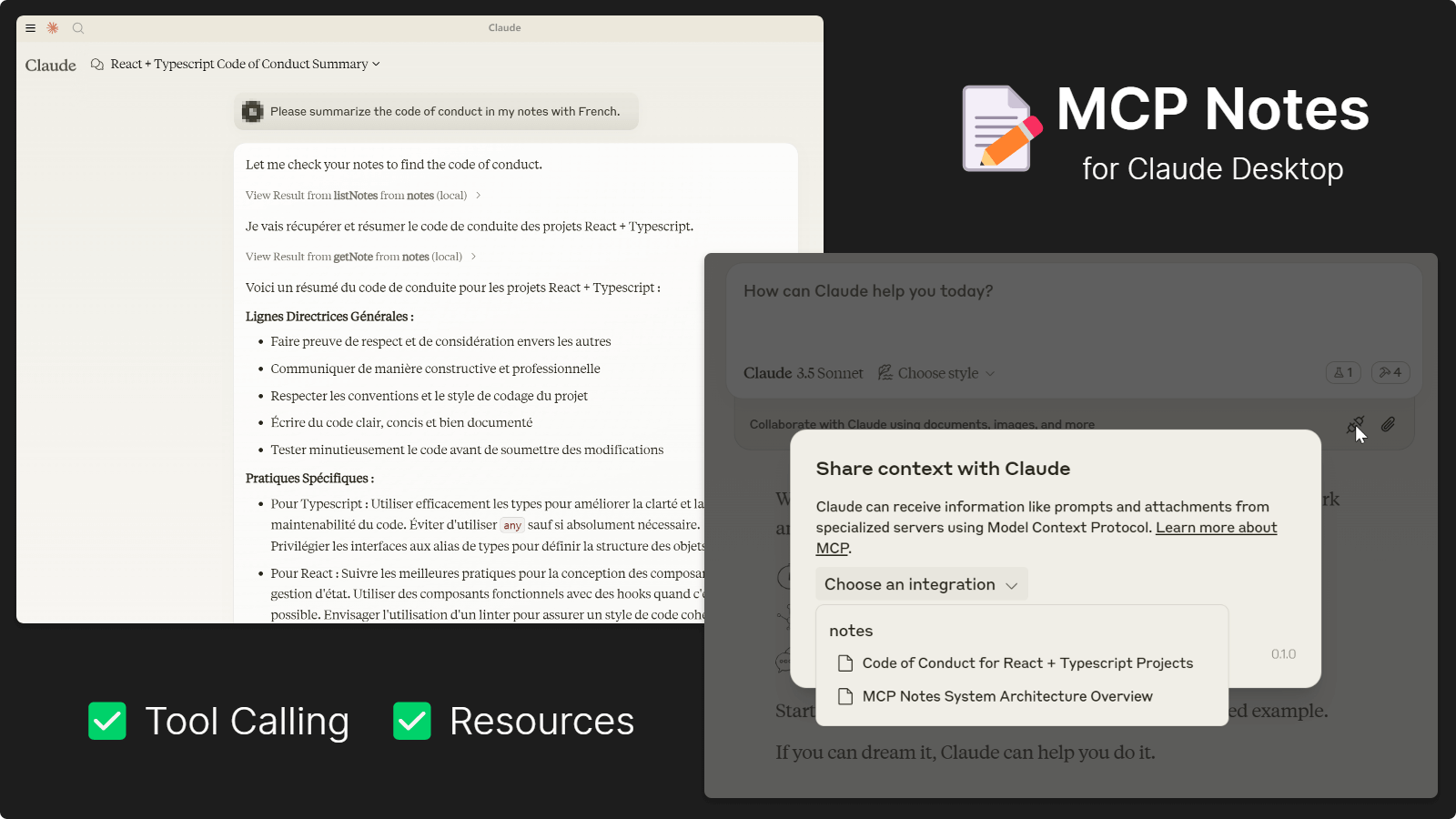
MCP Notes Server es una sencilla aplicación para tomar notas basada en el protocolo MCP. Su propósito es permitir a los usuarios grabar y visualizar notas y tareas complejas utilizando modelos de IA, como el registro de pensamientos, notas, inspiraciones y reflexiones personales. No requiere la creación de archivos de proyecto, lo que permite a los usuarios grabar cualquier contenido sin hacerlo público dentro del proyecto.
Este proyecto incluye dos servidores: un servidor Node.js que utiliza el Protocolo de contexto de modelo (MCP) para la gestión de notas impulsada por IA y un servidor web que proporciona una interfaz fácil de usar para la interacción manual con sus notas.
Nota: Este proyecto requiere DynamoDB para el almacenamiento de notas. Necesitará una cuenta de AWS para usarlo. AWS ofrece un generoso plan gratuito para DynamoDB, ideal para uso personal frecuente sin costo.
Related MCP server: Anki MCP Server
🖥️ Arquitectura de servidor dual: servidor MCP para la gestión de notas impulsada por IA y servidor web para la interfaz de usuario
🤖 Toma de notas con tecnología de IA: registre pensamientos, ideas y tareas mediante interacciones de IA
🗂️ Gestión integral de notas: crea, enumera, recupera, actualiza y elimina notas mediante IA o interfaz web
📋 Almacenamiento confiable: almacenamiento de notas seguro y eficiente con AWS DynamoDB
🔐 Autenticación flexible: Compatibilidad con credenciales de AWS a través de cadenas de conexión o variables de entorno
Independiente del proyecto: almacene notas personales sin afectar los archivos ni la estructura del proyecto
Puede usar cualquier modelo que admita llamadas a funciones, siempre que su cliente sea compatible con MCP. Los siguientes modelos han sido probados y su funcionamiento está confirmado:
Serie Claude 3.5
Serie Géminis 1.5 y 2.0
Serie GPT-4
Mistral grande
Grok-2
Chat de DeepSeek
Recomendado
Ejecútelo directamente con npx o bunx , vea los ejemplos a continuación.
Alternativa
Asegúrese de que Node.js esté instalado en su sistema.
Clone este repositorio e instale las dependencias con: npm install
Configure Claude Desktop o cualquier otra herramienta como se muestra a continuación
dynamodb://<access_key>:<secret_key>@<region>/<table>Ejemplo:
dynamodb://AKIAXXXXXXXX:SKXXXXXXXX@us-east-1/mcp-notes
Exportar AWS_ACCESS_KEY_ID y AWS_SECRET_ACCESS_KEY .
Proporcione información de conexión sin credenciales en la URI: dynamodb://us-east-1/mcp-notes
Agregue este fragmento a claude_desktop_config.json :
{
  "mcpServers": {
    "mcp-notes": {
      "command": "npx",
      "args": [
        "-y",
        "-p",
        "mcp-notes",
        "mcp-notes-server",
        "--dynamodb",
        "dynamodb://access_key:secret_key@region/table"
      ]
    }
  }
}
o archivo en discos locales:
{
  "mcpServers": {
    "mcp-notes": {
      "command": "node",
      "args": [
        "file://path/to/notes-mcp-server.js",
        "--dynamodb",
        "dynamodb://access_key:secret_key@region/table"
      ]
    }
  }
}Nota: Actualmente, Cody tiene soporte limitado para servidores MCP.
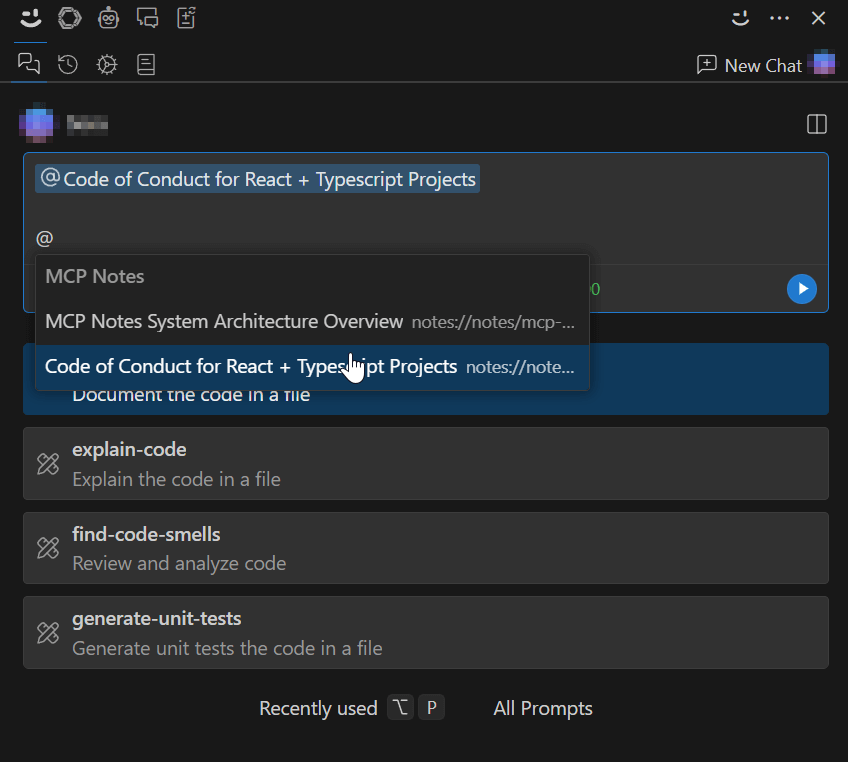
Solo permite una conexión al servidor y no puede realizar llamadas a herramientas. Deberá usar la interfaz web para crear y administrar notas y luego consultarlas en las conversaciones de chat de IA.
Añade este fragmento a tu configuración de VS Code:
{
  "openctx.providers": {
    "https://openctx.org/npm/@openctx/provider-modelcontextprotocol": {
      "nodeCommand": "node",
      "mcp.provider.uri": "file://path/to/notes-mcp-server.js",
      "mcp.provider.args": [
        "--dynamodb",
        "dynamodb://access_key:secret_key@region/table"
      ]
    }
  }
}
Alternativamente, úselo con npx (no se garantiza que funcione):
{
  "openctx.providers": {
    "https://openctx.org/npm/@openctx/provider-modelcontextprotocol": {
      "nodeCommand": "node",
      "mcp.provider.uri": "file:///usr/local/bin/npx",
      "mcp.provider.args": [
        "-y",
        "-p",
        "mcp-notes",
        "mcp-notes-server",
        "--dynamodb",
        "dynamodb://access_key:secret_key@region/table"
      ]
    }
  }
}Agregue este fragmento a cline_mcp_settings.json :
Encontrará un ícono de "Servidor MCP" junto al botón "Nueva tarea", y luego hay un botón "Editar configuración de MCP" para abrir este archivo.
{
  "mcpServers": {
    "mcp-notes": {
      "command": "npx",
      "args": [
        "-y",
        "-p",
        "mcp-notes",
        "mcp-notes-server",
        "--dynamodb",
        "dynamodb://access_key:secret_key@region/table"
      ]
    }
  }
}El servidor web ofrece una interfaz intuitiva para gestionar tus notas. Puedes iniciar interfaces web para gestionar tus notas, añadir nuevas notas para IA o modificar partes de las notas generadas por IA.
npx -p mcp-notes mcp-notes-web-server --dynamodb "dynamodb://access_key:secret_key@region/table"bun src/notes-web-server.ts --dynamodb "dynamodb://access_key:secret_key@region/table"Alternativamente, compile con
npm run buildy ejecutenode dist/notes-mcp-server.jsonode dist/notes-web-server.js
Luego navegue a http://localhost:3100 en su navegador para ver las notas.
Entrada: { tags?: string[] }
Salida: Matriz de todas las notas, opcionalmente filtradas por etiquetas.
Entrada: { id: string }
Salida: Un único objeto de nota que coincide con el ID dado, o un mensaje "no encontrado" si no existe ninguna coincidencia.
Entrada: { id: string, title: string, summary: string, tags: string[], content: string }
Salida: Un mensaje de confirmación de éxito.
Entrada: { id: string }
Salida: Mensaje de confirmación de eliminación 🚮.
Las notas se almacenan utilizando la siguiente estructura:
id : Un identificador único para la nota. Debe ser descriptivo, con un sufijo numérico aleatorio, como "notas-de-reunión-1362".
title : El título de la nota.
summary : Un breve resumen del contenido de la nota.
tags : una matriz de etiquetas asociadas con la nota (por ejemplo, ["reunión", "proyecto-x"]).
content : El contenido principal de la nota.
✅ Funcionalidad completa
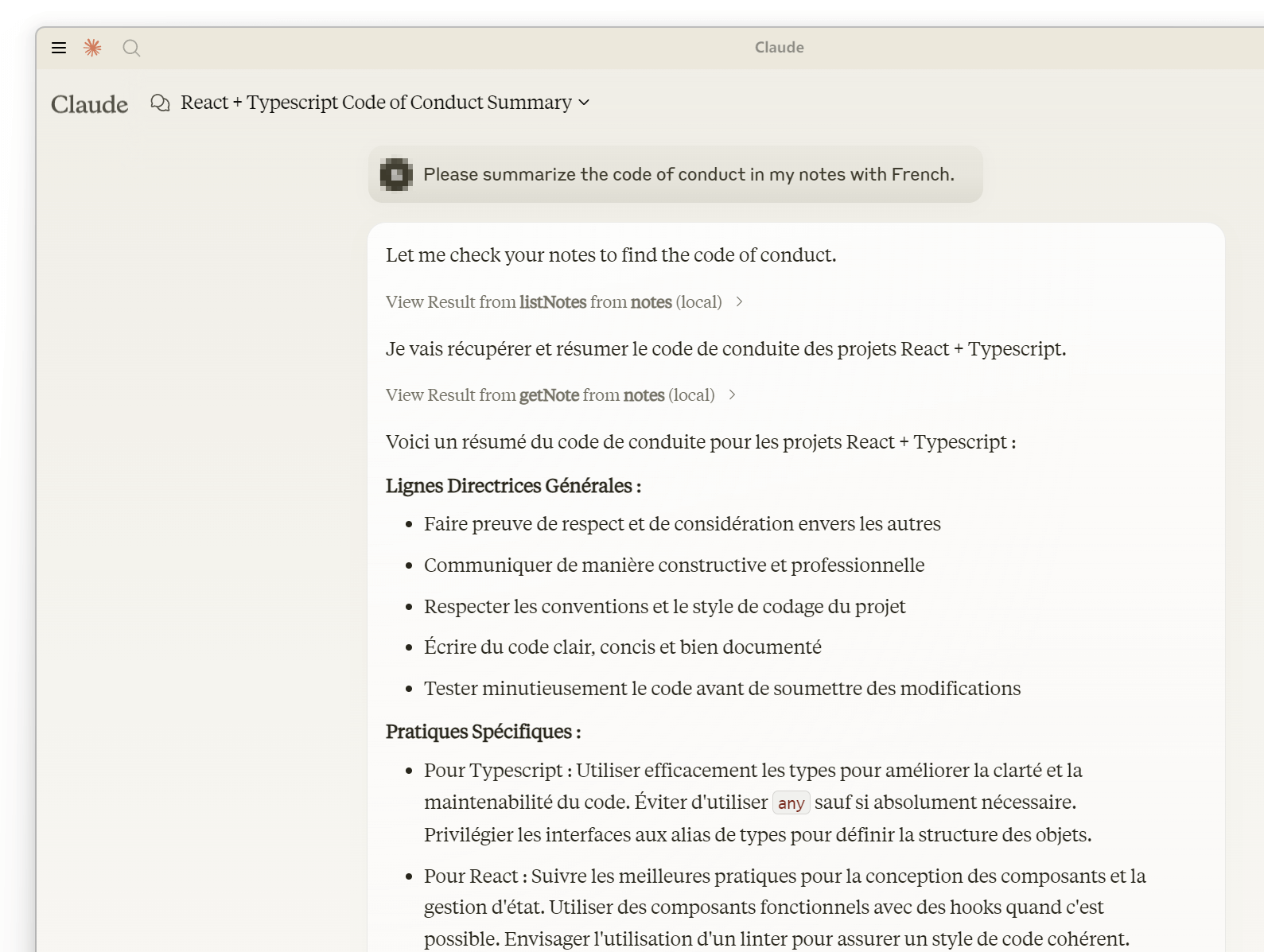
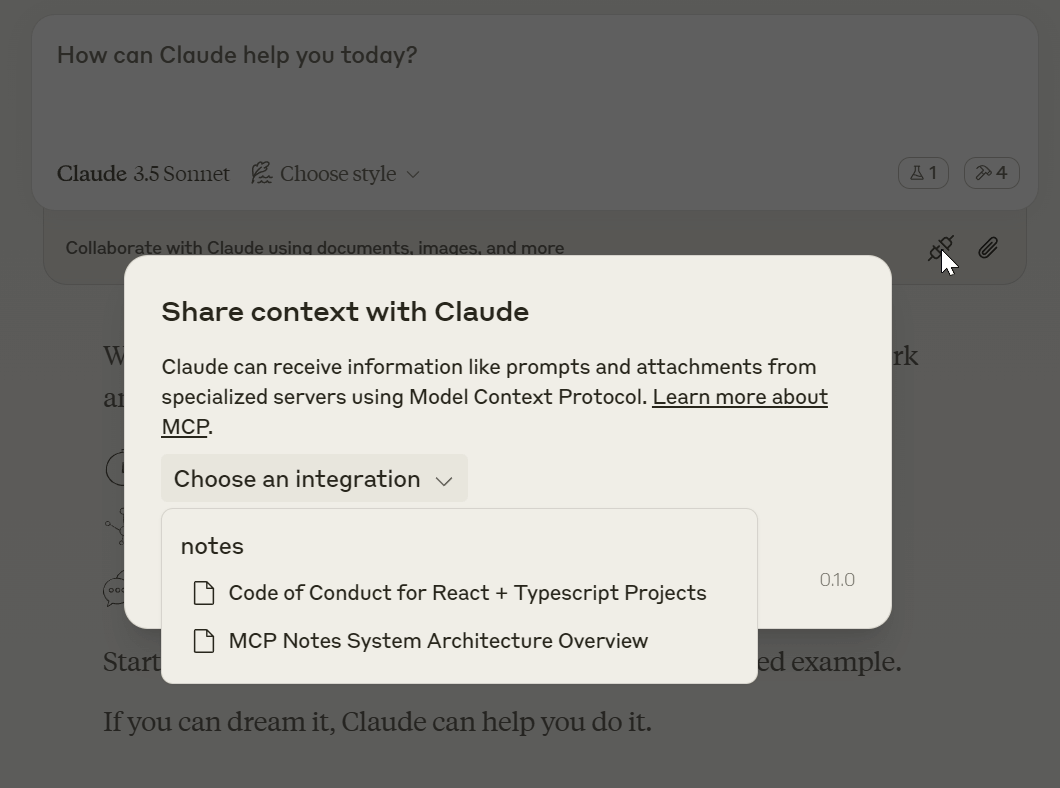
✅ Mencione notas a través del recurso
❎ No se admiten llamadas a herramientas
✅ Funcionalidad completa con llamadas a herramientas
❓ Los recursos no parecen funcionar; se necesita ayuda.
Deletes a specific note by its ID.
| Name | Required | Description | Default |
|---|---|---|---|
| id | Yes | ID of the note to delete |
Does the description disclose side effects, auth requirements, rate limits, or destructive behavior?
With no annotations provided, the description carries the full burden of behavioral disclosure. It states 'Deletes' which implies a destructive mutation, but lacks details on permissions needed, whether deletion is permanent or reversible, error handling (e.g., invalid ID), or side effects. This leaves significant gaps for a destructive operation.
Agents need to know what a tool does to the world before calling it. Descriptions should go beyond structured annotations to explain consequences.
Is the description appropriately sized, front-loaded, and free of redundancy?
The description is a single, efficient sentence with zero wasted words. It is front-loaded with the core action ('Deletes'), making it easy to scan and understand quickly.
Shorter descriptions cost fewer tokens and are easier for agents to parse. Every sentence should earn its place.
Given the tool's complexity, does the description cover enough for an agent to succeed on first attempt?
For a destructive tool with no annotations and no output schema, the description is incomplete. It lacks critical information such as success/error responses, confirmation prompts, or behavioral nuances (e.g., cascading effects). The schema covers the parameter, but overall context for safe and effective use is insufficient.
Complex tools with many parameters or behaviors need more documentation. Simple tools need less. This dimension scales expectations accordingly.
Does the description clarify parameter syntax, constraints, interactions, or defaults beyond what the schema provides?
The schema description coverage is 100%, with the parameter 'id' documented as 'ID of the note to delete'. The description adds minimal value beyond this, only reiterating 'by its ID' without providing additional context like ID format or examples. Baseline 3 is appropriate given the schema does the heavy lifting.
Input schemas describe structure but not intent. Descriptions should explain non-obvious parameter relationships and valid value ranges.
Does the description clearly state what the tool does and how it differs from similar tools?
The description clearly states the verb ('Deletes') and resource ('a specific note'), making the purpose unambiguous. It specifies 'by its ID' which helps differentiate it from siblings like 'listNotes' or 'writeNote', though it doesn't explicitly contrast with them in the description text.
Agents choose between tools based on descriptions. A clear purpose with a specific verb and resource helps agents select the right tool.
Does the description explain when to use this tool, when not to, or what alternatives exist?
The description provides no guidance on when to use this tool versus alternatives like 'writeNote' for updates or 'getNote' for retrieval. It mentions the 'ID' parameter but doesn't explain prerequisites (e.g., note must exist) or exclusions (e.g., cannot delete non-existent notes).
Agents often have multiple tools that could apply. Explicit usage guidance like "use X instead of Y when Z" prevents misuse.
Retrieves a specific note by its ID.
| Name | Required | Description | Default |
|---|---|---|---|
| id | Yes | ID of the note to retrieve |
Does the description disclose side effects, auth requirements, rate limits, or destructive behavior?
No annotations are provided, so the description carries the full burden of behavioral disclosure. It states the tool retrieves a note, implying a read-only operation, but doesn't cover aspects like error handling (e.g., what happens if the ID is invalid), authentication needs, rate limits, or return format. This leaves gaps in understanding how the tool behaves beyond the basic action.
Agents need to know what a tool does to the world before calling it. Descriptions should go beyond structured annotations to explain consequences.
Is the description appropriately sized, front-loaded, and free of redundancy?
The description is a single, clear sentence with zero waste—it directly states the tool's purpose without redundancy. It's appropriately sized for a simple retrieval tool and front-loaded with the essential information.
Shorter descriptions cost fewer tokens and are easier for agents to parse. Every sentence should earn its place.
Given the tool's complexity, does the description cover enough for an agent to succeed on first attempt?
Given the tool's low complexity (single parameter, no output schema, no annotations), the description is minimally adequate. It covers the basic action but lacks details on behavior, usage context, or output, which could be helpful for an agent. It meets the minimum viable standard but has clear gaps in completeness.
Complex tools with many parameters or behaviors need more documentation. Simple tools need less. This dimension scales expectations accordingly.
Does the description clarify parameter syntax, constraints, interactions, or defaults beyond what the schema provides?
The schema description coverage is 100%, with the parameter 'id' fully documented in the schema as 'ID of the note to retrieve'. The description adds no additional meaning beyond this, such as format examples or constraints. Since the schema does the heavy lifting, the baseline score of 3 is appropriate.
Input schemas describe structure but not intent. Descriptions should explain non-obvious parameter relationships and valid value ranges.
Does the description clearly state what the tool does and how it differs from similar tools?
The description clearly states the action ('Retrieves') and resource ('a specific note by its ID'), making the purpose immediately understandable. It doesn't explicitly distinguish from sibling tools like listNotes (which likely lists multiple notes) or deleteNote (which deletes), but the specificity of 'by its ID' implies it's for fetching a single, known note.
Agents choose between tools based on descriptions. A clear purpose with a specific verb and resource helps agents select the right tool.
Does the description explain when to use this tool, when not to, or what alternatives exist?
The description provides no guidance on when to use this tool versus alternatives. It doesn't mention siblings like listNotes for browsing notes or writeNote for creating/updating, nor does it specify prerequisites (e.g., needing a valid note ID). Usage is implied by the action but lacks explicit context.
Agents often have multiple tools that could apply. Explicit usage guidance like "use X instead of Y when Z" prevents misuse.
Lists all notes, or search notes with tags you seen in previous list operation.
| Name | Required | Description | Default |
|---|---|---|---|
| tags | No | Optional tags to filter notes. do not specify this if you didn't certainly sure what tags you want. |
Does the description disclose side effects, auth requirements, rate limits, or destructive behavior?
With no annotations provided, the description carries the full burden of behavioral disclosure. It mentions the tool can list all notes or search with tags, but fails to describe critical behaviors: whether it's read-only (implied but not stated), how results are returned (e.g., pagination, format), error conditions, or any rate limits. This leaves significant gaps for an agent to understand operational traits.
Agents need to know what a tool does to the world before calling it. Descriptions should go beyond structured annotations to explain consequences.
Is the description appropriately sized, front-loaded, and free of redundancy?
The description is concise with two clear clauses, front-loading the main purpose ('Lists all notes') and adding a secondary function ('or search notes with tags'). There's no wasted text, though the phrasing 'tags you seen in previous list operation' is slightly awkward but still functional.
Shorter descriptions cost fewer tokens and are easier for agents to parse. Every sentence should earn its place.
Given the tool's complexity, does the description cover enough for an agent to succeed on first attempt?
Given the tool's moderate complexity (list/search functionality), lack of annotations, and no output schema, the description is insufficiently complete. It doesn't explain return values, error handling, or behavioral constraints, leaving the agent with incomplete operational context. This is a significant gap for a tool without structured support.
Complex tools with many parameters or behaviors need more documentation. Simple tools need less. This dimension scales expectations accordingly.
Does the description clarify parameter syntax, constraints, interactions, or defaults beyond what the schema provides?
The input schema has 100% description coverage, with the 'tags' parameter well-documented in the schema itself. The description adds minimal value beyond the schema by mentioning tags are for filtering and should be used only if certain, but doesn't provide additional context like tag format examples or interaction details. This meets the baseline for high schema coverage.
Input schemas describe structure but not intent. Descriptions should explain non-obvious parameter relationships and valid value ranges.
Does the description clearly state what the tool does and how it differs from similar tools?
The description clearly states the tool's purpose: 'Lists all notes, or search notes with tags'. It specifies the verb ('Lists'/'search') and resource ('notes'), making the function understandable. However, it doesn't explicitly differentiate from sibling tools like 'getNote' (which presumably retrieves a single note) or mention scope limitations, preventing a perfect score.
Agents choose between tools based on descriptions. A clear purpose with a specific verb and resource helps agents select the right tool.
Does the description explain when to use this tool, when not to, or what alternatives exist?
The description provides some implied guidance: it suggests using tags for filtering based on previous operations ('tags you seen in previous list operation'), which hints at a workflow. However, it lacks explicit instructions on when to use this tool versus alternatives like 'getNote' for single notes or 'writeNote' for creation, and doesn't specify prerequisites or exclusions, leaving usage context incomplete.
Agents often have multiple tools that could apply. Explicit usage guidance like "use X instead of Y when Z" prevents misuse.
Creates or updates a note with a unique ID suffixed by a random number.
| Name | Required | Description | Default |
|---|---|---|---|
| content | Yes | Content of the note | |
| id | Yes | Unique identifier of the note, should be unique enough like "a-note-about-python-file-server-design-109". | |
| summary | Yes | Short summary of the note | |
| tags | Yes | Tags of the note | |
| title | Yes | Title of the note, describe what was inside the content. |
Does the description disclose side effects, auth requirements, rate limits, or destructive behavior?
With no annotations, the description carries full burden but provides minimal behavioral insight. It mentions the ID includes a random number suffix, hinting at uniqueness, but lacks details on permissions, error handling, or whether updates overwrite or merge. For a mutation tool, this is inadequate disclosure.
Agents need to know what a tool does to the world before calling it. Descriptions should go beyond structured annotations to explain consequences.
Is the description appropriately sized, front-loaded, and free of redundancy?
The description is a single, efficient sentence that directly states the tool's function without redundancy. It's front-loaded and wastes no words, making it easy for an agent to parse quickly.
Shorter descriptions cost fewer tokens and are easier for agents to parse. Every sentence should earn its place.
Given the tool's complexity, does the description cover enough for an agent to succeed on first attempt?
For a mutation tool with 5 required parameters and no annotations or output schema, the description is insufficient. It doesn't explain return values, error conditions, or the implications of 'creates or updates' (e.g., idempotency), leaving significant gaps for agent usage.
Complex tools with many parameters or behaviors need more documentation. Simple tools need less. This dimension scales expectations accordingly.
Does the description clarify parameter syntax, constraints, interactions, or defaults beyond what the schema provides?
Schema description coverage is 100%, so parameters are well-documented in the schema. The description adds no additional meaning beyond implying ID uniqueness with a random suffix, which is partially covered in the schema. Baseline 3 is appropriate as the schema handles most semantics.
Input schemas describe structure but not intent. Descriptions should explain non-obvious parameter relationships and valid value ranges.
Does the description clearly state what the tool does and how it differs from similar tools?
The description clearly states the verb ('Creates or updates') and resource ('a note'), making the purpose evident. However, it doesn't explicitly differentiate from sibling tools like 'getNote' or 'listNotes', which would require mentioning that this is the primary write operation versus read-only siblings.
Agents choose between tools based on descriptions. A clear purpose with a specific verb and resource helps agents select the right tool.
Does the description explain when to use this tool, when not to, or what alternatives exist?
No guidance is provided on when to use this tool versus alternatives. It doesn't mention prerequisites (e.g., needing an ID), compare to siblings like 'deleteNote', or specify scenarios for creation versus updates, leaving the agent without contextual usage cues.
Agents often have multiple tools that could apply. Explicit usage guidance like "use X instead of Y when Z" prevents misuse.
Recent tool additions, removals, and schema changes observed during successful MCP inspections.
v1.0.0deleteNotegetNotelistNoteswriteNoteScored across 4 tools
Each tool has a clearly distinct purpose: deleteNote removes notes, getNote retrieves single notes, listNotes lists or searches notes, and writeNote creates or updates notes. There is no overlap in functionality, making tool selection straightforward for an agent.
All tool names follow a consistent verb_noun pattern in camelCase (e.g., deleteNote, getNote, listNotes, writeNote). This uniformity enhances readability and predictability across the toolset.
With 4 tools, this server is well-scoped for a notes management system. Each tool serves a distinct CRUD operation (create, read, update, delete), which is appropriate and efficient for the domain without being overly sparse or bloated.
The toolset provides complete CRUD coverage for notes: writeNote handles creation and updates, getNote and listNotes cover retrieval, and deleteNote handles deletion. There are no obvious gaps, enabling agents to perform full lifecycle operations on notes.
Google Keep-style notes app with an MCP server for AI agents to read/write notes.
Markdown-based note-taking with a hosted MCP server. Your notes serve you and your AI.
An MCP server that used to create notes
Persistent memory layer for AI tools. Save and recall notes across Claude and other MCP clients.