

F
licenseNot graded
qualityD
maintenanceA simple MCP server for creating and managing notes with support for summarization functionality.
1
-

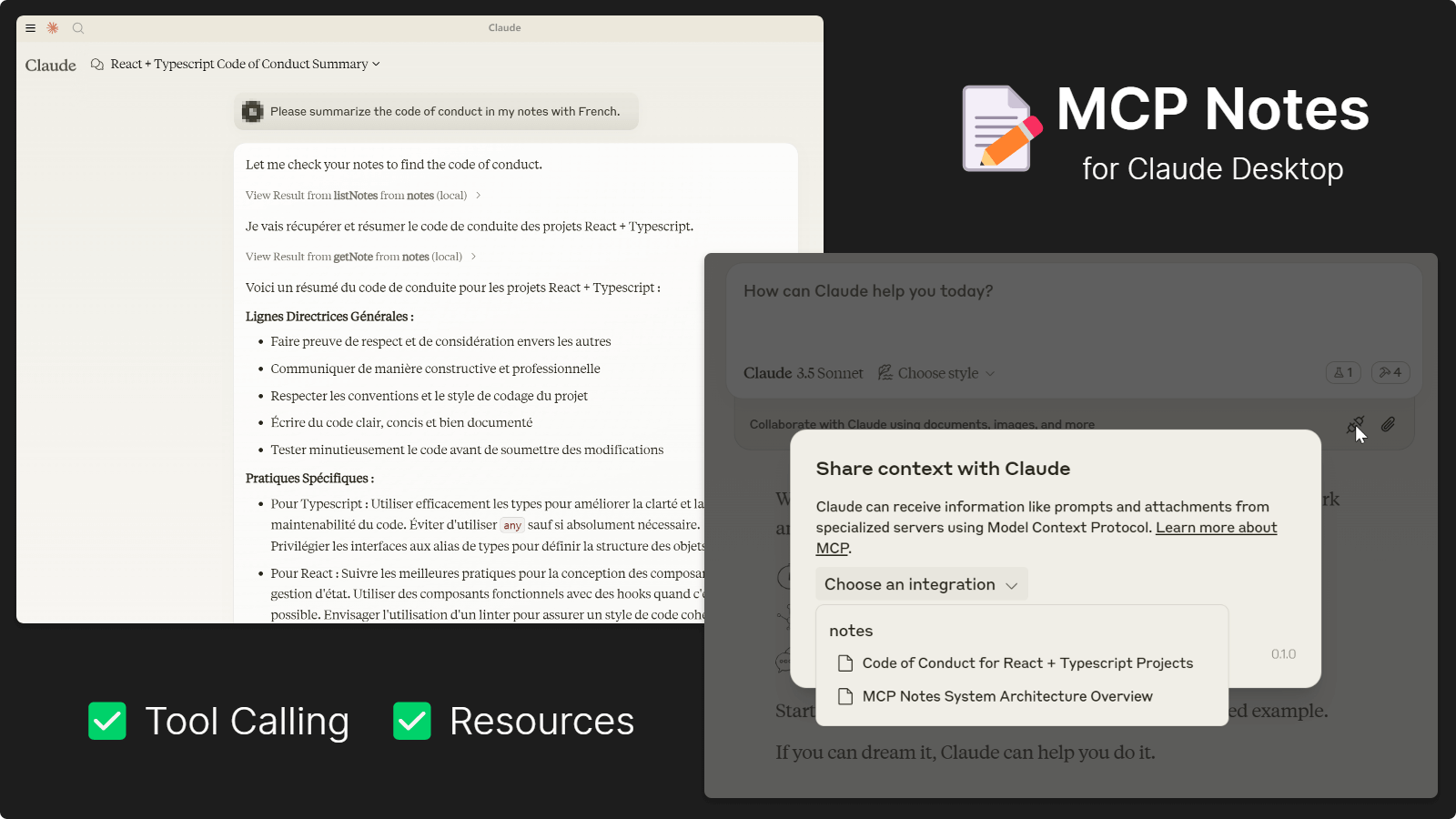
MCP Notes Server ist eine einfache Notizanwendung, die auf dem MCP-Protokoll basiert. Sie ermöglicht es Nutzern, komplexe Notizen und Aufgaben mithilfe von KI-Modellen aufzuzeichnen und anzuzeigen, beispielsweise persönliche Gedanken, Notizen, Inspirationen und Erkenntnisse. Die Anwendung benötigt keine Projektdateien und ermöglicht es Nutzern, beliebige Inhalte aufzuzeichnen, ohne diese innerhalb des Projekts öffentlich zugänglich zu machen.
Dieses Projekt umfasst zwei Server: einen Node.js-Server, der das Model Context Protocol (MCP) für die KI-gesteuerte Notizverwaltung verwendet, und einen Webserver, der eine benutzerfreundliche Oberfläche für die manuelle Interaktion mit Ihren Notizen bietet.
Hinweis: Dieses Projekt benötigt DynamoDB zur Notizenspeicherung. Sie benötigen hierfür ein AWS-Konto. AWS bietet ein großzügiges kostenloses Kontingent für DynamoDB an, sodass es sich für die häufige private Nutzung ohne Kosten eignet.
Related MCP server: Anki MCP Server
🖥️ Dual-Server-Architektur: MCP-Server für KI-gesteuertes Notizmanagement und Webserver für die Benutzeroberfläche
🤖 KI-gestütztes Notieren: Halten Sie Gedanken, Erkenntnisse und Aufgaben durch KI-Interaktionen fest
🗂️ Umfassende Notizverwaltung: Erstellen, Auflisten, Abrufen, Aktualisieren und Löschen von Notizen über KI oder Weboberfläche
📋 Zuverlässiger Speicher: Sichere und effiziente Notizenspeicherung mit AWS DynamoDB
🔐 Flexible Authentifizierung: Unterstützung für AWS-Anmeldeinformationen über Verbindungszeichenfolgen oder Umgebungsvariablen
📝 Projektunabhängig: Speichern Sie persönliche Notizen, ohne Projektdateien oder -struktur zu beeinträchtigen
Sie können jedes Modell verwenden, das Funktionsaufrufe unterstützt, solange Ihr Client MCP unterstützt. Die folgenden Modelle wurden getestet und ihre Funktionsfähigkeit bestätigt:
Claude 3.5 Serie
Gemini 1.5 und 2.0 Serie
GPT-4-Serie
Mistral Large
Grok-2
DeepSeek-Chat
Empfohlen
Führen Sie es direkt mit npx oder bunx aus, siehe Beispiele unten.
Alternative
Stellen Sie sicher, dass Node.js auf Ihrem System installiert ist.
Klonen Sie dieses Repository und installieren Sie Abhängigkeiten mit: npm install
Konfigurieren Sie Claude Desktop oder andere Tools wie unten gezeigt
dynamodb://<access_key>:<secret_key>@<region>/<table>Beispiel:
dynamodb://AKIAXXXXXXXX:SKXXXXXXXX@us-east-1/mcp-notes
Exportieren Sie AWS_ACCESS_KEY_ID und AWS_SECRET_ACCESS_KEY .
Geben Sie Verbindungsinformationen ohne Anmeldeinformationen in der URI an: dynamodb://us-east-1/mcp-notes
Fügen Sie diesen Codeausschnitt zu claude_desktop_config.json hinzu:
{
  "mcpServers": {
    "mcp-notes": {
      "command": "npx",
      "args": [
        "-y",
        "-p",
        "mcp-notes",
        "mcp-notes-server",
        "--dynamodb",
        "dynamodb://access_key:secret_key@region/table"
      ]
    }
  }
}
oder Datei auf lokalen Datenträgern:
{
  "mcpServers": {
    "mcp-notes": {
      "command": "node",
      "args": [
        "file://path/to/notes-mcp-server.js",
        "--dynamodb",
        "dynamodb://access_key:secret_key@region/table"
      ]
    }
  }
}Hinweis: Derzeit bietet Cody nur eingeschränkte MCP-Serverunterstützung.
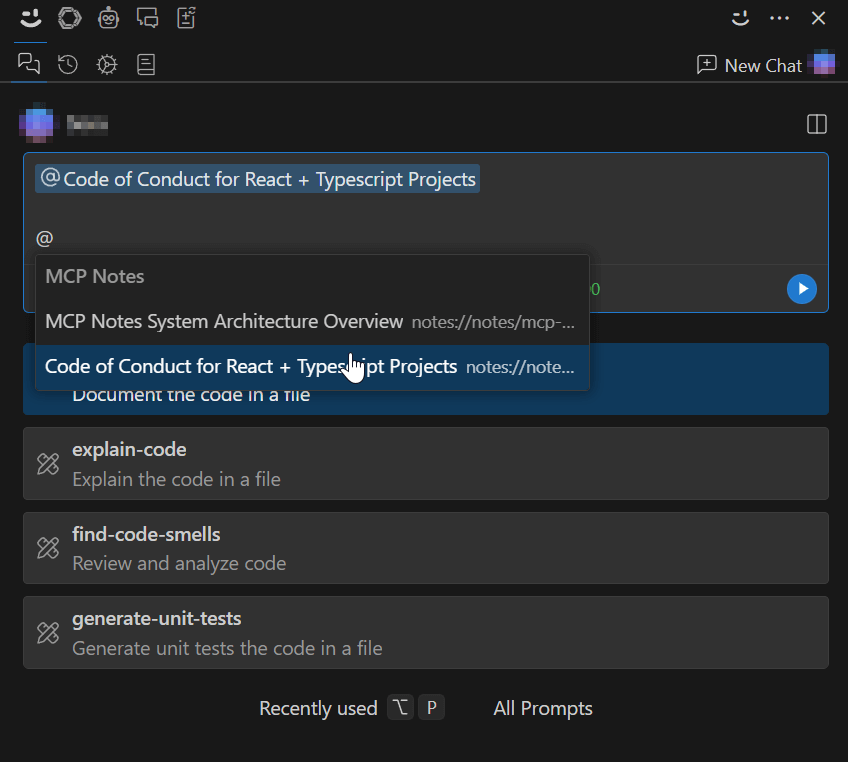
Es ist nur eine Serververbindung möglich und es können keine Tool-Aufrufe durchgeführt werden. Sie müssen die Weboberfläche verwenden, um Notizen zu erstellen und zu verwalten und diese dann in KI-Chat-Konversationen zu referenzieren.
Fügen Sie diesen Codeausschnitt zu Ihren VS Code-Einstellungen hinzu:
{
  "openctx.providers": {
    "https://openctx.org/npm/@openctx/provider-modelcontextprotocol": {
      "nodeCommand": "node",
      "mcp.provider.uri": "file://path/to/notes-mcp-server.js",
      "mcp.provider.args": [
        "--dynamodb",
        "dynamodb://access_key:secret_key@region/table"
      ]
    }
  }
}
alternativ mit npx verwenden (Funktion nicht garantiert):
{
  "openctx.providers": {
    "https://openctx.org/npm/@openctx/provider-modelcontextprotocol": {
      "nodeCommand": "node",
      "mcp.provider.uri": "file:///usr/local/bin/npx",
      "mcp.provider.args": [
        "-y",
        "-p",
        "mcp-notes",
        "mcp-notes-server",
        "--dynamodb",
        "dynamodb://access_key:secret_key@region/table"
      ]
    }
  }
}Fügen Sie diesen Codeausschnitt zu cline_mcp_settings.json hinzu:
Neben der Schaltfläche „Neue Aufgabe“ finden Sie ein „MCP-Server“-Symbol und dann eine Schaltfläche „MCP-Einstellungen bearbeiten“, um diese Datei zu öffnen.
{
  "mcpServers": {
    "mcp-notes": {
      "command": "npx",
      "args": [
        "-y",
        "-p",
        "mcp-notes",
        "mcp-notes-server",
        "--dynamodb",
        "dynamodb://access_key:secret_key@region/table"
      ]
    }
  }
}Der Webserver bietet eine benutzerfreundliche Oberfläche zur Verwaltung Ihrer Notizen. Sie können Weboberflächen starten, um Ihre Notizen zu verwalten, neue Notizen für die KI hinzuzufügen oder Teile der von der KI generierten Notizen zu ändern.
npx -p mcp-notes mcp-notes-web-server --dynamodb "dynamodb://access_key:secret_key@region/table"bun src/notes-web-server.ts --dynamodb "dynamodb://access_key:secret_key@region/table"Alternativ können Sie mit
npm run buildkompilieren undnode dist/notes-mcp-server.jsodernode dist/notes-web-server.jsausführen.
Navigieren Sie dann in Ihrem Browser zu http://localhost:3100 um Notizen anzuzeigen.
Eingabe: { tags?: string[] }
Ausgabe: Array aller Notizen, optional nach Tags gefiltert.
Eingabe: { id: string }
Ausgabe: Ein einzelnes Notizobjekt, das mit der angegebenen ID übereinstimmt, oder eine „Nicht gefunden“-Meldung, wenn keine Übereinstimmung vorhanden ist.
Eingabe: { id: string, title: string, summary: string, tags: string[], content: string }
Ausgabe: Eine Erfolgsbestätigungsmeldung.
Eingabe: { id: string }
Ausgabe: Löschbestätigungsnachricht 🚮.
Notizen werden mit der folgenden Struktur gespeichert:
id : Eine eindeutige Kennung für die Notiz. Sie sollte beschreibend sein und ein zufälliges Zahlensuffix enthalten, z. B. „meeting-notes-1362“.
title : Der Titel der Notiz.
summary : Eine kurze Zusammenfassung des Inhalts der Notiz.
tags : Ein Array von Tags, die mit der Notiz verknüpft sind (z. B. ["Meeting", "Projekt-x"]).
content : Der Hauptinhalt der Notiz.
✅ Volle Funktionalität
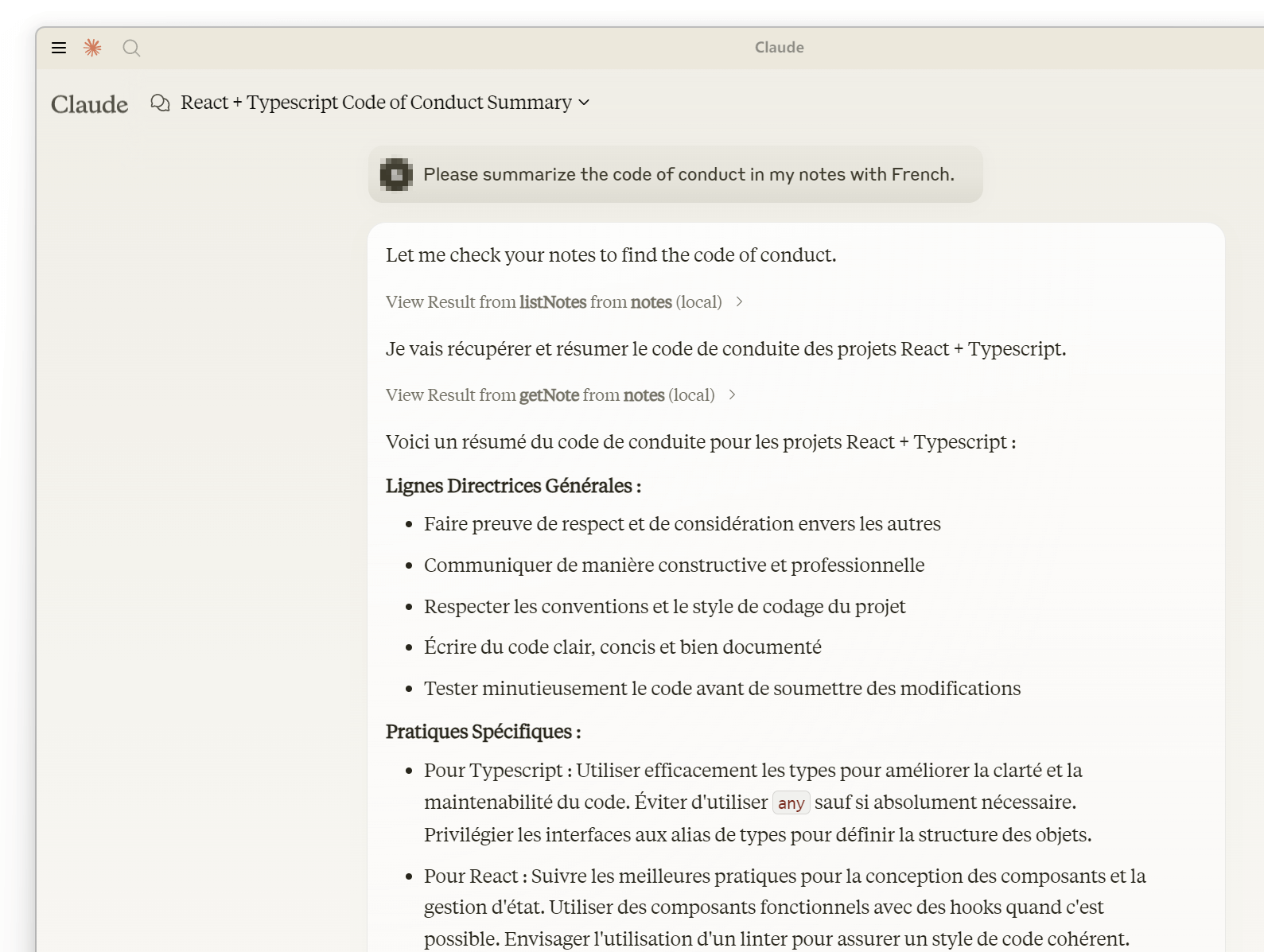
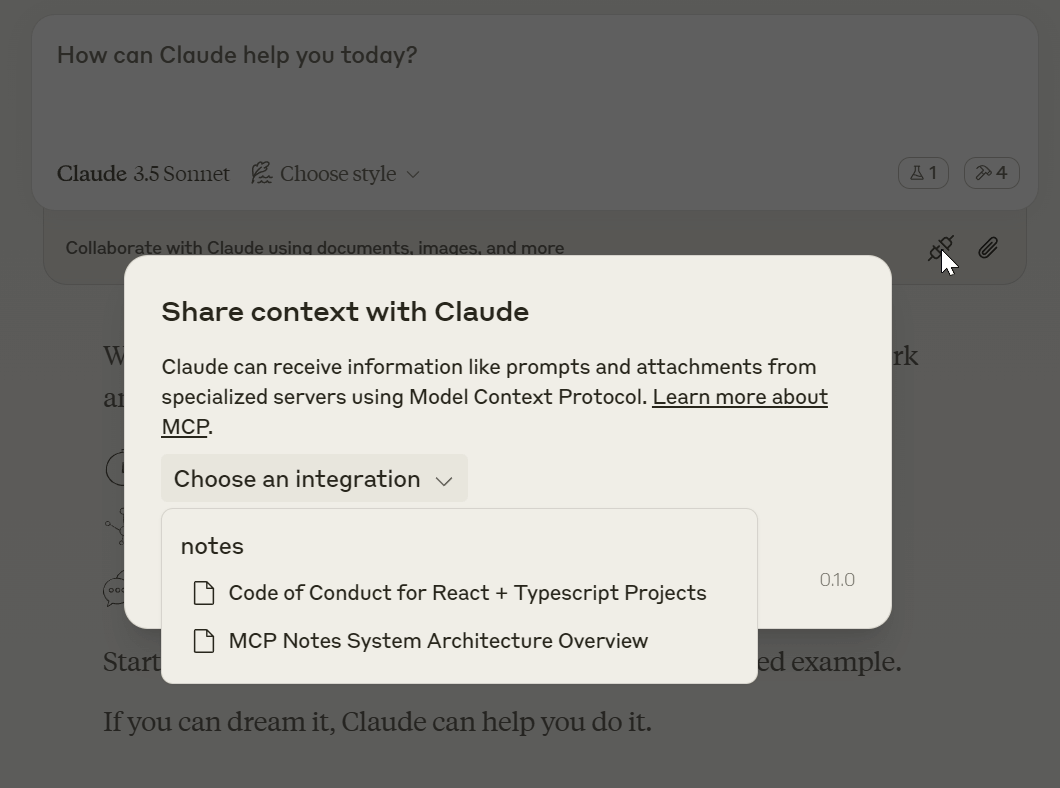
✅ Erwähnen Sie Notizen über die Ressource
❎ Tool-Aufrufe werden nicht unterstützt
✅ Volle Funktionalität mit Tool Calls
❓ Ressourcen scheinen nicht zu funktionieren; Hilfe erwünscht.
Deletes a specific note by its ID.
| Name | Required | Description | Default |
|---|---|---|---|
| id | Yes | ID of the note to delete |
Does the description disclose side effects, auth requirements, rate limits, or destructive behavior?
With no annotations provided, the description carries the full burden of behavioral disclosure. It states 'Deletes' which implies a destructive mutation, but lacks details on permissions needed, whether deletion is permanent or reversible, error handling (e.g., invalid ID), or side effects. This leaves significant gaps for a destructive operation.
Agents need to know what a tool does to the world before calling it. Descriptions should go beyond structured annotations to explain consequences.
Is the description appropriately sized, front-loaded, and free of redundancy?
The description is a single, efficient sentence with zero wasted words. It is front-loaded with the core action ('Deletes'), making it easy to scan and understand quickly.
Shorter descriptions cost fewer tokens and are easier for agents to parse. Every sentence should earn its place.
Given the tool's complexity, does the description cover enough for an agent to succeed on first attempt?
For a destructive tool with no annotations and no output schema, the description is incomplete. It lacks critical information such as success/error responses, confirmation prompts, or behavioral nuances (e.g., cascading effects). The schema covers the parameter, but overall context for safe and effective use is insufficient.
Complex tools with many parameters or behaviors need more documentation. Simple tools need less. This dimension scales expectations accordingly.
Does the description clarify parameter syntax, constraints, interactions, or defaults beyond what the schema provides?
The schema description coverage is 100%, with the parameter 'id' documented as 'ID of the note to delete'. The description adds minimal value beyond this, only reiterating 'by its ID' without providing additional context like ID format or examples. Baseline 3 is appropriate given the schema does the heavy lifting.
Input schemas describe structure but not intent. Descriptions should explain non-obvious parameter relationships and valid value ranges.
Does the description clearly state what the tool does and how it differs from similar tools?
The description clearly states the verb ('Deletes') and resource ('a specific note'), making the purpose unambiguous. It specifies 'by its ID' which helps differentiate it from siblings like 'listNotes' or 'writeNote', though it doesn't explicitly contrast with them in the description text.
Agents choose between tools based on descriptions. A clear purpose with a specific verb and resource helps agents select the right tool.
Does the description explain when to use this tool, when not to, or what alternatives exist?
The description provides no guidance on when to use this tool versus alternatives like 'writeNote' for updates or 'getNote' for retrieval. It mentions the 'ID' parameter but doesn't explain prerequisites (e.g., note must exist) or exclusions (e.g., cannot delete non-existent notes).
Agents often have multiple tools that could apply. Explicit usage guidance like "use X instead of Y when Z" prevents misuse.
Retrieves a specific note by its ID.
| Name | Required | Description | Default |
|---|---|---|---|
| id | Yes | ID of the note to retrieve |
Does the description disclose side effects, auth requirements, rate limits, or destructive behavior?
No annotations are provided, so the description carries the full burden of behavioral disclosure. It states the tool retrieves a note, implying a read-only operation, but doesn't cover aspects like error handling (e.g., what happens if the ID is invalid), authentication needs, rate limits, or return format. This leaves gaps in understanding how the tool behaves beyond the basic action.
Agents need to know what a tool does to the world before calling it. Descriptions should go beyond structured annotations to explain consequences.
Is the description appropriately sized, front-loaded, and free of redundancy?
The description is a single, clear sentence with zero waste—it directly states the tool's purpose without redundancy. It's appropriately sized for a simple retrieval tool and front-loaded with the essential information.
Shorter descriptions cost fewer tokens and are easier for agents to parse. Every sentence should earn its place.
Given the tool's complexity, does the description cover enough for an agent to succeed on first attempt?
Given the tool's low complexity (single parameter, no output schema, no annotations), the description is minimally adequate. It covers the basic action but lacks details on behavior, usage context, or output, which could be helpful for an agent. It meets the minimum viable standard but has clear gaps in completeness.
Complex tools with many parameters or behaviors need more documentation. Simple tools need less. This dimension scales expectations accordingly.
Does the description clarify parameter syntax, constraints, interactions, or defaults beyond what the schema provides?
The schema description coverage is 100%, with the parameter 'id' fully documented in the schema as 'ID of the note to retrieve'. The description adds no additional meaning beyond this, such as format examples or constraints. Since the schema does the heavy lifting, the baseline score of 3 is appropriate.
Input schemas describe structure but not intent. Descriptions should explain non-obvious parameter relationships and valid value ranges.
Does the description clearly state what the tool does and how it differs from similar tools?
The description clearly states the action ('Retrieves') and resource ('a specific note by its ID'), making the purpose immediately understandable. It doesn't explicitly distinguish from sibling tools like listNotes (which likely lists multiple notes) or deleteNote (which deletes), but the specificity of 'by its ID' implies it's for fetching a single, known note.
Agents choose between tools based on descriptions. A clear purpose with a specific verb and resource helps agents select the right tool.
Does the description explain when to use this tool, when not to, or what alternatives exist?
The description provides no guidance on when to use this tool versus alternatives. It doesn't mention siblings like listNotes for browsing notes or writeNote for creating/updating, nor does it specify prerequisites (e.g., needing a valid note ID). Usage is implied by the action but lacks explicit context.
Agents often have multiple tools that could apply. Explicit usage guidance like "use X instead of Y when Z" prevents misuse.
Lists all notes, or search notes with tags you seen in previous list operation.
| Name | Required | Description | Default |
|---|---|---|---|
| tags | No | Optional tags to filter notes. do not specify this if you didn't certainly sure what tags you want. |
Does the description disclose side effects, auth requirements, rate limits, or destructive behavior?
With no annotations provided, the description carries the full burden of behavioral disclosure. It mentions the tool can list all notes or search with tags, but fails to describe critical behaviors: whether it's read-only (implied but not stated), how results are returned (e.g., pagination, format), error conditions, or any rate limits. This leaves significant gaps for an agent to understand operational traits.
Agents need to know what a tool does to the world before calling it. Descriptions should go beyond structured annotations to explain consequences.
Is the description appropriately sized, front-loaded, and free of redundancy?
The description is concise with two clear clauses, front-loading the main purpose ('Lists all notes') and adding a secondary function ('or search notes with tags'). There's no wasted text, though the phrasing 'tags you seen in previous list operation' is slightly awkward but still functional.
Shorter descriptions cost fewer tokens and are easier for agents to parse. Every sentence should earn its place.
Given the tool's complexity, does the description cover enough for an agent to succeed on first attempt?
Given the tool's moderate complexity (list/search functionality), lack of annotations, and no output schema, the description is insufficiently complete. It doesn't explain return values, error handling, or behavioral constraints, leaving the agent with incomplete operational context. This is a significant gap for a tool without structured support.
Complex tools with many parameters or behaviors need more documentation. Simple tools need less. This dimension scales expectations accordingly.
Does the description clarify parameter syntax, constraints, interactions, or defaults beyond what the schema provides?
The input schema has 100% description coverage, with the 'tags' parameter well-documented in the schema itself. The description adds minimal value beyond the schema by mentioning tags are for filtering and should be used only if certain, but doesn't provide additional context like tag format examples or interaction details. This meets the baseline for high schema coverage.
Input schemas describe structure but not intent. Descriptions should explain non-obvious parameter relationships and valid value ranges.
Does the description clearly state what the tool does and how it differs from similar tools?
The description clearly states the tool's purpose: 'Lists all notes, or search notes with tags'. It specifies the verb ('Lists'/'search') and resource ('notes'), making the function understandable. However, it doesn't explicitly differentiate from sibling tools like 'getNote' (which presumably retrieves a single note) or mention scope limitations, preventing a perfect score.
Agents choose between tools based on descriptions. A clear purpose with a specific verb and resource helps agents select the right tool.
Does the description explain when to use this tool, when not to, or what alternatives exist?
The description provides some implied guidance: it suggests using tags for filtering based on previous operations ('tags you seen in previous list operation'), which hints at a workflow. However, it lacks explicit instructions on when to use this tool versus alternatives like 'getNote' for single notes or 'writeNote' for creation, and doesn't specify prerequisites or exclusions, leaving usage context incomplete.
Agents often have multiple tools that could apply. Explicit usage guidance like "use X instead of Y when Z" prevents misuse.
Creates or updates a note with a unique ID suffixed by a random number.
| Name | Required | Description | Default |
|---|---|---|---|
| content | Yes | Content of the note | |
| id | Yes | Unique identifier of the note, should be unique enough like "a-note-about-python-file-server-design-109". | |
| summary | Yes | Short summary of the note | |
| tags | Yes | Tags of the note | |
| title | Yes | Title of the note, describe what was inside the content. |
Does the description disclose side effects, auth requirements, rate limits, or destructive behavior?
With no annotations, the description carries full burden but provides minimal behavioral insight. It mentions the ID includes a random number suffix, hinting at uniqueness, but lacks details on permissions, error handling, or whether updates overwrite or merge. For a mutation tool, this is inadequate disclosure.
Agents need to know what a tool does to the world before calling it. Descriptions should go beyond structured annotations to explain consequences.
Is the description appropriately sized, front-loaded, and free of redundancy?
The description is a single, efficient sentence that directly states the tool's function without redundancy. It's front-loaded and wastes no words, making it easy for an agent to parse quickly.
Shorter descriptions cost fewer tokens and are easier for agents to parse. Every sentence should earn its place.
Given the tool's complexity, does the description cover enough for an agent to succeed on first attempt?
For a mutation tool with 5 required parameters and no annotations or output schema, the description is insufficient. It doesn't explain return values, error conditions, or the implications of 'creates or updates' (e.g., idempotency), leaving significant gaps for agent usage.
Complex tools with many parameters or behaviors need more documentation. Simple tools need less. This dimension scales expectations accordingly.
Does the description clarify parameter syntax, constraints, interactions, or defaults beyond what the schema provides?
Schema description coverage is 100%, so parameters are well-documented in the schema. The description adds no additional meaning beyond implying ID uniqueness with a random suffix, which is partially covered in the schema. Baseline 3 is appropriate as the schema handles most semantics.
Input schemas describe structure but not intent. Descriptions should explain non-obvious parameter relationships and valid value ranges.
Does the description clearly state what the tool does and how it differs from similar tools?
The description clearly states the verb ('Creates or updates') and resource ('a note'), making the purpose evident. However, it doesn't explicitly differentiate from sibling tools like 'getNote' or 'listNotes', which would require mentioning that this is the primary write operation versus read-only siblings.
Agents choose between tools based on descriptions. A clear purpose with a specific verb and resource helps agents select the right tool.
Does the description explain when to use this tool, when not to, or what alternatives exist?
No guidance is provided on when to use this tool versus alternatives. It doesn't mention prerequisites (e.g., needing an ID), compare to siblings like 'deleteNote', or specify scenarios for creation versus updates, leaving the agent without contextual usage cues.
Agents often have multiple tools that could apply. Explicit usage guidance like "use X instead of Y when Z" prevents misuse.
Recent tool additions, removals, and schema changes observed during successful MCP inspections.
v1.0.0deleteNotegetNotelistNoteswriteNoteScored across 4 tools
Each tool has a clearly distinct purpose: deleteNote removes notes, getNote retrieves single notes, listNotes lists or searches notes, and writeNote creates or updates notes. There is no overlap in functionality, making tool selection straightforward for an agent.
All tool names follow a consistent verb_noun pattern in camelCase (e.g., deleteNote, getNote, listNotes, writeNote). This uniformity enhances readability and predictability across the toolset.
With 4 tools, this server is well-scoped for a notes management system. Each tool serves a distinct CRUD operation (create, read, update, delete), which is appropriate and efficient for the domain without being overly sparse or bloated.
The toolset provides complete CRUD coverage for notes: writeNote handles creation and updates, getNote and listNotes cover retrieval, and deleteNote handles deletion. There are no obvious gaps, enabling agents to perform full lifecycle operations on notes.
Google Keep-style notes app with an MCP server for AI agents to read/write notes.
Markdown-based note-taking with a hosted MCP server. Your notes serve you and your AI.
An MCP server that used to create notes
Persistent memory layer for AI tools. Save and recall notes across Claude and other MCP clients.