Linear MCP Server
The Linear MCP Server provides tools for managing Linear issues and project tracking:
Create Issues: Create new issues with title, team ID, description, priority, and status
Update Issues: Modify existing issues by changing properties like title, description, priority, or status
Search Issues: Find issues using filters such as text query, team, assignee, labels, priority, estimate points, and archive status
Get User Issues: Retrieve issues assigned to a specific user or the authenticated user
Add Comments: Add comments to existing issues, with options to customize the user's name and avatar
Access Resources: Retrieve details about issues, teams, users, organizations, and the authenticated viewer
Provides tools for issue tracking and project management in Linear, allowing users to create and update issues, search and filter issues, retrieve user-assigned tasks, add comments, and access organizational information.
Click on "Deploy Server".
Wait a few minutes for the server to deploy. Once ready, it will show a "Started" state.
In the chat, type
@followed by the MCP server name and your instructions, e.g., "@Linear MCP Server create a bug ticket for the login screen disappearing on mobile"
That's it! The server will respond to your query, and you can continue using it as needed.
Here is a step-by-step guide with screenshots.
Linear MCP
A Model Context Protocol (MCP) server for Linear, providing tools for issue tracking and project management.
Configuration
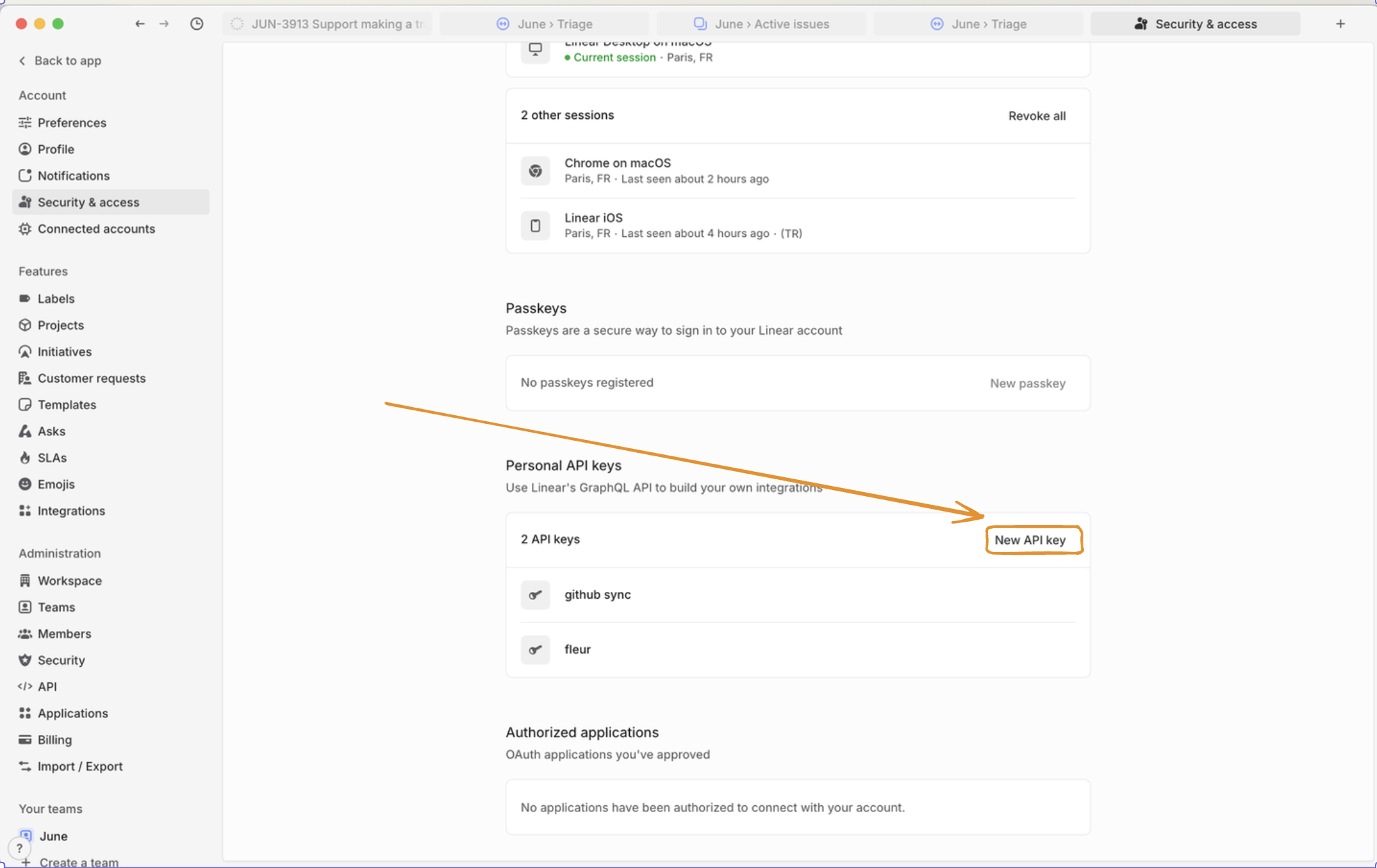
Go to Linear security settings and create an API key:

Then, configure it with the LINEAR_API_KEY env variable:
# Add to your .env file
LINEAR_API_KEY=lin_api_xxxxxxxxxxxx
# Or export as environment variable
export LINEAR_API_KEY=lin_api_xxxxxxxxxxxxRelated MCP server: MCP Linear App
Running the Server
uvx --from git+https://github.com/vinayak-mehta/linear-mcp linear-mcpDocker
docker build -t linear-mcp:latest .
docker run -it --rm -e LINEAR_API=lin_api_xxxxxx linear-mcp:latestAnd to use this in Claude Desktop, it would look like this:
"linear-mcp-server": {
"command": "docker",
"args": [
"run",
"-it",
"--rm",
"-e",
"LINEAR_API_KEY=lin_api_xxxxxx",
"linear-mcp-server:latest"
]
}Resources
Linear MCP provides access to the following resource types:
Resource | Description | Example URI |
Issue | Details of a specific Linear issue |
|
Team Issues | All issues for a specific team |
|
User Issues | Issues assigned to a user |
|
Organization | Details about your Linear organization |
|
Viewer | Information about the authenticated user |
|
Tools
Tool | Description |
| Create a new Linear issue with title, description, and other attributes |
| Update an existing issue's properties |
| Search issues using flexible filtering criteria |
| Retrieve issues assigned to a specific user |
| Add a comment to an existing issue |
Example Prompts
Creating a New Issue
Create a bug ticket: "Login screen disappears like magic tricks at a birthday party!" Priority: HIGH, Team: EngineeringUpdating an Issue
Upgrade ENG-123 to "shooting star" priority! Users are excited! Change status to "Racing to the finish line!"Searching for Issues
Find all Frontend tasks with "authentication" that are patiently waiting for their moment to shineRetrieving User Tasks
What exciting challenges await me today in Linear?Adding a Comment
Add to DEV-456: "Temporarily paused while the API does its beauty routine. Back on it next sprint with fresh energy!"Organization Overview
Show me our amazing team structure so I can appreciate all the talented people making this happenLicense
Apache 2.0
Available Tools
5 toolslinear_add_commentB
Add a comment to an issue.
Args:
issue_id: Issue ID to comment on
body: Comment text (markdown supported)
create_as_user: Custom username
display_icon_url: Custom avatar URL
Inputs: issue_id (required), body (required), create_as_user, display_icon_url. Returns: result
linear_create_issueB
Create a new Linear issue.
Args:
title: Issue title
team_id: Team ID to create issue in
description: Issue description (markdown supported)
priority: Priority level (1=urgent, 4=low)
status: Initial status name
Inputs: title (required), team_id (required), description, priority, +1 more. Returns: result
linear_get_user_issuesB
Get issues assigned to a user.
Args:
user_id: User ID (omit for authenticated user)
include_archived: Include archived issues
limit: Max results (default: 50)
Inputs: user_id, include_archived, limit. Returns: result
linear_search_issuesB
Search issues with flexible filtering.
Args:
query: Text to search in title/description
team_id: Filter by team
status: Filter by status
assignee_id: Filter by assignee
labels: Filter by labels
priority: Filter by priority
estimate: Filter by estimate points
include_archived: Include archived issues
limit: Max results (default: 10)
Inputs: query, team_id, status, assignee_id, +5 more. Returns: result
linear_update_issueB
Update an existing Linear issue.
Args:
id: Issue ID to update
title: New title
description: New description
priority: New priority (1=urgent, 4=low)
status: New status name
Inputs: id (required), title, description, priority, +1 more. Returns: result
Tool Schema Changelog
Recent tool additions, removals, and schema changes observed during successful MCP inspections.
Loading tool schema changelog…
TDQS
Scored across 5 tools
Each tool has a clearly distinct purpose: add_comment, create_issue, get_user_issues, search_issues, and update_issue target specific operations with no overlap. The descriptions reinforce these distinctions, making misselection unlikely.
All tools follow a consistent 'linear_verb_noun' pattern (e.g., linear_add_comment, linear_create_issue). This predictable naming scheme enhances readability and agent usability without any deviations.
With 5 tools, the count is reasonable for a Linear issue management server, covering core operations. It feels slightly thin but not inadequate, as key functions like create, read, update, and search are present.
The toolset covers essential CRUD operations for Linear issues (create, get, update, comment) and includes search functionality. Minor gaps exist, such as no delete_issue or list_teams tools, but agents can manage core workflows effectively.
Related MCP Connectors
A comprehensive Model Context Protocol (MCP) server that enables AI assistants to interact with yo…
A Model Context Protocol server for Wix AI tools
The Mercado Pago MCP Server implements the Model Context Protocol to provide AI agents and LLMs with access to Mercado Pago's APIs and tools within compatible development environments. It acts as an intermediary that translates Mercado Pago resources into executable functions (tools) that AI applications can invoke to perform actions and automate flows. The server simplifies integration, enables using documentation to implement or improve code, and optimizes operations through natural language interactions without manual implementations.
Enable secure connectivity between Sentry issues and debugging data, and LLM clients, using a Model Context Protocol (MCP) server.
Related MCP Servers
- AlicenseNot gradedqualityDmaintenanceA Model Context Protocol server that integrates with Linear's issue tracking system, allowing LLMs to create, update, search, and comment on Linear issues through natural language interactions.418 npm346MIT
- FlicenseBqualityDmaintenanceA server that enables AI assistants to interact with Linear's project management tools through the Model Context Protocol, supporting features like searching, creating, and updating issues, adding comments, and retrieving user profiles and team information.91-
- AlicenseNot gradedqualityDmaintenanceA Model Context Protocol server implementation that enables AI assistants to interact with Linear project management systems, allowing them to create, retrieve, and modify data related to issues, projects, teams, and users.21 npm3MIT
- AlicenseAqualityDmaintenanceA Model Context Protocol server that enables large language models to interact with Linear's issue tracking system, allowing management of issues, projects, teams, and other Linear resources.1957 npm1MIT